|
Author
|
Message
|
|
Peter (RL)
|
Peter (RL)
Posted 11 Years Ago
|
|
Group: Administrators
Last Active: 2 Years Ago
Posts: 23.1K,
Visits: 36.6K
|
wires (2/1/2015)
Convert Position to Path not working.In this post, user Powerhouse 2822 reported that the "Convert Position to Path" function outlined here in the online Help doesn't work. I've tested this and can confirm his/her findings. Screen shot added: 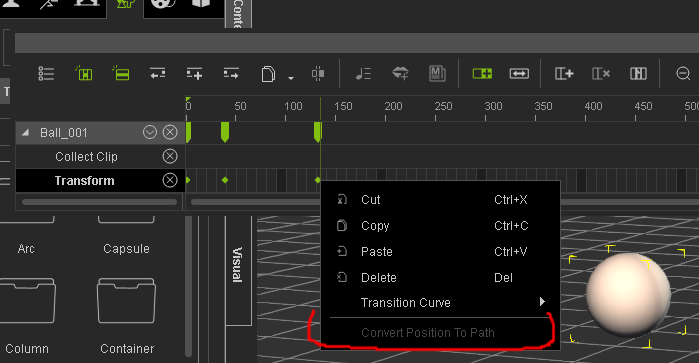
. This issue is now fixed in the upcoming iClone 6.03. :)
Peter
Forum Administrator www.reallusion.com
|
|
|
|
|
Peter (RL)
|
Peter (RL)
Posted 11 Years Ago
|
|
Group: Administrators
Last Active: 2 Years Ago
Posts: 23.1K,
Visits: 36.6K
|
Hi Everyone,iClone 6.02 has now been officially released. Please update using LiveUpdate, or from your Member Account under Patch/Bonus, or by going to Help > Check For Update in iClone 6. Then check if any issues you were having have been resolved. If they haven't, can you please post all issues, bugs, glitches, etc. that you find with the iClone 6.02 release in the thread below. https://forum.reallusion.com/Topic224537-385-1.aspx Please do try to provide your full system specs and a description of the problem when posting issues as this will help greatly. If you can provide step by step information so we can repeat the problem even better. Thank you for all the excellent feedback we have received in this thread. It will now be closed.
Peter
Forum Administrator www.reallusion.com
|
|
|
|
|
duchess110
|
duchess110
Posted 11 Years Ago
|
|
Group: Forum Members
Last Active: 6 Years Ago
Posts: 2.0K,
Visits: 15.5K
|
lpatter (2/10/2015)
MOTION Addition
There is a weird motion problem when adding more than one motion to an avatar. After the first motion the others are not applied. Sometimes it will not add after a certain motion is applied or it seems to add just the first frame of a motion because there is a little flicker. Since it is difficult to see if the problem has already been observed by searching this thread I don't want to give specific examples and hurt the reputation of a developer. I noticed it more frequently with one developer and I checked another who had the problem after I used a particular motion, so I will check others but if it is a iClone problem I want to make sure before I do more checking. The problems does not occur in Iclone 5 using the same developers.
BTW it is becoming unwieldy to search through this thread or the forum for similar reports so that I don't have to add to the list or report a problem bug (poor staff can't answer as quickly as before).
So maybe one could add a thread that nobody could reply to.
It is just a summary of the issues reported. An alphabetical list. So that I can jump to " 'Software Packs', Motion errors", Hardware errors etc .... which have no more than 2 lines of explanation. It can link to a more detailed explanation if possible. eg. Missing files turned out to be .VNS files which had a workaround that people could apply by resaving in Iclone 5 or changing to the proper new extention in some cases.A agree it is difficult to find if something has been reported as a bug. I see someone was having that same issue with motions adding them to RL new Mason He posted in this thread. https://forum.reallusion.com/FindPost222463.aspx I have also had similar problems when using Mason and Heidi and adding motions to the timeline.
Duchess Designs Store
|
|
|
|
|
lpatter
|
lpatter
Posted 11 Years Ago
|
|
Group: Forum Members
Last Active: 10 Years Ago
Posts: 145,
Visits: 898
|
MOTION Addition
There is a weird motion problem when adding more than one motion to an avatar. After the first motion the others are not applied. Sometimes it will not add after a certain motion is applied or it seems to add just the first frame of a motion because there is a little flicker. Since it is difficult to see if the problem has already been observed by searching this thread I don't want to give specific examples and hurt the reputation of a developer. I noticed it more frequently with one developer and I checked another who had the problem after I used a particular motion, so I will check others but if it is a iClone problem I want to make sure before I do more checking. The problems does not occur in Iclone 5 using the same developers.
BTW it is becoming unwieldy to search through this thread or the forum for similar reports so that I don't have to add to the list or report a problem bug (poor staff can't answer as quickly as before).
So maybe one could add a thread that nobody could reply to.
It is just a summary of the issues reported. An alphabetical list. So that I can jump to " 'Software Packs', Motion errors", Hardware errors etc .... which have no more than 2 lines of explanation. It can link to a more detailed explanation if possible. eg. Missing files turned out to be .VNS files which had a workaround that people could apply by resaving in Iclone 5 or changing to the proper new extention in some cases.
|
|
|
|
|
Postfrosch
|
Postfrosch
Posted 11 Years Ago
|
|
Group: Forum Members
Last Active: 3 Years Ago
Posts: 6.9K,
Visits: 18.4K
|
Hello, this is an obvious bug and was on 01/22/15 already reported: You can iC 6:01 on rights to 9999 frames Set- (goes higher because not only 4-digit display !!!!!!! -also a bug). But you can only clips to 1800 frames rendern- is specified as the render distance eg 1- 2200 (the clip is 3000 frames eg large), the display automatically jumps back to 1800 frames and more is not rendered. The "all" setting is. There rendering of all frames (as far as I could see it now) This applies only to projects that were created with IC 6:01. For IC 5 imported projects can render any frame number. Although (5 Create a blank project in IC with more necessary number of frames and then re-open in IC 6) The workaround is feasible but eigenlich nonsense. For what I then bought the IC 6 ??? if I need to create a longer 5 Clips IC? Newcomers to IClone shareholders probably only IC 6 !!!! Furstration is preset. Also of note is intended to stop then create more clips at 1800 frames and put together in the video editing program is for users who already longer projects have created and they are not or only now fully render can not particularly helpful. See this tread: https://forum.reallusion.com/Topic224517-385-1.aspxUnfortunately, so far nothing has been officially (RL) heard about this bug, and when you can expect to resolve this error. Greetings from Germany Werner PS. I would like to apologize for my bad english. It is a Google translation
--------------------------------------------------------------

|
|
|
|
|
bluemidget666
|
bluemidget666
Posted 11 Years Ago
|
|
Group: Forum Members
Last Active: 10 Years Ago
Posts: 3.5K,
Visits: 13.8K
|
Hi Cricky Yep it has a hole under the top, I'll cap it and try again. Thanks I would never have solved it ....

I Make My Mates Do The CanCan For The Amusement Of Killer Robots:D
|
|
|
|
|
Cricky
|
Cricky
Posted 11 Years Ago
|
|
Group: Forum Members
Last Active: 4 Years Ago
Posts: 2.8K,
Visits: 13.8K
|
bluemidget666 (2/9/2015)
So I have finished a model I was working on and alls good until I apply real time smoothing and this happens.. 
I have subdivided this model in many 3d apps and have had no issues .. whats going on ? Cheers Do you have a Wire Frame Image? Edit: Just ran a few Tests... Does your model have closed edges? In other words, "holes". If it does, then what you show can and will happen.
SKYPE ID: rc.650
http://city.reallusion.com/store/ModuleExpand.aspx?id=GS634545170497417354&mdid=18866
http://city.reallusion.com/ContentTag.aspx?tagname=Cricky&AuthorID=20081020688550191201#]Reallusion Store Content
" If I had Alzheimer's (Old Timers), would I know it? "
|
|
|
|
|
bluemidget666
|
bluemidget666
Posted 11 Years Ago
|
|
Group: Forum Members
Last Active: 10 Years Ago
Posts: 3.5K,
Visits: 13.8K
|
So I have finished a model I was working on and alls good until I apply real time smoothing and this happens..
I have subdivided this model in many 3d apps and have had no issues .. whats going on ? Cheers
I Make My Mates Do The CanCan For The Amusement Of Killer Robots:D
|
|
|
|
|
GOETZIWOOD STUDIOS
|
GOETZIWOOD STUDIOS
Posted 11 Years Ago
|
|
Group: Forum Members
Last Active: 5 Years Ago
Posts: 1.2K,
Visits: 7.2K
|
animagic (2/9/2015)
I realize that. This is just for those iClone 6 Pro users that don't have 3DXchange 5 and at the request of one of them.Oh, I see. Sorry. That said BVH Motion Converter was not very practical to use. For those who can, better invest in 3DXchange for this.
--
guy rabiller | GOETZIWOOD STUDIOS
"N.O.E." (Nations Of Earth) Sci-Fi TV Show, Showrunner.
|
|
|
|
|
animagic
|
animagic
Posted 11 Years Ago
|
|
Group: Forum Members
Last Active: 4 Months Ago
Posts: 15.8K,
Visits: 31.4K
|
I realize that. This is just for those iClone 6 Pro users that don't have 3DXchange 5 and at the request of one of them.
|
|
|
|