|
By Peter (RL) - 11 Years Ago
|
|
Hi Everyone, iClone 6.01 has now been released along with the Indigo Plugin 1.01. You can update using LiveUpdate, or from your Member Account under Patch/Bonus, or by going to Help > Check For Update in iClone 6. IMPORTANT: If you have iClone 6 and Indigo RT, then you must update both iClone 6 to version 6.01 and the Indigo Plugin to version 1.01. If you don't update the Indigo Plugin, iClone 6 will not launch correctly. Can you please post all issues, bugs, glitches, etc. that you find with the iClone 6.01 release here. Of course feel free to post general feedback in your own threads but it will be great if we can keep outstanding issues and bugs here in this official thread. It will make it easier for the development team to track any outstanding problems and get them fixed quickly. Please do try to provide your full system specs and a description of the problem when posting issues as this will help greatly. If you can provide step by step information so we can repeat the problem even better. Thanks.  v6.01 (6.01.1312.1) released 12th January-15 Added: - "Non-DRM Content" folder under "Not Installed" folder for early content pack in Pack Template of Content Manager.
- Accurate function for transforming by holding down the shift key while using traditional iClone gizmo (Ctrl+Q).
- iClone 6 Standard official released.
- "Reset" function for Edit Motion Layer in non-human character.
- "Ctrl + K" hotkey for Duplicate function.
- Additional Indigo parameters in Indigo Settings:
- Tone Mapping
- Align Indigo light to iClone light
- Supersampling Factor
- Added Global settings for Facial Expression & Viseme Strength.
- Added world/local switch for physics initial force.
Enhanced: - Insert Frame performance in timeline editing.
- Update the default Grid color in preference settings.
- Interface Visual Enhancement:
- Fixed some visual defects for small font interface.
- Reduced color saturation in toolbar divider for gray color theme.
- Content Enhancement: Optimized default values for following content:
- Sky tool props
- Tessellation template props
- Flag Props in Softcloth
Fixed: - Fixed: Some early content cannot be loaded into iClone 6.
- Fixed: Content pack view miss displaced because of pack name using special character (e.g. Machines of War using "/").
- Fixed: Content Manager input string in Search box and the item's tips displayed Content ID in Pack Template.
- Fixed: Pack View shows .ink file extension name on content items in Content Manager.
- Fixed: Warning message for removing animation when opening the Proportion edit tool even for characters without animation.
- Fixed: Break viseme clip caused possible crash.
- Fixed: Modifier button not disabled when motion clip is not selected.
- Fixed some behavior defects for all spin buttons:
- Fixed: Value not updated correctly
- Fixed: Input incorrect value in textbox, doesn't auto-convert to correct
- Fixed: Values now max out at 360 (e.g. value 360, press up spin button became 1)
- Fixed: Constraint button not disabled when parent constraint is cancelled.
- Fixed: Dragging a .sbsar file from Explorer to 3D view does not successfully add Substance material.
- Fixed: Cutting and pasting a video clip adds key to the timeline.
- Fixed: Frame rate disabled in some condition when exporting image sequences.
- Fixed: When changing voice clip speed, wave view was not updating correctly.
- Fixed: Switching from world to local in transform movement didn't work in Edit Path mode.
- Fixed: When exiting planting mode for tree or grasses, mouse cursor didn't update properly.
- Fixed: Creating a Script from the Menu and choosing a .wav format caused crashes in certain environments.
- Fixed: Mirror function didn't work correctly in Facial Feature Detail Settings.
- Fixed: Voice and lips not synced when using 50% speed recording in Face Puppet.
- Fixed: Switching the Bound Axis caused possible crash when adjusting character collision shape.
- Fixed: Value back to default when adjusting Diagonal parameter for a particle object once play and stop.
- Fixed: Possible crash while selecting outer control point for Right/Left Face in Facial Feature Detail Settings, with Mirror option checked.
- Fixed: Substance texture size stays at 1024x1024 after being baked.
- Fixed: Indigo rendering for some basic shapes (e.g. Cylinder) causes visual defects.
- Fixed: Substance objects would occasionally disappear when rendering with Indigo.
- Fixed: Indigo rendering failed when rendering an .igq file for the first time.
|
|
By Alien Maniac - 11 Years Ago
|
Update patches installed. So, IC6 loads faster. While working with particles...... turning off/on emitter settings leads to a program green screen. Hu? Also does this when I am in the Scene settings menu clicking show/hide particle. Either does not hide or make it invisible. This did not happen before the update patchs.
Note: appears only to happen with particles.
I am currently rendering a scene in Indigo RT plugin......I will see if all is ok or?
MSI GT683DX Win 7 hp 64bit quad core
i7 2670 QM CPU
2.2 Ghz 16GB Ram HD 750GB and 1TB external
|
|
By pompel_4 - 11 Years Ago
|
|
after updating - DRM routin, then crash - "app Iclone stopped working".
|
|
By brand468 - 11 Years Ago
|
Tried to install update 6.01.1312.1 but after a crash I cant start iClone.
After the long verification of the DRM content, iClone crash.
Message comes up "iClone AP has stopped working"
Tried reeboot but same problem.
|
|
By brand468 - 11 Years Ago
|
|
Installed the iClone Render Plugin 101 patch, and now iClone works with 6.01 patch :)
|
|
By jann - 11 Years Ago
|
|
brand468 (1/12/2015)
Installed the iClone Render Plugin 101 patch, and now iClone works with 6.01 patch :)
Same here. Installing the Indigo plugin patch solved the problem.
|
|
By pompel_4 - 11 Years Ago
|
|
Same here. Also installed the Indigo plugin patch and solved the problem.
|
|
By Agonos - 11 Years Ago
|
After the same crash, I went to download the patch "iClone_Render_Plugin_101_Patch" available from my accountin the "Patch / Bonus" section. Now everything works again normally. Old projects even loadable without causing crash now. But we still can not change the faces of IC6 avatars ("Create face" is absent). And I still have problems with the "Glare".
Whatever the type that I have chosen, I have a line diagonally.
https://www.youtube.com/watch?v=Jt-Pr8y1fRA&feature=youtu.be
Windows 8.1 (X64)
Intel Core i5 4670K 3.40 GHz
Socket: Socket 1150 LGA
Mother card MSI Z87-G45 GAMING (MS-7821) 1.0
14 Go DDR3
GPU NVIDIA GeForce GTX 770
|
|
By pumeco - 11 Years Ago
|
Is the update available for those using the Trial version?
I can't find a way to update it or download it.
|
|
By giannigodi - 11 Years Ago
|
After last patch installation: iC 6.01,1312.1 and Indigo plugin patch, iClone 6 does not crash any more. Tks very much :D
My computer: Intel i7-3770 3.4Hhz 16Gb RAM, Windows 7 ultimate, GeForce GTX 660
|
|
By menro28 - 11 Years Ago
|
Hi Peter (RL).
Thank you very much for 6.01.
Corrected, I'm sorry. Have to install Patch Patch iClone 6 and Indigo, and play !!!!
:D:D:D:D;):)
|
|
By Bigboss - 11 Years Ago
|
I don't know if I am the only person with this problem but I cannot install ANY of my Reallusion purchased Packs since the installation of iC6 on my computer.
In other words, I go to the Package TAB, I explode the ''Not Installed'' folder, I see all my Reallusion Packs, I double click on one of the motions pack, the rld script gets downloaded, I open the rld script, I get the Promt message asking me if I want to install, I click the Start button and then I get a Network Error and the pack s does not get installed.
Reallusion Support suggested I install version 6.01 Patch which I did and guess what, I get the same errors as those reported here with a first panel to check DRM and then iClone CRASHES...
At this point, I uninstalled 6.01 and reverted to 6.0 but I still have the package installation issue.
TABARNAK ! :Whistling:
At this point, I am really upset... This has been going on for 2 weeks now...
I run the latest Windows 7 service pack ...
ah.. Now I guess I need to install the indigo plugin patch as well.. :w00t:
The only problem is that there is no "iClone_Render_Plugin_101_Patch" in my patch bonus section so where to I get it???
|
|
By menro28 - 11 Years Ago
|
Hi!!!
indigo tab:
export size: nothing comes out.
tracing methods: nothing comes out.
:Whistling:;)
|
|
By Sen - 11 Years Ago
|
hi , same here (no option). But you can tweak inside indigo ;)
All work fine with this new patch :)
|
|
By Bigboss - 11 Years Ago
|
Ok a small update... To see the indigo patch in your bonus-patch section, you need to register the indigo package first so I got that done, got the path and now iC6.01 no longer crashes...
But I still cannot install any new package... :(
|
|
By mark - 11 Years Ago
|
Patch seems to be good with me so far...But
...looks like I've lost the "Scroll Wheel" feature of being able to move an object "up & down" when hiding the Gizmo with CRTL Q...It now back to Zooming in and Out with the scroll wheel not moving Up & Down.
|
|
By mark - 11 Years Ago
|
And wouldn't it be a good idea to have the "Remove All Animation" button back in the Modify panels so we don't have to go hunting for the object and right click on it to have the animation removed or.... go over to the Animation menu click in the toolbar and click to remove animation...please!!!! :)
|
|
By Peter (RL) - 11 Years Ago
|
|
Agonos (1/12/2015)
After the same crash, I went to download the patch "iClone_Render_Plugin_101_Patch" available from my accountin the "Patch / Bonus" section. Now everything works again normally. Old projects even loadable without causing crash now. But we still can not change the faces of IC6 avatars ("Create face" is absent). And I still have problems with the "Glare".
Whatever the type that I have chosen, I have a line diagonally.
https://www.youtube.com/watch?v=Jt-Pr8y1fRA&feature=youtu.be
Windows 8.1 (X64)
Intel Core i5 4670K 3.40 GHz
Socket: Socket 1150 LGA
Mother card MSI Z87-G45 GAMING (MS-7821) 1.0
14 Go DDR3
GPU NVIDIA GeForce GTX 770The G6 characters are currently non-standard characters so "Create Face" won't work for Mason and Heidi. You can however use this feature with the G5 characters Chuck and Gwynn. We will be updating the G6 avatars in a future patch to add extra functionality. :)
|
|
By Peter (RL) - 11 Years Ago
|
|
pumeco (1/12/2015)
Is the update available for those using the Trial version?
I can't find a way to update it or download it.You won't be able to update your existing trial to 6.01. You will need to uninstall and then download the latest version which is 6.01. You can get it from the link below. http://www.reallusion.com/iclone/iclone_trial.aspx
|
|
By Peter (RL) - 11 Years Ago
|
|
Bigboss (1/12/2015)
Ok a small update... To see the indigo patch in your bonus-patch section, you need to register the indigo package first so I got that done, got the path and now iC6.01 no longer crashes...
But I still cannot install any new package... :(Hi BB, I have replied to you via Support with more information about the updated downloader. However as you are also having trouble accessing our FTP it does appear like you may have some overzealous Security software that is blocking access in some way. Perhaps you could try quickly turning off your security software\firewall and see if you are able to use the package installer that way. It will help narrow down the problem.
|
|
By jack-london - 11 Years Ago
|
1-12-2015
I have iClone 6.0 / Indigo RT.
Downloaded and udated to 6.0.1312.1
I start iCclone 6.0.1312.1 and get a requestor asking to "check files for DRM".
I let it run - ONLY OPTION AVAILABLE.
Now iClone 6.0.1312.1 crashes after start.
Gives error msg:
"iClone 6 API has stopped working. A problem caused the program working correctly. Please close the program."
This is the only option. Upon starting again, the same thing happens.
iClone 6 is NON FUNCTIONAL.
Please advise when bug is fixed.
I will sent this file as an email to tech support along with a screenshot of the error msg.
Jack
|
|
By justaviking - 11 Years Ago
|
|
jack-london (1/13/2015)
1-12-2015
I have iClone 6.0 / Indigo RT.
Downloaded and udated to 6.0.1312.1
Now iClone 6.0.1312.1 crashes after start.
From reading earlier posts in this thread (and others), I think you also have to update Indigo to 1.01 and then it should work.
|
|
By Keith_MPS - 11 Years Ago
|
|
menro28 (1/12/2015)
Hi!!!
indigo tab:
export size: nothing comes out.
tracing methods: nothing comes out.
:Whistling:;)
Same. There are no options in the drop-down menus for tracing method or export size. If this works properly for some people, let us know so we can give more info specific to our setups.
|
|
By animagic - 11 Years Ago
|
|
I believe this was reported before, but HDR does not work correctly for me: 
I've set it to Spectral Cross (size 3), but only one direction is showing; there should be two perpendicular (like a cross...:P). System specs: Win 7 SP1; i7 2600K CPU; 16GB RAM; NVidia GTX 980 GPU. It may be card-dependent (Maxwell again...)
|
|
By james_muia - 11 Years Ago
|
After installing the new IC6 patch, and the Indigo patch and launching IC6, everything was fine.
Close and reopen IC6, now I receive a message saying my Indigo Render Serial # isn't valid.
|
|
By Keith_MPS - 11 Years Ago
|
|
animagic (1/13/2015)
I believe thiswas reported before, but HDR does not work correctly for me:
I've set it to Spectral Cross (size 3), but only one direction is showing; there should be two perpendicular (like a cross...:P).
System specs: Win 7 SP1; i7 2600K CPU; 16GB RAM; NVidia GTX 980 GPU.
It may be card-dependent (Maxwell again...)
It works for me on my ATI Radeon 7870.
|
|
By Soya_RL - 11 Years Ago
|
|
Bigboss (1/12/2015)
Reallusion Support suggested I install version 6.01 Patch which I did and guess what, I get the same errors as those reported here with a first panel to check DRM and then iClone CRASHES...
Dear Bigboss,
Launch AP, and a verification DRM message will appear, and then AP crashes.
Solution: iClone v6.01 must go with Indigo Plug-in v1.01, so iClone can launch normally. This version mix issue is already fixed by our RD, and will be released in v6.02.
Thanks!
Soya
|
|
By Bigboss - 11 Years Ago
|
Thanks soyasu, I have iC6.01 working now but I still cannot install any one of my previous Reallusion packs... I have a ticket open to that regard.
Cheers.
|
|
By Soya_RL - 11 Years Ago
|
|
mark (1/13/2015)
Patch seems to be good with me so far...But
...looks like I've lost the "Scroll Wheel" feature of being able to move an object "up & down" when hiding the Gizmo with CRTL Q...It now back to Zooming in and Out with the scroll wheel not moving Up & Down.
Dear Mark,
We made a mistake on the function. Will restore it right away. Sorry!
Soya
|
|
By animagic - 11 Years Ago
|
gnasche (1/13/2015)
animagic (1/13/2015)
I believe this was reported before, but HDR does not work correctly for me:
I've set it to Spectral Cross (size 3), but only one direction is showing; there should be two perpendicular (like a cross...:P).
System specs: Win 7 SP1; i7 2600K CPU; 16GB RAM; NVidia GTX 980 GPU.
It may be card-dependent (Maxwell again...)It works for me on my ATI Radeon 7870. The other report was from someone with a GTX 970, so it seems Maxwell-related. Viking didn't have the problem either.
|
|
By animagic - 11 Years Ago
|
|
This is something else, I reported previously. I really like the face mapping in iClone 6 (iClone 5 heads look better), but the neck and ear area of the head texture look kind of rough. As a result also, the bottom section of the head texture does not properly blend with neck part of the Upper texture. 
Other than that, it works quite nicely. Right now I try to fix it in a graphics editor.
|
|
By animagic - 11 Years Ago
|
gnasche (1/13/2015)
menro28 (1/12/2015)
Hi!!!
indigo tab:
export size: nothing comes out.
tracing methods: nothing comes out.
:Whistling:;)Same. There are no options in the drop-down menus for tracing method or export size. If this works properly for some people, let us know so we can give more info specific to our setups. Doesn't work for me either. We got some new settings...:cool: and we lost some...:crying:
|
|
By animagic - 11 Years Ago
|
|
One more for the today: the render quality setting for video (MP4, WVF) has not been addressed: it has no effect.
|
|
By Jen Arrow - 11 Years Ago
|
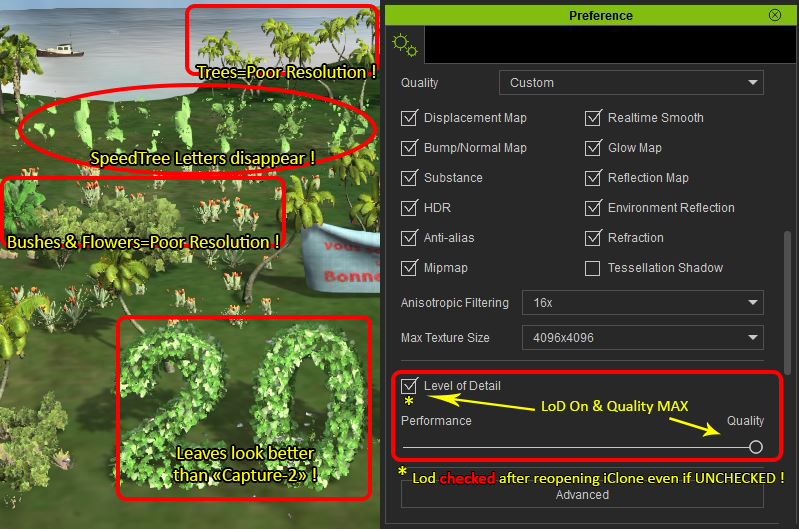
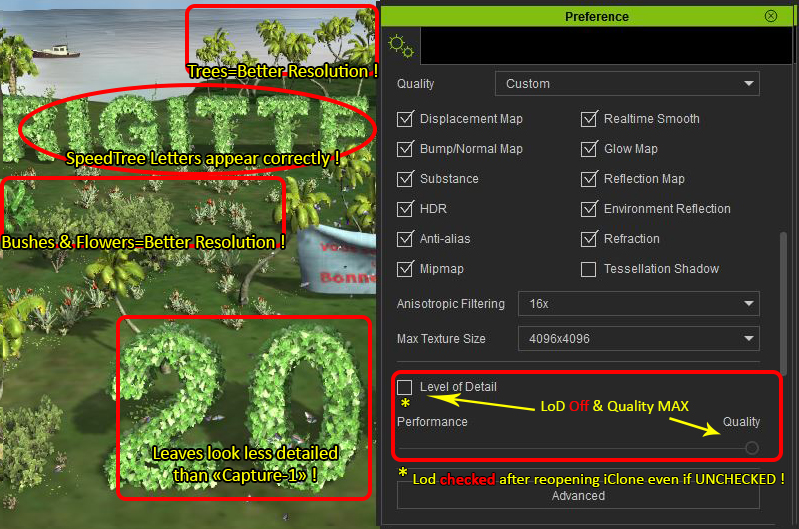
Level of Detail BUG !!!
In Preference setting, If I check LoD and Quality is FULL, Letter Trees do not render correctly in the Main screen and objects in the background are rendered poorly!
If LoD is unchecked and Quality is Full, Letter Trees are correct !
If Level of Detail is unchecked and i leave iClone, when i reopen iClone, LoD reappear CHECKED and the Letter Trees do not render correctly.
2 Screens to explain:
|
|
By Soya_RL - 11 Years Ago
|
|
jack-london (1/13/2015)
1-12-2015
I have iClone 6.0 / Indigo RT.
Downloaded and udated to 6.0.1312.1
I start iCclone 6.0.1312.1 and get a requestor asking to "check files for DRM".
I let it run - ONLY OPTION AVAILABLE.
Now iClone 6.0.1312.1 crashes after start.
Gives error msg:
"iClone 6 API has stopped working. A problem caused the program working correctly. Please close the program."
This is the only option. Upon starting again, the same thing happens.
iClone 6 is NON FUNCTIONAL.
Please advise when bug is fixed.
I will sent this file as an email to tech support along with a screenshot of the error msg.
Jack
Dear jack-london,
You need path both iClone and Indigo. After you do that, iClone will not crash when you launch it. Please try to patch Indigo first and then launch iClone.
Soya
|
|
By Soya_RL - 11 Years Ago
|
animagic (1/13/2015)
gnasche (1/13/2015)
menro28 (1/12/2015)
Hi!!!
indigo tab:
export size: nothing comes out.
tracing methods: nothing comes out.
:Whistling:;)Same. There are no options in the drop-down menus for tracing method or export size. If this works properly for some people, let us know so we can give more info specific to our setups. Doesn't work for me either. We got some new settings...:cool: and we lost some...:crying:
Dear animagic,
Please download Indigo patch again. After you install it, the issue should be resolved.
http://file.reallusion.com/patch/ic/iClone_Render_Plugin_101_Patch.exe
:P
Soya
|
|
By LeeHounshell - 11 Years Ago
|
Hi Peter,
I have a question regarding content directory import to iClone 6.
I have seen the FAQ here: http://faq.reallusion.com/?action=article&cat_id=011001007002&id=716&lang=
But that does not help in my case.
My iClone 5 content currently exists on a separate drive under these folders:
D:\Reallusion\Custom
D:\Reallusion\Template
D:\Reallusion\Templates
My C: drive is now an SSD, and I don't have room to copy old content to that.
Instead, I just want my new iClone 6 to recognize and use the iClone 5 content (i have a lot) on drive D.
Please help with instructions about how I can accomplish this. I'm an adept user.
Thank you very much.
|
|
By Cricky - 11 Years Ago
|
Look At Camera Set Free is not functioning at all
|
|
By Soya_RL - 11 Years Ago
|
Cricky (1/13/2015)
Look At Camera Set Free is not functioning at all
Dear Cricky,
Thank you for reporting the issue. I have asked our RD to look into it.
Soya
|
|
By kenmatthews - 11 Years Ago
|
Hello Big Boss,
I have the same problem as yourself, I've literally spent days downloading to find they're nowhere to be seen...
Best regards.
Ken.
|
|
By Supergerry - 11 Years Ago
|
@justaviking: Thank you !!
@wires: Thank you !!
Thanks RL for the update, it fixes my problem with the rotate settings.
Is there a possibility in the future that iClone 6 exploit the RAM resource ??
As a test, I had several Genesis figures imported and shaken mightily to 5000 frames with Direct Puppet. As a result iClone took only about 2GB of RAM, but about 25GB of disk space. A simple undo lasted approximately 2 minutes with continuous access to the hard drive ... The almost identical scene is in DAZ Studio approx 14GB RAM
|
|
By Agonos - 11 Years Ago
|
|
Peter (RL) (1/13/2015)
The G6 characters are currently non-standard characters so "Create Face" won't work for Mason and Heidi. You can however use this feature with the G5 characters Chuck and Gwynn.
We will be updating the G6 avatars in a future patch to add extra functionality. :)
Hi,
Thank you Peter. But concern the problem "Glare", do you have any information to give us? Do you have at least one "clue" ?
I also have a software crash "IC6" to 40/50% when I use the rendering "INDIGO" in a complete scene. whilst my scene is short, just with an avatar dancing and without decor. Other people they have this problem?
Windows 8.1 (X64)
Intel Core i5 4670K 3.40 GHz
Socket: Socket 1150 LGA
Mother card MSI Z87-G45 GAMING (MS-7821) 1.0
14 Go DDR3
GPU NVIDIA GeForce GTX 770
|
|
By hj - 11 Years Ago
|
After updating iclone 6 and the Indingo Plugin i got this
:w00t::w00t::w00t::w00t:

I de-installed the plugin
i downloaded the plugin from link i got from Bruce
and reinstalled the plugin it was Version 1.0
then iclone 6 crashed total :w00t::w00t::w00t::w00t:
I installed the update of the plugin from live-updatefolder on my computer
Now every thing is ok. :P:P:P
The issue, that i do not see any content in "Parts" is not solved.
hj
|
|
By Keith_MPS - 11 Years Ago
|
soyasu (1/13/2015)
animagic (1/13/2015)
gnasche (1/13/2015)
menro28 (1/12/2015)
Hi!!!
indigo tab:
export size: nothing comes out.
tracing methods: nothing comes out.
:Whistling:;)Same. There are no options in the drop-down menus for tracing method or export size. If this works properly for some people, let us know so we can give more info specific to our setups. Doesn't work for me either. We got some new settings...:cool: and we lost some...:crying: Dear animagic, Please download Indigo patch again. After you install it, the issue should be resolved. http://file.reallusion.com/patch/ic/iClone_Render_Plugin_101_Patch.exe :P Soya
This fixed it for me. Thanks, Soya.
|
|
By wires - 11 Years Ago
|
|
@hj, Just go to your account and enter - copy & paste - the serial number to get the product registered: 
|
|
By hj - 11 Years Ago
|
hi Gerry
thank you :):):)
i forgot it :crying::crying::crying:
hj
|
|
By sbaerman - 11 Years Ago
|
Iclone to Indigo Export bug that forces Iclone to crash has not been fixed yet.
Hi all, although various posts and a support ticket the issue did not get fixed. Pretty unhappy about the answer from support team that suggested on the case to install the patch.
But for the moment it seems that noone really read it yet / worked on it. Which potentially even is ok. But telling me installing the patch and it would be gone, ist not the best way of handling it !
|
|
By justaviking - 11 Years Ago
|
|
sbaerman (1/13/2015)
Iclone to Indigo Export bug that forces Iclone to crash has not been fixed yet.Which one? (I have a bad memory.)
|
|
By sbaerman - 11 Years Ago
|
the bug that makes clone crash in more complex scenes. Iclone plugin makes Iclone crash after 30-50 frames when sending to Indigo.
Happens in a bit more complex machine, irregular, more often and earlier depending on machine power.
|
|
By VegFile - 11 Years Ago
|
Nice job on the patch, RL team! This patch improved the general speed of the application for me including adding assets and rendering. Even in some instances, I found the highest rendering quality setting produced an MP4 HD file whereas the original would crash or proceed at one frame every ten minutes. I suspect that the developers have improved the coding to handle memory issues; have they somehow changed the balance between GPU and CPU processing? Or maybe fixed bugs that interfered with this? The CPU/GPU usage tracking software that I use shows less GPU utilization and more CPU than before with the same project. If the software is being tweaked to better utilize all resources available, this is great news. If so, too, then I doubt that a directx9 version is a good place to spend the developers' time. After all, most users (are least those who post here with the minimum system requirements) should have post 2009 video cards capable of being updated via driver to directx11.
There are still issues with the RL downloader. For example, my 2013 black friday special Fashion Gear vol 1 had an application stopped error message. Both the Evil Force and Deluxe Wedding planner did not fully install as indicated in the log (for example in the Wedding planner all the iAvators except the groomsman installed). Better than last night though when neither would download at all. Needless to say, however, spending all this time to re-download software is essentially not acceptable; some other software (such as Sony Vegas 13) will convert your old content automatically if necessary when a new version is installed.
Hopefully RL will have a few more of those Black Friday type specials for older content (fixed up for ic6) as a few low cost or freebie offers makes users feel better about in effect being beta testers for IC6 (it clearly wasn't ready for prime time upon release). By the way, I really do like the new version, much more contemporary and improved compared to the old interface. Keep up the good work, RL team.
System: i7 920, 12g ram, HD 5870 card.
|
|
By redrubyslippers - 11 Years Ago
|
|
well so much for that, i downloaded the patch and the indigo update and installed them , much to my better judgement, it went through its paces and lo and behold went to the drm(why the hell is it doing this)check .. it crashes every time when its checking..hmmm,, so and excuse me RL fuck it , i uninstalled the bugger and installed the original copy which IS STABLE I knew deep down that it would cause problems with the update....so no joy for me and i cannot be bothered with reporting it, im tired of it now.
|
|
By pinguintje - 11 Years Ago
|
|
Yesterday I received the live update of iClone6 and the Indigo Render Plug in, which I installed. Today I received again a live update of the Indigo Render Plug in. In Windows I see the installed version is 1.01. 
And In iClone it is version1.0 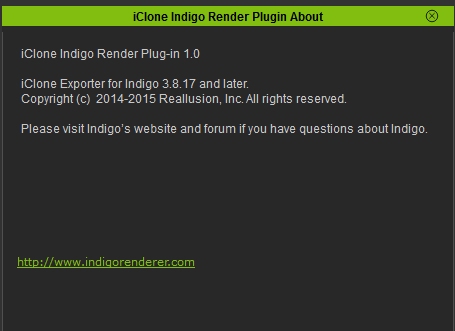
Is this correct? Best Regards, Arie
|
|
By pumeco - 11 Years Ago
|
Peter (RL) (1/13/2015)
pumeco (1/12/2015)
Is the update available for those using the Trial version?
I can't find a way to update it or download it.You won't be able to update your existing trial to 6.01. You will need to uninstall and then download the latestversion which is 6.01. You can get it from the link below. http://www.reallusion.com/iclone/iclone_trial.aspx
Thanks Peter, just one thing though, I notice there's some extra content in this update, is that part of the iClone installer itself or do I need to re-download the content file again to add the new stuff?
|
|
By theschemer - 11 Years Ago
|
I just wanted to report that I just downloaded the Indigo update and installed it. Then I downloaded the iClone 6 patch/update and installed it. And it worked just fine. Took no more than 2 or 3 minutes and I was done. I did a quick 1 minute Indigo Render and it worked fine. No drama. No DRM check. Smooth. :) I already had installed all my content and edited all my .VNS files so I was on top of things before the update.
Hope that helps,
TS
p.s. Intel i7 with 16BG RAM and Nvidia GTX780 FTW on Win7 Pro 64.
|
|
By RB3006 - 11 Years Ago
|
|
Strange Shadows if you use hats :w00t: (Yes, they are 2 Sided) Issue was also in iC 6 
Whats about AVI Output. It´s not more changeable (fix 30 fps) We (ok, I) need a 25fps WMV Output. Working last years with this Format. Bigger fps (30) make bad mood to my Video Editor. RL ....have mercy !!
|
|
By madicloner - 11 Years Ago
|
First the good thing: v6 now loads my most important v5 project. Fine! Thanx!
The other issues still persist:
1. If I load a v6 cloth project first, v6 crashes. If I load a generic v6 project (with any content) and then the cloth project, it loads without problems.
2. v6 has still problems with fat Dazzies or highpoly content. v5 let me view (and turn cam around) my Dazzies / highpoly content smoothly - v6 handle them strong noticeable slower, if I do exact the same.
3. My bought v5 projects are still trial in v6. Please don´t tell me, I must download them all again! And yes, I tried the two "cheats" of iClone for such content. They don´t work.
4. The pack scifi machines crashes v6 as it has crashed v5, if I put in a "finished" robot.
|
|
By Soya_RL - 11 Years Ago
|
Jen Arrow (1/13/2015)
Level of Detail BUG !!! In Preference setting, If I check LoD and Quality is FULL, Letter Trees do not render correctly in the Main screen and objects in the background are rendered poorly! If LoD is unchecked and Quality is Full, Letter Trees are correct ! If Level of Detail is unchecked and i leave iClone, when i reopen iClone, LoD reappear CHECKED and the Letter Trees do not render correctly. 2 Screens to explain:
Deaer Jen Arrow,
Check LOD. When a object is further away from the camera, it will become less detailed. It is to be more efficient. You can observe the object with Wireframe. If LOD is not checked, no matter how you zoom in/out, the wireframe will be the same. It is what you saw "The trees far away have good quality". :)
Soya
|
|
By mark - 11 Years Ago
|
I don't think that shadow problem is new with iC6 Robert.
I had to deal with that all the time in iC5 as well :w00t:
|
|
By Soya_RL - 11 Years Ago
|
|
LeeHounshell (1/13/2015)
Hi Peter,
I have a question regarding content directory import to iClone 6.
I have seen the FAQ here: http://faq.reallusion.com/?action=article&cat_id=011001007002&id=716&lang=
But that does not help in my case.
My iClone 5 content currently exists on a separate drive under these folders:
D:\Reallusion\Custom
D:\Reallusion\Template
D:\Reallusion\Templates
My C: drive is now an SSD, and I don't have room to copy old content to that.
Instead, I just want my new iClone 6 to recognize and use the iClone 5 content (i have a lot) on drive D.
Please help with instructions about how I can accomplish this. I'm an adept user.
Thank you very much.
Dear LeeHounshell ,
You can manually create a shortcut of the template folder in D drive in "C:\Users\Public\Documents\Reallusion\Custom\iClone 6 Custom\Pack". Please be sure that the shortcut name should be the same as the folder name you see in iC6 Content Manager. ;)
Soya
|
|
By Soya_RL - 11 Years Ago
|
|
Bigboss (1/13/2015)
Thanks soyasu, I have iC6.01 working now but I still cannot install any one of my previous Reallusion packs... I have a ticket open to that regard.
Cheers.
Dear Bigboss,
Someone is working on your pack problem. Someone will build a version to help you log. ;)
Soya
|
|
By Jen Arrow - 11 Years Ago
|
Hi Sovasu,
THX for the reply but why the SpeedTree Letters disappear In the background when the Level of Detail is checked and the Quality is set on Max ?
The other trees don't disappear !!!
In the version 6.00 all trees showing well with the same settings!
Waiting for an explanation...
|
|
By KenCoon - 11 Years Ago
|
Peter- I had 6.0 installed and never found any content even though I keep getting messages that is is installed in my iClone6.
I have installed the patches and still have the same problem.
Is there a trick to getting the content that comes with it. Everything says it should be there.
Ken:)
|
|
By animagic - 11 Years Ago
|
|
Ken, there are three downloads you need. If you go to your member page there are 3 download links for iClone 6. The first is the program itself, the second is the G6 outfit collection, and the third is the resource pack. Did you download and install all three?
|
|
By KenCoon - 11 Years Ago
|
Yes and they said they had been installed in my iClone one just said iClone and the other said iClone6.
I only have iClone6 on this computer.
EDIT: I noticed I am still listed as not having an activated copy even though I entered the serial number and registered it. Is there a way to activate the iClone6?
KEN:)
|
|
By pumeco - 11 Years Ago
|
Has anyone downloaded the content pack since the 6.01 update?
Is it the same as the previous pack or has it been updated since the 6.0 version?
I'm on the Trial version so I have to download the content packs seperately, but I don't want to download over another GB of content for no reason, so I'm hoping if someone can confirm whether or not the new content stuff has been added to the content pack yet :)
|
|
By animagic - 11 Years Ago
|
|
@pumeco: I don't think there were any changes in the content pack. It still has the original date and no changes have been announced.
|
|
By KenCoon - 11 Years Ago
|
I still don't have any content even though they have been downloaded and installed. I also seem to have inactivated the programs according to my page.
Intel i3 8GBP ram Nvidia gtx750TI 1tbsp hard drive.
Ken
|
|
By pumeco - 11 Years Ago
|
Thanks Job, looks like I misinterpreted the announcement in the other thread. I thought they'd added a new folder of content to go with the update :blush::D
|
|
By animagic - 11 Years Ago
|
|
The image sequence frame rate is now adjustable, thank you! :w00t: However, the AVI frame rate is no longer adjustable, and it should. This was reported by member rgreenidge in another thread. Also, if possible, I would like the image sequence frame rate to be a maximum of 60, as in iClone 5. The reason is that this may be useful for fast movements when you want to do motion blur in post.
|
|
By DELETED2 - 11 Years Ago
|
|
When editing motion layers it would be very beneficial to drag the window to the top and bottom screen margins. Currently we're about 6 or 7 levels deep and in this model we have something like 38 to 40 levels we have to jitteringly scroll through. Any chance of adding the re-sizeability option to this window please. Thanks. Armstrong. 
|
|
By theschemer - 11 Years Ago
|
|
kencoon7 (1/14/2015)
I still don't have any content even though they have been downloaded and installed. I also seem to have inactivated the programs according to my page.
Intel i3 8GBP ram Nvidia gtx750TI 1tbsp hard drive.
Ken
It may be because your hard drive is only 1 tablespoon in size. :D
|
|
By KenCoon - 11 Years Ago
|
|
Not funny. I have just bought a new computer for this and have been trying to get it working for 2 days.
|
|
By theschemer - 11 Years Ago
|
Ken,
Did you ever get your password sorted out and are able to logon to your account?
TS
|
|
By DELETED2 - 11 Years Ago
|
|
++++++++++++++++++++++++++++++++++++++++++++++++++++++++++++++++++++++++++++++
On the same topic, could we have the "edit motion layer" window dockable as well? Thanks. Armstrong. 
|
|
By KenCoon - 11 Years Ago
|
I am on kindle now. I found out it only does this on the forum. I signed in now with the PC password and that seems to have fixed the log in problem.
The account info is the same on either one.
|
|
By theschemer - 11 Years Ago
|
So did you try going to the help drop down menu in iClone 6 and click on the 2 activation tabs just for the heck of it? And when you run iClone 6 what does the about box say from the help menu? Does it show your serial number?
TS
|
|
By KenCoon - 11 Years Ago
|
|
I will have to check that in the morning. I am not near the computer now and it is late at night here. Thanks.
|
|
By pumeco - 11 Years Ago
|
@Job
Yup, same here, frame rate is greyed out for AVI now. It was enabled in the previous version although it caused a crash, so maybe they've temporarily disabled it until they get to the bottom of it. I'm curious to know why you would like to cap the maximum frame rate output to 60FPS though. Surely if you want slow-mo etc, the higher the better as long as you get to choose?
I never mentioned it for a feature, but I would have loved to see it export up to at least 120 FPS, you can get some really nice slow-mo stuff with that. It would look extra cool now that we have better flowing hair and cloth to play with!
@Armstrong
I totally share your frustration, I think we need those up and down arrows to complement the scrollbar because it's a real chore the way it is at right now. I think there should be scrollbar arrows everywhere there is a scrollbar. It would be nice to have a wider scrollbar as well. I don't know why, but almost every developer I know seems to have a fetish for annoyingly skinny scroll bars. I think most of them need to be at least three times wider than they are!
|
|
By theschemer - 11 Years Ago
|
|
KenCoon (1/14/2015)
I will have to check that in the morning. I am not near the computer now and it is late at night here. Thanks.
Read this too. Don't know if it is the same for iClone 6 but it probably is.
http://www.reallusion.com/registration_faq_premium2.asp
TS
|
|
By theschemer - 11 Years Ago
|
Armstrong (1/14/2015)
++++++++++++++++++++++++++++++++++++++++++++++++++++++++++++++++++++++++++++++
On the same topic, could we have the "edit motion layer" window dockable as well?
Thanks.
Armstrong.
+1 on this. I was going to ask how to set the avatar back to default motion after removing motions, and realized the "edit motion layer" window was not to be found. Then I turned on my 2nd monitor and it was there all along. It would be nice to have it dockable *or* moved to the other monitor so if both is possible, do that. :)
TS
|
|
By Draian63 - 11 Years Ago
|
@pumeco
totally agree with both your interventions. No frame rate control now on exporting; at least it was available on AVI... now it totally disappeared. (OK we can live with the general 30 fps) And why cap it to 60fps...? (maybe I am ignorant of something... it happens...:) ). And what about the arrows in submenu, they would be helpfull.
BTW maybe someone can help me with this; can you import - export projects freely from iClone6 PRO and iClone 6 Standard with no limitations...? I am looking to buy a second seat Standard Version (costs less and really Indigo, to me, was a wrong choice)... sorry if this is a bit OT but don't know where to ask and maybe an experienced guy out there can give me line of feedback
Thx
|
|
By Agonos - 11 Years Ago
|
|
In preference (ctrl + p), IC6 (in custom mode of course) is unable to remember the "Anisotropic Filtering" by x16. Whenever he returns to x4 :(
|
|
By animagic - 11 Years Ago
|
|
pumeco (1/14/2015)
@JobI'm curious to know why you would like to cap the maximum frame rate output to 60FPS though. Surely if you want slow-mo etc, the higher the better as long as you get to choose?
I never mentioned it for a feature, but I would have loved to see it export up to at least 120 FPS, you can get some really nice slow-mo stuff with that. It would look extra cool now that we have better flowing hair and cloth to play with!Well, I mentioned 60 because that is the current internal frame rate that we see and that is what we had in iClone 5. So I was requesting to that restore in iClone 6. More would be nice, but I don't know if that is technically feasible or easy, because I assume that all motion data (clips and such) is currently sampled at 60 fps internally. I guess you could interpolate between frames to double the rate. I was thinking the other day that if we had 600 fps, we could perfectly derive 24, 25, and 30 fps and make everyone happy...:P
|
|
By Cricky - 11 Years Ago
|
Time Line Switcher does not match when the name is changed in the Scene. This makes it difficult to follow a Switch for timing purposes.
The scene has a specific Camera chosen (BROWN) with the shortcut used to get there. The Cameras were named and then locked. The Switcher was then employed to change as the scene progresses, but after review the names of the cameras are retaining the name of the camera as it was added instead of picking up on the name change to identify what it is.
The camera names could be anything the user desires such as; (Head) (Panning) (Grin) (Back of Head) (Follow Up Stairs) (Etc.), but not easy to figure out if the time line does not match the scene for the Switcher.
|
|
By madicloner - 11 Years Ago
|
|
This is only conditional an issue - but we need it badly, if the physX and clothes should work right: We need collision soft vs soft. That is even more important than the selfmesh as collision mesh, because without it, nearly every wide cloth is "ugly" clipping through the different cloth "layers".
|
|
By KenCoon - 11 Years Ago
|
I FEEL STUPID.
The content was there all the time. I had to click the first one ( which I did) but when nothing showed up on the right of it I assumed there was nothing there.
This morning I moved the content tab over and things began to move down the screen. The content is there but difficult to find on my 18 inch screen.
I may have to switch monitors with my son.
Sorry for all the confusion.
Ken:)
|
|
By justaviking - 11 Years Ago
|
|
Cricky (1/14/2015)
Time Line Switcher does not match when the name is changed in the Scene. This makes it difficult to follow a Switch for timing purposes.
The scene has a specific Camera chosen (BROWN) with the shortcut used to get there. The Cameras were named and then locked. The Switcher was then employed to change as the scene progresses, but after review the names of the cameras are retaining the name of the camera as it was added instead of picking up on the name change to identify what it is.
The camera names could be anything the user desires such as; (Head) (Panning) (Grin) (Back of Head) (Follow Up Stairs) (Etc.), but not easy to figure out if the time line does not match the scene for the Switcher.
Excellent example. I agree. Thanks for reporting it and providing a clear example.
|
|
By Soya_RL - 11 Years Ago
|
Agonos (1/13/2015)
Peter (RL) (1/13/2015)
The G6 characters are currently non-standard characters so "Create Face" won't work for Mason and Heidi. You can however use this feature with the G5 characters Chuck and Gwynn.
We will be updating the G6 avatars in a future patch to add extra functionality. :)Hi, Thank you Peter. But concern the problem "Glare", do you have any information to give us? Do you have at least one "clue" ? I also have a software crash "IC6" to 40/50% when I use the rendering "INDIGO" in a complete scene. whilst my scene is short, just with an avatar dancing and without decor. Other people they have this problem? Windows 8.1 (X64) Intel Core i5 4670K 3.40 GHz Socket: Socket 1150 LGA Mother card MSI Z87-G45 GAMING (MS-7821) 1.0 14 Go DDR3 GPU NVIDIA GeForce GTX 770
Dear Agonos,
The Glare Type of HDR, Effect of Vertical Flare and Horizontal Flare, the verticle and horizontal is opposite. RL knows about this issue and is working on it. ;)
Soya
|
|
By Soya_RL - 11 Years Ago
|
|
redrubyslippers (1/13/2015)
well so much for that, i downloaded the patch and the indigo update and installed them , much to my better judgement, it went through its paces and lo and behold went to the drm(why the hell is it doing this)check .. it crashes every time when its checking..hmmm,, so and excuse me RL fuck it , i uninstalled the bugger and installed the original copy which IS STABLE I knew deep down that it would cause problems with the update....so no joy for me and i cannot be bothered with reporting it, im tired of it now.
Dear redrubyslippers,
There was a known issue. You must patch both iClone v6.01 and Indigo Plug-in v1.01. Otherwise, when you launch iClone6 DRM check will popoup and it will crash. Are you sure you finished patching Indigo Plug-in?
If you did patch both, what exactly did you do to make DRM Check popoup? ;)
Soya
|
|
By animagic - 11 Years Ago
|
|
soyasu (1/15/2015)
Dear Agonos,
The Glare Type of HDR, Effect of Vertical Flare and Horizontal Flare, the verticle and horizontal is opposite. RL knows about this issue and is working on it. ;)
SoyaHi Soya, Thanks for keeping on top of everything and reporting back! :D Is RL also working on the HDR problem that I reported (and another member as well), where the HDR effect is only showing in one direction? 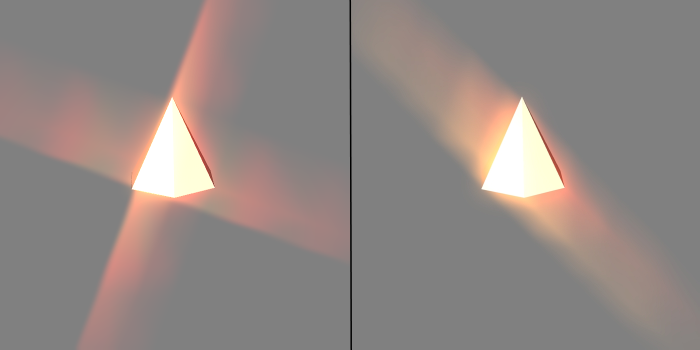
The image on the left shows the Spectral Cross correctly in iClone 5. However, in iClone 6 one direction is missing (image on the right). This happens with a GTX 980 and has also been reported for a GTX 970. It may be related to Maxwell cards, because other cards don't have this problem.
|
|
By Soya_RL - 11 Years Ago
|
|
Jen Arrow (1/14/2015)
Hi Sovasu,
THX for the reply but why the SpeedTree Letters disappear In the background when the Level of Detail is checked and the Quality is set on Max ?
The other trees don't disappear !!!
In the version 6.00 all trees showing well with the same settings!
Waiting for an explanation...
Dear Jen Arrow,
If you check "Tree Billboard" in Advanced in Preference, and zoom way out. SpeedTree will become Billboard, but it's not disappeared. Just doesn't have details.
Check LOD. This will not affect much of the trees in close range, only to the trees in long range. :)
Soya
|
|
By Soya_RL - 11 Years Ago
|
Cricky (1/14/2015)
Time Line Switcher does not match when the name is changed in the Scene. This makes it difficult to follow a Switch for timing purposes. The scene has a specific Camera chosen (BROWN) with the shortcut used to get there. The Cameras were named and then locked. The Switcher was then employed to change as the scene progresses, but after review the names of the cameras are retaining the name of the camera as it was added instead of picking up on the name change to identify what it is. The camera names could be anything the user desires such as; (Head) (Panning) (Grin) (Back of Head) (Follow Up Stairs) (Etc.), but not easy to figure out if the time line does not match the scene for the Switcher.
Dear Cricky ,
Thank you for telling us. This is a bug. I have reported to RD. ;)
Soya
|
|
By Soya_RL - 11 Years Ago
|
animagic (1/15/2015)
soyasu (1/15/2015)
Dear Agonos,
The Glare Type of HDR, Effect of Vertical Flare and Horizontal Flare, the verticle and horizontal is opposite. RL knows about this issue and is working on it. ;)
SoyaHi Soya, Thanks for keeping on top of everything and reporting back! :D Is RLalso working on the HDR problem that I reported (and another member as well), where the HDR effect is only showing in one direction? The image on the left shows the Spectral Cross correctly in iClone 5. However, in iClone 6 one direction is missing (image on the right). This happens with a GTX 980 and has also been reported for a GTX 970. It may be related to Maxwell cards, because other cards don't have this problem.
Dear animagic,
Thank you for reporting this issue. I have noticed it, and have reported to RD. ;)
Soya
|
|
By LeeHounshell - 11 Years Ago
|
|
Thank you! I was able to make it work.
|
|
By hattori kun - 11 Years Ago
|
3dxpro and Iclone 6 issue.
Installed Iclone 6 then installed 3dxpro. When I start 3dxpro I get a pop up that 3dx pro needs Iclone 5 installed or some features are disabled. I don't have Iclone 5 so I proceed to load an fbx file to characterize. The convert to non standard button is grayed out. The only option available is convert to non human.
The fbx files file surely works since its from 3DX5_Character_Designer_Resource_FBX. I suspect that I need to install Iclone 5 to have that button work.
So the question is, do people who didn't install Iclone 5 still able to import their own characters into Iclone 6 via the old 3dxpro 5?
|
|
By hattori kun - 11 Years Ago
|
According to this you just need 3dxpro to import to Iclone 6.
http://www.reallusion.com/iclone/3DXchange.html
But why the popup and the disabled features?
|
|
By Galfridus - 11 Years Ago
|
|
Modifying Facial Features in IC6 deletes animation.
Not sure if this has been previously reported ? Perhaps better if I duplicate than not report at all?
For a G5 Avatar with motion Data in the timeline:-
Selecting to modify the Avatar proportions prompts a similar warning to that in IC5 that animation data will be removed. You need to confirm acceptance to be able to proceed.
Selecting to modify the Avatar Facial Features in IC6 does not prompt a warning and no conformation is required. However, unlike IC5, the animation data is now being automatically deleted as the Facial Features option panel opens.
Perhaps RL could reinstate the ability to modify facial features without removing previous animation data, as was the case with IC5? Failing that add a warning/conformation routine to the modify Facial Features button in IC6?
Geoff.
|
|
By pumeco - 11 Years Ago
|
@Madicloner
Check out the new request I made in the request forum ;)
@Draian
I think yesterday was an amazing day for agreements, there was a few :w00t:
@Job
I hear you. I've created a request on the request forum and have mentioned the stuff you refer to. What I posted regards the FPS Cap is just a guess, but it might work :P;)
|
|
By animagic - 11 Years Ago
|
|
hattori kun (1/15/2015)
3dxpro and Iclone 6 issue.
Installed Iclone 6 then installed 3dxpro. When I start 3dxpro I get a pop up that 3dx pro needs Iclone 5 installed or some features are disabled. I don't have Iclone 5 so I proceed to load an fbx file to characterize. The convert to non standard button is grayed out. The only option available is convert to non human.
The fbx files file surely works since its from 3DX5_Character_Designer_Resource_FBX. I suspect that I need to install Iclone 5 to have that button work.
So the question is, do people who didn't install Iclone 5 still able to import their own characters into Iclone 6 via the old 3dxpro 5?
Unfortunately, it has been discovered that 3DXchange 5 requires iClone 5. RL should definitely address this for new iClone 6 users, as I don't believe IC5 is mentioned as a condition for 3DXchange 5 usage.
|
|
By justaviking - 11 Years Ago
|
|
animagic (1/15/2015)
Unfortunately, it has been discovered that 3DXchange 5 requires iClone 5. RL should definitely address this for new iClone 6 users, as I don't believe IC5 is mentioned as a condition for 3DXchange 5 usage.Uh, yeah, that's important and should be CRYSTAL CLEAR on the pages where you buy 3DXchange. I know 3DXchange 6 is being worked on, but we've always said 3DX 5 would still work for most things. Never did they say you also need to have iC5 installed to make it work.
|
|
By justaviking - 11 Years Ago
|
|
I don't remember this being reported in the "Issues" thread yet (6.0 or 6.01). So better safe than sorry, I'll be the messenger. IMPORT SOUND FILE FOR AVATAR SPEECH WAV FILE FAILS, BUT MP3 WORKS This was reported and verified in this thread: https://forum.reallusion.com/Topic220257-385-1.aspx I have not tested it, I'm just doing a favor by ensuring visibility of this issue to Reallusion.
|
|
By Agonos - 11 Years Ago
|
|
Than you Soyasu. Maybe it would be nice if Peter adds in the first page with the resolved bugs, bugs that are being processed for the next patch ?
|
|
By hattori kun - 11 Years Ago
|
animagic (1/15/2015)
hattori kun (1/15/2015)
3dxpro and Iclone 6 issue.
Installed Iclone 6 then installed 3dxpro. When I start 3dxpro I get a pop up that 3dx pro needs Iclone 5 installed or some features are disabled. I don't have Iclone 5 so I proceed to load an fbx file to characterize. The convert to non standard button is grayed out. The only option available is convert to non human.
The fbx files file surely works since its from 3DX5_Character_Designer_Resource_FBX. I suspect that I need to install Iclone 5 to have that button work.
So the question is, do people who didn't install Iclone 5 still able to import their own characters into Iclone 6 via the old 3dxpro 5?
Unfortunately, it has been discovered that 3DXchange 5 requires iClone 5. RL should definitely address this for new iClone 6 users, as I don't believe IC5 is mentioned as a condition for 3DXchange 5 usage.
Eeek! So its a known issue?
I hope they would have mentioned it here
http://www.reallusion.com/iclone/3DXchange.html
I bought it and was excited to import my own stuff but didn't work. Sent some vids showing the issue to CS and waiting for another reply. First reply was that I need to have the correct bone rig for my character for 3dx to have convert non standard. Double checking my rig
I sent the fbx to my friend and it works with no issues but he has Iclone 5. Convert to non standard was available immediately. I hope RL has a fix not involving purchasing Iclone 5 :D
|
|
By animagic - 11 Years Ago
|
|
Creating speech with a .WAV file works for me. I've tested this with G6 and G5 avatars. Maybe the .WAV file that gives problems can be posted to test, unless it is for all .WAV files of the user. Then I don't know...:unsure:
|
|
By justaviking - 11 Years Ago
|
animagic (1/15/2015)
Creating speech with a .WAV file works for me. I've tested this with G6 and G5 avatars. Maybe the .WAV file that gives problems can be posted to test, unless it is for all .WAV files of the user. Then I don't know...:unsure: I took the liberty of posting the problem up here since it was duplicated by a second person. Fortunately it's not a universal problem since it works for Animagic. Typically WAV seems to be the most reliable format based on my experience with other software. MP3's may or may not work, but WAV "always" works. I wonder what Gazzzzzzzz, and DoubleDutchhave in common, either in the way the files were made, or in their hardware, or other setup.
|
|
By Agonos - 11 Years Ago
|
We can use the "wav" files with "iclone6" except those being uncompressed (raw file).Tries to load the problem file with "Audacity" and come back to tell us whether this software treats it as a file "raw".
And maybe Iclone6 only accept standard PCM format Wav files with sample rates of 8000~48000 Hz ?
|
|
By jack-london - 11 Years Ago
|
Today is day 4 of the same problem with the update. Just received another help msg from Lilian.
Nothing has changed.
Lilian suggested running "CleanReg.exe to fix the serial number RT plug problem. She sent me the link to the file. I downloaded and ran it. Got an error msg:
"The system cannot find the path specified".
I thought - maybe the renderer is NOT installed? I ran the plug-in renderer installer.
This is what I got:
"The installed version of the application could not be determined. The setup will now terminate."
So, to recap:
I CANNOT install RT plug as it is "already installed". I CANNOT UN-install RT plug as the RT removal tool can't find it.
Catch 22.
I tried reinstalling iClone 6, 8 times already with various combination of patch, order of files, etc. Same conclusion every time: Iclone will NOT allow the renderer to be installed. Nor can it be deleted - if it's actually there. Reallusion contradictory message aren't much help.
However, all is NOT lost. I think know the solution. Reinstall the ORIGINAL 1st edition of iClone 6 as installed December 18, 2014. Then install the 1st edition of the RT plug. Update iClone with new patch, etc.
Of course that's NOT going to happen.
There is NO copy of the original iClone 6 program available.
Jack
|
|
By justaviking - 11 Years Ago
|
|
jack-london (1/15/2015)
"The system cannot find the path specified".I wonder if going into iClone and manually specifying the location of Indigo RT would help? I'm away from my iClone machine and can't bet more specific than that. Not right now. Maybe someone else can chime in if they think I'm on the right track. It's also possible I'm completely failing to correctly follow what you were saying.
|
|
By nat woi - 11 Years Ago
|
|
No uninstall on trialthat I can find wanted to install full version . trial had a psy.64 dll crash while testing Memory (RAM) 8.00 GB 7.6
Graphics NVIDIA GeForce GTX 760 8.1
Gaming graphics 4096 MB Total available graphics memory 8.1
Primary hard disk 360GB Free (465GB Total) 5.5
Windows 8 x64
System type 64-bit operating system
Number of processor cores 6
|
|
By lpatter - 11 Years Ago
|
Version 6.01 crashes when I use "search"
Version 6.00 search worked ok
Saved projects reopened. My avatars moved back to 0,0,0 even though I did not activate any motion when I saved the project.
The icon of the saved project looked correct but when I reopened they were all at the world axis.
Removing object animation fixed it but they had not been animated - just moved with time=1
Love Iclone!
Still can't make skytool work
|
|
By pumeco - 11 Years Ago
|
Not sure whether this is a bug or whether I'm doing something wrong, but I cannot get a rigid body to collide with cloth.
-Add a Heidi
-Add a Sphere and make it a Rigid Body, and set it to Self-Mesh
-Animate it so that it moves to slowly push-up against Heidi's dress
Just goes through it no matter what I try.
|
|
By Cricky - 11 Years Ago
|
|
pumeco (1/16/2015)
Not sure whether this is a bug or whether I'm doing something wrong, but I cannot get a rigid body to collide with cloth.
-Add a Heidi
-Add a Sphere and make it a Rigid Body, and set it to Self-Mesh
-Animate it so that it moves to slowly push-up against Heidi's dress
Just goes through it no matter what I try.
Is the sphere Kinematic?
Do you have a large enough Collision Margin for Self Mesh? (Hint: It takes More than you would think) .
Did you increase the drag on the cloth; if it doesn't recognize something touching it, it won't react... Drag grabs what comes by?
Have you tried Convex Hull? You'll probably get a better response than from Self Mesh.
Edit:
Forgot to add, make sure you do this in "By-Frame Mode"...Real Time will not give you an accurate result of what will render.
Try using a BOX as Bounding instead of Self Mesh..
|
|
By Soya_RL - 11 Years Ago
|
Galfridus (1/15/2015)
Modifying Facial Features in IC6 deletes animation.
Not sure if this has been previously reported ? Perhaps better if I duplicate than not report at all?
For a G5 Avatar with motion Data in the timeline:-
Selecting to modify the Avatar proportions prompts a similar warning to that in IC5 that animation data will be removed. You need to confirm acceptance to be able to proceed.
Selecting to modify the Avatar Facial Features in IC6 does not prompt a warning and no conformation is required. However, unlike IC5, the animation data is now being automatically deleted as the Facial Features option panel opens.
Perhaps RL could reinstate the ability to modify facial features without removing previous animation data, as was the case with IC5? Failing that add a warning/conformation routine to the modify Facial Features button in IC6?
Geoff.
Dear Galfridus,
Thank you for telling us!
Press Create Face, Facial Features, and Collision Shape button in Modify, and the Animation key are deleted. This is a bug.
Please press the function in the menu above when you operate for now. Keys won't be deleted by the menu functions. ;)
Soya
|
|
By animagic - 11 Years Ago
|
|
In a discussion elsewhere on the board, Mark reported that he had problems with flickering when using a spotlight for lighting. His card is a Quadra 4000. I have a GTX 980 and when repeating the test I didn't notice what he saw. However, I did find something else. The scene is just a simple scene with some elephant ear plants. Here follows my test: When playing the preview of the scene I noticed definite shadow artifacts with the spotlight, which did not occur with the directional light. For some reason, I decided to move the plant up and down, which revealed another shadow problem with the spotlight, as you will see. The videos are in 1080HD. The first video is a test with a directional light: Everything works as it should. Now the video with the spotlight. You will notice that the shadow disappears in the ground when the plant is lowered. Also, the shadows are jittery when the preview is played.
|
|
By Galfridus - 11 Years Ago
|
|
Thank you for the prompt response Soya, concerning "bug" with deleted avatar animations using modify panel. Using the drop down top modify menu functions as you describe for Create Face, Facial Features, and Collision Shape. As expected, I noticed with Avatar Proportion, it does still remove animation. However, in this menu circumstance, now without any warning or conformation as required when selecting Avatar Proportion option button from the modify panel. Maybe both require a warning to the user that avatar animation will be deleted? Geoff.
|
|
By Rampa - 11 Years Ago
|
I have just created and characterized a Makehuman avatar, and need to adjust the bones. Previously I could do this in the "Avatar Proportion" panel. The drop down list would give the names of the original bones, and they could be selected and adjusted left/right/ forward backward, etc. The name substitution is nice and clear, but not all the functionality is there. The "scale" works fine, but the "rotate" does not. Again, this is a characterized FBX model.
Both the scale and rotate work fine for standard avatars.
|
|
By sbaerman - 11 Years Ago
|
Still the bug exists, if you export longer frame scenes (20-80 frames) to indigo that are +100.000 polygons. This makes Iclone crash :
- see also my other thread about it
- case with Reallusion is open
|
|
By Soya_RL - 11 Years Ago
|
|
jack-london (1/15/2015)
Today is day 4 of the same problem with the update. Just received another help msg from Lilian.
Nothing has changed.
Lilian suggested running "CleanReg.exe to fix the serial number RT plug problem. She sent me the link to the file. I downloaded and ran it. Got an error msg:
"The system cannot find the path specified".
I thought - maybe the renderer is NOT installed? I ran the plug-in renderer installer.
This is what I got:
"The installed version of the application could not be determined. The setup will now terminate."
So, to recap:
I CANNOT install RT plug as it is "already installed". I CANNOT UN-install RT plug as the RT removal tool can't find it.
Catch 22.
I tried reinstalling iClone 6, 8 times already with various combination of patch, order of files, etc. Same conclusion every time: Iclone will NOT allow the renderer to be installed. Nor can it be deleted - if it's actually there. Reallusion contradictory message aren't much help.
However, all is NOT lost. I think know the solution. Reinstall the ORIGINAL 1st edition of iClone 6 as installed December 18, 2014. Then install the 1st edition of the RT plug. Update iClone with new patch, etc.
Of course that's NOT going to happen.
There is NO copy of the original iClone 6 program available.
Jack
Dear Jack,
Delete this folder. You should be able to install it normally.C:\Program Files (x86)\InstallShield Installation Information\{15BFCCC5-1217-4026-B2A2-5B579B17F5E4}
Note: InstallShield Installation Information is hidden. Please go to explorer and show all hidden folders. ;)
Soya
|
|
By Soya_RL - 11 Years Ago
|
|
Galfridus (1/16/2015)
As expected, I noticed with Avatar Proportion, it does still remove animation. However, in this menu circumstance, now withoutany warning or conformation as required when selecting Avatar Proportion option button from the modify panel. Maybe both requirea warning to the user that avatar animation will be deleted?
Geoff.
Dear Galfridus,
I have noticed it, and have reported to RD. :P
Soya
|
|
By namunger - 11 Years Ago
|
Not sure if this has been mentioned...
If I go to modify collision shape on a character that has an animation applied, the animation is deleted, so there's really no way to check if the physics settings work with a specific animation.
|
|
By pumeco - 11 Years Ago
|
Repeatable bug for Soft Cloth Dynamics:
I think I know why Soft-Cloth dynamics needs an unacceptably large Collision Margin. It appears to be down to the greyscale values of the Weight Map applied to the objects. Here is an easy way to test it:
-Create a Floor and make it a Rigid Body
-Create a Sphere and make it a Soft Cloth
-Give the Sphere Self-Mesh Collision
-Give the Sphere Weight Map a solid Grey colour
-Drop the Sphere onto the Floor and note the gap between the Sphere and the Floor
-Adjust the solid Grey colour of the Weight Map attached to the Sphere
-Drop the Sphere again and check out the gap between the Sphere and Floor (it's changed)
In a nutshell, the greyscale value of the Weight Map is influencing the Collision Margin as well as how the dynamics are applied. Been playing with dynamics all day, trying out Cricky's suggestion (thank's Cricky) and just noticed it. As an additional note, Soft to Soft dynamics is soooooooo bad it might as well not exist, but I have a feeling it might have something to do with the Weight Map influencing the Collision Margin - so fingers crossed on that one!
|
|
By rgreenidge - 11 Years Ago
|
|
I haven't read all the problems and hope I'm not repeating a bug or problem. I just finally got my computer working right after buying a new 8GB Video card, power supply, then a motherboard, upgrade to Win 7 Pro, to have 32GB of memory. It works like a charm now. Here's my problem, I loaded one Audio program, Cakewalk Sonar X3; and looped it for 2.5 hours to make sure it didn't freeze up like when I first got this R9 290X video card, before buying a new motherboard. The chipsets on this MB seem work with this card AMD doesn't want to tell you there is a problem with 290 video cards and 700 or 800 chipsets. You know, buy first then you'll have to buy a new MB or overclock the older chipsets if you are lucky that method works. I got about 20 minutes of working with Wordpad, before it froze sometimes. Anyway now I can be certain of a problem I mentioned on here that I'm certain of now. I closed Sonar, and loaded iC6.1; it loaded very slow. I loaded in a project, and the project started jumping frame rates, and was not running smooth. I rebooted the computer and only loaded iC6.1, it loaded faster and when I loaded the same project, it now ran normal. I do not remember this with iClone 3-5 that you needed to clean boot to run the program properly. Re-booting is not a problem, but I don't expect this when you have 16 or 32 GB of memory. Not a programming expert at all, but this will be the first Windows program I've probably encountered where you need a clean boot to function normally. Also no one seems to be answering why with the modify panels, I cannot right click to copy and paste values, I have to highlight and use the control, "c" and "v" keys? Have a great weekend.
|
|
By animagic - 11 Years Ago
|
|
OK, I don't know if there is a reward for the weirdest bug, but I believe the following is a good candidate: 
This is a torus that is placed on a plane, both at [0,0,0]. The torus casts the usual shadow and then 3 additional "ghost" ones. You can move the torus underneath the plane, and the 3 ghost shadows will remain. The only thing unusual about the scene is that the objects are very large: the scale of both is "5000", so the camera is at quite a distance. This is with the Shadow range set to "Auto". If you set it to "Manual" you don't get any shadows. It's a very small project, so I'm attaching it here for verification.
|
|
By pumeco - 11 Years Ago
|
@Job
I think that's down to the way Shadows work in iClone and the fact that you have it set to such a large scale. Don't quote me on this but I think Shadow Blur is created by casting multiple Shadows in slightly different positions and then blending them to make one softer-looking one.
It looks like due to the scale, your extra Shadows aren't lying on top of one another like they would with a small scale. I'm amazed the Shadows still look like that, I think they're supposed to work a bit different in DX11.
|
|
By Agonos - 11 Years Ago
|
|
[b]animagic It's a very small project, so I'm attaching it here for verification.
Hi,
There's a problem with your file Animagic. It has no extension. Therefore, it is not affiliated with any program. This is a zip file? IProject?
|
|
By animagic - 11 Years Ago
|
|
@Agonos: Thanks for trying. It is a ZIP file with an .iProject file in it. I just tried to download it, and it worked fine. I wonder why you don't see the extension? @pumeco: I found this problem when rendering an IC5 project, which has a large city in a desert. In the beginning the camera moves towards the city following a car. I was rendering it in iClone 6 and suddenly noticed part of what turned out to be a huge shadow. I never had this in iClone 5. EDIT: Here is a still from the scene which had the problem: 
The unwanted shadow is in the lower left. It is actually independent of any blur settings.
|
|
By madicloner - 11 Years Ago
|
|
namunger (1/16/2015)
Not sure if this has been mentioned...
If I go to modify collision shape on a character that has an animation applied, the animation is deleted, so there's really no way to check if the physics settings work with a specific animation.
+1 on that.
It really costs time to test, animate again, test, animate again and so on. Especially, if the collison of a char works strange and often how it wants and when it wants. Please check this system again. It appears really buggy!
And: Motion-plus animations are no more "auto-deletable". You get the message, that is linkend, and no chance to delete it. Only help and ok. Then you must delete it and then you can animate. That costs time!
And please, please check the engine! It has big problems with highpoly content. Daz is difficult to animate - anything bigger near to impossible. V5 "ate" all without serious problems. What for does v6 need all this power of the machine? It doesn´t seem to use it, really!
|
|
By planetstardragon - 11 Years Ago
|
I was having a strange shadow artifact show up on a scene I was working on...
I had created a large wall to act like a land mass across a large body of water - I placed it as far away from the camera as possible, in fact it was right on the sky sphere itself ...spanning from left to right.....
for some reason the water and sky ( used a modified version of sky tool ) started reflecting spots of black that didn't exist on my prop....what was stranger was that one of the black spot reflections popped up in mid air and looked like it was refecting in the sky - but it wasn't , I had hidden the sky just to inspect, and the spot was still there .....it was the water reflection emitting it .... I played around with the settings and adjusting the water transparency was the only thing to soften it up.
The prop was beige, to imitate a sand mound across a lake / bay - but the reflection spots were pure black. it looked as if it was reflecting dark crevice shadows....which didn't exist on the prop.
|
|
By Agonos - 11 Years Ago
|
Animagic : Watch this video. The option "auto" triple shadows. In "manuel" mode there is only one but only if we are close to the object. Still, the closer the object, the more we perceive that the shadow is cut. And the shadow of the object is cut when we move away :D
https://www.youtube.com/watch?v=MLwSI4OwtkM&feature=youtu.be
PS : Any resemblance to your scene, is not accidental ;)
|
|
By mark - 11 Years Ago
|
|
planetstardragon (1/17/2015)
I was having a strange shadow artifact show up on a scene I was working on...
Love to see an example Ricky!!!!;)
|
|
By planetstardragon - 11 Years Ago
|
mark (1/17/2015)
planetstardragon (1/17/2015)
I was having a strange shadow artifact show up on a scene I was working on...Love to see an example Ricky!!!!;)
the dot in the sky turned out to be a lamp I had way in the distance ...but the reflections aren't exactly a bug, just an over exaggerated reflection of the shadows ?

|
|
By animagic - 11 Years Ago
|
|
Agonos (1/17/2015)
Animagic : Watch this video. The option "auto" triple shadows. In "manuel" mode there is only one but only if we are close to the object. Still, the closer the object, the more we perceive that the shadow is cut. And the shadow of the object is cut when we move away :D
https://www.youtube.com/watch?v=MLwSI4OwtkM&feature=youtu.be
PS : Any resemblance to your scene, is not accidental ;)Thank you for confirming... It is very strange indeed!
|
|
By rgreenidge - 11 Years Ago
|
|
Animagic, now that my new computer stuff is working. Like you I wanted to clean up my avatars in iC6 and make adjustments before I continue with my movie, because like you said earlier, I too seem to have more control with the facial and bone features. But I've notice I get strange shadows and spider like artifacts under some breasts and on the shoulders using the default shadow selection. I did notice more shadow options and when I select none or change from default selection, they disappear. To modify my avatars, I'm just using the default new setting, and just adding a avatar to modify; no added lights or backgrounds. If I have to eliminate avatar shadows in my movie, they are not important to me. Last night when adding a belt accessory to a avatar, when deleting it, the program crashed with it's iClone 6 has stooped message. To the new programs credit it took me back to where it crashed with all my updates, but now then program loaded slow, panned and did everything slow. So I had to re-boot the computer to get iClone to work normal as I mentioned before if I start IC6 after I start another program and close it. I love the new iclone 6, but I'm kind of baffled where I'm working on something as simple as a avatar by itself, after all the money I spent to upgrade even more causes a crash. If you know anything about anything you can determine iClone is not a simple program to develop and I appreciate them for getting IC6 out when they did. One thing I'm not clear on, do you have to write a ticket to get every problem looked at, or does someone from Reallusion monitor this thread and forward the issues written on here? Thanks..
|
|
By theschemer - 11 Years Ago
|
The Search feature in the Content Tab is not so handy. I tried to find the scooter and typed in "scooter" under the Props section and it pretty much ties the pc up with the spinning icon like its working, then the main header on the window says it quit responding. Then it still has the app and me tied up and then the screen changes a different color and appears to have crashed. Then it ends up finding the scooter and carrys on to let you work. So I try it again as I forget where the scooter is, and it crashes, or I didn't want to wait it out and ctrl-alt-del to end. Is the search feature not working properly a known issue or do I just have too much content?
Thanks,
TS
p.s. Where is the scooter located? :P
p.s.s. I found it in the "Auto Driver" folder under props. :)
|
|
By RobertoColombo - 11 Years Ago
|
Hello RL,
I found the following problem.
In the timeline I display the Project track + the tracks of 2 Characters.
When, I minimize the tracks of one character, also the tracks of the other characters get minimized.
Likewise, when I expand the tracks of one character, also the tracks of the other character are expanded.
The problem can be easily replicated:
1. start an empty project
2. add Chuck
3. add Gwymm
4. expand/collect the tracks of one the character => the tracks of the other character are also expanded/collected
Thanks for fixing it ;)
Cheers
Roberto
|
|
By animagic - 11 Years Ago
|
|
@rgreenidge: RL (Soya) monitors this thread, so it is a good place to report your issues, also for the benefit of others. Usually Soya confirms the issue. Now, if you can't run iClone 6 at all for example then that would be more something for support.
|
|
By Jen Arrow - 11 Years Ago
|
theschemer:
I have the same problem! I have to wait a long time between each letter i type in a search!
It doesn't respond immediately and the search function is really boring!!
In iClone v.6.0 the search function was working great!!!
|
|
By wires - 11 Years Ago
|
|
. RobertoColombo (1/17/2015)
Hello RL,
I found the following problem.
In the timeline I display the Project track + the tracks of 2 Characters.
When, I minimize the tracks of one character, also the tracks of the other characters get minimized.
Likewise, when I expand the tracks of one character, also the tracks of the other character are expanded.
The problem can be easily replicated:
1. start an empty project
2. add Chuck
3. add Gwymm
4. expand/collect the tracks of one the character => the tracks of the other character are also expanded/collected
Thanks for fixing it ;)
Cheers
Roberto
Roberto, What you describe is a feature, and not a problem, that can be turned on and off in the Timeline: 
|
|
By RobertoColombo - 11 Years Ago
|
Hi Gerry,
damn... you are right!!! :)
... and now I understand how to use that switch (I admit that so far I had not paid so much attention to it) :P
Thanks for the help
Roberto
|
|
By RobertoColombo - 11 Years Ago
|
Ok... I try a new one... not sure it has already reported.
1. empty project
2. add Chuck
3. add a prop
4. move to frame N (anyone)
5. set Chuck "look at" constraint to the prop (Chuck now turns his head)
6. move the timeline ahead
7. "Look at" SET FREE button is still disabled
Bug to fix ? :cool:
Cheers
Roberto
|
|
By Jen Arrow - 11 Years Ago
|
Roberto:
It's a bug !
I have the same problem...
You can disable the "look at " object in the time line, right clicking over the "look at" line and doing disable!
But you don't have a key that mark this action !
Jen
|
|
By justaviking - 11 Years Ago
|
|
RobertoColombo (1/18/2015)
Ok... I try a new one... not sure it has already reported.
1. empty project
2. add Chuck
3. add a prop
4. move to frame N (anyone)
5. set Chuck "look at" constraint to the prop (Chuck now turns his head)
6. move the timeline ahead
7. "Look at" SET FREE button is still disabled
Bug to fix ? :cool:
Cheers
RobertoJen Arrow (1/18/2015)
Roberto:
It's a bug !
I have the same problem...
You can disable the "look at " object in the time line, right clicking over the "look at" line and doing disable!
But you don't have a key that mark this action !
JenIt's working fine for me. The "Look At" is hiding under the "Constraint" area. And I'm getting key frames. And "Right-Click --> Look At --> Stop Look At" appears correctly for me. When I'm over the "look at" line, "Stop Look At" is available. If I'm before or after that constraint, then I do not see the "Stop Look At" option. 
.
|
|
By RB3006 - 11 Years Ago
|
Strange Hat Shadow in iC6 .... (Hat is 2 sided)
@ Mark ..... I did not notice in iC5
|
|
By RobertoColombo - 11 Years Ago
|
justaviking (1/18/2015)
RobertoColombo (1/18/2015)
Ok... I try a new one... not sure it has already reported.
1. empty project
2. add Chuck
3. add a prop
4. move to frame N (anyone)
5. set Chuck "look at" constraint to the prop (Chuck now turns his head)
6. move the timeline ahead
7. "Look at" SET FREE button is still disabled
Bug to fix ? :cool:
Cheers
RobertoJen Arrow (1/18/2015)
Roberto:
It's a bug !
I have the same problem...
You can disable the "look at " object in the time line, right clicking over the "look at" line and doing disable!
But you don't have a key that mark this action !
JenIt's working fine for me. The "Look At" is hiding under the "Constraint" area. And I'm getting key frames. And "Right-Click --> Look At --> Stop Look At" appears correctly for me. When I'm over the "look at" line, "Stop Look At" is available. If I'm before or after that constraint, then I do not see the "Stop Look At" option. .
Hi Dennis,
I tried to right-click over the constraints?look-at timeline and select release, but nothing happens.
I will send a ticket for this.
Thanks anyway for checking on your system
Cheers
Roberto
|
|
By justaviking - 11 Years Ago
|
|
RobertoColombo (1/18/2015)
I tried to right-click over the constraints?look-at timeline and select release, but nothing happens.
I will send a ticket for this.
Thanks anyway for checking on your systemI was right-clicking only on the avatar. I hadn't thought to do it on the timeline. Right-clicking on the Constraint row on the timeline always gives me the option to "Release," even if I'm not actually on a Look At constraint. In this picture, I released the Look At constraint, resulting in a new keyframe (green). The keyframe from the old "end" of the Look At constraint is still there. Clicking before it will also allow me to do "Release" and it results in a keyframe, but one that's pretty useless. So it seems okay to me on my system. Yup, sounds like a support ticket is the right way to go. Sorry.
|
|
By animagic - 11 Years Ago
|
|
I can confirm Roberto's problem. The Set Free button remains disabled and when right-clicking on the Look At track, I can select Release, but no keyframe is created, although the release action has effect. Curiously, if I then delete the initial Look At keyframe, the missing second keyframe appears. Now, why does it work for Viking?
|
|
By justaviking - 11 Years Ago
|
animagic (1/19/2015)
I can confirm Roberto's problem. The Set Free button remains disabled and when right-clicking on the Look At track, I can select Release, but no keyframe is created, although the release action has effect. Curiously, if I then delete the initial Look At keyframe, the missing second keyframe appears. Now, why does it work for Viking? Why does it work for me: - Either because I'm intimidating it, and it works out of fear
- Or because I'm missing something...
I thought it was because I didn't actually use the "Set Free" button. But I've tested it now, and it works exactly the same as right-clicking "Release" on the timeline. COULD THIS BE IT??? I have not applied any patches yet. I'm still running 6.0.
|
|
By Jen Arrow - 11 Years Ago
|
Viking:
I'm running iClone 6.01 and i think that's the reason of the "look at" bug!
After installing version 6.01, lot of bugs have appeared!
Jen
|
|
By Soya_RL - 11 Years Ago
|
madicloner (1/17/2015)
namunger (1/16/2015)
Not sure if this has been mentioned...
If I go to modify collision shape on a character that has an animation applied, the animation is deleted, so there's really no way to check if the physics settings work with a specific animation.+1 on that. It really costs time to test, animate again, test, animate again and so on. Especially, if the collison of a char works strange and often how it wants and when it wants. Please check this system again. It appears really buggy! And: Motion-plus animations are no more "auto-deletable". You get the message, that is linkend, and no chance to delete it. Only help and ok. Then you must delete it and then you can animate. That costs time! And please, please check the engine! It has big problems with highpoly content. Daz is difficult to animate - anything bigger near to impossible. V5 "ate" all without serious problems. What for does v6 need all this power of the machine? It doesn´t seem to use it, really!
https://forum.reallusion.com/FindPost220506.aspx
Press Create Face, Facial Features, and Collision Shape button in Modify, and the Animation key are deleted. This is a bug.
Please press the function in the menu above when you operate for now. Keys won't be deleted by the menu functions. ;)
Soya
|
|
By Rampa - 11 Years Ago
|
soyasu (1/19/2015)
madicloner (1/17/2015)
namunger (1/16/2015)
Not sure if this has been mentioned...
If I go to modify collision shape on a character that has an animation applied, the animation is deleted, so there's really no way to check if the physics settings work with a specific animation.+1 on that. It really costs time to test, animate again, test, animate again and so on. Especially, if the collison of a char works strange and often how it wants and when it wants. Please check this system again. It appears really buggy! And: Motion-plus animations are no more "auto-deletable". You get the message, that is linkend, and no chance to delete it. Only help and ok. Then you must delete it and then you can animate. That costs time! And please, please check the engine! It has big problems with highpoly content. Daz is difficult to animate - anything bigger near to impossible. V5 "ate" all without serious problems. What for does v6 need all this power of the machine? It doesn´t seem to use it, really! https://forum.reallusion.com/FindPost220506.aspx Press Create Face, Facial Features, and Collision Shape button in Modify, and the Animation key are deleted. This is a bug. Please press the function in the menu above when you operate for now. Keys won't be deleted by the menu functions. ;) Soya
Thank you Soya for letting us know it's a bug, and that the one in the Modify menu works properly!:)
|
|
By Soya_RL - 11 Years Ago
|
|
animagic (1/19/2015)
I can confirm Roberto's problem.
The Set Free button remains disabled and when right-clicking on the Look At track, I can select Release, but no keyframe is created, althoughthe release action has effect.
Curiously, if I then delete the initialLook At keyframe, the missing second keyframe appears.
Now, why does it work for Viking?
https://forum.reallusion.com/FindPost219960.aspx
Thank you for reporting the issue. I have asked our RD to look into it. :P
Soya
|
|
By Bellatrix - 11 Years Ago
|
|
RB3006 (1/18/2015)
Strange Hat Shadow in iC6 .... (Hat is 2 sided)
@ Mark ..... I did not notice in iC5
The hat shadow issue is not so much a bug but a glitch. Mostly likely Shadow Bias, a common problem in Unity and a few other popular game engines.
To resolve the hat issue (and other typical shadow bias in small to medium size scenes) Visual > Shadow setting > Shadow Bias from default -10 to the "safe" range between -2 to -5 will make it look more correct. Then fine-tune with Manual distance and Focus Near Area. There is no magic formula, just eyeball it...
Regardless, I think this shadow issue needs to be officially re-calibrated for version updates, if only for marketing reasons.
|
|
By Galfridus - 11 Years Ago
|
|
Default Pinned cloth example props in IC6.
IC6 online help specifically refers to this.
Remove Dummies The dummies of the hanging clothes can be removed. One cloth template can have more styles, each for different purposes.
It gives an example of removing the four corner dummies of the 5 point cloth to leave the centre dummy attached to avatars hand
“Simulate and the cloth now turns into a handkerchief with four corners dropping naturally.”
For removing the dummies I used “Delete”. This, however, does not seem to “deactivate” the individual pinned points on the cloth props in IC6? What is the correct procedure for that ?
I find removing the dummies does not remove the pinning points and therefore the four corners do not drop naturally when running the simulation as described in on-line help.
Switching over from PhysX to Bullet did not provide a solution.
Is this a bug in the software, inaccurate documentation or user error ?
In the same IC6 help section, instructions for animating pinned points on the cloth via the dummies works as described. Geoff.
|
|
By elektron2kim - 11 Years Ago
|
|
namunger (1/16/2015)
Not sure if this has been mentioned...
If I go to modify collision shape on a character that has an animation applied, the animation is deleted, so there's really no way to check if the physics settings work with a specific animation.
I will echo this as I lost the whole timeline track of animations by changing collision areas on a DAZ character and there is no doubt.
The DAZ character I used didn't react as collision shape when I reapplied the motion. Something I could have found out and tested if the animations had stayed. Actual I'm not sure.
Otherwise the patch fixed a whole lot.
|
|
By Cricky - 11 Years Ago
|
Something else _ Convert Position to Path - is not working.

|
|
By Agonos - 11 Years Ago
|
quote]soyasu (1/19/2015)
animagic (1/19/2015)
I can confirm Roberto's problem.
The Set Free button remains disabled and when right-clicking on the Look At track, I can select Release, but no keyframe is created, althoughthe release action has effect.
Curiously, if I then delete the initialLook At keyframe, the missing second keyframe appears.
Now, why does it work for Viking?
I did the test. If you want to act with the "at loot" option in the "Timeline", we must develop the "CONSTRAINT" option also. By cons, you can not break or off if. It seems that the options "realase" and "set free" were not active. Strange
|
|
By justaviking - 11 Years Ago
|
Agonos (1/19/2015)
quote] soyasu (1/19/2015)
animagic (1/19/2015)
I can confirm Roberto's problem. The Set Free button remains disabled and when right-clicking on the Look At track, I can select Release, but no keyframe is created, althoughthe release action has effect. Curiously, if I then delete the initialLook At keyframe, the missing second keyframe appears. Now, why does it work for Viking? I did the test. If you want to act with the "at loot" option in the "Timeline", we must develop the "CONSTRAINT" option also. By cons, you can not break or off if. It seems that the options "realase" and "set free" were not active. Strange Also, briefly reiterating...
"Set Free" button
Looks like a regression in the patch.
6.0 --> Works for me 6.01 --> Fails for Roberto and Animagic 6.02 --> ??? Read the earlier discussion for more details.
|
|
By Agonos - 11 Years Ago
|
Hello all. Can't we copy and past a "path "?
Why can not I delete my post ? I turn around. With each attempt, it asks for my email address and password
|
|
By GOETZIWOOD STUDIOS - 11 Years Ago
|
|ISSUE| With Paint Toon Levels To Full White, Materials Still Show Specularity
Hi,
When using the Toon Shader and setting both Paint Toon Level to full white the image appear unshaded, which is the expected behavior (granted the used Directional Light shadows are disabled).
However, if the used Directional Light is rotated, then Specularity still shows on materials having specular values.
Is this the intentional behavior ?
Intuitively, having both Paint Toon Levels to full white should result in no shading at all, including specular shading.
Thanks,
Guy.
|
|
By Ron12345 - 11 Years Ago
|
Can't render a project in IC 6.01 beyond default 1,800 frames.
I can add frames to a project over the standard 1800. I move the right green triangle on the timeline to the last frame (example 3,000). I can preview the entire project. When I render video, if I select "all", only 1800 are rendered. If I select "range", the "to" box says 1800. If I enter 3000, it changes back to 1800. If I use the up arrow, after 1800 is 2. If I create a new IC 6 project, save it and then open it, the range "to" box in render shows the correct last frame, but only renders 1800. Same if I check "all". Same thing happens with an old IC 5.5 project longer than 1800 frames. Yes the right green triangle is on the last frame. Waiting for tech support.
Everything else works fine.
Intel I7 4790, Nvidia GeForce GTX 970 4GB, 16GB RAM, Windows 8.1 64bit
|
|
By animagic - 11 Years Ago
|
|
@Ron: That is strange indeed. It seems you have all the right settings. I have been rendering longer projects in iClone 6 without problems, so I wonder what is different in your setup.
|
|
By planetstardragon - 11 Years Ago
|
i wonder if that bug is related to a similar bug I was experiencing in ic5.
I was doing custom keyframing from some video footage I was sent ...when I was done with the project I'd review all my project files back to back - for some reason the start / end pointers fell out of alignment - like my pointers would focus on one section ....and when I hit play the project was reacting to invisible markers. In my case it looked like a memory leak because it looked like the previous marker settings carried over to the next project.
|
|
By justaviking - 11 Years Ago
|
|
Ron12345 (1/20/2015)
Can't render a project in IC 6.01 beyond default 1,800 frames.
I can add frames to a project over the standard 1800. I move the right green triangle on the timeline to the last frame (example 3,000). I can preview the entire project. When I render video, if I select "all", only 1800 are rendered. If I select "range", the "to" box says 1800. If I enter 3000, it changes back to 1800. If I use the up arrow, after 1800 is 2. If I create a new IC 6 project, save it and then open it, the range "to" box in render shows the correct last frame, but only renders 1800. Same if I check "all". Same thing happens with an old IC 5.5 project longer than 1800 frames. Yes the right green triangle is on the last frame. Waiting for tech support.
Everything else works fine. Please let us know if you get any resolution from Support, or if you figure it out. We're all mystified. FYI for others... This topic originally discussed here: https://forum.reallusion.com/Topic220846-385-1.aspx
|
|
By DenLac - 11 Years Ago
|
Hi Peter, I would like to post something but I just can't find how to initiate a post. Can you help please.
sinedl
|
|
By musicaz - 11 Years Ago
|
|
I have the exact same problem with it not rendering the amount of frames correctly
|
|
By animagic - 11 Years Ago
|
|
Yes, there are special versions for querulant individuals...:P
|
|
By musicaz - 11 Years Ago
|
|
i thought it was against the forums rules
|
|
By animagic - 11 Years Ago
|
|
OK, I did a test tonight and was able to render a project longer than 1800 internal frames (I rendered to WMV). The 10,000 frames rendered as 5,000 at 30 fps as expected. However, I found that setting the Range in Render settings caps at 1800. Even if you enter more than 1800, the value reverts to 1800. In addition, the field only allows four digits as far as I can tell, so the possible maximum is only "9999".
|
|
By pi-qui - 11 Years Ago
|
Indigo crashes all the time. I get a white screen, it freezes, and I have to kill the application. Restart doesnt solve anything. My PC meets all the requirements Core i7 860 ATI Radeon 6850 DirectX 11 and plenty of RAM.
|
|
By justaviking - 11 Years Ago
|
|
pi-qui (1/21/2015)
Indigo crashes all the time. I get a white screen, it freezes, and I have to kill the application. Restart doesnt solve anything. My PC meets all the requirements Core i7 860 ATI Radeon 6850 DirectX 11 and plenty of RAM.
Are you running Indigo by clicking the "Render Scene" buttion inside iClone? Or are you launching it by itself from the Windows "Start" menu? There is a recent version of Indigo RT that you can download from IndigoRenderer.com. (Version 3.8.25, I think. You'll find it on their download page.) Save it to your PC, and you can install it right over your existing copy (no need to uninstall). See if that helps.
|
|
By wires - 11 Years Ago
|
justaviking (1/21/2015)
pi-qui (1/21/2015)
Indigo crashes all the time. I get a white screen, it freezes, and I have to kill the application. Restart doesnt solve anything. My PC meets all the requirements Core i7 860 ATI Radeon 6850 DirectX 11 and plenty of RAM.
Are you running Indigo by clicking the "Render Scene" buttion inside iClone? Or are you launching it by itself from the Windows "Start" menu? There is a recent version of Indigo RT that you can download from IndigoRenderer.com. (Version 3.8.25, I think. You'll find it on their download page.) Save it to your PC, and you can install it right over your existing copy (no need to uninstall). See if that helps. Unless pi-qui has purchased Indigo RT directly from Glare he could have problems installing that version over the Reallusion version. It was clearly stated that the version included with the RL Indigo plug-in is a "stripped down" version that will only work with iClone 6. Installing a full version over a custom version could lead to problems, not the least of which would be the Licensing method. I have a purchased Glare version installed, and it does not have a Serial number - it is tied to the PC MB. I know this because I had to contact their support to get my version "released" in order to install it on my new rig.
|
|
By justaviking - 11 Years Ago
|
wires (1/21/2015)
Unless pi-qui has purchased Indigo RT directly from Glare he could have problems installing that version over the Reallusion version. It was clearly stated that the version included with the RL Indigo plug-in is a "stripped down" version that will only work with iClone 6. Installing a full version over a custom version could lead to problems, not the least of which would be the Licensing method. I don't want to promote unsupported solutions, but it is possible to download Indigo RT from their website and make it work with iClone. I won't say how I know this. :Whistling: P.S. It's nothing illegal. No hacking.
|
|
By wires - 11 Years Ago
|
justaviking (1/21/2015)
wires (1/21/2015)
Unless pi-qui has purchased Indigo RT directly from Glare he could have problems installing that version over the Reallusion version. It was clearly stated that the version included with the RL Indigo plug-in is a "stripped down" version that will only work with iClone 6. Installing a full version over a custom version could lead to problems, not the least of which would be the Licensing method. I don't want to promote unsupported solutions, but it is possible to download Indigo RT from their website and make it work with iClone. I won't say how I know this. :Whistling: Interesting. Does the "works with iClone" version also function as a full version for renders from SketchUp or Blender. If so I'll be looking for some refunds from Glare.
|
|
By Postfrosch - 11 Years Ago
|
Animagic and Rampa have already recognized it right and I can also confirm that.
Yes, you can create projects with 54000 frames and render the entire Projket (setting: all). Man can, for example, only the frame 2500 - 5000 can render (setting range 2500-5000) But try it once in denesm project frames 10100-12700 or 42300 - render 48000 (Settings: Range). It will not work, because you can only set a four-digit numbers (1 - 9999). This is because it still went in IC 5 for me a program error. Or is that a new Future possibly?:cool:
Greets from Germany
Postfrosch (Werner)
|
|
By RobertoColombo - 11 Years Ago
|
Hi Postfrosch, Animagic, Rampa, and all,
here is a work-around for the 4-digit problem:
1. Create an empty project in IC5 and save it
2. Open it in IC6
3. Boom!! Now you can select 5 digits for the rendering :D :cool:
PS: how did I find it ? because I am working in IC6 on a project started in IC5... and was able to render 5 digit frames... ;)
|
|
By Postfrosch - 11 Years Ago
|
|
Hi Postfrosch, Animagic, Rampa, and all,
here is a work-around for the 4-digit problem:
1. Create an empty project in IC5 and save it
2. Open it in IC6
3. Boom!! Now you can select 5 digits for the rendering [BigGrin] [Cool]
.
Yeah right,
so it really would. I've tried the trick. Despite this Work a round there is an error in IC 6 needs to be fixed.
Greetings from Germany
Werner (Postfrosch)
|
|
By RobertoColombo - 11 Years Ago
|
Yes, for sure they need to fix it.
But at least we are not blocked with long projects till the fix is done.
Gruessen
Roberto
|
|
By RobertoColombo - 11 Years Ago
|
I had my 1st IC6 crash ( finally... I was tired to have a working program...:P ), so I decided to try the "restore" function.
The pop up window asks whether I want to restore the project with the unsaved data: obviously I want! So, I clicked yes.
Then, it prompts to save the project on the disk: I chose a new name and... message: RESTORE FAILED.
If I try to open the file that was supposed to be the restore project, the message is FILE IS CORRUPTED.
i know it sounds like "shooting on the red cross" but maybe some of the ppl here who have so many issues with iClone could check if they can restore anything after a crash... ;)
Cheers
Roberto
|
|
By justaviking - 11 Years Ago
|
|
@Roberto, I've had good success with the "Restore" feature. I think it's quirky the way it works, but it has been good to me. I've had (at least) one file that's gotten corrupted, but I don't know if that was even related to a crashed one. I just noticed a couple days ago that I can't open it any more. Fortunately it was an early draft of a project so I didn't lose anything important, but it doesn't inspire confidence. I'm still in the habit of doing Save As rather frequently. No solutions, just saying you're not entirely alone. I wonder if Reallusion would like too look at any of these corrupted projects.
|
|
By animagic - 11 Years Ago
|
|
As to project length: the projects I'm working on in iClone 6 started out as IC5 projects, so that's why I didn't notice the problem. But it is there for new IC6 projects.
|
|
By RobertoColombo - 11 Years Ago
|
@Dennis: I also do save quite often (right now at version 41 for the project I am working on...).
So, with the crash I lost really few modifications. But the point is that the crash recovery did not work and maybe RL can try to improve it
@Job: yes, for brand new projects in IC6 the render length is limited and RL shall fix this. But in the meanwhile, it is possible to create an empty project in IC5 and re-open in IC6... and this answers the old question asked by many ppl after the IC6 buy promotion "why should I get an IC5 for free, and what is the usage for, when I buy and use IC6 ?" :P :D
|
|
By GOETZIWOOD STUDIOS - 11 Years Ago
|
|BUG| iClone Fails To Properly Save Layouts With Negative Window Coordinates
Hi,
On Windows, window coordinates can be negative, for instance if your second monitor is on top of your main monitor. But in this case iClone Window -> Workspace -> Save Layout fails to record the true coordinates of any window placed in the second monitor. Those windows will be saved with (0,0) position, that is on the top left of the main monitor.
Solution: Please use signed integers to save windows coordinates.
Windows API use RECT with LONG (signed) values.
QT API uses QWidget->pos() with QPoint which uses int (signed) values.
Thanks,
Guy.
|
|
By Ron12345 - 11 Years Ago
|
Can't render beyond 1,899 frames
Tech emailed that it is a bug to be fixed in the next patch. I uninstalled 6.01 and installed 6.0 and it now works.
|
|
By justaviking - 11 Years Ago
|
|
RobertoColombo (1/22/2015)
@Dennis: I also do save quite often (right now at version 41 for the project I am working on...).
So, with the crash I lost really few modifications. But the point is that the crash recovery did not work and maybe RL can try to improve it.We are in total agreement. It should be fixed. Meanwhile, we protect ourselves as best we can. :) I hope you'll be sharing some video with us soon.
|
|
By mr_vidius - 11 Years Ago
|
so I tak:sick::sick:e it.. 6.1 won't be coming soon.. I was so looking forward to the morphing character thing.. oh well.. :crying:
vidius
|
|
By RobertoColombo - 11 Years Ago
|
justaviking (1/22/2015)
RobertoColombo (1/22/2015)
@Dennis: I also do save quite often (right now at version 41 for the project I am working on...).
So, with the crash I lost really few modifications. But the point is that the crash recovery did not work and maybe RL can try to improve it.We are in total agreement. It should be fixed. Meanwhile, we protect ourselves as best we can. :) I hope you'll be sharing some video with us soon.
HI Dennis,
I will... as soon as finished. It takes time... and often I am also busy with other stuff, so the time I can dedicate is not that much (for example, next week I am out of home for biz trip the whole week). But the scene, character animation, and cameras are almost done. Then, I need to add the facial animation, some special effect, lights, post production, NLE sync, audio sync... OMG... still long way to go :)
|
|
By RB3006 - 11 Years Ago
|
|
My iClone 6.2 beta crashes when I click Soft vs Soft Collision. Does anyone have also this problem?
|
|
By RobertoColombo - 11 Years Ago
|
Edit Motion Layer window for Non-Human animation editing must have also the horizontal scroll bar, otherwise a deep bone structure cannot be displayed (e.g. the full neck till the head of Hydra from Protofactor).
Better also to let the window be resizable.
|
|
By animagic - 11 Years Ago
|
|
Deleting a range of frames from a project has the undesirable effect that every item in the scene ends up at the world origin [0,0,0]. I will post an example image later. EDIT: I have to qualify this by stating that it MAY happen. When I tried to repeat it, I could delete the frames correctly. I have also found that a very old bug has reappeared (from iClone 3 or so) where cameras are visible in the scene even though they are set to invisible. I think the same is true for lights.
|
|
By RobertoColombo - 11 Years Ago
|
|
animagic (1/25/2015)
I have also found that a very old bug has reappeared (from iClone 3 or so) where cameras are visible in the scene even though they are set to invisible. I think the same is true for lights.
Same here: I found the cameras being visible in the scene even though they are marked as invisible
|
|
By Supergerry - 11 Years Ago
|
Bug found in IC6.02xxx: spring no longer works after resizing Avatar
1. Import genesis DAZ character into 3DXchange
2. Map rPectoral and lPectoral to additional bone
3. Activate spring for rPectoral and lPectoral
etc ....
4. Export to IC6
5. Load avatar in IC6 -> PLAY> you see -The springs work
6. Now change AVATAR PROPORTION -> The springs have no longer effect.
(Switch spring ON/OFF / load my saved *.spx from 3dXC / deleting Keyframes ...no effect...)
The same figure exported to IC5 exported functions according to the CHANGE AVATAR wonderfully without problems.
|
|
By namunger - 11 Years Ago
|
Another for the "not a bug, but a missing crucial feature" pile...
There used to be a check box on camera controls, something to the effect of "auto-level". This seems to have been lost in 6.x. Without this feature, linking camera to a path and selecting "follow path" gives some strange results. Example - using a circular path, the camera will not remain upright and point to the center of the circle. I know this can be overcome by adding a "look at" to a dummy prop, but you shouldn't have to resort to that.
|
|
By GOETZIWOOD STUDIOS - 11 Years Ago
|
|
namunger (1/27/2015)
Another for the "not a bug, but a missing crucial feature" pile...
There used to be a check box on camera controls, something to the effect of "auto-level". This seems to have been lost in 6.x. Without this feature, linking camera to a path and selecting "follow path" gives some strange results. Example - using a circular path, the camera will not remain upright and point to the center of the circle. I know this can be overcome by adding a "look at" to a dummy prop, but you shouldn't have to resort to that.
You will find that in the Edit -> Camera menu.
|
|
By namunger - 11 Years Ago
|
grabiller (1/27/2015)
namunger (1/27/2015)
Another for the "not a bug, but a missing crucial feature" pile...
There used to be a check box on camera controls, something to the effect of "auto-level". This seems to have been lost in 6.x. Without this feature, linking camera to a path and selecting "follow path" gives some strange results. Example - using a circular path, the camera will not remain upright and point to the center of the circle. I know this can be overcome by adding a "look at" to a dummy prop, but you shouldn't have to resort to that.You will find that in the Edit -> Camera menu.
In that case, it is a bug, because it doesn't work if the camera is following a path. It may actually be the "follow" command that is mixed up, because there is no "level" setting among the different axes. In Ic5 you could override that with the "level" command, but in iC6 it doesn't seem to work the same way.
|
|
By GOETZIWOOD STUDIOS - 11 Years Ago
|
|ISSUE| Animated Substances Do Not Animate In iClone
Hi,
iClone does not animate animated Substances.
Thanks,
Guy.
|
|
By GOETZIWOOD STUDIOS - 11 Years Ago
|
|ISSUE| IndigoRT Camera And iClone Camera Do Not Match
Hi,
When sending a iClone scene to render in IndigoRT (with the IndigoRT iClone plugin), the IndigoRT Camera framing does not match the original iClone camera framing. FOV is different.
Thanks,
Guy.
|
|
By justaviking - 11 Years Ago
|
|
grabiller (1/28/2015)
|ISSUE| IndigoRT Camera And iClone Camera Do Not Match
When sending a iClone scene to render in IndigoRT (with the IndigoRT iClone plugin), the IndigoRT Camera framing does not match the original iClone camera framing. FOV is different.QUESTION: Is this a radical change, or a subtle change? It's been oberved that there are some minor differences, most noticable on outdoor scenes where the primary subject is fairly close to the camera, and you can see objects further back in the distance aren't aligned exactly the same relative to foreground items. I sometimes forget to set my aspect ratio correctly before starting the render, so what I see in the preview window is significantly different from the render. I'm not saying there's nothing for Reallusion to fix. The camera position and lense (FOV) should match, as you reported. I was just curious what it is you're seeing. REQUEST: Could you post two pictures, please? An iClone render to a still image (not a screen shot), and the corresponding Indigo render, so we can see exactly what you're seeing, would be great. (Please re-size them so they're forum-friendly.)
|
|
By GOETZIWOOD STUDIOS - 11 Years Ago
|
|
justaviking (1/28/2015)
REQUEST:
Could you post two pictures, please? An iClone render to a still image (not a screen shot), and the corresponding Indigo render, so we can see exactly what you're seeing, would be great. (Please re-size them so they're forum-friendly.)
Here are rendered images from 3 default iClone scenes. Loaded in iClone as-is, and sent to IndigoRT as is.
Default:


Aging Substance:


Abandoned House:


We can clearly see the framing is different each time in IndigoRT.
I've checked the camera positions and they match. It must be a FOV (horizontal/vertical)/Sensor size computation issue.
|
|
By wires - 11 Years Ago
|
|
Same test as done by Guy with a standard project. iClone: 
Indigo RT: 
Note: I turned off the Image Layer for the iClone render because for some reason Indigo RT will not render it - see the stills posted by Guy above.
|
|
By justaviking - 11 Years Ago
|
|
Thanks, Guy. For the record, I believed you. It's just nice to have an example we can all look at. Have a great day.
|
|
By urbanlamb - 11 Years Ago
|
I think most of these bugs are listed but I will write them down just in case
look at - does not seem to have a way to stop the look at (well it does but it doesnt seem to work) its greyed out. I try to release it in the timeline but sometimes it works and sometimes it does not. I can get the buttons to light up if i close the project down and shut down iclone and reload it again after restarting iclone
attach option - has the same problem as look at the button to release it greyed out not always but often. Again I can fix it by closing down the project and iclone and reopening it
motions - when loading a motion sometimes the autoadvance does not work (not always..)
loading a set
A) the windows seem to not be correct at times.
I am not sure how to explain this I will save a set say with the render windows set up saved up. I then load the set it get the "standard window" but the checkmark is beside the render window set up configuration. Also sometimes it says beside it when I load a set its "standard" set up but its actually not
this is the same with the indigo plugin toolbar sometimes there is a checkmark to say the toolbar is there when its not and visa versa.. (hope that made sense)
B) cannot load a full set with motions and sound files in the timeline it always crashes. I have to load a set with an avatar and a couple of objects first so the windows resize to the right location but the set holds very small amount of memory then I can load a full set. (is this my pc or the software the fact that it works 100% of the time leads me to believe its the software and also has to do with window resizing)
Motions for hands .. again this is a bit wierd to explain
I try to load a motion or pose just for one hand say the left hand. I select left hand on the menu on the top bar under animations etc and it often loads both hands. I have to try multiple times to get it to load an animation/pose for the left hand. It does the right hand only all the time it doesnt want to let me do the left hand.. eventually it does.
I probaby have had others but I didnt remember to remember them as I was working through the project. Or I attributed it to my pc which is actually getting a bit outdated for this sort of stuff.
-----------------
my pc is running windows 7 sp1
i7 cpu
12 gig ram
graphics card nvidia 660ti 4 gig ram
|
|
By jamesknine - 11 Years Ago
|
Okay, I know that this is one of those "uh, dude, that's nice" issues but...
Upgraded to an ATI 290x and an Asus PB287Q 4k monitor. Turned on Windows 8.1 scaling so I could actually read the text in Windows in 3840x2160. However, iClone 6's text doesn't scale at all. Is there an option to scale up the text?
Thanks,
Jim
|
|
By animagic - 11 Years Ago
|
|
jamesknine (1/29/2015)
However, iClone 6's text doesn't scale at all. Is there an option to scale up the text?There is an option in the Preference settings: 
You could try that. I have not used it myself, so I don't know how effective it is.
|
|
By jamesknine - 11 Years Ago
|
|
You could try that. I have not used it myself, so I don't know how effective it is.
Thanks! It didn't do much but it bumped it up enough so I could read it without having to squint. They really need a size one or two bigger than the biggest setting for 4k monitors.
Jim
|
|
By JimmyB7 - 11 Years Ago
|
|
jamesknine (1/29/2015)
Okay, I know that this is one of those "uh, dude, that's nice" issues but...
Upgraded to an ATI 290x and an Asus PB287Q 4k monitor. Turned on Windows 8.1 scaling so I could actually read the text in Windows in 3840x2160. However, iClone 6's text doesn't scale at all. Is there an option to scale up the text?
Thanks,
Jim
I have the scaling problem too. Also, I posted this "bug" in the Official iClone 6 issues thread on 12/20/2014 but apparently never got a response:
"Mark In/Out of Playback/Export Range triangles on the Play Bar are missing after I change Preference's Icon and Font size to large. I'm using a 3840 x 2160 monitor resolution and I need the iClone workspace text to be as large as possible. Anyone else having this problem?"
I changed graphics card and still have the issue.
|
|
By justaviking - 11 Years Ago
|
|
JimmyB7 (1/30/2015)
"Mark In/Out of Playback/Export Range triangles on the Play Bar are missing after I change Preference's Icon and Font size to large. I'm using a 3840 x 2160 monitor resolution and I need the iClone workspace text to be as large as possible. Anyone else having this problem?"And overlapping text where it displays your polygons and FPS. :(
|
|
By RobertoColombo - 11 Years Ago
|
Hi,
not sure if it has been already reported, but it seems that it can't be changed the size of the particle emitter.
Whatever I insert new values, as soon as I press play, the values go back to the original ones (the "freeze" flag is also set to off).
Roberto
|
|
By animagic - 11 Years Ago
|
|
I have an issue that I don't recall from before the patch and that is that saving custom content is very slow. I will try to save a prop for example and seems to take a minute or more before it is saved.
|
|
By Supergerry - 11 Years Ago
|
BUG FOUND IN IC6.02BETA:
Deleting Motion from Bodyparts in the timeline:
- Right click in the MOTION track
- Select "Remove motion"
- The RIGHT LEG is missing
|
|
By Supergerry - 11 Years Ago
|
I`m missing the Autoblink --> Edit in 3dxchange button as contained in IC 5....
Generally: There are 2 options for input values:
Sliders and input boxes with arrows up down controls.
My suggestion for future updates:
- (specifically Move / Rotate / Scale): unify all the fields to sliders with the possibility of direct entry of values (same as in the material editor: Opacity, Specular ....).
This is much more user friendly than the eternal click, click, type values, enter, mark and replace, enter......
- Use at first the RAM instead of the hard drive. In a scene with 3 DAZ Genesis figures IC6 uses only about 2GB of RAM, but about 40GB of the hard drive. A simple undo can ever take 2 minutes with permanet disk access
|
|
By RobertoColombo - 11 Years Ago
|
Hi,
I found that several controls of the PARTICLE system have a "random" behavior when modified, i.e., sometimes the value reverts back, with no reason, to a previously set value (the particle prop is set as NOT frozen in the Scene manager).
Moreover, the particle behavior (as seen during the playback) does not always change according to the settings.
As an example, see the attached picture, where I used a simple green map to better show the problem (hope the picture is clear enough...).
The particle goes up-diagonal even though the applied settings should generate a set of particle that "stay on the ground".
Same settings in IC5 gives the expected behavior, i.e. the particle remain close to the ground.
Anyone else experienced problems with the particle in IC6 ?
I am quite anxious about this issue because if it is a common bug, I think RL will solve it, but if I am the only one, then makes the whole SW lame...
Thanks in advance for the feedback
Cheers
Roberto
|
|
By wires - 11 Years Ago
|
|
Convert Position to Path not working. In this post, user Powerhouse 2822 reported that the "Convert Position to Path" function outlined here in the online Help doesn't work. I've tested this and can confirm his/her findings. Screen shot added: 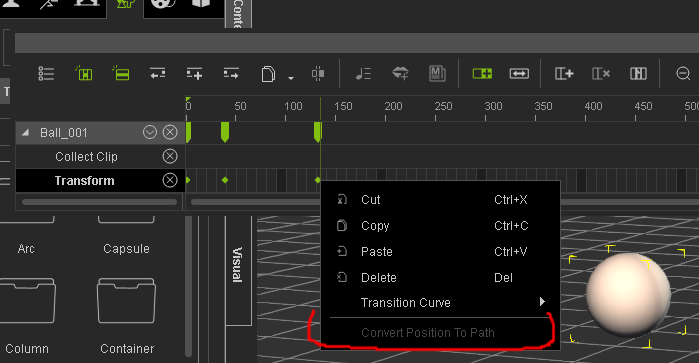
.
|
|
By hestera - 11 Years Ago
|
|
RobertoColombo (2/1/2015)
Hi,
I found that several controls of the PARTICLE system have a "random" behavior when modified, i.e., sometimes the value reverts back, with no reason, to a previously set value (the particle prop is set as NOT frozen in the Scene manager).
Moreover, the particle behavior (as seen during the playback) does not always change according to the settings.
As an example, see the attached picture, where I used a simple green map to better show the problem (hope the picture is clear enough...).
The particle goes up-diagonal even though the applied settings should generate a set of particle that "stay on the ground".
Same settings in IC5 gives the expected behavior, i.e. the particle remain close to the ground.
Anyone else experienced problems with the particle in IC6 ?
I am quite anxious about this issue because if it is a common bug, I think RL will solve it, but if I am the only one, then makes the whole SW lame...
Thanks in advance for the feedback
Cheers
Roberto
I've also come across this bug, but it seems to happen at random...I did discover that changing the value with the up and down arrows is retained, but entering the value would result in reverting back to previous. This was with the soft cloth physics parameters. It doesn't happen all the time, though, so I'm not sure what triggers it.
I'd be interested if the work around works for you, but it would be nice to be fixed.
|
|
By RobertoColombo - 11 Years Ago
|
hestera (2/1/2015)
RobertoColombo (2/1/2015)
Hi,
I found that several controls of the PARTICLE system have a "random" behavior when modified, i.e., sometimes the value reverts back, with no reason, to a previously set value (the particle prop is set as NOT frozen in the Scene manager).
Moreover, the particle behavior (as seen during the playback) does not always change according to the settings.
As an example, see the attached picture, where I used a simple green map to better show the problem (hope the picture is clear enough...).
The particle goes up-diagonal even though the applied settings should generate a set of particle that "stay on the ground".
Same settings in IC5 gives the expected behavior, i.e. the particle remain close to the ground.
Anyone else experienced problems with the particle in IC6 ?
I am quite anxious about this issue because if it is a common bug, I think RL will solve it, but if I am the only one, then makes the whole SW lame...
Thanks in advance for the feedback
Cheers
Roberto
I've also come across this bug, but it seems to happen at random...I did discover that changing the value with the up and down arrows is retained, but entering the value would result in reverting back to previous. This was with the soft cloth physics parameters. It doesn't happen all the time, though, so I'm not sure what triggers it. I'd be interested if the work around works for you, but it would be nice to be fixed.
Hi,
thanks for the reply :)
Yes, I noticed the same: the up/down arrow somehow fix the value.
It seems that the only way to assign a new value is:
1. to type in the desired value + 1 (or -1)
2. click up arrow down (or up)
Cheers
Roberto
|
|
By JimmyB7 - 11 Years Ago
|
justaviking (1/30/2015)
JimmyB7 (1/30/2015)
"Mark In/Out of Playback/Export Range triangles on the Play Bar are missing after I change Preference's Icon and Font size to large. I'm using a 3840 x 2160 monitor resolution and I need the iClone workspace text to be as large as possible. Anyone else having this problem?"And overlapping text where it displays your polygons and FPS. :(
Yes, I noticed that thanks. See attached for other 4K monitor issues.
|
|
By Supergerry - 11 Years Ago
|
Next BUG found (IC 6.02 BETA DX11):
The GLOSSINESS slider in the material editor has an incorrect function:
Setting "0" -> no gloss (okay)
Setting "1" -> full gloss (should probably be the "100" ...)
Setting "100" -> very little gloss (should probably be the "1" ...)
Gerry
|
|
By animagic - 11 Years Ago
|
|
Supergerry (2/1/2015)
Next BUG found (IC 6.02 BETA DX11):
The GLOSSINESS slider in the material editor has an incorrect function:
Setting "0" -> no gloss (okay)
Setting "1" -> full gloss (should probably be the "100" ...)
Setting "100" -> very little gloss (should probably be the "1" ...)This behavior is also present in earlier iClone versions. Glossiness seems to determine the definition of the glossy areas in that they become more defined (and smaller) with higher values. I agree that it is sort of counterintuitive, but it would not be good to change it at this point, as it would impact compatibility with older projects.
|
|
By animagic - 11 Years Ago
|
|
Supergerry (2/1/2015)
BUG FOUND IN IC6.02BETA:
Deleting Motion from Bodyparts in the timeline:
- Right click in the MOTION track
- Select "Remove motion"
- The RIGHT LEG is missingGood catch (it's also in 6.01). It might be a matter of mislabeling, as the are two Right Hand choices: 
I just tried this and can confirm that the second "Right Hand" is really the "Right Leg".
|
|
By mark - 11 Years Ago
|
|
That's so funny I just found that mislabeled "Remove Motion" typo and was about to post!!!:P
|
|
By Supergerry - 11 Years Ago
|
... 2 right hands are still much better than two left hands ... :)
----------------------
Now I have a crash in IC6.02 Beta DX11:
Step by step:
- Load 2 characters
- Create 2 boxes as reach target objects
- Attach these boxes to the hip of figure 1
- Reach target the hands of figure 2 to the boxes
- Now select figure 1 and replacing it with another avatar
-> IC crash
(If the boxes are detach BEFORE replacing the figure 1, and are attach again after replacement, everything is fine...)
Sorry for my english:(
Gerry
|
|
By animagic - 11 Years Ago
|
|
It would be good to have some feedback from RL about what reported bugs are acknowledged and can expected to be fixed in the next round. We haven't heard anything in a while...:unsure:
|
|
By Bellatrix - 11 Years Ago
|
REFRACTION bug
Reflection bug is known, easily replicated, and reported many times by others. Refraction is related, and equally buggy.
Refraction bug specific behavior shown using default Heidi in default scene + plane primitive set to diffuse black
- Refraction used on Plane (and props)
refraction when checked at 0, move slider above 0, will cause plane/ prop to disappear; however, refraction when checked at 100, move slider below 100, will not cause such disappearance. Regardless, refracted reflection image is evidently inaccurate.
- Refraction used on Heidi's dress
refraction when checked at 100, move slider below 100, will cause reflected dress to disappear, but show some refraction effect on actual dress. Refraction when checked at 0, move up above 0, will cause BOTH dress and reflected dress to disappear.

|
|
By mark - 11 Years Ago
|
I just noticed this. It may only be me and my system but thought I'd get it out there. Seems to be a problem with either Motion Puppet or with the "Remove Motion" timeline feature...
|
|
By vidi - 11 Years Ago
|
|
It may only be me and my system but thought I'd get it out there. Seems to be a problem with either Motion Puppet or with the "Remove Motion" timeline feature.
I confirm
|
|
By mark - 11 Years Ago
|
|
Thanks vidi!!:D
|
|
By RobertoColombo - 11 Years Ago
|
Hi Mark,
I tried the same, with Mason, I can also confirm the problem.
Roberto
|
|
By mark - 11 Years Ago
|
That's good I guess!!:P :P
Has anybody tried any other body-parts with "Remove-Motion"?
|
|
By animagic - 11 Years Ago
|
|
I tried it with a regular walk forward and got the same results. The arms definitely are the most out of whack. However, if you reverse the process and remove the motion before making the adjustment, everything works as expected. I tried the same with one of the legs (adjusting and then removing the motion), and it stays more or less in place. With the head, however, there is a bit of deviation.
|
|
By mark - 11 Years Ago
|
|
Thanks Job. That's kinda what I found out. Just need to keep iC5 close a bit longer;)
|
|
By nlprod1 - 11 Years Ago
|
|
Very Weird results here also, however, i tried it a second time ,but this time i put a break in the motion where i wanted the arm to stop swinging (removed motion of the left arm) and moved down the timeline a bit and put another break where i wanted the arm to begin swinging again and guess what, it worked - Crazy right! :cool:
|
|
By Supergerry - 11 Years Ago
|
Found another bug (IC6.02BETA DX11):
- Load a DAZ Genesis figure with springs on lPectoral and rPectoral into iClone 6
- Scroll down: MODIFY -> SPRING -> SELECT SPRING
- If you open the field, you see lPectoral and rPectoral and you can switch on / off individually (to there ok)
- Now load a spring file (* .spx), which was previously created in 3dxc
- The selection field now contains only a CHEST instead of lPectoral and rPectoral
- It is now no longer possible, lPectoral and rPectoral to switched on or off individually or singly to modify the values :(
(as a test: I`ve opened the original 3dxc *.spx file in a text editor: the file always contains lPectoral and rPectoral, even if I save the spring under a different name in iClone)
On this occasion I have noticed that the arrow on all Load button shows into the folder (this is confusing, because it means SAVE)...
Gerry
|
|
By GOETZIWOOD STUDIOS - 11 Years Ago
|
|CRASH| When Trying To Access Network Shared Folder Link From iClone 6 Custom Folder
Hi,
Perhaps there is a wiser way of doing this but I have installed my default content iClone 6 folders on one harddrive, and everything 'custom' for production on another hardrive (with a backup system).
My current actual "iClone 6 Custom" folder being on the default hardrive, I've network shared - for instance - a Props folder on my production harddrive and then created a link to this folder inside my "iClone 6 Custom/Props" folder.
The link appear in the iClone 6 Content manager window, but when I double click on it to open it then iClone crashes.
Does anyone experienced this as well ?
|
|
By GOETZIWOOD STUDIOS - 11 Years Ago
|
|ISSUE| 3DXchange Sets Bump Maps As Normal Maps When Exporting To iClone 6 Props
Hi,
When you import props with 3DXChange from *.obj files having *.mtl and some maps, including bump maps, then once you export the Prop as iClone 6 Prop, iClone 6 use those Bump Maps as Normal Maps instead of Bump Maps, hence weird rendering (big black spots and splats on the models).
Workaround: In iClone 6, remove the Bump Map then reload it, this time choose the option "Bump Map".
|
|
By vidi - 11 Years Ago
|
That drive me crazy, that I can not more easy select all Items texture with the Pipette in iClone 6. This works in 3Dxchange and iClone 5, but not in iClone 6 .
I have it already criticized in beta, but still no fix.
|
|
By lpatter - 11 Years Ago
|
The "Fishing net" n the "Softcloth Props" section of the "Phics Props" gives this error
Found 4 files load failed.
Pleases check whether the file exist.
Or, make sure the required codec is installed in your system.
Template/iClone 6 Template/iClone Template/SubstancePreset/3Dblock source map/Base/Torus_001\Torus_001_ws.png
I am posting here just in case this has been reported a million times to the help desk
|
|
By Bellatrix - 11 Years Ago
|
2 odd behaviors of Materials that I'm not sure are bugs or just shortcomings
- Blend channel does not respond to UV offset and Tiling "Affect All Channels"
- Certain preset materials, Water/Sky etc, when clicking on Diffuse to get to its own folder, never lead to any Diffuse folder or Water/Sky>Diffuse folder. But these Diffuse textures has applink option and will load in external app. They must be buried somewhere in one of the Template folders, archeological excavation madness.
It would be logical to simply Ctrl Click on any loaded textures to Drag Drop into any other channels. Save unnecessary entry-level workflow breaks.
|
|
By animagic - 11 Years Ago
|
|
lpatter (2/5/2015)
I am posting here just in case this has been reported a million times to the help deskActually this is the place to post your findings to the benefit of other users. These are the files listed as missing for the Fishing Net: C:/Users/Public/Documents/Reallusion/Template/iClone 6 Template/iClone Template/SubstancePreset/3Dblock source map/Base/Torus_001\Torus_001_ao.png C:/Users/Public/Documents/Reallusion/Template/iClone 6 Template/iClone Template/SubstancePreset/3Dblock source map/Base/Torus_001\Torus_001_cur.png C:/Users/Public/Documents/Reallusion/Template/iClone 6 Template/iClone Template/SubstancePreset/3Dblock source map/Base/Torus_001\Torus_001_nor.png C:/Users/Public/Documents/Reallusion/Template/iClone 6 Template/iClone Template/SubstancePreset/3Dblock source map/Base/Torus_001\Torus_001_ws.png
We've had a similar issue in the past. The problem seems to be that the file references don't take into account that the user may have their content installed in custom location. The files are there, but not in the default location. Is that the case for you? For example, my Reallusion root is F:\Media\Reallusion.
|
|
By GOETZIWOOD STUDIOS - 11 Years Ago
|
|BUG| Loading Sub-Props Materials From Disk Corrupts The Scene Tree
Hi,
If you have a prop having several sub-props, and try to load from disk a Material for one of the sub-prop surface (in my case with external textures referenced, did not tried yet with embedded textures), then the scene tree becomes corrupted, listing twice the sub-props.
Only workaround I've found so far: Save the master Prop on disk, delete the Prop from the scene, reload the master Prop from disk.
|
|
By GOETZIWOOD STUDIOS - 11 Years Ago
|
|WISH| Ability To Save Rendered Image Sequences As OpenEXR Files
Hi,
As we can load OpenEXR files for textures, it would make sense to have the option to also save OpenEXR files for image sequences rendering.
|
|
By animagic - 11 Years Ago
|
|
grabiller (2/5/2015)
|WISH| Ability To Save Rendered Image Sequences As OpenEXR Files
Hi,
As we can load OpenEXR files for textures, it would make sense to have the option to also save OpenEXR files for image sequences rendering.Could you briefly explain what that would give us? I've seen it mentioned, but my knowledge is limited here...:unsure:
|
|
By Agonos - 11 Years Ago
|
If it helps, I must inform you that I have tested the patch "DX11 to DX9 IC6" (https://forum.reallusion.com/Topic220555-385-1.aspx) and that in the DX9 version, my problem with the "glare" option disappears
Remember, the problem I am talking about is on this video :
https://www.youtube.com/watch?v=Jt-Pr8y1fRA&feature=youtu.be
|
|
By GOETZIWOOD STUDIOS - 11 Years Ago
|
animagic (2/5/2015)
grabiller (2/5/2015)
|WISH| Ability To Save Rendered Image Sequences As OpenEXR Files
Hi,
As we can load OpenEXR files for textures, it would make sense to have the option to also save OpenEXR files for image sequences rendering.Could you briefly explain what that would give us? I've seen it mentioned, but my knowledge is limited here...:unsure:
Answering a post regarding color grading reminded me to ask for this.
The OpenEXR format allows to save images in floating point format, which is a huge gain in precision in terms of color values range.
This is useful for color grading rendered images with iClone because - as you now it - iClone does not apply sRGB correction to the rendered images, which means those images being 'linear' are saved in files (png,jpg,..) that are considered to be sRGB with a limited precision of 255 values per color channel.
With this kind of precision, if you try to get more informations from the low/shadows areas you will get banding artifacts. Hence the need to have a file format with more precision (or applying sRGB correction, as one intent of the sRGB color space is to give more room to the low/shadow area in the 0/255 values range, so you get more precision in these low/shadows area and usually avoid those artifacts).
|
|
By prabhatM - 11 Years Ago
|
animagic (2/5/2015)
grabiller (2/5/2015)
|WISH| Ability To Save Rendered Image Sequences As OpenEXR Files
Hi,
As we can load OpenEXR files for textures, it would make sense to have the option to also save OpenEXR files for image sequences rendering.Could you briefly explain what that would give us? I've seen it mentioned, but my knowledge is limited here...:unsure:
OpenEXR interests me for one reason - deep data.
Normally, one Pixel would resolve to one final value in normal images. But in OpenEXR, each pixel would have multiple values (color, opacity, and Z-depth information) at "different depths" .
While compositing two images, it will be possible to place the second image at a right depth rather than just over the first image.
For example you have an image of a tree and a garden with fence around it. You can actually be able to place the tree inside the fence of the garden.
Or, you can place a clip of fire blast on a street IMAGE at a place of your choice e.g. behind / on any vehicle on that street.
So the composting takes a new meaning.
|
|
By GOETZIWOOD STUDIOS - 11 Years Ago
|
prabhatM (2/5/2015)
animagic (2/5/2015)
grabiller (2/5/2015)
|WISH| Ability To Save Rendered Image Sequences As OpenEXR Files
Hi,
As we can load OpenEXR files for textures, it would make sense to have the option to also save OpenEXR files for image sequences rendering.Could you briefly explain what that would give us? I've seen it mentioned, but my knowledge is limited here...:unsure: OpenEXR interests me for one reason - deep data. Normally, one Pixel would resolve to one final value in normal images. But in OpenEXR, each pixel would have different values i.e. color, opacity, and Z-depth information. While compositing two images, it will be possible to place the second place at a right depth rather than just over the first image. For example you have an image of a tree and a garden with fence around it. You can actually be able to place the tree inside the fence of the garden. So the composting takes a new meaning.
What you describe is a bit different from what "deep data" or "deep compositing" is.
What you describe is depth compositing, which is already possible without the need to have OpenEXR deep data. You just need to have a depth pass.
Deep compositing is based on the concept of having multiple rendering samples being saved individually for each pixel, each sample having its own z value (and any other values) associated with it. This allows to solve aliasing issues that occurs with just "depth compositing".
But as iClone does not do multi-sampling (but just over-sampling), OpenEXR deep data is pretty useless for iClone.
|
|
By wires - 11 Years Ago
|
|
Duplicate while rotating does not work. Holding the CTRL key while moving an item creates a duplicate, this does not work when rotating the item. :crying:
|
|
By prabhatM - 11 Years Ago
|
grabiller (2/5/2015)
prabhatM (2/5/2015)
animagic (2/5/2015)
grabiller (2/5/2015)
|WISH| Ability To Save Rendered Image Sequences As OpenEXR Files
Hi,
As we can load OpenEXR files for textures, it would make sense to have the option to also save OpenEXR files for image sequences rendering.Could you briefly explain what that would give us? I've seen it mentioned, but my knowledge is limited here...:unsure: OpenEXR interests me for one reason - deep data. Normally, one Pixel would resolve to one final value in normal images. But in OpenEXR, each pixel would have different values i.e. color, opacity, and Z-depth information. While compositing two images, it will be possible to place the second place at a right depth rather than just over the first image. For example you have an image of a tree and a garden with fence around it. You can actually be able to place the tree inside the fence of the garden. So the composting takes a new meaning. What you mention is different from what "deep data" or "deep compositing" is. What you describe is depth compositing, which is already possible without the need to have OpenEXR deep data. You just need to have a depth pass. Deep compositing is based on the concept of having multiple rendering samples being saved individually for each pixel, each sample having its own z value (and any other values) associated with it. This allows to solve aliasing issues that occurs with just "depth compositing". But as iClone does not do multi-sampling (but just over-sampling), OpenEXR deep data is pretty useless for iClone.
It's true that a Multi-pass with Zdepth pass rendering would also help. OpenEXR offers deep data possibilities.
Please mark my opening sentence - " Why OpenEXR interests me."
|
|
By GOETZIWOOD STUDIOS - 11 Years Ago
|
|ISSUE| FPS Slider From iClone5 Export Is Missing In iClone6 Render
We can't choose the framerate of the rendering of image sequences.
This is a regression which should be fixed.
|
|
By GOETZIWOOD STUDIOS - 11 Years Ago
|
prabhatM (2/5/2015)
grabiller (2/5/2015)
prabhatM (2/5/2015)
animagic (2/5/2015)
grabiller (2/5/2015)
|WISH| Ability To Save Rendered Image Sequences As OpenEXR Files
Hi,
As we can load OpenEXR files for textures, it would make sense to have the option to also save OpenEXR files for image sequences rendering.Could you briefly explain what that would give us? I've seen it mentioned, but my knowledge is limited here...:unsure: OpenEXR interests me for one reason - deep data. Normally, one Pixel would resolve to one final value in normal images. But in OpenEXR, each pixel would have different values i.e. color, opacity, and Z-depth information. While compositing two images, it will be possible to place the second place at a right depth rather than just over the first image. For example you have an image of a tree and a garden with fence around it. You can actually be able to place the tree inside the fence of the garden. So the composting takes a new meaning. What you mention is different from what "deep data" or "deep compositing" is. What you describe is depth compositing, which is already possible without the need to have OpenEXR deep data. You just need to have a depth pass. Deep compositing is based on the concept of having multiple rendering samples being saved individually for each pixel, each sample having its own z value (and any other values) associated with it. This allows to solve aliasing issues that occurs with just "depth compositing". But as iClone does not do multi-sampling (but just over-sampling), OpenEXR deep data is pretty useless for iClone. It's true that a Multi-pass with Zdepth pass rendering would also help. OpenEXR offers deep data possibilities. Please mark my opening sentence - " Why OpenEXR interests me."
Right, you mean even with 1 sample per pixel you would be interested to have z values associated with pixels color values inside one file (instead of having several passes).
|
|
By prabhatM - 11 Years Ago
|
|
grabiller (2/5/2015)
Right, you mean even with 1 sample per pixel you would be interested to have z values associated with pixels color values inside one file (instead of having several passes).
It depends on the deep comp pipeline workflow you plan for your projects. There are so many ways to use the deep data in your pipeline.
OpenEXR interests you because of its color precision. It caught my fancy because of the deep data possibilities. It's so compositing friendly.
|
|
By Supergerry - 11 Years Ago
|
BUG found (for me...):
Material editor:
- Select multiple mesh names when holding down the Ctrl key in the table
- Now you can modify the colors (Diff / Amb / Spec...) at the same time for ALL Meshes
- But this does NOT work for the strength (only the first selected mesh changehis strengh)
It may be that it is not a bug, but it would be very user friendly (especially during the rather long time, in contrast to other programs IC6 need to assign a new texture ...)
(To speed increase I have all the textures scaled down to 2048).
Gerry
|
|
By RobertoColombo - 11 Years Ago
|
I found this problem (bug?) : whatever I individually change the X, Y, or Z size of a tree, the tree gets re-sized like if I were modifying all the dimension together (i.e. the yellow small cube at the feet of the resize control).
Now, I wonder whether RL is taking care of all of these problems (quite a lot so far....), what are they going to fix, and when.
I haven't seen any replies from RL ppl in this thread for long time...
|
|
By animagic - 11 Years Ago
|
|
I wonder about that too, Roberto. It was nice when we got feedback. I have a new one, at least I don't think it was reported...:unsure: A character loses all animation when the Facial Features dialog is opened: - Load a character.
- Apply an animation or a pose.
- Select Facial Features.
- The character's animation or pose is removed.
Doing an Undo restores it, but still.
|
|
By animagic - 11 Years Ago
|
|
RobertoColombo (2/5/2015)
I found this problem (bug?) : whatever I individually change the X, Y, or Z size of a tree, the tree gets re-sized like if I were modifying all the dimension together (i.e. the yellow small cube at the feet of the resize control)Trees have only a single scale factor (check the Modify panel), so that is most likely the reason. Trees are not props in the normal sense.
|
|
By Tarampa Studios - 11 Years Ago
|
|
Hey Guys, did you know the main Forum for iC6 is still missing from the main forum directory... ? We can see the sub-forum for the work in progress is under the General Forum, but since iC6 is now released for more than a month, can we have a main forum for it please? see screenshot: (Makes it much harder to find posts about the finished product, without having to sort through all the development posts.) :D 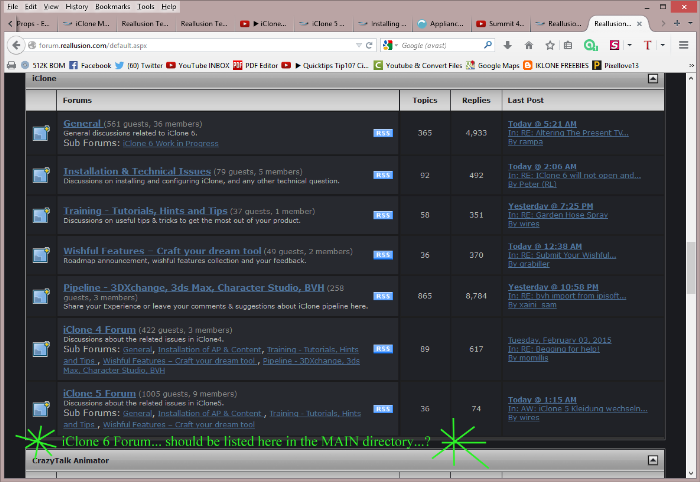
|
|
By justaviking - 11 Years Ago
|
|
@Bleetz, The "iClone --> General" forum is the CURRENT version. When a new version is released, the "archive" the thread into a named version. I agree, they could just as well call it "iClone 6" from the start.
|
|
By animagic - 11 Years Ago
|
|
Just curious: what would the main part of the forum be about otherwise? Anyway, this doesn't really belong in the iClone issues thread.
|
|
By rgreenidge - 11 Years Ago
|
|
Crash, crash crash. I got tired of it, so I had to trouble shoot. Last week I had one Avatar made in iC5, that would not upload in iC 6.1; it would cause it to crash, so I sent it to Reallusion and they found a solution. Open the Avatar in iC5 again and remove all the accessories, hair etc. Then load the stripped avatar into iC 6, and then attach the same accessories to it, and save it in iC 6. It worked like a charm. I made a scene in airplane with many avatars in iC5, it never or rarely crashed unless the memory seemed to run out. I have 2 main avatars made in iC5 that had no problems uploading to iC 6, but if I moved one of those avatars arm in the project with the motion puppet in iC 6, it would crash. So what I did is take those 2 avatars, strip them in iC 5, and added the accessories and hair in iC 6. I then replaced the old avatars with the new modified ones, then saved the project in iC 6, and re-loaded. Same problem, move the arm a few times with the motion puppet, and "Crash".. Next I made all of the other avatars made with iC 5 that are on the plane that were not stripped and re-done in iC6 and their accessories invisible. Now I was able to use the motion puppet and everything was fine until I clicked one of my two visible avatars to look at the other "Carash"... Okay this is getting redundant. Booted. Loaded the project again (recovery fails always). I had another scene filmed on the same set and used 6 cameras, I only need 2 for this short scene, so I wanted to delete the cameras first, then the avatars. Click to delete 1 of the 4 cameras, it is taking forever, then I deleted the 2nd one and "Carash".. What deleting cameras are causing crashes, this is insane. Booted again and loaded project. But this time I'm going to delete those other 12 avatars, invisible is not enough. The deleting is slow and after the 6th one "Crash", so I decided to delete two and save the project after each two. After 6 avatars were removed not only was I able to delete the cameras with no problem the deletion process speeded up and no more crashes. I was able to do anything with my two stripped modified iC 5 made avatars. I have come to my conclusion, that any avatar made in iC 5 with any accessories is not 100% compatible with iC 6.1 now. And if you are going to use them in IC 6.1 unless they fix this, you're going to have to strip it down in iC 5, all the hair and accessories attachments and redress it in iC 6 and save a new version of it. I'll do more experimenting tomorrow.
|
|
By james_muia - 11 Years Ago
|
--- BUGS ----
Control + Z does not undo that far back when adding motions or face puppet movements then motion clips. I've noticed in many occasions it fails to undo your changes even though it allows you to keep pressing control Z or the back arrow in the GUI.
TIMELINE (popped out): Pressing the shortcut "V" does not create a keyframe on transform or motion layer. You have to manually press the button to do it. Note: My timeline is "Popped out" of the GUI by itself.
TIMELINE (popped out): Pressing Minus - or + key does not zoom out or zoom in unless you left click to make the timeline the active window. This didn't happen in IC5 that I know of.
SKYTOOL: Skytool GUI keeps appearing randomly in GUI interface window even after pressing X to close it. This is mainly caused by pressing Control Z to undo after editing a motion layer.
|
|
By wires - 11 Years Ago
|
|
@ James, Control + Z does not undo that far back when adding motions or face puppet movements then motion clips. I've noticed in many occasions it fails to undo your changes even though it allows you to keep pressing control Z or the back arrow in the GUI. How many "undos" have you set in the Preferences settings?
|
|
By james_muia - 11 Years Ago
|
|
100 undo's. Which clearly doesn't work.
|
|
By james_muia - 11 Years Ago
|
BUG: UI Windows do not stay expanded, and re-position themselves to a default state when opening saved project.
Replication:
-Expand the scene or content window out further to see more text on the name column and save the project.
-Re open the project
-The columns do not open the way they were saved in the project file.
Save Layout does not work with saving the "position" of these smaller columns specifically name, condition, size, etc.
Every time I open Iclone or an existing project file, I have to resize the column windows to see the names of my props, or my content. This should be fixed :)
|
|
By james_muia - 11 Years Ago
|
|
BUG: After iclone crashes, it asks you to restore. Once you choose a location to restore the file, it begins restoring. After restore, iClone closes down and won't launch again until you kill the iclone.exe tasks that are running in task manager (more than 1). Once you do that then iclone will launch.
|
|
By rgreenidge - 11 Years Ago
|
|
Like James above I found that window resizing every time I open is a small annoyance also. I usually don't use my iClone video and audio production computer to come to the forum, unless I'm buying something on Reallusion. As I stated before but before I start messing around with virtual memory and tweaking my 'puter. Is this a know issue with iC6 or am I the only one with this problem? I booted this computer and used IE explorer to check out the forum here. I closed IE down and booted my iC 6.1, when I loaded my last project it took more time than normal. When I ran the project the voices and mouths were out of sync and things just appeared to be going slower to myself. I then hard booted my computer and loaded iC6.1 again. Loaded the project and it came up in pretty good time, and it ran smoothly with no problem. It's starting to look like if I load anything before I boot iC6.1, or it crashes and I restart it, I have to hard boot the computer or iC 6.1 will not run right. I've never had any other program do this unless it crashed or didn't boot. I just want to know am I the only one with this problem? All my other previous iC programs didn't do this, and I only had 16GB of memory then. While writing on here I decided to check something. I just booted my latest version of iC 5, and it works fine, lip sync and everything. I closed it and loaded iC 6.1, then loaded my last project; it's out of lip sync etc. I closed it again, booted iC 5 again, no problems with it. Verdict, it's not my computer I can tell you that. I think I'm going to send a ticket to Reallusion I'm not sure if they know of this? Now when I get finished here, I'm going to have to hard boot my computer to start on the next scene.
|
|
By animagic - 11 Years Ago
|
|
james_muia (2/8/2015)
BUG: After iclone crashes, it asks you to restore. Once you choose a location to restore the file, it begins restoring. After restore, iClone closes down and won't launch again until you kill the iclone.exe tasks that are running in task manager (more than 1). Once you do that then iclone will launch.I haven't experienced that. After a restore, there will be a message that the project has been restored and you need to click OK. After that, iClone launches with the restored project. Do you see that message? I'm wondering if it's hidden perhaps.
|
|
By RobertoColombo - 11 Years Ago
|
Hi,
not sure if already reported: when I add a .wav file (CreateScript->wav), it completely removes the character animation in the timeline range occupied by the wav.
Waiting for the fix, the work-around is to add the wav file in some tiomeline range where there are no animations and then to shift it to the right place.
Cheers
Roberto
|
|
By justaviking - 11 Years Ago
|
animagic (2/8/2015)
james_muia (2/8/2015)
BUG: After iclone crashes, it asks you to restore. Once you choose a location to restore the file, it begins restoring. After restore, iClone closes down and won't launch again until you kill the iclone.exe tasks that are running in task manager (more than 1). Once you do that then iclone will launch.I haven't experienced that. After a restore, there will be a message that the project has been restored and you need to click OK. After that, iClone launches with the restored project. Do you see that message? I'm wondering if it's hidden perhaps. It works for me, just like animagic reported. For me, it's a bit quirky and I've suggested adjustments to the recovery process (from a user interaction perspective). I don't crash a lot, but I'd say it all but once. If it's not the "hidden" message as animagic suggested, I wonder what's wrong. Do you have a project that you can open/crash/fail consistently? If so, I'm certain Reallusion Development would love to have a copy, along with your instructions. Heck, I'd be willing to try and duplicate it, too.
|
|
By mark - 11 Years Ago
|
|
RobertoColombo (2/8/2015)
Hi,
not sure if already reported: when I add a .wav file (CreateScript->wav), it completely removes the character animation in the timeline range occupied by the wav.
Waiting for the fix, the work-around is to add the wav file in some tiomeline range where there are no animations and then to shift it to the right place.
Roberto, I just tried what you reported and, for me, it seemed to work. I'll keep checking to be sure.
mp
|
|
By rgreenidge - 11 Years Ago
|
|
I'm waiting for the Reallusion team to possibly find a answer because I'm more baffled now. As I was saying before; if I load ANY program and then load iC6.1 it won't work right, I have to hard boot my 'puter then everything is fine. Once iC6.1 is loaded first, I can boot other programs including iC5 and find iC6.1 is not affected. I think it's a memory address problem. iC6 probably likes this memory range and if something else is poked there it doesn't like it, and as long as it is first or it can go back and poke and peek that same memory starting address it doesn't have a problem. That's what I believe.
|
|
By james_muia - 11 Years Ago
|
animagic (2/8/2015)
james_muia (2/8/2015)
BUG: After iclone crashes, it asks you to restore. Once you choose a location to restore the file, it begins restoring. After restore, iClone closes down and won't launch again until you kill the iclone.exe tasks that are running in task manager (more than 1). Once you do that then iclone will launch.I haven't experienced that. After a restore, there will be a message that the project has been restored and you need to click OK. After that, iClone launches with the restored project. Do you see that message? I'm wondering if it's hidden perhaps.
Yes I see the message that the file has been restored. Once I click OK, iclone closes down and does not open the project file and I stare at my desktop with nothing happening. When I look in task manager, there's 2 or 3 iclone.exe instances running. Not sure why that is, but its a minor annoyance..At least I don't lose my work, that's one feature I do like even if its not working for me as expected.
|
|
By justaviking - 11 Years Ago
|
|
rgreenidge (2/8/2015)
I'm waiting for the Reallusion team to possibly find a answer because I'm more baffled now. As I was saying before; if I load ANY program and then load iC6.1 it won't work right, I have to hard boot my 'puter then everything is fine. Once iC6.1 is loaded first, I can boot other programs including iC5 and find iC6.1 is not affected. I think it's a memory address problem. iC6 probably likes this memory range and if something else is poked there it doesn't like it, and as long as it is first or it can go back and poke and peek that same memory starting address it doesn't have a problem. That's what I believe.Very interesting. I've never encountered that, and I almost always have multiple programs running when I launch iClone; often Audacity or my video editor, and Indigo too. Sometimes all of them. With 32GB of RAM it's not like you're suffering. I've got 16GB, and my son has launched iClone with 8GB of RAM and Blender running. Of course I believe you, I'm just saying it's perplexing. And what can Reallusion do to duplicate, and therefore fix, the problem? Problems like that can be a challenge. At least you have a workaround for now.
|
|
By animagic - 11 Years Ago
|
|
james_muia (2/8/2015)
Yes I see the message that the file has been restored. Once I click OK, iclone closes down and does not open the project file and I stare at my desktop with nothing happening. When I look in task manager, there's 2 or 3 iclone.exe instances running. Not sure why that is, but its a minor annoyance..At least I don't lose my work, that's one feature I do like even if its not working for me as expected.I remember having that happening that to me, but that was when I launched iClone myself after a restore because it wasn't clear to me that it would launch by itself. What you are describing is that iClone launches but that the GUI doesn't show for some reason. Or worse, that it doesn't shut down properly, explaining why you have more than one instance.
|
|
By animagic - 11 Years Ago
|
|
This issue concerns a tool that is missing in iClone 6 Pro, the BVH Converter. See for some discussion this thread here: https://forum.reallusion.com/Topic2605-13-1.aspx. Every version of iClone Pro (since IC3 I believe) has included the BVH Converter, but it is missing in iClone 6 Pro. Motions in BVH format still form a valuable resource that after proper conversion can be used in iClone. This is a request to make the BVH Converter available for our new iClone 6 Pro users.
|
|
By GOETZIWOOD STUDIOS - 11 Years Ago
|
animagic (2/9/2015)
This issue concerns a tool that is missing in iClone 6 Pro, the BVH Converter. See for some discussion this thread here: https://forum.reallusion.com/Topic2605-13-1.aspx. Every version of iClone Pro (since IC3 I believe) has included the BVH Converter, but itis missing in iClone 6 Pro. Motions in BVH format still form a valuable resource that after proper conversion can be used in iClone. This is a request to make the BVH Converter available for our new iClone 6 Pro users.
You don't need that anymore, you can drag&drop bvh files directly into 3DXchange, and work like if you imported a fbx with a non-standard human (you may have to create a custom profile though, depending of the bvh origin).
|
|
By animagic - 11 Years Ago
|
|
I realize that. This is just for those iClone 6 Pro users that don't have 3DXchange 5 and at the request of one of them.
|
|
By GOETZIWOOD STUDIOS - 11 Years Ago
|
|
animagic (2/9/2015)
I realize that. This is just for those iClone 6 Pro users that don't have 3DXchange 5 and at the request of one of them.
Oh, I see. Sorry. That said BVH Motion Converter was not very practical to use. For those who can, better invest in 3DXchange for this.
|
|
By bluemidget666 - 11 Years Ago
|
|
So I have finished a model I was working on and alls good until I apply real time smoothing and this happens.. 
I have subdivided this model in many 3d apps and have had no issues .. whats going on ? Cheers
|
|
By Cricky - 11 Years Ago
|
bluemidget666 (2/9/2015)
So I have finished a model I was working on and alls good until I apply real time smoothing and this happens..
I have subdivided this model in many 3d apps and have had no issues .. whats going on ? Cheers
Do you have a Wire Frame Image?
Edit: Just ran a few Tests... Does your model have closed edges? In other words, "holes". If it does, then what you show can and will happen.
|
|
By bluemidget666 - 11 Years Ago
|
Hi Cricky
Yep it has a hole under the top, I'll cap it and try again.
Thanks I would never have solved it ....
|
|
By Postfrosch - 11 Years Ago
|
Hello, this is an obvious bug and was on 01/22/15 already reported:
You can iC 6:01 on rights to 9999 frames Set- (goes higher because not only 4-digit display !!!!!!! -also a bug). But you can only clips to 1800 frames rendern- is specified as the render distance eg 1- 2200 (the clip is 3000 frames eg large), the display automatically jumps back to 1800 frames and more is not rendered. The "all" setting is. There rendering of all frames (as far as I could see it now)
This applies only to projects that were created with IC 6:01. For IC 5 imported projects can render any frame number.
Although (5 Create a blank project in IC with more necessary number of frames and then re-open in IC 6) The workaround is feasible but eigenlich nonsense. For what I then bought the IC 6 ??? if I need to create a longer 5 Clips IC?
Newcomers to IClone shareholders probably only IC 6 !!!! Furstration is preset.
Also of note is intended to stop then create more clips at 1800 frames and put together in the video editing program is for users who already longer projects have created and they are not or only now fully render can not particularly helpful.
See this tread: https://forum.reallusion.com/Topic224517-385-1.aspx
Unfortunately, so far nothing has been officially (RL) heard about this bug, and when you can expect to resolve this error.
Greetings from Germany
Werner
PS. I would like to apologize for my bad english. It is a Google translation
|
|
By lpatter - 11 Years Ago
|
MOTION Addition
There is a weird motion problem when adding more than one motion to an avatar. After the first motion the others are not applied. Sometimes it will not add after a certain motion is applied or it seems to add just the first frame of a motion because there is a little flicker. Since it is difficult to see if the problem has already been observed by searching this thread I don't want to give specific examples and hurt the reputation of a developer. I noticed it more frequently with one developer and I checked another who had the problem after I used a particular motion, so I will check others but if it is a iClone problem I want to make sure before I do more checking. The problems does not occur in Iclone 5 using the same developers.
BTW it is becoming unwieldy to search through this thread or the forum for similar reports so that I don't have to add to the list or report a problem bug (poor staff can't answer as quickly as before).
So maybe one could add a thread that nobody could reply to.
It is just a summary of the issues reported. An alphabetical list. So that I can jump to " 'Software Packs', Motion errors", Hardware errors etc .... which have no more than 2 lines of explanation. It can link to a more detailed explanation if possible. eg. Missing files turned out to be .VNS files which had a workaround that people could apply by resaving in Iclone 5 or changing to the proper new extention in some cases.
|
|
By duchess110 - 11 Years Ago
|
|
lpatter (2/10/2015)
MOTION Addition
There is a weird motion problem when adding more than one motion to an avatar. After the first motion the others are not applied. Sometimes it will not add after a certain motion is applied or it seems to add just the first frame of a motion because there is a little flicker. Since it is difficult to see if the problem has already been observed by searching this thread I don't want to give specific examples and hurt the reputation of a developer. I noticed it more frequently with one developer and I checked another who had the problem after I used a particular motion, so I will check others but if it is a iClone problem I want to make sure before I do more checking. The problems does not occur in Iclone 5 using the same developers.
BTW it is becoming unwieldy to search through this thread or the forum for similar reports so that I don't have to add to the list or report a problem bug (poor staff can't answer as quickly as before).
So maybe one could add a thread that nobody could reply to.
It is just a summary of the issues reported. An alphabetical list. So that I can jump to " 'Software Packs', Motion errors", Hardware errors etc .... which have no more than 2 lines of explanation. It can link to a more detailed explanation if possible. eg. Missing files turned out to be .VNS files which had a workaround that people could apply by resaving in Iclone 5 or changing to the proper new extention in some cases.A agree it is difficult to find if something has been reported as a bug. I see someone was having that same issue with motions adding them to RL new Mason He posted in this thread. https://forum.reallusion.com/FindPost222463.aspx I have also had similar problems when using Mason and Heidi and adding motions to the timeline.
|
|
By Peter (RL) - 11 Years Ago
|
|
Hi Everyone, iClone 6.02 has now been officially released. Please update using LiveUpdate, or from your Member Account under Patch/Bonus, or by going to Help > Check For Update in iClone 6. Then check if any issues you were having have been resolved. If they haven't, can you please post all issues, bugs, glitches, etc. that you find with the iClone 6.02 release in the thread below. https://forum.reallusion.com/Topic224537-385-1.aspx Please do try to provide your full system specs and a description of the problem when posting issues as this will help greatly. If you can provide step by step information so we can repeat the problem even better. Thank you for all the excellent feedback we have received in this thread. It will now be closed.
|
|
By Peter (RL) - 11 Years Ago
|
wires (2/1/2015)
Convert Position to Path not working.In this post, user Powerhouse 2822 reported that the "Convert Position to Path" function outlined here in the online Help doesn't work. I've tested this and can confirm his/her findings. Screen shot added:
. This issue is now fixed in the upcoming iClone 6.03. :)
|