|
Author
|
Message
|
|
Kelleytoons
|
Kelleytoons
Posted 7 Years Ago
|
|
Group: Forum Members
Last Active: Last Year
Posts: 9.2K,
Visits: 22.1K
|
Those are all interesting thoughts, but the bottom line is that I (and I'm guessing every other person) don't have that problem. So it is NOT iClone, nor the hair, nor anything other than something with your system. In the old days (when computers were simpler) I'd just suggest you start from scratch -- wipe your disk, install your OS again, and all your programs. Honestly, I do this about once a year anyway (mostly because of things I end up buying -- either a new computer, or perhaps a new SSD or whatever). Something is wrong in your system and if it can't be duplicated otherwise your only alternative is to make your system like everyone else's. But you've sent this to RL, right, the problem project? So perhaps they will have better ideas (and please share whatever they end up telling you).
Alienware Aurora R16, Win 11, i9-149000KF, 3.20GHz CPU, 64GB RAM, RTX 4090 (24GB), Samsung 870 Pro 8TB, Gen3 MVNe M-2 SSD, 4TBx2, 39" Alienware Widescreen Monitor
Mike "ex-genius" Kelley
|
|
|
|
|
Am7add9
|
Am7add9
Posted 7 Years Ago
|
|
Group: Forum Members
Last Active: Last Year
Posts: 468,
Visits: 9.3K
|
animagic (4/27/2018)
I'm saddened by the fact that issue 3373 is still not fixed. It concerns hair against fog/particles, which becomes really ugly. 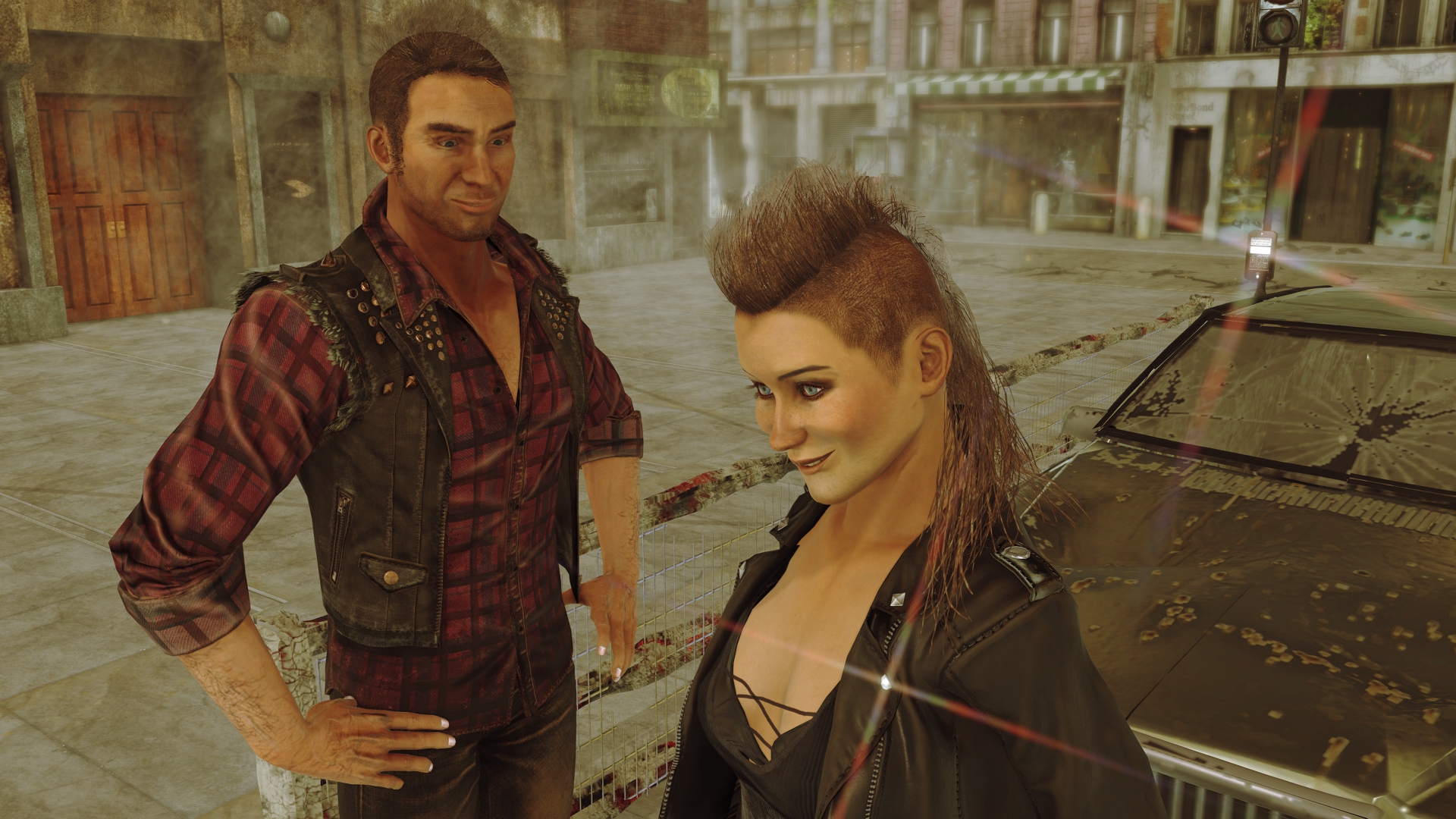 It is worse in preview. I'm also noticing the slow fps reported by others. this is easily fixed in the textures i think alpha threshold is the name (dont have iclone open)
.
|
|
|
|
|
animagic
|
animagic
Posted 7 Years Ago
|
|
Group: Forum Members
Last Active: Last Month
Posts: 15.8K,
Visits: 31.4K
|
Kelleytoons (4/27/2018)
Those are all interesting thoughts, but the bottom line is that I (and I'm guessing every other person) don't have that problem. So it is NOT iClone, nor the hair, nor anything other than something with your system.
In the old days (when computers were simpler) I'd just suggest you start from scratch -- wipe your disk, install your OS again, and all your programs. Honestly, I do this about once a year anyway (mostly because of things I end up buying -- either a new computer, or perhaps a new SSD or whatever). Something is wrong in your system and if it can't be duplicated otherwise your only alternative is to make your system like everyone else's.
But you've sent this to RL, right, the problem project? So perhaps they will have better ideas (and please share whatever they end up telling you).Well, the status is "Assigned", so it is recognized as a problem by RL, and I'm not the only one who has observed it. Sorry, I'm not some whining novice who doesn't know what he is doing.
|
|
|
|
|
animagic
|
animagic
Posted 7 Years Ago
|
|
Group: Forum Members
Last Active: Last Month
Posts: 15.8K,
Visits: 31.4K
|
telecaster (4/27/2018)
this is easily fixed in the textures
i think alpha threshold is the name (dont have iclone open)
I tried that obviously, and it doesn't work, in that the hair looks stringy rather than like hair. It looses some of it's fluffiness. Rampa, I will try your suggestion, thanks, although this is unrelated to DOF. It occurs with particles.
|
|
|
|
|
TonyDPrime
|
TonyDPrime
Posted 7 Years Ago
|
|
Group: Forum Members
Last Active: Last Year
Posts: 3.4K,
Visits: 12.4K
|
Look at this...I set the Nvidia Graphics driver mode to 8 Bit color, looks like Safe-Mode.... And it STILL had the flickering square artifacts...Could that be a clue to something?... 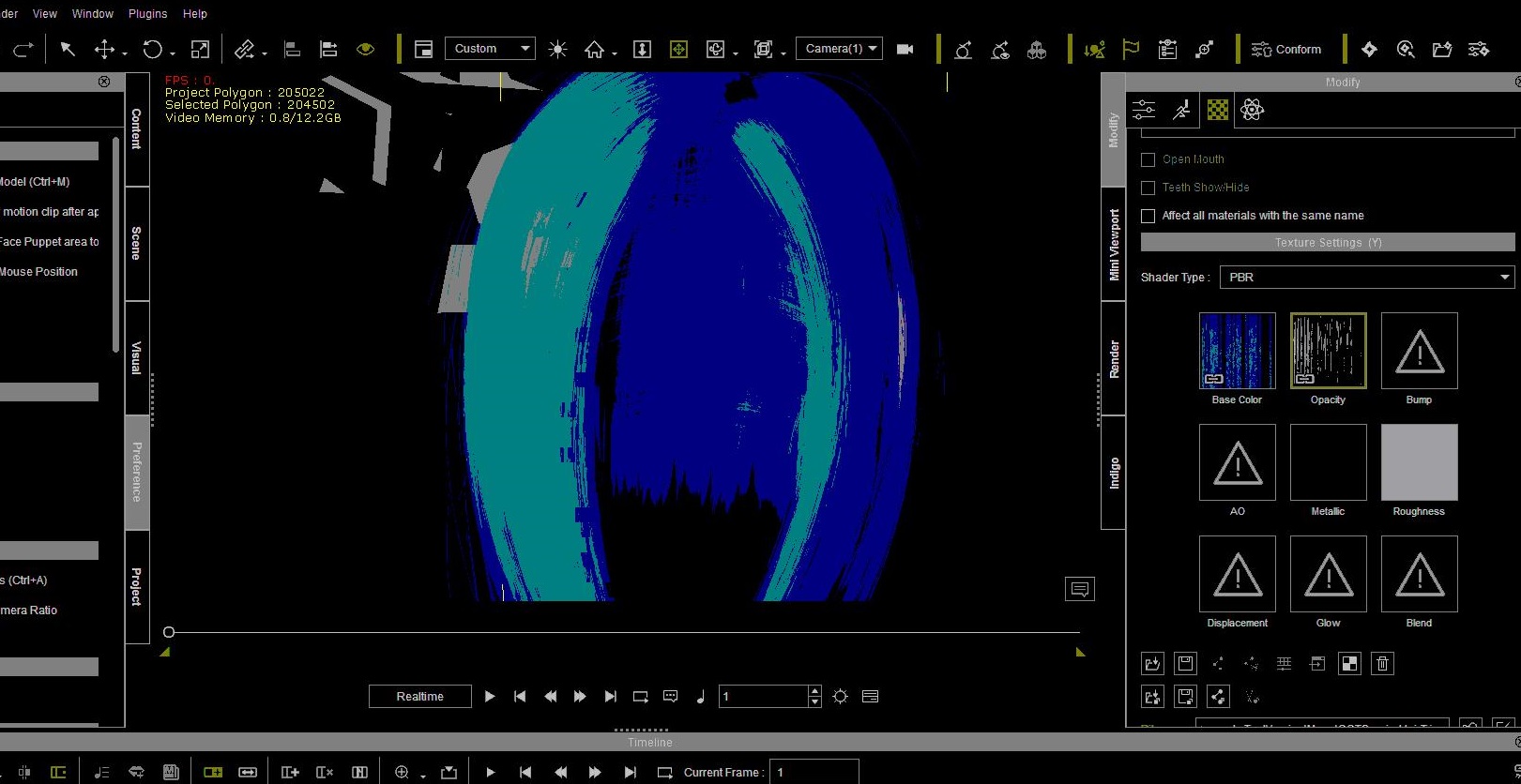
|
|
|
|
|
Kelleytoons
|
Kelleytoons
Posted 7 Years Ago
|
|
Group: Forum Members
Last Active: Last Year
Posts: 9.2K,
Visits: 22.1K
|
animagic (4/27/2018)
Kelleytoons (4/27/2018)
Those are all interesting thoughts, but the bottom line is that I (and I'm guessing every other person) don't have that problem. So it is NOT iClone, nor the hair, nor anything other than something with your system.
In the old days (when computers were simpler) I'd just suggest you start from scratch -- wipe your disk, install your OS again, and all your programs. Honestly, I do this about once a year anyway (mostly because of things I end up buying -- either a new computer, or perhaps a new SSD or whatever). Something is wrong in your system and if it can't be duplicated otherwise your only alternative is to make your system like everyone else's.
But you've sent this to RL, right, the problem project? So perhaps they will have better ideas (and please share whatever they end up telling you).Well, the status is "Assigned", so it is recognized as a problem by RL, and I'm not the only one who has observed it. Sorry, I'm not some whining novice who doesn't know what he is doing. I was talking about your problem, Ani, unless you are the one with the square pixelation showing (and if you have it as well, I apologize). So you're saying RL knows about this square weird thing that Tony and you have? Why doesn't anyone else have this issue (or, to put it another way -- why doesn't Tony's project have the same problem on my machine?) And if you have a project that also shows that square thing, could you post it here? I'd love to see if it shows that way on my machine.
Alienware Aurora R16, Win 11, i9-149000KF, 3.20GHz CPU, 64GB RAM, RTX 4090 (24GB), Samsung 870 Pro 8TB, Gen3 MVNe M-2 SSD, 4TBx2, 39" Alienware Widescreen Monitor
Mike "ex-genius" Kelley
|
|
|
|
|
TonyDPrime
|
TonyDPrime
Posted 7 Years Ago
|
|
Group: Forum Members
Last Active: Last Year
Posts: 3.4K,
Visits: 12.4K
|
I updated my FBT ticket with my additional findings.
I wonder if Ani's scene, or a scene like it, would give me an issue, but not you, KT.
|
|
|
|
|
animagic
|
animagic
Posted 7 Years Ago
|
|
Group: Forum Members
Last Active: Last Month
Posts: 15.8K,
Visits: 31.4K
|
Sorry, Kelley, that was a misunderstanding on my part. I don't have Tony's square pixelation issue, although I have come across other square pixelation artifacts (more like a flashing coarse grid superimposed on the scene) that are incidental and cannot be repeated. I hope RL takes a look at Tony's problem and project. I'm just getting back into iClone, so I'm a bit behind. If anybody is interested in verifying MY problem, here is a link to a zipped project that shows it: http://www.virtualrealist.com/uploads/hair_and_smoke_and_dof.zip.
|
|
|
|
|
4u2ges
|
4u2ges
Posted 7 Years Ago
|
|
Group: Forum Members
Last Active: Last Month
Posts: 5.3K,
Visits: 16.8K
|
TonyDPrime (4/27/2018)
KT, look at this...If you don't ever get any pixelation artifacting like this, I am fascinated.
What could it be, we tried the same driver....it must be Win 10 vs Win 7 then?
Specifically a Direct X difference perhaps...
You bet. There is an old thread, where me and Mark discussing opacity artifacts and finally we came to the conclusion it is an iClone/DirectX 11 vs iClone/DirectX 12. We both had the problem with Mark's project (given both own Win7 OS), while other user Zeronimo with win10 had no problem with the project at all. https://forum.reallusion.com/339948/Opacity-Artifacts?PageIndex=1@animagic This is bizarre. Even with DOF off, it is still a problem. Replacing iClone smoke with PopcornFX makes no difference. :Whistling:
|
|
|
|
|
Rampa
|
|
|
Group: Forum Members
Last Active: Last Week
Posts: 8.2K,
Visits: 62.6K
|
@Animagic
It's a depth-sorting issue. It has trouble figuring the proper transparency when transparencies are layered. Hair with opacity in front of fog with opacity.
There is sort of a fix, and that is to make the hair opacity not completely transparent. There are a couple ways to do that. You can reduce the strength of the opacity channel. This has the advantage of being something you can animate. The other way is to lighten the opacity texture with the texture adjust panel This cannot be animated though.
Sadly, it will then look weird wherever it overlaps something 100 opaque. :(
|
|
|
|