|
Eric C (RL)
|
Eric C (RL)
Posted 5 Years Ago
|
|
Group: Administrators
Last Active: 2 Months Ago
Posts: 552,
Visits: 6.0K
|
Dear iCloners,
Thank you for your continuous support, and we simply could not have gone this far without your enthusiastic participation.
In 2019, we developed our Python-scripted plugins, and introduced our Unreal Live Link plugin to you.
We hope this has helped many of you in your plans, ideas and 3D projects!
We have read through your numerous forum posts and the feedback tracker, and now it's time to look forward and see what we will bring in 2020.
This post is for sharing iClone's roadmap with all the relevant technical breakthroughs we have achieved!
*Some new features may require the purchase of additional content and plugins. For sales related inquiries, please wait for further notices from Reallusion.
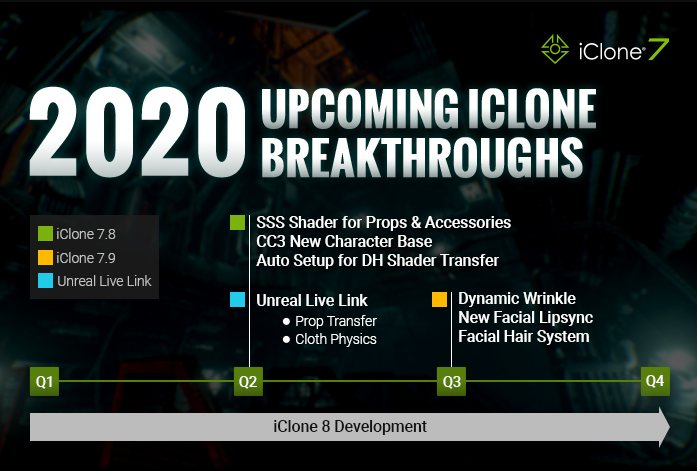
SSS Shader for Accessories & Props (CC 3.3 / iClone 7.8)Besides the update for CC characters, props, accessories, now non-standard characters will be able to have SSS shader in CC 3.3 and iClone 7.8. With the SSS shader, users are able to create translucent material effects, and a built-in SSS material library in the coming update. 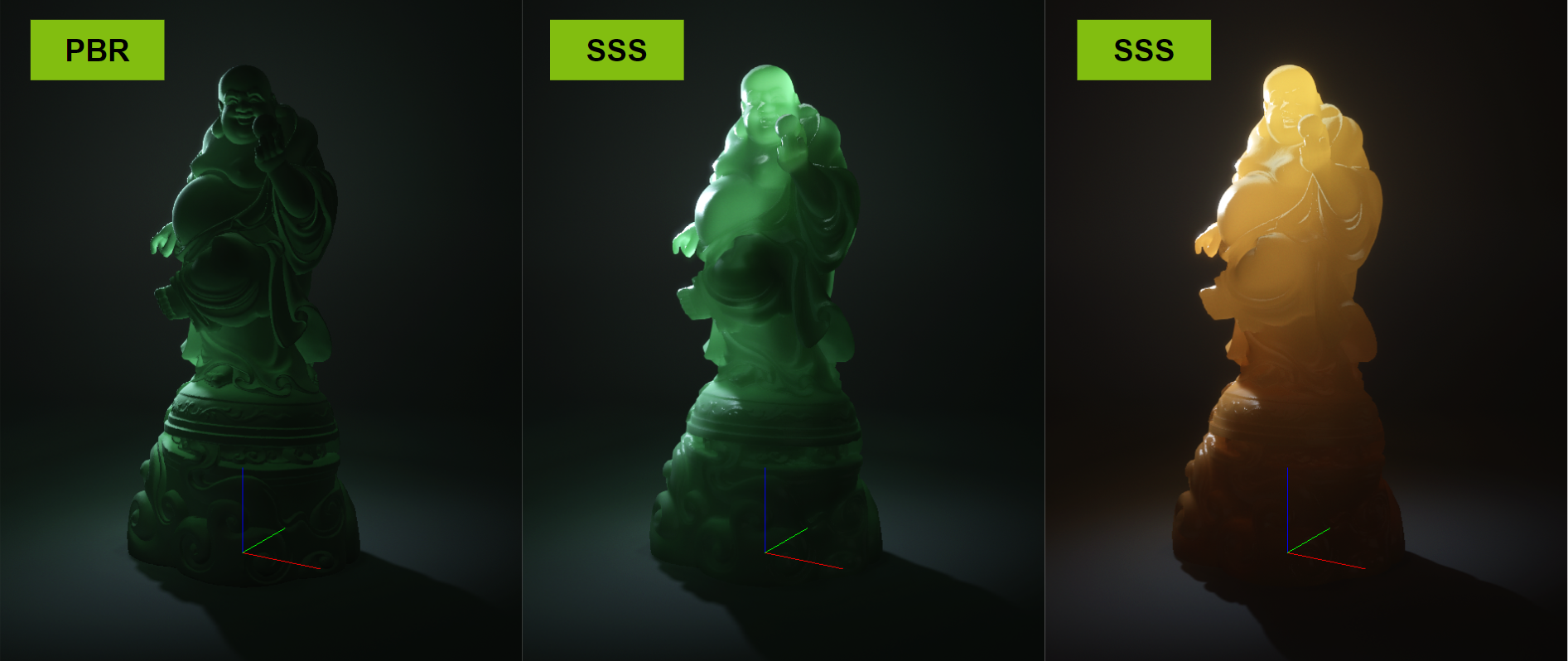 See this quick demo on applying SSS shader to a prop. See this quick demo on applying SSS shader to a prop.
CC Digital Human Features (CC 3.4 / iClone 7.9)
Please note that iClone users are entitled to a free Character Creator 3 (for iClone version), and all major character updates will be supported by iClone as well. CC3 + Character Base: support animated tear line and occlusion mesh in eye animation Facial Hair System: mustache and beard can move along with facial expression and lipsync animation Wrinkle System: facial morphs can drive diffuse and normal texture blend, users can define custom wrinkle patterns for different characters.
Visit CC page (here) for detailed introduction. Enhanced Facial Lip-sync (iClone 7.9)- A highly accurate viseme generation based on voice detection will be added (supports English, French, German in the first release)
- Facial animation can be driven by audio strength for different animation styles
- Enhanced smooth lip algorithm for co-articulation.
Pipeline for 3rd Party Tools
We will keep enhancing the pipeline between mainstream 3D tools with iClone:
#Unreal Engine
Updates along with CC 3.3 and iClone 7.8:
iClone Unreal Live Link Plugin 1.2- Direct transfer iClone props and link animation
- Direct transfer of iClone non-human skin-bone characters and link animation
- Direct transfer cloth physics attributes
- Direct transfer iClone characters' collision shape to Unreal (it might take some minor adjustments to get ideal results)
iClone 8 - What’s in the Lab Now !
This is for YOU! Our amazing iClone community have been so supportive with their forum suggestions and Feedback Tracker reporting, this has enabled us to include many new powerful visual features into the development of iClone 8.
Hot from the Reallusion Lab -- here we share some videos that we know will bring a smile to some your faces ! :)
Visual Enhancements - Mirror - the number one voted feature from the Feedback Tracker. This mirror object works as a plane which can be placed anywhere.
- Lens Flare - supports multiple lens flare patterns and custom features.
- Volumetric Light - yes, the God rays are here! This works beautifully with particle effects.
- Motion Blur - to bring more film effects to animated objects and cameras
- See the difference after using the combined effects
*Helicopter and vehicle props courtesy of Adolf Antareus. Visit their page and see more details: (helicopter) (pickup)
- Enhanced TAA for Animated Render
Comparing to iClone7, TAA designed for static frame render, the newly enhanced TAA can effectively remove alias flickering in animation, and give a much faster render output.
This is just a beginning, there will be more exciting things to come... Please STAY TUNED and thanks for your patience and support.
The Reallusion Team
|
|
animagic
|
animagic
Posted 5 Years Ago
|
|
Group: Forum Members
Last Active: Last Month
Posts: 15.8K,
Visits: 31.4K
|
uvz (3/7/2020)
Hi,
Why wait till 2021 when it is already ready ?
There is a difference between a prototype/proof of concept and a production version.
|