|
Author
|
Message
|
|
Snarp Farkle
|
Snarp Farkle
Posted 10 Years Ago
|
|
Group: Forum Members
Last Active: 2 Years Ago
Posts: 770,
Visits: 3.6K
|
Galfridus (8/3/2016)
Snarp Farkle (8/3/2016)
After following all the steps again this is what I get when I CNTRL+P after SHIFT SELECTING the CC_Base_Body because I get nothing when I SHIFT SELECT the Armature. So somewhere before this point I'm not getting something right. :( I can`t see where your Cloth is listed in the scene tree. It seems to be showing the body higlighted. Click on your cloth mesh in the tree (it should then be highlighted) then hold shift and click on the top armature in the tree this will then be highlighted and not the cloth. Then move your cursor over the main window and CTRL P. Geoff. Thanks for trying again to help me Geoff, This is exactly what I have been doing for days now and I get the same results, I get no action whatsoever when I click on the cloth mesh then hold shift and click on the top armature then move my cursor over the main window and CTRL P no matter where in the scene tree my cloth is located. I cannot get the cloth to parent to the armature, I've followed every tutorial and tip on the internet and still cannot get past this point. I'm at an end with this trial and error process, the Blender tuts are spread out between several version numbers and impossible for me to follow jumping between them and the forum's tuts on this subject. If someone nails this process down to a step by step tutorial concentrating on just "DAZ to Blender to CC" and show the completed process I would be eternally grateful. :unsure:
Dell XPS 8900, Intel(R) Core(TM) i7-6700 CPU @ 3.40GHz, 3408 Mhz, 4 Core(s), 8 Logical Processor(s), 16 GB RAM, - 4 GB GeForce GTX 745, NVIDIA compatible.
Acer Aspire V Nitro Laptop, 2.5GHz Intel Core i5-7300HQ processor with 6MB cache, 256GB solid state drive, 16GB Ram, 4 GB NVIDIA GeForce GTX 1050 Ti graphics.
|
|
|
|
|
Galfridus
|
Galfridus
Posted 10 Years Ago
|
|
Group: Forum Members
Last Active: 2 Years Ago
Posts: 727,
Visits: 2.2K
|
Snarp Farkle (8/3/2016)
After following all the steps again this is what I get when I CNTRL+P after SHIFT SELECTING the CC_Base_Body because I get nothing when I SHIFT SELECT the Armature. So somewhere before this point I'm not getting something right. :( I can`t see where your Cloth is listed in the scene tree. It seems to be showing the body higlighted. Click on your cloth mesh in the tree (it should then be highlighted) then hold shift and click on the top armature in the tree this will then be highlighted and not the cloth. Then move your cursor over the main window and CTRL P. Geoff.
|
|
|
|
|
Snarp Farkle
|
Snarp Farkle
Posted 10 Years Ago
|
|
Group: Forum Members
Last Active: 2 Years Ago
Posts: 770,
Visits: 3.6K
|
After following all the steps again this is what I get when I CNTRL+P after SHIFT SELECTING the CC_Base_Body because I get nothing when I SHIFT SELECT the Armature. So somewhere before this point I'm not getting something right. :(
Dell XPS 8900, Intel(R) Core(TM) i7-6700 CPU @ 3.40GHz, 3408 Mhz, 4 Core(s), 8 Logical Processor(s), 16 GB RAM, - 4 GB GeForce GTX 745, NVIDIA compatible.
Acer Aspire V Nitro Laptop, 2.5GHz Intel Core i5-7300HQ processor with 6MB cache, 256GB solid state drive, 16GB Ram, 4 GB NVIDIA GeForce GTX 1050 Ti graphics.
|
|
|
|
|
Galfridus
|
Galfridus
Posted 10 Years Ago
|
|
Group: Forum Members
Last Active: 2 Years Ago
Posts: 727,
Visits: 2.2K
|
Snarp Farkle (8/2/2016)
@Galfridus I tried using your method only difference is I am using DAZ 4.8. I went through all the steps but when I come to the end of "using the data transfer modifier" link you provided and this statement; "Lastly, enter object mode > select your piece of clothing and then shift select your rig > CNTRL+P > with empty groups. And wa-lah!"
This is where I keep getting hung up because no matter what key combination I try I cannot select both the clothing item and the rig to continue on with the tuts. I'm obviously missing some thing or lacking an add on, something. I've tried with a skirt too with the same results, I'm at a loss here, very frustrating. :( I feel your frustration and wish I could offer some instant fix. I`m working on the very edge of my understanding so the best I can offer you is to try and show what I am doing. I`ve just been using a G5 Wizard avatar I bought from the Big Boss content store some time ago to try and move some of the cloth for use with CC. In this example from this afternoon the Cloth mesh is called "Wizard upper". This is what I did and this is what works for me.... 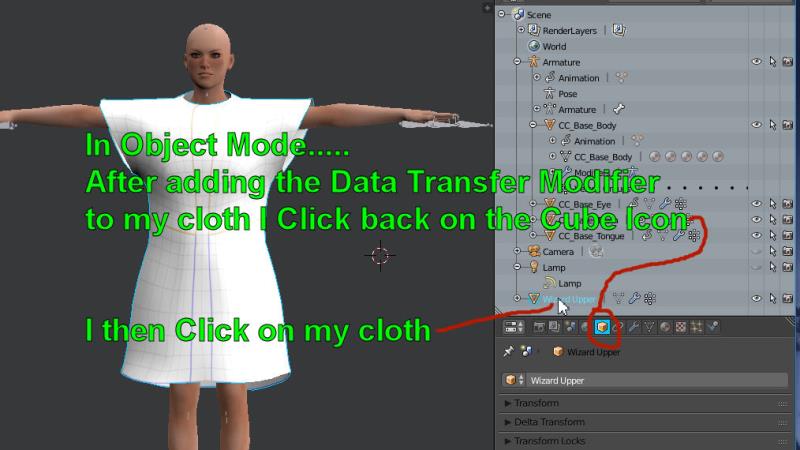 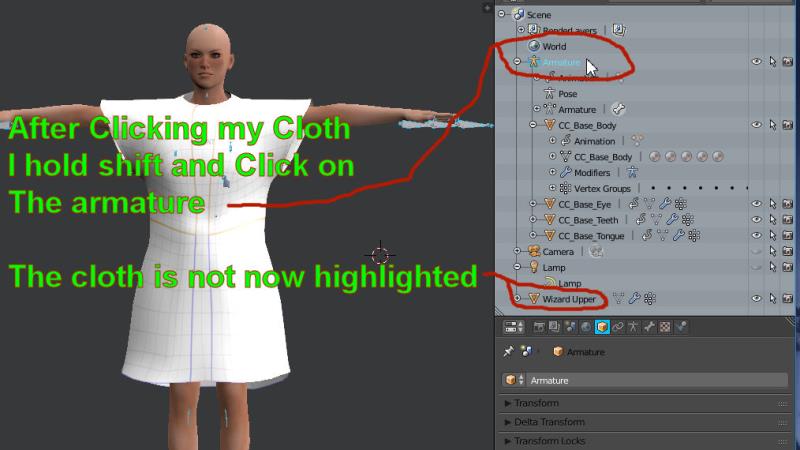 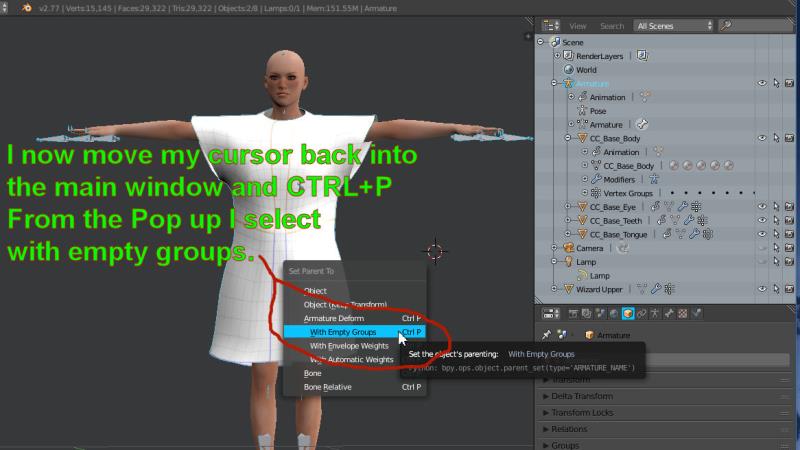 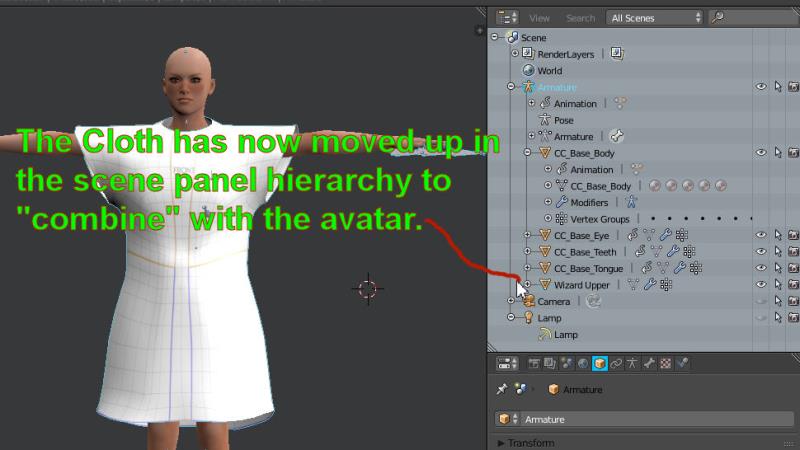 I hope that will help. Geoff.
|
|
|
|
|
Galfridus
|
Galfridus
Posted 10 Years Ago
|
|
Group: Forum Members
Last Active: 2 Years Ago
Posts: 727,
Visits: 2.2K
|
budbundy (8/2/2016)
Galfridus (8/1/2016)
@Snarp Farkle
The following seems to be working for me.....
I`m using Daz 4.9 and dress my Genesis or Genesis 2 before export to .fbx 2012.
Everything comes into 3DX6.5 from that .fbx and the pose gets auto corrected.
I select the required clothing mesh in 3DX6.5 tree and export via the export mesh command. This produces an .obj file and the textures.
very cool tip! do you mind if i include that when i update the 3ds max tut to a audio version? By all means please do Budbundy if you think it will help others. Geoff.
|
|
|
|
|
Skuzzlebutt
|
Skuzzlebutt
Posted 10 Years Ago
|
|
Group: Forum Members
Last Active: 3 Years Ago
Posts: 582,
Visits: 8.6K
|
Galfridus (8/1/2016)
@Snarp Farkle
The following seems to be working for me.....
I`m using Daz 4.9 and dress my Genesis or Genesis 2 before export to .fbx 2012.
Everything comes into 3DX6.5 from that .fbx and the pose gets auto corrected.
I select the required clothing mesh in 3DX6.5 tree and export via the export mesh command. This produces an .obj file and the textures.
very cool tip! do you mind if i include that when i update the 3ds max tut to a audio version?
.
|
|
|
|
|
Snarp Farkle
|
Snarp Farkle
Posted 10 Years Ago
|
|
Group: Forum Members
Last Active: 2 Years Ago
Posts: 770,
Visits: 3.6K
|
@Galfridus I tried using your method only difference is I am using DAZ 4.8. I went through all the steps but when I come to the end of "using the data transfer modifier" link you provided and this statement; "Lastly, enter object mode > select your piece of clothing and then shift select your rig > CNTRL+P > with empty groups. And wa-lah!"
This is where I keep getting hung up because no matter what key combination I try I cannot select both the clothing item and the rig to continue on with the tuts. I'm obviously missing some thing or lacking an add on, something. I've tried with a skirt too with the same results, I'm at a loss here, very frustrating. :(
Dell XPS 8900, Intel(R) Core(TM) i7-6700 CPU @ 3.40GHz, 3408 Mhz, 4 Core(s), 8 Logical Processor(s), 16 GB RAM, - 4 GB GeForce GTX 745, NVIDIA compatible.
Acer Aspire V Nitro Laptop, 2.5GHz Intel Core i5-7300HQ processor with 6MB cache, 256GB solid state drive, 16GB Ram, 4 GB NVIDIA GeForce GTX 1050 Ti graphics.
|
|
|
|
|
Galfridus
|
Galfridus
Posted 10 Years Ago
|
|
Group: Forum Members
Last Active: 2 Years Ago
Posts: 727,
Visits: 2.2K
|
rampa (8/1/2016)
Geoff, sending it to 3DX is very clever. No posing in DAZ needed, or anything! :)Thank you Rampa. I owe you a huge debt of gratitude. It`s your tutorials that made it possible for me to even attempt this sort of thing with blender. Using Daz with 3DX6.5 in the initial stages of the work flow was simply a case of me resorting to familiar routines when so much of the following process was so strange and new. Geoff.
|
|
|
|
|
Rampa
|
Rampa
Posted 10 Years Ago
|
|
Group: Forum Members
Last Active: Last Month
Posts: 8.2K,
Visits: 62.6K
|
Geoff, sending it to 3DX is very clever. No posing in DAZ needed, or anything! :)
|
|
|
|
|
Snarp Farkle
|
Snarp Farkle
Posted 10 Years Ago
|
|
Group: Forum Members
Last Active: 2 Years Ago
Posts: 770,
Visits: 3.6K
|
Thank you Galfridus, I will try your workflow. :)
I picked the robe on purpose knowing it would be harder to do than... say a shirt, my thoughts were if I could do one of the hardest items first the rest would be easy! :crazy: I will move into creating my own assets one day, but for now I just want to learn more by utilizing items I already have, your method looks promising, thanks again for the tip! :)
Dell XPS 8900, Intel(R) Core(TM) i7-6700 CPU @ 3.40GHz, 3408 Mhz, 4 Core(s), 8 Logical Processor(s), 16 GB RAM, - 4 GB GeForce GTX 745, NVIDIA compatible.
Acer Aspire V Nitro Laptop, 2.5GHz Intel Core i5-7300HQ processor with 6MB cache, 256GB solid state drive, 16GB Ram, 4 GB NVIDIA GeForce GTX 1050 Ti graphics.
|
|
|
|