|
HansRL
|
HansRL
Posted 2 Years Ago
|
|
Group: Administrators
Last Active: Last Year
Posts: 29,
Visits: 214
|
Welcome
Reallusion, a pioneer in enhancing the character workflows of 3D software users, is thrilled to announce the release of the free Character Creator Auto Setup for Autodesk 3ds Max. This groundbreaking tool automates the setup of shaders and rigs for CC Characters, offering lookdev essentials like lighting and PBR swapping to significantly streamlining the character creation process. Finally, realistic Arnold or V-Ray renders of CC or ActorCore characters is now possible without manual material graph setups.
Seamless character and animation import into 3ds max
3ds Max has been a cornerstone in the industry for 30 years, widely adopted by professionals for 3D modeling, animation production, archviz, concept art, and game development. Its powerful scripting capabilities make it essential for studios maintaining long-standing production workflows.
Character Creator, iClone, and ActorCore offer high-quality characters, animations, and assets for film studios and game developers. Traditionally, importing these characters into 3ds Max required complex setups, including creating and assigning material graphs for each part of the character. The Reallusion Auto Setup tool reduces workloads by automating the Digital Human shader and PBR material assignments for characters, outfits, props, and scenes in 3ds Max.
Lifelike Digital Human Shader
Auto Setup automatically converts the CC Digital Human Shader into Arnold and V-Ray material graphs for realistic ray-traced rendering. Easily tweak texture details for skin, eyes, hair, teeth, and tongue using the Auto Setup options panel.
- Skin: Adjustable subsurface scattering, roughness, specularity, and micro-normal properties for achieving lifelike results.
- Hair & Beard: Enables natural color variations between hair strands and gradual chroma changes from root to tip.
- Eyes: Fully adjustable iris, sclera, limbus, and pupil components. Anatomical accuracy is represented with realistic roughness, depth, and refraction effects.
- Teeth: The Teeth Shader can adjust SSS, color, and brightness to reflect different natural constitutions, ages, or health conditions.
- Wrinkle: Enhances the appearance of CC3+ characters with high-resolution, multi-texture blending.

PBR Materials for Crowd, Prop, and SceneFor ActorCore crowd actors and models like cloth, accessories, props, or scene elements with PBR materials applied in CC and iClone, Auto Setup can automatically build the material graph, and provides matching PBR values, such as roughness and metallic that helps to ensure visual consistency.
Crowd: Utilizing a specialized color adjustment panel, effortlessly expand material variations of ActorCore crowd characters, featuring distinct color regions for skin, hair, and attire.


Crowd Simulation: Generate realistic masses with detailed facial expressions, accessories, and diverse animation styles using iClone. Seamlessly batch transfer these assets to 3ds Max in the same placement for final rendering.

Effortless animation with control rigs
The Auto Setup tool allows designers to easily add facial and body control rigs for custom animation of imported CC characters.
Face Rig
- Comprehensive facial control rigs for both CC3+ and ActorCore characters.
- More than 140 extended facial morphs for CC3+ characters.
- More than 60 standard facial morphs for 3D extras and crowd sim.
Body Rig
- Works with official Reallusion characters, including CC3+, ActorCore, and AccuRIG.
- All characters support 3ds Max Biped and CAT rigging.
- Easy body part selection via proxy objects, including dummy IK controllers for IK toggling.

Lightning-fast turnarounds with integrated look dev
The Auto Setup Look Dev mode supports different lighting presets, HDR templates and Macbeth Color Checker.
Light Presets
Includes five setups for close-up views and five for full shots, each adjustable to achieve the desired visual outcome, whether for high-quality main characters or low-poly crowd and extras. 
HDR & Macbeth Chart
Allowing for HDR background rotation to adjust lighting direction, and integration of custom EXR images. Also features a Macbeth Color Checker with Grey & Chrome balls for accurate color calibration and lighting analysis.

Auto Setup empowers the creation of realistic Arnold and V-Ray renders for high-definition characters from Character Creator, iClone, and ActorCore, and breaks down the rendering process into separate passes. Crowd Break down the rendering process into separate passes for diffuse color, specular highlights, shadows, and reflections. This allows fine-tuning specific visual elements and easy tweaking of the final image without re-rendering the entire scene.

CharacterEnabling flexible and different post-processing effects applications. Facilitating clearer organization of rendering tasks, enhancing overall rendering efficiency and quality in complex graphics applications.

Free download and upcoming beta version for Maya
The Auto Setup for 3ds Max is available for free download upon registration on the Reallusion website. Recognizing Maya's pivotal role in film and game production, Reallusion is also developing a beta version of the Auto Setup tailored for Maya. Interested users can gain early access by signing up through an online form. For more information, including download instructions, visit the website.
Related resources
|
|
AutoDidact
|
AutoDidact
Posted 2 Years Ago
|
|
Group: Forum Members
Last Active: 3 Months Ago
Posts: 2.1K,
Visits: 13.6K
|
I am not a Max user myself but this Autosetup for 3DS Max looks as complete as the one we have for Blender . Nice job Reallusion!!
|
|
Group: Forum Members
Last Active: Last Year
Posts: 2,
Visits: 51
|
Hello. I have installed CC_Auto_Setup for max 2024 but when starting up the script gives me an error. It says that the error is on line 2 of the script "start = (max_roaming.count-28+1)". can anybody help me? 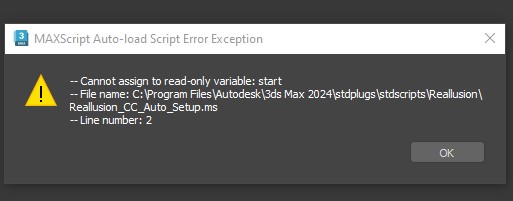 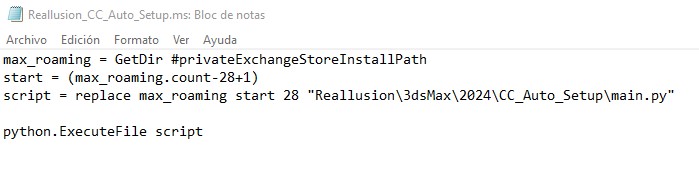
|
|
luke (RL)
|
luke (RL)
Posted 2 Years Ago
|
|
Group: Power Developer
Last Active: Last Year
Posts: 289,
Visits: 5.6K
|
Hi, albertoluque Can you try to modify the ms scritpt like this: ''' max_roaming = GetDir #privateExchangeStoreInstallPath temp_start = (max_roaming.count-28+1) script = replace max_roaming temp_start 28 "Reallusion\3dsMax\2024\CC_Auto_Setup\main.py" python.ExecuteFile script
'''
|
|
Group: Forum Members
Last Active: Last Year
Posts: 2,
Visits: 51
|
Hi Luke, thank you very much for your help. I have done what you suggested and the script error when starting MAX has disappeared, but the "reallusion" menu did not appear. It occurred to me to drag the script to the MAX window and the menu appeared and works.
Muchas gracias.
|
|
Group: Forum Members
Last Active: Last Year
Posts: 7,
Visits: 173
|
Very excited about this plugin! Is there a plan to support Corona render or do we need to find a workflow to convert Arnold/Vray to Corona format?
Again, Thank you for this.
|
|
Group: Forum Members
Last Active: Last Year
Posts: 140,
Visits: 3.2K
|
hey,
is there any news for Maya too?
|
|
animagic
|
animagic
Posted 2 Years Ago
|
|
Group: Forum Members
Last Active: Today @ 3:06 AM
Posts: 15.8K,
Visits: 31.4K
|
davood.kharmanzar (7/29/2024)
hey,
is there any news for Maya too?It says the following in Luke(RL)'s post above: "Recognizing Maya's pivotal role in film and game production, Reallusion is also developing a beta version of the Auto Setup tailored for Maya. Interested users can gain early access by signing up through an online form." So, they are working on it.
|
|
Group: Forum Members
Last Active: 2 Years Ago
Posts: 5,
Visits: 35
|
Doesn't work for me. I get some errors. .  
|
|
luke (RL)
|
luke (RL)
Posted 2 Years Ago
|
|
Group: Power Developer
Last Active: Last Year
Posts: 289,
Visits: 5.6K
|
Hi, jmi3 It seems that the file cannot be found. Could you please check if the file Reallusion_CC_Auto_Setup.ms exists in c:\program files\autodesk\3ds max 2025\stdplugs\stdscripts\Reallusion\?
If not, please close 3ds Max and run install.bat again.jmi3 (7/30/2024)
Doesn't work for me. I get some errors. .
|