|
Author
|
Message
|
|
armondtanz
|
armondtanz
Posted 5 Years Ago
|
|
Group: Forum Members
Last Active: 2 Years Ago
Posts: 201,
Visits: 357
|
Maybe hire Andrew Krammer. Ha
If not maybe load up his software and see what things you can be influenced by.
1-Gotta be the render engine. Hope that gets a polishing up.
2-Morphing? Twisting, duplicate, bending... Bit like in C4D
3-Ability to fracture objects... this would be cool...
4-Tracking??? dont think this is going to happen, but imagine tracking, send it to (unreal) or import it in from Ae etc?
5-Bake animations for export to Unreal?
6-Scatter tool, like in omneverse where objects scatter and follow physics
7-Paint with objects-load a series of objects and you can paint with them (like scatter)
|
|
|
|
|
justaviking
|
justaviking
Posted 5 Years Ago
|
|
Group: Forum Members
Last Active: 2 Years Ago
Posts: 8.2K,
Visits: 26.5K
|
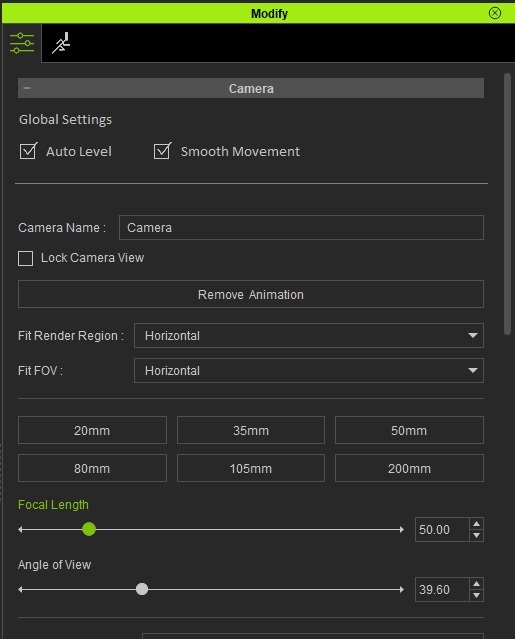
I made an update to the Camera Auto Level suggestion on Feedback Tracker which I shared earlier in this thread.
Issue #8052: Camera "Auto Level" option should be on the camera Modify panel
Auto Level and Smooth Movement (found under "Edit --> Camera") both affect ALL cameras, like a Project Preference would. I'm suggesting putting BOTH options on the camera Modify panel, and indicating they affect all cameras.
iClone 7... Character Creator... Substance Designer/Painter... Blender... Audacity...
Desktop (homebuilt) - Windows 10, Ryzen 9 3900x CPU, GTX 1080 GPU (8GB), 32GB RAM, Asus X570 Pro motherboard, 2TB SSD, terabytes of disk space, dual monitors.
Laptop - Windows 10, MSI GS63VR STEALTH-252, 16GB RAM, GTX 1060 (6GB), 256GB SSD and 1TB HDD
|
|
|
|
|
4u2ges
|
4u2ges
Posted 5 Years Ago
|
|
Group: Forum Members
Last Active: Last Month
Posts: 5.3K,
Visits: 16.8K
|
I was a bit sleepy yesterday :) Now I remember why I gave up on tweaking position/rotation after the fact. It's kind of backward. I want to finish with all transforms *before* attaching/linking. There were some problem with scaling after the export. It should be all zeroed out prior... So yes, it's best to have this in Ctrl+L. Otherwise it's back and force
|
|
|
|
|
4u2ges
|
4u2ges
Posted 5 Years Ago
|
|
Group: Forum Members
Last Active: Last Month
Posts: 5.3K,
Visits: 16.8K
|
Rampa (8/6/2021)
Click on the elypsis for the link or attach to get a position or position and rotation option. It aligns the axis of the object being linked/attached to the axis of the body-part being linked/attached to.Seen it thousand times... never used it for some reason :w00t::D
|
|
|
|
|
Rampa
|
|
|
Group: Forum Members
Last Active: Last Month
Posts: 8.2K,
Visits: 62.6K
|
Click on the elypsis for the link or attach to get a position or position and rotation option. It aligns the axis of the object being linked/attached to the axis of the body-part being linked/attached to.
|
|
|
|
|
justaviking
|
justaviking
Posted 5 Years Ago
|
|
Group: Forum Members
Last Active: 2 Years Ago
Posts: 8.2K,
Visits: 26.5K
|
4u2ges (8/6/2021)
Can you explain more what you mean? I want to say the "Attach" option work, but I suspect there is more to your statement than what I'm seeing.
I believe Alex meant the ability to align (Ctrl+L) the object with character limbs.
That would be a nice feature to immediately place an object by character's hand, for instance and then just tweak it before attaching/linking.
That makes sense. Thanks.
iClone 7... Character Creator... Substance Designer/Painter... Blender... Audacity...
Desktop (homebuilt) - Windows 10, Ryzen 9 3900x CPU, GTX 1080 GPU (8GB), 32GB RAM, Asus X570 Pro motherboard, 2TB SSD, terabytes of disk space, dual monitors.
Laptop - Windows 10, MSI GS63VR STEALTH-252, 16GB RAM, GTX 1060 (6GB), 256GB SSD and 1TB HDD
|
|
|
|
|
4u2ges
|
4u2ges
Posted 5 Years Ago
|
|
Group: Forum Members
Last Active: Last Month
Posts: 5.3K,
Visits: 16.8K
|
Dennis reminded me about my very first FT ticket. It was about camera to allow Auto Level by any axis - not only Z: https://www.reallusion.com/FeedBackTracker/Issue/Allow-camera-Auto-Level-for-any-given-axisIt was mostly when I built 90 degrees twisted scenes to have water as a mirror. After releasing Auto Level and rolling camera by 90 degrees, it was practically impossible to operate it as it kept snapping. Attaching to a prop was the only solution. We soon going to have a "normal" mirror, yet still Leveling by any axis should be in place. Can you explain more what you mean? I want to say the "Attach" option work, but I suspect there is more to your statement than what I'm seeing.
I believe Alex meant the ability to align (Ctrl+L) the object with character limbs.
That would be a nice feature to immediately place an object by character's hand, for instance and then just tweak it before attaching/linking.
|
|
|
|
|
justaviking
|
justaviking
Posted 5 Years Ago
|
|
Group: Forum Members
Last Active: 2 Years Ago
Posts: 8.2K,
Visits: 26.5K
|
AlexKong (7/29/2021)
1 Give us an option to Turn off ALL autokeying
I agree with this being an OPTION. I firmly believe that with it Off, many people will be equally, or even more frustruated when they spend a lot of time posing a character or positioning a prop, only to discover later they forgot to create a keyframe. To me, a keyframe is so easy to delete, that cost of an unwanted keyframe far outweighs the cost of missed ones. But I am okay as long as it is an option.
AlexKong (7/29/2021)
26 Allow object transformation matching/aligning to character's body parts
Can you explain more what you mean? I want to say the "Attach" option work, but I suspect there is more to your statement than what I'm seeing.
iClone 7... Character Creator... Substance Designer/Painter... Blender... Audacity...
Desktop (homebuilt) - Windows 10, Ryzen 9 3900x CPU, GTX 1080 GPU (8GB), 32GB RAM, Asus X570 Pro motherboard, 2TB SSD, terabytes of disk space, dual monitors.
Laptop - Windows 10, MSI GS63VR STEALTH-252, 16GB RAM, GTX 1060 (6GB), 256GB SSD and 1TB HDD
|
|
|
|
|
justaviking
|
justaviking
Posted 5 Years Ago
|
|
Group: Forum Members
Last Active: 2 Years Ago
Posts: 8.2K,
Visits: 26.5K
|
mtakerkart (8/6/2021)
justaviking
a) Select your camera.
b) Edit --> Camera --> Auto Level (uncheck it)
OMG!!!! Can't believe it..... :w00t:
As long as we're on the topic, I created a Feedback Tracker suggestion.
Issue #8052: Camera "Auto Level" option should be on the camera Modify panel 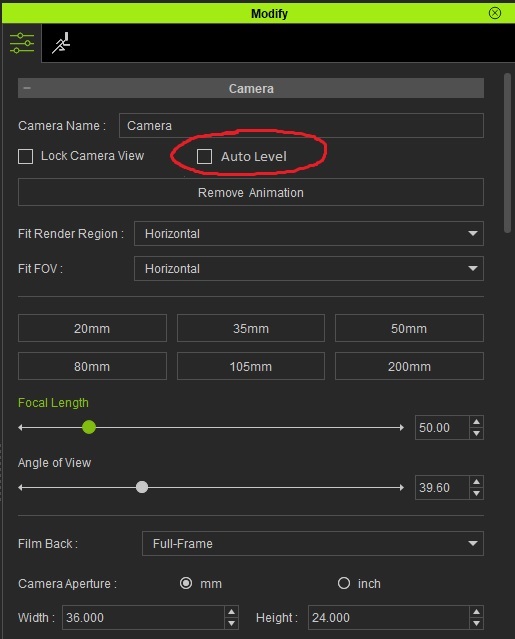
iClone 7... Character Creator... Substance Designer/Painter... Blender... Audacity...
Desktop (homebuilt) - Windows 10, Ryzen 9 3900x CPU, GTX 1080 GPU (8GB), 32GB RAM, Asus X570 Pro motherboard, 2TB SSD, terabytes of disk space, dual monitors.
Laptop - Windows 10, MSI GS63VR STEALTH-252, 16GB RAM, GTX 1060 (6GB), 256GB SSD and 1TB HDD
|
|
|
|
|
mtakerkart
|
mtakerkart
Posted 5 Years Ago
|
|
Group: Forum Members
Last Active: Last Month
Posts: 3.2K,
Visits: 29.2K
|
a) Select your camera.
b) Edit --> Camera --> Auto Level (uncheck it)
OMG!!!! Can't believe it..... :w00t:
|
|
|
|