|
Miranda (RL)
|
Miranda (RL)
Posted 6 Years Ago
|
|
Group: Administrators
Last Active: 3 Years Ago
Posts: 1.8K,
Visits: 11.2K
|
Dear Character Creator users,
The Character Creator 3.04 update has now been released.
Since both Character Creator 3, and the Character Creator 3 Pipeline Extension are updated, please find the Update tab in Reallusion Hub, and download two program updates accordingly.
The CC 3.04 update includes several new features, enhancements and bug fixes. For example, we enhanced the performance of loading morph sliders and fixed the long delay issue during application startup which will make launching CC3 much quicker. Feature-wise, M3/V3 characters added for Transformer, character pose can be kept for GoZ & OBJ export, new content category "hand gesture" is added, and 71 hand gestures are now embedded for free, etc. Also, several updates are added for the Unity/Unreal pipeline to fine tune the automatic process. The Auto-Setup Script / Plug-ins will be released along with this update. See the full release notes below. General Feature- Enhanced: Better performance when loading morph sliders during application startup. (FT #5544)
*Morph slider module optimization removes redundant read requests on every application start up. Morph slider cache is built on the initial launch of CC 3.04, thereafter you will experience a big improvement in startup time when the morph sliders remain unchanged.
- Fixed: Projects set as default failing on application startup due to not having installed the Resource Pack. (FT #5589)
- Fixed: Missing sliders for Virtual Human Heads Vol. 1 and no warning message as a result. (FT #5517)
- Fixed: Application crash from clothing without skin weights.
- Added: The About dialog will now show the serial numbers for both Character Creator and CC Pipeline Extension.
Character Base- Enhanced: Base characters now come with default collision shapes. Existing CC3 characters without collision shapes will be assigned a set when brought into CC3.04. You may fine-tune the collision shapes in iClone to optimize soft-cloth physics behavior. (FT #5392)
- Enhanced: Base characters now come with default chest spring data and the ability to apply spring hair assets. Existing CC3 characters without spring data will be assigned a new set when brought into CC3.04. Spring hair and chest spring effects now function normally in iClone 7. (FT #4317)
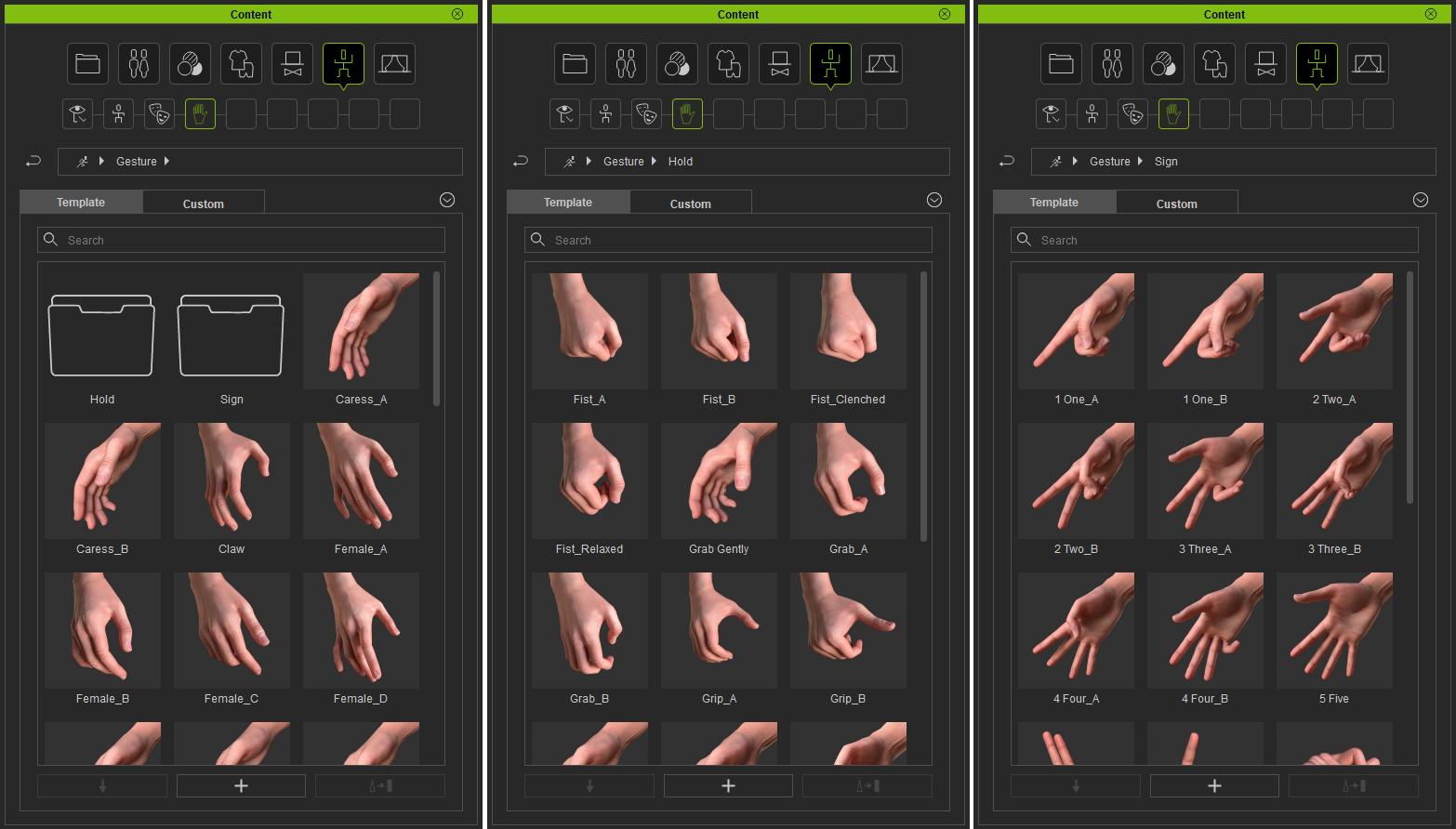
Embedded Content - Added: new hand gesture library, including 32 hand-released gestures, 18 hand-hold gestures, 21 hand gestures with special sign
Preference- Added: New preference option to show enlarged content/texture preview on mouse-over. The enlarge content/texture preview on mouse-over is by default ON. >> Know More
Content Manager- Added: New "Gesture" content category for hand gesture library.
- Fixed: Mouth closes after applying a set of teeth with Open Mouth mode enabled.
- Fixed: Hair assets renamed as "Hair" when applied despite being saved under a different name. (FT #5492)
Modify Panel (Material Editing & Normals Editing)- Added: New context menu for Modify > Material (Tab) > Texture with the ability to copy and paste textures along with original functionalities: File, All Material Texture File, and Link Setting. >> Know More
- Added: Drag and drop is now allowed among material channels: Modify > Material (Tab) > Texture Settings. >> Know More
- Added: Hide mesh now supports the brush tool. >> Know More
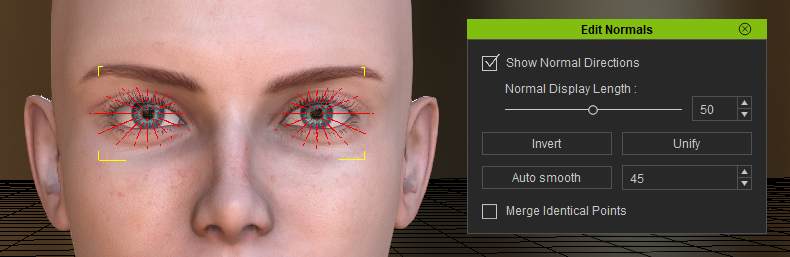
- Added: Normals editing for Eyes/Teeth content type.
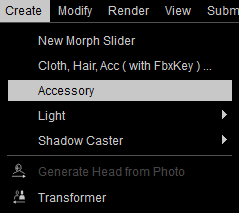
Content Creation- Added: New accessory creation workflow now available: Import any asset into CC as accessory without a FbxKey.
Main Menu > Create > Accessory:
- Fixed: CC3 crashing on exit after creating morph. (FT #5248, FT #5467)
Fixed: OBJ assets imported into CC and used with the Appearance Editor becomes unsmoothed. (FT #5423) -- updated: it's false alarm- Fixed: CC characters edited in 3ds Max has a chance of failing when imported back into CC. (FT #5466)
GoZ- Added: Poses are now supported with GoZ. CC Character becomes the best character prototype for sculpting in ZBrush. >> Know More
- Fixed: Meshes experience offset when brought back to CC with ZBrush GoZ. (FT #5190, FT #5235)
Transformer- Added: Transformer can now support Michael 3 and Victoria 3 character bases exported from Daz Studio and Poser.
*Known issue: Eyebrows on Michael 3 and Victoria 3, brought in by CC Transformer, will become accessories that do not move in sync with the facial morphs.
*Reason: Victoria 3 and Michael 3 eyebrows are made of mesh geometries inside Daz Studio & Poser. When they go missing, the user can simply add them back to the figure before exporting the character. However, these eyebrow meshes are assigned as accessories when brought into CC with the Transformer tool.
- Added: Ability to import a specific article of clothing and set the default skin weight template with the Transformer tool.
- Added: Ability to import the morphable accessory.
- Enhanced: Advanced mode is removed for Poser characters imported via Transformer as it is inapplicable.
Export- Added: OBJs can now be exported as posed. >> Know More
- Added: Textures will now saved into a single folder along with the exported OBJ file.
Game Pipeline (Unity / Unreal)*Some of the following feature updates will be effective with new Auto-Setup Script / Plugin Beta 2.0.
Download links will be posted on the thread Unity / Unreal in the week of March 4th.General for Unity & Unreal- Added: Sequential number suffixes will now append to identical material names within an exported FBX file. >> Know More
- Changed: Embed texture option is disabled for Unity/Unreal FBX export preset.
- Changed: Added "_Pbr" and "_Tra" keyword to material names in order for the Unity/Unreal script to correctly allocate the maps for the texture channels. These keywords are automatically added according to the type of material used in Character Creator 3.
*New script / plugin is required.
- Enhanced: T-pose/A-pose will be applied to characters exported for Unity 3D/Unreal for convenient animation retargeting.
Unity- Added: Four new full-body HDRP maps for the detail mask texture-embedded in the blue channel.
*New script is required.
- Enhanced: Game Base and Neutral base mesh names will be identical for FBX export to Unity. This is so that expressions and animations can be applied simultaneously to both bases.
Unreal - Added: New ORM texture option for the Unreal pipeline FBX export. ORM textures are split by Unreal Auto-Setup Plugin into separate channel assignments for AO, Roughness, and Metallic.
*New plugin is required.
- Changed: Hair material name will be suffixed with "_Transparency" when exported in FBX for Unreal pipeline.
*New plugin is required.
- Fixed: Auto-assignment script is not compatible with Unity HDRP 4.8.0 and above.
*Solution: use the script in conjunction with HDRP Beta 1.3 (FT #5691, Forum report)
|