|
Author
|
Message
|
|
Jfrog
|
|
|
Group: Forum Members
Last Active: 2 Years Ago
Posts: 702,
Visits: 4.7K
|
I am glad you get the 90 fps. Ps. Enabling Optimization was key to getting 90FPS. Without it I was only averaging 70FPS.
At 1280 x 720, I get around 75 to 77 fps, so I always enable optimization to get 90 fps at 640 x 360, this not a problem since Faceware does not care about the resolution.
Ryzen R9 5950x, RTX 3090, 128Gb Ram ,2 x 2 TB Samsung 980 Pro M.2 SSD
Horror Stories in VR
Immersive Sound VR
Immersive Sound VR on Oculus TV
|
|
|
|
|
jairo.assis
|
jairo.assis
Posted 9 Years Ago
|
|
Group: Forum Members
Last Active: 8 Years Ago
Posts: 7,
Visits: 42
|
So, the problem seems to be my USB drivers. Out of desperation I reinstalled all of my drivers and plugged the camera into my USB-C port. That gave me 90FPS. YAY!.... 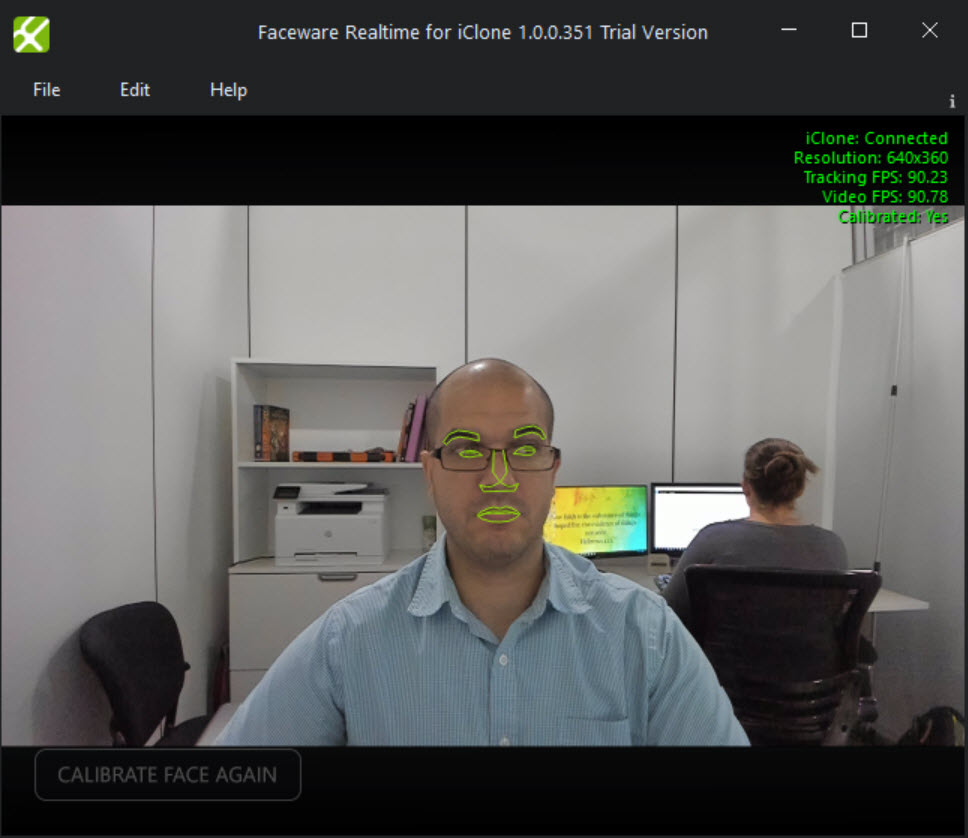 Ps. Enabling Optimization was key to getting 90FPS. Without it I was only averaging 70FPS. Thanks for all of the help guys! :D
|
|
|
|
|
jairo.assis
|
jairo.assis
Posted 9 Years Ago
|
|
Group: Forum Members
Last Active: 8 Years Ago
Posts: 7,
Visits: 42
|
Ok, so I tried turning the Low Light Compensation off, turning the HDR off, and changing my USB port and still no dice. The max I am getting is around 45FPS.
|
|
|
|
|
Jfrog
|
|
|
Group: Forum Members
Last Active: 2 Years Ago
Posts: 702,
Visits: 4.7K
|
Another thing to try is updating your usb controller drivers if possible, and try connecting the camera to a different usb port,preferably one that isn't shared with anything else, if using a desktop, try connecting it to one of the ports in the back, just to rule out possible hardware related issues or driver issuesYes this is really important. If I would be troubleshooting the fps issue, I would certainly start by unplugging all USB 3 port devices that are not necessary for the test. I would try to get the fps I need first (with all the tips shared here by Kellytoons and others), than I would plug each usb composant one at a time to see if one of them, is eating the USB bandwidth.
Ryzen R9 5950x, RTX 3090, 128Gb Ram ,2 x 2 TB Samsung 980 Pro M.2 SSD
Horror Stories in VR
Immersive Sound VR
Immersive Sound VR on Oculus TV
|
|
|
|
|
Jfrog
|
|
|
Group: Forum Members
Last Active: 2 Years Ago
Posts: 702,
Visits: 4.7K
|
I'll be curious to see how your nighttime performance goes once you turn off low-light.Yes me too. Tonight isn't the best time to try it, but I will keep you updated. Thank you
Ryzen R9 5950x, RTX 3090, 128Gb Ram ,2 x 2 TB Samsung 980 Pro M.2 SSD
Horror Stories in VR
Immersive Sound VR
Immersive Sound VR on Oculus TV
|
|
|
|
|
Kelleytoons
|
Kelleytoons
Posted 9 Years Ago
|
|
Group: Forum Members
Last Active: 2 Years Ago
Posts: 9.2K,
Visits: 22.1K
|
Jfrog (9/29/2017)
As I said, you will need the Logitech Gaming Software to do this.
I will. Thank you Kellytoons! When you say that you can get 90FPS, are you talking about the camera's FPS or Tracking FPS?
Both! please see attached picture 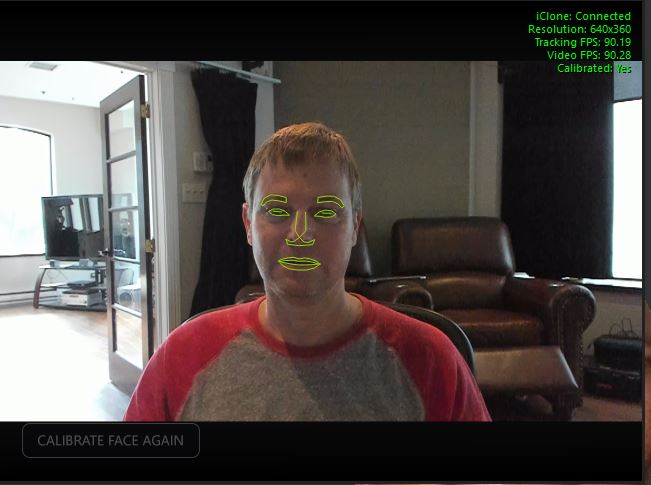 Cool that you're getting that rate with so much light coming from behind you. That's usually a big issue, so the Brio is definitely performing well there. I'll be curious to see how your nighttime performance goes once you turn off low-light.
Alienware Aurora R16, Win 11, i9-149000KF, 3.20GHz CPU, 64GB RAM, RTX 4090 (24GB), Samsung 870 Pro 8TB, Gen3 MVNe M-2 SSD, 4TBx2, 39" Alienware Widescreen Monitor
Mike "ex-genius" Kelley
|
|
|
|
Rockoloco666
|
Rockoloco666
Posted 9 Years Ago
|
|
Group: Banned Members
Last Active: 6 Years Ago
Posts: 762,
Visits: 2.0K
|
Another thing to try is updating your usb controller drivers if possible, and try connecting the camera to a different usb port,preferably one that isn't shared with anything else, if using a desktop, try connecting it to one of the ports in the back, just to rule out possible hardware related issues or driver issues
|
|
|
|
|
Jfrog
|
|
|
Group: Forum Members
Last Active: 2 Years Ago
Posts: 702,
Visits: 4.7K
|
As I said, you will need the Logitech Gaming Software to do this.
I will definitely download the software. Thank you Kellytoons! When you say that you can get 90FPS, are you talking about the camera's FPS or Tracking FPS?
Both! please see attached picture
Ryzen R9 5950x, RTX 3090, 128Gb Ram ,2 x 2 TB Samsung 980 Pro M.2 SSD
Horror Stories in VR
Immersive Sound VR
Immersive Sound VR on Oculus TV
|
|
|
|
|
jairo.assis
|
jairo.assis
Posted 9 Years Ago
|
|
Group: Forum Members
Last Active: 8 Years Ago
Posts: 7,
Visits: 42
|
Yeah, it shouldn't be my computer. It's a fairly beefy computer.
Intel i7-5820k (water cooled 6 core running at 4.3Ghz),
64GB of DDR4 RAM,
512 SSD Drive
nVidia GTX 1080
I will download the gaming app tonight when I get back to town and let you guys know. :)
|
|
|
|
|
Kelleytoons
|
Kelleytoons
Posted 9 Years Ago
|
|
Group: Forum Members
Last Active: 2 Years Ago
Posts: 9.2K,
Visits: 22.1K
|
As I said, you will need the Logitech Gaming Software to do this. Download from Logitech's site and install. It will see your webcam, and you can click and go to "Advanced" settings where you can turn it off. I have to do this each and every time (so it's a PITA) but it works a treat. Pity there's no way to set this as a default, though (a LOT of folks have complained to Logitech about this).
Alienware Aurora R16, Win 11, i9-149000KF, 3.20GHz CPU, 64GB RAM, RTX 4090 (24GB), Samsung 870 Pro 8TB, Gen3 MVNe M-2 SSD, 4TBx2, 39" Alienware Widescreen Monitor
Mike "ex-genius" Kelley
|
|
|
|