|
By Miranda (RL) - 10 Years Ago
|
|
Dear Reallusion Members and Developers,
Welcome to Character Creator 2.0 Open Beta Program. Please post bug reports and issues to the Feedback Tracker.Beta 2 version:  Beta 1 version:  ------------------------------------------------------------------------------------------------------------------------------------------------------------------------- Status of Issues Reported in Beta 1 (Updated on Feb. 18th)[Fixed in the Beta 2 & official version] - load atmosphere will enable sync to sky automatically ( Feedback Tracker #1970; reported by justaviking)
[Under development]
[Internal discussion] - hide mesh information disappeared when export iAvatar using iClone 6.5 version ( Feedback Tracker #1967; reported by rampa) - save material ( Reported by Ather) [New Features]Export FBX compatible with UE4 rig (same structure; no need to rename) [Won't be in the CC 2.0 official version] - Lack of Transparent Shadows through Surfaces with Opacity (either parameter or texture channel) < 100. ( Reported by grabiller) - "save" and "save as" hot key ( Reported by animagic) - keep values of adjust color when save project ( Feedback Tracker #1992; reported by grabiller) - weight map in CC (Reported by eternityblue & vidi) - Selection of vertices and edges to the mesh editor; a good quick way to work with hair under hats ( Reported by eternityblue) - Embed new light effects ( Reported by Ather) - Facial hair follows viseme morphs ( Reported by eternityblue) - Animations part of the calibration tool ( Reported by eternityblue) - Persona (Reported by eternityblue & grabiller) - Open for shader output ( Reported by mtakerkart) - Expose Character Visemes As CC Morph Sliders; having the equivalent of the 'Calibrate' feature but for voice ( Reported by grabiller) - Hierarchical Morph Groups ( Reported by grabiller) - Real bone editing tools, re-adjust morph in CC ( Reported by Mythcons) - Export V-pose in frame -1 and T-pose in frame 1 (Reported by grabiller & brainsguy)------------------------------------------------------------------------------------------------------------------------------------------------------------------------- General Known Issues (Beta 1)- File data loss may occur when saving iClone 6.5 or CC 1.5 compatible iAvatars. Click HERE to know more.
|
|
By Tesira - 10 Years Ago
|
hi Miranda,
until now I don't get CharacterCreator2 at the FeedbackTracker.
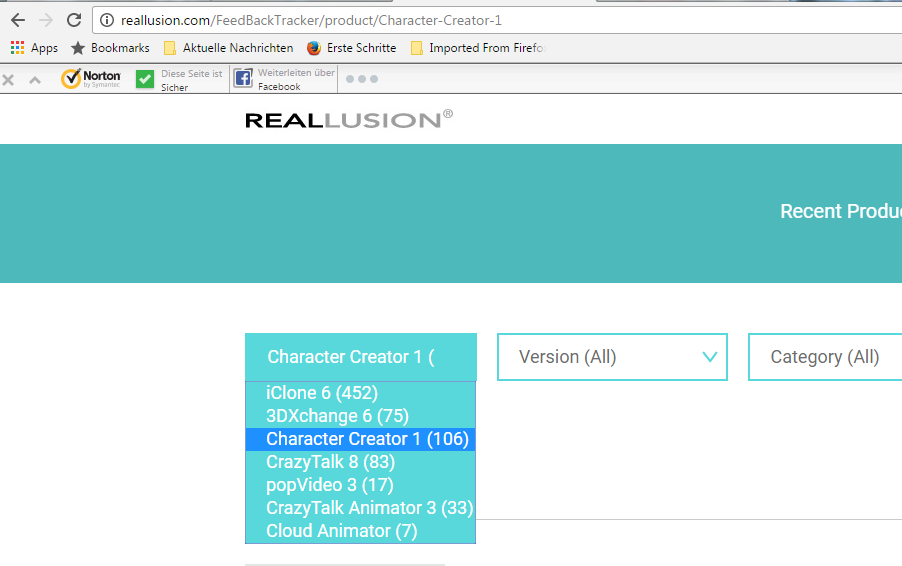
Greetings
Tesira
|
|
By Miranda (RL) - 10 Years Ago
|
Hi Tesira,
There is no ticket submitted on the CC2.0 Beta, so CC2.0 Beta doesn't appear under Character Creator.
You are able to see the option when creating a new ticket. :)

|
|
By justaviking - 10 Years Ago
|
(Previously posted in the "Welcome to the Beta" thread
ISSUE 1961:
http://www.reallusion.com/FeedBackTracker/Issue/Textures-are-listed-twice-in-Appearance-Editor
In the Dynamic Appearance Texture editor, the controls are listed twice.
It appears they really are duplicates. Colors changed in one place show up in the other.
I haven't checked everywhere yet, but it occurs for both EYES and TEETH, and HAIR, it doesn't matter if you "keep" or "clear" unused channels.
Doesn't appear to be duplicated on the dress, though.

|
|
By justaviking - 10 Years Ago
|
|
Miranda (RL) (12/30/2016)
Hi Tesira,
There is no ticket submitted on the CC2.0 Beta, so CC2.0 Beta doesn't appear under Character Creator.
You are able to see the option when creating a new ticket. :)
a) Correct, it is an option when creating a new issue
b) I officially posted my first issue, and now CC2.0 Beta shows up in the product list
|
|
By justaviking - 10 Years Ago
|
Exporting an iAvatar to iC6 format LOCKS UP and CC2 stops responding.
Exporting an iAvatar to iC7 seems to work okay. At least it makes the .iAvatar file.
I will try this on another, fresh project, to see if I can duplicate it.
If I can duplicate it, I will post an issue in FeedBack Tracker.
I might have it figured out.... ;)
Yes, I think I do... but I have to keep you in suspense for a few minutes... family duty calls...
Entered ISSUE #1962: "Clear" unused channels option for Appearance Editor breaks export to iC6.5 format
|
|
By Rampa - 10 Years Ago
|
|
justaviking (12/30/2016)
Exporting an iAvatar to iC6 format LOCKS UP and CC2 stops responding.
Exporting an iAvatar to iC7 seems to work okay. At least it makes the .iAvatar file.
I will try this on another, fresh project, to see if I can duplicate it.
If I can duplicate it, I will post an issue in FeedBack Tracker.
They do list a couple known issues. I think that's one of them.
|
|
By justaviking - 10 Years Ago
|
rampa (12/30/2016)
justaviking (12/30/2016)
Exporting an iAvatar to iC6 format LOCKS UP and CC2 stops responding.
Exporting an iAvatar to iC7 seems to work okay. At least it makes the .iAvatar file.
I will try this on another, fresh project, to see if I can duplicate it.
If I can duplicate it, I will post an issue in FeedBack Tracker.
They do list a couple known issues. I think that's one of them.
Thanks for the tip, but the only one I found was about a "loss of data":
https://forum.reallusion.com/309195/iClone-65-CC-15compatible-iAvatar-Export
but I found a way to LOCK UP (FREEZE) the export process, so I'm pretty sure it's a separate issue.
Entered ISSUE #1962: "Clear" unused channels option for Appearance Editor breaks export to iC6.5 format
|
|
By Rampa - 10 Years Ago
|
|
I'm not seeing the tessalation/displacement controls. Now that we can load our own Substances, I think we need them.
|
|
By wires - 10 Years Ago
|
|
Following the steps that Dennis listed in FT 1962 Character Creator crashes on my system. Comment has been added for the Devs.
|
|
By wires - 10 Years Ago
|
Weird results when the Appearance Editor is loaded.
This is how the Jeans look on the Base Male (PBR) when first loaded:
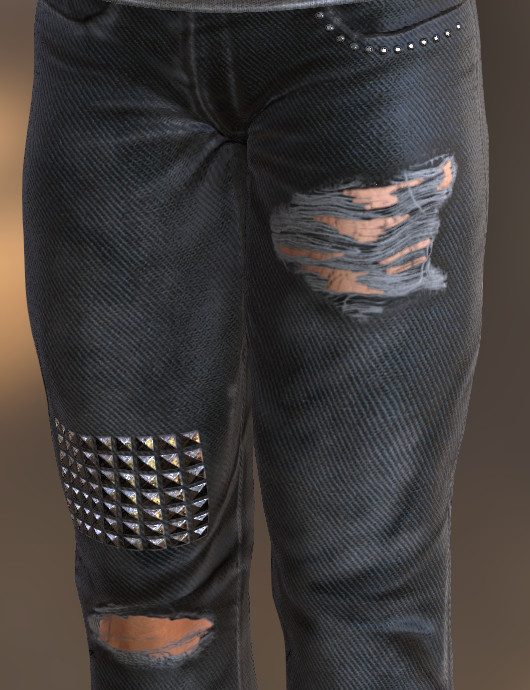
Loading the Appearance Editor and selecting "Keep" results in this:
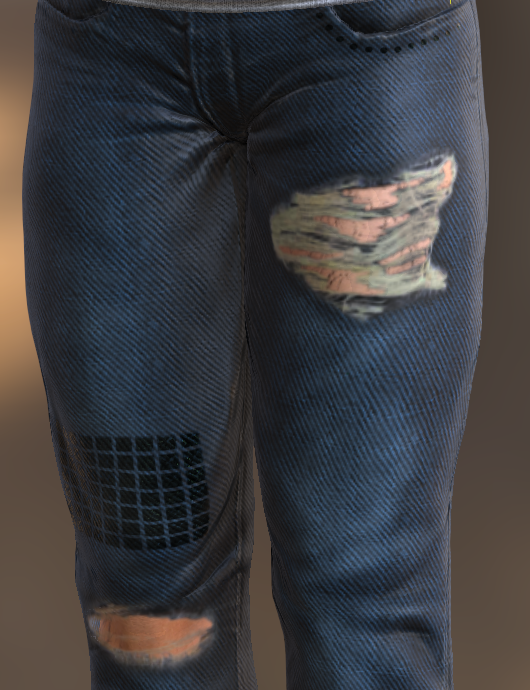
Selecting "Clear" results in this:
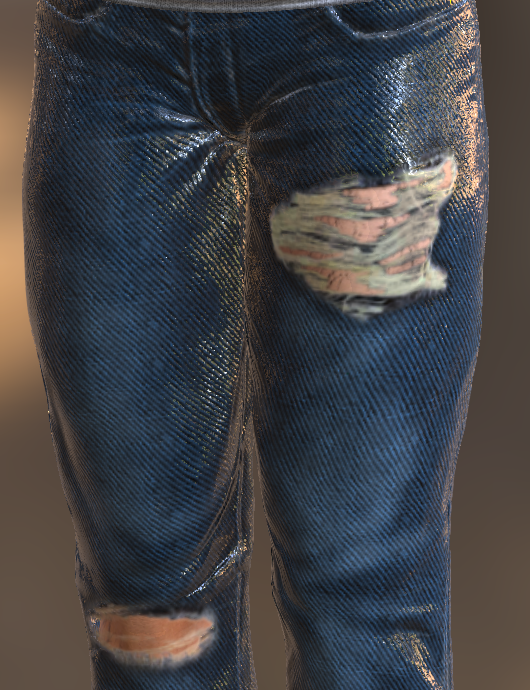
Now the question is, how to get the material back to looking like the default for editing?
Anyone else seeing this?
|
|
By GOETZIWOOD STUDIOS - 10 Years Ago
|
@wires
On my side the Jeans_B (I suppose) looks like your second image when I load it the first time (minus the black board patch above the right knee).
Whether I keep the Classic Shader or convert to the PRB, then when I open the Appearance Editor and choose "Keep", nothing change (respectively according to the Classic/PBR shader).
If I choose "Clear", and the shader Classic, nothing change, everything is ok, but if I choose "Clear" after converted to PBR then I get your third image, yes.
In Short:
Jeans_B --> Classic -> AE Keep -> OK
                    -> AE Clear -> OK
        --> PBR     -> AE Keep -> OK
                    -> AE Clear -> Issue!
|
|
By GOETZIWOOD STUDIOS - 10 Years Ago
|
@wires
Sorry I missed the fact you were loading the "Base Male PBR" and its Jeans (which has been converted to PBR already). And with it, yes, I have the same results you have.
|
|
By wires - 10 Years Ago
|
This only seems to be happening with PBR materials. Here's the Base Male (PBR) again, this time showing the skin.
Default:
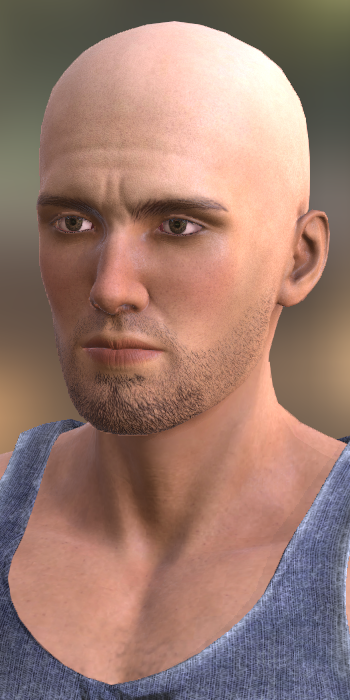
"Keep" selected for the Appearance Editor:
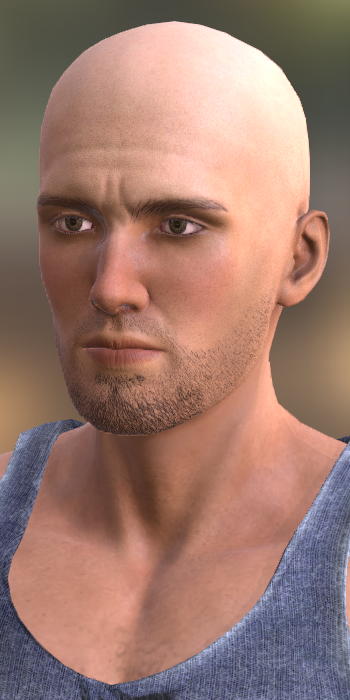
"Clear" selected:
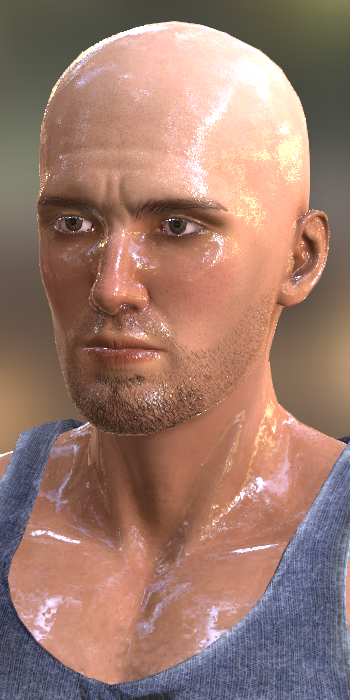
So far I haven't noticed any great differences when using the non PBR characters and the materials set to Legacy. It is however another thing once the materials are changed to PBR.
I think that this should be added to the Feedback Tracker if a few others can confirm the situation.
|
|
By magnoliaPower - 10 Years Ago
|
Hello
I encounter the same "wet skin" effect with the beta. I have tried to play with all the sliders to change that without success (i thought it was not a bug).
Frédéric
|
|
By wires - 10 Years Ago
|
|
I've posted the issue in the Feedback Tracker issue 1965. Please add comments if you are experiencing this problem. If you add a comment please also include which Windows version you are using.
|
|
By justaviking - 10 Years Ago
|
Gerry,
I noticed the shiny skin too, when I was working on Issue #1962.
Thanks for logging this in FeedBack Tracker.
And thanks for confirming #1962.
I have added more detailed steps on observations to Gerry's Issue #1965.
http://www.reallusion.com/FeedBackTracker/Issue/Unexpected-results-when-loading-the-Appearence-Editor-for-PBR-materials
The easy "fix" for the shiny skin is to add some Roughness.
But why are Metallic and Roughness considered "unused channels?"
For Teeth and Eye, you can change between the PBR and Classic shader in the Material tab.
But for all the other channels, the option is grayed out and it's stuck on PBR, but with two key channels missing, as seen in the pictures below.
Metallic and Roughness are NOT unused channels, since they are fundamental to a PBR shader.
(ADDED: See Rampa's comment in the post following this one, and my reply to it.)
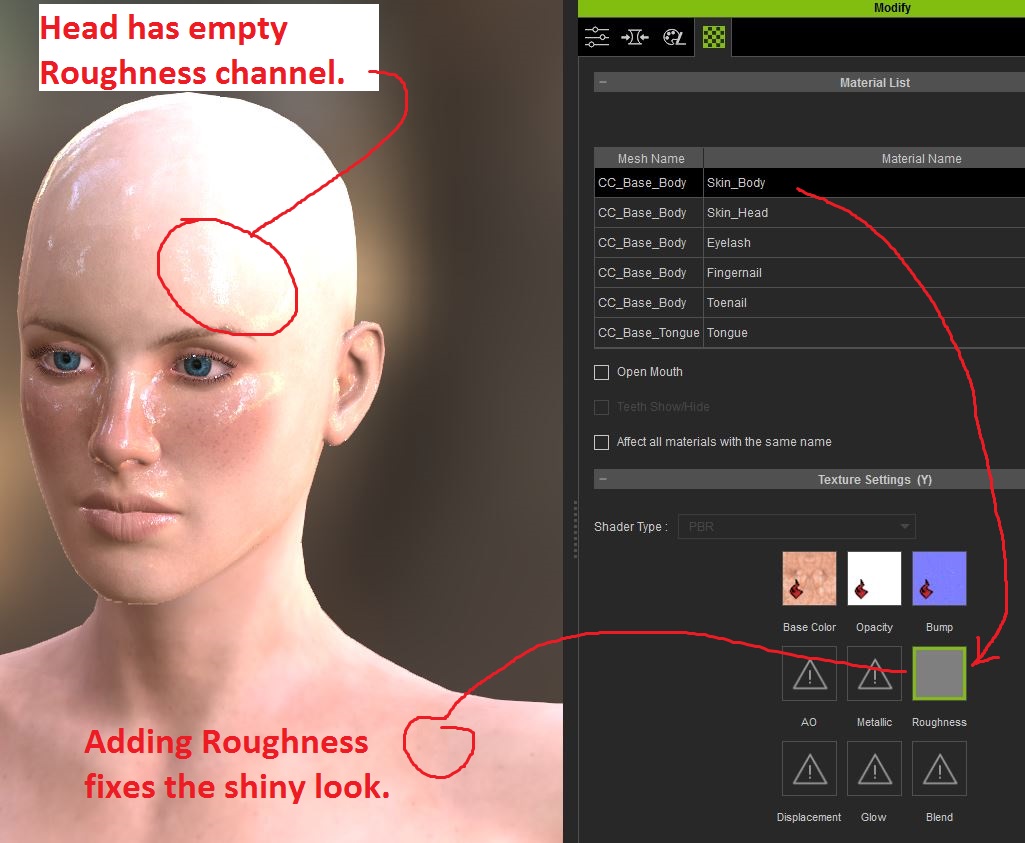
Here you can see the Metallic and Roughness channels are present when you select the "KEEP" option...
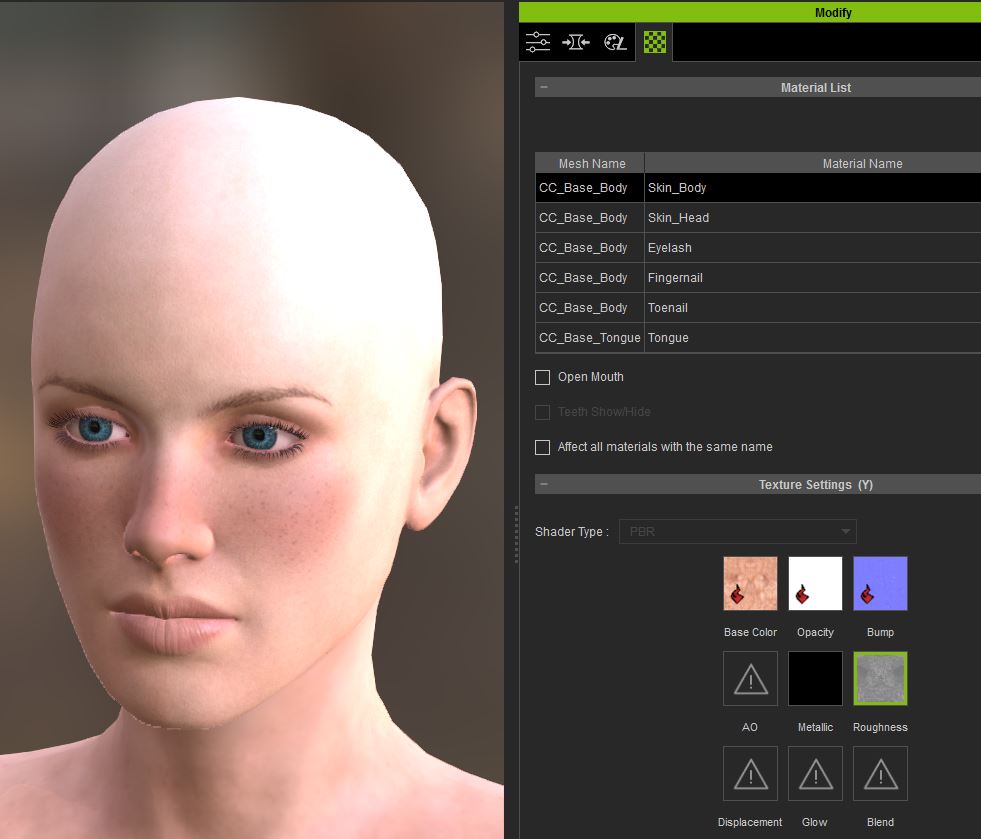
|
|
By Rampa - 10 Years Ago
|
The current CC Substances are not PBR, and so do not contain metallic and roughness. They are added to the textures though. The dialog is asking if you want to to clear non-Substance texture channels, so if you hit yes it deletes the metallic and roughness.
I assume the Substances will be upgraded to PBR, and contain those texture channels in a later release.
|
|
By justaviking - 10 Years Ago
|
|
rampa (12/30/2016)
The current CC Substances are not PBR, and so do not contain metallic and roughness. They are added to the textures though. The dialog is asking if you want to to clear non-Substance texture channels, so if you hit yes it deletes the metallic and roughness.
I assume the Substances will be upgraded to PBR, and contain those texture channels in a later release.
Interesting that the Teeth and Eye materials are "PBR" while others are not.
Yeah, maybe they're half done with the process of updating the character.
For the four Teeth and Eye materials, you can change between the PBR and Classic shader in the Material tab.
But for all the other channels, the option is grayed out and it's stuck on PBR, but with two key channels missing.
|
|
By Rampa - 10 Years Ago
|
|
You can also load any Substances you want now, so additional skin Substances could be created if someone wants to do it. The tessalation controls are not there (yet?) though.
|
|
By Kevin.S - 10 Years Ago
|
wires (12/30/2016)
Following the steps that Dennis listed in FT 1962 Character Creator crashes on my system. Comment has been added for the Devs.
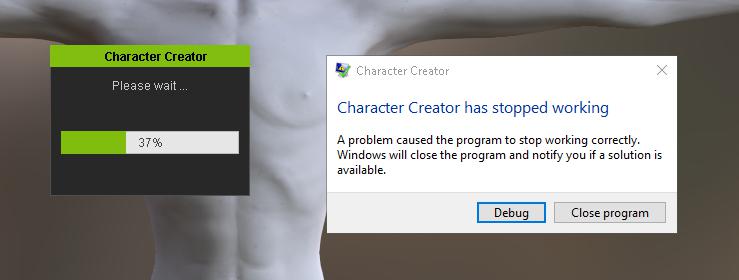
I opened CC 2.0 and within about 30 second I got a crash CC has stopped working......
|
|
By TheOldBuffer - 10 Years Ago
|
In one of the reallusion posts there are roughness pics to use in the roughness channels for the head and body skins. I'll find the post and add here shortly.
This is the link to the roughness maps https://forum.reallusion.com/Attachment6177.aspx
Ive been using CC all day and its been rock solid. ......... so far !
|
|
By Rampa - 10 Years Ago
|
EDIT: Nevermind. It's just a different icon in CC 2! :blush:
I'm also curious if CC 2 will get the color adjust panel, for adjusting the non-Substance (or baked) texture channels.
|
|
By justaviking - 10 Years Ago
|
QUESTION: Has anyone managed any PBR clothing?
I've not dug deeply into it, but I've been able to make PBR skin, but the dress stays in "classic" mode.
Maybe that's just because I'm adding the Substance to an existing dress. ("Base Female" - Black top and horizontal striped skirt)
Or is this another "known issue?"
I'm bouncing between so many applications today, I'm losing track.
Well, once again, posting about something magically fixed it.
I went back to my CC2 session, and in 15 seconds switched from Classic to PBR on the dress.
I have no idea why the option was grayed out before. Really, I'm 99% sure about that. Oh well, I'll just have to keep my eyes open next time.

|
|
By Rampa - 10 Years Ago
|
Can someone else check that mesh hidden in CC 2.0 does not stay hidden when the iAvatar is imported into iClone?
EDIT:
It does not seem to hide the mesh when it exports. If I open the saved iAvatar in CC 2, it has no hidden mesh.
|
|
By Zeronimo - 10 Years Ago
|
|
problem with lady Pirate clothes If I want to replace the pants of Lady Pirate this is what happens 1 - Lady Pirate with all her Pirate clothes
2 - Delete the pants
3 - Replace the pants with Jeans
The top has disappeared
 if I try with a skirt the same thing happens Is there a way to correct this problem?
|
|
By Rampa - 10 Years Ago
|
|
There can be up to 18 layers of clothing. If you add a piece of clothing that has the same layer assignment as one on the character, it will replace it. So....What you want to do is set the piece of clothing that is disappearing to a different layer. The layer settings are in the bottom of the "Conform" panel. Conform is in the toolbar.
|
|
By wires - 10 Years Ago
|
|
rampa (12/31/2016)
Can someone else check that mesh hidden in CC 2.0 does not stay hidden when the iAvatar is imported into iClone?
EDIT:
It does not seem to hide the mesh when it exports. If I open the saved iAvatar in CC 2, it has no hidden mesh.
Confirmed, the hidden mesh is saved in CC but not when the character is exported as an iAvatar.
|
|
By Rampa - 10 Years Ago
|
wires (12/31/2016)
rampa (12/31/2016)
Can someone else check that mesh hidden in CC 2.0 does not stay hidden when the iAvatar is imported into iClone?
EDIT:
It does not seem to hide the mesh when it exports. If I open the saved iAvatar in CC 2, it has no hidden mesh.Confirmed, the hidden mesh is saved in CC but not when the character is exported as an iAvatar.
Thanks. :) I posted it in the tracker.
|
|
By wires - 10 Years Ago
|
|
Comment also added in the tracker.
|
|
By Galfridus - 10 Years Ago
|

Starting at 0.07 in the Character Creator 2.0 Beta - Visual Enhancements vid there is a brief sequence where the rotate gizmo is used to horizontally revolve the "IBL sky" whilst the avatar remains stationary.
Try as I may, I can`t duplicate this method to observe the changing play of light on my avatars face. Even affetr selecting sky the "Rotate" remains stubornly greyed out so the gizmo doesn`t appear. I can of course rotate the entire scene with the Camera but that doesn`t reproduce the effect demonstrated in the vid.
Hopefully I am making some very basic error, which eludes me, and a more knowledgable user may kindly point me in the right direction ?
Geoff.
|
|
By Delerna - 10 Years Ago
|
|
press ctrl and forward slash to bring up the gizmo if memory serves me correctly. Hmmm maybe back slash. well one of the slashes I'm getting tired. End of day for me
|
|
By Zeronimo - 10 Years Ago
|
|
rampa (12/31/2016)
There can be up to 18 layers of clothing. If you add a piece of clothing that has the same layer assignment as one on the character, it will replace it. So....What you want to do is set the piece of clothing that is disappearing to a different layer. The layer settings are in the bottom of the "Conform" panel. Conform is in the toolbar.
Thank you Rampa. Indeed my problem is solved.

|
|
By Galfridus - 10 Years Ago
|
|
Delerna (12/31/2016)
press ctrl and forward slash to bring up the gizmo if memory serves me correctly. Hmmm maybe back slash. well one of the slashes I'm getting tired. End of day for me
Thank You very much Delerna for prompt and helpful reply.
CTRL+forward slash was what I needed to know to make it work.:)
Geoff.
|
|
By wires - 10 Years Ago
|
|
rampa (12/30/2016)
EDIT: Nevermind. It's just a different icon in CC 2! :blush:
I'm also curious if CC 2 will get the color adjust panel, for adjusting the non-Substance (or baked) texture channels.
The option is available for both Classic and PBR materials, they used a different icon in CC. :pinch::crazy:

|
|
By justaviking - 10 Years Ago
|
Galfridus (12/31/2016)
Delerna (12/31/2016)
press ctrl and forward slash to bring up the gizmo if memory serves me correctly. Hmmm maybe back slash. well one of the slashes I'm getting tired. End of day for meThank You very much Delerna for prompt and helpful reply. CTRL+forward slash was what I needed to know to make it work. :)
I'm seeing what I think is a bug here.
1) Open the "Base Female" project
2) Press and hold Ctrl-/ and use the left mouse button to rotate the gizmo horizontally... works fine... background image rotates
3) Open the Atmosphere panel, and apply a different background
4) Repeat Step #2... the light changes, but the background does not move
Bug? If anyone agrees, I'll report it. If not, please explain why not.
UPDATE:
Duchess concurred, so I logged it.
Issue #1970: http://www.reallusion.com/FeedBackTracker/Issue/Background-image-will-not-rotate-after-you-change-environment-image
|
|
By duchess110 - 10 Years Ago
|
justaviking (12/31/2016)
Galfridus (12/31/2016)
Delerna (12/31/2016)
press ctrl and forward slash to bring up the gizmo if memory serves me correctly. Hmmm maybe back slash. well one of the slashes I'm getting tired. End of day for meThank You very much Delerna for prompt and helpful reply. CTRL+forward slash was what I needed to know to make it work. :) I'm seeing what I think is a bug here. 1) Open the "Base Female" project 2) Press and hold Ctrl-/ and use the left mouse button to rotate the gizmo horizontally... works fine... background image rotates 3) Open the Atmosphere panel, and apply a different background 4) Repeat Step #2... the light changes, but the background does not move Bug? If anyone agrees, I'll report it. If not, please explain why not.
Yes followed your steps and the same thing happens background stays only lights move.
|
|
By justaviking - 10 Years Ago
|
|
duchess110 (12/31/2016)Yes followed your steps and the same thing happens background stays only lights move.
Thank you.
Issue #1970: http://www.reallusion.com/FeedBackTracker/Issue/Background-image-will-not-rotate-after-you-change-environment-image
|
|
By GOETZIWOOD STUDIOS - 10 Years Ago
|
@justaviking
This is not a bug. When you load another Atmosphere, the check box "Sync Sky Image" becomes unchecked, that's why now the lighting and background are "unsynced" when you use CTRL+/.
If you check back that check box then both lighting and background will follow accordingly.
Not a bug but perhaps this check box should be kept checked after Atmosphere change to avoid confusion indeed.
|
|
By GOETZIWOOD STUDIOS - 10 Years Ago
|
For Your Information:
TipTool Messages For Metallic and Roughness Slots Are Inverted
I just realized I should have called those "ToolTips" lol. Sorry about that.
|
|
By eternityblue - 10 Years Ago
|
I have gotten CC to crash several times by importing a large accessory and then adjusting the key lights. The accessory was actually a house, but still. Crash!
|
|
By wires - 10 Years Ago
|
eternityblue (12/31/2016)
I have gotten CC to crash several times by importing a large accessory and then adjusting the key lights. The accessory was actually a house, but still. Crash!
Let's be honest, a house isn't an accessory - unless you are a Turtle!!
|
|
By Zeronimo - 10 Years Ago
|
|
Delerna (12/31/2016)
press ctrl and forward slash to bring up the gizmo if memory serves me correctly. Hmmm maybe back slash. well one of the slashes I'm getting tired. End of day for me
on a french keybord (azerty) I have to press CTRL+Shift+Forward Slash to obtain the gizmo
it works with the default avatar and default background, but nothing move's.
As soon I load the base Female or change the default atmosphere and press Ctrl+Shift+Forward Slash the program crash.
|
|
By GOETZIWOOD STUDIOS - 10 Years Ago
|
zeronimo (12/31/2016)
Delerna (12/31/2016)
press ctrl and forward slash to bring up the gizmo if memory serves me correctly. Hmmm maybe back slash. well one of the slashes I'm getting tired. End of day for meon a french keybord (azerty) I have to press CTRL+Shift+Forward Slash to obtain the gizmo it works with the default avatar and default background, but nothing move's. As soon I load the base Female or change the default atmosphere and press Ctrl+Shift+Forward Slash the program crash.
On a french keyboard, you have to press CTRL+/ (from the Numeric Pad) in order to rotate the IBL.
CTRL+SHIFT+/ (main Keyboard) will act the same as SHIFT+/ (main Keyboard): It will rotate a Light (not the IBL).
In short, to rotate the IBL you have to use the "/" from the Numeric Pad.
|
|
By justaviking - 10 Years Ago
|
|
grabiller (12/31/2016)
@justaviking
This is not a bug. When you load another Atmosphere, the check box "Sync Sky Image" becomes unchecked, that's why now the lighting and background are "unsynced" when you use CTRL+/.
If you check back that check box then both lighting and background will follow accordingly.
Not a bug but perhaps this check box should be kept checked after Atmosphere change to avoid confusion indeed.
Thanks for the info.
I'll check that out, and then add a comment to the Issue I reported.
I guess I'd call it a "different bug." I think it should preserve the "Sync" option you set, even when changing atmosphere.
|
|
By justaviking - 10 Years Ago
|
|
grabiller (12/31/2016)
On a french keyboard, you have to press CTRL+/ (from the Numeric Pad) in order to rotate the IBL.
CTRL+SHIFT+/ (main Keyboard) will act the same as SHIFT+/ (main Keyboard): It will rotate a Light (not the IBL).
In short, to rotate the IBL you have to use the "/" from the Numeric Pad.
On my "English" keyboard, I used the "/" on the main keyboard area.
I found what I thought was a bug: https://forum.reallusion.com/FindPost309558.aspx
I still think it's a bug, but maybe not the one I thought. Apparently the "Sync" option get's un-checked when you change Atmosphere.
|
|
By GOETZIWOOD STUDIOS - 10 Years Ago
|
justaviking (12/31/2016)
grabiller (12/31/2016)
@justaviking
../..I think it should preserve the "Sync" option you set, even when changing atmosphere.
I agree.
justaviking (12/31/2016)
grabiller (12/31/2016)
On a french keyboard, you have to press CTRL+/ (from the Numeric Pad) in order to rotate the IBL.
CTRL+SHIFT+/ (main Keyboard) will act the same as SHIFT+/ (main Keyboard): It will rotate a Light (not the IBL).
In short, to rotate the IBL you have to use the "/" from the Numeric Pad.On my "English" keyboard, I used the "/" on the main keyboard area.I found what I thought was a bug: https://forum.reallusion.com/FindPost309558.aspxI still think it's a bug, but maybe not the one I thought. Apparently the "Sync" option get's un-checked when you change Atmosphere.
The french (and possibly other country) keyboard issue is unrelated to the unchecked "Sync Sky Image" checkbox.
On a french keyboard you have to use SHIFT to get the "/" sign from the main Keyboard, while you get it directly on an English main keyboard.
|
|
By GOETZIWOOD STUDIOS - 10 Years Ago
|
For Your Information:
Morph Slider Editor Does Not Remember Slider Path
|
|
By Kevin.S - 10 Years Ago
|
Getting some crashes

|
|
By Rampa - 10 Years Ago
|
|
This beta does not yet export compatible iC7 content. That is written up in the introduction.
|
|
By Kevin.S - 10 Years Ago
|
|
rampa (12/31/2016)
This beta does not yet export compatible iC7 content. That is written up in the introduction.
Never mind :)
|
|
By GOETZIWOOD STUDIOS - 10 Years Ago
|
> deleted post <
|
|
By Kevin.S - 10 Years Ago
|
Think I got the crash sloved
|
|
By GOETZIWOOD STUDIOS - 10 Years Ago
|
|
> deleted post <
|
|
By justaviking - 9 Years Ago
|
FYI... I updated my write-up for Issue #1970:
http://www.reallusion.com/FeedBackTracker/Issue/Background-image-will-not-rotate-after-you-change-environment-image
Something finally dawned on me: Image + Settings = Atmosphere
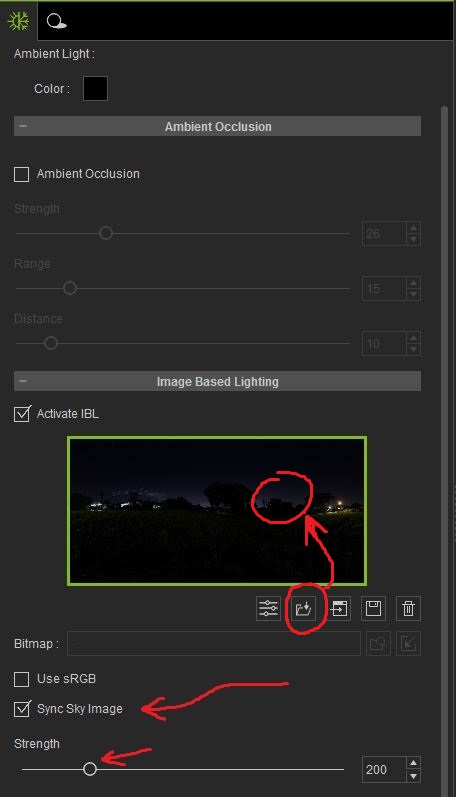
The "Sync Sky Image" gets un-checked when you change your Atmosphere (IBL background). That's because that is the setting in all three Atmosphere options. If you change Atmosphere, you will notice each one has a unique "Strength" setting. That's what finally activated my brain.
Changing to a different IBL image by double-clicking on the image (or using the "Load" icon) will NOT UN-CHECK the Sync option.
It might be debatable, but I'm still going to call it a bug, since it leads to unexpected behavior, but I think the fix is to simply update the Atmospheres with Sync=On. That should be easy for them to do.
(Sorry I was so scatter-brained on this Issue. I've only been pulled away from my computer about 87 times so far today.)
|
|
By Zeronimo - 9 Years Ago
|
grabiller (12/31/2016)
zeronimo (12/31/2016)
Delerna (12/31/2016)
press ctrl and forward slash to bring up the gizmo if memory serves me correctly. Hmmm maybe back slash. well one of the slashes I'm getting tired. End of day for meon a french keybord (azerty) I have to press CTRL+Shift+Forward Slash to obtain the gizmo it works with the default avatar and default background, but nothing move's. As soon I load the base Female or change the default atmosphere and press Ctrl+Shift+Forward Slash the program crash. On a french keyboard, you have to press CTRL+/ (from the Numeric Pad) in order to rotate the IBL. CTRL+SHIFT+/ (main Keyboard) will act the same as SHIFT+/ (main Keyboard): It will rotate a Light (not the IBL). In short, to rotate the IBL you have to use the "/" from the Numeric Pad.
@Grabiller Thank you. on a french keyboard CTRL+/ (numeric pad) and 'Sync Sky Image' checked works very well.
You have to make a big gap with your fingers, but it's ok. :)
|
|
By hirospot - 9 Years Ago
|
|
Issue: Keyboard operation for IBL Gizmo control I'd like to confirm that I should change my keyboard.
My Keyboard: ELECOM USB full 106 Japanese keybord for Windows, key pitch is 19mm.
It is designed that by press and hold the [Ctrl] & [/] button (by left hand) for IBL gizmo to show up, and rotate it by mouse (at right hand).
The issue is that my thumb and pinkie distance is less than 17cm and the two buttons are located 20 cm apart.
I confirmed the IBL Gizmo on the Model body, however both hands are needed, then not possible to rotate the Gizmo. Unfortunately, My keyboard does not have second [Ctrl] key close to [/] key.
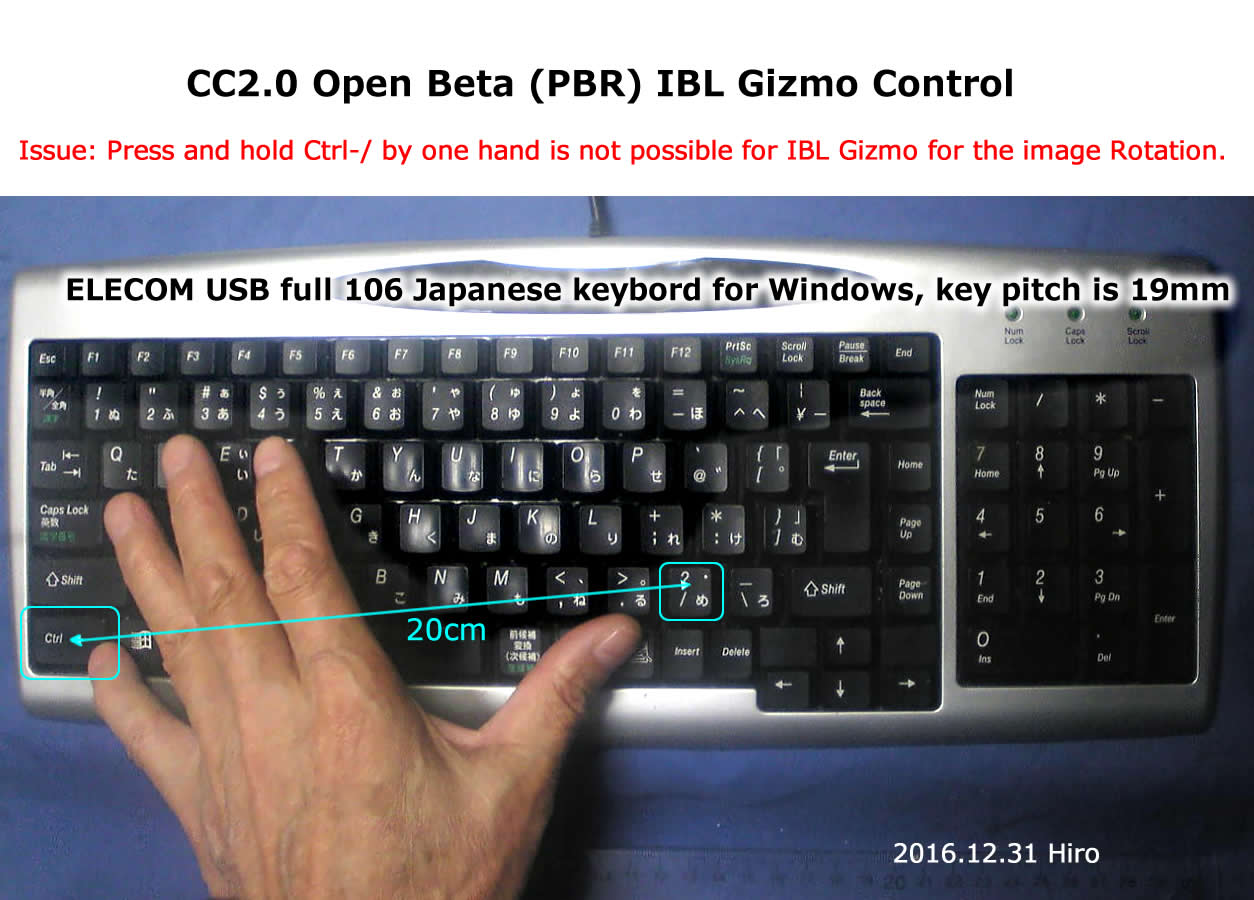 Does nobody have the same issue, or something wrong with my understadings?
Thank you for any suggestions. Hiro
|
|
By justaviking - 9 Years Ago
|
|
A "simple" solution would be for us to have more capability to customize iClone keyboard shortcuts.
|
|
By wires - 9 Years Ago
|
|
justaviking (1/1/2017)
A "simple" solution would be for us to have more capability to customize iClone keyboard shortcuts.
+1
On a German keyboard the / is on the top of the 7 key and can only be accessed by pressing Shift. On the numeric key pad the / works without Shift, and Ctrl + / can be done without too much pain using the right side Ctrl key.
No matter, it would be nice to customize the shortcuts.
|
|
By justaviking - 9 Years Ago
|
|
SERIOUS ISSUE:
FeedBack Tracker #1974: http://www.reallusion.com/FeedBackTracker/Issue/DISPLACEMENT-channel-on-PBR-shader-is-inverted/#issue_comments
The short story is the Displacement channel is inverted.
I kept thinking something was a bit "off" when viewing some of the more textured materials. This "studded leather" material finally revealed the issue. The light on a raised surface should light up the top of the raised surface, not the bottom of it (assuming a normal "lights angled downward" setup).
I compared the behavior in Substance Player, and came to the conclusion that Reallusion's PBR shader has a flaw in how it handles the Displacement channel.
Here are a few pictures to look at...
How it looks (correctly) in Substance Player...
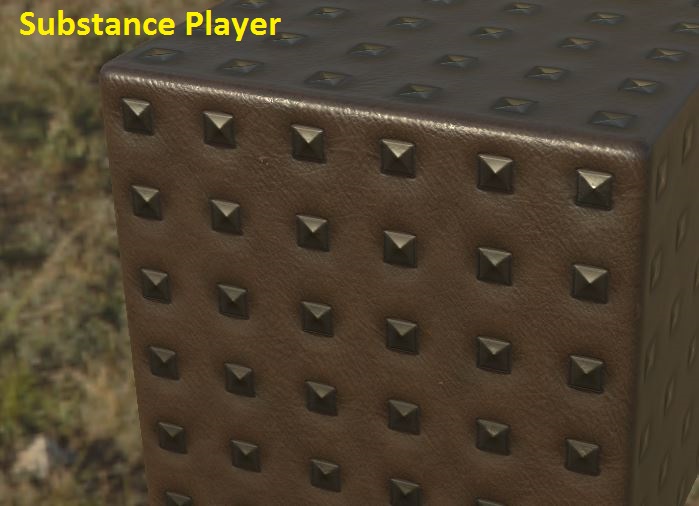
How it looks in CC2 with the default setting for the Displacement channel... Something looks a bit off...
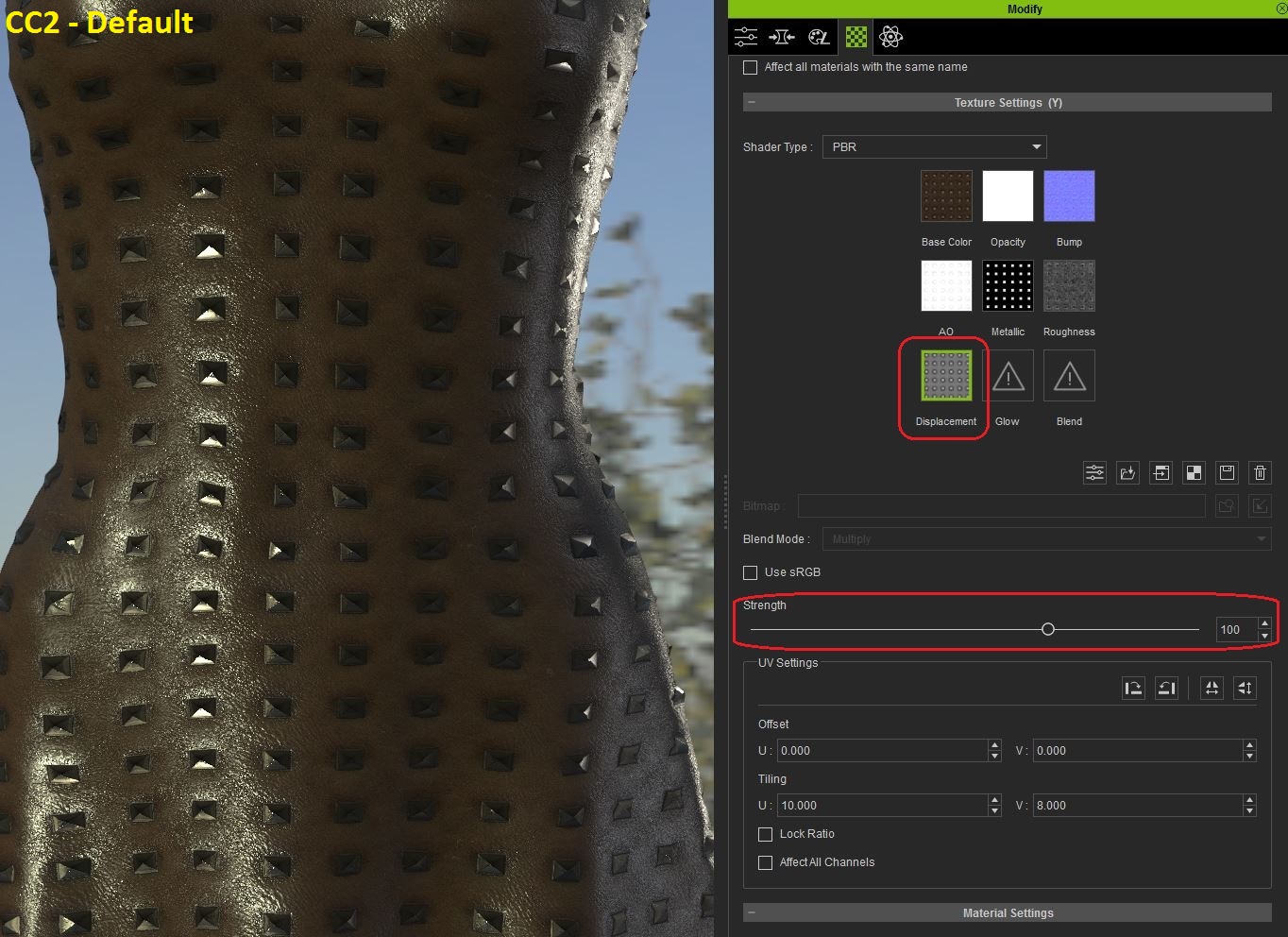
How it looks in CC2 after reversing the Strength setting on the Displacement channel... that looks much better...
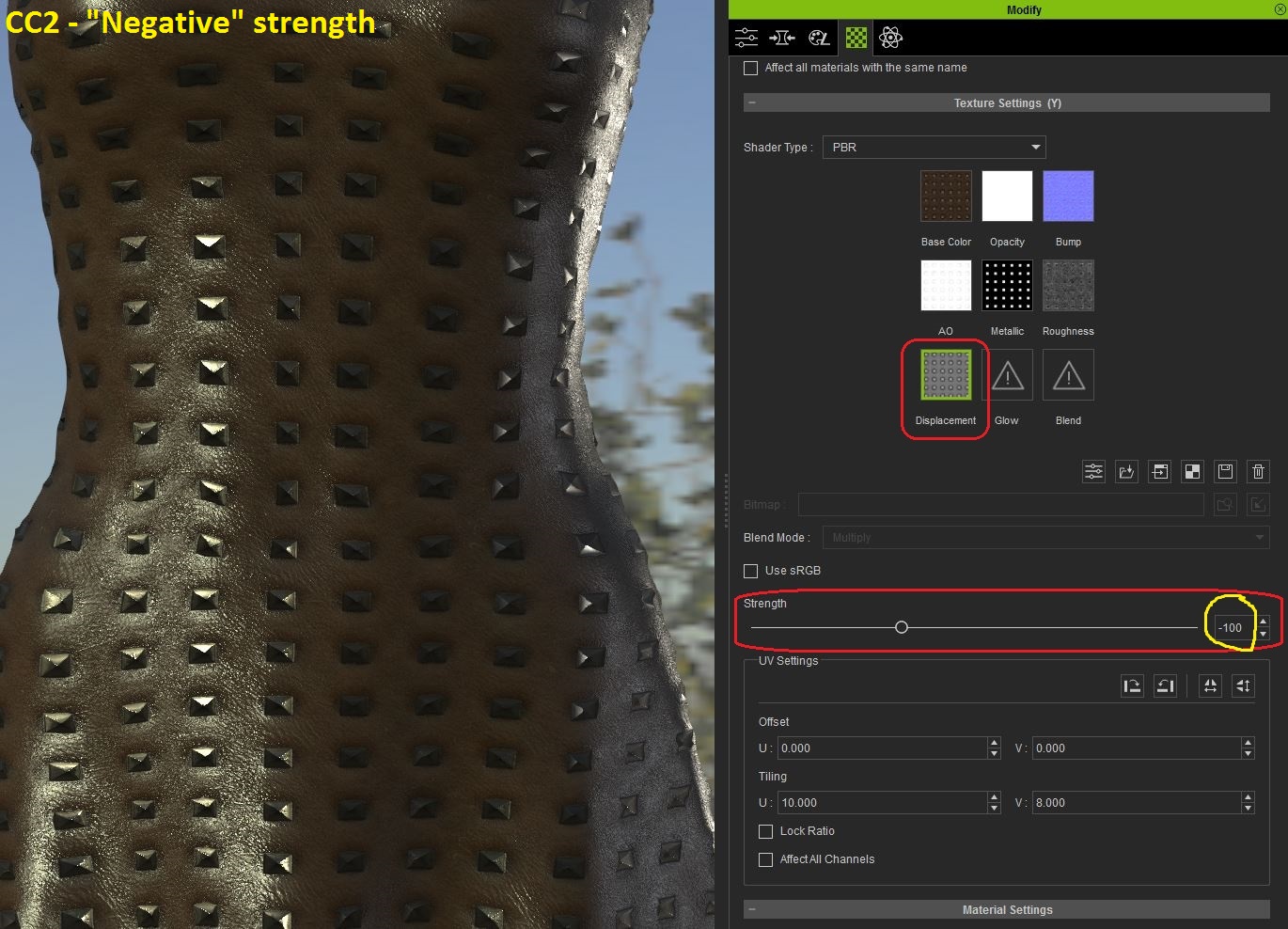
|
|
By justaviking - 9 Years Ago
|
A little "Ah ha!" moment...
Maybe everyone else already knows this, but I'll share my experience, just in case.
(I should make a video tutorial out of this, and a couple other things I've gotten better at.)
I was bothered by what appeared to be an inconsistent locking of the "Shader Type" (Classic/PBR) drop-down list.
It would often be grayed-out, and I blamed it on a number of things, but could not duplicate it reliably for reporting in FeedBack Tracker.
> Was certain clothing? Nope.
> The "Clear/Keep" option that was at the root of a bug I found? Nope.
> Skin? Nope.
> Certain PBR Substances? Nope.
> What, and when, and why was this happening?
I finally figured it out. The "Shader Type" cannot be changed when the Appearance Editor is opened.
I guess that makes sense.
STEPS:
1) Start with a default project, like "Base Female"
2) Select something, like the dress (
3) In the MODIFY panel, APPEARANCE tab, do NOT click the "Activate Appearance Editor" button yet. (Fig 1)
4) In the MATERIAL tab, notice the Shader types "Classic/PBR" are available... leave in on Classic (Fig 2)
5) Back in the Appearance tab, apply a Substance to the dress... but you don't see the change yet... (Fig 3)
6) To see the substance you just added, you have to click the "Activate Appearance Editor"... click it now (use the "Keep" option) (Fig 4)
>>> That is why I would often activate the appearance editor - so I could see my newly added Substance
7) Go to the Material tab again... the Shader Type drop-down is grayed-out and non-selectable (Fig 5)
>>> I would wonder what's wrong... why can't I use the PBR shader on this Substance?
8) Return to the Appearance tab, and "Unload Appearance Editor" (Fig 6)
9) Go to the Material tab again... you can now change Shader Type from "Classic" to "PBR" (Fig 7 and Fig 8)
LESSON LEARNED - Version 1:
a) Load PBR Substance in the Appearance tab
b) Immediately go to the Material tab and check the Shader Type (and change it if you plan to use the other shader)
c) Go back to the Appearance tab, and THEN finally Activate Appearance Editor to see your new material and begin working with it.
<<< OR >>>
LESSONE LEARNED - Version 2:
a) Load PBR Substance in the Appearance tab
b) Immediately Activate and Unload the Apperance Editor to "activate" your newly loaded substance
c) Now you can go to the Material tab and change Shader Type (if you wish) and continue on with your material edits
Fig 1

Fig 2

Fig 3

Fig 4

Fig5

Fig 6

Fig 7

Fig 8

|
|
By vidi - 9 Years Ago
|
it seems my test is over :satisfied:
At the moment CC is for me only waste of time
Why had it worked in the 1. beta version , but now I have only trouble ?
For me importing a Dress, feels like a gambling not like a creation tool.
The result of bind mesh with Maya excactly like the whitepaper description

And this with aditional copy weights

also in Maya a get a strange messages

That Mesh is UV mapped. I have also try with delete the history in maya , I'm on the first Keyframe . I have so many tested I have no Idea more what do I wrong
|
|
By eternityblue - 9 Years Ago
|
I just had an issue with a pack in the Marketplace that has both CC 1.5 and CC 2.0 cloth, I am assuming the buyer doesn't have the beta. When attempting to install, it prompted him to install CC. I'm still waiting on confirmation about the details of his system, but it seems to me there may be some issue distributing packs that contain both PBR and non-PBR files.
This is my item:
http://city.reallusion.com/ContentPreview.aspx?i=JCCdcd130aa7e32a8445
|
|
By eternityblue - 9 Years Ago
|
Hey Vidi,
I'm having a similar issue trying to get Blender files to import now, I receive the error "missing the designated mesh" I just tried the 1.5 version and am now having the same issue there as well. Older stuff that I created and set up in Blender still can import from their FBX rigs, so I am not sure what the heck is going on. As far as I can tell, everything is parented and weight mapped ok. I'm at a loss as to what is wrong. BUT, that being said, I can import into CC 2.0 with what had worked previously, so I'm thinking it is my own error. I don't have a damn clue right now why, but I'm going with that and try to figure it out inside Blender.
vidi (1/1/2017)
it seems my test is over :satisfied:At the moment CC is for me only waste of time Why had it worked in the 1. beta version , but now I have only trouble ? For me importing a Dress, feels like a gambling not like a creation tool. The result of bind mesh with Maya excactly like the whitepaper description And this with aditional copy weights also in Maya a get a strange messages That Mesh is UV mapped. I have also try with delete the history in maya , I'm on the first Keyframe . I have so many tested I have no Idea more what do I wrong
|
|
By Rampa - 9 Years Ago
|
|
Check mesh and material names in Blender. Sometimes numbers get appended to the names. That will make everything fail.
|
|
By eternityblue - 9 Years Ago
|
|
And I think I figured out my issue: somehow I got a subsurf modifier added to the Base.fbx rig, I must have hit a smoothing hotkey, not seeing that it was selected. Once I resolved the error in Blender, the cloth comes in just fine to 2.0. I do wish we could just do the weight mapping and attaching inside CC and make it simple for everyone across different modelling platforms, let us just import OBJs and be done with the compatability issues. Maybe one day, CC 3.0 perhaps? I just dream of something like Sculptris being part of the CC feature set. Until then, much of the character creation will have to be done elsewhere.
|
|
By Rampa - 9 Years Ago
|
|
I hope it will get all integrated too. That would be very nice.
|
|
By eternityblue - 9 Years Ago
|
|
One huge feature request of mine, maybe minor to many, but still: please allow us to define a default .fbxkey file so we don't have to choose it every time we import something. It just doesn't serve much purpose to have us select the same exact thing again and again.
|
|
By justaviking - 9 Years Ago
|
Submitted an enhancement request.
Issue #1980: http://www.reallusion.com/FeedBackTracker/Issue/Request-easy-way-to-SET-DEFAULT-PROJECT-same-as-in-iClone
It would be nice and convenient if it was as easy to set the DEFAULT PROJECT in Character Creator as it is in iClone.
I am attaching a picture from iClone 6.53:
|
|
By justaviking - 9 Years Ago
|
|
Ability to modify existing keyboard shortcuts, and add new ones too
|
|
By Delerna - 9 Years Ago
|
I second eternity blues request. Either have it so we can setup a default fbxkey or just have the importer remember the previous one used. That way i only need to change it when i use a different character. Seems not a big deal i guess but the way i work is
1) Produce a rough shape of the clorthing in Blender
2) Import to cc, set rough textures and weight maps with uv map displayed on the diffuse so i can see where issues are
3) Send character to iclone and test with animation to determine whether it works
4) Adjust in blender to correct pokethhroughs etc and improve the shapes.
Repeat steps 2 to 4 until complete
Sometimes it might be a day or 2 working on it in Blender but often i do the modify in blender export and import to CC texture and send to iclone to check what i changed every few minures. Thats when it gets annoying having to reselect the fbxkey everytime
|
|
By hirospot - 9 Years Ago
|
|
@justaviking Issue: Keyboard operation for IBL Gizmo control
Thank you for your strong support.
I handcrafted the Finger Extender "Beta Finger" which is handy, and works very fine at this moment, no surgery.
Thank you again,
Hiro
|
|
By justaviking - 9 Years Ago
|
hirospot (1/2/2017)
Thank you for your strong support. I handcrafted the Finger Extender "Beta Finger" which is handy, and works very fine at this moment, no surgery. ]
My pleasure.
And thank you for a genuine LOL moment. Maybe Reallusion can give a "Beta Finger" as a bonus with each purchase of iClone and CC.
Did you patent and trademark it?
|
|
By hirospot - 9 Years Ago
|
|
@justaviking
No, I didn't yet, it must be only necessary for the beta period, I hope. And, I must improve this Beta Finger as a Back Scratcher when Beta period is over.
Thank you, Hiro
|
|
By vidi - 9 Years Ago
|
|
I wish we could only do the weight mapping and fastening within CC
Yes, but it should be like DAZ Studio. Maybe RL can copy it: D
Weight painting should not cause pain.
DAZ Studio is the proof that it can be fun
I can not understand that Maya is the indutry standard of rigging and have such a crippled (hard for precise work) and time consuming (time is money) weight color tool. Btw Blender is no better in this case.
|
|
By Rampa - 9 Years Ago
|
I like that CC can have its entire toolbars vertically at the edges of the screen. I think it has slightly improved UI over iClone, in some ways. You can (oddly) only put a couple tools on the side in iClone. I like the horizontal tabs along the bottom of the panels as well. In CC, the toolbars can also be placed at the bottom.


|
|
By wires - 9 Years Ago
|
eternityblue (1/1/2017)
I just had an issue with a pack in the Marketplace that has both CC 1.5 and CC 2.0 cloth, I am assuming the buyer doesn't have the beta. When attempting to install, it prompted him to install CC. I'm still waiting on confirmation about the details of his system, but it seems to me there may be some issue distributing packs that contain both PBR and non-PBR files. This is my item: http://city.reallusion.com/ContentPreview.aspx?i=JCCdcd130aa7e32a8445
Since we are working with a Beta version of the software I wouldn't place make any item available for general use. RL have not published any guidelines yet regarding content. Also, being a Beta version, the software still has a lot of unfinished code in it. A Beta is for testing only, never for production work.
|
|
By eternityblue - 9 Years Ago
|
|
It isn't dependent at all on the code of CC really, it is just textures, << (Well, that's not really accurate, but still, I'm not worried) so I'm just building up my library so when 2.0 is released in the wild, I have stuff on the shelf. Anyhow, the issue still exists: how will versions of content be handled? I personally am just going all PBR, I'm not trying to make a business out of trading in the market myself so losing business isn't a concern, but it is a real issue affecting many that needs some addressing. And since the uploader is set to handle 2.0 items, I figure it is totally safe to post the stuff.
|
|
By wires - 9 Years Ago
|
|
Since CC 1.5 can't handle anything PBR then you need to provide a "Classic" iClone 6.5/CC 1.5 material of the item for CC 1.5 users and a PBR version for the rest.
|
|
By eternityblue - 9 Years Ago
|
|
Yes, of course, but right now, if you put both in a pack, it won't let a 1.5 only user install it. I had this issue with the very first sale. I'm a tiny potato so it wasnt a big deal and now I'm just one to stick to pbr unless they get it sorted, but for some it could me a headache. This is the issues and feedback thread, so I mentioned it.
|
|
By wires - 9 Years Ago
|
|
eternityblue (1/2/2017)
Yes, of course, but right now, if you put both in a pack, it won't let a 1.5 only user install it. I had this issue with the very first sale. I'm a tiny potato so it wasnt a big deal and now I'm just one to stick to pbr unless they get it sorted, but for some it could me a headache. This is the issues and feedback thread, so I mentioned it.
The version number has always been in the store as it protects users of an "older" version purchasing anything marked with a higher number. They can purchase the item, but can't install it - and the Reallusion refund system will make sure that they get their money/points returned. Nothing from iClone 6 will work in iClone 5, as a matter of fact nothing from iClone 6.5 will even open in 6.0. The only way to get around this restriction is to upload 2 versions of the asset.
|
|
By eternityblue - 9 Years Ago
|
|
Well, after sleeping on it and taking another look at the marketplace, I really don't know how many developers would care about maintaining compatible versions, and there are so few CC developers anyway, so it can't be a huge issue for RL. I still think it is an issue, regardless how bad a road has been paved in the past, it can always be improved, but whatever. Compatibility doesn't seem to be bothering anyone but me.
|
|
By eternityblue - 9 Years Ago
|
|
There are two channels for gloves, but only one can be used at a time. I have armbands that are imported as gloves, so I can't use both at the same time.
|
|
By eternityblue - 9 Years Ago
|
|
I'm not sure what your character should look like, but is it an issue with not having the morphs you are using installed in the beta version? You mean CC, not iC7, no?
|
|
By GOETZIWOOD STUDIOS - 9 Years Ago
|
rampa (1/2/2017)
I like that CC can have its entire toolbars vertically at the edges of the screen. I think it has slightly improved UI over iClone, in some ways. You can (oddly) only put a couple tools on the side in iClone. I like the horizontal tabs along the bottom of the panels as well. In CC, the toolbars can also be placed at the bottom.
I agree, not a big deal though but it seems there are some discrepancies between how the UI is "allowed" to behave between iClone and CC. Probably two different teams of developers.
CC seems to use a more "standard" approach as being able to dock the toolbars all over the UI sides is standard Qt behavior. If a toolbar cannot dock to, say, the bottom of the UI, it means docking has been "restricted" on this toolbar.
iClone seems to use a more customized Qt build and settings. For instance, in iClone, left panes docked on top of each others have their vertical title tabs on the right, which needs a custom build of Qt as by default the tabs appear on the left for left panes and on the right for the right panes and there is no 'flag' to modify that, you have to edit the main Window widget layout source file.
In CC they switched back to bottom tabs instead, which is the standard behavior. Personally I actually like having the vertical tabs and having them inverted as in iClone, so you can easily see all the title tabs at once while when they are horizontal (bottom or top) you have to scan all the pane separations to read them all. I don't know yet if they changed anything about that in iClone7, some peoples here with "early early early access" to iClone7 may know.
|
|
By Delerna - 9 Years Ago
|
|
With regard to the comments made on iclone 7 i am wondering when i wil get access to that. I mean i bought the upgrade very quick so that i would be one of the 1000 who get early access to CC2, iClone 7 and 3dXchange7. I had the opinion that the 1000 who bought that upgrade would form part of the beta testing. Was i wrong thinking that? The only early access i am getting so far is CC. Or is there 2 levels of early access? Beta testing early access, followed by early purchasers early access followed by final release?
|
|
By Delerna - 9 Years Ago
|
|
Another thought i have been having is how am i supposed to check whether what i do to characters in CC is going to have issues when it gets sent to iClone7. I have no iClone 7 with which to test anything i do in CC2. I have experienced a few problems in iClone 6 with characters sent to it from CC 1.5. I can understand seperate beta teams for CC and iClone. But CC is a tool for producing characters and clothing for animation in IClone. So, how can i fully test CC if i cant send the characters i make to iClone 7?
|
|
By Miranda (RL) - 9 Years Ago
|
Hi eternityblue, thanks for your participation! CC 2.0 Beta is not widely distributed at this moment. iClone 6 PRO users who didn't placed an early order of iClone 7 Bundle won't get CC 2.0 unitl it officially launches. To have better user experience in content sales, please do not publish CC contents created by CC 2.0 Beta software before CC 2.0 official launch. :)
eternityblue (1/2/2017)
Well, after sleeping on it and taking another look at the marketplace, I really don't know how many developers would care about maintaining compatible versions, and there are so few CC developers anyway, so it can't be a huge issue for RL. I still think it is an issue, regardless how bad a road has been paved in the past, it can always be improved, but whatever. Compatibility doesn't seem to be bothering anyone but me.
|
|
By Miranda (RL) - 9 Years Ago
|
Hi Graham, CC 2.0 Beta is the platform for early iClone 7 Bundle pre-order users to experience PBR effects before iClone 7 official launch, it's not part of early access actually. We have been working hard on preparing the iClone 7 Early Access to have better user experience. We will announce the details of Early Access soon.
Delerna (1/3/2017)
With regard to the comments made on iclone 7 i am wondering when i wil get access to that. I mean i bought the upgrade very quick so that i would be one of the 1000 who get early access to CC2, iClone 7 and 3dXchange7. I had the opinion that the 1000 who bought that upgrade would form part of the beta testing. Was i wrong thinking that? The only early access i am getting so far is CC. Or is there 2 levels of early access? Beta testing early access, followed by early purchasers early access followed by final release?
|
|
By mark - 9 Years Ago
|
Well, for me, I'm pretty happy so far. My pre-beta version of CC would crash whenever I added a texture to an avatar...this Beta doesn't!!! Oh that's sooo goood!!! :P:P
Never have figured why that was an issue for me with latest video drivers an all.;)
|
|
By eternityblue - 9 Years Ago
|
|
2.0 not being for actual development is pretty.... I'll refrain from saying what I feel. You shouldn't even release it at all if it isn't ready for production, saying that it isn't part of 'early access' is pretty absurd. What is the point even if not to allow developers to create content? I was working on items for 7 but now I feel like I have no clue when 7 will actually be here and when it will be OK to make content for it. And the uploader shouldn't be setup for 2.0 stuff if we can't offer it. Grrr.....
|
|
By eternityblue - 9 Years Ago
|
Lack of a real roadmap coupled with the inability to sell packs that contain both 1.5 and 2.0 items makes me lose enthusiasm to be a content developer at all. I do think I'll be making things exclusively for my own, which might be of no consequence to Reallusion for my mediocre work, but still. I'm discouraged.
BTW, I am fine hiding my stuff from view until 7 is released, this isn't about sales, look at my prices and you'll see I could care less about the points, it is the lack of a production version that I can start creating a catalog with in anticipation of launch that gets my goat.
|
|
By Delerna - 9 Years Ago
|
|
But it isnt released. The version we have is for the purpose of beta testing only. Ie testing the software in order to find any bugs that need fixing before it actually does get officially released. That being said , there is nothing wrong in developing content for your store ready for publishing once it is officially released while doing the testing......I am
|
|
By eternityblue - 9 Years Ago
|
|
Delerna (1/4/2017)
But it isnt released. The version we have is for the purpose of beta testing only. Ie testing the software in order to find any bugs that need fixing before it actually does get officially released. That being said , there is nothing wronk in developing content for your store ready for publishing once it is officially released......I am
Yes, but I was told the content may not be compatible. Anyhow, yeah, its a beta, but it is more a marketing tool in regards to us, the real beta testers have test cases and test plans. This is for sales. I was a QA manager and trust me when I say that. We rolled out to public beta testers in every org I worked with for marketing way more than finding useful bugs.
Anyhow, I'm going to take time off from this forum, obviously I'm not in the mood to make a positive contribution right now.
|
|
By Rampa - 9 Years Ago
|
|
eternityblue (1/4/2017)
Lack of a real roadmap coupled with the inability to sell packs that contain both 1.5 and 2.0 items makes me lose enthusiasm to be a content developer at all. I do think I'll be making things exclusively for my own, which might be of no consequence to Reallusion for my mediocre work, but still. I'm discouraged.
Don;t be discouraged! :)
Making things for your own use is pretty rewarding. You get what your after that way.
I think it's important for content developers to only release content for officially released stuff. It does change from beta to beta. I even thought it was pretty lousy that content developers were releasing content for the original G6 transitional characters that were not compatible with CC. Just my opinion there.
Converting something to PBR is pretty easy to do in CC2. But the CC Substances are not yet PBR either. So releasing content for the beta is going to be confusing all around. Do go ahead and release content for CC1.5 though. :)
|
|
By Delerna - 9 Years Ago
|
|
Thanks Mirander, it is clearer now. I was just got a bit confused as to what the early access for pre-release purchasers meant
|
|
By eternityblue - 9 Years Ago
|
|
Rampa, it is about developing the content, if the relatively small amount of stuff I have made with this beta is broken in release, then needs to be fixed to work with the release, that would suck. I have no motivation now to start developing a library of goods. I'm cool with not selling it and not confusing customers, but the file in stuff should be stable at the stage to allow development with confidence. I have worked with platform developers, and those that found success worked early with developers to build out content for a release. The idea that a whole catalog might need fixing means I'll go practice guitar instead. Anyhow, I'm beating a dead horse, I'm afraid. See you all in a week.
|
|
By GOETZIWOOD STUDIOS - 9 Years Ago
|
@eternityblue
Come on, this is the price to pay having early/beta access ; )
|
|
By eternityblue - 9 Years Ago
|
Actually, $199 was the price I paid ;)
Anyhow, I find working on stuff cathartic, so I made a new freebie with the boring old shaders. You can find it here if you're interested. Ok, I'll shut up now, at least for a while.
|
|
By Space 3D - 9 Years Ago
|
Dear RL and iCloner ,
I use CC 2 -------> Edit texture base metal and conect with iClone 6.5 ( maybe one hour ).
in this case CC versi 2 is " VERY Hungry of Memori " ( i say ...... EAT my Computer Memory )
Just edit and save file " Eat 5 giga memori " .
So , what the best spesification computer for CC 2 and iClone 7 .
Any reference ....
Note :
- Sometime just edit texture , export to iClone 6.5 and replace file on CC 2 " My Computer is Freeze "
--------------------------------------------------------------------------------------
Visit Space 3D Gallery - http://city.reallusion.com/store/space3D
|
|
By Space 3D - 9 Years Ago
|
This FREE software for see how your computer work .
This software will help for better computer .
http://openhardwaremonitor.org/
Maybe Usefull
|
|
By wires - 9 Years Ago
|
|
Space 3D (1/5/2017)
Dear RL and iCloner ,
I use CC 2 -------> Edit texture base metal and conect with iClone 6.5 ( maybe one hour ).
in this case CC versi 2 is " VERY Hungry of Memori " ( i say ...... EAT my Computer Memory )
Just edit and save file " Eat 5 giga memori " .
So , what the best spesification computer for CC 2 and iClone 7 .
Any reference ....
Note :
- Sometime just edit texture , export to iClone 6.5 and replace file on CC 2 " My Computer is Freeze "
The system requirements are listed on this page.
|
|
By luke (RL) - 9 Years Ago
|
thanks all your suggestions, some items have been developing
here is "set default character" and "load atmosphere will enable sync to sky automatically"
already fixed:
- tool tip for metallic and roughness ( stupid issue ... )
- set default character ( not project )
- load atmosphere will enable sync to sky automatically
- tessalation / displacement control
list of under development :
- load character doesn't change environment
- invert problem when using image with alpha channel
- default fbxkey ( I hope ... )
internal discussion ( fighting or thinking ) :
- AO
- hide mesh information disappeared when export iAvatar using iClone 6.5 version
- IBL hotkey ( @Hiro, we want to give you a "beta finger", how is your thumb size ? )
- morph slider editor does not remember slider path
- DISPLACEMENT channel on PBR shader is inverted
- brightness slider has strange result when using invert
- keep values of adjust color when save project
do i miss anything ? please tell me
|
|
By eternityblue - 9 Years Ago
|
|
Wow, so this is proving to be more of am beta test than just a marketing thing, well, that's interesting. Is there any possible way you can add selection of vertices and edges to the mesh editor? And we really need a good quick way to work with hair under hats. Right now IMO hair in general is cc's big weak area.
|
|
By GOETZIWOOD STUDIOS - 9 Years Ago
|
@waveact
Wow too : ) It is really appreciated Reallusion developers give direct feedback in the forum and to see that our concerns are quickly addressed or at least taken into consideration. This v7 release of iClone (& Co) products will certainly be a kind of a revolution in the "machinima" univers.
You listed everything I reported so on my side I have nothing to add for now.
Thanks to you. Cheers.
|
|
By eternityblue - 9 Years Ago
|
|
Maybe a mask painting tool? That would get hair fixed up easiest I think. Possible? I guess I could try exporting the hair meshes and painting externally, but hopefully cc develop to not need outside tools for fitting sorts of things.
|
|
By GOETZIWOOD STUDIOS - 9 Years Ago
|
|
waveact (1/6/2017)
../.. do i miss anything ? please tell me
Oh, yes, actually:
The Shadow and Diffuse Lighting issue on Transparent Surfaces (with Opacity < 100)
1) Lack of Transparent Shadows through Surfaces with Opacity (either parameter or texture channel) < 100.
2) Worse, Diffuse Lighting disappear suddenly/abruptly on any Surface with Opacity < 100 (or parts of Surface that has Opacity < 100 due to Opacity texture channel).
|
|
By Rampa - 9 Years Ago
|
|
eternityblue (1/6/2017)
Maybe a mask painting tool? That would get hair fixed up easiest I think. Possible? I guess I could try exporting the hair meshes and painting externally, but hopefully cc develop to not need outside tools for fitting sorts of things.
If you use the mesh editor, you can hide parts of the mesh. You can also use the move, rotate, and scale gizmos on the selected mesh. The soft select can be very useful as well. This works on attached accessories now as well in CC2. So you can use it with accessory hair too! :)

|
|
By eternityblue - 9 Years Ago
|
|
Sure, that helps, but it isn't precise, and depending on the hair, can just be plain unworkable. Masking would seem far easier. Anyhow, I still dream of them making full use of the Nvidia hair tools. 7.5 maybe?
|
|
By Kalex - 9 Years Ago
|
Hello everyone,
As far as I used CC 2.0, I must say I'm truly amazed by the visual effects and quality of the lighting. Reallusion is keeping his promises for now.
However, I think the tool that's missing is the "save" for the materials. For now, we must remember every details of every map (diffuse, opacity, etc...). It would be so easy to save them as a material and load afterwards... Also, it could be interesting to add some lights effects instead of constantly save them into iclone 6 and import them into CC 2.
But great great work, I'm excited to see what's next !
|
|
By animagic - 9 Years Ago
|
|
One minor annoyance for me is that Ctrl-S is interpreted as "Save As" instead of "Save". This slows down quick intermediary saving of the project. I would like for Ctrl-S to simply mean "Save" as it does in iClone and almost all other applications. Ctrl-Shift-S can then be "Save As". Other than that, CC2 is a joy to work with.
|
|
By adolf.antareus - 9 Years Ago
|
Edited this post by the approval of Adolf.
Adolf used the wrong CC version which was provided through 3D Character Design Contest. All the issues were proved to be fixed in the current CC 2.0 Beta, so I remove all the images and darken the issues to avoid confusion.
Hi everybody!
Not much time to check older posts, so I'm sorry if I repeat some issue... :Whistling:
1- Selecting "Mirror" option in "Mesh Editing" causes CC crash!
2- Still in "Editing Mesh", I can do multiple polygon selections holding pressed the CTRL key while clicking with the mouse, but if I select something wrong, I can't de-select just the wrong selection and I must to start again from the beginning. I'd suggest to implement the 3DMax hotkeys... You already have (CTRL + Click) to add selection, but I would add, (ALT + Click) to un-select polygons.
3- I wanted to use a black essential skin on my character, but instead to become black, my character got that bizarre albino look...I tried changing the shader from PBR to Legacy but the result was the same...
4- It seemed to me that now, the skin joins are visible due to some slightly changes on the light. First, I noticed it with a character designed by me and I thought that maybe I had changed some skin parameter, but then, I used a essential character as it comes with no further manipulations and... Well, look at the picture below.
5- Also, the eyes of the characters always look as blinded by eye cataracts. I realized the problem is caused by the specular value of the eye material.
Reducing it to zero, the yes become normal again... It's just the "eye" material, the "cornea" material can keep some specular value to look shiny. (Although I reduced the standard value).
6- Every time I try to save some shoes, CC crashes! I tested saving shirts, pants and other clothes and it worked fine, but something happens with the shoes... :blink:
And that's all at the moment... :)
Cheers!
Adolf
|
|
By justaviking - 9 Years Ago
|
|
adolf.antareus (1/10/2017)
2- Still in "Editing Mesh", I can do multiple polygon selections holding pressed the CTRL key while clicking with the mouse, but if I select something wrong, I can't de-select just the wrong selection and I must to start again from the beginning. I'd suggest to implement the 3DMax hotkeys... You already have (CTRL + Click) to add selection, but I would add, (ALT + Click) to un-select polygons.
I suggest "Ctrl-Click" be a simple toggle:
> If you Ctrl-Click on a non-selected polygon, it adds it to the group of selected polygons
> If you Ctrl-Click on an already-selected polygon, it removes it from the group of selected polygons
In other words, keep doing Ctrl-Click on the same item, and it will select-unselect-select-unselect... etc.
That is consistent with how Windows Explorer select files, and many other applications follow that same convention without requiring an additional keyboard shortcut.
That behavior should be the same for props or almost anything that can be multi-selected.
P.S.
Thank you for noticing it and sharing your discovery.
|
|
By luke (RL) - 9 Years Ago
|
|
waveact (1/6/2017)
thanks all your suggestions, some items have been developing
here is "set default character" and "load atmosphere will enable sync to sky automatically"
already fixed:
- tool tip for metallic and roughness ( stupid issue ... )
- set default character ( not project )
- load atmosphere will enable sync to sky automatically
- tessalation / displacement control
- AO
- invert problem when using image with alpha channel
list of under development :
- load character doesn't change environment
- default fbxkey ( I hope ... )
internal discussion ( fighting or thinking ) :
- hide mesh information disappeared when export iAvatar using iClone 6.5 version
- IBL hotkey ( @Hiro, we want to give you a "beta finger", how is your thumb size ? )
- morph slider editor does not remember slider path
- DISPLACEMENT channel on PBR shader is inverted
- brightness slider has strange result when using invert
- keep values of adjust color when save project
- Worse, Diffuse Lighting disappear suddenly/abruptly on any Surface with Opacity < 100 (or parts of Surface that has Opacity < 100 due to Opacity texture channel).
- save material
- "save" and "save as" hot key
should not have in this version ( 2.0 official ) :
- mask or brush tool
- Lack of Transparent Shadows through Surfaces with Opacity (either parameter or texture channel) < 100.
|
|
By GOETZIWOOD STUDIOS - 9 Years Ago
|
@waveact
Awesome! Thanks a lot for paying attention to our requests and for your efforts fixing those.
Regarding AO, it is not mentioned in your video but, AO should also have effect if an Ambient color is used (even if IBL is off) (and of course have effect on the Ambient color only, not the direct lights as well).
|
|
By eternityblue - 9 Years Ago
|
I don't know if this has been discussed, but the inability to have mesh on the face conform to viseme morphs is a real drag. It even affects the Reallusion supplied hair when the forehead is furrowed. It is especially bad when you are using more extreme morphs. Facial hair like eyebrows, beards and moustaches are a big part of character design, and though there are some ways to work around this, they don't look so good, and definitely not realistic. It would be really nice to have the option of conforming mesh with viseme support inside CC. Please?
I added a suggestion to the feedback tracker, so please vote it up if you agree. Thanks!
|
|
By Miranda (RL) - 9 Years Ago
|
Hi Justaviking, it might be a little bit late, but your guess is correct. :D
Appearance Editor have both PBR and non-PBR, so we need to grayed out the Shader Type when the Appearance Editor is open.
justaviking (1/1/2017)
A little "Ah ha!" moment...
Maybe everyone else already knows this, but I'll share my experience, just in case.
(I should make a video tutorial out of this, and a couple other things I've gotten better at.)
I was bothered by what appeared to be an inconsistent locking of the "Shader Type" (Classic/PBR) drop-down list.
It would often be grayed-out, and I blamed it on a number of things, but could not duplicate it reliably for reporting in FeedBack Tracker.
> Was certain clothing? Nope.
> The "Clear/Keep" option that was at the root of a bug I found? Nope.
> Skin? Nope.
> Certain PBR Substances? Nope.
> What, and when, and why was this happening?
I finally figured it out. The "Shader Type" cannot be changed when the Appearance Editor is opened.
I guess that makes sense.
|
|
By luke (RL) - 9 Years Ago
|
|
waveact (1/6/2017)
thanks all your suggestions, some items have been developing
here is "set default character" and "load atmosphere will enable sync to sky automatically"
AO
new feature :
- zoom to mouse position
- you could change shader type when you opened the appearance editor
already fixed :
- tool tip for metallic and roughness ( stupid issue )
- set default character ( not project )
- load atmosphere will enable sync to sky automatically
- tessalation / displacement control
- AO ( part of )
- invert problem when using image with alpha channel
- IBL hotkey ( should change to "\" )
list of under development :
- load character doesn't change environment
- default fbxkey ( I hope ... )
- Worse, Diffuse Lighting disappear suddenly/abruptly on any Surface with Opacity < 100 (or parts of Surface that has Opacity < 100 due to Opacity texture channel).
internal discussion ( fighting or thinking ) :
- hide mesh information disappeared when export iAvatar using iClone 6.5 version
- morph slider editor does not remember slider path
- DISPLACEMENT channel on PBR shader is inverted
- brightness slider has strange result when using invert
- save material
- relation between AO and ambient color
should not have in this version ( 2.0 official ) :
- mask or brush tool
- Lack of Transparent Shadows through Surfaces with Opacity (either parameter or texture channel) < 100.
- "save" and "save as" hot key
- keep values of adjust color when save project
|
|
By TheOldBuffer - 9 Years Ago
|
|
Great new feature, hope the same will be implemented in iClone 7.
|
|
By brainsguy - 9 Years Ago
|
Is there any way to save poses with characters in FBX export?
Sometimes have an issue with pants that have baggy knees on import.
This could be fixed if I could export a base character with the legs further apart.
|
|
By GOETZIWOOD STUDIOS - 9 Years Ago
|
@brainsguy
This could indeed be avoided with having a V-Pose as an alternative to the default T-Pose.
This is a perfect example why we need such a pose.
Of course, ideally, having the choice for exporting arbitrary pose would be a must.
|
|
By eternityblue - 9 Years Ago
|
|
Just a thought for a future version, but it would be nice to have animations part of the calibration tool. Weight mapping would be nice right there too. Wait, hey, it would be nice to be able to define some default actions as a persona, 'character' is so much more than just the physical existence.
|
|
By GOETZIWOOD STUDIOS - 9 Years Ago
|
|
Same thought here, and even going further and bring back the 'Director' mode we had once in older version of iClone, I regret this feature which was in essence machinima spirit. We could then have a "Character Trainer or Educator" aside or inside "Character Creator" with which we could prepare behaviors, perhaps with Behavior Trees like found in UE, so we could prepare actions and reactions to realtime "events" and direct parts of a movie in realtime. In short, adding some 'soul' to our characters.
|
|
By eternityblue - 9 Years Ago
|
|
It boggles my mind that they remove that feature. They also used to have some facilities to express general emotional states, but that is no more. It seems personas never developed fully to me.
|
|
By GOETZIWOOD STUDIOS - 9 Years Ago
|
I agree, Persona is what should have become the essence of such application.
I mean by that we could direct movies by giving "intentions" and editing "intention clips" instead of manipulating motion clips (which should be part of the prepared "Personas")
|
|
By eternityblue - 9 Years Ago
|
|
We are waiting on the new demo video of the professional animation features, so maybe some of this will be addressed. But stuff like foot sliding I hope does not get neglected.
|
|
By Kevin.S - 9 Years Ago
|
This is a new one i have never seen

|
|
By Snarp Farkle - 9 Years Ago
|
|
grabiller (1/14/2017)
@brainsguy
This could indeed be avoided with having a V-Pose as an alternative to the default T-Pose.
This is a perfect example why we need such a pose.
Of course, ideally, having the choice for exporting arbitrary pose would be a must.
There is a "Y Pose" in iC6 that you could use.
|
|
By GOETZIWOOD STUDIOS - 9 Years Ago
|
Snarp Farkle (1/16/2017)
grabiller (1/14/2017)
@brainsguy
This could indeed be avoided with having a V-Pose as an alternative to the default T-Pose.
This is a perfect example why we need such a pose.
Of course, ideally, having the choice for exporting arbitrary pose would be a must.There is a "Y Pose" in iC6 that you could use.
Yes I know, I mentioned it in the V-Pose specific thread. Unfortunately CC2.0 only export T-Pose, even if you set your Character with this Y-Pose : /
|
|
By eternityblue - 9 Years Ago
|
|
Has anyone had any issues creating morph sliders? I can create them for heads, but when I try creating a teeth morph slider, it appears to be created, will work with the dummy that contains the morph, but as soon as I reload a new character and try to apply the morph, it is just gone.
|
|
By Miranda (RL) - 9 Years Ago
|
Hi Kevin, may we know what specific condition / operation are before popping up this message? Thanks
I'm afraid that the information on this message box is not correct, which strings are not changed from iClone to Character Creator.
kevin.S (1/16/2017)
This is a new one i have never seen
|
|
By Miranda (RL) - 9 Years Ago
|
Hi all,
We just updated the current status of issues and suggestions on the first page of this thread.
There are name and the ticket number (if it's submitted to Feedback Tracker), which might help to check the status of issues you care about.

Through this Beta Program, you made the software more stable and useful. Many thanks!
Meanwhile, we collected some great suggestions. Some of them are originally in our plan, some are not.
Although some suggestions are categorized to "Won't be in the CC 2.0 official version", don't worry, we will schedule a time to implement those great features in the later versions. :)
|
|
By Miranda (RL) - 9 Years Ago
|
Hi Adolf and justaviking,
You can press Ctrl + Shift - Click to de-select the polygons now. Ctrl + Shift - Click is widely used in 3D tools, while Ctrl - Click is Windows behavior which most people are adapted to. To fulfill everyone's need, hotkey manager is the ideal solution, we will think about it in the future. :)
justaviking (1/10/2017)
adolf.antareus (1/10/2017)
2- Still in "Editing Mesh", I can do multiple polygon selections holding pressed the CTRL key while clicking with the mouse, but if I select something wrong, I can't de-select just the wrong selection and I must to start again from the beginning. I'd suggest to implement the 3DMax hotkeys... You already have (CTRL + Click) to add selection, but I would add, (ALT + Click) to un-select polygons. I suggest " Ctrl-Click" be a simple toggle: > If you Ctrl-Click on a non-selected polygon, it adds it to the group of selected polygons > If you Ctrl-Click on an already-selected polygon, it removes it from the group of selected polygons
|
|
By GOETZIWOOD STUDIOS - 9 Years Ago
|
Miranda (RL) (1/19/2017)
Hi Adolf and justaviking, You can press Ctrl + Shift - Click to de-select the polygons now. Ctrl + Shift - Click is widely used in 3D tools, while Ctrl - Click is Windows behavior which most people are adapted to. To fulfill everyone's need, hotkey manager is the ideal solution, we will think about it in the future. :) justaviking (1/10/2017)
adolf.antareus (1/10/2017)
2- Still in "Editing Mesh", I can do multiple polygon selections holding pressed the CTRL key while clicking with the mouse, but if I select something wrong, I can't de-select just the wrong selection and I must to start again from the beginning. I'd suggest to implement the 3DMax hotkeys... You already have (CTRL + Click) to add selection, but I would add, (ALT + Click) to un-select polygons. I suggest " Ctrl-Click" be a simple toggle: > If you Ctrl-Click on a non-selected polygon, it adds it to the group of selected polygons > If you Ctrl-Click on an already-selected polygon, it removes it from the group of selected polygons
Not a big deal but I disagree a bit here. I believe "Shift" has long entered our minds as 'add', then "Ctrl" as 'remove'.
For instance in Houdini you select and add to the selection by pressing "Shift" and remove from selection by pressing "Ctrl". So Shift to add to the selection and Ctrl to remove from selection feel natural here ; ).
I also suggest a selection 'Undo'. If you have some polygons selected then you click without "Shift" and suddenly you only get one polygon or none selected, then Ctrl+Z should bring you back your selection (like in Houdini ahem ;) ).
|
|
By GOETZIWOOD STUDIOS - 9 Years Ago
|
Miranda (RL) (12/27/2016)
Status of Issues Reported in Beta 1 (Updated on Jan 18th) [Fixed in the official version] - ../..
Hi Miranda,
The IBL hotkey is definitely not fixed, as the new one is a showstopper on french keyboards. Should I re-open a FT issue despite the fact it has been reported in another beta thread ?
|
|
By animagic - 9 Years Ago
|
I just added a new issue to FT as #2063: https://www.reallusion.com/FeedBackTracker/Issue/CC-2-0-Characters-miss-certain-collision-shapes.
This issue is actually already present in CC 1.5, but it also appears with CC 2.0 characters. The problem is that the characters lack collision shapes, which makes it impossible to correctly apply soft physics to clothing. For example, the thighs have only a single collision shape, whereas the Heidi character has three shapes, which allows for much better control. The image below illustrates the difference in collision shapes for the left thigh:

I mention it here because it concerns CC characters, but it might be an iClone problem, that's for RL to figure out.
EDIT: Removed workaround as it doesn't seem to work...:unsure:
|
|
By animagic - 9 Years Ago
|
|
To follow up on my previous post: there is a work-around. The Natalie and Christian CC characters include the full set of collision shapes. You can save these as profiles and then load the approiate one (male or female) for use with your CC character. This will give you the collision shapes required to work with soft-cloth clothing.
|
|
By Miranda (RL) - 9 Years Ago
|
Hi grabiller, we had more internal discussion about the hot key, and now we decided to make it as Shift + i
grabiller (1/19/2017)
Miranda (RL) (12/27/2016)
Status of Issues Reported in Beta 1 (Updated on Jan 18th) [Fixed in the official version] - ../.. Hi Miranda, The IBL hotkey is definitely not fixed, as the new one is a showstopper on french keyboards. Should I re-open a FT issue despite the fact it has been reported in another beta thread ?
|
|
By Snarp Farkle - 9 Years Ago
|
|
animagic (1/20/2017)
To follow up on my previous post: there is a work-around. The Natalie and Christian CC characters include the full set of collision shapes. You can save these as profiles and then load the approiate one (male or female) for use with your CC character. This will give you the collision shapes required to work with soft-cloth clothing.
Thanks animagic, I was wondering why I was having such a problem with soft-cloth collision, I voted for it.
|
|
By GOETZIWOOD STUDIOS - 9 Years Ago
|
Miranda (RL) (1/24/2017)
Hi grabiller, we had more internal discussion about the hot key, and now we decided to make it as Shift + i grabiller (1/19/2017)
Miranda (RL) (12/27/2016)
Status of Issues Reported in Beta 1 (Updated on Jan 18th) [Fixed in the official version] - ../.. Hi Miranda, The IBL hotkey is definitely not fixed, as the new one is a showstopper on french keyboards. Should I re-open a FT issue despite the fact it has been reported in another beta thread ?
Sounds good, at least on french keyboards : )
Thanks.
|
|
By luke (RL) - 9 Years Ago
|
export FBX compatible with ue4 rig, no need rename, same structure.
|
|
By GOETZIWOOD STUDIOS - 9 Years Ago
|
|
waveact (1/24/2017)
export FBX compatible with ue4 rig, no need rename, same structure.
^^ Awesome !
You are amazing : )
Thanks a lot for this.
|
|
By GOETZIWOOD STUDIOS - 9 Years Ago
|
FYI, New Issue, FT 2096
8-bit/1channel Grayscale PNG,TGA & BMP Textures Are Loaded As 24-bit/3channel Images
Character Creator loads 8-bit/1channel Grayscale JPG texture image 'as is', they are not converted and kept internally as 8-bit/1channel Grayscale images. This is not the case when loading 8-bit/1channel Grayscale from PNG,TGA & BMP image files. Character Creator converts those on the fly and keep those internally as 24-bit/3channels. The prove is that saving such images from CC2 (even loaded as 'External Image') gives 24-bit/3channels image files instead of the expected 8-bit/1channel image files. Character Creator should load 8-bit/1channel Grayscale PNG,TGA & BMP 'as is' without conversion, and keep those internally as such. The user expect Character Creator to optimize memory management when he provides 8-bit/1channel images as Textures. Character Creator should respect and keep internally this format even if the images come from PNG,TGA & BMP image files.
|
|
By Rampa - 9 Years Ago
|
brainsguy (1/14/2017)
Is there any way to save poses with characters in FBX export? Sometimes have an issue with pants that have baggy knees on import. This could be fixed if I could export a base character with the legs further apart.
Touching in this again because I finally realized something that is quite helpful with importing different poses into CC.
To start out, I recall it was decided that A-pose would be on frame zero, and T pose on frame 1 of exported FBX files. So that is great news! What I found pertains to clothing that is pre-made, in that it does not fit either pose.
If you re-pose the FBX in your 3D software of choice, you do not to re-pose it back into a T pose for export. Just export it as you posed it to match your clothing. It will import that way into CC. You then save your clothing and load a new avatar. The new avatar will be in a T-pose. Now load the clothing you just saved onto it. It will be be posed correctly on the T pose, so long as you rigged it properly in your 3D app.
It finally ocurred to me (that means I tried it) that the clothing is going to follow whatever pose, even the default one.
re-posed skeleton in Blender to match existing clothing.

Imported same pose into CC. Then saved cloth to library.

Loaded new character in CC and applied saved clothing. Because it's properly weighted, it adjusts to the T pose just fine.

|
|
By justaviking - 9 Years Ago
|
FYI... Feedback Tracker still lists "Beta 2" as the latest available version against which to report issues. That's probably just as well, since the download files are also designated as v2. But it is a source of potential confusion and communication challenges.
I entered a minor suggestion: Put the "Tabs" for the Content panel in the same place as in iClone.
FeedBack Tracker Issue #2115: https://www.reallusion.com/FeedBackTracker/Issue/Put-Content-tabs-in-same-location-as-in-iClone
I suggest putting the "Tabs" for the Content panel in the same location as in iClone.
I really like how the Character Creator and iClone interfaces are becoming very similar. That makes it easier to switch back and forth between applications. This is a minor thing, but the less searching your eyes and mouse need to do, the better.


|
|
By justaviking - 9 Years Ago
|
Aged wood gets too shiny in spots (in my opinion).
Rather than getting old looking, it appears as if it has metallic spots, or mercury sprinkled on it.
(Cool tool, though. I don't mean to sound harsh, just trying to explain it simply.)
You can see a lot of bright, shiny spots that appear when you age the wood.

Adjusting the brightness up on the Roughness channel (more rough = less shiny) helps.

|
|
By wires - 9 Years Ago
|
<<<< Problem solved >>>>
Before I post this in the FT I would ask a few to test it first.
Pressing Ctrl+/ does not bring up the Gizmo to rotate the IBL. I'm using a German keyboard and I can use the / key on the number keypad, or Shift+7 on the main area, to get the Light rotation Gizmo, but I can not activate the Gizmo to rotate the IBL.
Is anyone else seeing this?
This method still works as expected in CC Beta 1.
|
|
By duchess110 - 9 Years Ago
|
Confirmed on my system Gerry Ctrl+/ does NOT bring up the gizmo
UPDATE I believe it is now shift+i
|
|
By wires - 9 Years Ago
|
|
- deleted -
|
|
By animagic - 9 Years Ago
|
wires (2/19/2017)
Thanks for testing duchess, I'll added the issue to the FT, issue 2116. Looks like there aren't too many users doing any testing at all. :ermm::blink:
Well, I noticed it, and then I remembered that they were talking about changing the hot key combination, but that may have been for something else, and I'm getting so confused with all this testing..:crazy: :ermm: :crying:
|
|
By animagic - 9 Years Ago
|
|
justaviking (2/18/2017)
Aged wood gets too shiny in spots (in my opinion).
I have seen this on occasion (with other materials) and found that I then need to lower the normal map contribution.
|
|
By animagic - 9 Years Ago
|
|
<deleted>
|
|
By animagic - 9 Years Ago
|
animagic (2/19/2017)
wires (2/19/2017)
Thanks for testing duchess, I'll added the issue to the FT, issue 2116. Looks like there aren't too many users doing any testing at all. :ermm::blink: Well, I noticed it, and then I remembered that they were talking about changing the hot key combination, but that may have been for something else, and I'm getting so confused with all this testing..:crazy: :ermm: :crying:
Ha, I'm not quite senile! The hot key sequence has been changed to Shift-I. Grabiller requested a change I believe.
|
|
By duchess110 - 9 Years Ago
|
If I recall the manual still states CTRL+Q
So now even more confusing
|
|
By GOETZIWOOD STUDIOS - 9 Years Ago
|
Yes it has been changed to Shift-I due to international keyboards issue (french, german, ..).
It is mentioned here:
https://forum.reallusion.com/FindPost313833.aspx
|
|
By duchess110 - 9 Years Ago
|
|
Thanks grabiller for confirming what is now the way to rotate the IBL it is indeed shift+ i
|
|
By animagic - 9 Years Ago
|
|
<deleted>
|
|
By Miranda (RL) - 9 Years Ago
|
Hi all, sorry for not writing it clearly.
Yes, the IBL rotating hotkey is now changed to Shift + i.
|
|
By Rampa - 9 Years Ago
|
;)
|
|
By Miranda (RL) - 9 Years Ago
|
Version Beta 2 is created on Feedback Tracker:

|
|
By wires - 9 Years Ago
|
|
The issues with the Beta 1 Appearance Editor and PBR materials that I posted about here, and here and also in the Feedback Tracker issue 1965, are still present in Beta 2. Should I open a new FT issue for this still being present in the second Beta?
|
|
By animagic - 9 Years Ago
|
wires (2/22/2017)
The issues with the Beta 1 Appearance Editor and PBR materials that I posted about here, and here and also in the Feedback Tracker issue 1965, are still present in Beta 2. Should I open a new FT issue for this still being present in the second Beta?
The status is Assigned, so that means they are still working on it (it would be Solved/Released otherwise).
You could add a note to the existing entry.
|
|
By Miranda (RL) - 9 Years Ago
|
|
Hi Gerry and Job, we will update all issue status in the Feedback Tracker next week. The current status can be referred to the main page of this thread. Thanks!
|
|
By wires - 9 Years Ago
|
Miranda (RL) (2/23/2017)
Hi Gerry and Job, we will update all issue status in the Feedback Tracker next week. The current status can be referred to the main page of this thread. Thanks!
:):cool:
|
|
By Rampa - 9 Years Ago
|
I just realized that 3d scenes (iScene) can be loaded in CC. :)
None of the items in the 3d scene are listed in the scene manager. Does the CC scene manager not show background items?
The scene can also not be deleted, even by selecting file/new. Restarting CC was the only way I could remove it!
I found one instance where it might help to have scene objects selectable and listed in the scene manager. The statue is right on my character! :P

|
|
By Rampa - 9 Years Ago
|
Should the clothing icons in the content manager and layering panel match? I don't think it has ever been an issue for anyone, but just for continuity?

|
|
By TheOldBuffer - 9 Years Ago
|
I've seen this problem in another thread so hopefully someone will recognise it. In both CC 1.5 and CC 2. v1 and v2 the avatar is disconnected from the bounding box. All my drivers have been updated. The issue is also happening in iClone but not 3dxchange.
Edit. Problem solved by re-installing graphics drivers.
 
|
|
By justaviking - 9 Years Ago
|
|
rampa (2/25/2017)
Should the clothing icons in the content manager and layering panel match? I don't think it has ever been an issue for anyone, but just for continuity?
It wouldn't hurt. Consistency is good.
It's interesting that the "Dress" and the "Jeans" use the same "shirt" icon. That's "bad consistency."
|
|
By Vit3D - 9 Years Ago
|
Hi Miranda,
How to post feedback for CC2 RC?
Currently I see 3 choices:
- 2.0;
- 2.0 beta 1;
- 2.0 beta 2.
Should we use "2.0" or "2.0 beta 2" or You will add "2.0 RC" soon?
Cheers,
|
|
By Miranda (RL) - 9 Years Ago
|
Hi Vit, post it under this thread, thanks!
https://forum.reallusion.com/318960/Update-New-version-releases-Release-Candidate
Vit3D (3/11/2017)
Hi Miranda,
How to post feedback for CC2 RC?
Currently I see 3 choices:
- 2.0;
- 2.0 beta 1;
- 2.0 beta 2.
Should we use "2.0" or "2.0 beta 2" or You will add "2.0 RC" soon?
Cheers,
|
|
By Kevin.S - 9 Years Ago
|
This looks like fun im not sure whats going on here :D
I have a Titan X pascal 12.GB Nvidia drivers 381.89

|
|
By duchess110 - 9 Years Ago
|
Hi Kevin
Been busy today but when I saw your post the first thing I did was go through the motions of installing the beta.
Like you as you know I also run with Titan X Pascal so I thought I should test asap for you.
It did take quite some time to launch and I was beginning to wonder but it did launch.
So works for me.
A couple of things.
1 - Did you leave C.Creator2 on your system as this is required.
2 - Are you launching C.Creator 2 beta which was also a download zip from the bin64 folder.
When I launched from there I did a right click and run as administrator.
I expect you have done all this anyway with your knowledge but thought I would mention what I did anyway.
EDIT
Nvidia driver I am using 376.33 O.S. Windows 7 sp1
|
|
By sterlingy - 9 Years Ago
|
Did we lose the body size morph slider? I would like to adjust the entire scale of everything, like I could in CC1.5.
-S
|
|
By wires - 9 Years Ago
|
|
They are showing up and working as expected on my system.
|
|
By sterlingy - 9 Years Ago
|
|
wires (4/30/2017)
They are showing up and working as expected on my system.
Is it in CC Essentials, because I don't have those in CC2?
|
|
By wires - 9 Years Ago
|
|
If you purchased the Essentials Pack and had it installed in CC 1 then you should have been given the option to have all of your content copied from CC 1 during the installation of CC 2.
|
|
By similarly - 9 Years Ago
|
|
I downloaded the zipfile for the cc2 beta, but it's a bunch of folders. Do I put the folders in the cc2 folders manually? What do I do with these folders?
|
|
By similarly - 9 Years Ago
|
|
I downloaded the zipfile for the cc2 beta, but it's a bunch of folders. Do I put the folders in the cc2 folders manually? What do I do with these folders?
|
|
By wires - 9 Years Ago
|
|
generally_happy (5/4/2017)
I downloaded the zipfile for the cc2 beta, but it's a bunch of folders. Do I put the folders in the cc2 folders manually? What do I do with these folders?
Follow these instructions that were posted by Grace(RL) in this post:
1. Make sure installed Character Creator 2.0 for iClone. 2. Unzip "Character Creator 2.0 for iClone 7 EA Beta.zip" (please be aware not to unzip and overwrite the path of your original CC) 3. Run CC 2 via \Character Creator 2.0 for iClone 7 EA Beta\Bin64\Character Creator.exe
4. This dev. version is successfully activated if you see the program title marked with [Apr 26 2017]
You can unzip the files on any drive on your system and open it from your Desktop by placing a link to the exe file there.
|
|
By similarly - 9 Years Ago
|
|
Thank you very much, wires!
|