|
Author
|
Message
|
|
masterdmn8
|
masterdmn8
Posted 3 Years Ago
|
|
Group: Forum Members
Last Active: 2 Years Ago
Posts: 4,
Visits: 59
|
I have already been talking to Tech support and we have not found a solution as of yet. I've been following the instructions but everything has failed except for the "talking Kevin" project. i was even asked to download the Iclone trial so i could export from there and that still did not work. FBX Export Failed - Feedback Tracker (reallusion.com)
|
|
|
|
|
Peter (RL)
|
Peter (RL)
Posted 3 Years Ago
|
|
Group: Administrators
Last Active: 2 Years Ago
Posts: 23.1K,
Visits: 36.6K
|
REMINDER:I see many posts in this thread with no Feedback Tracker number or link. As mentioned in the first post of this thread, it is vital you report issues to the Feedback Tracker (or you can contact Support if the issue is urgent). Just reporting the issue here will delay it getting looked at. For more information, please click the link below. https://forum.reallusion.com/530835/Important-How-To-Get-Reallusion-SupportThank you.
Peter
Forum Administrator www.reallusion.com
|
|
|
|
|
Peter (RL)
|
Peter (RL)
Posted 3 Years Ago
|
|
Group: Administrators
Last Active: 2 Years Ago
Posts: 23.1K,
Visits: 36.6K
|
masterdmn8 (3/7/2023)
FBX EXPORT FAILED
So since 4.2 I haven't been able to export FBX in any form.
I have reinstalled.
I have cleared the temp files.
I am extremely upset about this because i currently have $500 worth of software that is completely useless.
Please check how much free hard drive space you have on the C: drive and the drive you are exporting to if different. While it may seem you have plenty of free space you can get this kind of error message if there is insufficient space to export successfully. The amount needed can vary due to many different factors so try to free up space and see if it makes a difference just in case. If that doesn't help, please contact Technical Support using the link below. They will be able to assist you further. https://www.reallusion.com/CustomerSupport/UserEx/QForm.html
Peter
Forum Administrator www.reallusion.com
|
|
|
|
|
masterdmn8
|
masterdmn8
Posted 3 Years Ago
|
|
Group: Forum Members
Last Active: 2 Years Ago
Posts: 4,
Visits: 59
|
FBX EXPORT FAILED So since 4.2 I haven't been able to export FBX in any form. I have reinstalled. I have cleared the temp files. I am extremely upset about this because i currently have $500 worth of software that is completely useless. 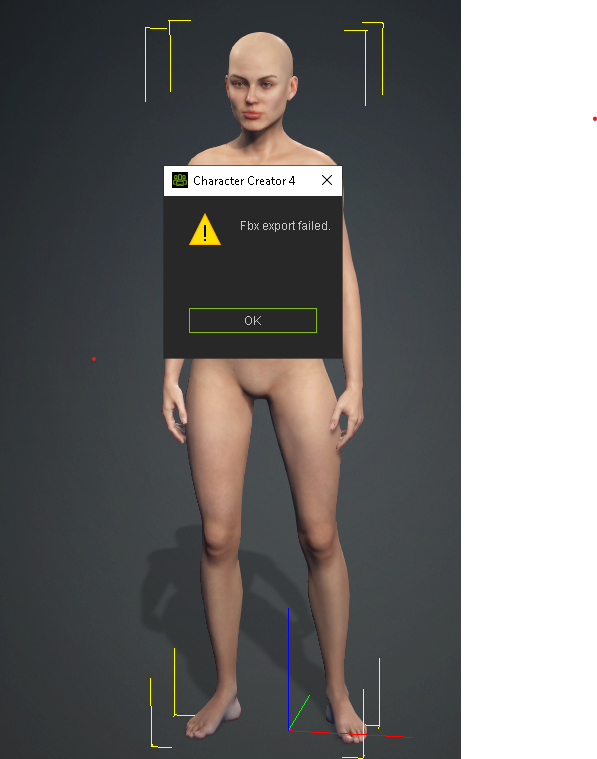
|
|
|
|
|
blindman
|
blindman
Posted 3 Years Ago
|
|
Group: Forum Members
Last Active: Last Year
Posts: 57,
Visits: 374
|
Lost file references after update to 4.2 the update to 4.2 is generating an error for the file locations of textures "AGAIN" CC is reporting the reference location for all the skin gen tools to (D:\Reallusion\00Content\Character Creator 3 Template\Texture\SkinTextures\SkinBase\ ( A LOCATION THAT DOES NOT, AND NEVER HAS EXISTED)
This is the third time in a row that this problem has occurred after an update ( I'm sorry to say this borders on incompetence) And again the error is generated every time a character is loaded despite the autosearch finding the right reference location on the previous character load. This time however the error is generated only with Characters created after the 4.2 update. All characters created before the update load without Error.
|
|
|
|
|
4u2ges
|
4u2ges
Posted 3 Years Ago
|
|
Group: Forum Members
Last Active: Last Month
Posts: 5.3K,
Visits: 16.8K
|
ElefantastiqueGames (2/25/2023)
Rendering in cc4 is very slow now. Even with or without wrinkle functionality. Can anyone confirm this? The render process itself is not slow (I did confirm that rendering a video). What slow, is render initializing. But since we render stills most of the time in CC, it takes enormous amount of time for each preview or export (30 sec as oppose to couple of sec before the upgrade). This is true for CC and iClone. Must be fixed. FT: https://www.reallusion.com/FeedBackTracker/Issue/Render-initializing-is-extremely-slow
|
|
|
|
|
3DChick
|
3DChick
Posted 3 Years Ago
|
|
Group: Forum Members
Last Active: Last Month
Posts: 411,
Visits: 2.0K
|
Hi all I'm getting really weird results with the Wrinkle editor/wrinkle pack. I add a wrinkle map (Deep_Bulky from the paid pack) to my character, edit a few settings in the wrinkle editor, and it works fine in animation mode in CC4 for a couple frames, but then it gets weird. Also renders weird, and then it stays weird until I deactivate the expression wrinkle editor. But then the wrinkles go away... I did post this to feedback tracker: https://www.reallusion.com/FeedBackTracker/Issue/Adding-Wrinkles-Eats-the-Diffuse-Map:
Is this a bug or am I doing something wrong? 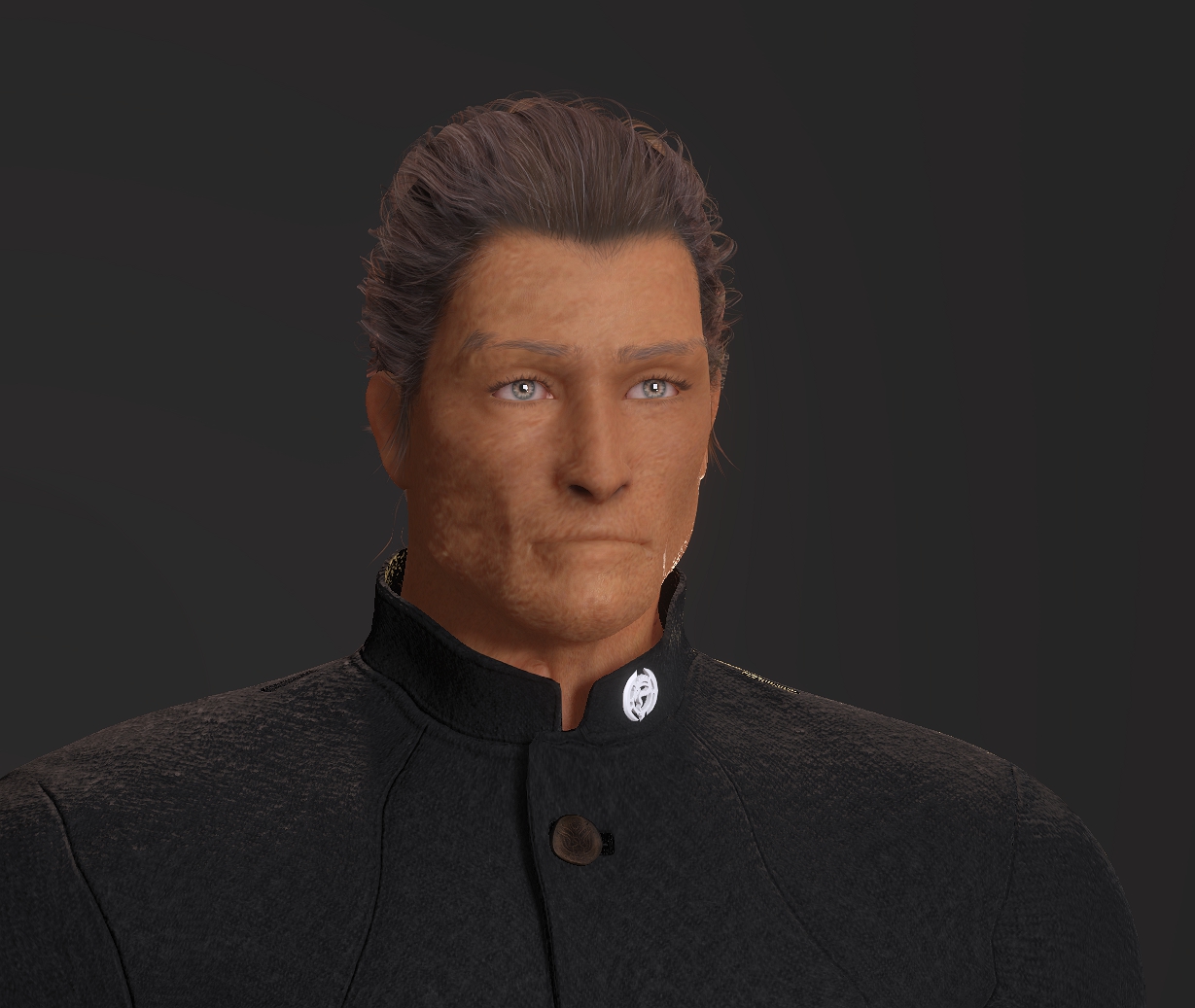
Life-long learner and having waaaay too much fun with iClone! Youtube Channel: 3DChick
Book Covers: www.significantcover.com Largely Unfinished Fiction: www.nemontgomery.com
|
|
|
|
|
TonyDPrime
|
TonyDPrime
Posted 3 Years Ago
|
|
Group: Forum Members
Last Active: 2 Years Ago
Posts: 3.4K,
Visits: 12.4K
|
ElefantastiqueGames (2/25/2023)
Rendering in cc4 is very slow now. Even with or without wrinkle functionality. Can anyone confirm this? Yes, I do confirm this. I'm thinking it may be the wrinkles, although not sure. Perhaps not optimized yet, because it would snap an image right back when rendered, and now seems to go through a processing calculation first.
|
|
|
|
|
TonyDPrime
|
TonyDPrime
Posted 3 Years Ago
|
|
Group: Forum Members
Last Active: 2 Years Ago
Posts: 3.4K,
Visits: 12.4K
|
Okay, so I have CC4 working again. Every it loads it oddly pops up with an error saying "Load GUI failed. Please reinstall iClone."
So I x-out, and then it continues to load.
But, I do not show any new wrinkle assets. What is interesting is the Reallusion Hub installer said it will install 4.2 GB of stuff, but then it does 2.1 GB or something, so I know the new assets are just not present.
So, wrinkle is indeed working, because even though the content for wrinkles is empty, when I load in a default character I can activate the wrinkles and they are there on the character. But just the profile presets and new wrinkle character versions are not in my CC4 content.
Now I already know, from past things like this, that it's something I could probably get in Content manager, but I just have no idea how to download it because it does not show it anywhere as a pack or Free resource where I could download it.
Any ideas where to get the new wrinkle content?...
EDIT - okay, so I saw in the Wrinkle announcement, Peter (RL) correctly mentioned what you can do:
(1) look in Template > Free Resource > Pack, and set filter to show ALL items.
(2) You will see already pre-installed items, but some have green arrow. These are ones requiring Update, as they have the new wrinkle content - double click on these
(3) Confirm in the Character>Wrinkle Expressions that new content is installed
Now, what made it confusing was that none of it outright says "Wrinkle", but it is the case case that the new Wrinkle content is stored in the already established CC4 Free Resource Pack items requiring update.
Once you do update you should see the new content.
|
|
|
|
|
TonyDPrime
|
TonyDPrime
Posted 3 Years Ago
|
|
Group: Forum Members
Last Active: 2 Years Ago
Posts: 3.4K,
Visits: 12.4K
|
Weirdest thing - I uninstalled and installed again, and it was working. Then it crashed, but then seemingly deleted the shortcut icon on my desk top, and after searching, seemingly self-deleted the main .exe application from the Bin64 folder, on its own.
I have never seen an application self-delete like that! I have to reinstall again.
:laugh:
|
|
|
|