|
Author
|
Message
|
|
revengepirate
|
revengepirate
Posted 4 Years Ago
|
|
Group: Forum Members
Last Active: Last Year
Posts: 6,
Visits: 93
|
Hi peter thanks for replying. The problem i'm having is the skingen tools folder isn't showing in the content manager. the actual skingen tools are located on my computer but cc4 doesnt see it and show it in the content manger. i'm so confused. Any help you could give would be great. Thanks. 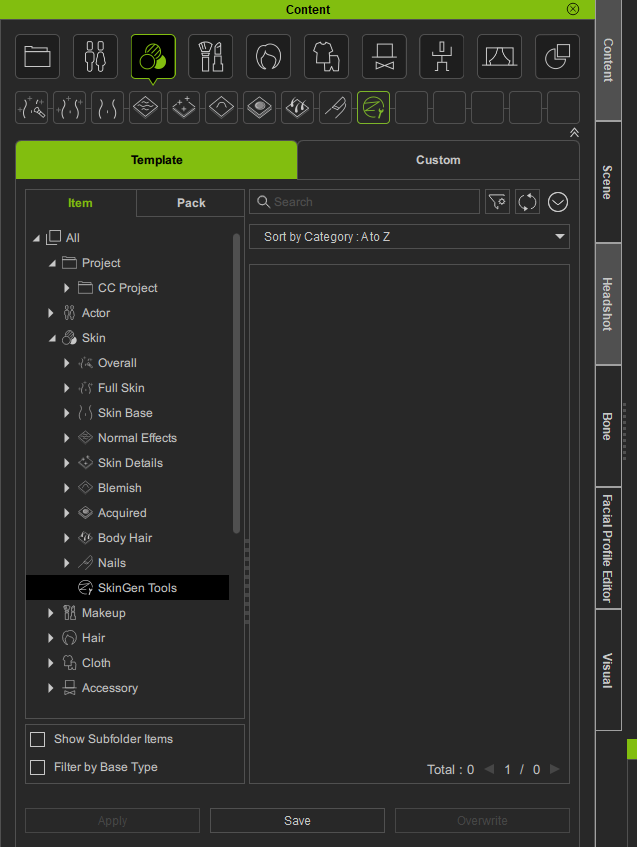 
|
|
|
|
|
revengepirate
|
revengepirate
Posted 4 Years Ago
|
|
Group: Forum Members
Last Active: Last Year
Posts: 6,
Visits: 93
|
oh here is a screenshot of the pack display 
|
|
|
|
|
revengepirate
|
revengepirate
Posted 4 Years Ago
|
|
Group: Forum Members
Last Active: Last Year
Posts: 6,
Visits: 93
|
oh here is a screenshot of the pack display
|
|
|
|
|
amtenorio2000
|
amtenorio2000
Posted 4 Years Ago
|
|
Group: Forum Members
Last Active: Last Year
Posts: 23,
Visits: 508
|
I am having exactly the same problem. Originally, I installed the Skingen premium package from the reallusion hub, but it is not present in the Content, under the skin packages. So I uninstall it from the Hub and then I tried to install using the link with the redemption code. I downloaded the installer y repeat the installation, but still, I cannot see the package. However, in the CC4 menu, under plugins, the SkinGen Premium is listed, but only the "About" dialog and manuals are available. 
|
|
|
|
|
amtenorio2000
|
amtenorio2000
Posted 4 Years Ago
|
|
Group: Forum Members
Last Active: Last Year
Posts: 23,
Visits: 508
|
I was able, apparently to solve the issue. Still not sure if this happen frequently or if it is the real reason of the problem. I was looking for the Reallusion plugin file, which is located at ..\Reallusion\Reallusion Templates\Skin There are several folders there, particularly three of them were of interest: Skin Base Skin Details SkinGen tool The folders are the same as in Character Creator 3. What I was wondering is if the "t" in "tool" should be capitalized. For operating systems like Windows for many operations there is no case sensitivity for folder and file names.
However as a programmer I know that sometimes in configuration scripts the distinction can be important. My Operating System is Windows 11 Pro in Spanish.
So I changed the "t" to uppercase (So, I renamed the folder to SkinGen Tool) and restarted the program, but nothing happened.
However, after refreshing the content, the missing package appeared and I was able to install it.
I am not sure if this was the solution as also I had sent an issue ticket to customer support.
Anyway, I put here this answer if it can be useful to somebody. Still I don't receive an answer from support.

|
|
|
|
|
sean_UK3D
|
sean_UK3D
Posted 4 Years Ago
|
|
Group: Forum Members
Last Active: 4 Years Ago
Posts: 3,
Visits: 20
|
I am having the exact same problem.
SkinGen Tools was working fine in CC3. When I upgraded to CC4 I now notice that SkinGen Tools are missing from the Content browswer and can't be found with the search.
There is no pack so it can't be refreshed. Inside the HUB I can see that I have SkinGen registered.
I have tried uninstalling and reinstalling.
I have tried the search for SkinGen Tools but no look.
CC4 is ignoring that I have SkinGen installed. I have contacted support but they are telling me to do what you guys suggest, and it's not happening.
Before I start poking around in the file system does anybody have any ideas what is going on?
Kind regards
Sean
|
|
|
|
|
wires
|
|
|
Group: Forum Members
Last Active: Last Year
Posts: 5.7K,
Visits: 26.5K
|
As has already been stated, SkinGen is not installed using the HUB. You need to install it using the Content Manager. Did you follow the link that Peter(RL) included in this post to redeem the free updates? Once you have done that follow my instructions in this post, and the information that Peter(RL) posted here. These steps have worked for every user so far without issues.
Gerry
System: Win 10 Pro (21H2), Asus X99-E WS, CPU i7-5930K -3,5 GHz, 32 GB DDR4 2666-16 RAM, NVidia GTX 1080 Ti GPU - 11 GB VRAM(Driver Studio-536.99), Samsung 850 Pro 512 GB SSD, 6 TB HD storage.
|
|
|
|
|
sean_UK3D
|
sean_UK3D
Posted 4 Years Ago
|
|
Group: Forum Members
Last Active: 4 Years Ago
Posts: 3,
Visits: 20
|
Hi all,
Thanks for your patience. I am not particularly technical but also not a novice.
I admit I missed the critical bit of information which was there was a free update to both SkinGen and as it happens Headshot. namely SkinGen for CC4 and Headshot for CC4. These sorted the problem so thanks to all here.
There is a but coming and you know it. But why did I have to wait to discover this trawling through forums? Why didn't reallusion let it's paying customers know such a fundamental update had been issued. Come to that why didn't support tell me there was an update when I queried the issue in the first place?
Wasn't the HUB suposed to be the place to check for updates etc? When did that change? Where now do we look for the latest updates and bugfixes?
I know email isn't popular but for some it's the one place I expect to be informed of updates. Most other software houses do it. Just saying.
Anyhow, thanks for helping and stay cool.
Sean
|
|
|
|
|
Peter (RL)
|
Peter (RL)
Posted 4 Years Ago
|
|
Group: Administrators
Last Active: 2 Years Ago
Posts: 23.1K,
Visits: 36.6K
|
sean_UK3D (7/19/2022)
Hi all,
But why did I have to wait to discover this trawling through forums? Why didn't reallusion let it's paying customers know such a fundamental update had been issued. Come to that why didn't support tell me there was an update when I queried the issue in the first place?
Hi Sean Emails were sent out when iClone 8 and CC4 released with a redeem link for the updated plug-ins included. We also placed a notification and link in everyone's Reallusion Account where they could redeem the updated plug-ins from there. Sadly from experience it seems many emails we send out end up being filtered as spam so unless you check your spam folder regularly then it is easy to miss them.
Peter
Forum Administrator www.reallusion.com
|
|
|
|
|
Rubberdog
|
Rubberdog
Posted 3 Years Ago
|
|
Group: Forum Members
Last Active: 2 Years Ago
Posts: 5,
Visits: 65
|
I managed to fix the problem via this forum and trail and error and a support ticket. What fixed it for me was to uninstall SkinGen and then remove the SkinGen Tools Folder. I then reinstalled Skingen Tools and it was fixed. Thanks for the help 
|
|
|
|