|
Author
|
Message
|
|
ronan.burgess
|
ronan.burgess
Posted 5 Years Ago
|
|
Group: Forum Members
Last Active: 2 Years Ago
Posts: 1,
Visits: 143
|
"Delete hidden mesh" seems to have disappeared from the export options. I can still hide parts of the body mesh but there is no longer an option to delete the hidden parts when exporting. It used to be at the bottom left of the export scene 
|
|
|
|
|
videodv
|
videodv
Posted 5 Years Ago
|
|
Group: Forum Members
Last Active: 3 Years Ago
Posts: 342,
Visits: 12.0K
|
Ghetzi (3/30/2021)
videodv (3/30/2021)
Ghetzi (3/29/2021)
videodv (3/24/2021)
When I try to add a beard or try to setup a new default project I get the following pop up. 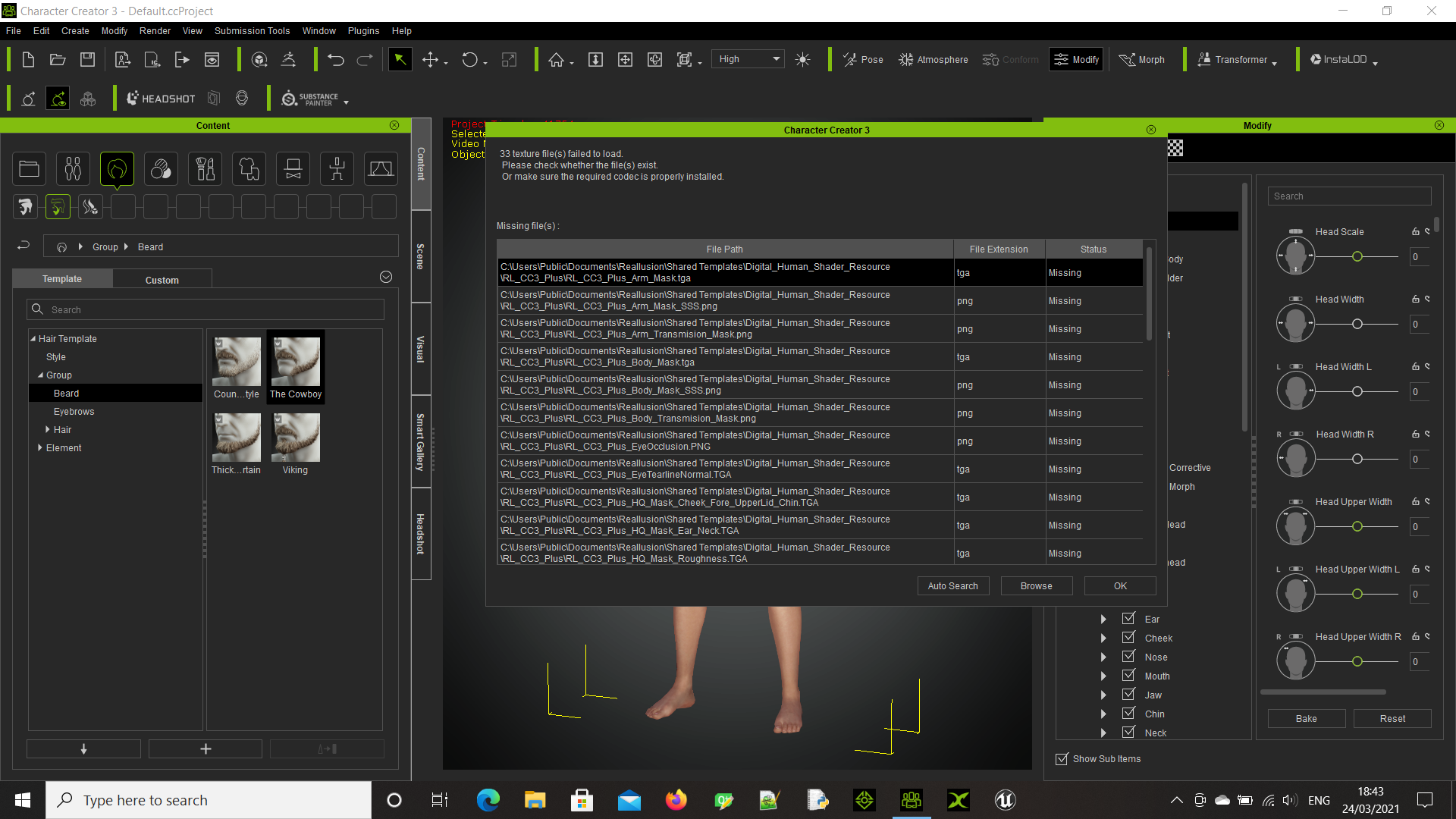 Chris. Just started working after the update and getting a similar result when I open a saved character. I really want to love CC3 and iC7, but there's always some problem that cuts into production time.  QUICK UPDATE: I hunted down all of the missing textures, reassigned them, and then saved the project. Unfortunately, got the exact same missing textures notification when I reloaded the save file. So apparently that's not a good work around. Been informed from the tracker to uninstall and reinstall CC3 Will checkout Iclone it self first to see if I need to do the same. Not really happy about this as installing an update should not require me to uninstall reinstall to get it to work. Chris. I got the same response and had the same issue with iC7. I agree with you, but the good news is that reinstalling worked at least. Hope the same for you. Thanks it worked for me too now to reinstall all the content. Chris
|
|
|
|
|
tantrum
|
tantrum
Posted 5 Years Ago
|
|
Group: Forum Members
Last Active: Last Year
Posts: 28,
Visits: 503
|
ronan.burgess (3/31/2021)
"Delete hidden mesh" seems to have disappeared from the export options. I can still hide parts of the body mesh but there is no longer an option to delete the hidden parts when exporting. It used to be at the bottom left of the export scene Hi, someone brought this up in the webinar tonight and pointed out that the dialog now doesn't fit everything inside the form that pops up, and it has a scrollbar to get to those (and other new) features. 
|
|
|
|
|
Igewere
|
Igewere
Posted 5 Years Ago
|
|
Group: Forum Members
Last Active: 5 Years Ago
Posts: 1,
Visits: 8
|
Same problem i'm having, i followed a fix for the smart gallery https://www.reallusion.com/FeedBackTracker/Issue/Problems-with-Smart-Gallery-Hotfix-zip , it worked, i could now download the new free beard and Hair files, but now i can't find smart gallery anymore
|
|
|
|
|
lthames
|
lthames
Posted 5 Years Ago
|
|
Group: Forum Members
Last Active: Last Year
Posts: 1,
Visits: 87
|
I found the problem with my export issues. Prior to me installing the pipeline extension, character creator v3.4 was working fine. As soon as install Character Creator 3 Pipeline Extension v3.4 on my system, Character Creator start to be unresponsive and the black dialog box appears and I had to close the program.
|
|
|
|
|
4u2ges
|
4u2ges
Posted 5 Years Ago
|
|
Group: Forum Members
Last Active: 2 Weeks Ago
Posts: 5.3K,
Visits: 16.8K
|
If you apply Motion+, which has custom face expression to a character, you cannot restore default expression anymore. You CAN restore the default pose but not the expression. Default Key button on Face Key applet does not work. Expression from Motion+ seems to be baked as default. (Same thing is in iClone) The only way to restore, is to take the character to iClone, split motion track and delete Expression key. FT: https://www.reallusion.com/FeedBackTracker/Issue/Default-Face-key-cannot-be-restored-after-applying-Motion
|
|
|
|
|
Jeasy
|
|
|
Group: Forum Members
Last Active: 2 Years Ago
Posts: 178,
Visits: 2.4K
|
After updating to CC and iClone an hour ago, The IRAY render issue is back with the eyebrows, beards and hair. In IRAY Renders, there is a black patch showing up, please check the screenshot below. Original CC Project on right and IRAY render window on the left. This render issue is in iClone and Character Creator. Also the Prime Hair Pack hair coulours change dramatically when in IRAY. Do we know how to fix this please @Peter(RL) 
|
|
|
|
|
wires
|
|
|
Group: Forum Members
Last Active: 2 days ago
Posts: 5.7K,
Visits: 26.5K
|
Jeasy (4/12/2021)
After updating to CC and iClone an hour ago, The IRAY render issue is back with the eyebrows, beards and hair. In IRAY Renders, there is a black patch showing up, please check the screenshot below. Original CC Project on right and IRAY render window on the left. This render issue is in iClone and Character Creator. Also the Prime Hair Pack hair coulours change dramatically when in IRAY.
Do we know how to fix this please @Peter(RL)
Have you read this thread on the issue?
Gerry
System: Win 10 Pro (21H2), Asus X99-E WS, CPU i7-5930K -3,5 GHz, 32 GB DDR4 2666-16 RAM, NVidia GTX 1080 Ti GPU - 11 GB VRAM(Driver Studio-536.99), Samsung 850 Pro 512 GB SSD, 6 TB HD storage.
|
|
|
|
|
Peter (RL)
|
Peter (RL)
Posted 5 Years Ago
|
|
Group: Administrators
Last Active: 2 Years Ago
Posts: 23.1K,
Visits: 36.6K
|
Character Creator 3.41 has now been released. Please continue to post any issues you may find first in the Feedback Tracker and then feel free to discuss in this thread. Thanks.
Peter
Forum Administrator www.reallusion.com
|
|
|
|
|
Jeasy
|
|
|
Group: Forum Members
Last Active: 2 Years Ago
Posts: 178,
Visits: 2.4K
|
wires (4/12/2021)
Jeasy (4/12/2021)
After updating to CC and iClone an hour ago, The IRAY render issue is back with the eyebrows, beards and hair. In IRAY Renders, there is a black patch showing up, please check the screenshot below. Original CC Project on right and IRAY render window on the left. This render issue is in iClone and Character Creator. Also the Prime Hair Pack hair coulours change dramatically when in IRAY.
Do we know how to fix this please @Peter(RL)
Have you read this thread on the issue? Thanks @wires. The other post was somewhat helpful, however seems this is an issue that needs fixing by RL for sure. As a workaround one could use it to fake a satisfactory result. Also another issue with IRAY, after rendering and trying to save, earlier we had PNG, JPG options now it is showing iMaterial :D LOL can't save the rendered image any more. Definately a BUG and needs to be fixed and updated. 
|
|
|
|