|
By Peter (RL) - 5 Years Ago
|
Dear Character Creator Users,
We have now released the 3.44 update for Character Creator 3 . However as always we do need your assistance to help us track down any remaining bugs, glitches or other issues.
Important: If you do find any bugs, issues or glitches in Character Creator 3.44, please can you report them first in the Feedback Tracker. Then feel free to discuss the issues in this thread but do try to include a link back to the original Feedback Tracker report or your tracker number.
As always it will help us greatly if we can keep all technical issue discussion in the one place (this thread). This will help the development team keep track of any problems.
Please try to provide your full system specifications and a detailed description of the problem when reporting issues and if possible try to include screenshots and/or a workflow video. If you can provide steps so we can try and reproduce the problem that really help too.
Many thanks and have fun with Character Creator. :)
|
|
By wires - 5 Years Ago
|
There is no CC 3.4 version area in the Feedback Tracker, and also no Smart Gallery area so I'll just post here.
The latest "Smart Gallery" version does not function in CC 3.4:
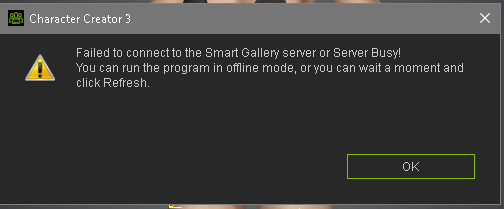
It does work in iClone 7.9.
|
|
By mrtobycook - 5 Years Ago
|
SmartHair doesn’t support physics? mike Kelly and I were asking about this on the CC3.4 announcement thread and Peter(RL) yelled at us lol.
So I’m posting here instead :)
SmartHair... physics? Etc. :)
|
|
By nildoessa - 5 Years Ago
|
Im having issues loading the free assets of smart-hair... its on a continuous loop.. the suggested workaround to activate in iclone does not work for me either
|
|
By Kelleytoons - 5 Years Ago
|
As I also posted there I'll remark here that I took one of the new Hair styles sold that said it didn't have physics and applied a weight map and it (mostly) worked. There were some small strands that floated free, but that's an issue with my design of the weight map and not the hair itself.
It does beg the question of WHY these hair styles were not provided with weight maps, at least the long ones. I don't know if RL was being lazy, or just forgetful or just not understanding that long hair like some of these without weight maps is useless, but they really ought to provide them.
At least we know there is nothing specific with the new hair system to prohibit hair physics.
|
|
By TonyDPrime - 5 Years Ago
|
There must be a lot of network traffic with updating, my iClone won't finish, it keeps pausing and sitting after about 20-25% done. Farthest I got was 89%...so close!
So I figured I would download directly from the member login page instead of the updater, and I can't even get in there.
After I type in log-in the info, the site just shows the circle spiraling over and over again. So I cannot login to the member forum.
Other sites working fine, but I guess I'm competing with everyone else network-wise now looking to get the updates.
Which, is all a good sign....it means business is good, which means great things for us content creators!
|
|
By TonyDPrime - 5 Years Ago
|
Some install anomalies -
Hub crashed 3 or 4 times during my install, and this one said that it had crashed at 97%...I was like "Fuuuuuuuuuu$$$######!!!!!!!"
But then, it miraculously then showed as installed!
So it proceeds, but this last thing it kept looping over and over again.
I just kept installing it over and over thinking it just needed to run its process, but the only way I was able to get it to end was to hit 'Cancel', and then it said something like 'You cancelled the install', then it said something like "click Finish to complete the installation". So I clicked 'Finish' when it then showed it, and it confirmed that the Faceware thing was installed....and then also a popup came up from the Hub that said "Installation Finished"
So......I guess it worked!
PS - the Member Login site to this point wouldn't let me log in.
|
|
By animagic - 5 Years Ago
|
|
mrtobycook (3/24/2021)
SmartHair doesn’t support physics? mike Kelly and I were asking about this on the CC3.4 announcement thread and Peter(RL) yelled at us lol.
Peter didn't yell, he hardly ever does, he just asked to report issues in the dedicated thread.
|
|
By Asolo - 5 Years Ago
|
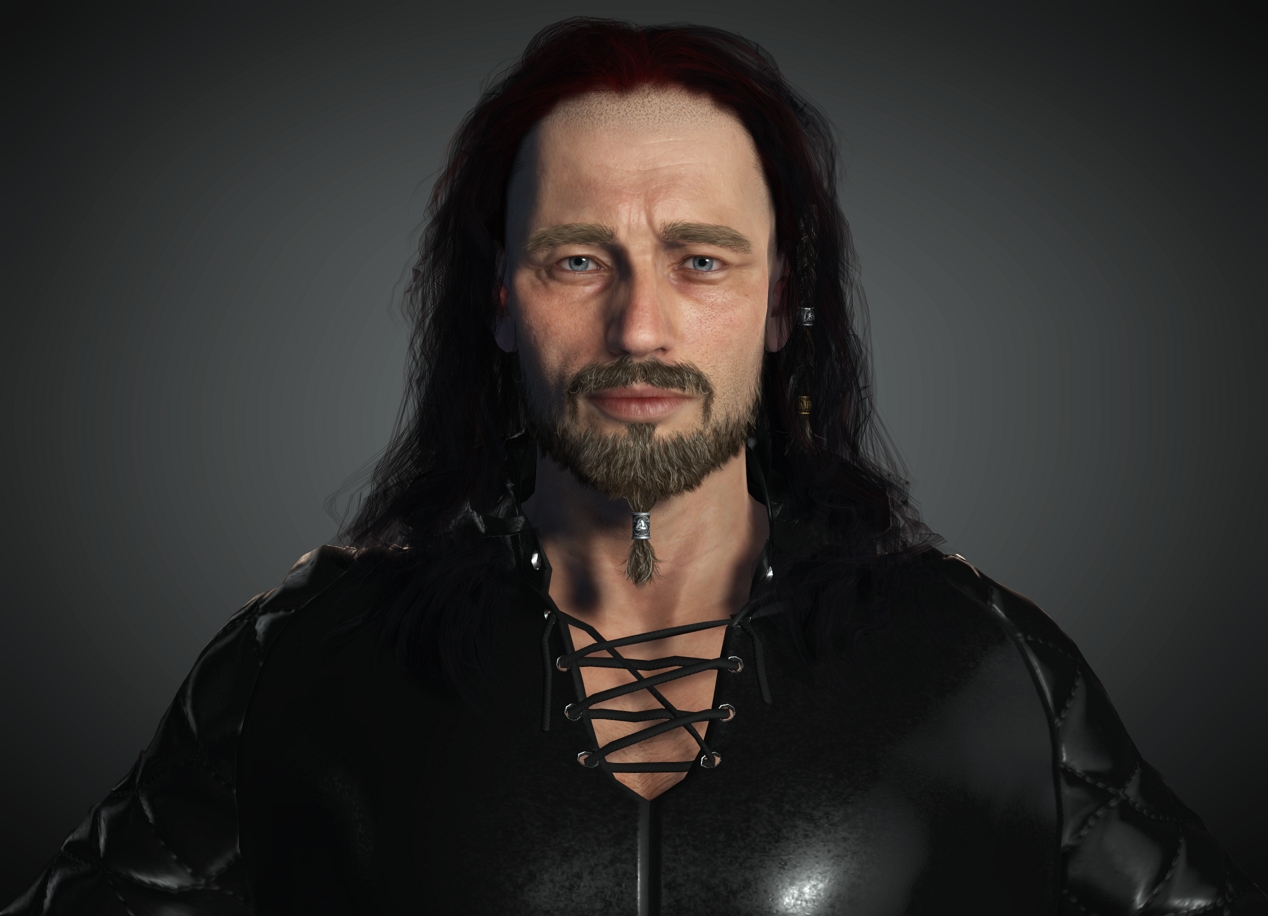
Good job Reallusion...really cool guys...tq
|
|
By animagic - 5 Years Ago
|
I had a problem that the Hub wouldn't even start the update process. I had the quit and log in again, after which it worked.
Some installs (3DXchange for example) require the user to acknowledge, which shouldn't be necessary.
|
|
By animagic - 5 Years Ago
|
wires (3/24/2021)
The latest "Smart Gallery" version does not function in CC 3.4: It does work in iClone 7.9.
I have the same problem. I hoped that that gets fixed quickly.
|
|
By videodv - 5 Years Ago
|
When I try to add a beard or try to setup a new default project I get the following pop up.
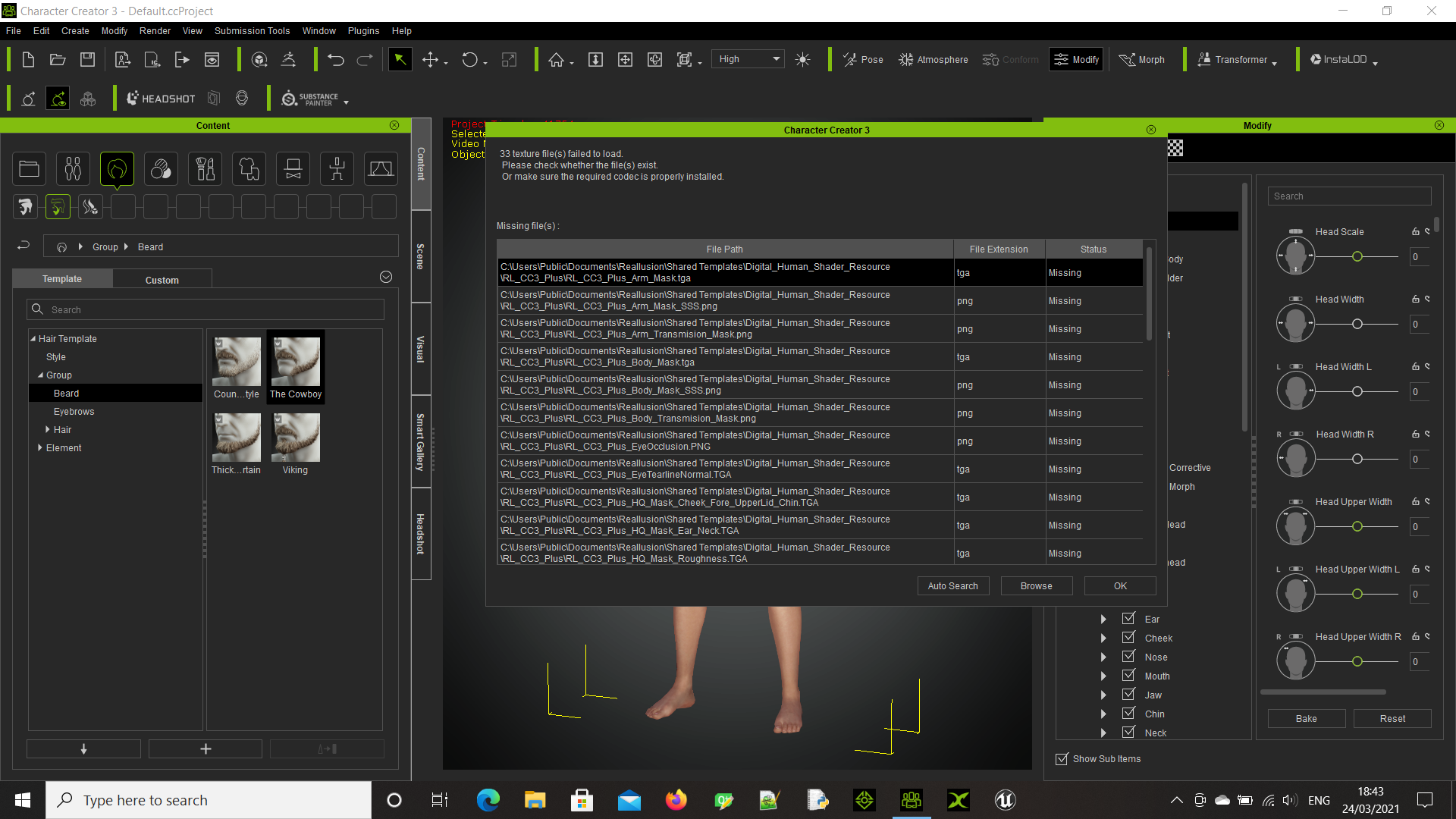
Chris.
|
|
By nem3d - 5 Years Ago
|
Hello all. I just found this.
When exporting to Unreal Engine, CC3 is no longer deleting hidden faces under clothing. Is this feature going to be re-added or how are we supposed to export meshes without the faces covered by clothing?
|
|
By StyleMarshal - 5 Years Ago
|
|
It does , scroll down in the Export settings and tick "Delete Hidden Faces" , the window gets larger.
|
|
By nem3d - 5 Years Ago
|
|
Thanks a lot. I didn't notice the window was scrollable. Scrollable pop-up windows are confusing to me.
|
|
By TonyDPrime - 5 Years Ago
|
This is a more genuine CC3.4 release issue:
I imported a Daz G8F-Default via Transformer and then started using the nex ExPlus facial, and the extreme angry gave avatar a glitch.
It exists between 85-100%.
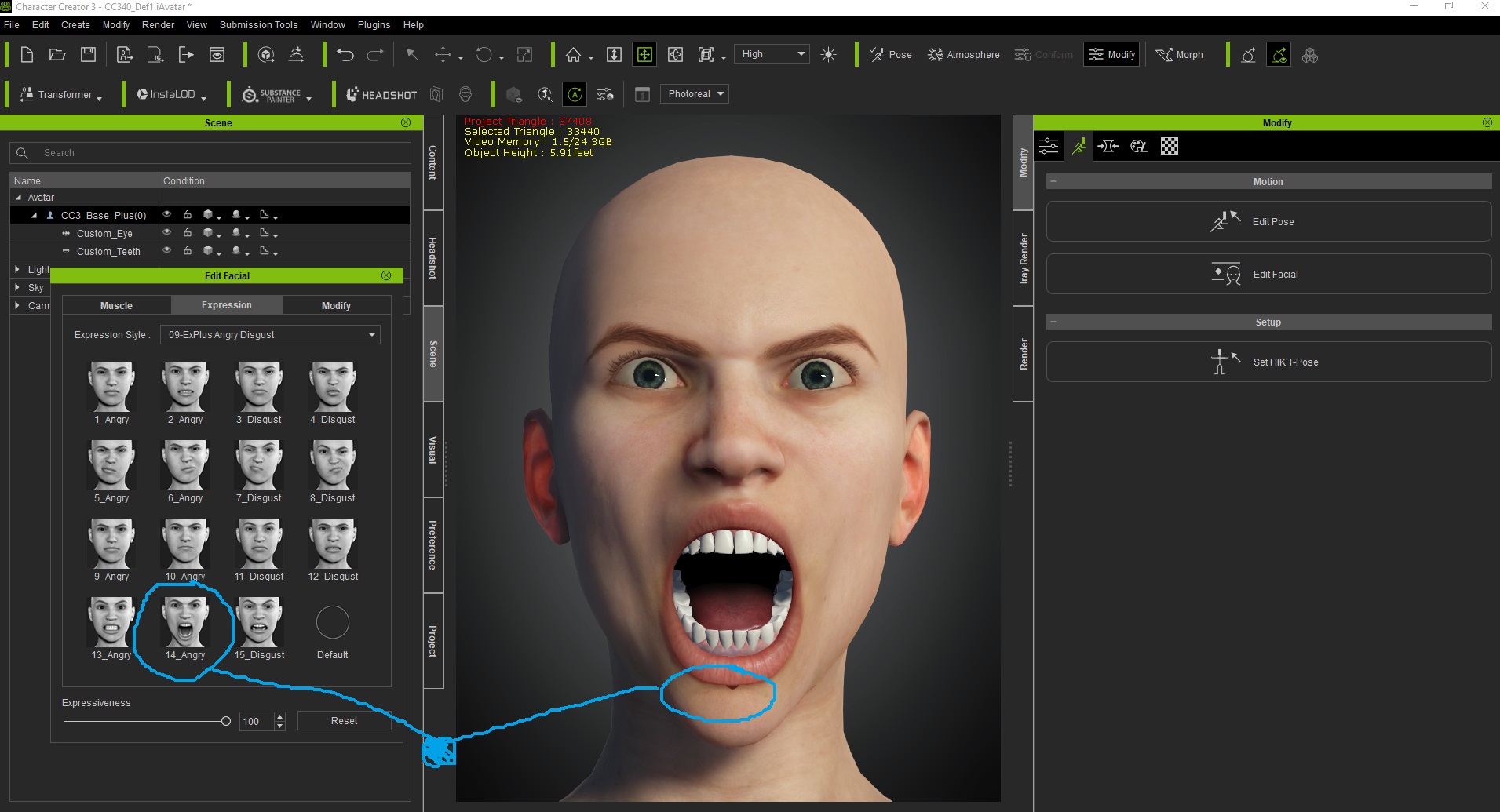
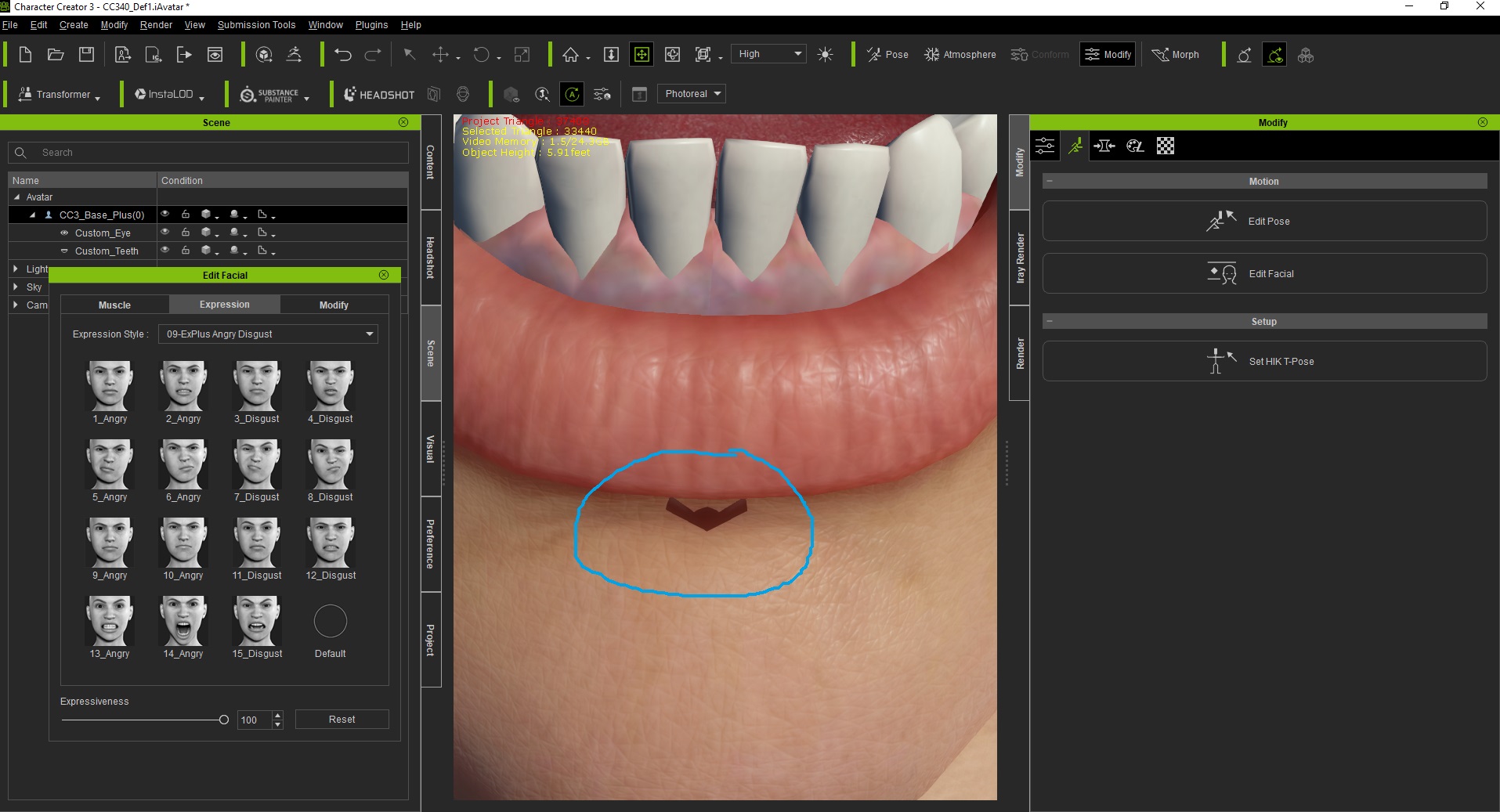
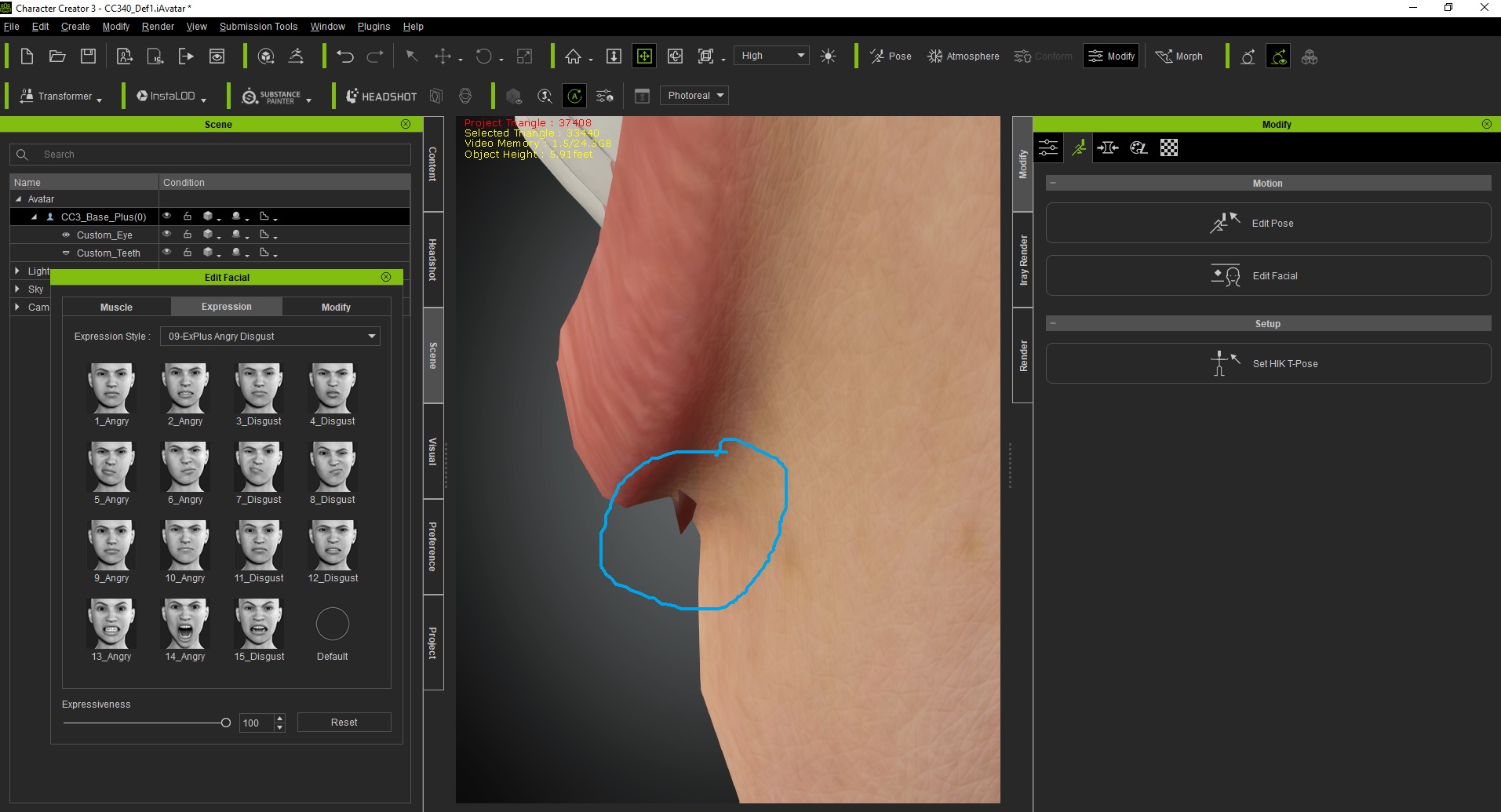
I tried to isolate via the mesh editor, but I couldn't select them as faces. I also tried adjusting 2-sided and it made it slightly smaller, but it is still there.
But when I blank-out the Face texture it also gets blanked out, so it is the head mesh.
It looks like a B52 stealth bomber - like maybe it is tiny humans who have covertly landed on her face, and she is really a giant alien all along....!!!!
|
|
By Amper Sand - 5 Years Ago
|
@TonyDPrime
You have to slightly adjust the teeth or jaw depth (sorry I forgot which). I know for sure because I encountered the same issue in the past CC versions.
|
|
By Jeasy - 5 Years Ago
|
Trying to apply eyebrows, hair, beard, keep getting the update morph list message and nothing happens after updating the morph list. Stuck in a loop.


|
|
By Jeasy - 5 Years Ago
|
Trying to apply eyebrows, hair, beard, keep getting the update morph list message and nothing happens after updating the morph list. Stuck in a loop.
|
|
By Tigernaut - 5 Years Ago
|
For some reason, some of the main free hair assets applied individually won't work. It keeps telling me this...(picture below) or tells me the following...
"The installation is finished. The installed (or uninstalled packs include morph sliders.
It may take some time to update your morph list. Would you like to process it now?"
I click OK.. It takes its time then it finishes, but when I try to apply them again the same message pops up. it's just a continuous loop.
BTW The purchased hair assets do work but not the free 3.4 updated ones.

|
|
By Peter (RL) - 5 Years Ago
|
Jeasy (3/24/2021)
Trying to apply eyebrows, hair, beard, keep getting the update morph list message and nothing happens after updating the morph list. Stuck in a loop.
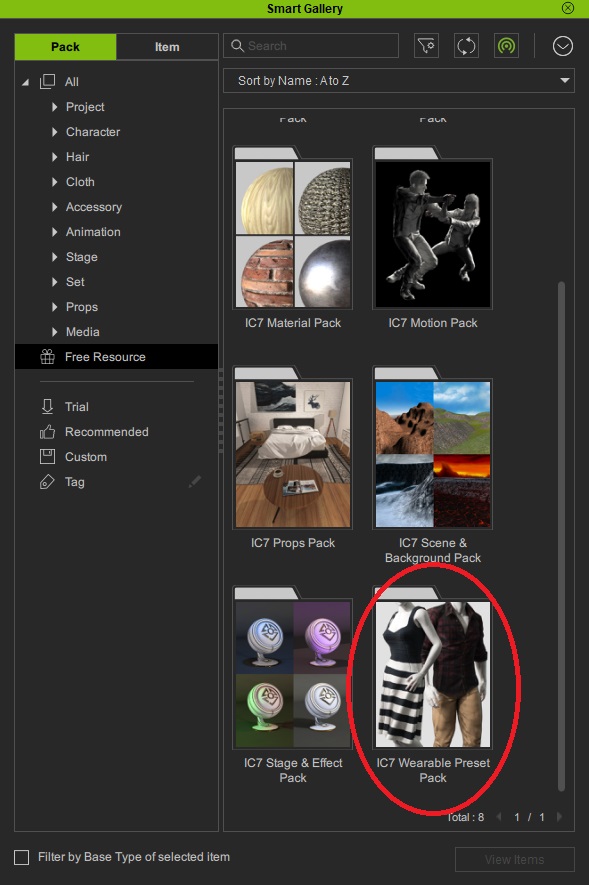
Unfortunately there is a known issue with Smart Gallery in Character Creator 3.4. We hope to get this fixed soon. In the meantime, if you have iClone 7, please update the "IC7 Wearable Preset Pack" in your iClone 7 Smart Galley and this will make the new Smart Hair content available in Character Creator 3.4.
|
|
By Jeasy - 5 Years Ago
|
Applying the new eyebrows and trying to render in Iray gives this effect. This is specific to the new pack and the effects / components available in the packs for eyebrows, beards etc.

|
|
By TonyDPrime - 5 Years Ago
|
|
ampertox (3/24/2021)
@TonyDPrime
You have to slightly adjust the teeth or jaw depth (sorry I forgot which). I know for sure because I encountered the same issue in the past CC versions.
Thanks, that indeed can obscure it, but it is artificially hiding it. If you push the jaw out then it no longer matches the head shape of the figure face in Daz.
I know what you mean though, on a timeline you could obscure that part by morphing it out, so I appreciate the suggested workaround.
But I think we can push to get it fixed, they can likely easily fix a glitch like this. They just probably did not notice or come across it yet, ie - I hadn't seen it yet myself.
|
|
By megaoutput - 5 Years Ago
|
|
I am not seeing the ic7 wearable preset pack what should I do.... I am stuck in the loop
|
|
By Peter (RL) - 5 Years Ago
|
|
megaoutput (3/24/2021)
I am not seeing the ic7 wearable preset pack what should I do.... I am stuck in the loop
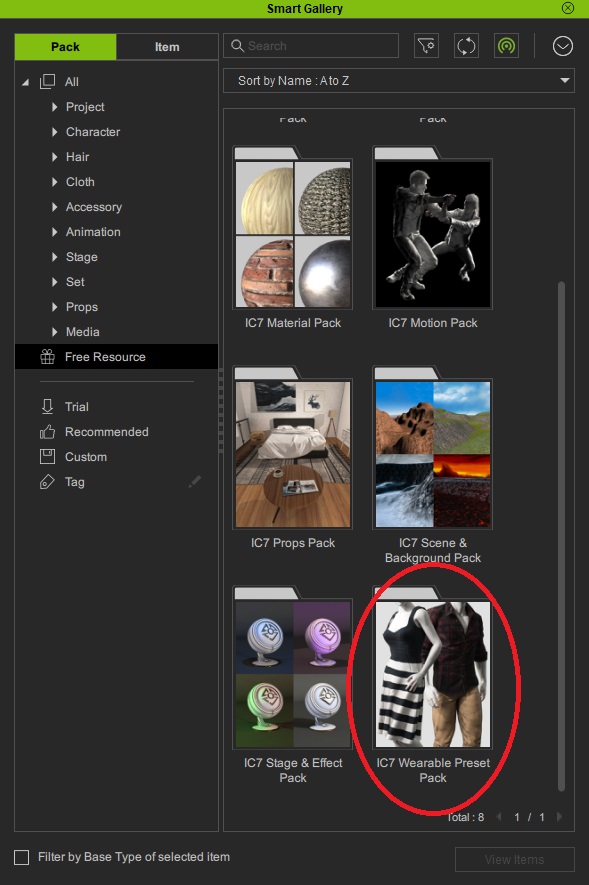
The "IC7 Wearable Preset Pack" is in the "Free Resource" section of Smart Gallery. If you don't have it, please make sure your Smart Gallery is Online and click Refresh. If that doesn't solve the problem, please post a screenshot showing what is displaying in your iClone 7 Smart Gallery "Free Resource" section. Thanks.
|
|
By megaoutput - 5 Years Ago
|
I have tried refreshing and restarting my computer however i am not seeing the wearable item.
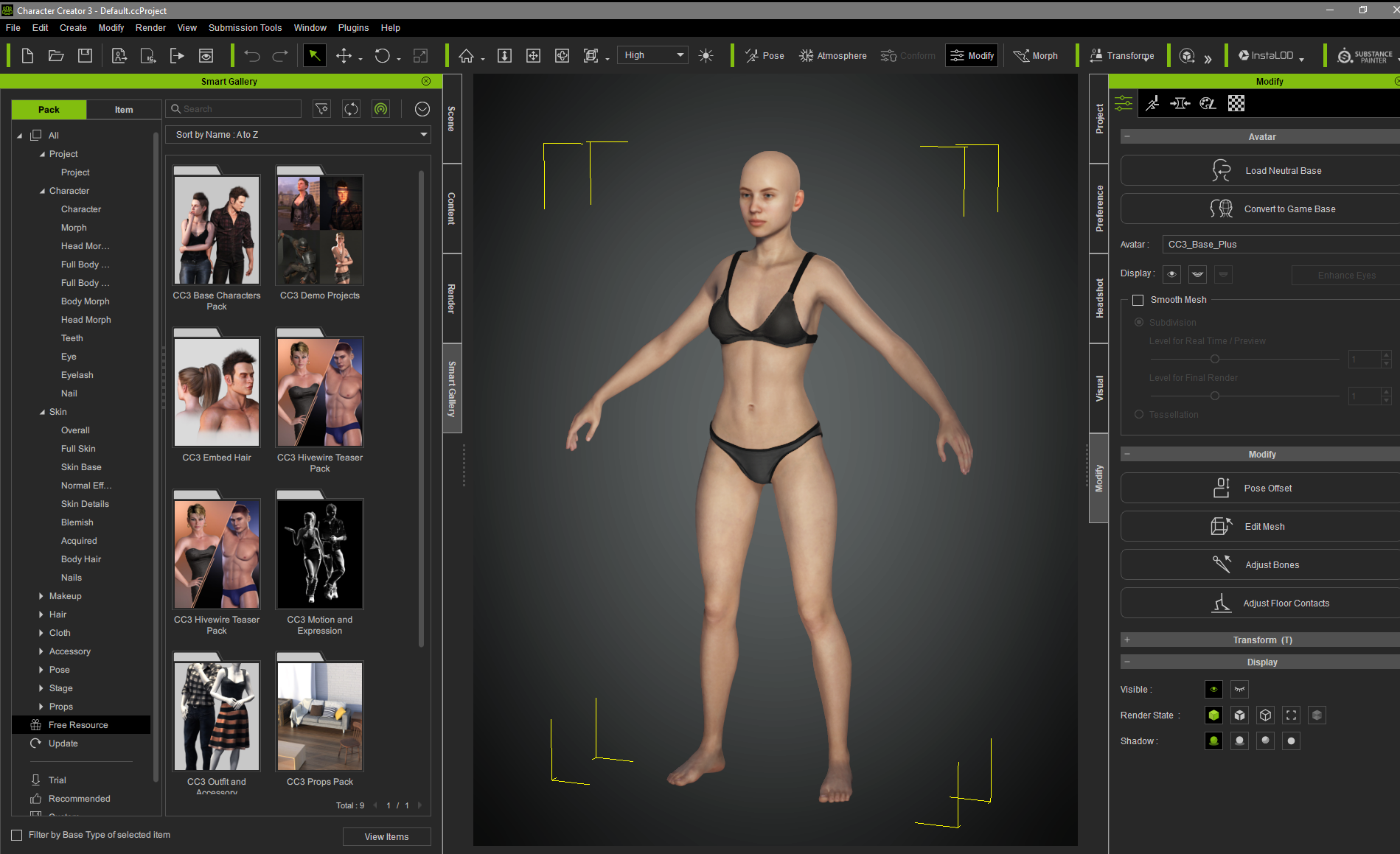
|
|
By Slayerazazel - 5 Years Ago
|
megaoutput (3/24/2021)
I have tried refreshing and restarting my computer however i am not seeing the wearable item.
In iClone 7, not CC3.
|
|
By Slayerazazel - 5 Years Ago
|
Peter (RL) (3/24/2021)
megaoutput (3/24/2021)
I am not seeing the ic7 wearable preset pack what should I do.... I am stuck in the loop The "IC7 Wearable Preset Pack" is in the "Free Resource" section of Smart Gallery. If you don't have it, please make sure your Smart Gallery is Online and click Refresh. If that doesn't solve the problem, please post a screenshot showing what is displaying in your iClone 7 Smart Gallery "Free Resource" section. Thanks.
This doesn't seem to work Peter. I've updated the iclone 7 wearable preset pack (uninstalled and re installed through smart gallery, as it wasn't showing an update option) and still getting the CC3 morph slider issue and the beards are not working in CC3.
Is there meant to be new items in the iclone 7 wearable preset pack? Because there isn't for me. Is there a download link that you can provide for the people having issues, like myself. So we can just direct download it without smart gallery. Also, the idea of smart gallery is great, if it worked all the time. Which it doesn't, i've had poor experiences with it, and also people purchasing my content have had issues with it. Resulting in me telling them to download the old way with the content downloader and then that resolves their issues. So the smart gallery not working isn't a surprise at all.
|
|
By chris_20150307160451360 - 5 Years Ago
|
|
I too am stuck ion the endless loop of "updating morphs" and I noticed another user posting this issue too. Hopefully a fix is in the works?
|
|
By megaoutput - 5 Years Ago
|
|
it worked thanks!!!!!!!!!!!!!!!!!!!!!!
|
|
By Jeasy - 5 Years Ago
|
 Ok, so on stress testing the new Prime Hair Pack and Beard and Brow generator Packs. seems IRAY doesn't understand the material presets for the new accessories being added. Try rendering them in Iray and they show up with Black Patch behind and do not render properly. Tested every material preset, For hair, beads, eyebrows etc. They look great on screen and transfer animation beautifully but running an iray render in CC3.4 or iClone 7.9 will result in the illusion being broken and there is black path. See my previous post on the forum for example screenshot. Ok, so on stress testing the new Prime Hair Pack and Beard and Brow generator Packs. seems IRAY doesn't understand the material presets for the new accessories being added. Try rendering them in Iray and they show up with Black Patch behind and do not render properly. Tested every material preset, For hair, beads, eyebrows etc. They look great on screen and transfer animation beautifully but running an iray render in CC3.4 or iClone 7.9 will result in the illusion being broken and there is black path. See my previous post on the forum for example screenshot.
Need an update patch to be released for these packs at the earliest or the forums are going to be inundated by tickets. @peter-RL
|
|
By 4u2ges - 5 Years Ago
|
Balbo beard from purchased hair pack is in Trial mode.
Uninstalled/installed the pack already. Run all available DRM options from Help menu.
(don't dare say a word about my beautiful screenshot :P)
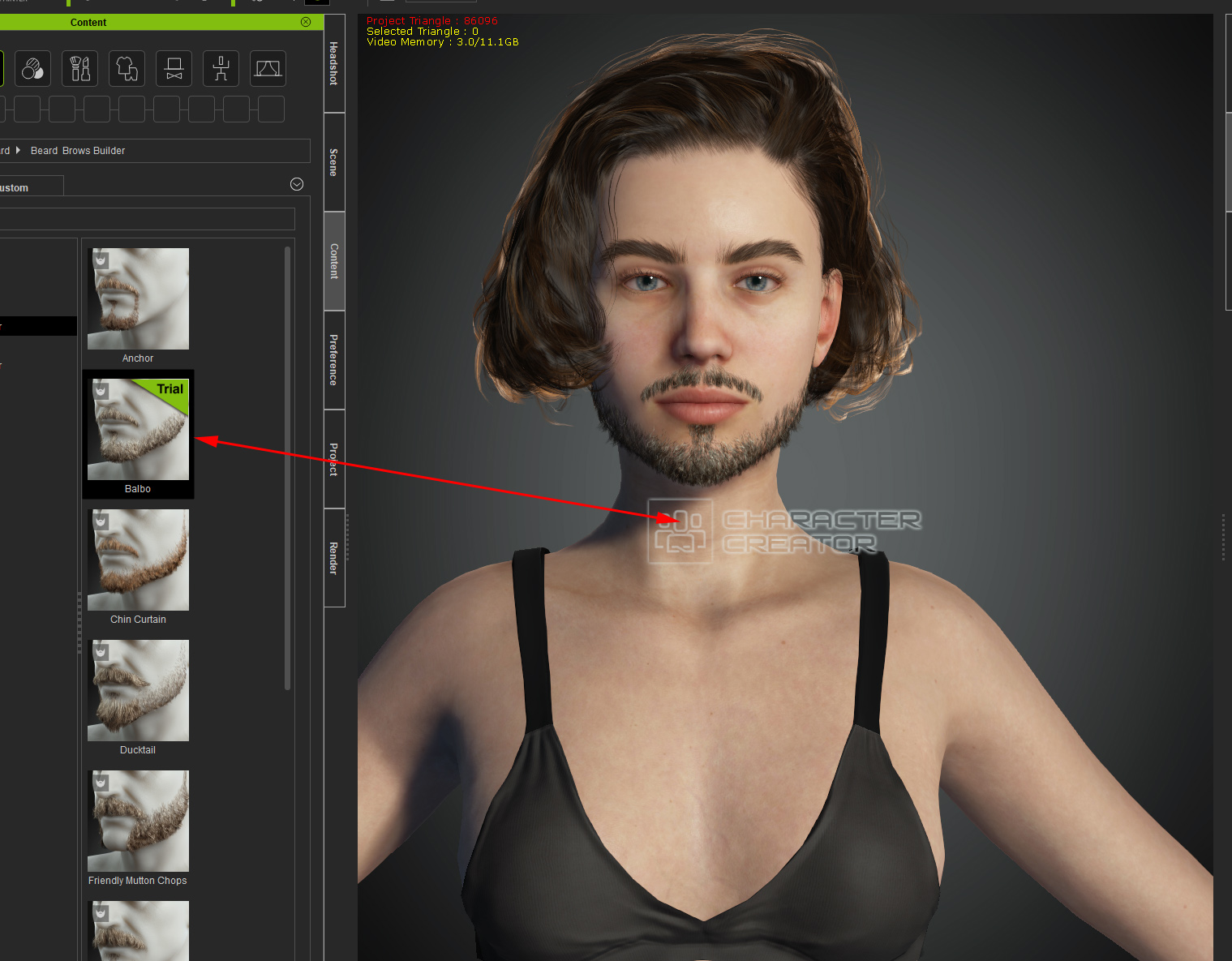
Moreover I get this in my account. That piece is part of the mentioned Balbo beard.
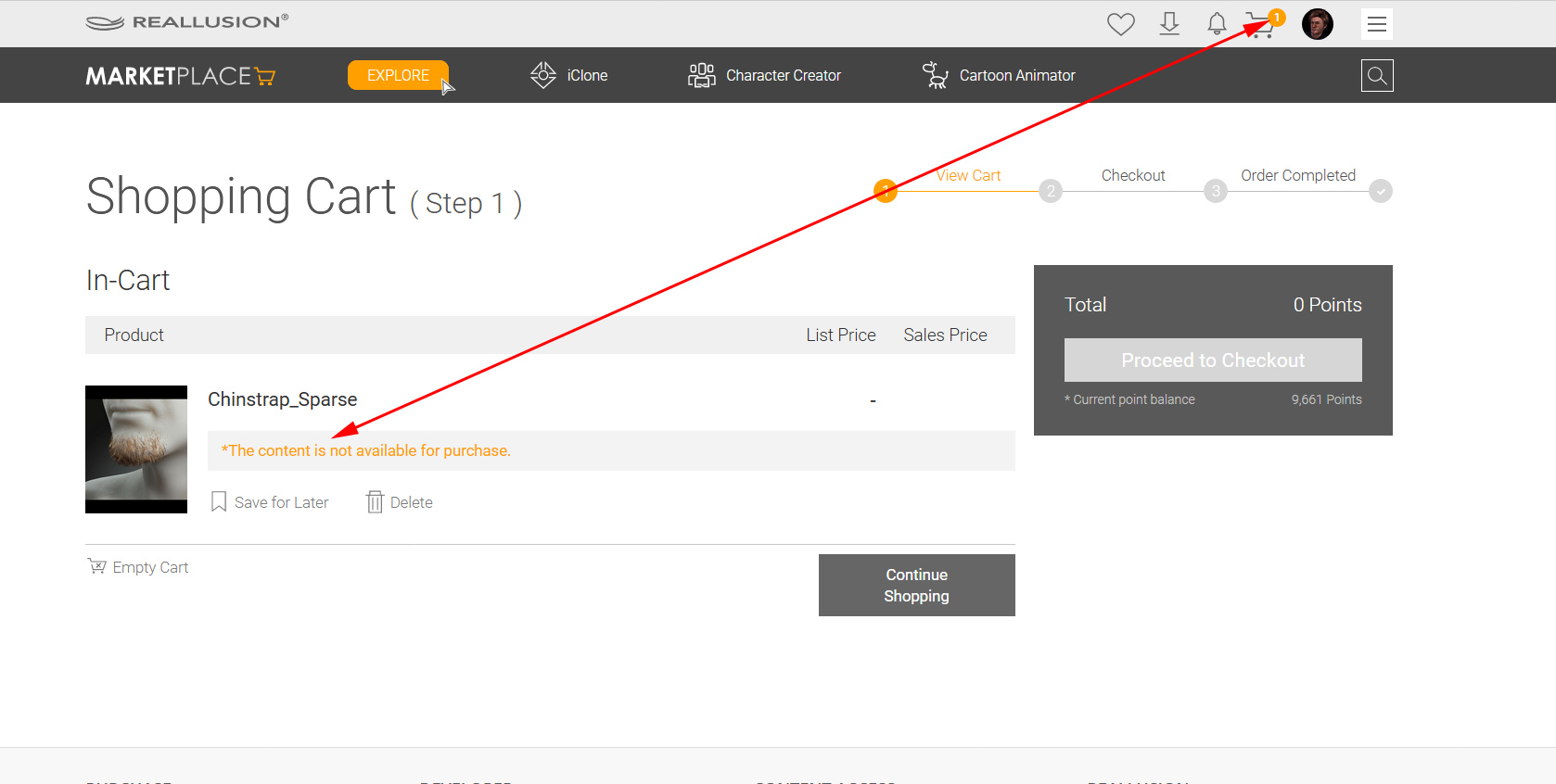
Please fix, or let me know how to fix it
|
|
By 4u2ges - 5 Years Ago
|
Jeasy (3/25/2021)
Ok, so on stress testing the new Prime Hair Pack and Beard and Brow generator Packs. seems IRAY doesn't understand the material presets for the new accessories being added. Try rendering them in Iray and they show up with Black Patch behind and do not render properly. Tested every material preset, For hair, beads, eyebrows etc. They look great on screen and transfer animation beautifully but running an iray render in CC3.4 or iClone 7.9 will result in the illusion being broken and there is black path. See my previous post on the forum for example screenshot. Need an update patch to be released for these packs at the earliest or the forums are going to be inundated by tickets. @peter-RL
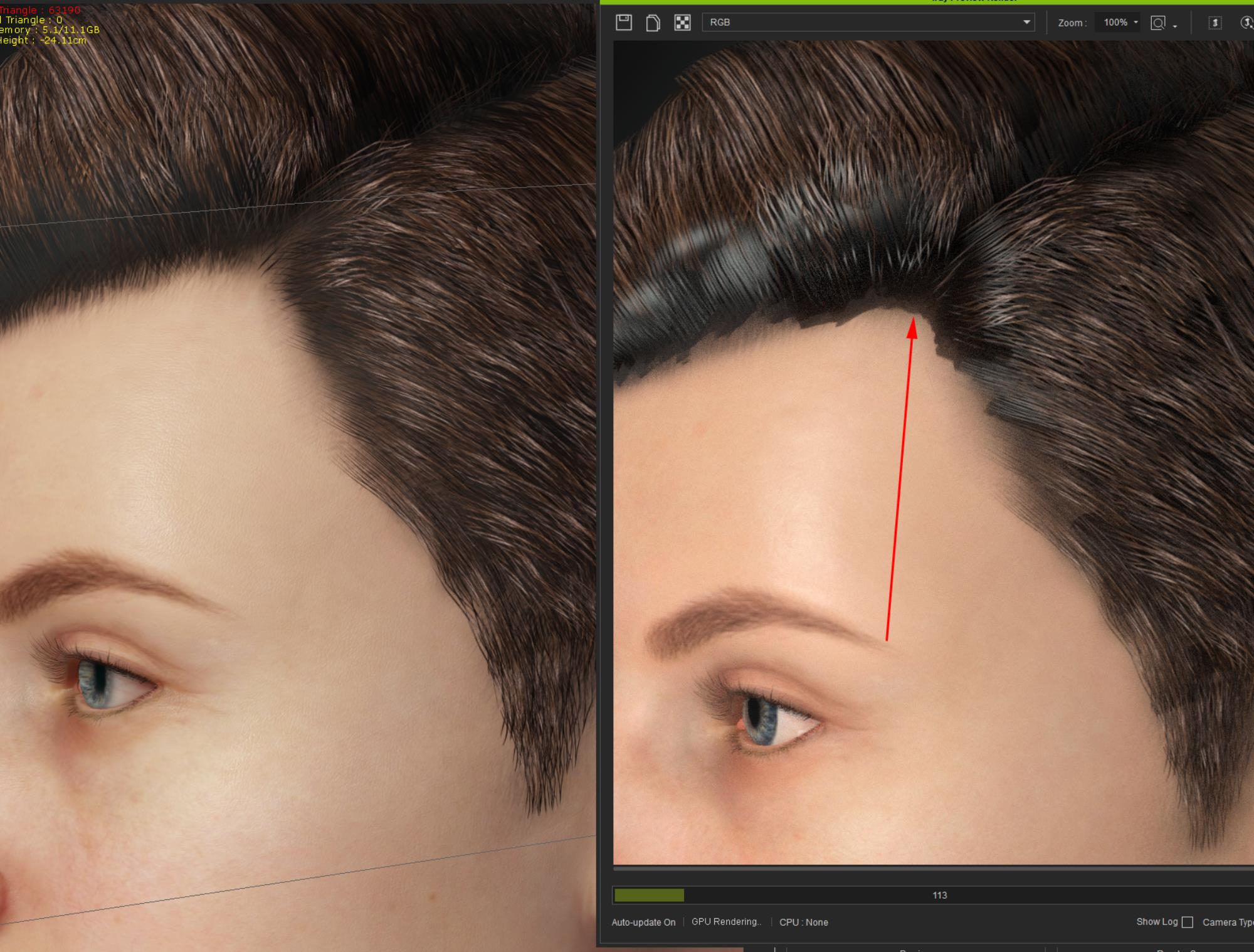
Wow! Is that a problem with shadows? Shadow supposed to be softer as you decrease opacity. Not the case with Hair shadows. It stays as is even if you completely hide hair with opacity slider:
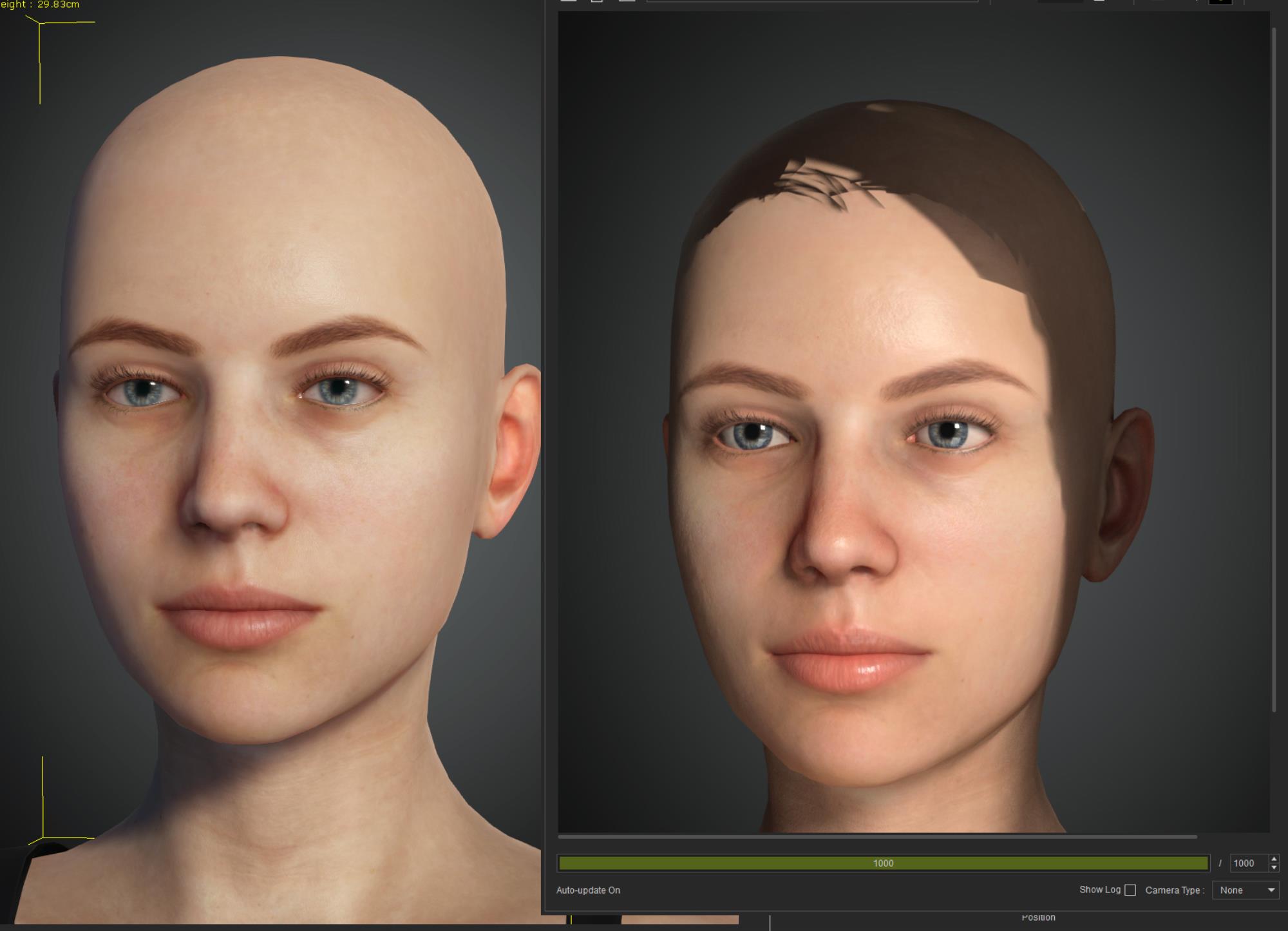
Even Regular hair looks bad.
|
|
By gordryd - 5 Years Ago
|
@4u2ges - I noticed this on the Beard page in the Content Store -- seemed odd that this would be "derivative" since this is brand new content. I think this base content is the same one you are having trouble with (if you click on the orange font link it goes to an empty product page...)
Note: This is a derivative content from the following base content. Please make sure you have the base content for this content to function as a full version. A derivative content can not be uploaded for sale unless it is modified from a base content. Chinstrap_Sparse
|
|
By Asolo - 5 Years Ago
|
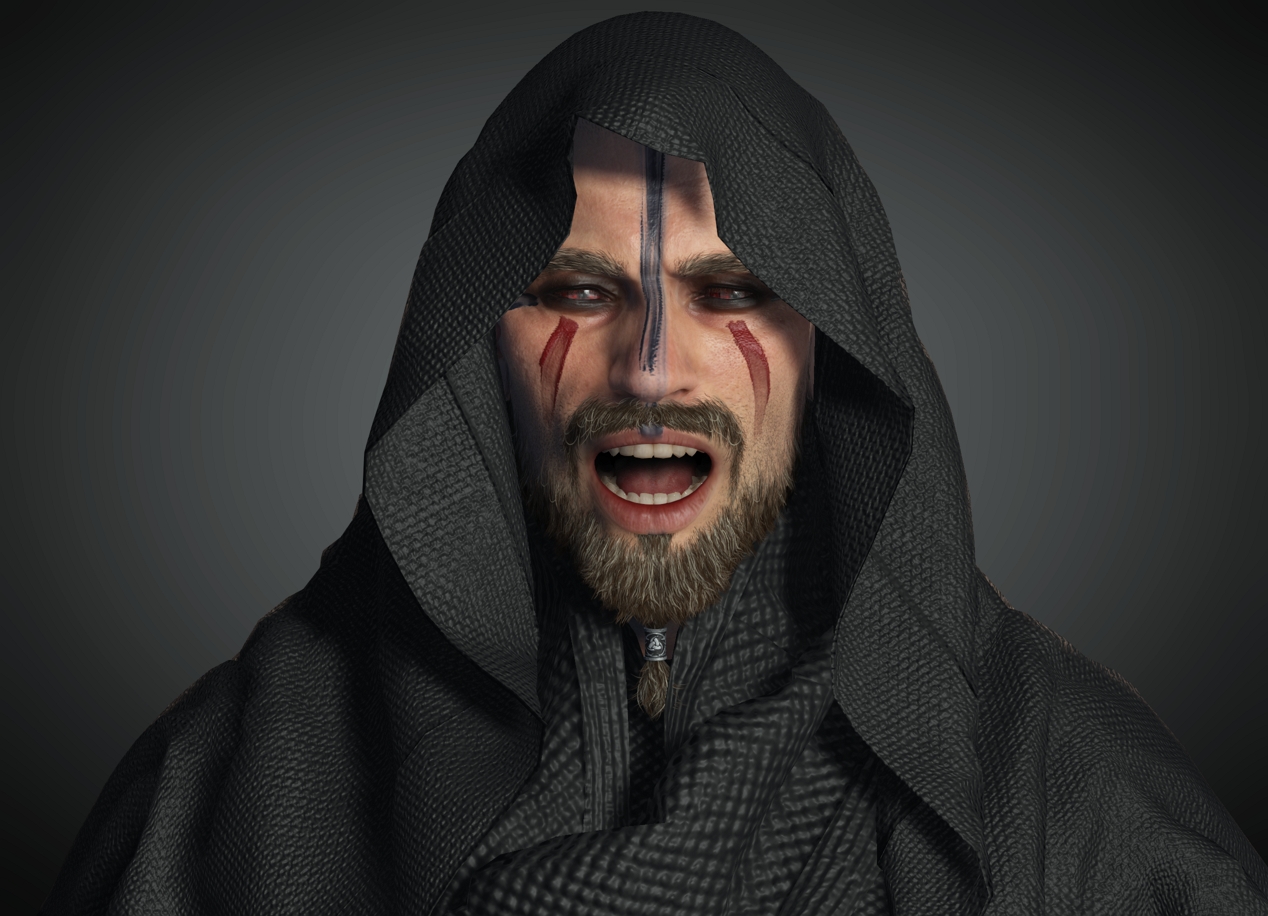
Everything works great for me only CC3 Hirewire Teaser Pack i also got double but uninstall first with smart gallery and installed back with smart gallery it work great back
|
|
By 4u2ges - 5 Years Ago
|
gordryd (3/25/2021)
@4u2ges - I noticed this on the Beard page in the Content Store -- seemed odd that this would be "derivative" since this is brand new content. I think this base content is the same one you are having trouble with (if you click on the orange font link it goes to an empty product page...) Note: This is a derivative content from the following base content. Please make sure you have the base content for this content to function as a full version. A derivative content can not be uploaded for sale unless it is modified from a base content. Chinstrap_Sparse
lol, yeah that is true, just looked at it. That is the one. Should not be derivative from some base content. I think it is just an honest error in content and would be fixed.
|
|
By 4u2ges - 5 Years Ago
|
Jeasy (3/25/2021)
Ok, so on stress testing the new Prime Hair Pack and Beard and Brow generator Packs. seems IRAY doesn't understand the material presets for the new accessories being added. Try rendering them in Iray and they show up with Black Patch behind and do not render properly. Tested every material preset, For hair, beads, eyebrows etc. They look great on screen and transfer animation beautifully but running an iray render in CC3.4 or iClone 7.9 will result in the illusion being broken and there is black path. See my previous post on the forum for example screenshot. Need an update patch to be released for these packs at the earliest or the forums are going to be inundated by tickets. @peter-RL
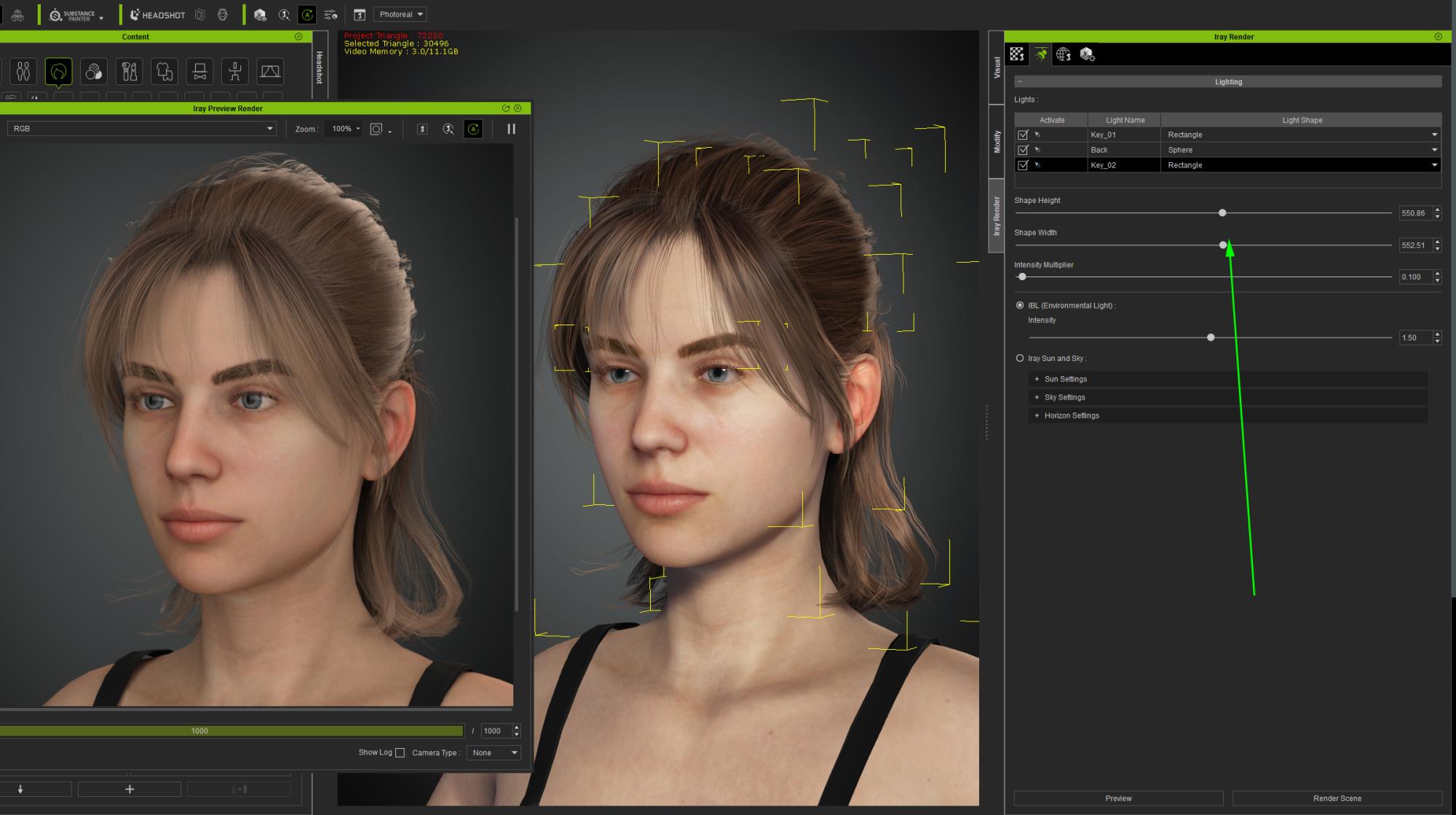
Oh boy, I forgot. You have to totally increase all lights shapes to soften the shadows in Iray. I never payed attention to shapes size before, because it was probably high enough for good, soft shadows. In this version it is realtively small and causing trouble.
RL, please reset Iray light shapes to optimal values!
|
|
By animagic - 5 Years Ago
|
In CC, under the Hair Template, I am not able to access any of the new content (Eyebrows, Beard). CC just hangs and I have to kill it.
This is probably related to Smart Gallery not working?
|
|
By gordryd - 5 Years Ago
|
|
@TonyDPrime - The Facial Editor 'glitch' is not just isolated to Daz characters. I loaded the provided Caleb CC3+ character and ran through the presets. >50% of the expressions have 'poke-through' around the mouth when the level is set to 100%.
|
|
By Jeasy - 5 Years Ago
|
Your IRAY render looks much better and not like what I'm getting as results. Did you figure out what is causing those harsh shadows etc? Could you possibly share your settings as a work around please.
4u2ges (3/25/2021)
Jeasy (3/25/2021)
Ok, so on stress testing the new Prime Hair Pack and Beard and Brow generator Packs. seems IRAY doesn't understand the material presets for the new accessories being added. Try rendering them in Iray and they show up with Black Patch behind and do not render properly. Tested every material preset, For hair, beads, eyebrows etc. They look great on screen and transfer animation beautifully but running an iray render in CC3.4 or iClone 7.9 will result in the illusion being broken and there is black path. See my previous post on the forum for example screenshot. Need an update patch to be released for these packs at the earliest or the forums are going to be inundated by tickets. @peter-RL Oh boy, I forgot. You have to totally increase all lights shapes to soften the shadows in Iray. I never payed attention to shapes size before, because it was probably high enough for good, soft shadows. In this version it is realtively small and causing trouble. RL, please reset Iray light shapes to optimal values!
|
|
By Kelleytoons - 5 Years Ago
|
|
I'll post this in the FT as well, but if you export an avatar from CC3.4 with physics maps on clothing into iClone they do NOT come across (so no physics on clothing in iClone). You need to reload the maps. I didn't try to see if they disappear again upon editing in Character Creator (from iClone) but the devs can test this part out. This is a new bug because it used to work just fine.
|
|
By donderhaas - 5 Years Ago
|
|
nildoe (3/24/2021)
Im having issues loading the free assets of smart-hair... its on a continuous loop.. the suggested workaround to activate in iclone does not work for me either<br/>
+1 I have the same issue - when I try to add hair elements via "Content" I am taken to Smart Gallery. Smart Gallery Embedded hair only contains the prev version hair.
|
|
By 4u2ges - 5 Years Ago
|
|
Could you possibly share your settings as a work around please.
That is what I have shown there with green arrow at the screenshot :)
|
|
By facr73 - 5 Years Ago
|
Hi. Mike.
That also happened to me in the previous version.
|
|
By facr73 - 5 Years Ago
|
donderhaas (3/25/2021)
nildoe (3/24/2021)
Im having issues loading the free assets of smart-hair... its on a continuous loop.. the suggested workaround to activate in iclone does not work for me either<br/>+1 I have the same issue - when I try to add hair elements via "Content" I am taken to Smart Gallery. Smart Gallery Embedded hair only contains the prev version hair.
+1 here
|
|
By planetstardragon - 5 Years Ago
|
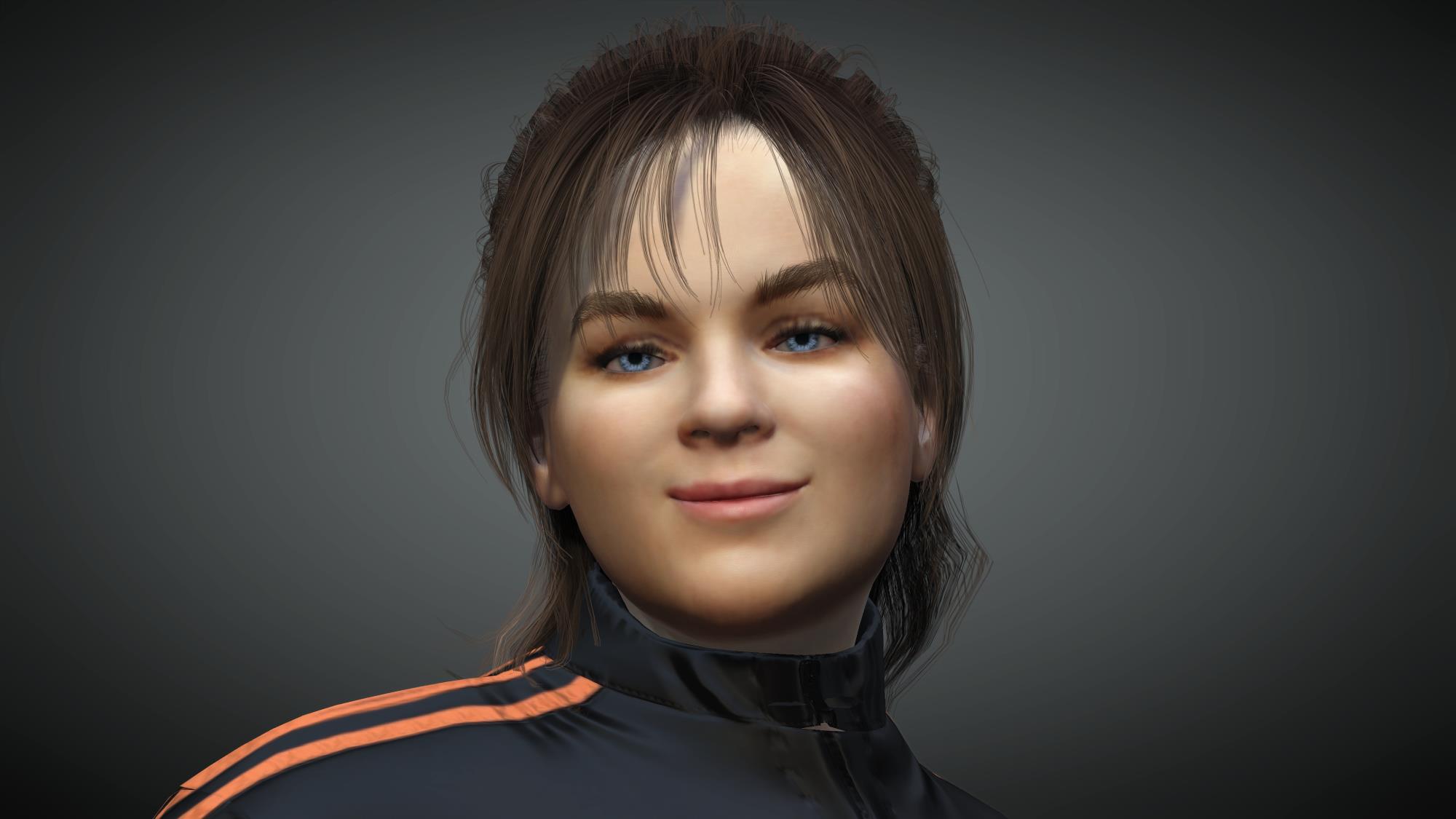
nice work on the update, the new features and lighting tweaks are making the native render engine a better option than iray, lots of good detail control now, - for some reason the opacity map on the hair base in iray is not looking proper, it looks jagged and no obvious way to fix that - I tried the basics ..no change ..so I dunno. - I noticed you capped some of the extended morphing to 200, can you uncap that or move it to at least 500 ? it helps for stylized expressions....those caps should be an artists decision ( boundaries bro! )
My favorite tool is the color picker, thank you for that ...it's a game changer for me!
cc3 standard render...
|
|
By Edward (RL) - 5 Years Ago
|
|
Hello,
Try this hotfix for those who have the new hair install issue.
Please read the "HowTo.txt" in the .zip before updating. And if you keep the Smart Gallery in Offline mode when updating to CC3.4/IC7.9. The hotfix install flow should be: 1. Switch the Smart Gallery to Online mode. 2. Close program 3. Run the Hotfix .bat 4. Open the program and click Refresh manually.
Edward
|
|
By wires - 5 Years Ago
|
|
Thank you Edward. :) The fix has fixed the problem. :cool:
|
|
By ToKoMotion - 5 Years Ago
|
|
Yes, work for me as well. Thanks Edward for the quick fix! :)
|
|
By facr73 - 5 Years Ago
|
Hi
It also worked for me too but it's not that simple to follow the hotfix instructions...
Greets
|
|
By animagic - 5 Years Ago
|
It partially fixed it for me. If I select Beard under Element, CC gets stuck again.
To clarify, this is in the Content Manager. It's OK in Smart Gallery.
|
|
By PIO C - 5 Years Ago
|
donderhaas (3/25/2021)
nildoe (3/24/2021)
Im having issues loading the free assets of smart-hair... its on a continuous loop.. the suggested workaround to activate in iclone does not work for me either<br/>+1 I have the same issue - when I try to add hair elements via "Content" I am taken to Smart Gallery. Smart Gallery Embedded hair only contains the prev version hair.
|
|
By alemar - 5 Years Ago
|
Edward (RL) (3/25/2021)
Hello,
Try this hotfix for those who have the new hair install issue.
Please read the "HowTo.txt" in the .zip before updating. And if you keep the Smart Gallery in Offline mode when updating to CC3.4/IC7.9. The hotfix install flow should be: 1. Switch the Smart Gallery to Online mode. 2. Close program 3. Run the Hotfix .bat 4. Open the program and click Refresh manually.
Edward
the ftp is out . Can´t acess the fix
|
|
By alemar - 5 Years Ago
|
|
its ok . my antivirus was locking that
|
|
By Jiinzu - 5 Years Ago
|
I downloaded the file but I do not understand all of them. What does "Copy the hotfix files to local" mean?
|
|
By ahingel - 5 Years Ago
|
i have the same issue
|
|
By ahingel - 5 Years Ago
|
where did they go all of our custom hair?
i cant find them
|
|
By ahingel - 5 Years Ago
|
|
the link is not loading
|
|
By ahingel - 5 Years Ago
|
i did what you said
but it still doesnt add onto the character
keeps showing the same message to reinstall them again
and after that nothing happens
copy to local what do you mean? where?
|
|
By animagic - 5 Years Ago
|
|
Jiinzu (3/25/2021)
I downloaded the file but I do not understand all of them. What does "Copy the hotfix files to local" mean?
I put them in the root (top level) of my C:\ drive and it worked.
|
|
By ahingel - 5 Years Ago
|
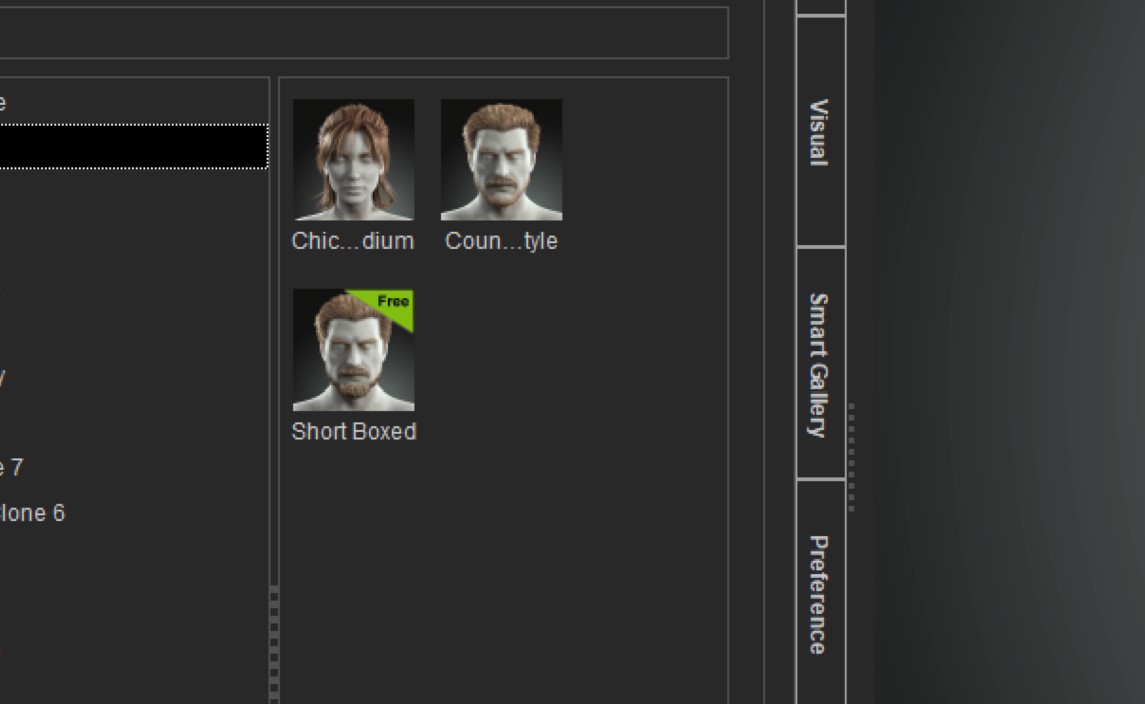
i put them there after your comment but still same issue
they dont appear in the smart gallery too
i can only apply the 2 full styles
but not the independent groups and elements
the elements that say free they cannot apply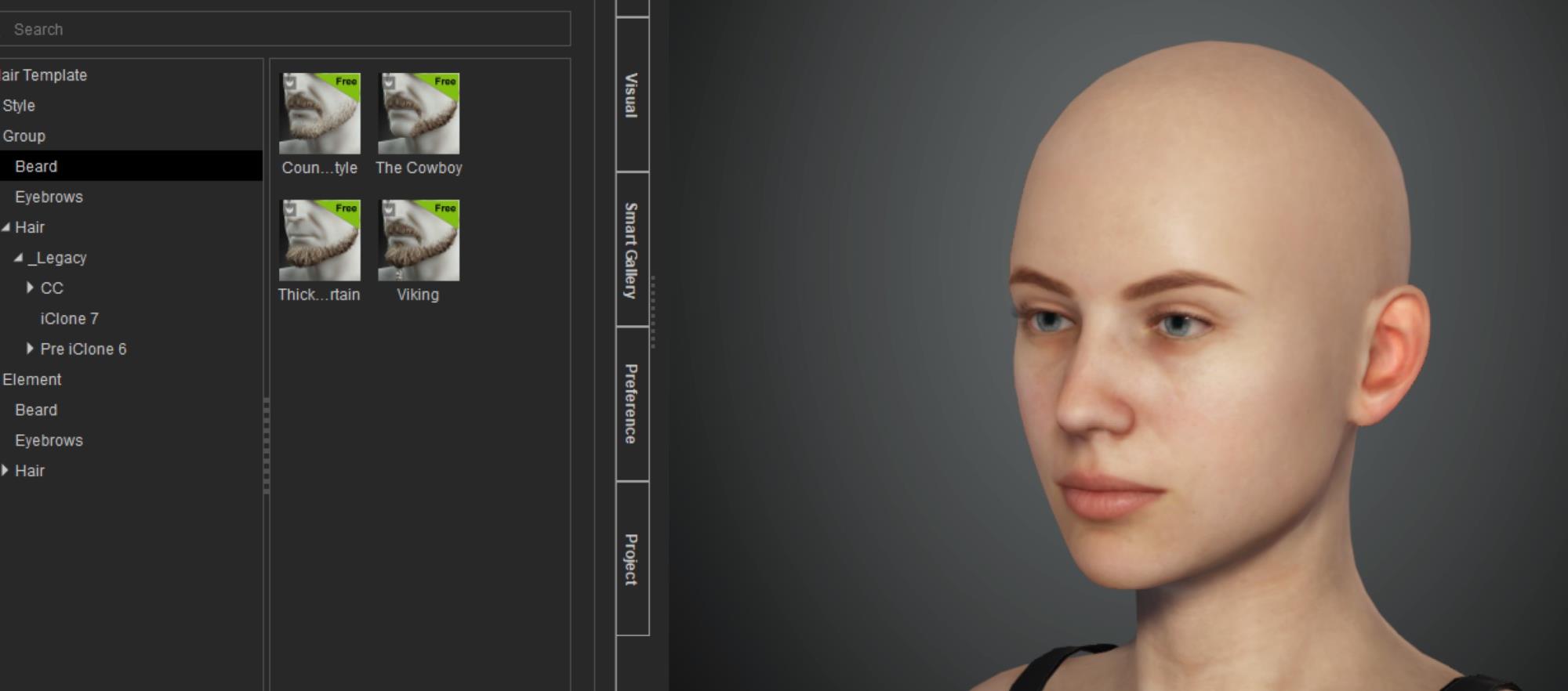
|
|
By younggunmotion - 5 Years Ago
|
Nice work on the update. I'm not seeing the hair patches/morphable scalp option as shown in this youtube video: https://www.youtube.com/watch?v=ezC7yMczDrM It doesn't appear in my content window. I should mention I had to use the hotfix in order to get the hair working. Any ideas?
|
|
By marymayadedipe - 5 Years Ago
|
Thanks for this, but how I don't seem to understand the hotfix solution, please can you break down the steps?
I can't use the new demo in iclone.
|
|
By lianchiu - 5 Years Ago
|
marymayadedipe (3/26/2021)
Thanks for this, but how I don't seem to understand the hotfix solution, please can you break down the steps?
I can't use the new demo in iclone.
|
|
By animagic - 5 Years Ago
|
|
There is an issue with resetting morph sliders with a range from -100 to 100. When the value is set at 100, a reset by clicking the morph name label results in the value going to -100. Resetting again restores the value to 0.
I have entered this in FT as Issue #7733. |
|
By ahingel - 5 Years Ago
|
still didnt fix for me
when i try to apply the hair groups or element with the free icon tag i always get that message
it does the installation and after that all over again the same thing
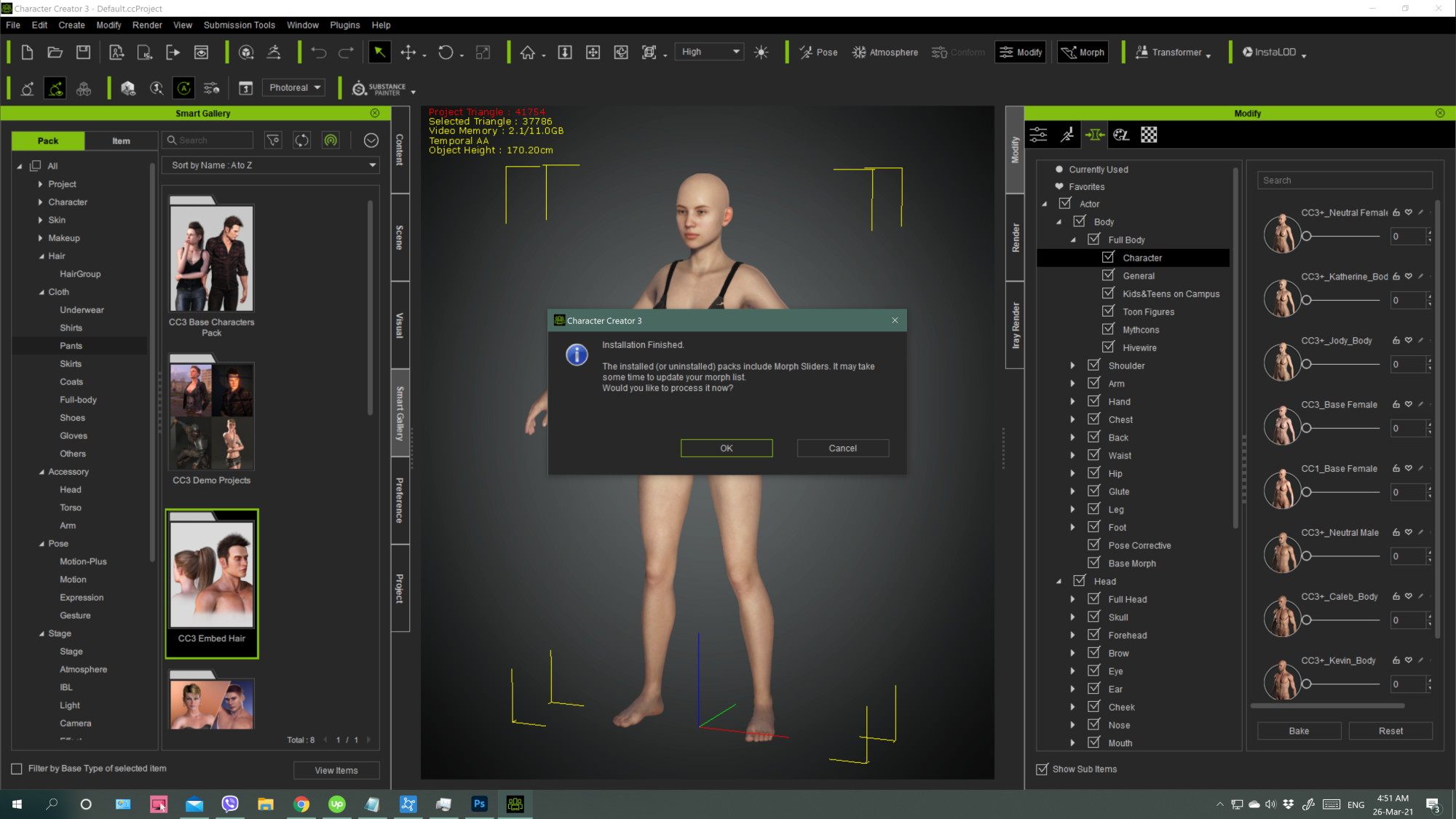
|
|
By ahingel - 5 Years Ago
|
ok finaly i found what i should do
after your steps with the hotfix still didnt work
but i went to smart gallery > free resource> cc3 embed hair, right click update and then they installed
😘
|
|
By alemar - 5 Years Ago
|
still don´t work for me IC and CC3


|
|
By alemar - 5 Years Ago
|
after show this message it instal...oh my...kkk

|
|
By Jeasy - 5 Years Ago
|
I am unable to apply the hotfix nothing happens beyond this point:

|
|
By lianchiu - 5 Years Ago
|
it happened to me too
i keep pressing close until it close.
and double click again press enter
open CC
SG click refresh
done
|
|
By oonabe - 5 Years Ago
|
I'm also having that issue where I cannot apply single hair components to a character, it kept asking if I want to convert to CC3+ and process the conversion to add the new morph sliders, so I installed the hotifx, running it as an administrator because otherwise it didn't work, but as an administrator the feedback said that 1 file was changed both in CC3 and iClone7. Then I went back to CC3 and tried it again, still not working, I saw a comment that said it worked after updating the content in the smart gallery, I couldn't find the "update" button he mentioned so I completely uninstalled the content and reinstalled it, still the same problem.
When I click on any of the hair components and click "find in smart gallery" it says the item couldn't be found. I was thinking of getting the new hair and beard packs before the sale price ends but on the one side this seems to be a very buggy addition and on the other side I cannot see any example of how these hair elements work together, your only example is using the hair parts that we already get as a demo but I don't know if combining different hair components from different hair styles would work because you never showed this on any of your promotional videos.
|
|
By Kelleytoons - 5 Years Ago
|
HUGE bug in 3.4 - it will no longer import just about any Daz avatar that isn't completely human.
IOW, all the Daz monsters, creatures and anything built on the Gen 3/8 model will cause 3.4 to crash, big time. I suspect it's something to do with the Arkkit installation during conversion but it also means you can't take all the existing creatures (which came fine into previous versions of CC3) and make them into CC3+ avatars (they also crash CC3 in spectacular ways, some even melting my machine down).
I really want to hear from the devs about this -- putting in in Feedback Tracker just means they won't see it.
|
|
By animagic - 5 Years Ago
|
|
Mike, does it also crash when you use the CC3 option of Transformer?
|
|
By Kelleytoons - 5 Years Ago
|
You can't bring in the ones I want to bring in via CC3 -- that's only for Genesis and Gen 2. These are Gen3/8 characters and they crash CC3. Those same characters (brought in previously) cannot also be converted from CC3 to CC3+.
I can promise you this is huge -- it essentially cuts the legs out of 50% of all Daz avatars.
|
|
By Kelleytoons - 5 Years Ago
|
Oops, spoke too soon. I guess I learn something every day. Okay so you CAN bring in even these Gen 8 characters via the CC3 import.
So for some reason it's only CC3+... but, more importantly, only on CERTAIN Gen3/8 characters. I'm not sure what they rhyme or reason is on this, as the ones I'm trying are just morphed characters (in point of fact I can bring over those and create morphs to apply to existing CC3+ characters. I'm going to have to play with this as a possible PITA workaround. Which would indeed be a pain in the ass workaround as it will require a TON more work).
|
|
By Kelleytoons - 5 Years Ago
|
And even spoke too soon THERE.
Nope, there's NO WAY to get the characters we used to be able to import just fine into CC3 AND convert them to CC3+ characters. Just no frickin' way. So this means about 95% of all CC3 can NOT be converted (and, worse, crash your entire computer).
Major, major bug.
|
|
By andreascholer - 5 Years Ago
|
|
For those having issues adding hair, beard, and eyebrow elements, I had the same issue and fixed it by going into the Smart Gallery to the CC3 Embed Hair pack. This is under Pack > Hair > Hair Style or Pack > Hair > Hair Element. I double clicked on the pack which initiated an update. Once the update was installed, I was able to successfully use the elements both from the Content tab and the Smart Gallery. No hotfix needed.
|
|
By oonabe - 5 Years Ago
|
|
andreascholer (3/26/2021)
For those having issues adding hair, beard, and eyebrow elements, I had the same issue and fixed it by going into the Smart Gallery to the CC3 Embed Hair pack. This is under Pack > Hair > Hair Style or Pack > Hair > Hair Element. I double clicked on the pack which initiated an update. Once the update was installed, I was able to successfully use the elements both from the Content tab and the Smart Gallery. No hotfix needed.
nice, this finally worked for me, someone mentioned a different route that wasn't working for me even after installing the hotfix and reinstalling the full embed hair pack, thanks
|
|
By phiammacdeo - 5 Years Ago
|

I *might* buy some content from the store if the free options would just show up in the smart gallery. This doesn't feel ready for primetime. I keep trying to build a workflow with Reallusion but it's proving very frustrating.
|
|
By phiammacdeo - 5 Years Ago
|
 I'm reading threads for options but nothing I try seems to update the model or the smart gallery I'm reading threads for options but nothing I try seems to update the model or the smart gallery
|
|
By tantrum - 5 Years Ago
|
CC3.4 smart hair doesn't seem to export well using merged materials for unity 3d, base hair / scalp and the eyebrows each had issues:
Smart hair merged materials builds wrong diffuse map - FeedBack Tracker (reallusion.com)
Smart hair merged materials base hair and scalp combined - FeedBack Tracker (reallusion.com)
Also tried a polygon reduction which really seems to destroy the hair system.
|
|
By marymayadedipe - 5 Years Ago
|
|
Still not working with the Demo project in iclone7. So tired.
|
|
By ahingel - 5 Years Ago
|
guys follow the steps with the hotfix file
go to smart gallery , cc3 embed hair . right click, update
and they will install
ti worked for me
|
|
By phiammacdeo - 5 Years Ago
|
|
Maybe post an update instead of asking us to hunt down some hotfix file? is there a link? I have a whole application from Reallusion dedicated to updating the software but I'm supposed to go and find something obscure in a forum to patch their software? This isn't how a company that want's me to buy a small fortune in assets should behave.
|
|
By Asolo - 5 Years Ago
|
i tried render the beard...looks okey maaa

|
|
By Jeasy - 5 Years Ago
|
Its started working adding features to the Cast for Oyun's Quest: https://oyunsquest.com/
MAGURE (Antagonist)

|
|
By animagic - 5 Years Ago
|
I installed the hotfix, but have still problems accessing the new hair content from the Content Manager (as instructed in the manual).
Basically, the connection between Smart Gallery and Content Manager is broken again. I can select the new hair in Smart Gallery, but when I select Show in Content Manager, CC is stuck. We had the same problems just after the introduction of SM...:crying:
Added: I seem to remember that that had to do with the content being installed under the Shared Template folder instead of the regular CC Template folder.
|
|
By Kelleytoons - 5 Years Ago
|
|
Honestly I hate SmartAss Gallery so much I would prefer an option to just not install it (I don't have it as a tab anywhere). To me the only point to it is for RL to try and sell things. It certainly doesn't help me manage my content in any way shape or form.
|
|
By wires - 5 Years Ago
|
|
Kelleytoons (3/27/2021)
Honestly I hate SmartAss Gallery so much I would prefer an option to just not install it (I don't have it as a tab anywhere). To me the only point to it is for RL to try and sell things. It certainly doesn't help me manage my content in any way shape or form.
+1
See my post here on the subject.
|
|
By simone.janssen - 5 Years Ago
|
I have the same issue...
... and was now able to fix it via the hotfix. THX!
|
|
By charly Rama - 5 Years Ago
|
|
ahingel (3/27/2021)
guys follow the steps with the hotfix file
go to smart gallery , cc3 embed hair . right click, update
and they will install
ti worked for me
Guy, it's not because it worked for you that it'll work for the others. There's no need to repeat "guys, follow the steps" . Do you really think all many people here who say it doesn't work didn't try to follow the step ? They followed the step but it doesn't work. The best way is , as Mike said, to give us another way to download the assets without smart gallery
|
|
By Kelleytoons - 5 Years Ago
|
Just so you know, Charly, you *CAN* install assets without SG. At least the ones you buy.
Just use the "other" method it asks (if you don't have iClone 7, for example), the old way where it downloads the RLD and installs it separately. This works fine for even the newest versions of iClone and CC3, as I bought the new hair for CC3 yesterday and it installed perfectly. Obviously the freebies are a whole different matter, but since they ARE free perhaps RL wouldn't have a heart attack if someone here just posted them (I'm not saying it's legal, it's only a suggestion. Don't shoot the messenger).
This has a STRONG parallel with Daz -- they, too, tried to get their content under their complete control by using a "smart" downloader, except most folks don't bother to use it as it's equally obnoxious as Smart Gallery. They really bury the way to download things you buy manually, but you can find it and install them that way and it's how I do it. I understand why companies feel a need to go this route, to encourage more buying, but for those of us who have too much old content that can't be managed this way it's a royal PITA.
|
|
By mrtobycook - 5 Years Ago
|
|
Mike they really need to hire you as a beta tester! You have been regularly finding problems and workarounds with the program now for... how many years?? It seems odd that you aren’t their number one “Daz workflow and non human character” beta tester.
|
|
By charly Rama - 5 Years Ago
|
|
Thank you Mike. New Beard and hairs are already at my cart. I'm going to achieve the payment this evening. Good to know. :)
|
|
By Kelleytoons - 5 Years Ago
|
|
mrtobycook (3/27/2021)
Mike they really need to hire you as a beta tester! You have been regularly finding problems and workarounds with the program now for... how many years?? It seems odd that you aren’t their number one “Daz workflow and non human character” beta tester.
Even beta testers can't catch all the problems, particularly if things are done at the last minute or not exposed to a certain class of testers.
|
|
By animagic - 5 Years Ago
|
|
mrtobycook (3/27/2021)
Mike they really need to hire you as a beta tester! You have been regularly finding problems and workarounds with the program now for... how many years?? It seems odd that you aren’t their number one “Daz workflow and non human character” beta tester.
Beta testers are not allowed to reveal themselves... But they do their best.
|
|
By Corvega - 5 Years Ago
|
Hi
Didnt see a txt file in that zip folder
|
|
By BamaGame - 5 Years Ago
|
no way to remove hidden meshes and no way to import animation like before
|
|
By Ascensi - 5 Years Ago
|
My Goz doesn't seem to work anymore after the update, it said it can't find Zbrush. I went into Zbrush tried to send a model over to CC3 and it said that I'd have to reinstall the files so I tried that and it told me error, not enough permissions and to run Zbrush as an administrator and try installing again... again the same error is stated. So I tried uninstalling the pipeline for CC3, reinstalled then tried installing the files from Zbrush as an admin.. again failed.. anyone else having this issue? thanks. Update: I figured out a way to get it working again: https://www.reallusion.com/FeedBackTracker/Issue/CC3-Can-t-locate-Zbrush
|
|
By Dorothy Jean - 5 Years Ago
|
3.4 is does not allow custom hair weight maps from blender. Anyone know a way around this? Right now its changes my weights back to default when I import back in to CC3 from Blender. It did not do this in the prev. version.
It takes me less than 5 mins to adjust my hair weights in blender and I cannot for the life of me do it in the CC3 weight painting window. It has taken me half hour and I still don't have the results I want.
Is there an easy way to remove all weights for a certain bone? For example, The default hair weight map uses a bunch of bones that do not work for certain hair styles so I want upper arm twist and clavicle set to zero weights. You would think that if you were to select all the hair it would give you a list of all the bones and their weights and let you delete them. Right now, if I select my full hair it only shows the Head bone.... see image. What am I missing? There must be a way. Otherwise they need to bring back the option to adjust the weights in blender.

|
|
By 4u2ges - 5 Years Ago
|
Dorothy, pls. see my post here: https://forum.reallusion.com/FindPost456347.aspx
|
|
By Dorothy Jean - 5 Years Ago
|
I see what your saying. Only issue is, it won't allow me to save the hair if it does not have "Hair" weights.

I also cannot add my physics weight map to the hair. I sell hair on the marketplace so normally add the soft cloth weights, bring into iClone, make the adjustments and then bring it back to CC3 and save the hair so the settings are saved to the hair. Then when someone buys the hair they don't have to fiddle around with the physics soft cloth settings. Before the update, I was able to edit the weights in blender and it imported back over into CC3 just fine. I don't know what changed or why other had issues with that in the first place? We NEED to be able to use blender to edit our weights.

|
|
By 4u2ges - 5 Years Ago
|
At the end of that post I gave an advise to paint only tips of hair to different bone in Blender, then CC would take it as Hair just fine.
I just tried and it worked fine in latest Blender/CC.
In Blender (make sure weights are normalized!):

In CC:

|
|
By Dorothy Jean - 5 Years Ago
|
I have no idea how you got that working. I tried for an hour and it kept reverting the weights back to default no matter what I did.
I posted a fix to my issue over in that thread you pointed me to.
edit** I just thought about it. That hair you used was "legacy hair" wasn't it?? It wasn't updated to the new hair before you brought it over into blender was it?
|
|
By Asolo - 5 Years Ago
|
i just create a new style viking hair...the great news i got 6K polygon....but not finished yet...haha

|
|
By Dorothy Jean - 5 Years Ago
|
|
ariksolo (3/29/2021)
i just create a new style viking hair...the great news i got 6K polygon....but not finished yet...haha
Looks great!! :)
|
|
By 4u2ges - 5 Years Ago
|
Yes, it was a legacy hair. I have not had a chance to go deep into a new hair system just yet.
|
|
By Asolo - 5 Years Ago
|
|
maybe a new hair card CC3 below 20K..then u can save in your files...just my thought....
|
|
By 4u2ges - 5 Years Ago
|
I just tested new hair in Blender and had no problem with CC accepting my paints


|
|
By Dorothy Jean - 5 Years Ago
|
4u2ges (3/29/2021)
I just tested new hair in Blender and had no problem with CC accepting my paints
Can you show me the steps you took? For some reason mine is going back to default when i bring it back into CC3... There must be a step i'm missing.
|
|
By 4u2ges - 5 Years Ago
|
There, some test. Hope this one helps...
|
|
By tantrum - 5 Years Ago
|
|
Ascensi (3/28/2021)
My Goz doesn't seem to work anymore after the update, it said it can't find Zbrush. I went into Zbrush tried to send a model over to CC3 and it said that I'd have to reinstall the files so I tried that and it told me error, not enough permissions and to run Zbrush as an administrator and try installing again... again the same error is stated. So I tried uninstalling the pipeline for CC3, reinstalled then tried installing the files from Zbrush as an admin.. again failed.. anyone else having this issue? thanks.
Just tried mine out, and it's working OK.
This is the first time I've used it since updating ZBrush recently, so my GoZ and CC3.3 were fine with the older one. Then at some point I updated zbrush to 2021.6.2, and now updated CC to 3.4 as well.
Opened CC3.4 just now, selected CC3_Base_Plus with the default avatar under Scene and clicked GoZ and it opened fine. Made some tweaks and GoZ'd back again, and the changes are reflecting in CC. So nothing fancy, just a simple test to see if I would get a problem like yours.
Sorry if you're still having trouble.
|
|
By Dorothy Jean - 5 Years Ago
|
|
4u2ges (3/29/2021)
There, some test. Hope this one helps...
Thank you!
|
|
By rosuckmedia - 5 Years Ago
|
@ 4u2ges.
Many Thanks for this Blender Tutorial.:):)
Greetings rosuckmedia
|
|
By Peter (RL) - 5 Years Ago
|
Just to clarify, for those still having Smart Hair loading issues, you should no longer need to use the Hotfix. The "CC3 Embed Hair" pack in the Free Resource area of Smart Gallery has been updated to include the Smart Hair Content. Just right click the "CC3 Embed Hair" thumbnail and choose Update (as shown below).

|
|
By Peter (RL) - 5 Years Ago
|
|
Kelleytoons (3/26/2021)
HUGE bug in 3.4 - it will no longer import just about any Daz avatar that isn't completely human.
IOW, all the Daz monsters, creatures and anything built on the Gen 3/8 model will cause 3.4 to crash, big time. I suspect it's something to do with the Arkkit installation during conversion but it also means you can't take all the existing creatures (which came fine into previous versions of CC3) and make them into CC3+ avatars (they also crash CC3 in spectacular ways, some even melting my machine down).
I really want to hear from the devs about this -- putting in in Feedback Tracker just means they won't see it.
Hi Mike
Please be assured if you post issues in the Feedback Tracker they will be looked at even if you don't get a personal reply. It is very important issues are reported in the FT and not just in the forum. Thanks.
|
|
By Kelleytoons - 5 Years Ago
|
Peter (RL) (3/29/2021)
Kelleytoons (3/26/2021)
HUGE bug in 3.4 - it will no longer import just about any Daz avatar that isn't completely human.
IOW, all the Daz monsters, creatures and anything built on the Gen 3/8 model will cause 3.4 to crash, big time. I suspect it's something to do with the Arkkit installation during conversion but it also means you can't take all the existing creatures (which came fine into previous versions of CC3) and make them into CC3+ avatars (they also crash CC3 in spectacular ways, some even melting my machine down).
I really want to hear from the devs about this -- putting in in Feedback Tracker just means they won't see it.Hi Mike Please be assured if you post issues in the Feedback Tracker they will be looked at even if you don't get a personal reply. It is very important issues are reported in the FT and not just in the forum. Thanks.
As I did more investigation it seems like ANY character with 4K textures causes the failure -- I was able to get all in as long as I didn't try 4K textures.
I'm making up a ZIP pack of four or five that will fail along with a video and I'll put it in the FT (although now that I can get stuff in without 4K I'm not nearly as anxious about it. Ironically, I almost NEVER use 4K textures but I was just trying them out when all these crashes occurred and I assumed it was a larger issue with meshes. Seems to me it's most likely a memory leak in CC Transformer).
|
|
By bgames - 5 Years Ago
|
Is anyone able to export any element of Prime Hairstyles, Beard & Brows Builder, or Hair Patch packs to FBX without an error? Every time I try to export FBX containing one of those elements it tells me the avatar file requires an export license even though I purchased an export license for each of those packs. As soon as I delete the element it exports fine.
Edit: For anyone having this issue
Make sure you are online, and select both "Activate Purchased Content" then Activate Entire Library" from the Help menu.
Fixed it for me. Thanks Reallusion support!
|
|
By tantrum - 5 Years Ago
|
|
Peter (RL) (3/29/2021)
Just to clarify, for those still having Smart Hair loading issues, you no longer need to use the Hotfix. The "CC3 Embed Hair" pack in the Free Resource area of Smart Gallery has been updated to include the Smart Hair Content. Just right click the "CC3 Embed Hair" thumbnail and choose Update (as shown below).
...
I never applied a hotfix, but I have no option to perform an update on the CC3 Embed Hair asset in CC3.4. It sounds like you're expecting I should be able to?

Or did it auto-update, because I haven't touched it for a few days when I first went through and updated all my versions, and the info is telling me it was just installed today:

|
|
By Ghetzi - 5 Years Ago
|
videodv (3/24/2021)
When I try to add a beard or try to setup a new default project I get the following pop up. Chris.
Just started working after the update and getting a similar result when I open a saved character. I really want to love CC3 and iC7, but there's always some problem that cuts into production time.

QUICK UPDATE: I hunted down all of the missing textures, reassigned them, and then saved the project. Unfortunately, got the exact same missing textures notification when I reloaded the save file. So apparently that's not a good work around.
|
|
By pmurphy - 5 Years Ago
|
|
Having the same problem ...please post if you find a way out of this loop. Looks like an amazing addition ...love to try it.
|
|
By tvwk2013 - 5 Years Ago
|
|
Hi, may be I missed something, but I have an issue after update CC to version 3.4. When I export FBX to Unity the checkbox "Delete hidden faces" has disappeared and the result in Unity is horrible because of it, please advice.
|
|
By StyleMarshal - 5 Years Ago
|
The export window is now scrollable , you have scroll down for "delete hidden faces" ...
I also got confused the first time :D
|
|
By videodv - 5 Years Ago
|
Ghetzi (3/29/2021)
videodv (3/24/2021)
When I try to add a beard or try to setup a new default project I get the following pop up. Chris. Just started working after the update and getting a similar result when I open a saved character. I really want to love CC3 and iC7, but there's always some problem that cuts into production time. QUICK UPDATE: I hunted down all of the missing textures, reassigned them, and then saved the project. Unfortunately, got the exact same missing textures notification when I reloaded the save file. So apparently that's not a good work around.
Been informed from the tracker to uninstall and reinstall CC3
Will checkout Iclone it self first to see if I need to do the same.
Not really happy about this as installing an update should not require me to uninstall reinstall to get it to work.
Chris.
|
|
By tvwk2013 - 5 Years Ago
|
:D thank you :D
You made my day!
|
|
By Ghetzi - 5 Years Ago
|
videodv (3/30/2021)
Ghetzi (3/29/2021)
videodv (3/24/2021)
When I try to add a beard or try to setup a new default project I get the following pop up. Chris. Just started working after the update and getting a similar result when I open a saved character. I really want to love CC3 and iC7, but there's always some problem that cuts into production time. QUICK UPDATE: I hunted down all of the missing textures, reassigned them, and then saved the project. Unfortunately, got the exact same missing textures notification when I reloaded the save file. So apparently that's not a good work around. Been informed from the tracker to uninstall and reinstall CC3 Will checkout Iclone it self first to see if I need to do the same. Not really happy about this as installing an update should not require me to uninstall reinstall to get it to work. Chris.
I got the same response and had the same issue with iC7. I agree with you, but the good news is that reinstalling worked at least. Hope the same for you.
|
|
By Peter (RL) - 5 Years Ago
|
|
tantrum (3/29/2021)
I never applied a hotfix, but I have no option to perform an update on the CC3 Embed Hair asset in CC3.4. It sounds like you're expecting I should be able to?
Or did it auto-update, because I haven't touched it for a few days when I first went through and updated all my versions, and the info is telling me it was just installed today:
Try right clicking the "CC3 Embed Hair" pack in Smart Gallery and select "View Items". If it has been updated you will see the new Smart Hair listed. If it hasn't been updated try hitting "Refresh" from the top of Smart Gallery.
|
|
By Peter (RL) - 5 Years Ago
|
|
Kelleytoons (3/29/2021)
As I did more investigation it seems like ANY character with 4K textures causes the failure -- I was able to get all in as long as I didn't try 4K textures.
I'm making up a ZIP pack of four or five that will fail along with a video and I'll put it in the FT (although now that I can get stuff in without 4K I'm not nearly as anxious about it. Ironically, I almost NEVER use 4K textures but I was just trying them out when all these crashes occurred and I assumed it was a larger issue with meshes. Seems to me it's most likely a memory leak in CC Transformer).
Thanks for the update and for putting it in the FT. I'll also pass the issue on to the dev team just to be sure. ;)
|
|
By CROFIELD GAMES - 5 Years Ago
|
I am having issues loading the free assets of smart-hair, so when I apply i get this message, and after that it always keep geting that. Please fix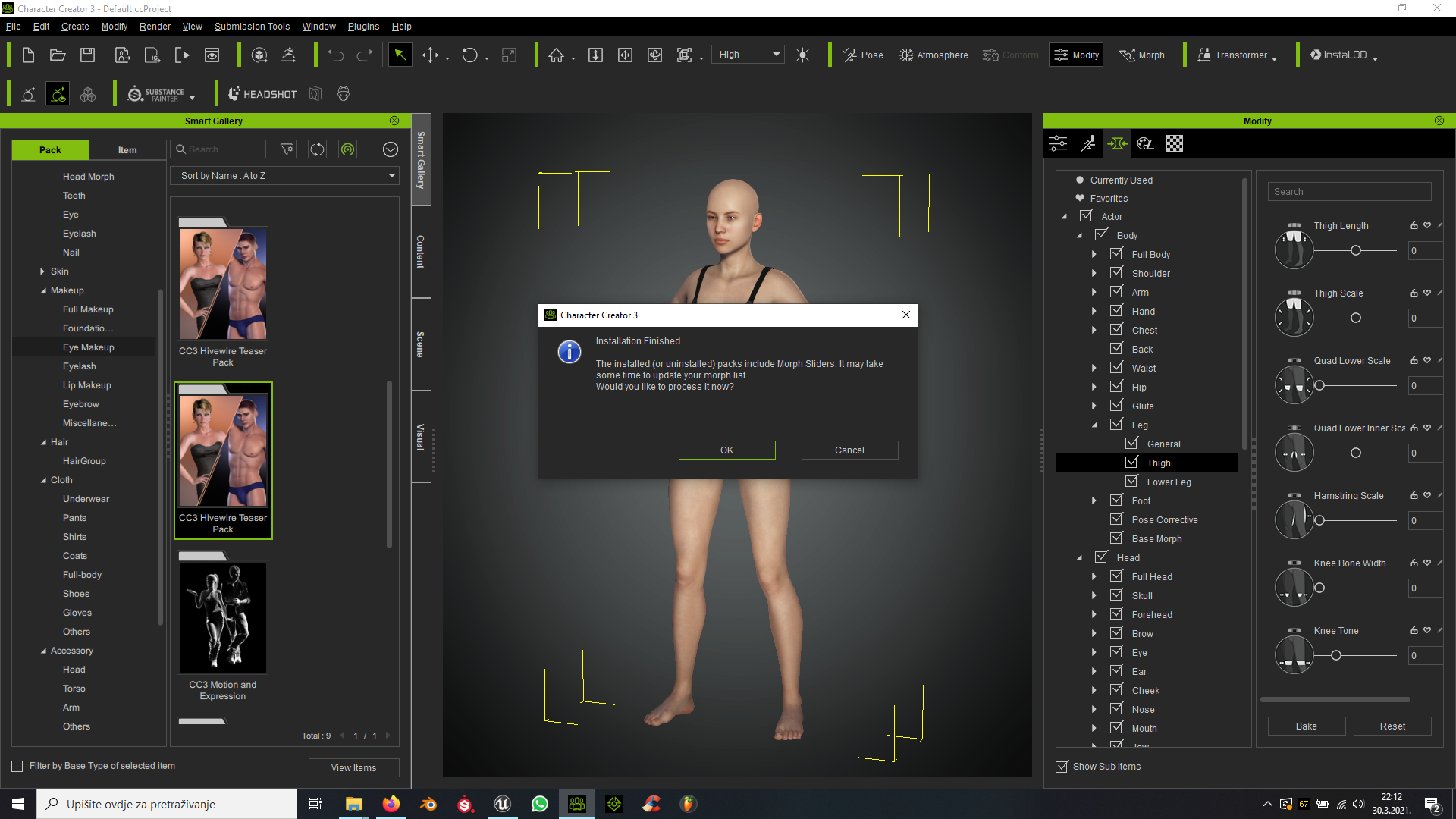
|
|
By ronan.burgess - 5 Years Ago
|
"Delete hidden mesh" seems to have disappeared from the export options. I can still hide parts of the body mesh but there is no longer an option to delete the hidden parts when exporting.
It used to be at the bottom left of the export scene

|
|
By videodv - 5 Years Ago
|
Ghetzi (3/30/2021)
videodv (3/30/2021)
Ghetzi (3/29/2021)
videodv (3/24/2021)
When I try to add a beard or try to setup a new default project I get the following pop up. Chris. Just started working after the update and getting a similar result when I open a saved character. I really want to love CC3 and iC7, but there's always some problem that cuts into production time. QUICK UPDATE: I hunted down all of the missing textures, reassigned them, and then saved the project. Unfortunately, got the exact same missing textures notification when I reloaded the save file. So apparently that's not a good work around. Been informed from the tracker to uninstall and reinstall CC3 Will checkout Iclone it self first to see if I need to do the same. Not really happy about this as installing an update should not require me to uninstall reinstall to get it to work. Chris. I got the same response and had the same issue with iC7. I agree with you, but the good news is that reinstalling worked at least. Hope the same for you.
Thanks it worked for me too now to reinstall all the content.
Chris
|
|
By tantrum - 5 Years Ago
|
ronan.burgess (3/31/2021)
"Delete hidden mesh" seems to have disappeared from the export options. I can still hide parts of the body mesh but there is no longer an option to delete the hidden parts when exporting. It used to be at the bottom left of the export scene
Hi, someone brought this up in the webinar tonight and pointed out that the dialog now doesn't fit everything inside the form that pops up, and it has a scrollbar to get to those (and other new) features.

|
|
By Igewere - 5 Years Ago
|
Same problem i'm having, i followed a fix for the smart gallery https://www.reallusion.com/FeedBackTracker/Issue/Problems-with-Smart-Gallery-Hotfix-zip , it worked, i could now download the new free beard and Hair files, but now i can't find smart gallery anymore
|
|
By lthames - 5 Years Ago
|
|
I found the problem with my export issues. Prior to me installing the pipeline extension, character creator v3.4 was working fine. As soon as install Character Creator 3 Pipeline Extension v3.4 on my system, Character Creator start to be unresponsive and the black dialog box appears and I had to close the program.
|
|
By 4u2ges - 5 Years Ago
|
If you apply Motion+, which has custom face expression to a character, you cannot restore default expression anymore.
You CAN restore the default pose but not the expression. Default Key button on Face Key applet does not work. Expression from Motion+ seems to be baked as default.
(Same thing is in iClone)
The only way to restore, is to take the character to iClone, split motion track and delete Expression key.
FT: https://www.reallusion.com/FeedBackTracker/Issue/Default-Face-key-cannot-be-restored-after-applying-Motion
|
|
By Jeasy - 5 Years Ago
|
After updating to CC and iClone an hour ago, The IRAY render issue is back with the eyebrows, beards and hair. In IRAY Renders, there is a black patch showing up, please check the screenshot below. Original CC Project on right and IRAY render window on the left. This render issue is in iClone and Character Creator. Also the Prime Hair Pack hair coulours change dramatically when in IRAY.
Do we know how to fix this please @Peter(RL)

|
|
By wires - 5 Years Ago
|
|
Jeasy (4/12/2021)
After updating to CC and iClone an hour ago, The IRAY render issue is back with the eyebrows, beards and hair. In IRAY Renders, there is a black patch showing up, please check the screenshot below. Original CC Project on right and IRAY render window on the left. This render issue is in iClone and Character Creator. Also the Prime Hair Pack hair coulours change dramatically when in IRAY.
Do we know how to fix this please @Peter(RL)
Have you read this thread on the issue?
|
|
By Peter (RL) - 5 Years Ago
|
|
Character Creator 3.41 has now been released. Please continue to post any issues you may find first in the Feedback Tracker and then feel free to discuss in this thread. Thanks.
|
|
By Jeasy - 5 Years Ago
|
wires (4/12/2021)
Jeasy (4/12/2021)
After updating to CC and iClone an hour ago, The IRAY render issue is back with the eyebrows, beards and hair. In IRAY Renders, there is a black patch showing up, please check the screenshot below. Original CC Project on right and IRAY render window on the left. This render issue is in iClone and Character Creator. Also the Prime Hair Pack hair coulours change dramatically when in IRAY.
Do we know how to fix this please @Peter(RL)
Have you read this thread on the issue?
Thanks @wires. The other post was somewhat helpful, however seems this is an issue that needs fixing by RL for sure. As a workaround one could use it to fake a satisfactory result.
Also another issue with IRAY, after rendering and trying to save, earlier we had PNG, JPG options now it is showing iMaterial :D LOL can't save the rendered image any more. Definately a BUG and needs to be fixed and updated.

|
|
By 4u2ges - 5 Years Ago
|
|
however seems this is an issue that needs fixing by RL for sure.
Absolutely. In that thread I did highlight what RL needs to work on to fix Iray lighting issues.
I hope some one from RL can look into that thread. I do not have time now to open an FT issue. it's really big and lots of details to explain.
Here it is again: https://forum.reallusion.com/479141/Iray-Render-of-Brows-from-Beard-and-Brown-Builder-not-recognizing-opacity
|
|
By lianchiu - 5 Years Ago
|
Jeasy (4/12/2021)
After updating to CC and iClone an hour ago, The IRAY render issue is back with the eyebrows, beards and hair. In IRAY Renders, there is a black patch showing up, please check the screenshot below. Original CC Project on right and IRAY render window on the left. This render issue is in iClone and Character Creator. Also the Prime Hair Pack hair coulours change dramatically when in IRAY. Do we know how to fix this please @Peter(RL)

|
|
By wires - 5 Years Ago
|
|
The image posted by Lian above does not get enlarged when clicked on and it it not possible to read the settings in the images. :Whistling::blink::ermm:
|
|
By Peter (RL) - 5 Years Ago
|
|
wires (4/13/2021)
The image posted by Lian above does not get enlarged when clicked on and it it not possible to read the settings in the images. :Whistling::blink::ermm:
Hi Gerry
Try right clicking the image and save it to your computer. It should then be viewable full size.
EDIT: Here it is again, hopefully viewable now.

|
|
By Jeasy - 5 Years Ago
|
Peter (RL) (4/13/2021)
wires (4/13/2021)
The image posted by Lian above does not get enlarged when clicked on and it it not possible to read the settings in the images. :Whistling::blink::ermm:Hi Gerry Try right clicking the image and save it to your computer. It should then be viewable full size. EDIT: Here it is again, hopefully viewable now.
Is there a Permanent Fix for this issue with the new hair, Beard and Brows pack or is this the only workaround for rendering in IRAY.
Also after the latest update, rendering a preview in Iray and trying to save that preview by clicking the Save Icon on the preview window gives only one option of iMaterial instead of JPG, PNG and other image formats. This is really weird. How can we change the default saving option back to Image formats?
|
|
By wires - 5 Years Ago
|
|
Thank you Peter, the image can now be viewed when clicked. :)
|
|
By Peter (RL) - 5 Years Ago
|
|
Jeasy (4/13/2021)
Is there a Permanent Fix for this issue with the new hair, Beard and Brows pack or is this the only workaround for rendering in IRAY.
Also after the latest update, rendering a preview in Iray and trying to save that preview by clicking the Save Icon on the preview window gives only one option of iMaterial instead of JPG, PNG and other image formats. This is really weird. How can we change the default saving option back to Image formats?
Hi Jeasy
If you have the issue logged in the Feedback Tracker then it will be looked at and if required a fix will be issued in the next update. For now try using the advice given by Lian.
For the Iray Preview save image issue, we will try to get this fixed as soon as possible. In the meantime just write the filename in with the correct extension and it will work. So for example typing irayrender.jpg or irayrender.png will still save your image file.
|
|
By 4u2ges - 5 Years Ago
|
Thanks Lian, Peter!
OK, Suppose for now 32 bounces is our new standard. Though Direction light and occasionally IBL still does not look alright.
|
|
By 4u2ges - 5 Years Ago
|
Sigh.. I just wasted a couple hours of work. I am so upset... do not yet know what I am going to do.
Anyway... If you export an avatar from CC as iAvatar and specify a low resolution texture (I did specify 256 for exporting to Morphs Creator - there is no even a need for texture for this),
the cloth hair and accessories for the remaining in CC avatar assumes that resolution! You cannot see it at first. It would only reveal itself when you save and reopen a project.
Luckily, at least the body parts texture remained intact...
I did send that avatar to iClone from CC, saved the project there. Then in CC saved the project as well. Now I ended up everywhere with avatar featuring 256px maps for the entire outfit.
FT: https://www.reallusion.com/FeedBackTracker/Issue/Texture-size-is-getting-reset-at-Avatar-export
I need a shot of vodka :ermm::crazy::angry:
Just an Update..
Here is my settings when I exported the avatar:

ANY material which is NOT listed above, assumes 256px maps for ALL textures on the remaining in the CC character.
Watch it out folks!
|
|
By gicag14102 - 5 Years Ago
|
|
There are no option to import fbx/obj file as accessories? Only usd files shows? Please fix..
|
|
By wires - 5 Years Ago
|
|
gicag14102 (4/14/2021)
There are no option to import fbx/obj file as accessories? Only usd files shows? Please fix..
Nothing needs fixed.
Select Create > Accessory and you can then select any .obj or .fbx file that you require. :)

|
|
By path.to.the.future - 5 Years Ago
|
Already posted in Feedback Tracker, now in forum:
Many problems not previously mentioned:
1. Exported FBX have bones poking in wrong directions if using automatic bone orientation in Blender (this didn't happen in previous CC version)

2. If you use manual bone orientation and force connect children, you don't get the funny poking bones, but the pelvis bone isn't pointing sideways as usual now. I am not sure if it's going to screw me down the road when I put rig on character.

3. Auto foot height adjust function is broken. Using it won't put character at 0.0.0 origin anymore.

4. Exporting A pose or T pose? Both are SAME, which is clearly WRONG. Come on Reallusion, this shows how much debugging you did. /sarcasm

5. Does anyone rig their CC characters here? Do you get rid of the original armature? Because if you use Quick Rig plug-in, you would know that CC armature is a pain because the arms and legs are TOO STRAIGHT. It messes up the rig's IK direction, it can't calculate which side is the correct front. And if you figured out after long days, yes days, of brain burning that you HAVE to adjust the T pose in CC before export, you have to watch out because the pose mirror can mysteriously fail at times. Then, you get some extra poking bones:

I was kinda excited when I saw Smart Hair in update. Then the free sample eyebrow kept bugging and I remembered how buggy CC can be. Then headed to the website... and after many confused clicks, discovered that Smart Hair isn't a plugin by itself. And I am happy to NOT have bought the packs. Besides, really? You really have put eyebrow + facial hair in one package, and hair builder in another?? Reallusion, please put yourself in customer's shoes and think thoroughly. How much do you like a software that requires you to troubleshoot bugs for days immediately after purchase and after each major update?
|
|
By Kelleytoons - 5 Years Ago
|
|
gicag14102 (4/14/2021)
There are no option to import fbx/obj file as accessories? Only usd files shows? Please fix..
Um, I get that option (it shows fbx/obj for me).
|
|
By 4u2ges - 5 Years Ago
|
@path.to.the.future
The bones orientation is correct. You just have to select Blender option while exporting.
There used to be a problem with Game Base bones orientation export, but they fixed it with one of the updates prior to this release.
The rest of the armature problems were *introduced* when they released CC3+ a few month ago.
This one is about foot contact: https://www.reallusion.com/FeedBackTracker/Issue/Please-make-all-CC3-characters-like-CC3-Jody
A/T - poses confusion and the mess created as a result is also since CC3.33
I do not rig in Blender and honestly, IMO, there are no problems for folks who do it.
For number 5, you can export in any pose by selecting either Current or Custom pose in FBX export applet (if you have no plans to return character to CC). No Fbxkey would be generated.
In Blender the Rest pose would still be straight A/Bind pose, but you can always bake Pose Position (the one you exported with) into the Rest Position.
Avatar would return to the ground BTW after the bake and then you start with your own rig.
|
|
By path.to.the.future - 5 Years Ago
|
@4u2ges
Well, the rigging plugin I use works with CC armature that people sent to the programmer and he showed that the armature he has on hand, has pelvis bone pointing sideways. The plugin works based on the rest pose and baking the rest pose with Apply pose as rest pose or Apply selected pose as rest pose gives me this:
 Plus a warning that it breaks all associated animation (at least I don't animate in CC). Plus a warning that it breaks all associated animation (at least I don't animate in CC).
Just to say rest pose matters.
Also, I really want to know which other plugin can rig the base CC armature without messing up all the weight paint and can bend arms and legs correctly with bones as straight as we get from CC. All the the rigging tutorials I have seen talk about the importance of having bent elbows and knees.
I forgot how I got screwed down the road, but fixing the knees and elbows after putting rig on is not working either. Either I get the rest pose right, or I get screwed.
Edit: wow, the ticket you submitted is since September 2020. The problem is still not fixed 8 and half months later?
|
|
By 4u2ges - 5 Years Ago
|
That ticket was not even assigned. There are some other related tickets, if you have time to go though the list :)
But, yes, baking a pose would require stripping all blend-shapes. Not sure it that is suitable with your workflow. But it works fine otherwise.
I hope Blender folks would finally figure out the way to do it without dismantling shape keys.
This is how I do it:
|
|
By path.to.the.future - 5 Years Ago
|
Unfortunately, I want to retain the shape keys for facial control. Otherwise, it would be as good as trashing the armature (since CC armature doesn't have facial bones) and weight paint, aka start from scratch.
|
|
By 4u2ges - 5 Years Ago
|
Couple of things you may try.
Export with Calibration clip (it has a T-pose). This way FBX key is generated and you may bring avatar back.
Bake T-pose with deleting shape keys.
Take avatar back to CC. When you do that, CC restores all shape keys.
Then export it again out of CC.
I have not tried that and it might be just a "catch 22" :w00t:
On the other hand, some time ago I also tried some scripts I have found for transferring shape keys from one object to another in Blender.
At the time it was just crashing Blender. But worth to try researching again.
|
|
By 4u2ges - 5 Years Ago
|
I just quickly tried first method and it works.
You have to uncheck "Bake Animation" and "Add Leaf Bones" in Blender when exporting out.
When you bring it back to CC, character would assume an inverted A-pose.
You'd need to add a Bind pose (which is nowhere to find) : https://forum.reallusion.com/476255/Bind-Pose-What-Bind-Pose
And then export it again in Current Pose. In Blender Rest and Pose would be *almost* the same T-pose and character with shape keys
|
|
By cynsegura - 5 Years Ago
|
Trying to import to unity with delete hidden mesh and I don't see that option anymore. Is there someoene who can help me? Is that option in any other area.
Please let me know.
Many thanks
|
|
By tantrum - 5 Years Ago
|
|
Scroll the dialog window, the options are just off the bottom since more options were added to it. Delete hidden mesh checkbox is there.
|
|
By animagic - 5 Years Ago
|
There is, I think, a strange behavior regarding setting morph sliders to their default.
Before CC3.4, double-clicking the label with a slider would return the value to the default from whatever value it was set to.
This is still the case in CC3.4 for sliders that range from 0 to 100. However, for sliders that range from -100 to 100, the behavior is peculiar.
If the slider is set to any value except +100, double-clicking the label resets the value to 0, as expected. However, if the value is at +100, double-clicking sets the value first to -100. Double-clicking it again resets it to 0.
When this was discovered, I reported the issue in FT as #7733. Yesterday, I got an email that the issue was NOT considered a bug and it is now closed.
It may not be a bug, but it is certainly bizarre. I cannot thing of any case where this is useful. What do you think?
|
|
By DKpitkdick - 5 Years Ago
|
What's up everybody :)
I spent 3 days (4 today) looking for a solution to my problem. Why do CC3 characters frequently have weight issues when used under UE4? I'm trying to use a feature above that allows to copy the pose of another skeletal mesh. A process that works very well without the slightest problem with any other character having the epic skeleton. Only those exported from CC3 made my head fart. I decided to look first for solutions on my side by importing the character on Blender, removing the skeleton from CC3 and putting in a new Epic skeleton rig thanks to an addon. I do that on another character, it works great but on a CC3 avatar, it doesn't. I suspect the bones starting with CC_Base to be the cause of the problem but no option in CC3 to keep a clean and original epic skeleton and on Iclone, impossible to click on the Remove CC_Base button. I tried a whole bunch of combination of manipulation, export but nothing helped, the character is unusable for the objective I am trying to achieve. Would you have any solutions to this problem please? Solutions that do not involve reworking the weights in an external software :(. Thank you in advance for your answer.    |
|
By siesar.music - 5 Years Ago
|
|
Hi everyone why i dont see never slider about new hairs? Look the image please thanks!  |
|
By Dorothy Jean - 5 Years Ago
|
siesar.music (5/11/2021)
Hi everyone why i dont see never slider about new hairs? Look the image please thanks .
I don't think that hair has morphs
|
|
By siesar.music - 5 Years Ago
|
|
Hi, in this video in official page of Smart Hairs i look the sliders for "morphing", but i don't see them in CC3

|
|
By 4u2ges - 5 Years Ago
|
@siesar.music
That is Morphable scalp. Available in CC3, all the way inside the Hair folder hierarchy.
|
|
By tantrum - 5 Years Ago
|
This comes from the Hair Patches pack. Add an appropriate scalp piece from there (although this will be in addition to the scalp sub-piece of the base hair, so you'll have 2 scalps effectively). The hair patch pieces have the morphs:

|
|
By yshokry - 5 Years Ago
|
hello! Ive been running into a problem getting a model to take a round trip through goz. i was moving a cc3 model into zbrush which worked smoothly; however once the edits where finished, my CC3 software had the 'adjust bones option greyed out', and when i try to load it in the model is broken by the rig. I tried to force reinstall goz in zbrush and got an error message saying I need administrative privilege's to finish. I also followed the instructions of this forum with two user with the same issue no results. LINK See example screen shots below.  
Support TicketID : 200862
|
|
By ifarkas - 5 Years Ago
|
|
I've just purchased Prime Hairstyles content. All software modules are up-to-date. I am applying \Template\Character Creator 3 Template\MaterialPlus\Hair\Prime Hairstyles\06_Ear length Bob\06_hair_5.iMtlPlus to the CC3+ base Avatar with Enhanced Eyes. When prompted I leave all selected. - Material Settings and Textures
- Shader Textures
- Shader Parameters
After clicking Apply getting this error: "Failed to apply materials. Materials are not compatible with this object." What could be the problem, please?
|
|
By ifarkas - 5 Years Ago
|
|
I figured it out. I add hair first, then apply MaterialPlus to that hair.
|
|
By Ascensi - 5 Years Ago
|
Full displacement, no UV tears even during animation and morphing. This is what SkinGen needs and I know how to make it possible.. I'd work with Reallusion to get this implemented. This character is a CC3+ model without the need for smoothing/smooth mesh by subdivision.
If you want to see SkinGen get an upgrade to support displacement please vote here https://www.reallusion.com/FeedBackTracker/Issue/Missing-Corresponding-Displacement-maps-of-scars-tendons-wrinkles-pores-burns-etc-Unsatisfied-Purchase

Also using soft body physics on characters will reduce or eliminate the need to use tessellation, please vote to have Reallusion reenable it here https://www.reallusion.com/FeedBackTracker/Issue/Request-to-allow-Softbody-Physics-on-character-s-skin-influenced-areas-are-to-determined-by-weight-map-painting Here is an example in iClone 7 of softbody physics for Characters. I tediously and relentlessly tested both physics settings and tested hand painted physics textures for areas to be influenced using a CC3+ Character I modified. If the physics was reenabled for characters and the weight painter was used to paint physics textures (black and white) then likely all that is need is to have the full bear system duplicated and relabeled "Character Physics Face Morph Detection" or make it automatic for characters and by default it works without having to import a beard. I think the physics painter should be added in iClone to eliminate the need to send to iClone to see results for each paint change to test your model if it's going to behave the way you want.
|
|
By razorshark.productions - 5 Years Ago
|
If i click anything at all the software crashes for me, its practically unusable.
- Clean Windows install, Nvidia driver downgrade
- System : i7-9700 / 16G / RTX2060 Ultra
Mutliple times reinstalled, runned as admin.
First application ever that has caused me this much headaches for not working out of the box.
Apply preset - Crash
Load Base Model - Crash
Removed SmartGallery, still crashing
|
|
By Peter (RL) - 5 Years Ago
|
|
razorshark.productions (6/1/2021)
If i click anything at all the software crashes for me, its practically unusable.
- Clean Windows install, Nvidia driver downgrade
- System : i7-9700 / 16G / RTX2060 Ultra
Mutliple times reinstalled, runned as admin.
First application ever that has caused me this much headaches for not working out of the box.
Apply preset - Crash
Load Base Model - Crash
Removed SmartGallery, still crashing
Sorry to hear you are having these problems.
One thing you should check is if you are using a custom Nvidia graphics profile. If you are you should disable this for Character Creator 3 and use the default (Application Controlled) profile instead. You can check this by opening the Nvidia Control Panel (right click the Desktop) and select "Manage 3D Settings". Then either set the Global Setting to default or create a custom profile for Character Creator 3 in the Program Settings tab using the default profile.
|
|
By Ascensi - 5 Years Ago
|
Recently a windows update has been causing me problems.. some programs that require my gpu freezes the computer and I'm forced to restart. Reallusion tests their program compatibility fairly well.. sometimes it's other things and settings in the environment causing the problems.
If your project is a bit heavy you might want to increase your virtual memory to something like 32 GB.
|
|
By silverbackpic - 5 Years Ago
|
|
I don't understand why I can't import a obj file in the create cloth option. What's going on?? Only let's me select fbx but then I need a key. This is so frustrating!!!!! No video explaining why it's not working but video showing the process. NEED HELP!
|
|
By silverbackpic - 5 Years Ago
|
|
Need help!!! Your tutorial video states to open create then cloth to enter obj clothing file but only let's my select fbx files. I need help! I purchased the iclone7 and cc3+ pipeline.
|
|
By 4u2ges - 5 Years Ago
|
The menu definitions are quite confusing https://www.reallusion.com/FeedBackTracker/Issue/Import-rotines-need-to-be-redefined-naming
This is a reason a lot of people are having a problem with it.
@silverbackpic
You should select Create > Accessory. Then you'd be able import OBJ and later convert it to cloth by transferring weights.
|
|
By animagic - 5 Years Ago
|
This suggestion should have far more votes than the measly 4 it has now. If you run into this problem, please vote, so RL will start taking it seriously.
|
|
By silverbackpic - 5 Years Ago
|
|
Funny I just purchased and I don't have a obj option. Just fdx
|
|
By amtenorio2000 - 5 Years Ago
|
Hello everybody
I just acquire iClone 7 and Character Creator 3. I installed the packages in my laptop running Windows 10 without any problem.
However, installing in my desktop, a Mac Pro computer with Bootcamp and Windows 8.1, when I try to run Character Creator 3, this message shows up:
Failed to initial Smart Gallery.
Local database not connected.
Please contact Reallusion Support, error = 6.
I uninstall my antivirus and malwarebytes in my computer, and uninstall/install Character Creator 3 from Reallusion Hub application sevarl times, restarting the computer, but problem persists.
Can you help me?
|
|
By Peter (RL) - 5 Years Ago
|
Hi...
Try uninstalling the Smart Gallery plug-in from the Reallusion Hub and then try to launch Character Creator 3. Does it now launch and run ok?
If everything is running smoothly without issue, try re-installing the Smart Gallery plug-in and see if the issue is now gone.
Please Note: Do make sure that you are running Windows with an Administrator account.
|
|
By DeeEssW - 5 Years Ago
|
I'm getting an error when attempting to import an exported CC3+ character back into CC3.4.3.
- Export > FBX(Clothed Character)
- Target Tool Preset = 3ds Max
- Import the FBX into 3ds max.
- Don't do anything to the character in Max, just testing to see if import/export works.
- In Max, export the character back out as an FBX. Have tried both Export and Export Selected. Both give same results.
- In CC3, Import the FBX that was exported from Max.
- Select correct Decrypt Key File.
- CC3 attempts to import the file for a few seconds then a Character Import Status Report pops up with multiple "Missing the designated Material" errors.
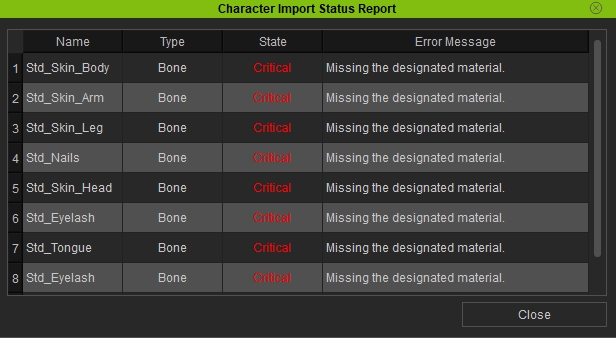
I have used this exact same workflow many times in the past with CC2 characters without any problems.
Any help would be appreciated.
|
|
By Dorothy Jean - 5 Years Ago
|
|
I would suggest that you use the free CC3 to blender add on. There is an import and export feature inside the addon that has all the correct export settings auto set up so it should help.
|
|
By DeeEssW - 5 Years Ago
|
Hi Dorothy Jean,
Thanks for replying, but as I mentioned in my original post, I'm using 3ds Max not Blender. It seems like the CC3 to Max and back to CC3 functionality that used to work in CC2 is now broken.
When exporting from CC3 using the Max target tool preset, it creates a Decrypt Key File, the only point of which is to allow the file to be imported back into CC3.
I'm not a Blender user and I don't wish to switch to it in order to modify a CC3+ character or clothing and import it back to CC3.
|
|
By Jfrog - 5 Years Ago
|
I haven't read this thread so perhaps this is already a known bug but I can't select motions when clicking on custom when using "include motions" it does not open any window.
EDIT: My mistake! I could not see the folder open tab. I had no idea I had to scroll with my mouse to see the rest of the window and the folder icon.
|
|
By animagic - 5 Years Ago
|
There is no thread for CC 3.43 issues, so here goes.
When I launch CC, it always gets stuck on loading CCAvatarShaping.dll (something like that), and I have to kill the process.
If I then launch CC again, it loads fine. This is repeatable for me (although I guess it's unique).
|
|
By Peter (RL) - 5 Years Ago
|
|
We have today released the 3.44 update for Character Creator 3 . However as always we do need your assistance to help us track down any remaining bugs, glitches or other issues.
Important: If you do find any bugs, issues or glitches in Character Creator 3.44, please can you report them first in the Feedback Tracker. Then feel free to discuss the issues in this thread but do try to include a link back to the original Feedback Tracker report or your tracker number.
Thank you.
|
|
By 4u2ges - 5 Years Ago
|
I rarely use Appearance Editor for outfit, but when I do, it crashes on basic operations.
It's been like that for a long time (maybe it's just my installation).
FT: https://www.reallusion.com/FeedBackTracker/Issue/CC-would-crash-inside-Appearance-Editor-for-outfit
|
|
By General Picture Animation - 5 Years Ago
|
I'm not familiar with that problem, but it makes me think of a similar problem with Modify panel.
It's very easy for certain icons on the right (such as the bitmap launch and the UV launch) to disappear from view, unless you know that you have to widen the panel/scroll to the right to see them all.
This needs to be corrected so that important icons never disappear.
|
|
By Orientlove - 4 Years Ago
|
Hi! Please I need help.
I have CC 3.43. I recently updated my ZBrush to the new 2022 version, and now GoZ doesn't work anymore.
What can I do?
Regards
Michela
|
|
By Orientlove - 4 Years Ago
|
Hi again.
Now I have updated my CC3 to the 3.44 version, but GoZ to ZBrush 2022 is still not working.
Does anybody know if there's any chance to have GoZ working with CC3 and ZBrush2022, or shall I wait for CC4?
Please, I'd really need an answer.
Michela
|
|
By yepkoo - 4 Years Ago
|
I don't know as I don't use Zbrush, but since the development team is focusing on CC4, I don't think there will be an update to CC3 any time soon. (Maybe there will be no updates)
The best option would be to use your working version of Zbrush or manually import/export.
I think CC4 GoZ will support new version of ZBrush.
Of course I'm not sure as I don't use Zbrush, maybe there is an installation error. Based on what you said, I thought GoZ doesn't support the new version of Zbrush.
|
|
By Orientlove - 4 Years Ago
|
Aw you're right, Yepkoo! I've just realized that I can manually import/export my models. :w00t:
Since I'm still not so skilled at using these programs I felt lost as soon as the bridge between the two broke off.
Thanks for you answer, much appreciated.
|
|
By yepkoo - 4 Years Ago
|
If you just want to transfer morphs, you can check out my 3dCoat video below. Most likely, importing morph should work the same way.
|
|
By tantrum - 4 Years Ago
|
I'm using 3.44 CC and 2022.0.2 Zbrush and GoZ seems to be working; at least with the default CC avatar that I just tried it with.
Was able to export to Zbrush, make changes, then import it back in again to CC with the changes applied.
|
|
By dr_ganz - 4 Years Ago
|
Hello,
When I click on Edit Pose button under Modify tab, the calibration panel doesn't appear anymore. It was working fine, but suddenly isn't nowhere to be found. The only thing that happens is the character rig appears underneath the model.
However, on the contrary the Edit Facial panel appears just fine. I tried uninstalling and re-installing CC3, as well as restarting my computer.
Does anyone know how to fix this?
|
|
By wires - 4 Years Ago
|
|
dr_ganz (2/20/2022)
Hello,
When I click on Edit Pose button under Modify tab, the calibration panel doesn't appear anymore. It was working fine, but suddenly isn't nowhere to be found. The only thing that happens is the character rig appears underneath the model.
However, on the contrary the Edit Facial panel appears just fine. I tried uninstalling and re-installing CC3, as well as restarting my computer.
Does anyone know how to fix this?
I replied to the question in your other post.
Please try to avoid asking the same question in multiple posts, it makes things difficult for those willing to provide assistance.
|
|
By roweaton - 4 Years Ago
|
Hi, newbie here, I'm finding that everytime I try to use Freckles my hair disappears on my character. The hair I'm using is SWAM hair downloaded, and each time I then select Frechkles I get the message "Applying this content will deactivate the current SkinGen session. Would you like to continue?"
I would like to keep my hair and add the freckles - isn't this possible?
My Base model doesn't seem to have any hair to select (no icons below the SkinGen icons).
This seems to be a simple task to complete, what am I doing wrong?
Also I haven't downloaded the SkinGen plugin but I seem to have it anyway????? Not sure how that happened.
Regards,
Sharon
|
|
By Postfrosch - 4 Years Ago
|
|
Hi, newbie here, I'm finding that everytime I try to use Freckles my hair disappears on my character. The hair I'm using is SWAM hair downloaded, and each time I then select Frechkles I get the message "Applying this content will deactivate the current SkinGen session. Would you like to continue?"
It works so: (look the pictures)


Greets from Germany
Postfrosch
|
|
By jeff.davies - 4 Years Ago
|
The hair is hidden temporarily while using Skin Gen. This enables you to better see the skin of your character. Turn it on, make your changes and when you turn it back off, your hair will reappear and your changes to the skin will still be in place.
It is a bit confusing though.
|
|
By mark - 4 Years Ago
|
Under the Preference/Dynamic Texture Editor you can set it to keep displaying the Clothing and Accessories while in the Texture Editor
|
|
By fsilva - 4 Years Ago
|
Hi, guys,
Please don't laugh! I've been using CC3 for about two years, and i STILL haven't discovered how to save the avatars as ccavatars. The only option I've seen is to export as iavatars. Can anyone please help?
Thanks.
Frank
|
|
By animagic - 4 Years Ago
|
I won't laugh...:hehe:
To save as a ccavatar, in the Content Manager, select Custom, then select Avatar, then Clothed or Base.

|
|
By fsilva - 4 Years Ago
|
|
Hello! Remember I told you not to laugh! I did as you suggested, I clicked on Custom, the Avatar. I can see all the avatars purchased there. But how to I get those avatars from Daz converted to CC3+?
|
|
By wires - 4 Years Ago
|
I'm confused. Are you seeing only DAZ characters in your Character Creator custom folders?
Mike Kelley, Kelleytoons, has produced some excellent videos on getting DAZ assets converted inside CC, check out his YouTube stuff here.
|
|
By theLight - 4 Years Ago
|
|
Hi, I was wondering if anyone else is having issues with their clothing textures? I set the to 2-sided but it doesn't work anymore. Same in iClone 7. 2 sided textures have stopped working.. Please help?
|
|
By oonabe - 3 Years Ago
|
Hi, is anyone currently unable to launch CC3? For me the software isn't starting at all, while iClone 7 starts without any issues and CC3 has worked without any issues in the past as well, but something seems to be broken now and seems to only affect CC3, not sure if it was the last nvidia update or that I switched recently to Windows 11 but CC3 isn't starting at all, both trying the regular icon or the reallusion hub, nothing happens when clicking the "open" button.
|
|
By Pollux - 3 Years Ago
|
Hi conabe,
I just tried to launch CC3 through Reallusion Hub = NO problem at all. It works perfectly.
I'm also on Windows 11.
Cheers
|
|
By oonabe - 3 Years Ago
|
thanks for answering, good to know is not a general issue, I will try reinstalling the program and see if I'm lucky here
|