|
Author
|
Message
|
|
fabricadegame
|
fabricadegame
Posted 5 Years Ago
|
|
Group: Forum Members
Last Active: Last Year
Posts: 1,
Visits: 25
|
For me, this problem was "fixed" by disabling automatic processing, keeping the window open for this, and only by adding none to the mandible.
|
|
|
|
|
deidrereaystudios
|
deidrereaystudios
Posted 5 Years Ago
|
|
Group: Forum Members
Last Active: 2 Years Ago
Posts: 43,
Visits: 346
|
Problem i see with that is now you have no jaw bone.. So how would one ever get animations to work correctly without the jaw bone..??
|
|
|
|
|
thevandal421
|
thevandal421
Posted 5 Years Ago
|
|
Group: Forum Members
Last Active: 5 Years Ago
Posts: 1,
Visits: 11
|
@Cybermynd Thank you for that video. I did it right after importing before doing anything else and it worked like a charm.
|
|
|
|
|
grps.inc
|
grps.inc
Posted 4 Years Ago
|
|
Group: Forum Members
Last Active: Last Year
Posts: 2,
Visits: 66
|
This happens and is confirmed in unity 2019 as well. Still don’t have a solution🙄 character imports but after hitting play the mouth is open
|
|
|
|
|
cognos
|
cognos
Posted 4 Years Ago
|
|
Group: Forum Members
Last Active: Last Year
Posts: 5,
Visits: 131
|
Just remove the jaw bone assignment in the head section of the avatar configuration. You don't need this assignment, because usually the mouth is directly controlled by other subsystems, e.g. systems for lipsync, emotions, etc., to which the bones are directly assigned.
These subsystems address the bones independently of the AnimatorController via script. To avoid oddities, these bones should not be addressed in the Animator at all. In my opinion, this also applies to fingers or toes, as these are also addressed by any subsystems that may be used, such as HandPoser, FingerIK, etc.   
|
|
|
|
|
neko-amatsukami
|
neko-amatsukami
Posted 4 Years Ago
|
|
Group: Forum Members
Last Active: 4 Years Ago
Posts: 2,
Visits: 20
|
I just make a new animation clip on the head bone (you can select the lower_jaw bone) with just 1sec of timeline, and I set the rotation of x to -0.001 at start and end of the animation put it in an animator controller, put it on you head bone, remeber to select your character avatar, and voila. 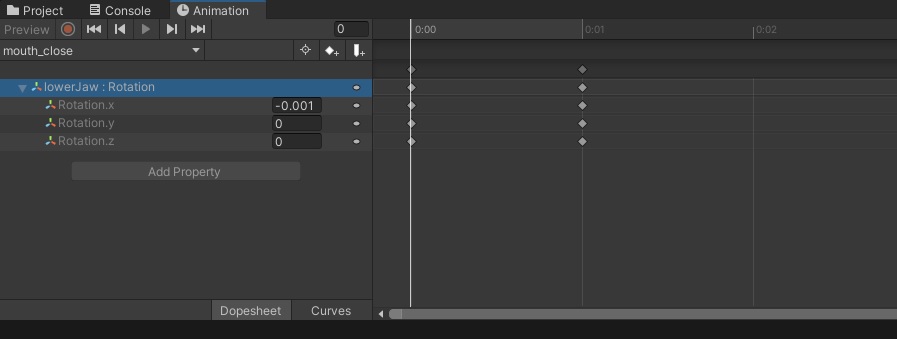 Anyway, if you know what you do, you can put in this one animation to make your character blinking and put it on you blendshape mesh too
|
|
|
|
|
TheBigEd
|
TheBigEd
Posted 4 Years Ago
|
|
Group: Forum Members
Last Active: Last Year
Posts: 3,
Visits: 116
|
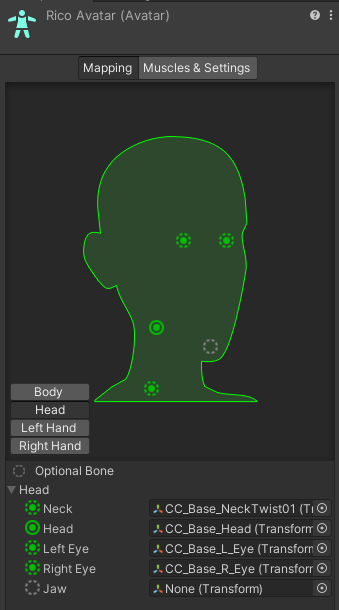 I know this is late to the party, but hopefully it will be helpful. I was able to fix the problem by selecting the avatar in the Project window, going to "Rig" then "Configure..." In the "Mapping" UI there, click on "Head", then setting "Jaw" to "None"
|
|
|
|
|
praxis_labs
|
praxis_labs
Posted 4 Years Ago
|
|
Group: Forum Members
Last Active: Last Year
Posts: 15,
Visits: 389
|
@ neko-amatsukami can you share a bit, on how were you able to access the bones and key frame them in Unity. I was not able to do that with my character's bones. Thanks for your solution
|
|
|
|
|
neko-amatsukami
|
neko-amatsukami
Posted 4 Years Ago
|
|
Group: Forum Members
Last Active: 4 Years Ago
Posts: 2,
Visits: 20
|
@ iuliiii You can simply creat a new animation, and animator for this... Place your animation in your animator, and the animator on any part of your character... ( pref on the head) and open the animation windows, so you can see every bones on your character, and play with. Anyway. if you want a little thing not really complicated, use this script. Name it " close_mouth.cs" and place it on your characters. using System.Collections;
using System.Collections.Generic;
using UnityEngine;
public class close_mouth : MonoBehaviour
{
private Animator animator;
private Vector3 eulerzangle;
// Start is called before the first frame update
void Start()
{
animator = GetComponent<Animator>();
eulerzangle = animator.GetBoneTransform(HumanBodyBones.Jaw).transform.localEulerAngles;
//euler = Quaternion.Euler(eulerzangle);
Debug.Log(eulerzangle);
}
// Update is called once per frame
void LateUpdate()
{
animator.GetBoneTransform(HumanBodyBones.Jaw).localRotation = Quaternion.Euler(eulerzangle);
}
}
Sorry my english is not really good.
For more idea on the animator example, Take the free " Unity-chan " model package, and look how they make her blink
|
|
|
|