Profile Picture

Scyra's Tricks & Treats — Daz to CC3

Posted By Scyra 7 Years Ago
Rated 5 stars based on 1 vote.
1
2
3

Author
Message
Scyra
Scyra
Posted 7 Years Ago
View Quick Profile
Distinguished Member

Distinguished Member (2.1K reputation)Distinguished Member (2.1K reputation)Distinguished Member (2.1K reputation)Distinguished Member (2.1K reputation)Distinguished Member (2.1K reputation)Distinguished Member (2.1K reputation)Distinguished Member (2.1K reputation)Distinguished Member (2.1K reputation)Distinguished Member (2.1K reputation)

Group: Forum Members
Last Active: 6 Years Ago
Posts: 220, Visits: 2.5K
Thank you, HKC.Ent.

Hi, richie. The Normal map for the face should not have been "off" like that. Did you try to drag and drop it? That must be the cause. Transformer remaps the textures in such a way that you cannot simply drag & drop from Daz; the proper way to do it is with the .ini file as covered here. Or you can grab the Normals from the CC3 model the same way you did with the AO maps.

This next image wasn't something I intended to show because it is just a quick job with no Normal/Bump applied to the hair, no Tessellation applied, and some other problems, but...

https://forum.reallusion.com/uploads/images/73ba843d-0bed-4bf0-9d81-ae86.jpg

https://forum.reallusion.com/uploads/images/17a0709c-6376-4958-93e9-dab7.jpg

Presumably, if you get your characters looking this good inside the CC3 viewport, if you knew what you were doing you could then render them and they would look realistic. Renders are not my focus. I can't offer guidance there.

The basic process to produce these I've mostly already covered, though not in detail. Go to the Visual window. Tweak your Ambient Occlusion, rotate your IBL, try a different IBL, apply a Light preset. I have prepared video material that needs to be edited and voiced-over, but I am finding it a chore to produce that content. I need more incentive to go through with that idea.

And here's the result of a 30-second "I have no idea what I'm doing, this is only my third render attempt..."

https://forum.reallusion.com/uploads/images/3e1b25a3-49ec-453b-84db-44e9.jpg

In Daz they use things like Anagenessis Iray skin shaders to get realistic results. I don't have anything like that, and don't know if it can be ported over or not.


CC3 & Daz Tricks | CC3 to Unity workflow

animagic
animagic
Posted 7 Years Ago
View Quick Profile
Distinguished Member

Distinguished Member (33.4K reputation)Distinguished Member (33.4K reputation)Distinguished Member (33.4K reputation)Distinguished Member (33.4K reputation)Distinguished Member (33.4K reputation)Distinguished Member (33.4K reputation)Distinguished Member (33.4K reputation)Distinguished Member (33.4K reputation)Distinguished Member (33.4K reputation)

Group: Forum Members
Last Active: Last Month
Posts: 15.8K, Visits: 31.4K
Scyra, your "quick" jobs look pretty good to me...:w00t:

I have failed to say so before, but I do appreciate your tips and tricks. I have used iClone for a long time, but there's always something new to learn...:ermm:


https://forum.reallusion.com/uploads/images/436b0ffd-1242-44d6-a876-d631.jpg

Power Ten Productions
Posted 7 Years Ago
View Quick Profile
Distinguished Member

Distinguished Member (1.5K reputation)Distinguished Member (1.5K reputation)Distinguished Member (1.5K reputation)Distinguished Member (1.5K reputation)Distinguished Member (1.5K reputation)Distinguished Member (1.5K reputation)Distinguished Member (1.5K reputation)Distinguished Member (1.5K reputation)Distinguished Member (1.5K reputation)

Group: Forum Members
Last Active: 4 Years Ago
Posts: 91, Visits: 300
Scyra once again thank you and echoing the above comment that your tips and tricks are incredible. What I want to see if I can add to this is how we can get iRay quality animated in CC3. The Daz results with that character still are incredible.
Scyra
Scyra
Posted 7 Years Ago
View Quick Profile
Distinguished Member

Distinguished Member (2.1K reputation)Distinguished Member (2.1K reputation)Distinguished Member (2.1K reputation)Distinguished Member (2.1K reputation)Distinguished Member (2.1K reputation)Distinguished Member (2.1K reputation)Distinguished Member (2.1K reputation)Distinguished Member (2.1K reputation)Distinguished Member (2.1K reputation)

Group: Forum Members
Last Active: 6 Years Ago
Posts: 220, Visits: 2.5K
Thanks animagic & richie, I appreciate you guys letting me know it's helping. The thread was totally dead for some weeks, so I was kind of wondering...

That last picture is the Iray inside CC3, by the way. Even though I paid for the plugin, I just haven't gotten around to experimenting with it. I'm heading into iClone and Unity now that I am happy with CC3 results. CC3 has better IBL's, LUT's and lighting presets than what comes with iClone, but it looks like it can all be ported over to achieve an identical look.


CC3 & Daz Tricks | CC3 to Unity workflow

Power Ten Productions
Posted 7 Years Ago
View Quick Profile
Distinguished Member

Distinguished Member (1.5K reputation)Distinguished Member (1.5K reputation)Distinguished Member (1.5K reputation)Distinguished Member (1.5K reputation)Distinguished Member (1.5K reputation)Distinguished Member (1.5K reputation)Distinguished Member (1.5K reputation)Distinguished Member (1.5K reputation)Distinguished Member (1.5K reputation)

Group: Forum Members
Last Active: 4 Years Ago
Posts: 91, Visits: 300
So geeking out on this further, I pinged the official support since IRay mainly uses a different lighting pattern then PBR. Since Daz is one of the official partners with NVIDIA you're getting the full render there. Having the plug in as well would allow a lot of the power of this to work in CC3 and iClone and interesting enough Unreal supports this also. I'm trying to get from Reallusion what the MDL workflow looks like in order to keep whatever data or files through the pipeline.  
Power Ten Productions
Posted 7 Years Ago
View Quick Profile
Distinguished Member

Distinguished Member (1.5K reputation)Distinguished Member (1.5K reputation)Distinguished Member (1.5K reputation)Distinguished Member (1.5K reputation)Distinguished Member (1.5K reputation)Distinguished Member (1.5K reputation)Distinguished Member (1.5K reputation)Distinguished Member (1.5K reputation)Distinguished Member (1.5K reputation)

Group: Forum Members
Last Active: 4 Years Ago
Posts: 91, Visits: 300
Taking the above tricks and also grabbing the Project EYEray plugin on the Daz store I was able to increase my model realness further. As mentioned above the limitation is coming from the technology of Character Creator not allowing for native IRay workflow and rendering (something that isn't their problem as much it is still very hardware intensive and would destroy a game engine). You can see what the IRay from Daz render at the bottom. If anyone has any further tricks or advice please correct me.

https://forum.reallusion.com/uploads/images/ab7c9c53-0eba-45ad-8cdf-d5c7.png https://forum.reallusion.com/uploads/images/11174949-e3c8-471a-9b4e-2df5.pnghttps://forum.reallusion.com/uploads/images/49e07274-9e98-4b48-aae2-b887.png
Scyra
Scyra
Posted 7 Years Ago
View Quick Profile
Distinguished Member

Distinguished Member (2.1K reputation)Distinguished Member (2.1K reputation)Distinguished Member (2.1K reputation)Distinguished Member (2.1K reputation)Distinguished Member (2.1K reputation)Distinguished Member (2.1K reputation)Distinguished Member (2.1K reputation)Distinguished Member (2.1K reputation)Distinguished Member (2.1K reputation)

Group: Forum Members
Last Active: 6 Years Ago
Posts: 220, Visits: 2.5K
Hi, richie. I went ahead and left some tips for you in the thread that you started. Well, let's see, what else can be done...

If the hair has a grayscale bump map, try using it instead of a Normal map. Those seem to look better for hair. It is possible to thicken the bangs by lowering the Opacity on the specific "bangs" or "front" or whatever the hair submesh part may be called. Sometimes it looks better, sometimes not.

I would decrease Sclera brightness by a small amount. Maybe try matching the hair to the eyebrows, or the other way around with Photoshop's Quick Selection Tool and a Hue/Saturation adjustment.

I like the character's style a lot.


CC3 & Daz Tricks | CC3 to Unity workflow

Scyra
Scyra
Posted 7 Years Ago
View Quick Profile
Distinguished Member

Distinguished Member (2.1K reputation)Distinguished Member (2.1K reputation)Distinguished Member (2.1K reputation)Distinguished Member (2.1K reputation)Distinguished Member (2.1K reputation)Distinguished Member (2.1K reputation)Distinguished Member (2.1K reputation)Distinguished Member (2.1K reputation)Distinguished Member (2.1K reputation)

Group: Forum Members
Last Active: 6 Years Ago
Posts: 220, Visits: 2.5K
Level up!

https://forum.reallusion.com/uploads/images/4526106d-05c0-4b92-b65a-5821.png

https://forum.reallusion.com/uploads/images/5c9aeb74-66dd-46a2-808b-11c5.jpg

New techniques will be shared eventually.


CC3 & Daz Tricks | CC3 to Unity workflow

TonyDPrime
TonyDPrime
Posted 7 Years Ago
View Quick Profile
Distinguished Member

Distinguished Member (13.4K reputation)Distinguished Member (13.4K reputation)Distinguished Member (13.4K reputation)Distinguished Member (13.4K reputation)Distinguished Member (13.4K reputation)Distinguished Member (13.4K reputation)Distinguished Member (13.4K reputation)Distinguished Member (13.4K reputation)Distinguished Member (13.4K reputation)

Group: Forum Members
Last Active: 2 Years Ago
Posts: 3.4K, Visits: 12.4K
@Scyra- Very good!
AWESOME!
Scyra
Scyra
Posted 7 Years Ago
View Quick Profile
Distinguished Member

Distinguished Member (2.1K reputation)Distinguished Member (2.1K reputation)Distinguished Member (2.1K reputation)Distinguished Member (2.1K reputation)Distinguished Member (2.1K reputation)Distinguished Member (2.1K reputation)Distinguished Member (2.1K reputation)Distinguished Member (2.1K reputation)Distinguished Member (2.1K reputation)

Group: Forum Members
Last Active: 6 Years Ago
Posts: 220, Visits: 2.5K
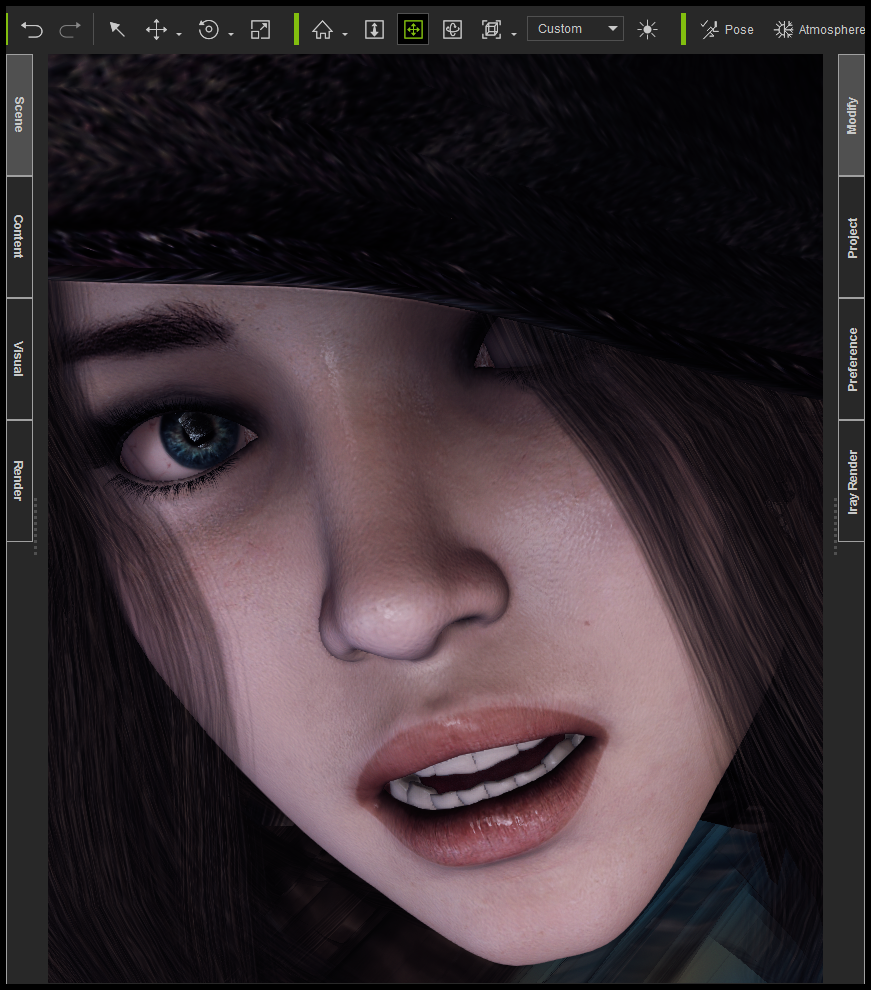
Hey, thanks Tony. I was wanting to show a closeup, but couldn't keep the hair from disappearing. Oh, but I do find ways around problems...here's exactly what it looks like in my viewport right now...
https://forum.reallusion.com/uploads/images/7d86fc70-0ff8-4cb6-abe2-b4e5.png

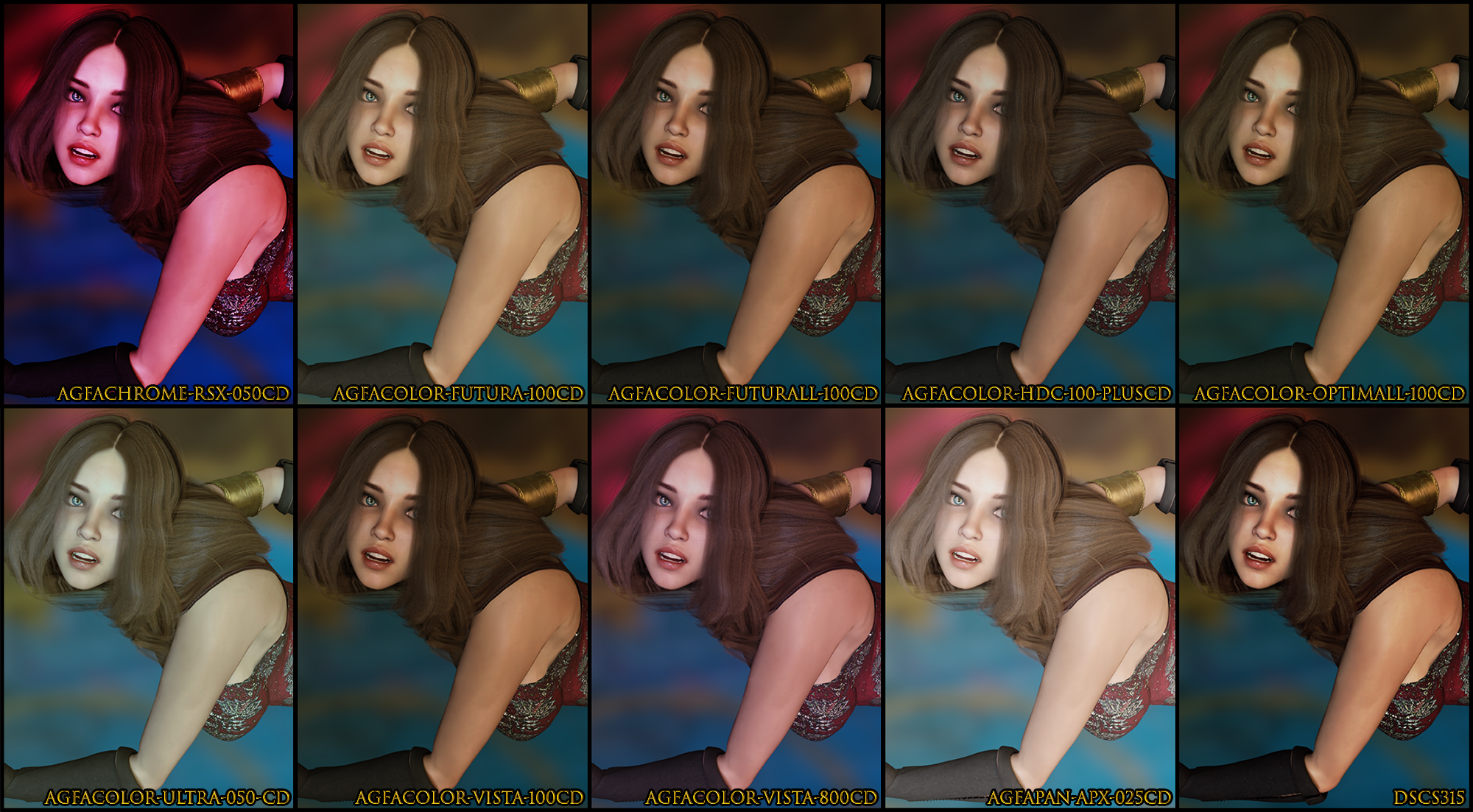
And since you're here, here's a trick: PNG's don't get destroyed by compression here in the way that JPG's do...(keep them under 2000 pixel to avoid automatic-resize quality loss). So I got around that problem too, and now I can post the Iray tonemap reference images I made earlier.

This covers 26 of the 58 Iray tonemaps that we have in CC3. The ones that aren't shown are part of sets with variations, and I've at least shown an example from each set. The first image is showing the Advantix & Ektachrome sets, and gives you an idea about the variations within a set...
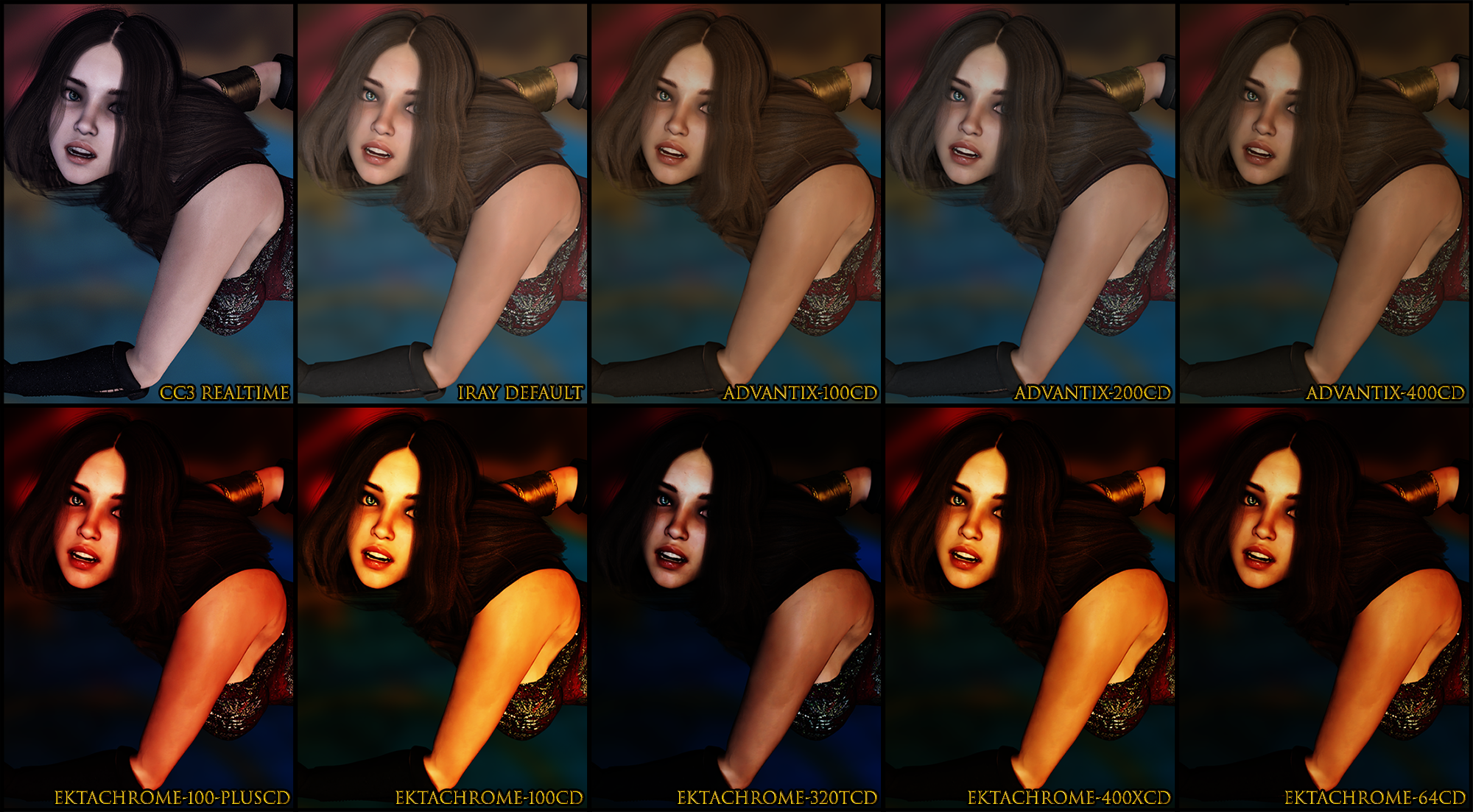
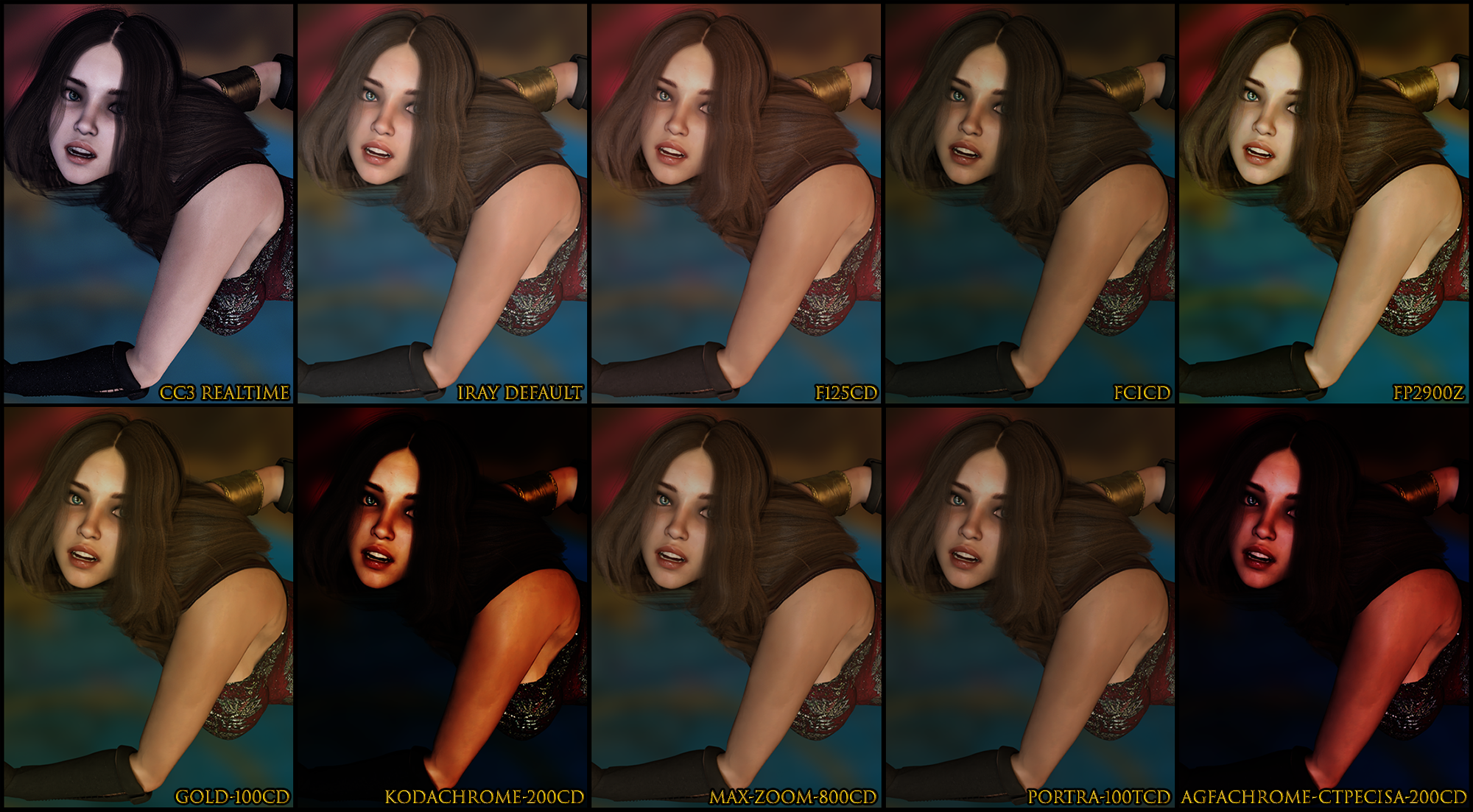
https://forum.reallusion.com/uploads/images/b23e2717-7ddd-4123-a363-051e.png
https://forum.reallusion.com/uploads/images/6f30aff9-097d-45ef-a05f-72db.png
https://forum.reallusion.com/uploads/images/28ed612b-c350-4560-b71e-3d0c.png

Bloom Filter under Tonemapper settings is checked, otherwise I think all other settings are at default. They are 200 iteration tests (~30 second renders) with De-Noise Start Iteration at 195.

CC3 Post Effects have no effect on Iray, so focus all your attention on rotating the IBL (most important thing), adjusting your material settings (such as Roughness/Bump strength—very important), and then choose a light and play around with the sliders (such as Intensity/Angle). This last image is a 500 iteration test, with De-Noise Start Iteration at 495, the agfacolor-vista-800CD Tonemapper Template, and a Key Light...
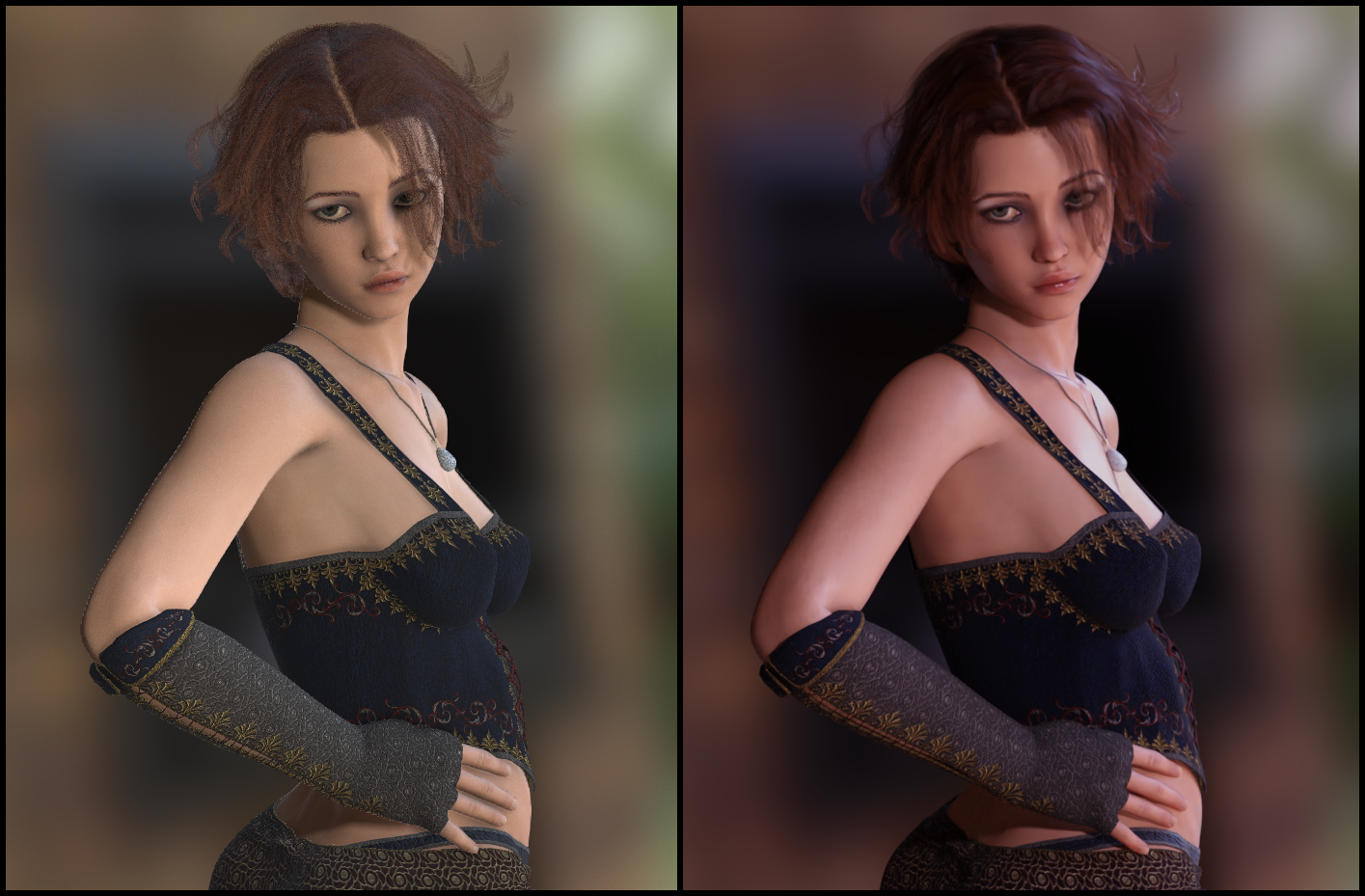
https://forum.reallusion.com/uploads/images/2caf338f-466a-4d67-8269-d335.png

This type of result can be achieved very rapidly—a few minutes to set up, a couple minutes to render. A problem I ran into was that my polygon-reduced hair, which looks great in the viewport, did not look so great in Iray. I decided to fall back to the unmodified 200K polycount original, which is...just a bit messy.


CC3 & Daz Tricks | CC3 to Unity workflow


1
2
3


Reading This Topic