|
Author
|
Message
|
|
courtneyclayart
|
courtneyclayart
Posted 6 Years Ago
|
|
Group: Forum Members
Last Active: 4 Years Ago
Posts: 2,
Visits: 43
|
Hi! It would be really useful to be able to see the numeric height of each character, especially when making an entire cast of people. It's hard to know if you're making someone absurdly short or tall when you can't see the entire cast at once, and I've had to do a lot of screenshots and guesswork to make sure I can keep sets of characters consistent. Even if there was some kind of ruler tool, that would be great.
|
|
|
|
|
animagic
|
animagic
Posted 6 Years Ago
|
|
Group: Forum Members
Last Active: Yesterday
Posts: 15.8K,
Visits: 31.4K
|
courtneyclayart (3/13/2019)
Hi! It would be really useful to be able to see the numeric height of each character, especially when making an entire cast of people. It's hard to know if you're making someone absurdly short or tall when you can't see the entire cast at once, and I've had to do a lot of screenshots and guesswork to make sure I can keep sets of characters consistent. Even if there was some kind of ruler tool, that would be great.You can already see that. Press Ctrl+F and you will notice an info section in the top left corner of the view port. This includes the height of what is selected. 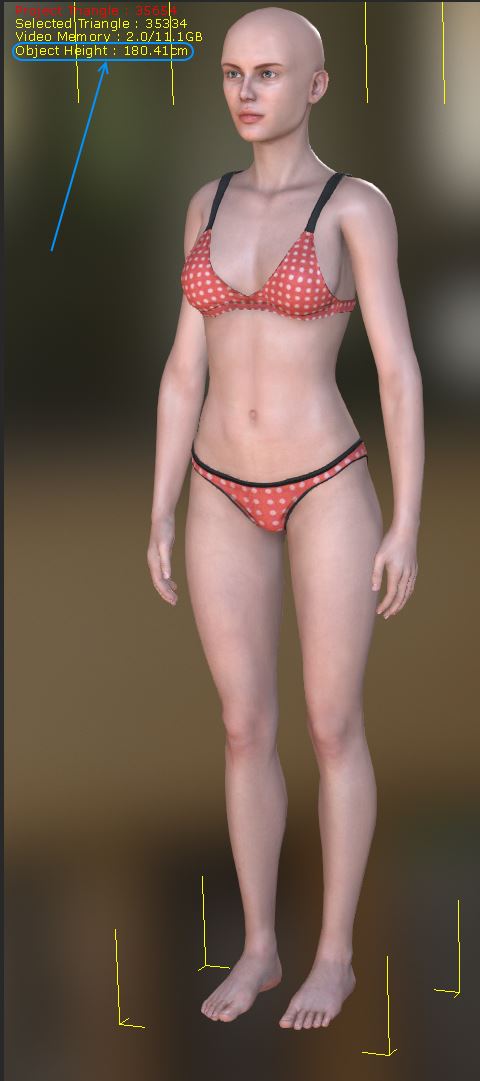 To get an accurate height you want to measure without shoes, hair, or hat, as those items would be added to the height. The default unit of measurement is Centimeters, but you can change that to Feet. Since the units in iClone are centimeters, it simpler to stick with that IMO.
|
|
|
|
|
dpage
|
|
|
Group: Forum Members
Last Active: 9 Months Ago
Posts: 12,
Visits: 89
|
I'm creating Dressed Characters for a game, and to achieve clothing and acessory customization that maintains skinning and bone assignments, I was able to dress a character in stacked clothing, export the avatar and enable and disable clothing item game objects within Unity. To do this I had to get around the in CC3 outfit tagging system that generally limits one shirt or shoes or pants at a time, by assigning the item and using "Transfer Skin Weights" andwith the setting "Other". That way I've been able to stack a bunch of outfits without conflict. For Hair, I've generally had to "Convert to an Accessory". 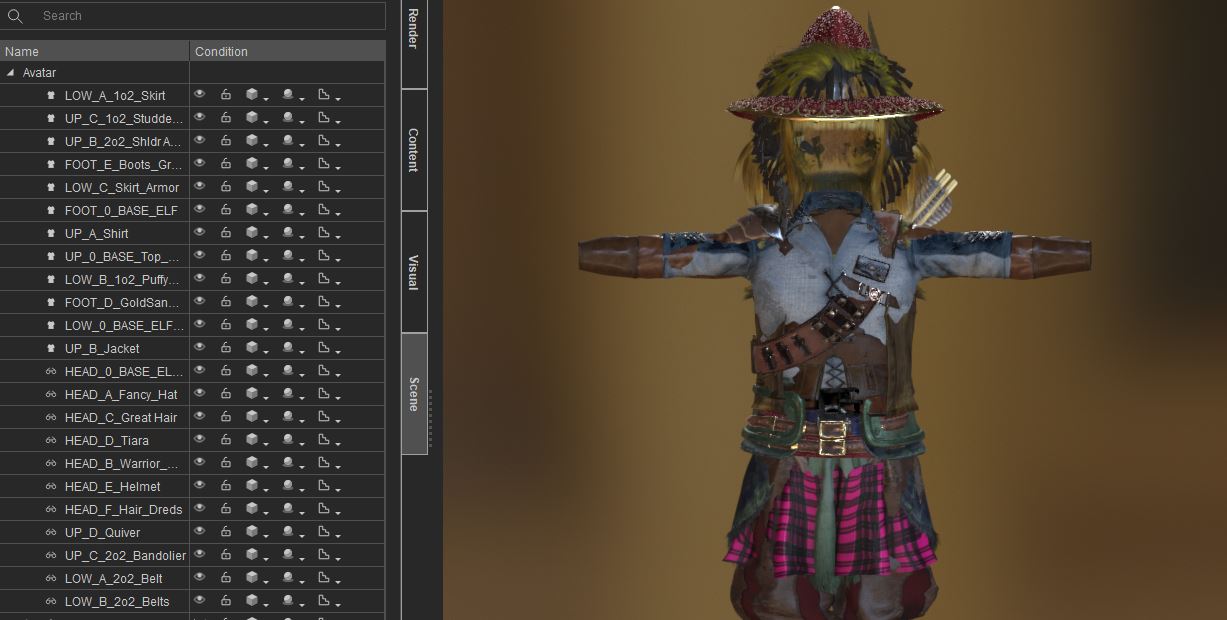 HOWEVER, there seems to be an arbitrary and not always consistent Limit to how many items you can assign to a Character . I realized after an hour of frustration that at a certain point, adding a new layer would delete an existing item to "make room" in the hierarchy of clothes. If anybody from RL could speak to what the limit on simultaneous items might be that would be glorious., Even better would be a solution to remove this cap.
|
|
|
|
|
Kelleytoons
|
Kelleytoons
Posted 6 Years Ago
|
|
Group: Forum Members
Last Active: Last Year
Posts: 9.2K,
Visits: 22.1K
|
The maximum is 20 (this doesn't count some items, like hair, which aren't given a number). You can see this number if you go to Modify/Conform/Cloth Layer Settings and then choose the gear to the far right of any item, which allows you to select the layer number. You can have as many accessories as you want, but only 20 cloth layers.
Alienware Aurora R16, Win 11, i9-149000KF, 3.20GHz CPU, 64GB RAM, RTX 4090 (24GB), Samsung 870 Pro 8TB, Gen3 MVNe M-2 SSD, 4TBx2, 39" Alienware Widescreen Monitor
Mike "ex-genius" Kelley
|
|
|
|
|
toystorylab
|
toystorylab
Posted 6 Years Ago
|
|
Group: Forum Members
Last Active: 3 Months Ago
Posts: 4.6K,
Visits: 29.9K
|
I noticed that for unknown reasons, you can't send an avatar from CC (non admin-mode) to IC (admin-mode)
but you can send an avatar from IC (admin-mode) to CC (non admin-mode) 
And from there back to IC works too.
Seems to be a bug...?
Toystorylab on Vimeo :  Crassitudes (my "Alter Ego") on Youtube: Crassitudes (my "Alter Ego") on Youtube: 
|
|
|
|
|
4u2ges
|
4u2ges
Posted 6 Years Ago
|
|
Group: Forum Members
Last Active: Yesterday
Posts: 5.3K,
Visits: 16.8K
|
toystorylab (7/28/2019)
I noticed that for unknown reasons, you can't send an avatar from CC (non admin-mode) to IC (admin-mode)
but you can send an avatar from IC (admin-mode) to CC (non admin-mode)
And from there back to IC works too.
Seems to be a bug...? I am running the latest IC7.5 and older windows 1709 and I have no problem with that. I run iClone always as Administrator and CC as regular. BTW you asked in the other thread how to always run as Administrator from taskbar pinned shortcut. If you have not figured it out yet: Right click on iClone icon on a taskbar. Context menu should have some recent projects list and another iClone icon. Now right click on that icon and go to properties. Click either Advanced button, or Compatibility tab and check "Run as Administrator" The difference I think is, that the first, sets the shortcut to run as Administrator. And the second to run the app itself as Administrator. But there should be no difference in behavior.
|
|
|
|
|
toystorylab
|
toystorylab
Posted 6 Years Ago
|
|
Group: Forum Members
Last Active: 3 Months Ago
Posts: 4.6K,
Visits: 29.9K
|
Yo, thanx... Set CC+IC+3DX to admin... Cause with 3dx it's the same as CC
Toystorylab on Vimeo : Crassitudes (my "Alter Ego") on Youtube:
|
|
|
|
|
Colonel_Klink
|
Colonel_Klink
Posted 6 Years Ago
|
|
Group: Forum Members
Last Active: 2 days ago
Posts: 1.1K,
Visits: 7.7K
|
Dunno if I've been a bad boy or not... How ever I have this issue that raises it's ugly head every now and then, and that is in Character Creator 3 Pipeline I am unable to save a character I have been working on, in that the the save button gets greyed out. This usually means having to reinstall CC3 and the resource pack etc etc 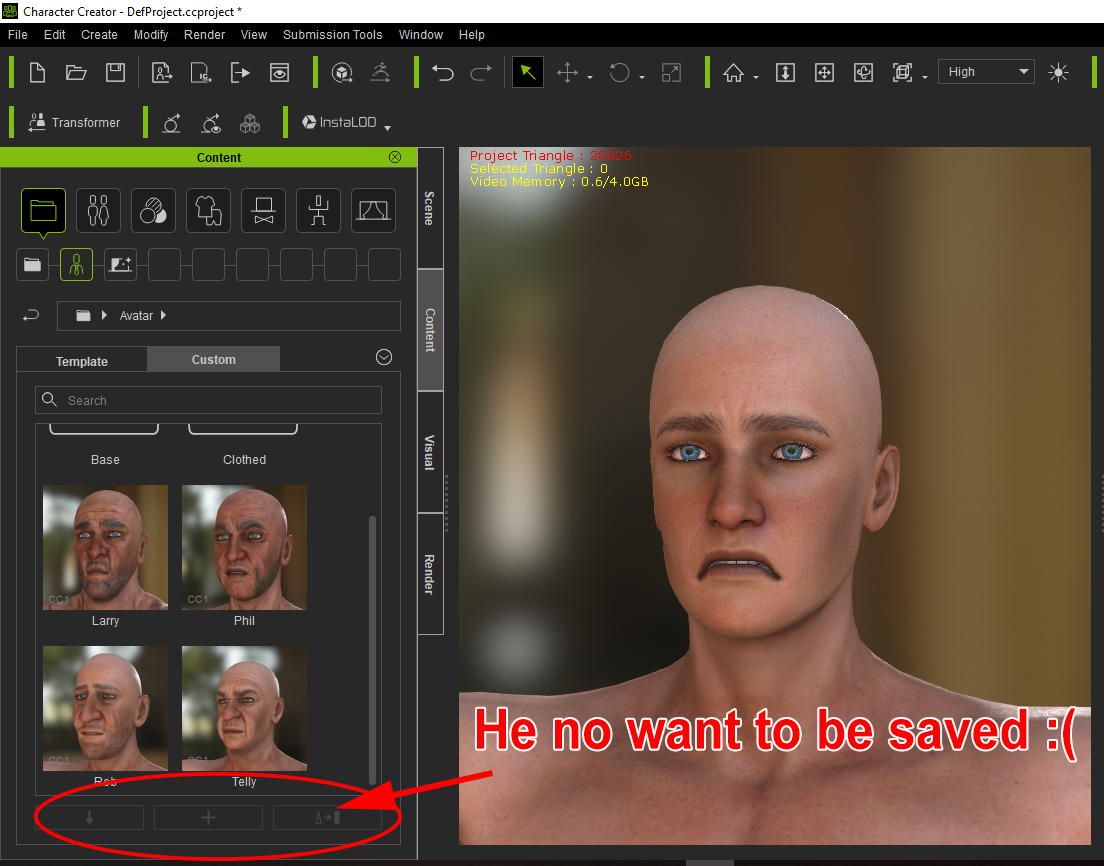
* * * * * * * * * * * * * * * * * *
See all my content in one place
Facebook Page: CWK3D Game and Film Content
Cancer Survivor - Retired Teacher - Geriatric Icloner still learning
Hardware: ZX80; Operating System- ZX80 Basic; CPU - ZX80 @ 3.25 MHz; Memory - 1KB; Hard Drive - N/A; Storage - Cassette; Monitor: Any old CRT TV
|
|
|
|
|
Scyra
|
|
|
Group: Forum Members
Last Active: 5 Years Ago
Posts: 220,
Visits: 2.5K
|
Hi, Colonel. I have had this problem but it has always been my fault. In the image I should be seeing the edge of the yellow bounding box from the selected CC_Base in your Scene tab, but I do not—that could be the problem. Well, in my case, it usually has something to do with having the wrong item selected or being in the wrong category at least.
CC3 & Daz Tricks | CC3 to Unity workflow
|
|
|
|
|
Colonel_Klink
|
Colonel_Klink
Posted 6 Years Ago
|
|
Group: Forum Members
Last Active: 2 days ago
Posts: 1.1K,
Visits: 7.7K
|
Hi Scyra I wish it was that simple. This has happened several times and each time the avatar was selected. I cannot even save it out as an individual character or as a project. It appears that whatever causes the problem upsets the overall save routines within the program, as nothing, cloth, hair etc will save.
* * * * * * * * * * * * * * * * * *
See all my content in one place
Facebook Page: CWK3D Game and Film Content
Cancer Survivor - Retired Teacher - Geriatric Icloner still learning
Hardware: ZX80; Operating System- ZX80 Basic; CPU - ZX80 @ 3.25 MHz; Memory - 1KB; Hard Drive - N/A; Storage - Cassette; Monitor: Any old CRT TV
|
|
|
|