|
Author
|
Message
|
|
rollasoc
|
rollasoc
Posted 8 Years Ago
|
|
Group: Forum Members
Last Active: Last Year
Posts: 188,
Visits: 3.1K
|
I have managed to get 7.2 3DExchange working by removing the current AMD Adenalin drivers (17.12.1 and 17.12.2 both cause 3DExchange to crash) and going back to September's Crimson drivers, which seem to work. Hopefully, the next version of 3DExchange will work with the latest drivers.
Home built PC:- i9 9900K 32GB RAM, Zotac 1080TI mini.
Band Music:- https://thehairthieves.bandcamp.com/
Solo Instrumentals:- https://sineglidermusic.bandcamp.com/
|
|
|
|
|
EddieChristian
|
EddieChristian
Posted 8 Years Ago
|
|
Group: Forum Members
Last Active: Last Year
Posts: 23,
Visits: 544
|
It's not the Video driver shredding the meshes. Although it does seem to have other issues
|
|
|
|
|
Rampa
|
|
|
Group: Forum Members
Last Active: Last Month
Posts: 8.2K,
Visits: 62.6K
|
Grfxman (1/4/2018)
It's not the Video driver shredding the meshes. Although it does seem to have other issues
Could you post an image? Are some parts not moving with animation? or is actually shredding?
|
|
|
|
|
gogstudios
|
gogstudios
Posted 8 Years Ago
|
|
Group: Forum Members
Last Active: 7 Years Ago
Posts: 51,
Visits: 326
|
Facing an issue with 3dx 7.2 crashing on startup. I reinstalled c++ redist and iclone and 3dx. Created an issue for the same here https://www.reallusion.com/FeedBackTracker/Issue/3dx-7-2-crashes-on-start
SkyRoads clone for Android: https://play.google.com/store/apps/details?id=com.gog.skyroads
Target Number - A math puzzle game: https://play.google.com/store/apps/details?id=com.tomag.targetNumber
|
|
|
|
|
TheOldBuffer
|
TheOldBuffer
Posted 8 Years Ago
|
|
Group: Forum Members
Last Active: 2 Years Ago
Posts: 429,
Visits: 6.4K
|
I'm getting this error message when converting to non standard. I've converted using 3dx 6 with no errors .  Homebuilt computer - Windoze 10, INTEL i9 9900 k @ 5.1 GHz, EVGA RTX 2080 TI XC ULTRA, 16GB 3100 MHz RAM, Asus Maximus Hero XI motherboard, Sound blaster Z series. iClone6 & 7 Pipeline, Crazytalk 8, Crazytalk Animator 2, Facefilter, Pop video 3, Hitfilm 4Pro, Cubase 8.5 Pro,
|
|
|
|
|
Rampa
|
|
|
Group: Forum Members
Last Active: Last Month
Posts: 8.2K,
Visits: 62.6K
|
TheOldBuffer (1/12/2018)
I'm getting this error message when converting to non standard. I've converted using 3dx 6 with no errors . Check in your motion library , morph library, etc. for non alphanumeric characters in the names. Also make sure you are not exporting with a name that is using unusual characters. I think you can only use letters, numbers, and the underscore "_".
|
|
|
|
|
TheOldBuffer
|
TheOldBuffer
Posted 8 Years Ago
|
|
Group: Forum Members
Last Active: 2 Years Ago
Posts: 429,
Visits: 6.4K
|
I've tried every combination I can think of and tried converting models that easily convert in 3dx 6. Daz Characters convert no problems its only non standard I'm having the problem with. Rampa (1/12/2018)
TheOldBuffer (1/12/2018)
I'm getting this error message when converting to non standard. I've converted using 3dx 6 with no errors . Check in your motion library , morph library, etc. for non alphanumeric characters in the names. Also make sure you are not exporting with a name that is using unusual characters. I think you can only use letters, numbers, and the underscore "_".
Homebuilt computer - Windoze 10, INTEL i9 9900 k @ 5.1 GHz, EVGA RTX 2080 TI XC ULTRA, 16GB 3100 MHz RAM, Asus Maximus Hero XI motherboard, Sound blaster Z series. iClone6 & 7 Pipeline, Crazytalk 8, Crazytalk Animator 2, Facefilter, Pop video 3, Hitfilm 4Pro, Cubase 8.5 Pro,
|
|
|
|
|
tq.linux
|
tq.linux
Posted 8 Years Ago
|
|
Group: Forum Members
Last Active: 7 Years Ago
Posts: 117,
Visits: 5.5K
|
I judged the same message by 3DX7.1 much. I want you to try using "Apply To iClone" instead of "Export". I sometimes get NonStandardCharacter by this way. 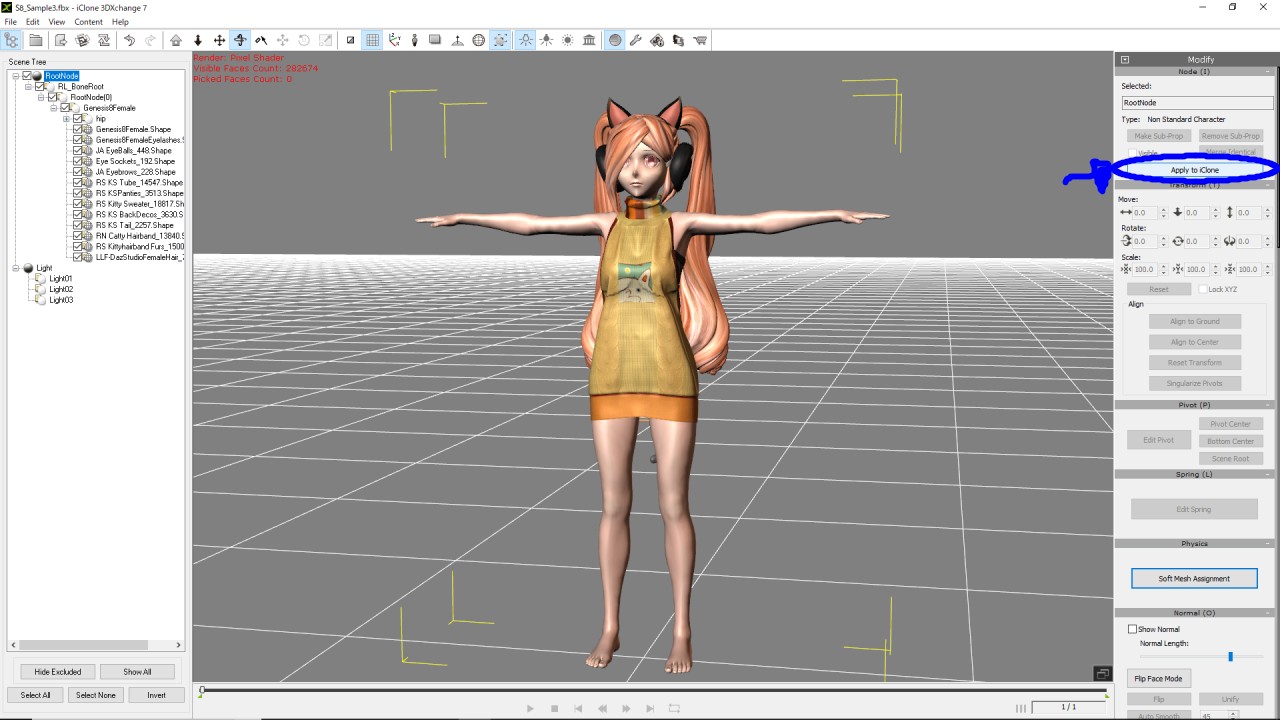 
|
|
|
|
|
TheOldBuffer
|
TheOldBuffer
Posted 8 Years Ago
|
|
Group: Forum Members
Last Active: 2 Years Ago
Posts: 429,
Visits: 6.4K
|
Apologies... I get the error message when converting to non human. I'm using 3dx 6 for now, it works perfectly. TheOldBuffer (1/12/2018)
I'm getting this error message when converting to non standard. I've converted using 3dx 6 with no errors .
Homebuilt computer - Windoze 10, INTEL i9 9900 k @ 5.1 GHz, EVGA RTX 2080 TI XC ULTRA, 16GB 3100 MHz RAM, Asus Maximus Hero XI motherboard, Sound blaster Z series. iClone6 & 7 Pipeline, Crazytalk 8, Crazytalk Animator 2, Facefilter, Pop video 3, Hitfilm 4Pro, Cubase 8.5 Pro,
|
|
|
|
|
dancnbird
|
dancnbird
Posted 8 Years Ago
|
|
Group: Forum Members
Last Active: 7 Years Ago
Posts: 2,
Visits: 53
|
Hi, having the same issue. Log support tickets, Reported on issue tracker. Can someone help find the issue? 3DXchange 6.0 Prod does the same thing. And yes I have dual graphics as well. 3DXchange is set to use the Nvidia GeForce graphics card.
|
|
|
|