|
Author
|
Message
|
|
pinguintje
|
pinguintje
Posted 10 Years Ago
|
|
Group: Forum Members
Last Active: 3 Years Ago
Posts: 834,
Visits: 1.1K
|
Maybe there is something wrong with the update to 6.52.
I have a lot of troubles in the timelime.
Items of the characters and props (motion, collect clip, motion layer etc.) disappear every time and I have them to check again.
The camera's don't show up in the timeline. (That is no fun!)
Has anyone the same problem?
Best Regards,
Arie
|
|
|
|
|
Galfridus
|
Galfridus
Posted 10 Years Ago
|
|
Group: Forum Members
Last Active: 2 Years Ago
Posts: 727,
Visits: 2.2K
|
pinguintje (10/28/2016)
Maybe there is something wrong with the update to 6.52.
I have a lot of troubles in the timelime.
Items of the characters and props (motion, collect clip, motion layer etc.) disappear every time and I have them to check again.
The camera's don't show up in the timeline. (That is no fun!)
Has anyone the same problem?
Best Regards,
Arie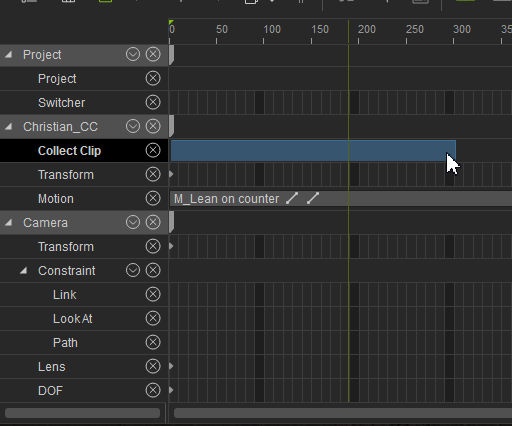 Just done V. quick test but don`t seem able to reproduce your problem Arie. :unsure:My example is collecting a clip from Lean on counter motion applied to CC Christian Avatar. My Camera`s show and as far as I can tell, time line seems to be working as I expect. Geoff.

|
|
|
|
|
pedrosura
|
pedrosura
Posted 10 Years Ago
|
|
Group: Forum Members
Last Active: 2 Years Ago
Posts: 220,
Visits: 5.7K
|
I can not get the iavatarrelated tracks to show on 6.52. So, I can not get a screen like that to show. Do you have Windows 10 or 8??
|
|
|
|
|
pinguintje
|
pinguintje
Posted 10 Years Ago
|
|
Group: Forum Members
Last Active: 3 Years Ago
Posts: 834,
Visits: 1.1K
|
@ Galfridus Thanks for the quick reply. I opened a new project and I have the same problem with the camera. 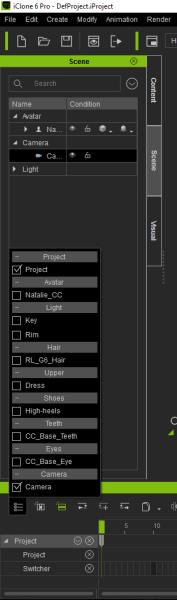 Even when the camera is checked , he doesn't appear on the timeline. (see picture) @pedrosura I have Windows 10, 64 bit Best Regards, Arie
|
|
|
|
|
pedrosura
|
pedrosura
Posted 10 Years Ago
|
|
Group: Forum Members
Last Active: 2 Years Ago
Posts: 220,
Visits: 5.7K
|
Ok, I have Windows 8.1. So Windows version is not the culprit...
|
|
|
|
|
Peter (RL)
|
Peter (RL)
Posted 10 Years Ago
|
|
Group: Administrators
Last Active: 2 Years Ago
Posts: 23.1K,
Visits: 36.6K
|
pedrosura (10/28/2016)
Problem with 6.52
When you select an iAvatar and you have the "object selected track" toggle, the tracks associated with the iAvatar do not show up. So for instance, with an iAvatar selected and the object selected track toggle on, I do not get the ability to see the motion track..
Please fix this...
Going back to 6.51Unfortunately I can't reproduce this in my iClone Pro 6.52. With the same settings and an avatar selected I get the timeline display as below. Do you get something different? Please post a screenshot showing how the timeline displays for you with an avatar selected. 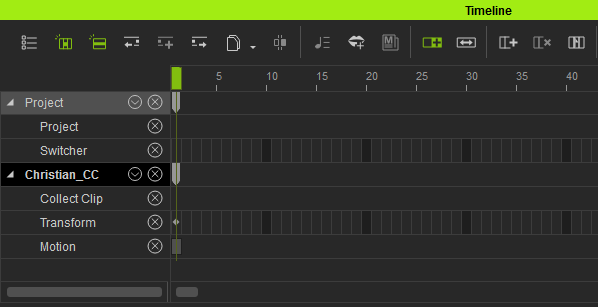
Peter
Forum Administrator www.reallusion.com
|
|
|
|
|
Peter (RL)
|
Peter (RL)
Posted 10 Years Ago
|
|
Group: Administrators
Last Active: 2 Years Ago
Posts: 23.1K,
Visits: 36.6K
|
Galfridus (10/28/2016)
Thank You. Very nice update RL. Glad to have G1`s functioning again.
Need some clarification for:-
Fixed: CC Characters do not interact with iClone 5 embedded iProp content (Outdoor/ Bike, Horizontal Bar, Merry-Go-Round, Seesaw, Swing Bench, Unicycle, etc.). Users now can get the fixed iProps by downloading the Bonus pack found in the Order History after logging in the member page.
Exactly which bonus pack ?
I have just downloaded the IC5 bonus pack from my past order history.
It won`t instal because I no longer have IC5 on my system !:crying:
Should I have download and reinstalled the IC6 bonus pack instead ? I have only a modest connection speed so the 1GB plus IC6 pack will take a few hours.
To add to the confusion in my members account neither the IC5 or IC6 bonus packs are showing a recent date i.e. (update).
Any advice appreciated. It will be good to give CC characters a ride on the RL Bike when I get this sorted.:)
Geoff.Hi Geoff, I don't believe this extra bonus pack has been added to accounts just yet. I will need to check this and let you know. Apologies for the confusion.
Peter
Forum Administrator www.reallusion.com
|
|
|
|
|
pedrosura
|
pedrosura
Posted 10 Years Ago
|
|
Group: Forum Members
Last Active: 2 Years Ago
Posts: 220,
Visits: 5.7K
|
Peter,
I am sorry but I uninstalled it and put back 6.51. I am working on a few Scenes and it's unworkable not to be able to see iAvatar tracks. My screen looks like yours but I can not see anything other than Project tracks. Did you install a patch or a full install that you may have access to??
|
|
|
|
|
Peter (RL)
|
Peter (RL)
Posted 10 Years Ago
|
|
Group: Administrators
Last Active: 2 Years Ago
Posts: 23.1K,
Visits: 36.6K
|
wires (10/28/2016)
The iClone 6.52 installers - Full and Patch, are not showing up in my member account. There is also no new iClone 6 Resource Pack available.Hi Gerry, The full iClone 6 download in your account will be version 6.52 although it still shows as version 6.51. We will need to correct this asap. The resource pack in your account will also be the most recent one but I don't believe this update included any changes to the resource pack.
Peter
Forum Administrator www.reallusion.com
|
|
|
|
|
Peter (RL)
|
Peter (RL)
Posted 10 Years Ago
|
|
Group: Administrators
Last Active: 2 Years Ago
Posts: 23.1K,
Visits: 36.6K
|
pinguintje (10/28/2016)
Maybe there is something wrong with the update to 6.52.
I have a lot of troubles in the timelime.
Items of the characters and props (motion, collect clip, motion layer etc.) disappear every time and I have them to check again.
The camera's don't show up in the timeline. (That is no fun!)
Has anyone the same problem?
Best Regards,
ArieHi Arie, Again I'm not able to reproduce these issues. Perhaps you could try uninstalling iClone and perform a clean install of the full iClone 6.52 version as there may have been a problem during the update. This is available from your Member Account if you click the download link on the Registration, Patch and Bonus page. All your content will remain so the process should be pretty quick.
Peter
Forum Administrator www.reallusion.com
|
|
|
|