|
Author
|
Message
|
|
j-wag
|
|
|
Group: Forum Members
Last Active: Last Year
Posts: 146,
Visits: 523
|
I don't know what it is but it kind of got reproduced in this example. Like in the previous one, that second key frame just disappears after a moment. And again, I can't get Dynamic physics to work unless they are from the very first frame. There seems to be no way to delay the onset of Dynamic physics.
|
|
|
|
|
Rampa
|
|
|
Group: Forum Members
Last Active: 2 days ago
Posts: 8.2K,
Visits: 62.6K
|
j-wag (7/10/2016)
I don't know what it is but it kind of got reproduced in this example. Like in the previous one, that second key frame just disappears after a moment. And again, I can't get Dynamic physics to work unless they are from the very first frame. There seems to be no way to delay the onset of Dynamic physics.
There does seem to be some other issue going on. I set up the same way you did, and got the exact same results. The force is not setting as the key like it should. This will keep me busy for a while! :)
|
|
|
|
|
Rampa
|
|
|
Group: Forum Members
Last Active: 2 days ago
Posts: 8.2K,
Visits: 62.6K
|
Forces do not seem to take key frames. But you can do this as a two step process. First record the static bit. Pause the timeline. Set your new force. Play your timeline. Lastly, disable physics on your ball to keep the baked animation. Otherwise, it'll just record your last force settings over it the next time you rewind. This is "baking" physics. If you want to see the actual animation clips in the timeline, select the appropriate tracks from the drop-down list of the ball in the timeline. 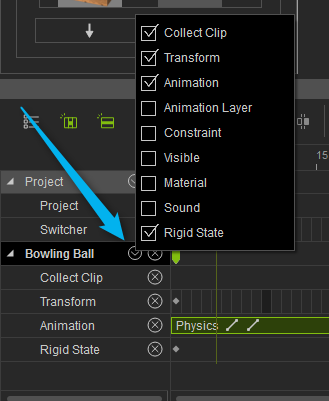
|
|
|
|
|
Alan_M
|
Alan_M
Posted 9 Years Ago
|
|
Group: Forum Members
Last Active: 5 Years Ago
Posts: 225,
Visits: 2.9K
|
Hi j-wag, The issues you are having are o do with the fact that you have deviated from my tutorial a bit. If you read up on how to use the initial force setting in the iClone user manual you will see it says the following. 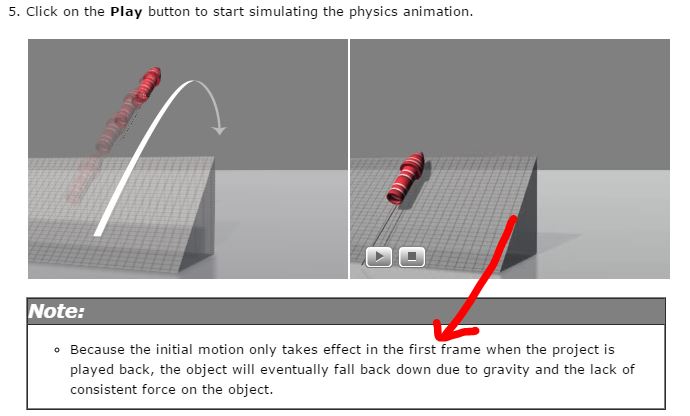 In video 103-09.10 Making the ball movement into a realistic throw.mp4 I am always setting the initial force on frame 1 of the timeline. I never try to set it later. In the next video 103-09.11 The human connection- completing the ball throwing.mp4, you will notice that I do not use the initial force setting at all. The speed of the throw actually comes from the pendulum motion of the avatars throwing arm Which is what physics is all about, transfer of momentum. I actually mention this in the tutorial that the motion velocity is coming from the movement of the throwing arm. I will do you a quick little video to try and clarify things for you. All the best
Alan M
|
|
|
|
|
Alan_M
|
Alan_M
Posted 9 Years Ago
|
|
Group: Forum Members
Last Active: 5 Years Ago
Posts: 225,
Visits: 2.9K
|
Hi j-wag, let me know if this helps in any way. OK FIXED, watch this one. All the best
Alan M
|
|
|
|
|
j-wag
|
|
|
Group: Forum Members
Last Active: Last Year
Posts: 146,
Visits: 523
|
Thank you Alan! Everything is now working as per your videos. I've gotten the ball animation to perform as expected when thrown by the character. Turning off physics after the first animation also resolved a lot of issues. I didn't realize it would keep recording over.
Q. Is there a way to give her throw a lot more power? I.e. what if you were simulating a baseball pitch at 100+ km/h? I shortened the length of the throw animation by half and it gave the throw a lot more power. Is that the only way?
|
|
|
|
|
j-wag
|
|
|
Group: Forum Members
Last Active: Last Year
Posts: 146,
Visits: 523
|
Thanks Rampa! I wasn't turning off physics after I recorded the motion, which obviously caused a lot of confusion for me.
|
|
|
|
|
j-wag
|
|
|
Group: Forum Members
Last Active: Last Year
Posts: 146,
Visits: 523
|
I was watching "103-10.04 Setting up Soft Cloth to work with gravity" but how would I fix Heidi's dress below? I followed what you said in "103-10.06 Using collision envelopes to fix intersections" but could not get the skin to stop showing through. It's difficult to edit especially because you can't really see the collision bounding boxes through her dress if they're smaller than the dress. Also, I hit the reset button in Collision Shape Editor and 3 settings for hips became one. Do I have to start over again if I run out of undo's?
|
|
|
|
|
j-wag
|
|
|
Group: Forum Members
Last Active: Last Year
Posts: 146,
Visits: 523
|
I'm getting this cloth effect when I shorten the length of the throwing animation and then turn off physics after recording the physics animation. When physics is on, it's ok, but when off, the legs go through the cloth.
|
|
|
|
|
Rampa
|
|
|
Group: Forum Members
Last Active: 2 days ago
Posts: 8.2K,
Visits: 62.6K
|
j-wag (7/11/2016)
I'm getting this cloth effect when I shorten the length of the throwing animation and then turn off physics after recording the physics animation. When physics is on, it's ok, but when off, the legs go through the cloth.If your doing how Alan mentioned, you really shouldn't even need to ever disable physics. You should only be changing the state from kinematic to dynamic.However, if you want to play with disabling it to bake the ball's motion, you should try this. Don't turn off physics entirely, just turn it off for the ball. That means un-check "enable physics" in the physics panel for the ball. Leave the icons in the toolbar alone. You may have inadvertently turned off soft physics, thus disabling the dress from reacting properly. 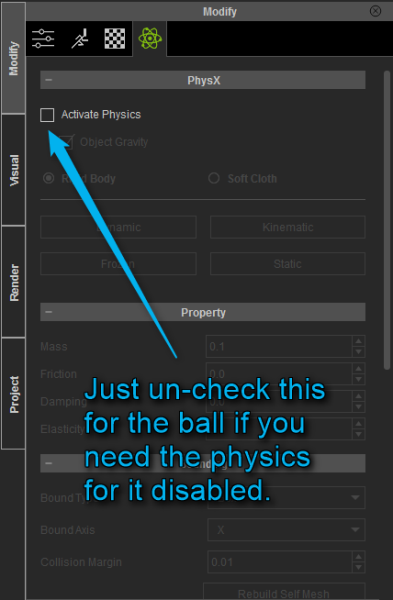
|
|
|
|