|
Author
|
Message
|
|
kelleyinwestport
|
kelleyinwestport
Posted 10 Years Ago
|
|
Group: Forum Members
Last Active: 2 Years Ago
Posts: 10,
Visits: 48
|
I'm having trouble installing iClone 6.42 and Toon Maker. Prior to buying both, I opted to download the 30-day Trial Version. Then later yesterday, I took the plunge and bought both. Even got a serial number. The purchase process involved downloading 6 links for iClone and 6 more for Toon Maker. This afternoon I attempted to install the real copy of iClone. I thought it had gone well until none (!) of the other 5 links/patches would install. For each of them I got an error message saying that this doc. cannot be installed with iClone 6 Trial Version. I had assumed that the paid version would simply overwrite the Trial Version. So I went to Control Panel and deleted the Trial Version. Then I re-installed iClone. And had the same problem. To make a long story short, it keeps installing itself as the Trial Version. And because of that, Toon Maker, which I had assumed to be a stand-alone program, will not install. (Neither it nor any of its links/patch/extra contents). How do I resolve this?
In theory, there is no difference between theory and practice. But, in practice there is.
|
|
|
|
|
DanieT
|
DanieT
Posted 10 Years Ago
|
|
Group: Forum Members
Last Active: 8 Years Ago
Posts: 4,
Visits: 29
|
- Intel i5 dual core CPU or higher
- 8GB RAM or higher recommended
- 10GB free hard disk space or higher recommended
- Display Resolution: 1920 x 1080 or higher
- Graphics Card: NVidia Geforce GTX 600 Series/ AMD Radeon HD 7000 Series or higher
- Video Memory: 2GB RAM or higher recommended
- Video card compatible with Pixel Shader 3.0 recommended for optimized visual performance.
Additional Requirements: - Sound card / keyboard / Speaker
- 3-button mouse
- DirectX 11
|
|
|
|
|
lpatter
|
lpatter
Posted 10 Years Ago
|
|
Group: Forum Members
Last Active: 10 Years Ago
Posts: 145,
Visits: 898
|
WATERMARKS
I had iclone 6.3 and since 6.4 had problems I never installed Iclone 6.4 and 6.42 until yesterday. So I could not use the new morphs. I also bought realistic head and the VFX. I installed them all and Tokomotion's characters all have watermarks in iclone and in character creator. I would have first tried deleting them and redownloading but I can never find where CC keeps its products and I am afraid that if I deleted them it might fix Icone but not CC.
VFX I first tried testing the projects. The first thing I touched was broken.
I downloaded all the things I bought before installing but did not try because its not allowed.
Any assistance before I have to call mamma!
|
|
|
|
|
bigh43
|
bigh43
Posted 10 Years Ago
|
|
Group: Forum Members
Last Active: 9 Years Ago
Posts: 21,
Visits: 450
|
I been using Genesis - G2 - G3 in iClone - can't understand why you can't .
|
|
|
|
|
gentledragon
|
gentledragon
Posted 10 Years Ago
|
|
Group: Forum Members
Last Active: 6 Years Ago
Posts: 12,
Visits: 28
|
Still having trouble transferring Daz avatars with high poly counts through 3dexchange to IClone 6. I keep getting the out of memory message. Just for the heck of it, I tried opening the FBX file in Maya. It opened with no problem, (I didn't need 3dxchange) the only message was I was using over 300K polys. That's when I discovered, 3Dxchange has a limit of no more than 290K polys allowed. How can Daz run with more polys than iClone, I want that photorealistic look. Is there a way to up the limit in 3Dexchange so I can get my avatars to iClone? Also those that do go, do not have their bones, why is it always necessary to reinstall them again in 3Dexhange?
|
|
|
|
|
Peter (RL)
|
Peter (RL)
Posted 10 Years Ago
|
|
Group: Administrators
Last Active: 2 Years Ago
Posts: 23.1K,
Visits: 36.6K
|
Feedback Tracker Beta is Now Live
No application is 100% free of issues or bugs, as there is always room to improve. So we have created a place where we can all work together to make your products better by making your suggestions visible to all, having them well-categorized, easy to track and easy to implement.
For this we have decided to allow all users to actively participate in our product improvement and development cycles with help from our brand-new Feedback Tracker platform that will put you in the developer seat, allowing you to suggest, vote, prioritize and track all product issues, findings, and enhancements. Ensuring the most efficient and transparent collaboration with you -- our partners. To find the Feedback Tracker please click HERE. What can the Feedback Tracker do for you?
** Check reported bugs, saving your time on duplicated reporting.
** Report bugs and suggested feature enhancements.
** Voting priority for feature enhancements and bug fixes.
Peter
Forum Administrator www.reallusion.com
|
|
|
|
Rockoloco666
|
Rockoloco666
Posted 10 Years Ago
|
|
Group: Banned Members
Last Active: 6 Years Ago
Posts: 762,
Visits: 2.0K
|
Hi, the lens slider value doesn't reflect the actual value of the lens, ie one key is at 80mm the next is at 120mm but the value is stuck either at 80mm or 120mm, evdn clicking on the actual key doesn't refresh the value, which makes it kind of hard to make adjustments. It works at first but after some time it just freezes
thanks
|
|
|
|
|
Madproff
|
Madproff
Posted 10 Years Ago
|
|
Group: Forum Members
Last Active: 10 Years Ago
Posts: 2,
Visits: 42
|
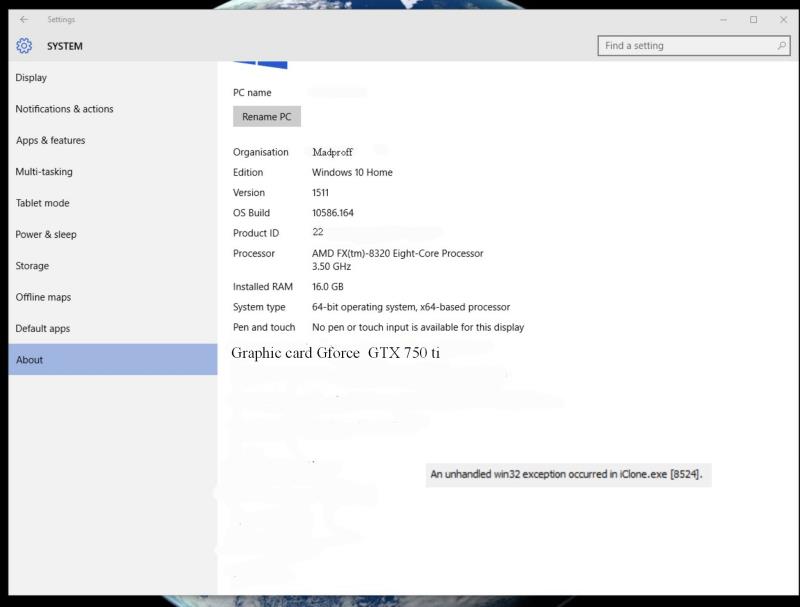 Hello again Seem to have problem with importing mp3 sounds iclone 6.42 computer say's closing program i have try'ed drag and drop from your own folders same applys
Ok found my problems, this seems to have done the job for me.Needed to download K-lite 12.0.5, Update Cineform HD codec Vorbis.ACM had problem
|
|
|
|
|
Agonos
|
Agonos
Posted 10 Years Ago
|
|
Group: Forum Members
Last Active: 7 Years Ago
Posts: 1.1K,
Visits: 3.1K
|
Hi all,
There is a trick to remove the shortcut "CTRL + 6" ? Because personally, it annoys me radically. Just press the "5" instead of "6" and we are obliged again to extend all the tabs.
|
|
|
|
|
Laugh Atlantic
|
Laugh Atlantic
Posted 10 Years Ago
|
|
Group: Forum Members
Last Active: Last Year
Posts: 9,
Visits: 265
|
Seem to be getting lots of crashes when opening projects.
IC 6.42.2728.1 - Win 10 . Directx 11.2 - AMD Radeon HD 5700 . Processor Intel(R) Core(TM) i7 CPU 860 @ 2.80GHz, 2801 Mhz, 4 Core(s)
|
|
|
|