|
Author
|
Message
|
|
Bellatrix
|
Bellatrix
Posted 11 Years Ago
|
|
Group: Forum Members
Last Active: 3 Years Ago
Posts: 420,
Visits: 1.2K
|
That's a useful link. Got used to DIY learning thanks to Daz3D forgot that official manuals actually exist lol
>>> Indie Generalist modeler-rigger-animator <<< Hardware: AlienWare i7-HK 32G GTX1080 2T-SSDs BenqSW320 Wacom-Intuous 3Dconnexion ||| Software: IC6 Pipeline - CTA3 Pipeline - ATK2 - Indigo ||| Zbrush4R8. Blender 2.79. DazStudio 4.9. Carrara. Poser. Octane.
|
|
|
|
|
urbanlamb
|
urbanlamb
Posted 11 Years Ago
|
|
Group: Forum Members
Last Active: 2 Years Ago
Posts: 1.2K,
Visits: 3.5K
|
Bellatrix (9/29/2015)
That's a useful link. Got used to DIY learning thanks to Daz3D forgot that official manuals actually exist lol Yes reallusion makes good helpfiles. Daz has always been a figure it out yourself thing although I never did warm to their stuff as I found the content to be not useful to me.
~~~~~~~~~~~~~~~~~~~~~~~~~~~~~~~~~~~~~~~~~~~~~~~~~~~~~~~~
"You have brains in your head. You have feet in your shoes. You can steer yourself in any direction you choose. You're on your own, and you know what you know. And you are the guy who'll decide where to go."
Dr. Seuss
|
|
|
|
|
TucsonDoobie
|
TucsonDoobie
Posted 11 Years Ago
|
|
Group: Forum Members
Last Active: 2 Years Ago
Posts: 51,
Visits: 225
|
1. It would be great when you've worked on a Project, the file would be listed as "Recent files opened, etc..." and it would list the last few you were working on.
2. An "Auto-save" feature that you could set by minutes.
3. The Indigo Render seems to ignore the actual iClone 6 light even if it is invisible and renders it.
That's about all I could think of. ...dave
|
|
|
|
|
KLS_PROD
|
KLS_PROD
Posted 11 Years Ago
|
|
Group: Forum Members
Last Active: 6 Years Ago
Posts: 9,
Visits: 370
|
I use my right mouse button to orbit around objects while in pan mode ( 'X' keyboard shortcut key). With this version, the context menu seems to pop up frequently when orbiting causing a major annoyance. Hopefully this can be fixed as it is pure muscle memory for me to orbit this way in IClone. Version 6.2.2.122.1
4x gtx 980ti, 2x xeon 2550v4, 512gb RAM, 1tb m.2
|
|
|
|
|
urbanlamb
|
urbanlamb
Posted 11 Years Ago
|
|
Group: Forum Members
Last Active: 2 Years Ago
Posts: 1.2K,
Visits: 3.5K
|
I just found this when I was building a set I dragged an avatar out for scaling and the CC characters in the iclone inventory .. they clothing is all messed up. I tried "sending to CC" and editing them and then sending it back to iclone and there was no change. The two originals Heidi and her sidekick are fine its just their CC versions are screwed up. Also to add inside the CC they both look fine, but I changed a few settings anyhow and sent them back. 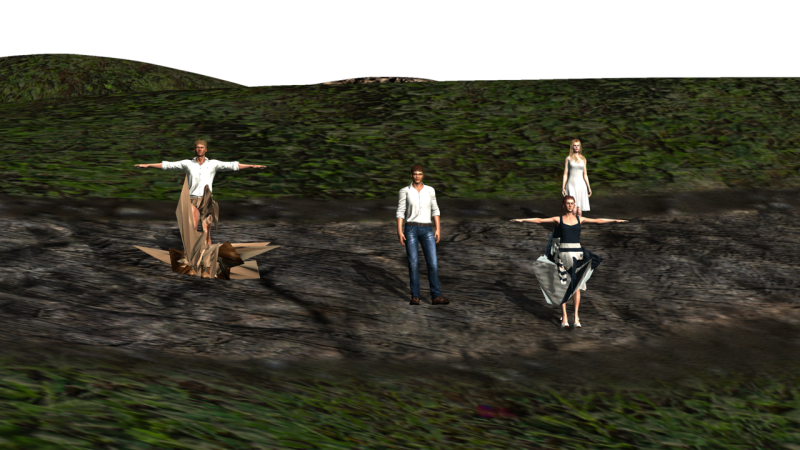 ~~~~~~~~~~~~~~~~~~~~~~~~~~~~~~~~~~~~~~~~~~~~~~~~~~~~~~~~
"You have brains in your head. You have feet in your shoes. You can steer yourself in any direction you choose. You're on your own, and you know what you know. And you are the guy who'll decide where to go."
Dr. Seuss
|
|
|
|
|
Alien Maniac
|
Alien Maniac
Posted 11 Years Ago
|
|
Group: Forum Members
Last Active: 5 Years Ago
Posts: 693,
Visits: 2.1K
|
I just tried to install the Indigo RT in IC 6.2 (first time in this version of IC)
All went well, BUT it does not show in iclone, it does show as being installed in my programs. Weird.
So, I uninstalled it and tried again...same- problem.....not there.
Any ideas or ???????
MSI GE66 Raider, Intel 10th Gen, I7, SC Turbo to 5.3 GHZ, 240HZ, 64GB 3300 Ram, 2x 1TB M2 SSD Drives, NVIDIA GPU RTX 2070/8GB, 55" Sony 4K Monitor External data drives total 7 TB. and an AUDIO Studio Recording system.
|
|
|
|
|
Cricky
|
Cricky
Posted 11 Years Ago
|
|
Group: Forum Members
Last Active: 4 Years Ago
Posts: 2.8K,
Visits: 13.8K
|
Did you install the Program "Indigo RT" 1st? Then the Plug-in? If the answer is Yes; You may want to try the Open all panels option (CTRL+6) Then place the panel where you want it.. Plus you may have to move a few others or turn them off. Bray42 (10/7/2015)
I just tried to install the Indigo RT in IC 6.2 (first time in this version of IC)
All went well, BUT it does not show in iclone, it does show as being installed in my programs. Weird.
So, I uninstalled it and tried again...same- problem.....not there.
Any ideas or ???????
SKYPE ID: rc.650
http://city.reallusion.com/store/ModuleExpand.aspx?id=GS634545170497417354&mdid=18866
http://city.reallusion.com/ContentTag.aspx?tagname=Cricky&AuthorID=20081020688550191201#]Reallusion Store Content
" If I had Alzheimer's (Old Timers), would I know it? "
|
|
|
|
|
Alien Maniac
|
Alien Maniac
Posted 11 Years Ago
|
|
Group: Forum Members
Last Active: 5 Years Ago
Posts: 693,
Visits: 2.1K
|
Cricky
I have tried it both ways and your tip (does nothing). So weird..... It shows installed in control panel (and Indigo RT) but nothing shows in IC 6. humm. I followed the install instructions per RL and still nada. Man if it were not for problems like this I might actually get to use iclone more. du. Why is this such a big problem for users anyway? It has always been a pain in the xxx to install and still is.
GueSS I will just have to waste another day figuring it out..DOH!
MSI GT780DX
on Win 7 Pro and an SSD 500GB and 32GB Ram
MSI GE66 Raider, Intel 10th Gen, I7, SC Turbo to 5.3 GHZ, 240HZ, 64GB 3300 Ram, 2x 1TB M2 SSD Drives, NVIDIA GPU RTX 2070/8GB, 55" Sony 4K Monitor External data drives total 7 TB. and an AUDIO Studio Recording system.
|
|
|
|
|
Cricky
|
Cricky
Posted 11 Years Ago
|
|
Group: Forum Members
Last Active: 4 Years Ago
Posts: 2.8K,
Visits: 13.8K
|
I just re-installed Indigo and the Plug-in, on my WIN7 system, 4 days ago without incident using the steps I suggested.
Background: Windows 10 caused so much havoc in the " UpDowngrade (if you ask me), it all but completely wiped out my software system when I reverted back to my Win7 version using the Windows 10 option allowing it. I understand that microSOFT Windows10 no longer offers that 30 day option to return once installed, but I could be wrong. It didn't work, so that may be why. Luckily I have 5 redundant backups done every other day, and a copy of my original restoration disk, or I wouldn't be typing this today.
SKYPE ID: rc.650
http://city.reallusion.com/store/ModuleExpand.aspx?id=GS634545170497417354&mdid=18866
http://city.reallusion.com/ContentTag.aspx?tagname=Cricky&AuthorID=20081020688550191201#]Reallusion Store Content
" If I had Alzheimer's (Old Timers), would I know it? "
|
|
|
|
|
Alien Maniac
|
Alien Maniac
Posted 11 Years Ago
|
|
Group: Forum Members
Last Active: 5 Years Ago
Posts: 693,
Visits: 2.1K
|
Cricky
I uninstalled IC6, Indigo RT, Indigo RT plugin.
I reinstalled IC 6 and updates, then tried again:
1. Installed plugin and all codes.....says installed
2. Installed RT and verified it with Indigo.
Same problem.... NO Indigo render tab showing in menu.
3 days of trying to fix this and NADA.
Must be Windows 7 Pro doesn't like it? LOL This is so absolutely mind boggling and such a waste of my time.
I guess RL insn't reading these postings for problems with IC 6.2? humm OK, support ticket time.
MSI GE66 Raider, Intel 10th Gen, I7, SC Turbo to 5.3 GHZ, 240HZ, 64GB 3300 Ram, 2x 1TB M2 SSD Drives, NVIDIA GPU RTX 2070/8GB, 55" Sony 4K Monitor External data drives total 7 TB. and an AUDIO Studio Recording system.
|
|
|
|