|
Author
|
Message
|
|
Peter (RL)
|
Peter (RL)
Posted 11 Years Ago
|
|
Group: Administrators
Last Active: 2 Years Ago
Posts: 23.1K,
Visits: 36.6K
|
Hi Everyone, iClone 6.1 has been released today and with it comes a large number of outstanding fixes and enhancements. However if you do still find any bugs, issues, glitches or other general annoyances, please can you post them here. As always, do feel free to post general feedback in your own threads, but it will help us greatly if we can keep all outstanding issues in one place. This will help the development team track and finally eradicate any nagging problems. Please do try to provide your full system specifications and a detailed description of the problem when posting. If the issue was one previously posted in one of the older issues threads, you can just provide a link back to the issue rather than write it all out again. Many Thanks. :)
Peter
Forum Administrator www.reallusion.com
|
|
|
|
|
wires
|
wires
Posted 11 Years Ago
|
|
Group: Forum Members
Last Active: 3 Months Ago
Posts: 5.7K,
Visits: 26.5K
|
Selecting "Hide Navigation Panel" in the Content window is no longer a permanent state - it is turned on every time iClone 6.1 is restarted. :crying::pinch::ermm:
Gerry
System: Win 10 Pro (21H2), Asus X99-E WS, CPU i7-5930K -3,5 GHz, 32 GB DDR4 2666-16 RAM, NVidia GTX 1080 Ti GPU - 11 GB VRAM(Driver Studio-536.99), Samsung 850 Pro 512 GB SSD, 6 TB HD storage.
|
|
|
|
|
mark
|
|
|
Group: Forum Members
Last Active: 2 Years Ago
Posts: 4.9K,
Visits: 16.7K
|
Looks like a lot of issues are resolved! Thanks! Was hoping my shadow issue would be fixed... But sadly my major problem of Spotlight shadow-flickering with Biosphere plants is still there. As stated before, there is no flickering in shadows with Directional lights so it's hard to believe it's my display card which has the newest drivers. :crying:

Click here to go to my YouTube Channel filled with iClone Tutes and Silly Stuff
Visit ANIMATED PROJECTIONS Powered by iCLONE
Intel Core i7 3960X @ 3300MHz Overclocked to 4999.7 MHz Sandy Bridge 24.0GB DDR3 @ 833MHz Graphic Display HP ZR30w
GeForce GTX 980Ti 6GB Microsoft Windows 7 Professional 64-bit SP1 ASUSTeK COMPUTER INC. P9X79 WS (LGA2011)
|
|
|
|
|
Agonos
|
Agonos
Posted 11 Years Ago
|
|
Group: Forum Members
Last Active: 7 Years Ago
Posts: 1.1K,
Visits: 3.1K
|
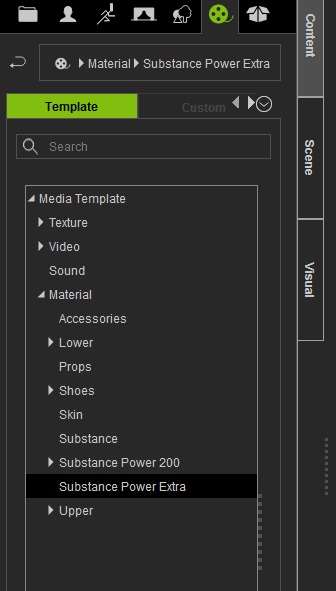
I do not know if it comes from updating or installing "3DXchange pro 6" but I do not have access to three tools found in the "Substance Power Extra". Even if I reinstall the pack, they no longer appear.
|
|
|
|
|
animagic
|
animagic
Posted 11 Years Ago
|
|
Group: Forum Members
Last Active: 4 Months Ago
Posts: 15.8K,
Visits: 31.4K
|
The HDR issue, which was promised as fixed in 6.1 has not been resolved. See this post: https://forum.reallusion.com/FindPost224623.aspx. This is really problematic...:crying:
|
|
|
|
|
jann
|
|
|
Group: Forum Members
Last Active: 4 Years Ago
Posts: 146,
Visits: 4.5K
|
Agonos (5/29/2015)
I do not know if it comes from updating or installing "3DXchange pro 6" but I do not have access to three tools found in the "Substance Power Extra". Even if I reinstall the pack, they no longer appear.
Same here. Substance Tools are gone! :crying:
|
|
|
|
|
Christy0
|
Christy0
Posted 11 Years Ago
|
|
Group: Forum Members
Last Active: Last Year
Posts: 1.0K,
Visits: 2.7K
|
Sugar!!!! and I was really enjoying using these tools to update the textures on all my old homemade props. Have to check mine when I get home. Yep!! Gone here too.
|
|
|
|
|
wires
|
wires
Posted 11 Years Ago
|
|
Group: Forum Members
Last Active: 3 Months Ago
Posts: 5.7K,
Visits: 26.5K
|
The 3 Substance tools are still in the sub-directory: drive letter:\IC6\Template\iClone 6 Template\iClone Template\Materials Lib\Substance Power Extra - and are iSubstance files. The file type should list them as "iClone iSubstance Files" and not "ISUBSTANCE Files" This file type is not recognised by the latest build of iClone, and right clicking and selecting iClone as the program to use in the "Open with" option does not solve the problem.
Gerry
System: Win 10 Pro (21H2), Asus X99-E WS, CPU i7-5930K -3,5 GHz, 32 GB DDR4 2666-16 RAM, NVidia GTX 1080 Ti GPU - 11 GB VRAM(Driver Studio-536.99), Samsung 850 Pro 512 GB SSD, 6 TB HD storage.
|
|
|
|
|
animagic
|
animagic
Posted 11 Years Ago
|
|
Group: Forum Members
Last Active: 4 Months Ago
Posts: 15.8K,
Visits: 31.4K
|
Yep, same problem here. Time for 6.11... :unsure:
|
|
|
|
|
Lawsuit Pending Records
|
Lawsuit Pending Records
Posted 11 Years Ago
|
|
Group: Forum Members
Last Active: 5 Years Ago
Posts: 376,
Visits: 2.1K
|
Hi Peter Since update when I save a project from default DefProject.iProject it no longer changes the rename up in the very top bar. It does save the rename project to the folder so not the end of the world. But my OCD does kick in a little :-)

iC5 Pipeline, iC6 Pipeline, CTA2 Pipeline, CTA Pro, Crazy Talk, Facefilter, POP.
LAWSUIT PENDING RECORDS - Label-Logos-Web Design-Artist Roster-Licensing - Flip type interactive magazine production
|
|
|
|