|
Author
|
Message
|
|
RobertoColombo
|
RobertoColombo
Posted 11 Years Ago
|
|
Group: Forum Members
Last Active: 5 Years Ago
Posts: 1.6K,
Visits: 3.0K
|
Hi, I found that several controls of the PARTICLE system have a "random" behavior when modified, i.e., sometimes the value reverts back, with no reason, to a previously set value (the particle prop is set as NOT frozen in the Scene manager). Moreover, the particle behavior (as seen during the playback) does not always change according to the settings. As an example, see the attached picture, where I used a simple green map to better show the problem (hope the picture is clear enough...). The particle goes up-diagonal even though the applied settings should generate a set of particle that "stay on the ground". Same settings in IC5 gives the expected behavior, i.e. the particle remain close to the ground. Anyone else experienced problems with the particle in IC6 ? I am quite anxious about this issue because if it is a common bug, I think RL will solve it, but if I am the only one, then makes the whole SW lame... Thanks in advance for the feedback Cheers Roberto
My PC:
OS: Windows 10 Pro English 64-bit / CPU: Intel i7-9700 3.6GHz / MB: ASUS ROG Strix Z390 RAM: 32GB DDR4 2.6GHz / HD: 2TB+3TB / SSD: 2x512GB Samsung 860 EVO + 1x2TB Samsung
VB: Palit GTX2080 TI GamingPro 11GB / AB: embedded in the MB and VB (audio from the MOTU M4 I/F) / DirectX: 12
|
|
|
|
|
wires
|
wires
Posted 11 Years Ago
|
|
Group: Forum Members
Last Active: Yesterday
Posts: 5.7K,
Visits: 26.5K
|
Convert Position to Path not working.In this post, user Powerhouse 2822 reported that the "Convert Position to Path" function outlined here in the online Help doesn't work. I've tested this and can confirm his/her findings. Screen shot added: 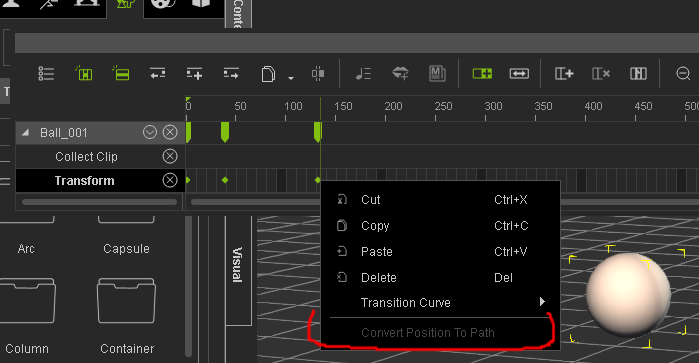
.
Gerry
System: Win 10 Pro (21H2), Asus X99-E WS, CPU i7-5930K -3,5 GHz, 32 GB DDR4 2666-16 RAM, NVidia GTX 1080 Ti GPU - 11 GB VRAM(Driver Studio-536.99), Samsung 850 Pro 512 GB SSD, 6 TB HD storage.
|
|
|
|
|
hestera
|
hestera
Posted 11 Years Ago
|
|
Group: Forum Members
Last Active: 7 Years Ago
Posts: 19,
Visits: 511
|
RobertoColombo (2/1/2015)
Hi,
I found that several controls of the PARTICLE system have a "random" behavior when modified, i.e., sometimes the value reverts back, with no reason, to a previously set value (the particle prop is set as NOT frozen in the Scene manager).
Moreover, the particle behavior (as seen during the playback) does not always change according to the settings.
As an example, see the attached picture, where I used a simple green map to better show the problem (hope the picture is clear enough...).
The particle goes up-diagonal even though the applied settings should generate a set of particle that "stay on the ground".
Same settings in IC5 gives the expected behavior, i.e. the particle remain close to the ground.
Anyone else experienced problems with the particle in IC6 ?
I am quite anxious about this issue because if it is a common bug, I think RL will solve it, but if I am the only one, then makes the whole SW lame...
Thanks in advance for the feedback
Cheers
Roberto
I've also come across this bug, but it seems to happen at random...I did discover that changing the value with the up and down arrows is retained, but entering the value would result in reverting back to previous. This was with the soft cloth physics parameters. It doesn't happen all the time, though, so I'm not sure what triggers it. I'd be interested if the work around works for you, but it would be nice to be fixed.
|
|
|
|
|
RobertoColombo
|
RobertoColombo
Posted 11 Years Ago
|
|
Group: Forum Members
Last Active: 5 Years Ago
Posts: 1.6K,
Visits: 3.0K
|
hestera (2/1/2015)
RobertoColombo (2/1/2015)
Hi,
I found that several controls of the PARTICLE system have a "random" behavior when modified, i.e., sometimes the value reverts back, with no reason, to a previously set value (the particle prop is set as NOT frozen in the Scene manager).
Moreover, the particle behavior (as seen during the playback) does not always change according to the settings.
As an example, see the attached picture, where I used a simple green map to better show the problem (hope the picture is clear enough...).
The particle goes up-diagonal even though the applied settings should generate a set of particle that "stay on the ground".
Same settings in IC5 gives the expected behavior, i.e. the particle remain close to the ground.
Anyone else experienced problems with the particle in IC6 ?
I am quite anxious about this issue because if it is a common bug, I think RL will solve it, but if I am the only one, then makes the whole SW lame...
Thanks in advance for the feedback
Cheers
Roberto
I've also come across this bug, but it seems to happen at random...I did discover that changing the value with the up and down arrows is retained, but entering the value would result in reverting back to previous. This was with the soft cloth physics parameters. It doesn't happen all the time, though, so I'm not sure what triggers it. I'd be interested if the work around works for you, but it would be nice to be fixed. Hi, thanks for the reply :) Yes, I noticed the same: the up/down arrow somehow fix the value. It seems that the only way to assign a new value is: 1. to type in the desired value + 1 (or -1) 2. click up arrow down (or up) Cheers Roberto
My PC:
OS: Windows 10 Pro English 64-bit / CPU: Intel i7-9700 3.6GHz / MB: ASUS ROG Strix Z390 RAM: 32GB DDR4 2.6GHz / HD: 2TB+3TB / SSD: 2x512GB Samsung 860 EVO + 1x2TB Samsung
VB: Palit GTX2080 TI GamingPro 11GB / AB: embedded in the MB and VB (audio from the MOTU M4 I/F) / DirectX: 12
|
|
|
|
|
JimmyB7
|
JimmyB7
Posted 11 Years Ago
|
|
Group: Forum Members
Last Active: 5 Years Ago
Posts: 198,
Visits: 3.2K
|
justaviking (1/30/2015)
JimmyB7 (1/30/2015)
"Mark In/Out of Playback/Export Range triangles on the Play Bar are missing after I change Preference's Icon and Font size to large. I'm using a 3840 x 2160 monitor resolution and I need the iClone workspace text to be as large as possible. Anyone else having this problem?"And overlapping text where it displays your polygons and FPS. :( Yes, I noticed that thanks. See attached for other 4K monitor issues.
CyberpowerPC, 64 GB Ram, 64bit Windows 10 Pro, Intel Core i9-10980XE 18 Core CPU, ASUS TUF X299 Mark 1 Motherboard, ROG-STRIX-RTX2080TI-O11G-GAMING graphics card, Toshiba 3TB hard drive, 3 x Seagate 3TB hard drives, RAGNAROK 801 Full Tower, LEPA G1600 1600W power supply, Killer WI-FI 6, ASUS PA329Q 32" 4K/UHD IPS Monitor.
|
|
|
|
|
Supergerry
|
Supergerry
Posted 11 Years Ago
|
|
Group: Forum Members
Last Active: 6 Years Ago
Posts: 25,
Visits: 106
|
Next BUG found (IC 6.02 BETA DX11):
The GLOSSINESS slider in the material editor has an incorrect function:
Setting "0" -> no gloss (okay)
Setting "1" -> full gloss (should probably be the "100" ...)
Setting "100" -> very little gloss (should probably be the "1" ...)
Gerry
------------------------------------------------
iClone 7 Pro (DX11 only), Mocap device plugin, Curve Editor, 3DXchange 7
Homebuilt PC: Windows 7 Pro SP1-64bit, 1kW BeQuiet, MSI Z97 Gaming 5, i7-4790K @ 4,00 GHz Hashwell, 32GB 1600Mhz Cruical, Gigabyte Windforce OC GTX970 4GB, 4-Monitor-Config: 28" on GTX970 only with Iclone`s main window, 2x 21" on the Intel HD4600 ports with all other tabs (timeline, scene- & content manager...), HUION GT190 TouchPen Monitor
|
|
|
|
|
animagic
|
animagic
Posted 11 Years Ago
|
|
Group: Forum Members
Last Active: 4 Months Ago
Posts: 15.8K,
Visits: 31.4K
|
Supergerry (2/1/2015)
Next BUG found (IC 6.02 BETA DX11):
The GLOSSINESS slider in the material editor has an incorrect function:
Setting "0" -> no gloss (okay)
Setting "1" -> full gloss (should probably be the "100" ...)
Setting "100" -> very little gloss (should probably be the "1" ...)This behavior is also present in earlier iClone versions. Glossiness seems to determine the definition of the glossy areas in that they become more defined (and smaller) with higher values. I agree that it is sort of counterintuitive, but it would not be good to change it at this point, as it would impact compatibility with older projects.
|
|
|
|
|
animagic
|
animagic
Posted 11 Years Ago
|
|
Group: Forum Members
Last Active: 4 Months Ago
Posts: 15.8K,
Visits: 31.4K
|
Supergerry (2/1/2015)
BUG FOUND IN IC6.02BETA:
Deleting Motion from Bodyparts in the timeline:
- Right click in the MOTION track
- Select "Remove motion"
- The RIGHT LEG is missingGood catch (it's also in 6.01). It might be a matter of mislabeling, as the are two Right Hand choices: 
I just tried this and can confirm that the second "Right Hand" is really the "Right Leg".
|
|
|
|
|
mark
|
|
|
Group: Forum Members
Last Active: 2 Years Ago
Posts: 4.9K,
Visits: 16.7K
|
That's so funny I just found that mislabeled "Remove Motion" typo and was about to post!!!:P

Click here to go to my YouTube Channel filled with iClone Tutes and Silly Stuff
Visit ANIMATED PROJECTIONS Powered by iCLONE
Intel Core i7 3960X @ 3300MHz Overclocked to 4999.7 MHz Sandy Bridge 24.0GB DDR3 @ 833MHz Graphic Display HP ZR30w
GeForce GTX 980Ti 6GB Microsoft Windows 7 Professional 64-bit SP1 ASUSTeK COMPUTER INC. P9X79 WS (LGA2011)
|
|
|
|
|
Supergerry
|
Supergerry
Posted 11 Years Ago
|
|
Group: Forum Members
Last Active: 6 Years Ago
Posts: 25,
Visits: 106
|
... 2 right hands are still much better than two left hands ... :)
----------------------
Now I have a crash in IC6.02 Beta DX11:
Step by step:
- Load 2 characters
- Create 2 boxes as reach target objects
- Attach these boxes to the hip of figure 1
- Reach target the hands of figure 2 to the boxes
- Now select figure 1 and replacing it with another avatar
-> IC crash
(If the boxes are detach BEFORE replacing the figure 1, and are attach again after replacement, everything is fine...)
Sorry for my english:(
Gerry
------------------------------------------------
iClone 7 Pro (DX11 only), Mocap device plugin, Curve Editor, 3DXchange 7
Homebuilt PC: Windows 7 Pro SP1-64bit, 1kW BeQuiet, MSI Z97 Gaming 5, i7-4790K @ 4,00 GHz Hashwell, 32GB 1600Mhz Cruical, Gigabyte Windforce OC GTX970 4GB, 4-Monitor-Config: 28" on GTX970 only with Iclone`s main window, 2x 21" on the Intel HD4600 ports with all other tabs (timeline, scene- & content manager...), HUION GT190 TouchPen Monitor
|
|
|
|