|
Author
|
Message
|
|
Peter (RL)
|
Peter (RL)
Posted 3 Years Ago
|
|
Group: Administrators
Last Active: 2 Years Ago
Posts: 23.1K,
Visits: 36.6K
|
Dear Character Creator Users,
We have now released Character Creator 4.22 with the new Dynamic Wrinkles for all your CC3+ characters. However, as with all updates there may still be a few bugs, glitches or other annoying issues remaining.
Important: If you do find any bugs, issues or glitches in Character Creator 4.21, please can you report them first in the Feedback Tracker. Then feel free to discuss the issues in this thread but do try to include a link back to the original Feedback Tracker report or your tracker number.
As always it will help us greatly if we can keep all technical issues in the one place (this thread). This will help the development team keep track of any problems.
Please do try to provide your full system specifications and a detailed description of the problem when reporting issues and include screenshots and/or a workflow video whenever possible. If you can provide specific steps so we can try and reproduce the problem that will be even better.
Many thanks and have fun with Character Creator 4.21.
Peter
Forum Administrator www.reallusion.com
|
|
|
|
|
gordryd
|
gordryd
Posted 3 Years Ago
|
|
Group: Forum Members
Last Active: 2 Months Ago
Posts: 730,
Visits: 8.1K
|
Don't know if this is a bug or OE, but using the Wrinkle Check - Functional animation in CC4, my character's neck extends into his shirt collar during extreme 'anger', even with both neck area settings at Strength = 0 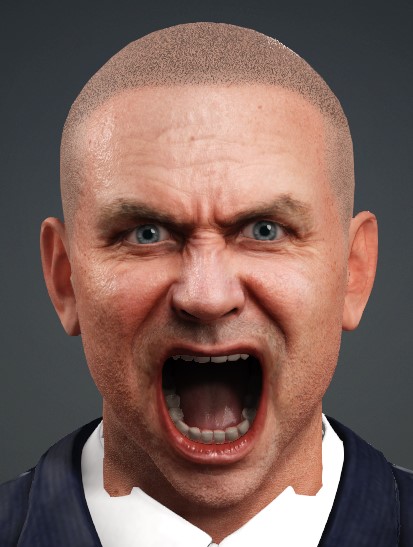 Reallusion Certified Director / Reallusion Best Visual Award / Reallusion Certified Content Developer
See all the G-Tools Plug-Ins available for iClone here: G-Tools Plug-Ins
|
|
|
|
|
TonyDPrime
|
TonyDPrime
Posted 3 Years Ago
|
|
Group: Forum Members
Last Active: 2 Years Ago
Posts: 3.4K,
Visits: 12.4K
|
I keep getting CC4.2 message that Initialization has failed and that application will close
It appears I do meet requirements:
iClone 8.2 loads fine.
I have Win 10 64
XEON processor newer than 2nd gen Core i5
more system memory than required
Current NVidia driver is latest
Any ideas?
|
|
|
|
|
ElefantastiqueGames
|
ElefantastiqueGames
Posted 3 Years Ago
|
|
Group: Forum Members
Last Active: 3 Months Ago
Posts: 1,
Visits: 73
|
Rendering in cc4 is very slow now. Even with or without wrinkle functionality. Can anyone confirm this?
|
|
|
|
|
TonyDPrime
|
TonyDPrime
Posted 3 Years Ago
|
|
Group: Forum Members
Last Active: 2 Years Ago
Posts: 3.4K,
Visits: 12.4K
|
Weirdest thing - I uninstalled and installed again, and it was working. Then it crashed, but then seemingly deleted the shortcut icon on my desk top, and after searching, seemingly self-deleted the main .exe application from the Bin64 folder, on its own.
I have never seen an application self-delete like that! I have to reinstall again.
:laugh:
|
|
|
|
|
TonyDPrime
|
TonyDPrime
Posted 3 Years Ago
|
|
Group: Forum Members
Last Active: 2 Years Ago
Posts: 3.4K,
Visits: 12.4K
|
Okay, so I have CC4 working again. Every it loads it oddly pops up with an error saying "Load GUI failed. Please reinstall iClone."
So I x-out, and then it continues to load.
But, I do not show any new wrinkle assets. What is interesting is the Reallusion Hub installer said it will install 4.2 GB of stuff, but then it does 2.1 GB or something, so I know the new assets are just not present.
So, wrinkle is indeed working, because even though the content for wrinkles is empty, when I load in a default character I can activate the wrinkles and they are there on the character. But just the profile presets and new wrinkle character versions are not in my CC4 content.
Now I already know, from past things like this, that it's something I could probably get in Content manager, but I just have no idea how to download it because it does not show it anywhere as a pack or Free resource where I could download it.
Any ideas where to get the new wrinkle content?...
EDIT - okay, so I saw in the Wrinkle announcement, Peter (RL) correctly mentioned what you can do:
(1) look in Template > Free Resource > Pack, and set filter to show ALL items.
(2) You will see already pre-installed items, but some have green arrow. These are ones requiring Update, as they have the new wrinkle content - double click on these
(3) Confirm in the Character>Wrinkle Expressions that new content is installed
Now, what made it confusing was that none of it outright says "Wrinkle", but it is the case case that the new Wrinkle content is stored in the already established CC4 Free Resource Pack items requiring update.
Once you do update you should see the new content.
|
|
|
|
|
TonyDPrime
|
TonyDPrime
Posted 3 Years Ago
|
|
Group: Forum Members
Last Active: 2 Years Ago
Posts: 3.4K,
Visits: 12.4K
|
ElefantastiqueGames (2/25/2023)
Rendering in cc4 is very slow now. Even with or without wrinkle functionality. Can anyone confirm this? Yes, I do confirm this. I'm thinking it may be the wrinkles, although not sure. Perhaps not optimized yet, because it would snap an image right back when rendered, and now seems to go through a processing calculation first.
|
|
|
|
|
3DChick
|
3DChick
Posted 3 Years Ago
|
|
Group: Forum Members
Last Active: 2 Weeks Ago
Posts: 411,
Visits: 2.0K
|
Hi all I'm getting really weird results with the Wrinkle editor/wrinkle pack. I add a wrinkle map (Deep_Bulky from the paid pack) to my character, edit a few settings in the wrinkle editor, and it works fine in animation mode in CC4 for a couple frames, but then it gets weird. Also renders weird, and then it stays weird until I deactivate the expression wrinkle editor. But then the wrinkles go away... I did post this to feedback tracker: https://www.reallusion.com/FeedBackTracker/Issue/Adding-Wrinkles-Eats-the-Diffuse-Map:
Is this a bug or am I doing something wrong? 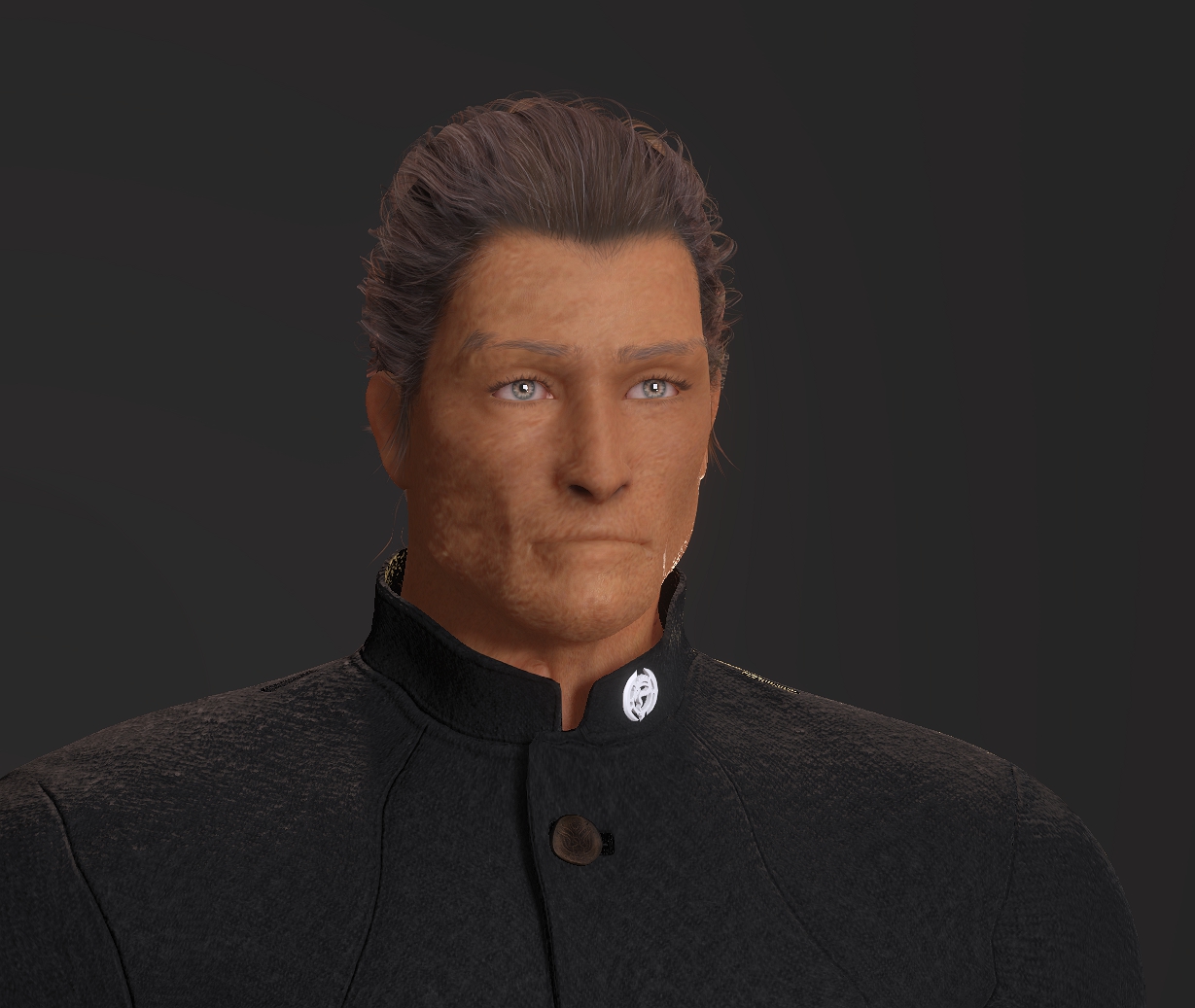
Life-long learner and having waaaay too much fun with iClone! Youtube Channel: 3DChick
Book Covers: www.significantcover.com Largely Unfinished Fiction: www.nemontgomery.com
|
|
|
|
|
4u2ges
|
4u2ges
Posted 3 Years Ago
|
|
Group: Forum Members
Last Active: 2 Weeks Ago
Posts: 5.3K,
Visits: 16.8K
|
ElefantastiqueGames (2/25/2023)
Rendering in cc4 is very slow now. Even with or without wrinkle functionality. Can anyone confirm this? The render process itself is not slow (I did confirm that rendering a video). What slow, is render initializing. But since we render stills most of the time in CC, it takes enormous amount of time for each preview or export (30 sec as oppose to couple of sec before the upgrade). This is true for CC and iClone. Must be fixed. FT: https://www.reallusion.com/FeedBackTracker/Issue/Render-initializing-is-extremely-slow
|
|
|
|
|
blindman
|
blindman
Posted 3 Years Ago
|
|
Group: Forum Members
Last Active: Last Year
Posts: 57,
Visits: 374
|
Lost file references after update to 4.2 the update to 4.2 is generating an error for the file locations of textures "AGAIN" CC is reporting the reference location for all the skin gen tools to (D:\Reallusion\00Content\Character Creator 3 Template\Texture\SkinTextures\SkinBase\ ( A LOCATION THAT DOES NOT, AND NEVER HAS EXISTED)
This is the third time in a row that this problem has occurred after an update ( I'm sorry to say this borders on incompetence) And again the error is generated every time a character is loaded despite the autosearch finding the right reference location on the previous character load. This time however the error is generated only with Characters created after the 4.2 update. All characters created before the update load without Error.
|
|
|
|