|
Author
|
Message
|
|
4u2ges
|
4u2ges
Posted 4 Years Ago
|
|
Group: Forum Members
Last Active: Last Month
Posts: 5.3K,
Visits: 16.8K
|
The problem with your motion to begin with is, that it did not have a t-pose. All bones assignment must start in T-pose. You have to either manually pose dummy into a t-pose (might be hard to make it precise), or use the routine I have outlined here: https://forum.reallusion.com/FindPost500970.aspx1. But since you have both profiles now you can load a t-pose profile and start practicing bones assignment. Click Load T-pose and point to the AXIS.3dxTPose profile I have attached. 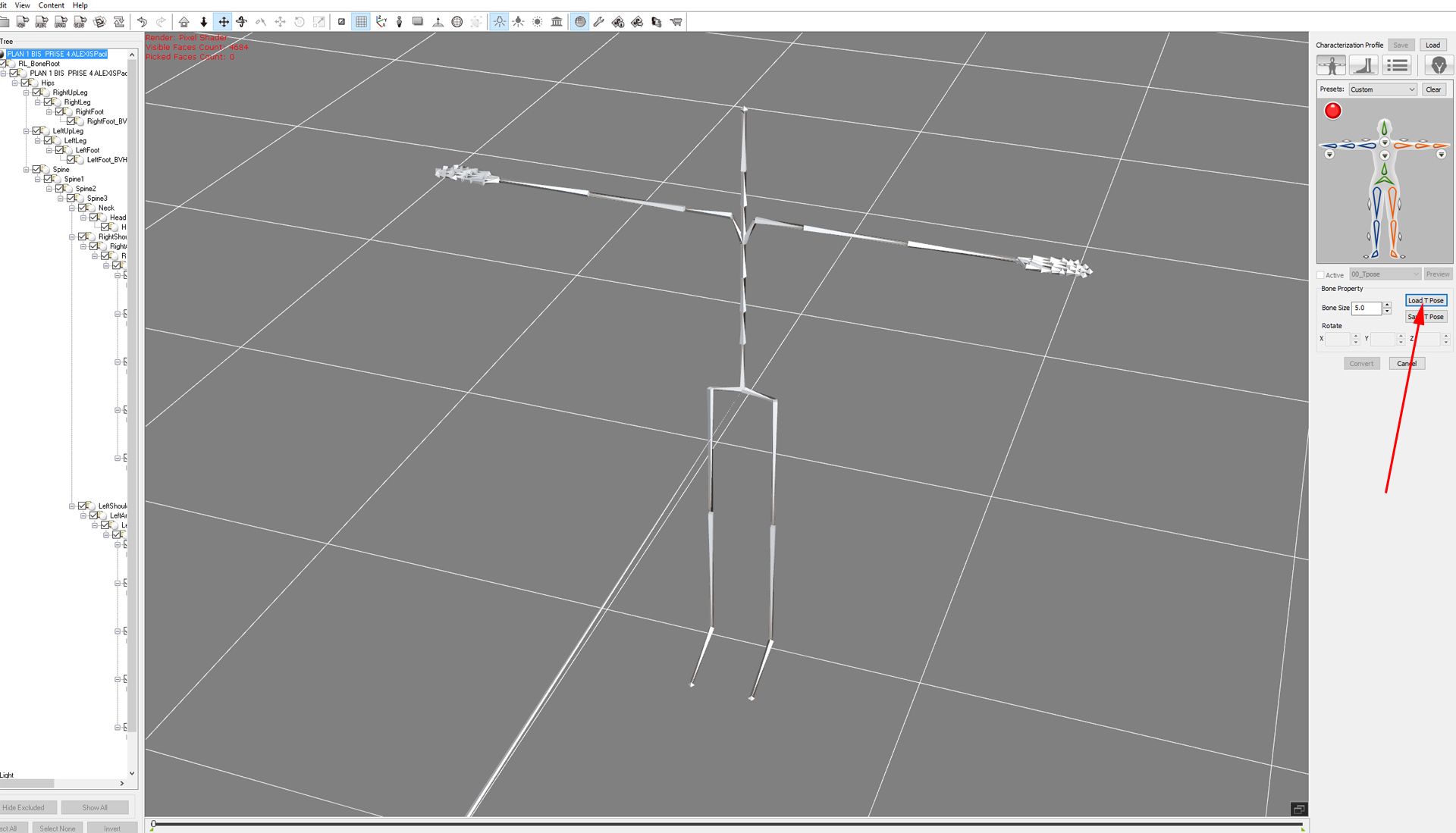 Have a look at this video. It shows basics of bones mapping: https://youtu.be/sg9MgQtjiik?t=1462. If you do not want to assign anything yourself, use the second profile I have attached. Click Load at the top and point to AXIS.3dxProfile All bones would be properly assigned 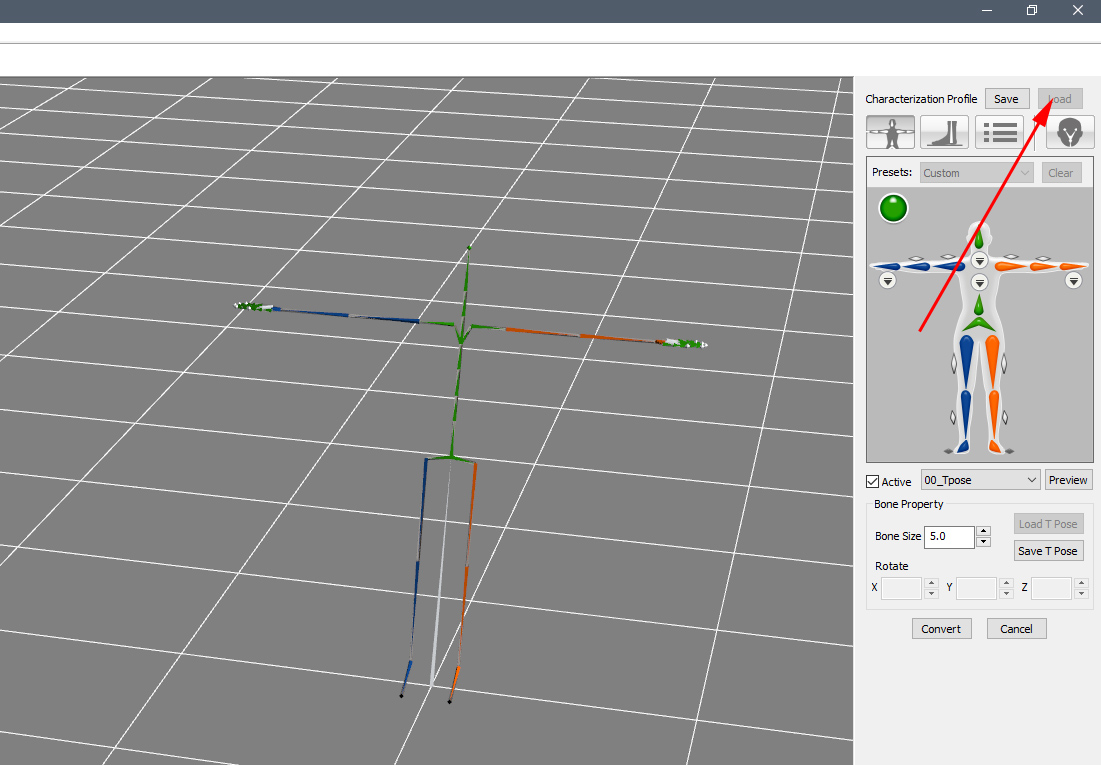
|
|
|
|
|
Cartooniste
|
Cartooniste
Posted 4 Years Ago
|
|
Group: Forum Members
Last Active: Last Year
Posts: 148,
Visits: 866
|
Hello and thank you.Could you give us the process to assign correctly during a next Motion Capture?And can you explain how to use the profile sent?For the hands, I have no problem, I use the plugin.Thanks in advance
Marc ARNAUD
https://www.youtube.com/user/Francebiographie
http://www.france-biographie.com
https://www.facebook.com/groups/279372129242230/
|
|
|
|
|
4u2ges
|
4u2ges
Posted 4 Years Ago
|
|
Group: Forum Members
Last Active: Last Month
Posts: 5.3K,
Visits: 16.8K
|
Axle_Munshine (1/26/2022)
Thank you for your answer.
We managed to convert but it's not great.
When you say that some bones are missing and that some have badly assigned, can you tell us how to rectify that? Is it a pre-adjustment on axis? Once the capture is made, can we still fix it or not?
Thank you for your precious help.Oh no, I meant the screenshot you posted with bones assignment in 3DX. Head, Clavicles and Hands were not assigned and legs bones are not properly assigned. But the profile I have attached should fix that. I do not have much experience with neuron suite (I have it, but it's mostly collecting dust lol) The problem with AXIS seams as if it's hard to calibrate fingers, specially the thumb. I remember I had lots of problem with that and finally gave up. The same thing I see with motion you posted, some fingers are twisted badly. So some cleanup is due. Or you may scrap all fingers motions (literally sample the clip and remove fingers keys) and then maybe try free Hand Gesture Puppeteering plugin: https://www.youtube.com/watch?v=VOEnVM2TlMw
|
|
|
|
|
Cartooniste
|
Cartooniste
Posted 4 Years Ago
|
|
Group: Forum Members
Last Active: Last Year
Posts: 148,
Visits: 866
|
Thank you for your answer.
We managed to convert but it's not great.
When you say that some bones are missing and that some have badly assigned, can you tell us how to rectify that? Is it a pre-adjustment on axis? Once the capture is made, can we still fix it or not?
Thank you for your precious help.
Marc ARNAUD
https://www.youtube.com/user/Francebiographie
http://www.france-biographie.com
https://www.facebook.com/groups/279372129242230/
|
|
|
|
|
4u2ges
|
4u2ges
Posted 4 Years Ago
|
|
Group: Forum Members
Last Active: Last Month
Posts: 5.3K,
Visits: 16.8K
|
From the screenshot I see you are missing bones and some are incorrectly assigned. (BTW, you do not have to attach images, you will quickly run out of space - 10MB is a limit. You need to post them in Editor directly with Insert button). First, you have to map bone in T-pose only. I have a routine for gathering a T-pose from BVH files here: https://forum.reallusion.com/FindPost500970.aspxThen go through through manual pages again and practice with bones mapping. This one has fairly straightforward skeleton bones structure (compare to some others I have seen). Finger are a bit messed up in the motion file, you'd have to fix it in iClone. I've attached 3DX and T-Pose profiles for your motion files anyway.
|
|
|
|
|
Cartooniste
|
Cartooniste
Posted 4 Years Ago
|
|
Group: Forum Members
Last Active: Last Year
Posts: 148,
Visits: 866
|
Here is
Marc ARNAUD
https://www.youtube.com/user/Francebiographie
http://www.france-biographie.com
https://www.facebook.com/groups/279372129242230/
|
|
|
|
|
Cartooniste
|
Cartooniste
Posted 4 Years Ago
|
|
Group: Forum Members
Last Active: Last Year
Posts: 148,
Visits: 866
|
Yes, I ask my colleague to send me the file in BVH and FBX and I attach it as soon as I have it.Thanks in advance.
Marc ARNAUD
https://www.youtube.com/user/Francebiographie
http://www.france-biographie.com
https://www.facebook.com/groups/279372129242230/
|
|
|
|
|
planetstardragon
|
planetstardragon
Posted 4 Years Ago
|
|
Group: Forum Members
Last Active: Last Year
Posts: 11.5K,
Visits: 46.0K
|
can you please attach a bvh version of the file ? 3DX doesn't import raw files, and while I'm sure i could eventually find a way to convert your file to bvh, ( i've done it before with the cmu files from their original formats - forgot which software i used though ) it would just be easier if you posted the bvh file you are trying to convert to imotion, even better if you could convert it to fbx first.
☯🐉 "To define Tao is to defile it" - Lao Tzu
|
|
|
|
|
Cartooniste
|
Cartooniste
Posted 4 Years Ago
|
|
Group: Forum Members
Last Active: Last Year
Posts: 148,
Visits: 866
|
Thank you.We tried to follow the procedure, but it doesn't work, we are very quickly blocked with grayed out parts that cannot be modified. See attached image with red button and not green.
I am also attaching the RAW file in case someone can verify.
Thanks for your help....
Marc ARNAUD
https://www.youtube.com/user/Francebiographie
http://www.france-biographie.com
https://www.facebook.com/groups/279372129242230/
|
|
|
|
|
planetstardragon
|
planetstardragon
Posted 4 Years Ago
|
|
Group: Forum Members
Last Active: Last Year
Posts: 11.5K,
Visits: 46.0K
|
|
|
|
|