|
Author
|
Message
|
|
4u2ges
|
4u2ges
Posted 4 Years Ago
|
|
Group: Forum Members
Last Active: 3 days ago
Posts: 5.3K,
Visits: 16.8K
|
Rigging High Heels imported as an Accessory in CC4RL help manual for CC4 would still ask you to edit heels to match the sole to feet in T-pose. It is possible, but manually editing mesh that way in CC Editor, is certainly prone to create deformations, specially on delicate shoe elements. Shown workflow designed to minimized that by doing the opposite - adjusting the feet/toes bones to fit the heels in the first place.
|
|
|
|
|
4u2ges
|
4u2ges
Posted 6 Years Ago
|
|
Group: Forum Members
Last Active: 3 days ago
Posts: 5.3K,
Visits: 16.8K
|
Yep, it's really annoying. I converted that Base character I directed you to, from CC3 to CC3+ and I thought that was the reason it baked the pose somehow. But now I have loaded another random one. It's a CC3 converted from CC1 a while ago. The problem is there :ermm: Hopefully that is the last one.
|
|
|
|
|
Amper Sand
|
Amper Sand
Posted 6 Years Ago
|
|
Group: Forum Members
Last Active: 3 Years Ago
Posts: 731,
Visits: 5.2K
|
4u2ges (9/14/2020)
@ampertox Could you please download those characters (is not already) and try to take heels off the default base female (the one in shorts): https://forum.reallusion.com/FindPost453048.aspxI did not have a chance to test anything else yet. Yep, you was right: tried removing shoes in both iClone and CC - all characters are adjusted to floor contact, but in their current pose, therefore the Base Female one remains in "high-heels pose". What confused me was that the "Floor Contact" option in iClone didn't work (as I expected to, honestly): - enabled that option, took her shoes off, she remained in "high-heels" pose, then I opened "Edit motion layer", I unlocked the feet locks, then I pushed her down by the hip - her feet remained in the "high-heels" pose even she was bending her knees due to "Floor Contact" option.
______________________________________________________________________________
Software developer. iClone hobbyist since January 11, 2020. Best work so far: Robots among us: The Lab and The sad end of a legend
In progress: Black Mamba
AMD Ryzen 3950X 16C/32T 4.2 GHz, 64GB RAM, RTX2080 11GB, 2TB Samsung 970 Pro SSD, 8TB Seagate BarraCuda HDD, Win11 64-bit, iClone 8.12
|
|
|
|
|
4u2ges
|
4u2ges
Posted 6 Years Ago
|
|
Group: Forum Members
Last Active: 3 days ago
Posts: 5.3K,
Visits: 16.8K
|
@cynsegura You can enter edit mode, uncheck Ignore Backfaces, then select all vertices on one feet and move it. But I am not sure how is that going to help. When you transfer weight, characters feet would bent further down. You need to fix the character feet first. There is a routine for making High Heels by RL: https://manual.reallusion.com/Character_Creator_3/ENU/3/Content/Character_Creator_3/3/08_Creating_Custom_Assets/Creating_Custom_High_Heels_OBJ.htm?Highlight=heels (though I do not really like it). I Transfer weight for high heels in Blender.
|
|
|
|
|
cynsegura
|
cynsegura
Posted 6 Years Ago
|
|
Group: Forum Members
Last Active: 4 Months Ago
Posts: 200,
Visits: 1.1K
|
Hi guys. I could resolve that. But now look at how my high heels look in this kind of characters I converted into accessories and that was better. but now I have to try to move separately to be able to put each one on the right feet. How do i do that?? Someone can help me.. I am not going to update.cc3. Because new version are full of problems always. I am stil with cc3.2. I will do when i read most of the big problems are resolved. I don't need skin gen either. And also looks super heavy.  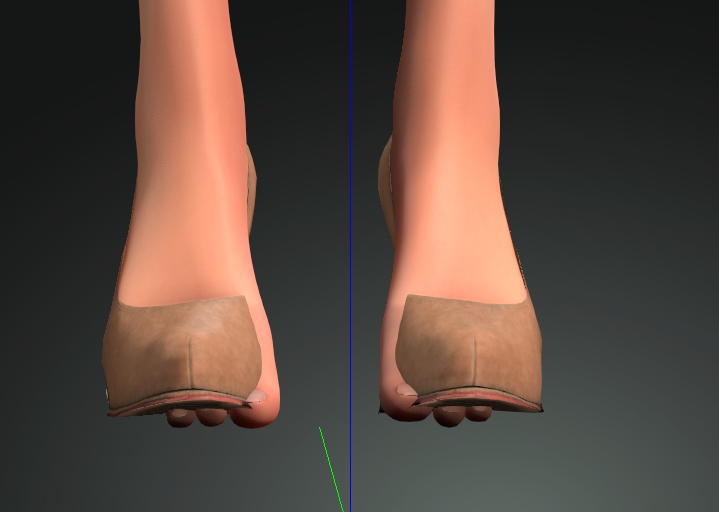
|
|
|
|
|
4u2ges
|
4u2ges
Posted 6 Years Ago
|
|
Group: Forum Members
Last Active: 3 days ago
Posts: 5.3K,
Visits: 16.8K
|
Ok, so here is how to reinstate the pose in Blender. This would actually work for moving those CC3+ characters to the ground as well: https://forum.reallusion.com/FindPost457543.aspx
Note : For CC3+ characters use an A pose on export out of CC. For all older bases use a T pose. After character is imported back to CC the materials need to be reinstated as some maps would be lost. The best, is to bring both characters - older one with a problem and the new fixed one to iClone and use a bucket tool to reapply materials.
|
|
|
|
|
4u2ges
|
4u2ges
Posted 6 Years Ago
|
|
Group: Forum Members
Last Active: 3 days ago
Posts: 5.3K,
Visits: 16.8K
|
So here are cross requests: @ampertox Could you please download those characters (is not already) and try to take heels off the default base female (the one in shorts): https://forum.reallusion.com/FindPost453048.aspxI did not have a chance to test anything else yet. @cynsegura You definitely need to upgrade. Latest release was mostly about fixing bugs in CC v3.3 and iClone v7.8 Upgrade and try to take heels off that character again. Let us know. @animagic Yes, from version to the other it was getting worse with cloth/shoes conformation. Latest one was the worst with shoes specifically. I mean I understand a different character topology, symmetry fix and so on. And I honesty tried to do my best not to complain much and was trying to find a workaround by adding shoes to older base and then convert and so on. But it never worked. It was a real saga :ermm:
I have not done much testing with the latest update in regards to shoes and cloth, only when I saw a post by cynsegura I quickly tried that older default female I had problem with taking heels and it did not work at all.
I'll try later on again to convert shoes on older base and see if that would work out, because really, there are few different problems here...
|
|
|
|
|
animagic
|
animagic
Posted 6 Years Ago
|
|
Group: Forum Members
Last Active: 3 Weeks Ago
Posts: 15.8K,
Visits: 31.4K
|
I have had these problems with CC3 and earlier as well. I haven't verified if it's fixed for me in the latest version. What I've started doing is save a base version of my character without shoes and then add clothing to it and save as a new version.
|
|
|
|
|
Amper Sand
|
Amper Sand
Posted 6 Years Ago
|
|
Group: Forum Members
Last Active: 3 Years Ago
Posts: 731,
Visits: 5.2K
|
LATER EDIT: now I've observed you said you don't want to update CC (and I cannot disagree with you) so you may ignore my post here. @cynsegura Maybe's worth to check the CC version in Help/About. I had exactly the same problem (well, not me, but my old CC3 character I'm still using) in the first release of CC3+ (3.30?) but it seemed solved in latest 3.31 I've checked again now - taking off the high-heels properly adjust the character's feet on the floor. Replacing high-heels with flat shoes also is working OK. Tried in both iClone 7.81 and CC 3.31, exchanging character between them or opening as project or as iAvatar - looks OK. iClone 7.81.4501 CC 3.31.3301
______________________________________________________________________________
Software developer. iClone hobbyist since January 11, 2020. Best work so far: Robots among us: The Lab and The sad end of a legend
In progress: Black Mamba
AMD Ryzen 3950X 16C/32T 4.2 GHz, 64GB RAM, RTX2080 11GB, 2TB Samsung 970 Pro SSD, 8TB Seagate BarraCuda HDD, Win11 64-bit, iClone 8.12
|
|
|
|
|
cynsegura
|
cynsegura
Posted 6 Years Ago
|
|
Group: Forum Members
Last Active: 4 Months Ago
Posts: 200,
Visits: 1.1K
|
Yes it is in high heel position when I take off the shoes. How do i fix this in blender? Can you please explain to me?? No I don't want to update because all is working for me well and i know new versions are having issues too.
|
|
|
|