|
Author
|
Message
|
|
AlbinosGambit
|
AlbinosGambit
Posted 6 Years Ago
|
|
Group: Forum Members
Last Active: 4 Years Ago
Posts: 162,
Visits: 478
|
Hi again.I now downloaded the ascend motion -fbx from mixamo and tested it out and it works pretty good with very decent results I have to say.You say that: " copy the clip, paste it, and right-click select Align Root for the copy. That way, the character will continue to move up" What does Align --- Root actually do and how does this work? How did you know how to do this? I would really like to know how things actually work and always ask why why why :) A good reason for this that way I know the reason behind what makes it actually work. It's always good to know why, not just with Animation software but for anything in life like math and chess, you have to explain why 2+2=4 and why your opponent is actually mated in a given position;)animagic (3/31/2020)
I did come across stair ascending and descending problems. What I have done in past is not to show the feet, so you work with the camera to hide imperfections. The camera is really your friend if things are not perfect, as they often are.
In my example, I imported the Ascend motion. I then used it in iClone and it worked pretty good. It is a short motion and what you need to do is copy the clip, paste it, and right-click select Align Root for the copy. That way, the character will continue to move up. Repeat this until you have enough to move up the stairs. To make the movement fit with the stairs I adjusted the height of the stairs as that is easier than adjusting the motion (I didn't try that).
WIN 10, COOLERMASTER MASTERCASE 500H, MSI GAMING PRO CARBON X470 RGB, AMD Ryzen 7 2700X CPU, MSI GeForce GTX 1650 GAMING X - 4GB GDDR5 RAM GPU, Corsair Vengeance RGB PRO DDR4 3200MHz 16GB RAM, SSD M.2 Corsair Force Series MP510 480 GB, SEAGATE BARRACUDA 3.5 HDD 4 TB.
Best regards
Albin
(AlbinosGambit)
|
|
|
|
|
AlbinosGambit
|
AlbinosGambit
Posted 6 Years Ago
|
|
Group: Forum Members
Last Active: 4 Years Ago
Posts: 162,
Visits: 478
|
I see, no problem:-) Makes sense
WIN 10, COOLERMASTER MASTERCASE 500H, MSI GAMING PRO CARBON X470 RGB, AMD Ryzen 7 2700X CPU, MSI GeForce GTX 1650 GAMING X - 4GB GDDR5 RAM GPU, Corsair Vengeance RGB PRO DDR4 3200MHz 16GB RAM, SSD M.2 Corsair Force Series MP510 480 GB, SEAGATE BARRACUDA 3.5 HDD 4 TB.
Best regards
Albin
(AlbinosGambit)
|
|
|
|
|
Rampa
|
|
|
Group: Forum Members
Last Active: Last Month
Posts: 8.2K,
Visits: 62.6K
|
That's where I was planning to post anything I came up with. Saves having to post it twice. :)
|
|
|
|
|
AlbinosGambit
|
AlbinosGambit
Posted 6 Years Ago
|
|
Group: Forum Members
Last Active: 4 Years Ago
Posts: 162,
Visits: 478
|
No worries Rampa. Maybe its a good idea to discuss further inside ToyStoryLab´s Challenge Thread indeed, but still I am hoping for some help in the meantime here or do you think I will get the help need from the Challenge Thread? Rampa (3/31/2020)
Sorry. That was me thinking faster than I type. I did mean scaling, but hopefully we do not need to do that at all.
Lets try and consolidate to the challenge thread for further discussion, as I think it will be seen by more people.
WIN 10, COOLERMASTER MASTERCASE 500H, MSI GAMING PRO CARBON X470 RGB, AMD Ryzen 7 2700X CPU, MSI GeForce GTX 1650 GAMING X - 4GB GDDR5 RAM GPU, Corsair Vengeance RGB PRO DDR4 3200MHz 16GB RAM, SSD M.2 Corsair Force Series MP510 480 GB, SEAGATE BARRACUDA 3.5 HDD 4 TB.
Best regards
Albin
(AlbinosGambit)
|
|
|
|
|
AlbinosGambit
|
AlbinosGambit
Posted 6 Years Ago
|
|
Group: Forum Members
Last Active: 4 Years Ago
Posts: 162,
Visits: 478
|
Hi again. I just tried following your example but just with the descending and Zane as the character. 1 question, why do I actually have to download the Mixamo Character and not only the motion? and Just apply the motion directly to Zane? I still get some weird results. Zane starts the walking down cycle, but his feet slide backward, but also the longer the mixamo animation plays, the further back he slips and deeper his legs get down to the floor, haha. Very funny stuff this, I have no idea what's happening here. Hmmm. Here is a photo of the start walking descending the stairs from the loft scene: 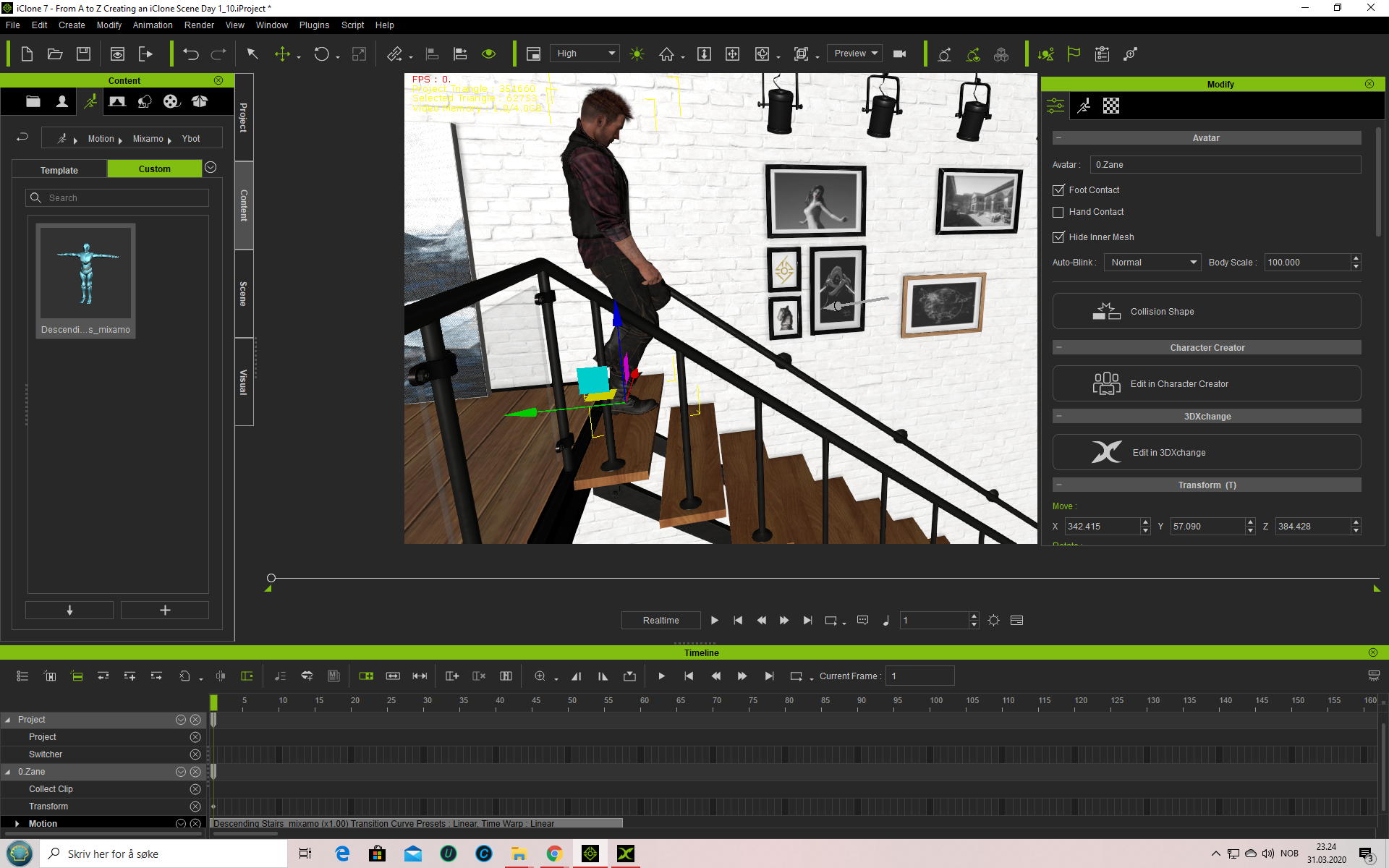 Here is the photo at the end of the mixamo motion applied to Zane 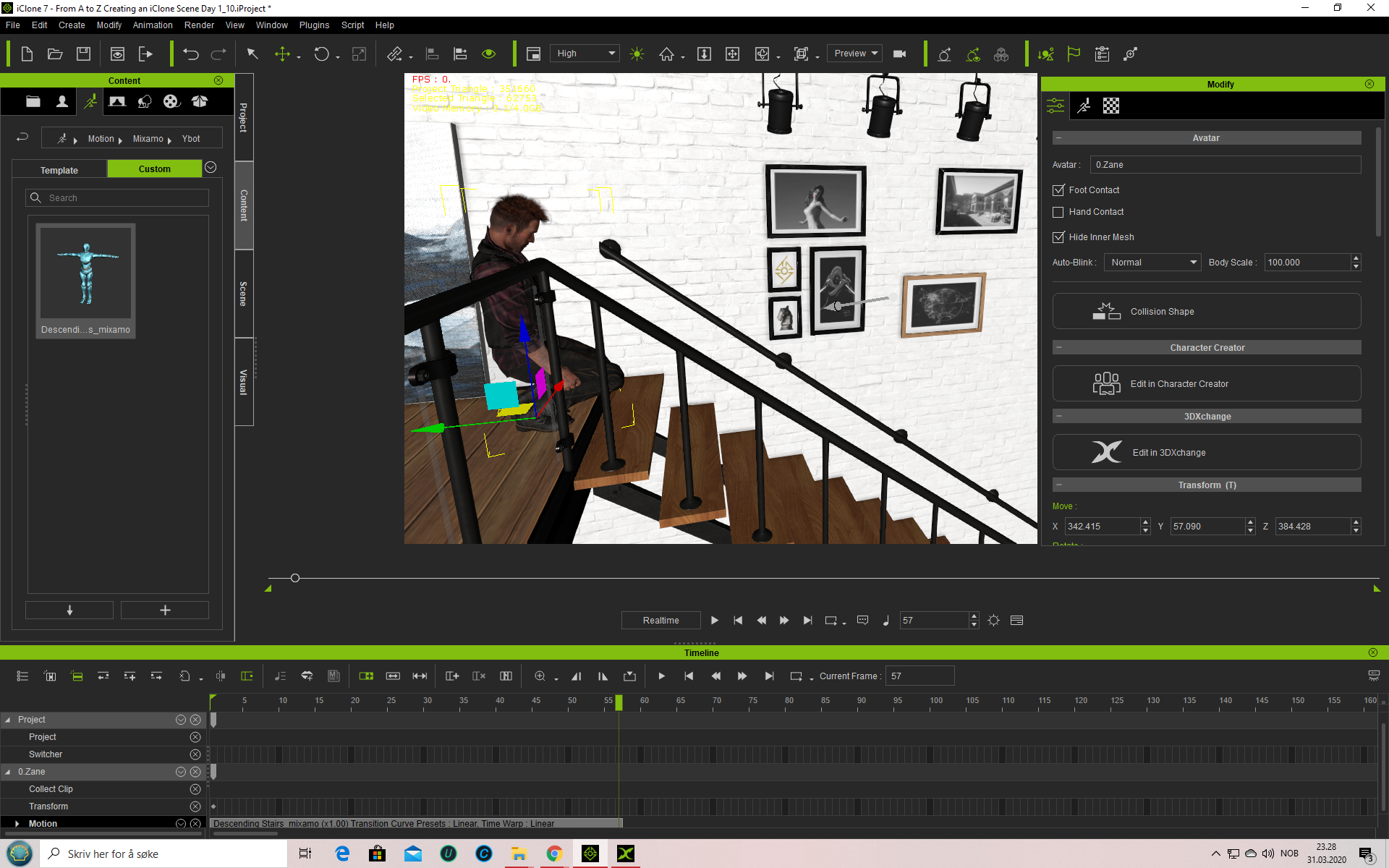 animagic (3/31/2020)
What I do is this: 1. Download the basic Mixamo character in T-pose: X bot for woman and Y bot for man. (So this depends on what your target character will be (man or woman). This may not be necessary to have both, but that is what I do. ) I chose X-bot as an example. 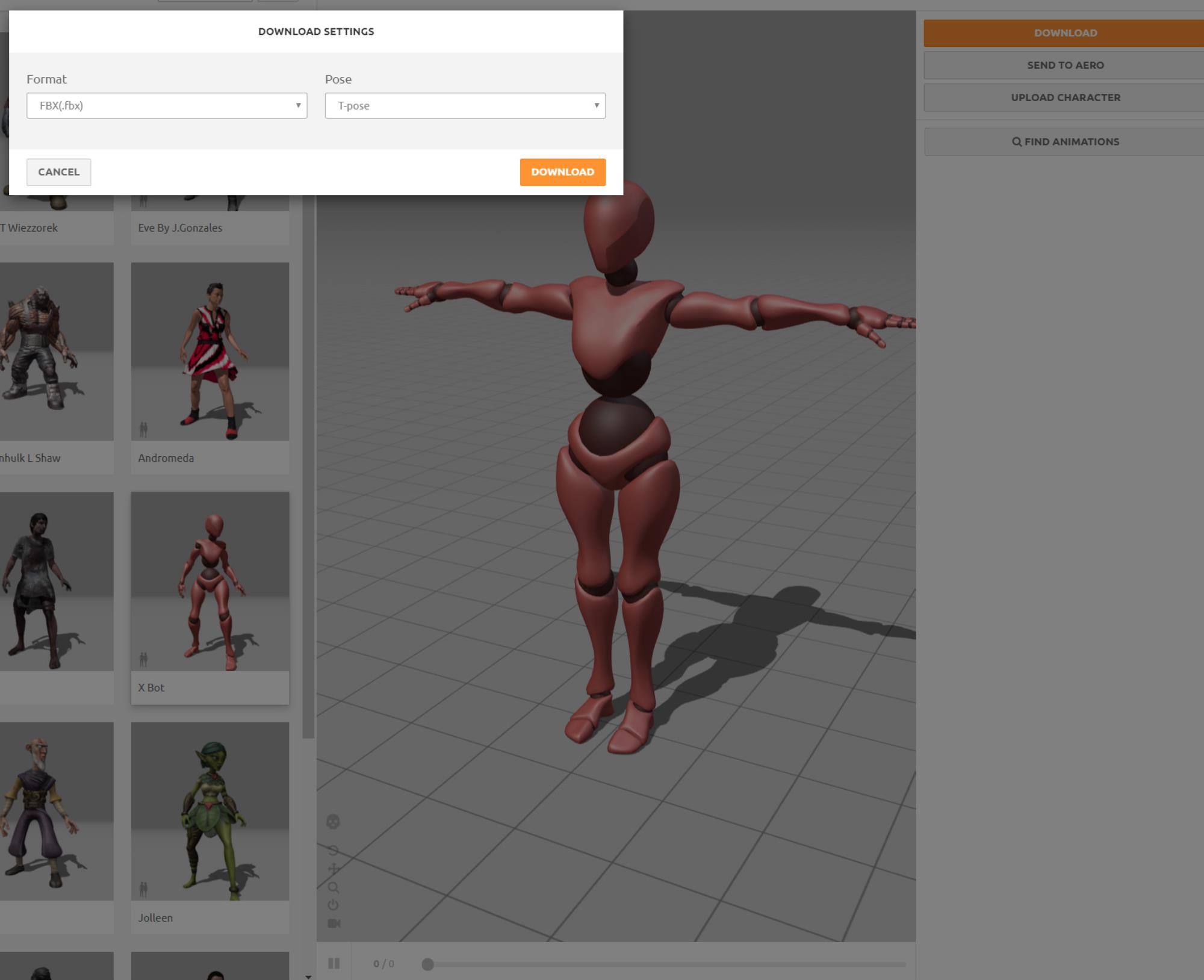 2. Import into 3DXchange. Accept the default settings. The Mixamo character will be recognized automatically.  3. Click Yes and also click Yes at the next prompt:  4. You will now have the X-bot in 3DXchange. You will use it as target for the MIxamo motions you will import. 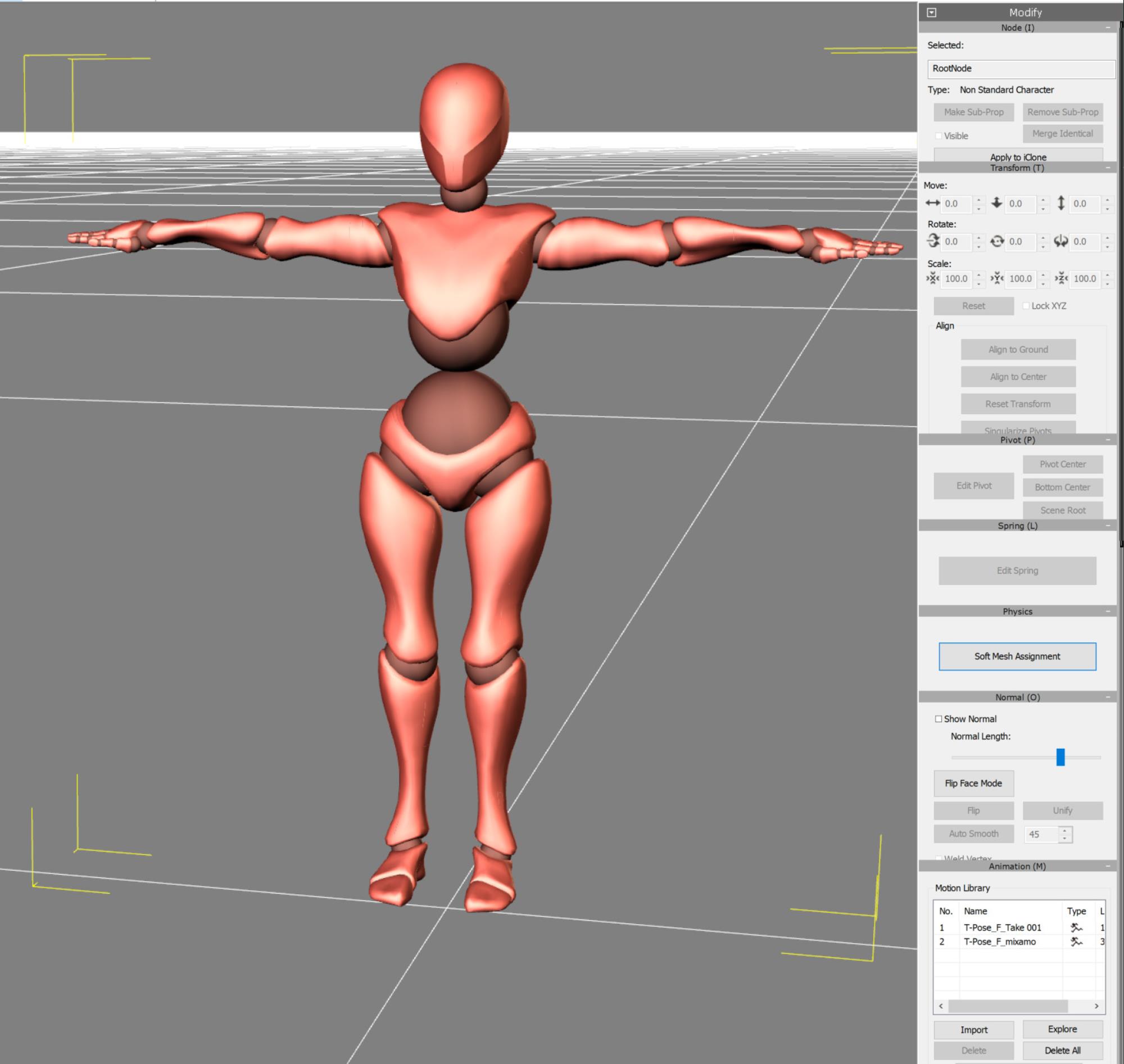 5. In Mixamo apply the Ascending Stairs motion to the character you just exported (X-bot in my case). 6. Download the motion only as FBX; make sure Without Skin is selected. 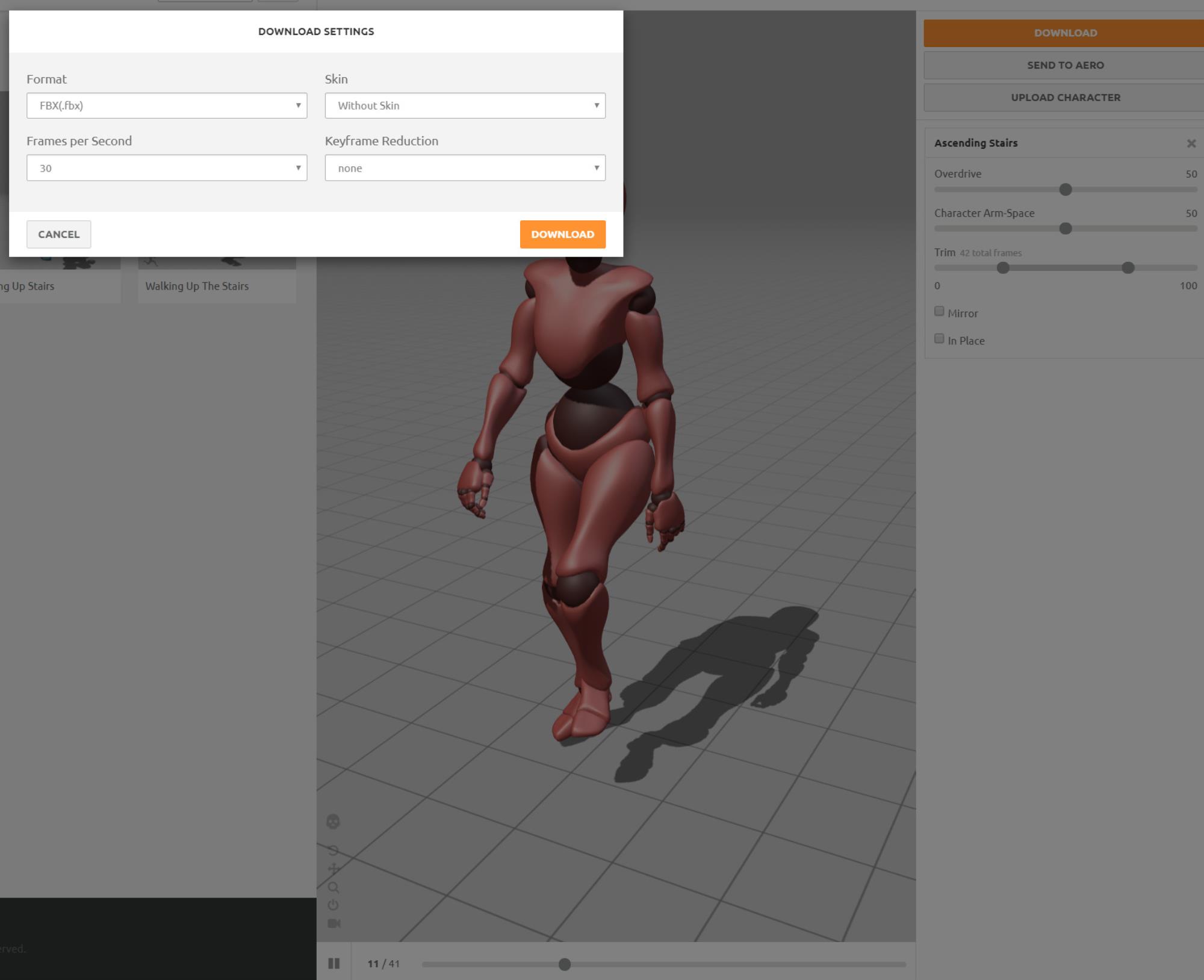 7. Back in 3DXchange you will now import the just downloaded motion, as follows: 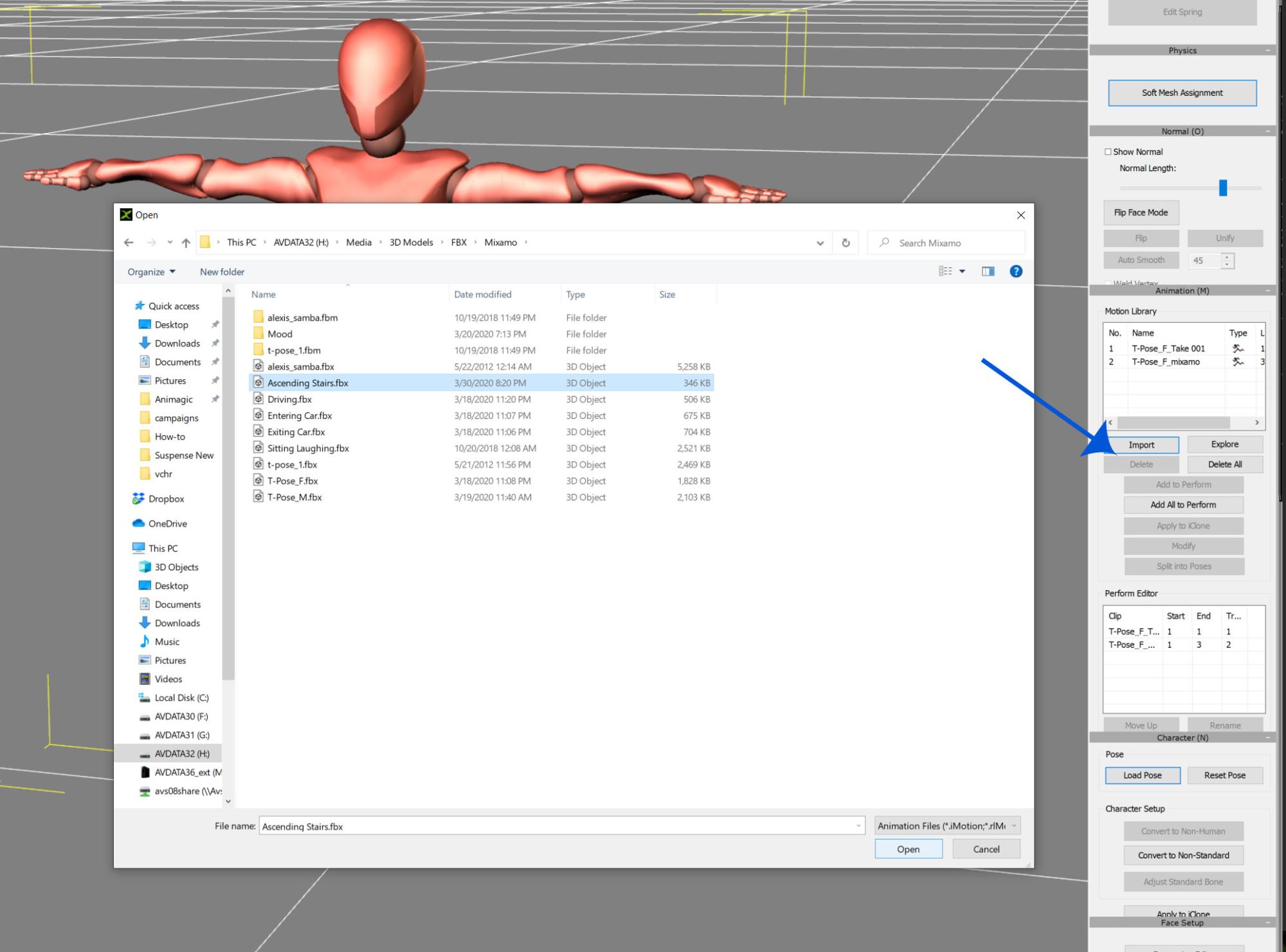 Select Import, which will open the file browser, where you can select the exported motion (Ascending Stairs in this case). At the prompt select the default settings. NOTE: It is best to export at 30 fps from Mixamo and import at 12 fps for most motions. 8. The motion will be added to the Motion Library: 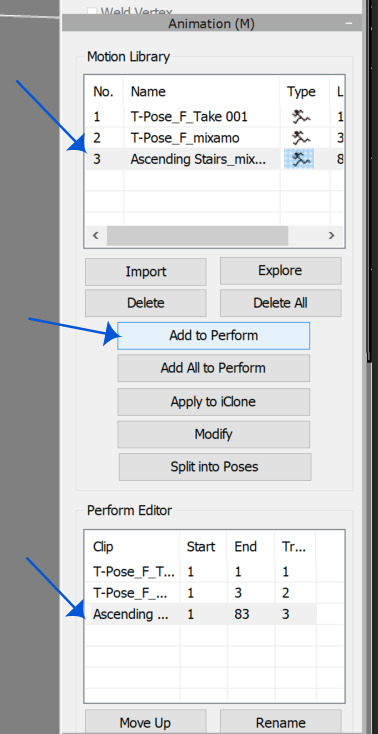 9. With the motion selected, click Add to Perform. The motion will be added to the Perform Editor list. 10. Now the delete the T-pose motions from the Motion Library, as we are only interested in the Ascending Stairs motion. 11. You can repeat Steps 6 through 9 to add more motions to the Perform list. 12 When done, select File => Export (Ctrl+E). You will get a dialog: 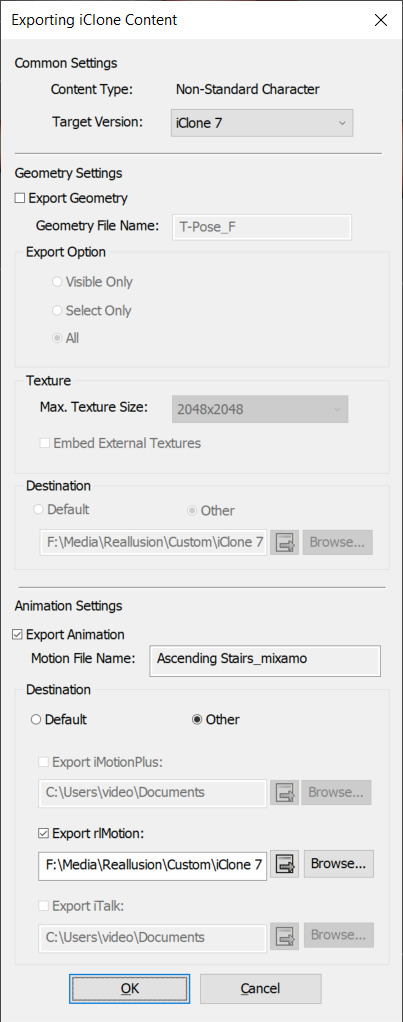 Make sure nothing is selected under Geometry Settings. Under Animation Settings, the motion(s) to be exported will be listed. You can keep the default file destination or choose your own. Then click OK.
WIN 10, COOLERMASTER MASTERCASE 500H, MSI GAMING PRO CARBON X470 RGB, AMD Ryzen 7 2700X CPU, MSI GeForce GTX 1650 GAMING X - 4GB GDDR5 RAM GPU, Corsair Vengeance RGB PRO DDR4 3200MHz 16GB RAM, SSD M.2 Corsair Force Series MP510 480 GB, SEAGATE BARRACUDA 3.5 HDD 4 TB.
Best regards
Albin
(AlbinosGambit)
|
|
|
|
|
Rampa
|
|
|
Group: Forum Members
Last Active: Last Month
Posts: 8.2K,
Visits: 62.6K
|
Sorry. That was me thinking faster than I type. I did mean scaling, but hopefully we do not need to do that at all.
Lets try and consolidate to the challenge thread for further discussion, as I think it will be seen by more people.
|
|
|
|
|
AlbinosGambit
|
AlbinosGambit
Posted 6 Years Ago
|
|
Group: Forum Members
Last Active: 4 Years Ago
Posts: 162,
Visits: 478
|
Rampa, nice talking to you again! If you would contribute and help the community out, we would be very greatful:-) You say: "But you can actually the stairs and scale them a little on the Y axis (green) to do some additional fine tuning. You may need to reposition them a little if you scale them." I am not sure what you mean by: you can actually the stairs? I was hoping also to avoid to scale the stairs if possible, and is it really possible to scale the stairs from the Loft Scene Project? If we can avoid scaling it would be more beneficial for future projects and also more convenient so we can use the original props without editing them. If you decide to make a tutorial on this subject, I hope you include 2 parts, 1 for ascending, and 1 for descending:-) Thank you in advance! In any work I do and especially in chess, I strive to achieve the best possible results, that's just me, also now as a noob in animation my goals are the same. I wish to make stunning animations one day, like my favorite movie Toy Story. I believe in both the software and you guys at RL can make our dreams come true, and also contribute making Tutorials for everyone to learn all the mystery and secrets iClone has to offer! Rampa (3/31/2020)
Hi Albin,
I thought I would see what I can do on this challenge, as it is a big one that I have attempted to solve in the past using different methods that were never quite satisfactory.
So to adjust the stride length, use the exaggeration sliders. Move them both the same amount to keep upper body and lower body in sync. It effects the entire motion, including the distance traveled, so it will be tricky. ;) I have only just had a look at it, so no tutorial yet.
But you can actually the stairs and scale them a little on the Y axis (green) to do some additional fine tuning. You may need to reposition them a little if you scale them.
WIN 10, COOLERMASTER MASTERCASE 500H, MSI GAMING PRO CARBON X470 RGB, AMD Ryzen 7 2700X CPU, MSI GeForce GTX 1650 GAMING X - 4GB GDDR5 RAM GPU, Corsair Vengeance RGB PRO DDR4 3200MHz 16GB RAM, SSD M.2 Corsair Force Series MP510 480 GB, SEAGATE BARRACUDA 3.5 HDD 4 TB.
Best regards
Albin
(AlbinosGambit)
|
|
|
|
|
Rampa
|
|
|
Group: Forum Members
Last Active: Last Month
Posts: 8.2K,
Visits: 62.6K
|
Hi Albin,
I thought I would see what I can do on this challenge, as it is a big one that I have attempted to solve in the past using different methods that were never quite satisfactory.
So to adjust the stride length, use the exaggeration sliders. Move them both the same amount to keep upper body and lower body in sync. It effects the entire motion, including the distance traveled, so it will be tricky. ;) I have only just had a look at it, so no tutorial yet.
But you can actually the stairs and scale them a little on the Y axis (green) to do some additional fine tuning. You may need to reposition them a little if you scale them.
|
|
|
|
|
AlbinosGambit
|
AlbinosGambit
Posted 6 Years Ago
|
|
Group: Forum Members
Last Active: 4 Years Ago
Posts: 162,
Visits: 478
|
Hi Rampa! Nice to hear from you again out here in the forums. So, the link and topic you are talking about are directly connected with ascending and descending the stair I have been discussing? I am not sure what to do with this information though... Could you maybe elaborate? Or best of all, that RL makes a new updated complete realistic Tutorial on how to actually accomplish ascending and descending the stairs used in, for example, the loft scene? Where the stairs cant be adjusted...
WIN 10, COOLERMASTER MASTERCASE 500H, MSI GAMING PRO CARBON X470 RGB, AMD Ryzen 7 2700X CPU, MSI GeForce GTX 1650 GAMING X - 4GB GDDR5 RAM GPU, Corsair Vengeance RGB PRO DDR4 3200MHz 16GB RAM, SSD M.2 Corsair Force Series MP510 480 GB, SEAGATE BARRACUDA 3.5 HDD 4 TB.
Best regards
Albin
(AlbinosGambit)
|
|
|
|
|
Rampa
|
|
|
Group: Forum Members
Last Active: Last Month
Posts: 8.2K,
Visits: 62.6K
|
|
|
|
|