|
Author
|
Message
|
|
Leowald
|
Leowald
Posted 6 Years Ago
|
|
Group: Forum Members
Last Active: 2 Months Ago
Posts: 83,
Visits: 2.9K
|
Thanks for the link! It's easier to use for animation!! :w00t:
|
|
|
|
|
4u2ges
|
4u2ges
Posted 6 Years Ago
|
|
Group: Forum Members
Last Active: Last Month
Posts: 5.3K,
Visits: 16.8K
|
|
|
|
|
|
Leowald
|
Leowald
Posted 6 Years Ago
|
|
Group: Forum Members
Last Active: 2 Months Ago
Posts: 83,
Visits: 2.9K
|
Oh ok I understand.
Thank you for your help, I'll try to animate what I need to the right moment then :D
|
|
|
|
|
Kelleytoons
|
Kelleytoons
Posted 6 Years Ago
|
|
Group: Forum Members
Last Active: 2 Years Ago
Posts: 9.2K,
Visits: 22.1K
|
You can't adjust a clip on the timeline -- it will be whatever it will be. You need to make the clip to work exactly the length and speed you want.
Alienware Aurora R16, Win 11, i9-149000KF, 3.20GHz CPU, 64GB RAM, RTX 4090 (24GB), Samsung 870 Pro 8TB, Gen3 MVNe M-2 SSD, 4TBx2, 39" Alienware Widescreen Monitor
Mike "ex-genius" Kelley
|
|
|
|
|
Leowald
|
Leowald
Posted 6 Years Ago
|
|
Group: Forum Members
Last Active: 2 Months Ago
Posts: 83,
Visits: 2.9K
|
I'm not sure to understand, sorry in advance if what I'm doing is stupid :pinch: I made a .gif of my texture to allow me to be dry or wet and drop it into the slot as you said. I get like a play button on the icon now, but I don't see any parameters to be able to change in the timeline. :( 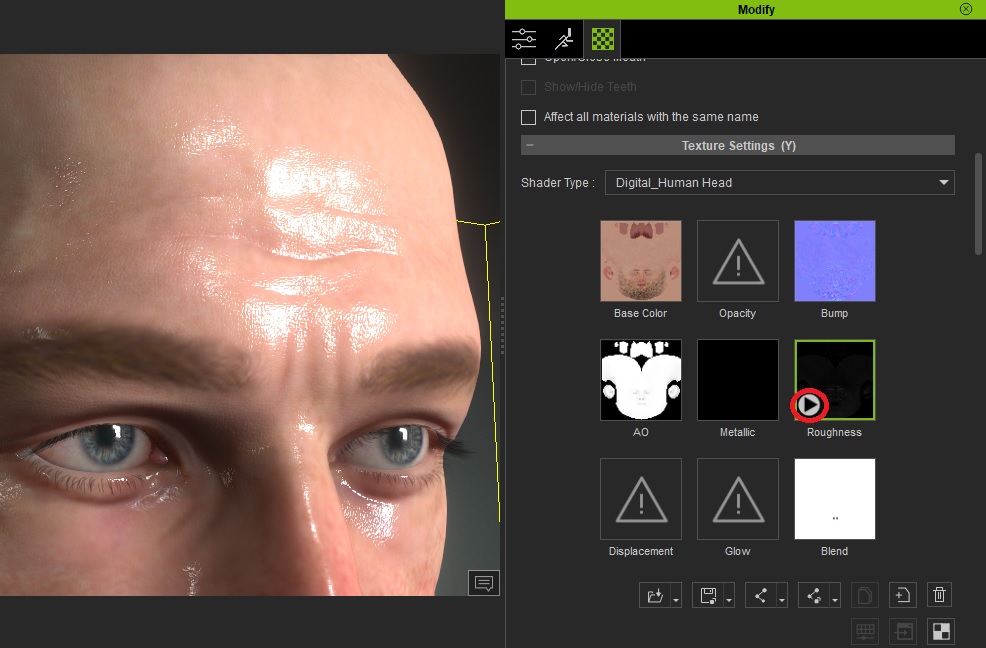
|
|
|
|
|
Kelleytoons
|
Kelleytoons
Posted 6 Years Ago
|
|
Group: Forum Members
Last Active: 2 Years Ago
Posts: 9.2K,
Visits: 22.1K
|
As I said, create an animated map and drop it into that roughness slot (use any photo editor -- heck, you could even use iClone itself).
Alienware Aurora R16, Win 11, i9-149000KF, 3.20GHz CPU, 64GB RAM, RTX 4090 (24GB), Samsung 870 Pro 8TB, Gen3 MVNe M-2 SSD, 4TBx2, 39" Alienware Widescreen Monitor
Mike "ex-genius" Kelley
|
|
|
|
|
Leowald
|
Leowald
Posted 6 Years Ago
|
|
Group: Forum Members
Last Active: 2 Months Ago
Posts: 83,
Visits: 2.9K
|
How can I do this?
I just would like to be able to change the roughness/brighness like the exemple here but in the timeline for animation.
|
|
|
|
|
Kelleytoons
|
Kelleytoons
Posted 6 Years Ago
|
|
Group: Forum Members
Last Active: 2 Years Ago
Posts: 9.2K,
Visits: 22.1K
|
Nearly any map can be animated, so you could make animated maps that show your character getting wet.
Alienware Aurora R16, Win 11, i9-149000KF, 3.20GHz CPU, 64GB RAM, RTX 4090 (24GB), Samsung 870 Pro 8TB, Gen3 MVNe M-2 SSD, 4TBx2, 39" Alienware Widescreen Monitor
Mike "ex-genius" Kelley
|
|
|
|
|
Leowald
|
Leowald
Posted 6 Years Ago
|
|
Group: Forum Members
Last Active: 2 Months Ago
Posts: 83,
Visits: 2.9K
|
Hello! These tips works great for a picture, but what about an animation? I need to animate a character who is not yet wet but who finds himself soaked a few seconds later. Is there a solution?
Or do you necessarily have to create two characters: a dry one, and a wet one and play the transition to video editing ...?
If there is a tip I am interested.
Thank you in advance.
|
|
|
|
|
Kelleytoons
|
Kelleytoons
Posted 6 Years Ago
|
|
Group: Forum Members
Last Active: 2 Years Ago
Posts: 9.2K,
Visits: 22.1K
|
Don't forget that clothing and hair need to also participate to "sell" the concept. 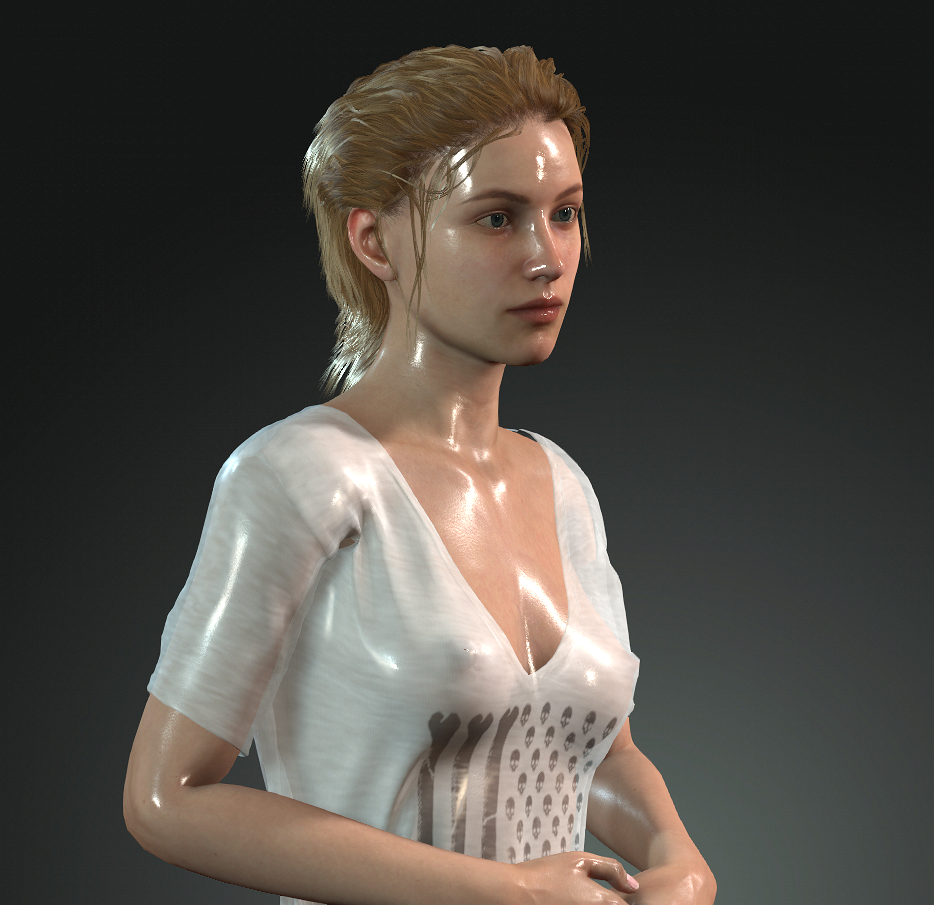
Alienware Aurora R16, Win 11, i9-149000KF, 3.20GHz CPU, 64GB RAM, RTX 4090 (24GB), Samsung 870 Pro 8TB, Gen3 MVNe M-2 SSD, 4TBx2, 39" Alienware Widescreen Monitor
Mike "ex-genius" Kelley
|
|
|
|