|
Author
|
Message
|
|
mtakerkart
|
mtakerkart
Posted 7 Years Ago
|
|
Group: Forum Members
Last Active: 2 Months Ago
Posts: 3.2K,
Visits: 29.2K
|
Hi , just a question for the community if it is my machine or an Iclone problem. I have a 3Gig project and a 8Gig video card. The project can't play up to 4fps. 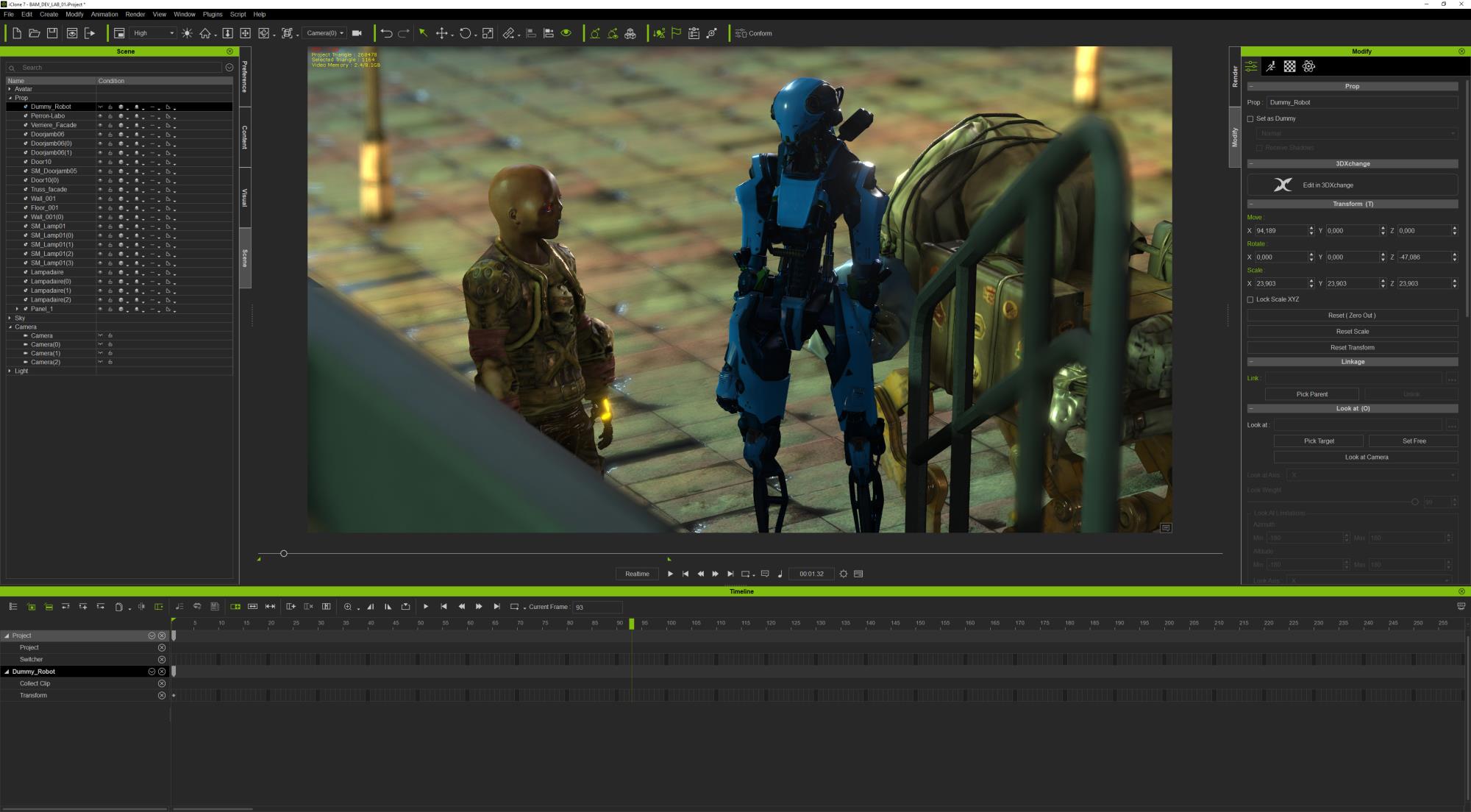 I enable the auxiliary light mod but no effect. Only 4fps  I hid every objects of the scene with auxiliary light mod : same behavior 4fps  Only the minimal preview mode works in realtime but hard to get an idea of what's going on of your work....  Since the Iclone 6 the "hidden" props had never had an effect of the realtime performance on my machines. I use only props from UDK which are optimised for realtime.
|
|
|
|
|
james_muia
|
james_muia
Posted 7 Years Ago
|
|
Group: Forum Members
Last Active: 4 Years Ago
Posts: 253,
Visits: 1.3K
|
My understanding is that if IClone is showing 0 FPS or "low fps", then it's because the scene is too taxing. That doesn't mean that rendering out the scene won't be in 30 FPS, but realtime playback is going to suck. I have a scene right now I'm working on that gets only 8 FPS, although I do notice a good speed increase when I use the auxiliary light which is to be expected. In your case, you aren't seeing any FPS boost turning on the auxiliary light? Sounds strange. Have you tried restarting the computer or IClone? I had an issue where the program was acting very sluggish, but I had been in the program all day. Maybe there's a memory leak still somewhere.
IMDB: James Muia
Aviticus Dragon on YouTube
Computer Specs:
Intel® Core™ i7-7820X Processor (8x 4.30GHz/11MB L3 Cache)
Corsair Hydro Series H115i 280mm
Liquid CPU CoolerASUS ROG STRIX X299-E Gaming Motherboard
32 GB DDR4-3200 GSKILL Ripjaws V Memory
NVIDIA GeForce GTX 1080 Ti - 11GB - EVGA FTW3
|
|
|
|
|
kungphu
|
kungphu
Posted 7 Years Ago
|
|
Group: Forum Members
Last Active: 2 Months Ago
Posts: 997,
Visits: 7.1K
|
I’ve had similar issues. I basically get 30fps on minimal settings with almost all assets hidden. I have a 6core i7 with 32 FB of ram and an RTX titan. Have zero clue what the bottleneck is. It happnerong my Unreal Livelink animations.
My "NEWEST" Latest:) Movie Made With Amaaaazing iClone
—> High Noon”ish” in Narrow Valley<—
|
|
|
|
|
TonyDPrime
|
TonyDPrime
Posted 6 Years Ago
|
|
Group: Forum Members
Last Active: 2 Years Ago
Posts: 3.4K,
Visits: 12.4K
|
Yes, this is a killer for Unreal Live Link.
Now, there a couple things you can do-
-Hide hair, if any
-delete scene and just work with avatars to eliminate poly count
-in my experience I have found Texture Size does absolutely nothing to slow down iClone, it just eats up VRAM, as if it is a space
-Displacement, on the other hand, is BRUTAL on performance
You may want to check temp on GPU, that alone can slow things down. A cooler GPU does run its application-load faster
|
|
|
|
|
sonic7
|
sonic7
Posted 6 Years Ago
|
|
Group: Forum Members
Last Active: 3 Years Ago
Posts: 1.7K,
Visits: 19.4K
|
Using a *single avatar asset* (94K polys) my animation replay is 18 fps. ('Smooth Mesh Subdivision' = '1', so it's *actually* 507K polys) Turning OFF AO, HDR and IBL in total makes no difference (maybe 0.1 fps). ●1 - Turning OFF 'Smooth Mesh' takes me to 48 fps. (EDIT: Repeated test - now getting about 43 fps average).●2 - Engaging 'Auxiliary Light' AS WELL takes me to 60 fps. ●3 - Leaving 'Auxiliary Light' ON, and returning to 'Smooth Mesh Subdivision' = 1, drops me to 18.2 fps. Textures used in the above were set to 128x128, with some at 64x64. Repeating the above, but with ALL textures now changed to '1K' - results in identical fps for tests ●2 and ●3 Test ●1 however, (now 1K textures) results in 33 fps. (instead of 48 fps). (EDIT: Repeated test - now getting about 43 fps average).All the above were with 'HIGH' setting for viewport replay.
--------------------------------------------------------------------------------------------------------------------------------------------------------
Please be patient with me ..... I don't always 'get it' the first time 'round - not even the 2nd time! :( - yikes! ... ● MSI GT72VR Laptop, i7 7700HQ 4-Core 3.8 GHz 16GB RAM; Nvidia 1070, 8GB Vram ● iClone-7.93 ● 3DXChange Pipeline 7.81 ● CC-3 Pipeline 3.44 ● Live Face ● HeadShot ● Brekel Pro-Body ● Popcorn FX ● iRAY ● Kinect V2 ● DaVinci Resolve17 ● Mixcraft 8.1
|
|
|
|
|
kungphu
|
kungphu
Posted 6 Years Ago
|
|
Group: Forum Members
Last Active: 2 Months Ago
Posts: 997,
Visits: 7.1K
|
TonyDPrime (1/3/2020)
Yes, this is a killer for Unreal Live Link.
Now, there a couple things you can do-
-Hide hair, if any
-delete scene and just work with avatars to eliminate poly count
-in my experience I have found Texture Size does absolutely nothing to slow down iClone, it just eats up VRAM, as if it is a space
-Displacement, on the other hand, is BRUTAL on performance
You may want to check temp on GPU, that alone can slow things down. A cooler GPU does run its application-load fasterI’ve been using only character, no assets when porting to Unreal. And.... I have ALL of my avatars hidden. There literally nothing g on the screen. No lights or anything. Only the animation is being transferred. But I have 8 characters in one scene. The best I can get is 45fps. So I’ve had to downgrade my entire project to 30fps and the animation has surely suffered.nit sure what else I can do aside from send the avatars to CC and LOD the snot out of them? I was curious about the video card temp, but I’ve had this poor performance right at start up as well, so I don’t think it’s a gpu thing either. Strange...
My "NEWEST" Latest:) Movie Made With Amaaaazing iClone
—> High Noon”ish” in Narrow Valley<—
|
|
|
|
|
TonyDPrime
|
TonyDPrime
Posted 6 Years Ago
|
|
Group: Forum Members
Last Active: 2 Years Ago
Posts: 3.4K,
Visits: 12.4K
|
I mean, with iClone rendeing, it really doesn't matter to anyone else that it was lagging in playback, other than being a previz nuisance.
But for Unreal Live Link it is worthless if it can't get over 30 FPS on playback, because as you say the animations suffer....I noticed they get choppy...you help by keeping it bare.
For me I am happy with > 30 FPS, I never see =60 FPS, pretty much ever, in any situation.
Does using a wireframe or that box-y view help?
But you know, why can't it go to 70 FPS, or 100+, like in gaming? Why is it capped at 60 seemingly, right?
OHHHHH.....
WAIT...Maybe this is coming in iCLONE 8!!!! :w00t:
SPREAD THE WORD!
> 60 FPS COMING IN iCLONE 8.....CONFIRMED!
|
|
|
|
|
GOETZIWOOD STUDIOS
|
GOETZIWOOD STUDIOS
Posted 6 Years Ago
|
|
Group: Forum Members
Last Active: 5 Years Ago
Posts: 1.2K,
Visits: 7.2K
|
One of the reasons iClone can't be as fast as a realtime game engine is that internally, iClone uses 2 skeletons per Character, one for skinning, one for animation. The remapping between the two skeletons is done in realtime for each Character in the scene and is extremely heavy.
--
guy rabiller | GOETZIWOOD STUDIOS
"N.O.E." (Nations Of Earth) Sci-Fi TV Show, Showrunner.
|
|
|
|
|
mtakerkart
|
mtakerkart
Posted 6 Years Ago
|
|
Group: Forum Members
Last Active: 2 Months Ago
Posts: 3.2K,
Visits: 29.2K
|
Iclone can run at 30 fps with small set . Game engine can run big setup with huge particles because it uses lod for everything ,you must bake all shadows with static
props and it compute only what is in front of the camera.
I don't think we will see Iclone 8 soon . It's the first time since nearly 10 years that we didn't see any WIP of the future of Iclone. Iclone 7 came out 3 year ago.
Today it seems that CC development drives the render of Iclone . Character creator had significative update every year since it came out.
For now, the only thing that consoles me is that since Epic and unity announced that their engine could be used to make animated film production,
I have only seen prtotypes or nothing convincing in terms of Pipeline efficiency.
|
|
|
|
|
TonyDPrime
|
TonyDPrime
Posted 6 Years Ago
|
|
Group: Forum Members
Last Active: 2 Years Ago
Posts: 3.4K,
Visits: 12.4K
|
@Mtakerkart - open up a simple scene in iClone, does it also run @4 FPS?
Because if it does run at 60, then it is in fact your scene, and not your machine, that is taxing iClone's FPS abilty.
What you can do is rebuild the scene to find just when the FPS starts to drop, and then you'd have the answer to the FPS drop.
So if you have a start of 60 FPS, and then adding X causes a drop to 50 FPS, then you know X causes said drop.
Now, yes, any one of us can do this with our scenes....
But, to your point, and since you are seeing such a high FPS drop from 60, then your next step could be to hide X, and see if it reverts back to 60 FPS.
Because if it does not, then you will have identified something for the Devs to physically speak to and or address.
And this is something I don't think we have done yet in an organized way.
|
|
|
|