|
Author
|
Message
|
|
wires
|
|
|
Group: Forum Members
Last Active: 11 days ago
Posts: 5.7K,
Visits: 26.5K
|
I'm also getting crashes when using the Transformer option. Added: Doing a complete uninstall/reinstall solved the issue.
Gerry
System: Win 10 Pro (21H2), Asus X99-E WS, CPU i7-5930K -3,5 GHz, 32 GB DDR4 2666-16 RAM, NVidia GTX 1080 Ti GPU - 11 GB VRAM(Driver Studio-536.99), Samsung 850 Pro 512 GB SSD, 6 TB HD storage.
|
|
|
|
|
pruiz
|
|
|
Group: Forum Members
Last Active: 6 Years Ago
Posts: 101,
Visits: 1.8K
|
Version: v3.01.1016.1 just installed. Importing fbx's with transformer that worked fine in the initial release now immediately crash cc3. How exactly do I save an fbx for the new release? Which version fbx - has it changed? - which export options and what exactly are the morph export rules? Do I have to go back and resave all daz /fbx's. Can I revert - and how to the original cc3 release which worked fine? Right now I'm hosed.
|
|
|
|
|
4u2ges
|
4u2ges
Posted 8 Years Ago
|
|
Group: Forum Members
Last Active: Last Month
Posts: 5.3K,
Visits: 16.8K
|
e) Yet worse, the issue which is being reported as Released is still an issue. I have one for instance (somebody else might have more): https://www.reallusion.com/FeedBackTracker/Issue/Follow-Terrain-and-Projected-Path-Inconsistensy
|
|
|
|
|
justaviking
|
justaviking
Posted 8 Years Ago
|
|
Group: Forum Members
Last Active: 2 Years Ago
Posts: 8.2K,
Visits: 26.5K
|
animagic (10/14/2018)
4u2ges (10/14/2018)
But it's already implemented Aminagic :) And I suppose Appearance Editor would follow current texture maps.
Well, thank you...:blush: One is supposed to be notified when an issue is implemented or resolved...:unsure: It's still listed as Active...:crazy: a) A big "Yay" for it being implemented b) An exasperated "Sigh" for it still being listed as "Active" c) Reallusion really wants us to use Feedback Tracker. Fine. But then they need to do their part. Hire an intern or someone to do the basic maintenance of the issues. d) I still worry about "old" issues not getting carried forward to the new version(s) when the reported issues, both bug reports and enhancement suggestions, are still relevant.
iClone 7... Character Creator... Substance Designer/Painter... Blender... Audacity...
Desktop (homebuilt) - Windows 10, Ryzen 9 3900x CPU, GTX 1080 GPU (8GB), 32GB RAM, Asus X570 Pro motherboard, 2TB SSD, terabytes of disk space, dual monitors.
Laptop - Windows 10, MSI GS63VR STEALTH-252, 16GB RAM, GTX 1060 (6GB), 256GB SSD and 1TB HDD
|
|
|
|
|
animagic
|
animagic
Posted 8 Years Ago
|
|
Group: Forum Members
Last Active: 2 days ago
Posts: 15.8K,
Visits: 31.4K
|
4u2ges (10/14/2018)
But it's already implemented Aminagic :) And I suppose Appearance Editor would follow current texture maps.
Well, thank you...:blush: One is supposed to be notified when an issue is implemented or resolved...:unsure: It's still listed as Active...:crazy:
|
|
|
|
|
4u2ges
|
4u2ges
Posted 8 Years Ago
|
|
Group: Forum Members
Last Active: Last Month
Posts: 5.3K,
Visits: 16.8K
|
But it's already implemented Aminagic :) And I suppose Appearance Editor would follow current texture maps. 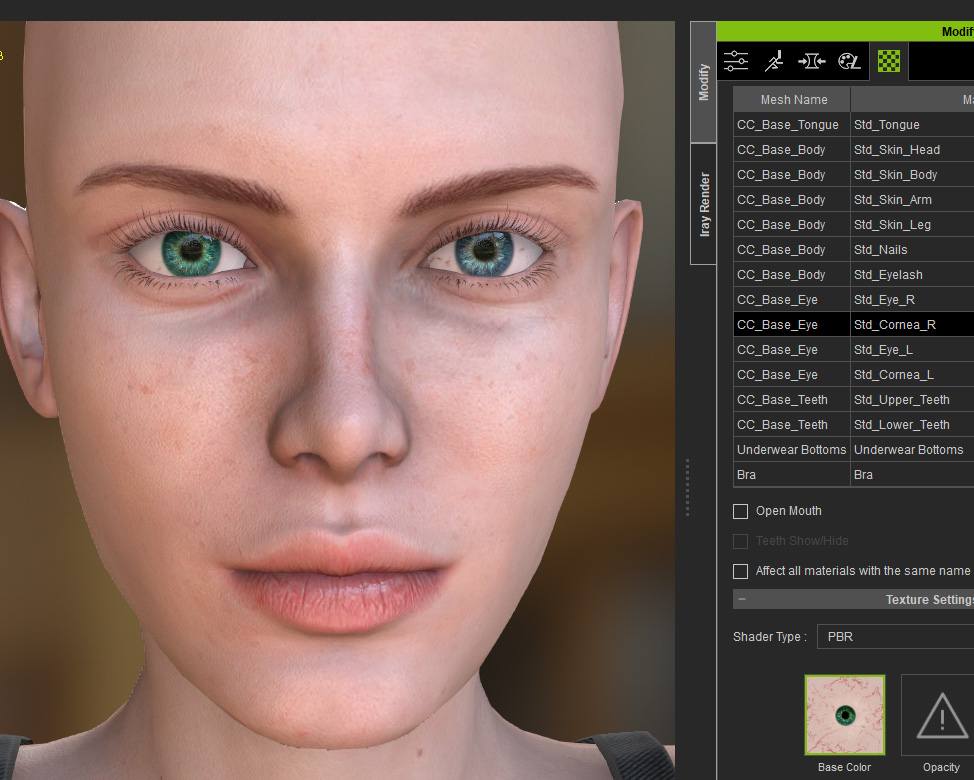
|
|
|
|
|
animagic
|
animagic
Posted 8 Years Ago
|
|
Group: Forum Members
Last Active: 2 days ago
Posts: 15.8K,
Visits: 31.4K
|
I hope that suggestions from CC2 are not being ignored. A very important one for me is the possibility to have two different texture for left and right eyes. See: https://www.reallusion.com/FeedBackTracker/Issue/Allow-separate-materials-for-left-and-right-eyes. Once the Appearance Editor becomes available in CC3 (for CC3 characters), it would be good to have that option added.
|
|
|
|
|
animagic
|
animagic
Posted 8 Years Ago
|
|
Group: Forum Members
Last Active: 2 days ago
Posts: 15.8K,
Visits: 31.4K
|
duchess110 (10/11/2018)
JimmyB7 (10/11/2018)
This may be the wrong place to ask but I'm getting this error when trying to export a head to CC3 from CT8. What am I doing wrong?  Myself and if I recall a few others have had this problem since waaaaaaaaaaaaaay back. Workaround is to save the head and not export. Then open CC3 and drag the head in onto your character. As has been mentioned, heads from CT8 are not compatible with CC3 characters. You have to start out with a CC1 character and then convert to CC3. Also, as Duchess mentions, you need to drag and drop the head on the character.
|
|
|
|
|
duchess110
|
duchess110
Posted 8 Years Ago
|
|
Group: Forum Members
Last Active: 6 Years Ago
Posts: 2.0K,
Visits: 15.5K
|
JimmyB7 (10/11/2018)
This may be the wrong place to ask but I'm getting this error when trying to export a head to CC3 from CT8. What am I doing wrong? Myself and if I recall a few others have had this problem since waaaaaaaaaaaaaay back. Workaround is to save the head and not export. Then open CC3 and drag the head in onto your character.
Duchess Designs Store
|
|
|
|
|
Dan Miller
|
Dan Miller
Posted 8 Years Ago
|
|
Group: Forum Members
Last Active: 7 Months Ago
Posts: 374,
Visits: 1.8K
|
You will soon have the option to stop this message popping up with a "Do Not Show Again" checkbox. This will hopefully make it into the 3.01 update or if not the next update.
Sounds great, thanks!
|
|
|
|