|
Author
|
Message
|
|
Realtimer (RL)
|
Realtimer (RL)
Posted 11 Years Ago
|
|
Group: Administrators
Last Active: 4 Months Ago
Posts: 226,
Visits: 3.0K
|
Tip. 1 – Character & Animation Export tip for Unity Mecanim Please check the ”Unlink Skinned Mesh and Move to Scene Root” and “Auto Skin Rigid Mesh” check boxes, when you exporting the CC actor and its animations.
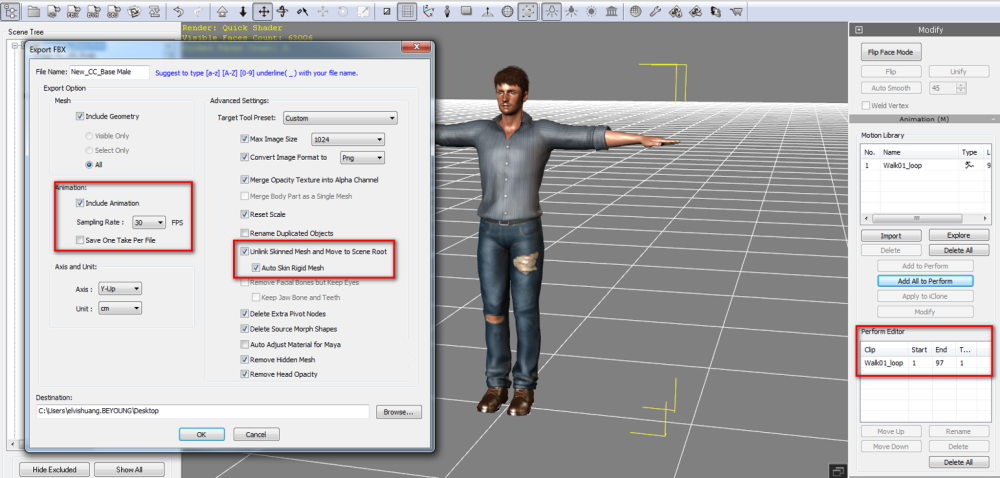
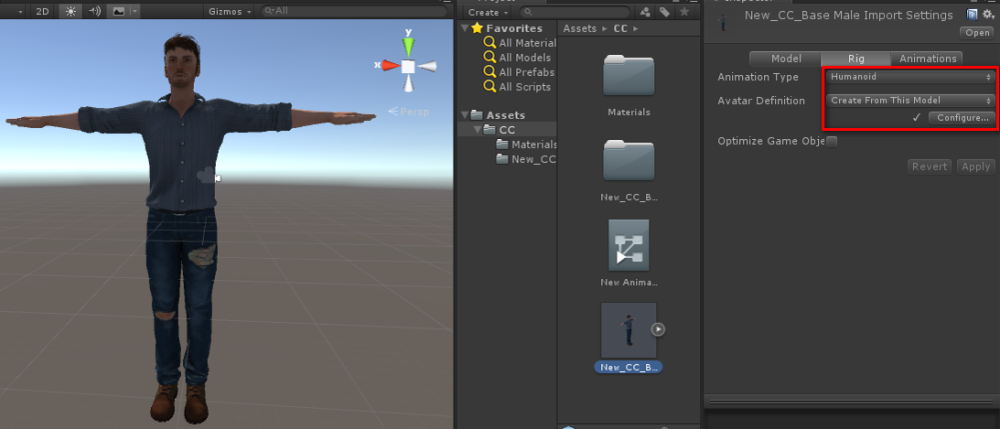 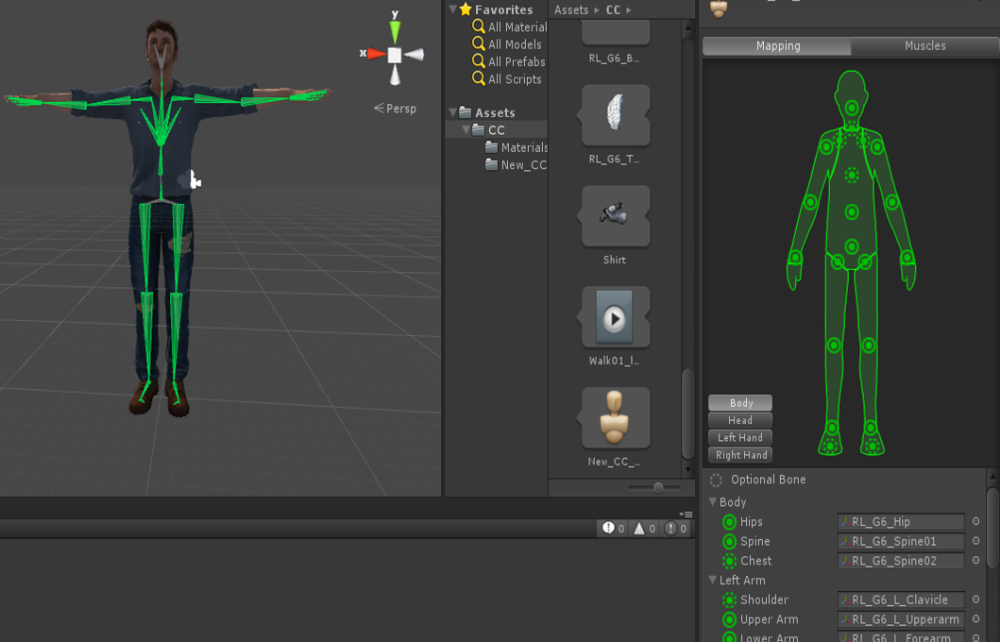 Tip 2 – Accessories Configuration for Unity Mecanim By Unity Default, the Accessories rigging and position in Unity will not be correct
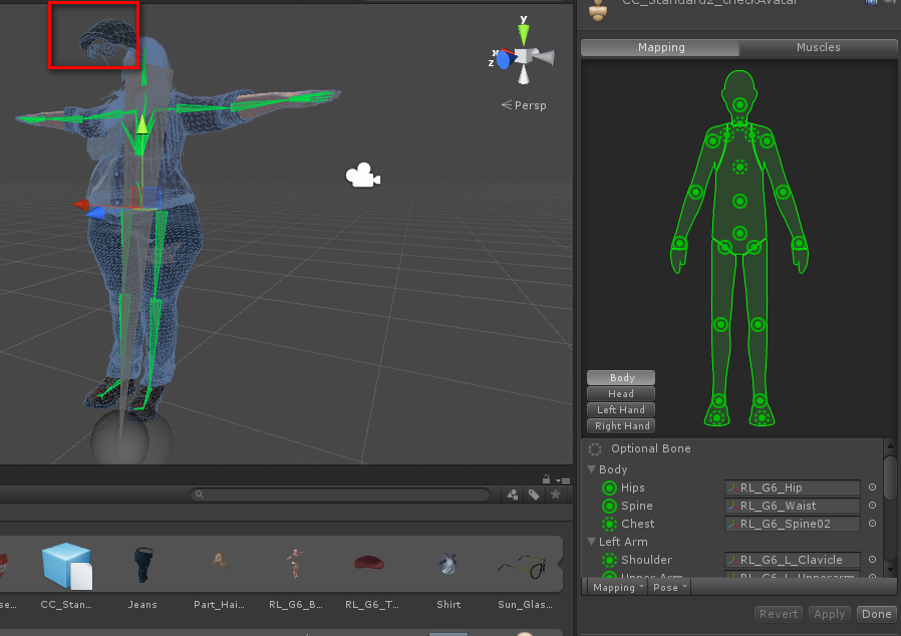 Select “pose -> reset” to reset the position of all accessories
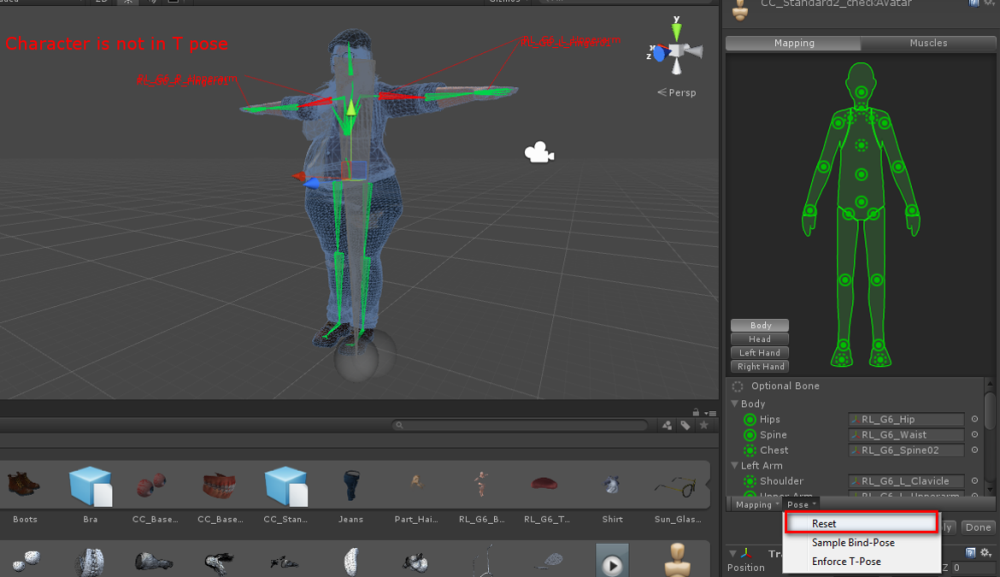 Then select “pose/Enforce T-pose” to correct the T-pose rig
 Tip 3 – Change Transparency Shader for Transparent Object in Unity The default shader applied by Unity is not correct when you have a transparent object.
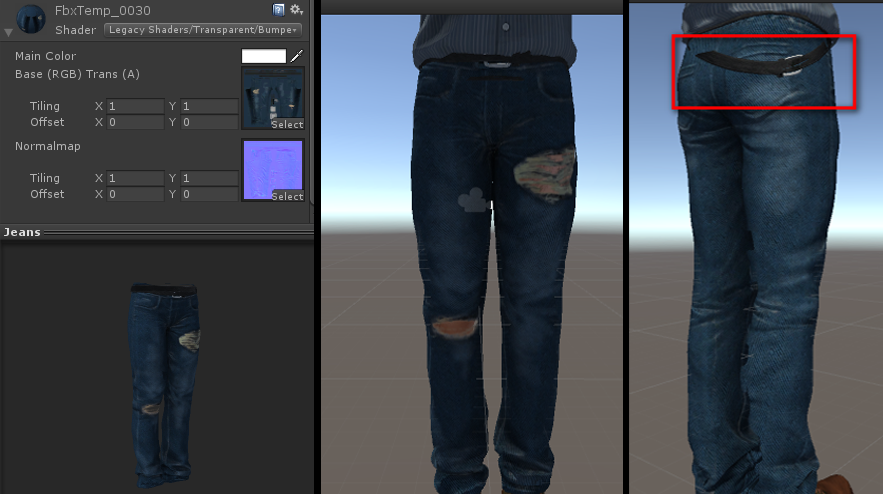
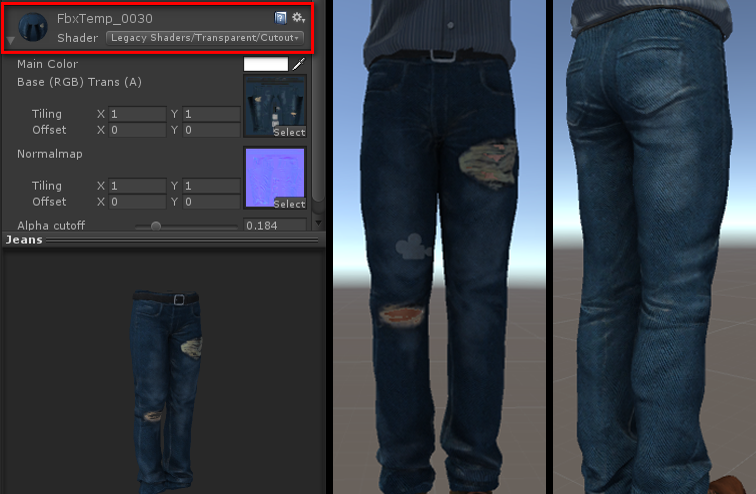
User can change the transparent shader to the “Legacy Shaders/Transparent/Cutout/Bumped Diffuse” to fix issue.
|
|
|
|
|
Brennon
|
Brennon
Posted 11 Years Ago
|
|
Group: Forum Members
Last Active: 10 Years Ago
Posts: 17,
Visits: 22
|
Hi,
Thanks for making these note. They were pointed out to me by another user and fixed a problem that I couldn't sort.
One question, is there a know way to make the changing of the shader to take effect by default in Unity? It is a real pain to change each one individually.
Cheers
|
|
|
|
|
AverageJoe
|
AverageJoe
Posted 11 Years Ago
|
|
Group: Forum Members
Last Active: Last Year
Posts: 2.4K,
Visits: 10.1K
|
And are there any official tips for getting CC characters into Unreal?
|
|
|
|
|
Eric (RL)
|
Eric (RL)
Posted 11 Years Ago
|
|
Group: Administrators
Last Active: 10 Years Ago
Posts: 99,
Visits: 1.0K
|
Hello Wizaerd!
We just posted a brand new four part series on bringing CC characters to Unreal. Hope this helps!
Part 1: Character Creation:
Part 2: Body Animations in iClone
Part 3: Facial Animation in iClone
Part 4: Export & Material Settings:
______________________________________
Eric (RL)
Forum Moderator
Reallusion, Inc.
https://forum.reallusion.com
"Simplicity is the ultimate sophistication." - Leonardo da Vinci
|
|
|
|
|
Hoaxx
|
Hoaxx
Posted 10 Years Ago
|
|
Group: Forum Members
Last Active: 10 Years Ago
Posts: 6,
Visits: 15
|
When exporting (to Unreal), is there a way to select a lower resolution skeleton (i.e. reduce number of bones)? I really wouldn't miss the toe or tongue bones, at least not in a secondary LOD. What would be the approach here - without loosing the character creation options (i.e. I want to create my characters in CC+iClone6, not just animate imported ones)?
|
|
|
|
|
Hexer_
|
Hexer_
Posted 10 Years Ago
|
|
Group: Forum Members
Last Active: Last Month
Posts: 5,
Visits: 115
|
What shaders are you using for hair?
I tried using Standard shader but the results aren't that good.
Transparency and Fade rendering modes show the top of the skull.
|
|
|
|
|
vidi
|
|
|
Group: Forum Members
Last Active: 4 Weeks Ago
Posts: 10.8K,
Visits: 40.2K
|
Hexer_ (6/11/2016)
What shaders are you using for hair?
I tried using Standard shader but the results aren't that good.
Transparency and Fade rendering modes show the top of the skull.
Use a double sided shader . Is not standard in Unity. https://www.assetstore.unity3d.com/en/#!/content/23087
-------------------------------------------------------------------
liebe Grüße vidi
|
|
|
|
|
uvz
|
|
|
Group: Forum Members
Last Active: 2 Years Ago
Posts: 36,
Visits: 529
|
CC Polycount and Bone Count for Unity is way too high than the recommended. So how to decimate the polycount and reduce the number of bones ---------------------------------------------------------------------------------------------------------------------------------------------------------------------------------------------------------------------- 1. Character Creator character's Polycount is 41000 while Unity recommends 1500 to 4000 max as per information on Unity Site: https://docs.unity3d.com/Manual/ModelingOptimizedCharacters.html2. Character Creator character's Bones are 132 or something like that while Unity recommends between 15 and 60 bones on Unity Site : https://docs.unity3d.com/Manual/ModelingOptimizedCharacters.html
|
|
|
|
|
gogstudios
|
gogstudios
Posted 10 Years Ago
|
|
Group: Forum Members
Last Active: 7 Years Ago
Posts: 51,
Visits: 326
|
I am interested in a reply to uvz's comment by a member of RL team. Please do tell us how to do that.
SkyRoads clone for Android: https://play.google.com/store/apps/details?id=com.gog.skyroads
Target Number - A math puzzle game: https://play.google.com/store/apps/details?id=com.tomag.targetNumber
|
|
|
|
|
gogstudios
|
gogstudios
Posted 10 Years Ago
|
|
Group: Forum Members
Last Active: 7 Years Ago
Posts: 51,
Visits: 326
|
Hi. I was experimenting on how to change poly count and was able to achieve it. Have a look at the step by step guide here: https://forum.reallusion.com/295571/Changing-Poly-Count-for-CC-characters
SkyRoads clone for Android: https://play.google.com/store/apps/details?id=com.gog.skyroads
Target Number - A math puzzle game: https://play.google.com/store/apps/details?id=com.tomag.targetNumber
|
|
|
|