|
Author
|
Message
|
|
bruceberg
|
bruceberg
Posted 13 Years Ago
|
|
Group: Forum Members
Last Active: 7 Years Ago
Posts: 172,
Visits: 500
|
Hi Gang...Me again. I'm at a point in my movie where the good guys in one spaceship realize that the bad guy in another spaceship is coming for them. So they are going to make the jump to hyperspeed, ala Star Wars. When I wrote this, I just assumed it would be no biggie to animate, but now that I need that scene, I have no idea how to do it. I've searched this forum, the iClone Wiki, and Warlords beginners manual, but haven't found any sort of tutorial. This is probably a staple of many space animations, so I suppose I just haven't figured out the correct way to search for a tutorial. So yet again I turn to this forum for some help and advice. How can I create an animation of jump to hyperspeed type starfield such as the type depicted in Star Wars. Thanks again!
Regards...Bruce
|
|
|
|
|
wires
|
wires
Posted 13 Years Ago
|
|
Group: Forum Members
Last Active: Yesterday
Posts: 5.7K,
Visits: 26.5K
|
martok2112 is the Sci-Fi master around here, Warlord has also done some space stuff. Have a look at the video posted by martok2112 in this thread. I'm sure he would give you any tips you need.:)
Gerry
System: Win 10 Pro (21H2), Asus X99-E WS, CPU i7-5930K -3,5 GHz, 32 GB DDR4 2666-16 RAM, NVidia GTX 1080 Ti GPU - 11 GB VRAM(Driver Studio-536.99), Samsung 850 Pro 512 GB SSD, 6 TB HD storage.
|
|
|
|
|
colour
|
colour
Posted 13 Years Ago
|
|
Group: Forum Members
Last Active: 3 Years Ago
Posts: 5.2K,
Visits: 8.1K
|
" bruceberg (11/11/2013)
Hi Gang...Me again. I'm at a point in my movie where the good guys in one spaceship realize that the bad guy in another spaceship is coming for them. So they are going to make the jump to hyperspeed, ala Star Wars. When I wrote this, I just assumed it would be no biggie to animate, but now that I need that scene, I have no idea how to do it. I've searched this forum, the iClone Wiki, and Warlords beginners manual, but haven't found any sort of tutorial. This is probably a staple of many space animations, so I suppose I just haven't figured out the correct way to search for a tutorial. So yet again I turn to this forum for some help and advice. How can I create an animation of jump to hyperspeed type starfield such as the type depicted in Star Wars. Thanks again! Regards...Bruce" Martok's the Forum's StarWars Expert Bruce ;) I suppose it depends how that particular Scene's setup in the first place. A combination of speeding-up of eg; Space Background coming towards the StarShip & Speeding-up the StarShip, would do it. If you have a Space Video Background, just speeding that-up would give a Warp Speed effect, I would have thought. Selecting an Object's Motion Timeline Loop/Speed Switch & Dragging the Motion to the left, speeds-up the motion. So-to; Dragging Transform Timescale Keys to the left. Most if not all NLE Programs have a Speed Effect Feature these days Anyone-else? ADDED - Gerry beat me to the Draw ;)
----------------------------------------------------------------------------------------- REALLUSION FORUM ANNUAL PINHEAD COMMUNITY PROJECTS. New Pinhead Website & Project to be announced in September 2015 -----------------------------------------------------------------------------------------
|
|
|
|
|
justaviking
|
justaviking
Posted 13 Years Ago
|
|
Group: Forum Members
Last Active: 2 Years Ago
Posts: 8.2K,
Visits: 26.5K
|
I agree with Colour... Using video editor (NLE) was my first thought. An NLE would probably have the special effects to distort the image and give you a "hyper speed" effect.
iClone 7... Character Creator... Substance Designer/Painter... Blender... Audacity...
Desktop (homebuilt) - Windows 10, Ryzen 9 3900x CPU, GTX 1080 GPU (8GB), 32GB RAM, Asus X570 Pro motherboard, 2TB SSD, terabytes of disk space, dual monitors.
Laptop - Windows 10, MSI GS63VR STEALTH-252, 16GB RAM, GTX 1060 (6GB), 256GB SSD and 1TB HDD
|
|
|
|
|
bruceberg
|
bruceberg
Posted 13 Years Ago
|
|
Group: Forum Members
Last Active: 7 Years Ago
Posts: 172,
Visits: 500
|
Thanks for the comeback guys! My hope was to create a video of a starfield going from static to stars with trails, what I refer to as the Star Wars hyperspeed effect. Then I was going to place that on the screen of my starship bridge as all the characters are looking on. I would almost think that I would have to build the hyperspeed effect in iClone. Do I need to make an individual star with some sort of particle effect and then place a bunch of those at various points in 3d space? (the more I type, the more I realize I have no idea what I'm talking about:P) Does any of that make any sense?
Regards...Bruce
|
|
|
|
|
warlord720
|
warlord720
Posted 13 Years Ago
|
|
Group: Forum Members
Last Active: 9 Years Ago
Posts: 1.3K,
Visits: 3.9K
|
An NLE will give you more options as stated and it is possible to do a stretch type of hypejump but there are so many ways to do hyperjumps that its up to personal taste. The stretch is just that... stretch the craft out along it's length then back to nothing within a few seconds on the timeline while using the glow channel to make the craft glow unless there are too many textures maps to set them all to glow at a certain time.
Somewhere I have a plane that opened an animated hole in the middle (created in Studio Max) and used animated mapped textures to draw the effects towards the hole. This is similar to how I was taught to animate black holes years ago. Trouble is... I can't find that prop! Maybe someone has something similar to it.
Edit: we must have been posting at the same time. Since you want to move the stars I have a free star globe in my marketplace store that I have stretched similar to the above method and achieved a decent effect.
--------------------------------------------------
I LIVE to anymate, irritate and machinamate. Not necessarily in that order.
|
|
|
|
|
wires
|
wires
Posted 13 Years Ago
|
|
Group: Forum Members
Last Active: Yesterday
Posts: 5.7K,
Visits: 26.5K
|
Hi Bruce, There are several star effects that come with iClone. Take a look under Set>Particle>Atmosphere as in this screen grab: 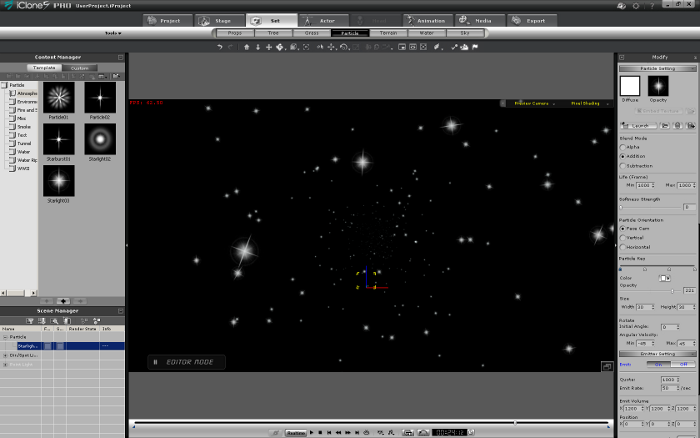
You could play around with the settings to maybe get what you need. Edit: I see That Warlord was posting at the same time.:)
Gerry
System: Win 10 Pro (21H2), Asus X99-E WS, CPU i7-5930K -3,5 GHz, 32 GB DDR4 2666-16 RAM, NVidia GTX 1080 Ti GPU - 11 GB VRAM(Driver Studio-536.99), Samsung 850 Pro 512 GB SSD, 6 TB HD storage.
|
|
|
|
|
bruceberg
|
bruceberg
Posted 13 Years Ago
|
|
Group: Forum Members
Last Active: 7 Years Ago
Posts: 172,
Visits: 500
|
Again, thanks for the comeback guys. Warlord, I actually have your starglobe...just didn't know how to use it. I'll try again when I get home tonight. BTW, I purchased your beginners guide awhile back and it really helped me get started. Thanks for that!
Gerry, thanks for the atmosphere tip. I will check that out as well!
Regards...Bruce
|
|
|
|
|
sjonesdc
|
sjonesdc
Posted 13 Years Ago
|
|
Group: Forum Members
Last Active: 3 Years Ago
Posts: 1.6K,
Visits: 9.6K
|
Bruce, fast forward to 1:56 and see if this is what you're looking for:
sjonesdc :hehe:
STILL LEARNING!!!

|
|
|
|
|
Am7add9
|
Am7add9
Posted 13 Years Ago
|
|
Group: Forum Members
Last Active: 2 Years Ago
Posts: 468,
Visits: 9.3K
|
i dont know if it a bug in iclone, but i find it useful.
say you made a starfield with just spheres....and merge it together.....
now add a cylinder (have the pivot away from camera) attach the starfield to the cylinder and position it in front of the cylinder. make your cylinder a dummy.
now when you animate the length of the cylinder the stars will stretch out . granted this will only be good for a very short burst depending on how dense you built the stars.
dont rule out moving everything during the animation either, this helps sell it.
its sounds like a lot of work, but mostly get a good camera angle is the key. the "look at" will help you out there.
i could make you a animated one in AE pretty easy, but dont know what angle or duration you need.
.
|
|
|
|