|
By bruceberg - 13 Years Ago
|
Hi Gang...Me again. I'm at a point in my movie where the good guys in one spaceship realize that the bad guy in another spaceship is coming for them. So they are going to make the jump to hyperspeed, ala Star Wars. When I wrote this, I just assumed it would be no biggie to animate, but now that I need that scene, I have no idea how to do it. I've searched this forum, the iClone Wiki, and Warlords beginners manual, but haven't found any sort of tutorial. This is probably a staple of many space animations, so I suppose I just haven't figured out the correct way to search for a tutorial. So yet again I turn to this forum for some help and advice. How can I create an animation of jump to hyperspeed type starfield such as the type depicted in Star Wars. Thanks again!
Regards...Bruce
|
|
By wires - 13 Years Ago
|
|
martok2112 is the Sci-Fi master around here, Warlord has also done some space stuff. Have a look at the video posted by martok2112 in this thread. I'm sure he would give you any tips you need.:)
|
|
By colour - 13 Years Ago
|
"bruceberg (11/11/2013)
Hi Gang...Me again. I'm at a point in my movie where the good guys in one spaceship realize that the bad guy in another spaceship is coming for them. So they are going to make the jump to hyperspeed, ala Star Wars. When I wrote this, I just assumed it would be no biggie to animate, but now that I need that scene, I have no idea how to do it. I've searched this forum, the iClone Wiki, and Warlords beginners manual, but haven't found any sort of tutorial. This is probably a staple of many space animations, so I suppose I just haven't figured out the correct way to search for a tutorial. So yet again I turn to this forum for some help and advice. How can I create an animation of jump to hyperspeed type starfield such as the type depicted in Star Wars. Thanks again!
Regards...Bruce"Martok's the Forum's StarWars Expert Bruce ;) I suppose it depends how that particular Scene's setup in the first place. A combination of speeding-up of eg; Space Background coming towards the StarShip & Speeding-up the StarShip, would do it. If you have a Space Video Background, just speeding that-up would give a Warp Speed effect, I would have thought. Selecting an Object's Motion Timeline Loop/Speed Switch & Dragging the Motion to the left, speeds-up the motion. So-to; Dragging Transform Timescale Keys to the left. Most if not all NLE Programs have a Speed Effect Feature these days Anyone-else? ADDED - Gerry beat me to the Draw ;)
|
|
By justaviking - 13 Years Ago
|
|
I agree with Colour... Using video editor (NLE) was my first thought. An NLE would probably have the special effects to distort the image and give you a "hyper speed" effect.
|
|
By bruceberg - 13 Years Ago
|
Thanks for the comeback guys! My hope was to create a video of a starfield going from static to stars with trails, what I refer to as the Star Wars hyperspeed effect. Then I was going to place that on the screen of my starship bridge as all the characters are looking on. I would almost think that I would have to build the hyperspeed effect in iClone. Do I need to make an individual star with some sort of particle effect and then place a bunch of those at various points in 3d space? (the more I type, the more I realize I have no idea what I'm talking about:P) Does any of that make any sense?
Regards...Bruce
|
|
By warlord720 - 13 Years Ago
|
An NLE will give you more options as stated and it is possible to do a stretch type of hypejump but there are so many ways to do hyperjumps that its up to personal taste. The stretch is just that... stretch the craft out along it's length then back to nothing within a few seconds on the timeline while using the glow channel to make the craft glow unless there are too many textures maps to set them all to glow at a certain time.
Somewhere I have a plane that opened an animated hole in the middle (created in Studio Max) and used animated mapped textures to draw the effects towards the hole. This is similar to how I was taught to animate black holes years ago. Trouble is... I can't find that prop! Maybe someone has something similar to it.
Edit: we must have been posting at the same time. Since you want to move the stars I have a free star globe in my marketplace store that I have stretched similar to the above method and achieved a decent effect.
|
|
By wires - 13 Years Ago
|
|
Hi Bruce, There are several star effects that come with iClone. Take a look under Set>Particle>Atmosphere as in this screen grab: 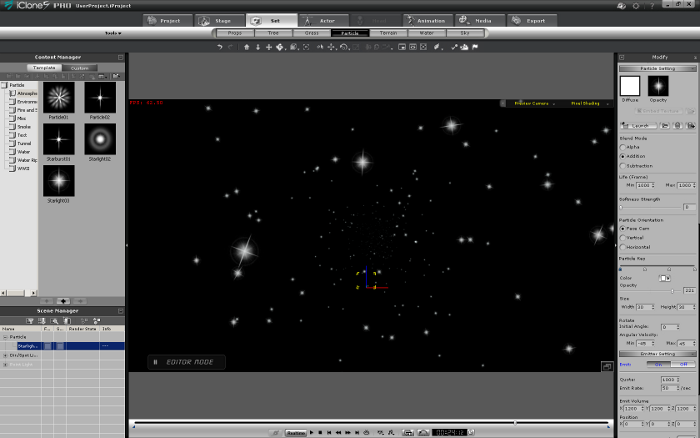
You could play around with the settings to maybe get what you need. Edit: I see That Warlord was posting at the same time.:)
|
|
By bruceberg - 13 Years Ago
|
Again, thanks for the comeback guys. Warlord, I actually have your starglobe...just didn't know how to use it. I'll try again when I get home tonight. BTW, I purchased your beginners guide awhile back and it really helped me get started. Thanks for that!
Gerry, thanks for the atmosphere tip. I will check that out as well!
Regards...Bruce
|
|
By sjonesdc - 13 Years Ago
|
|
Bruce, fast forward to 1:56 and see if this is what you're looking for:
|
|
By Am7add9 - 13 Years Ago
|
i dont know if it a bug in iclone, but i find it useful.
say you made a starfield with just spheres....and merge it together.....
now add a cylinder (have the pivot away from camera) attach the starfield to the cylinder and position it in front of the cylinder. make your cylinder a dummy.
now when you animate the length of the cylinder the stars will stretch out . granted this will only be good for a very short burst depending on how dense you built the stars.
dont rule out moving everything during the animation either, this helps sell it.
its sounds like a lot of work, but mostly get a good camera angle is the key. the "look at" will help you out there.
i could make you a animated one in AE pretty easy, but dont know what angle or duration you need.
|
|
By bruceberg - 13 Years Ago
|
Sadly, sjonesdc, when I try to play the video, it says it's private.
Regards...Bruce
|
|
By bruceberg - 13 Years Ago
|
Gerry, thanks for the particle/atmosphere tip. This will be useful.
Regards...Bruce
|
|
By martok2112 - 13 Years Ago
|
Hahahahah......thanks for the vote of confidence, everybody. :)
I never really thought of meself as a sci-fi master here, and Warlord certainly has great thoughts on the matter....but the sentiments are appreciated. Thank you. :)
I wanted to see sjonesdc's video and it was labeled as private. Auugghhhh!!!! (To quote Charlie Brown :D )
Bruce, a good external video editor would have the tools you need to create a decent warp effect of sorts. I use Magix Movie Edit Pro 2013 Premium, and it has a "motion" and "echo" effect that sorta works, but if I could afford After Effects (or eventually get Hit Film Ultimate 2), I might be able to generate better effects.
For now, here is an example of my refit USS Enterprise going into and securing from warp.
I used an Echo effect on Movie Edit Pro to give the Enterprise a sort of trail into warp effect, but it is very quick. The doppler distorted stars were created by using a "tower" sky surface, and then placing a stretch star diffuse and transparency video on the surface, then rotating it to make the tunnel around the Enterprise. It's not fancy by any means, but it gets the job done.
But that's Star Trek. You're wanting Star Wars, right? :) Sadly, I have not yet figured out how to make the stars "stretch" from a static background into the foreground. I can make a ship zip out of sight, but the closest thing I can think of to simulate the "stars stretching out" effect would have to be a series of tunnel effects.
Here is the result of a quickie effect I put together for you Bruce. It's not high quality, but it hopefully will convey the idea you might be looking for.
All I did was first make a 2D background starfield, and then created a tower sky effect, laid 90 degrees horizontal with an elongated star effect. I copied it twice, and rotated the copies randomly, and then transformed them so they were reduced to minimum stretch. I lowered their glow effect so that they would not be visible for the first couple of seconds. Then I restored their glow effect, and then keyframed a transform so the stars seem to stretch toward the camera. I made a .wmv video of the effect, and then superimposed that video onto my 2D background for my star destroyer set.
To make the star destroyer warp away, all I did was make a 2D background of my starfield, and then moved the camera quickly away from the star destroyer. This creates the effect of the ship zipping off into the distance.....not dissimilar to the old school blue-screen effect for miniatures and practical models. The camera creates the illusion of movement while the ship remains perfectly still.
I hope this helps. Will discuss in greater detail if needed. :)
Respectfully,
Friendly neighborhood Martok2112
|
|
By justaviking - 13 Years Ago
|
|
@Martok, Wow. EXCELLENT clips. Very nicely done.
|
|
By martok2112 - 13 Years Ago
|
Thanks Viking. :)
I hope my hints (which will be discussed in detail if need be) are of a help to Bruceberg. :)
|