|
Author
|
Message
|
|
vrsquare
|
vrsquare
Posted 5 Years Ago
|
|
Group: Forum Members
Last Active: 2 Years Ago
Posts: 6,
Visits: 98
|
Did this happen to you? Just click on Send to iColne button, go to iClone and export as FBX. You'll get the message that gives you the link to get the license. 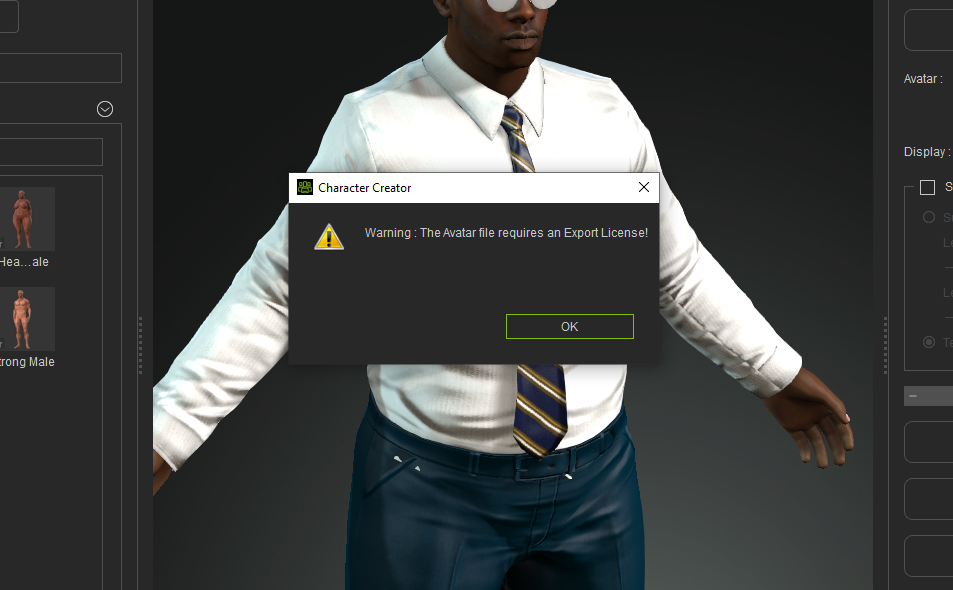
|
|
|
|
|
Peter (RL)
|
Peter (RL)
Posted 5 Years Ago
|
|
Group: Administrators
Last Active: Last Year
Posts: 23.1K,
Visits: 36.6K
|
If your character is using content from purchased content packs, do ensure that you have an export license for each item. This includes characters, clothing, textures, accessories and motions.
Peter
Forum Administrator www.reallusion.com
|
|
|
|
|
doithuong.vn1
|
doithuong.vn1
Posted 5 Years Ago
|
|
Group: Forum Members
Last Active: 5 Years Ago
Posts: 2,
Visits: 7
|
Hello, I have the same error as you, you have solved it yet?
|
|
|
|
|
Peter (RL)
|
Peter (RL)
Posted 5 Years Ago
|
|
Group: Administrators
Last Active: Last Year
Posts: 23.1K,
Visits: 36.6K
|
Please see my previous answer. It is likely the same issue that you don't have an export license for an item of content.
Peter
Forum Administrator www.reallusion.com
|
|
|
|
|
trothman
|
trothman
Posted 5 Years Ago
|
|
Group: Forum Members
Last Active: 2 Years Ago
Posts: 14,
Visits: 82
|
I just purchased all export licenses and I still receive the same error. After purchasing export licenses, I clicked the refresh button in Smart Gallery but it didnt pick up that I now have the export license. Please advise how I would fix this.
Thank you!
|
|
|
|
|
Peter (RL)
|
Peter (RL)
Posted 5 Years Ago
|
|
Group: Administrators
Last Active: Last Year
Posts: 23.1K,
Visits: 36.6K
|
Hi... In Character Creator 3 with your character open, try going to Help > Activate Purchased Items (or Activate Entire Library). This should update the content with the current licensing information. If you still have problems, please contact Technical Support using the link below and they will be able to check the content is correctly activated. https://www.reallusion.com/CustomerSupport/UserEx/QForm.html
Peter
Forum Administrator www.reallusion.com
|
|
|
|
|
tazoskangeli911
|
tazoskangeli911
Posted 4 Years Ago
|
|
Group: Forum Members
Last Active: 2 Years Ago
Posts: 8,
Visits: 25
|
same problem here
|
|
|
|
|
wires
|
|
|
Group: Forum Members
Last Active: 4 Months Ago
Posts: 5.7K,
Visits: 26.5K
|
tazoskangeli911 (7/16/2021)
same problem hereDid you follow the steps already mentioned here by Peter(RL) to solve the issue?
Gerry
System: Win 10 Pro (21H2), Asus X99-E WS, CPU i7-5930K -3,5 GHz, 32 GB DDR4 2666-16 RAM, NVidia GTX 1080 Ti GPU - 11 GB VRAM(Driver Studio-536.99), Samsung 850 Pro 512 GB SSD, 6 TB HD storage.
|
|
|
|
|
Peaches Chrenko
|
Peaches Chrenko
Posted 2 Years Ago
|
|
Group: Forum Members
Last Active: 5 Months Ago
Posts: 178,
Visits: 1.4K
|
Peter (RL) (3/30/2020)
Hi... In Character Creator 3 with your character open, try going to Help > Activate Purchased Items (or Activate Entire Library). This should update the content with the current licensing information. If you still have problems, please contact Technical Support using the link below and they will be able to check the content is correctly activated. https://www.reallusion.com/CustomerSupport/UserEx/QForm.html :) :D :) Jan 27 2023 ...I just had this same problem and this solved it! Thx
_____________________________________________________________________________________________
_____________________________________________
iBUYPOWER Phantom Gamer WA502i Desktop PC: Win 10 64bit - Nvidia GTX 1060 6GB, 24GB RAM (max 32 GB) - Intel Skylake Core i5-6600K Quad-Core Processor - 3.50 GHz, (Max Turbo Speed of 3.90 GHz), Int HD 1TB & WD 1TB Int HD
|
|
|
|
|
heybooboo87
|
heybooboo87
Posted Last Year
|
|
Group: Forum Members
Last Active: Last Year
Posts: 1,
Visits: 5
|
Hi, in case anyone is till struggling with this, you don't need to buy the license if you already have it. What you need to do is go to Help and scroll down to Active All Libraries. Then restart the software.
|
|
|
|