|
Author
|
Message
|
|
toystorylab
|
toystorylab
Posted 6 Years Ago
|
|
Group: Forum Members
Last Active: 3 Months Ago
Posts: 4.6K,
Visits: 29.9K
|
AlbinosGambit (4/3/2020)
Where is your scene with Jade walking down the stairs?
I am excited to see what your results are!
Remember, you started this "stairy mess", and you got lots of tips now, we want to see YOUR results too! :D
Toystorylab on Vimeo :  Crassitudes (my "Alter Ego") on Youtube: Crassitudes (my "Alter Ego") on Youtube: 
|
|
|
|
|
videodv
|
videodv
Posted 6 Years Ago
|
|
Group: Forum Members
Last Active: 3 Years Ago
Posts: 342,
Visits: 12.0K
|
toystorylab (4/3/2020)
videodv (4/3/2020)
I just set Chuck at the top of the stairs and used the "Edit Motion Layer" to set the each of the leg/foot/body positions
then move the timeline on a bit and reset the leg/foot/body positions ect until i was at the bottom of the stairs.
Yes I know it is not very good but as I said this was only my second go at doing this,
I have now setup the example scene with Jade and will post my example when I have it completed.Okay, the hard way , doing it by hand, keyframe by keyframe :)
Similar to how I did it, though I used a descending motion as basis.
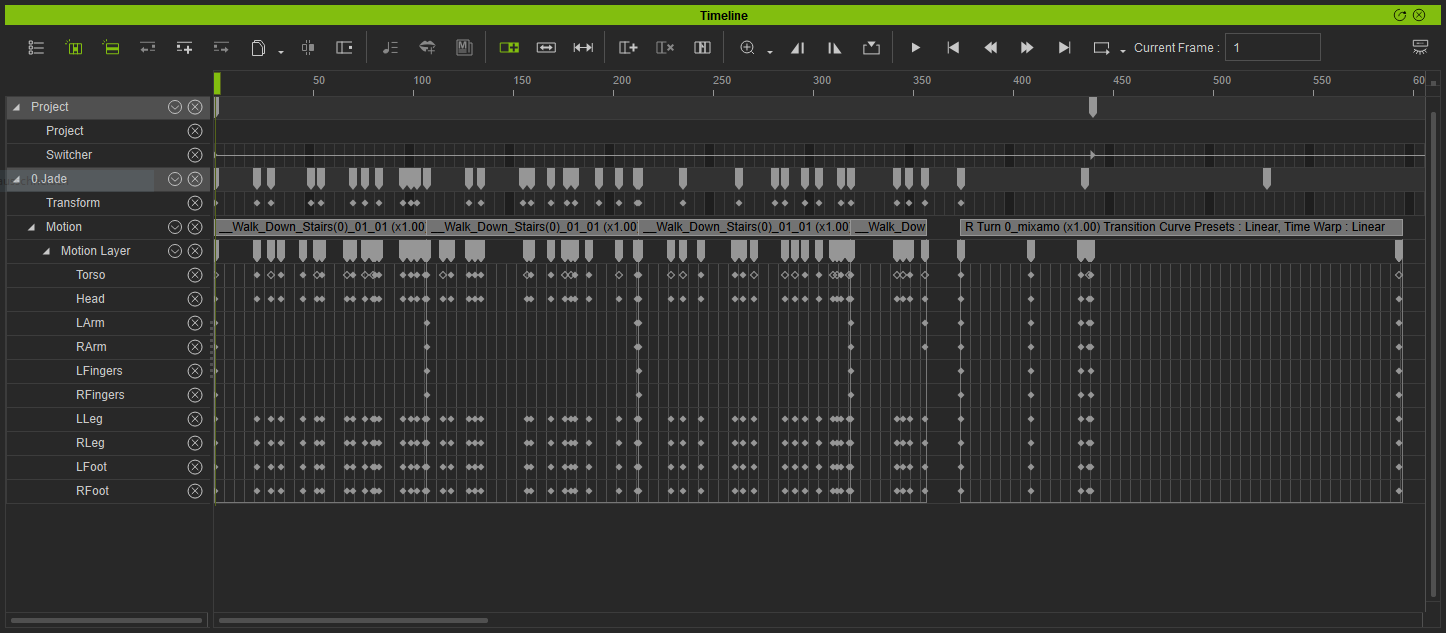
This is quite time consuming, and not that easy to make it look real. Though, with enough skills and experience, maybe even the best way. On my side that did not work perfect. The problem is, I guess, that we want to do it fast, and don't do it accurate enough. Hi Yep by hand, and yes it is time consuming, I did not use any underlying motions at all just me? So far I have Jade walking across the landing and got the first part of her walking down the stairs so now I need to put in all the extra touches to make it as real as I can this is the real time consuming part. Chris.
|
|
|
|
|
AlbinosGambit
|
AlbinosGambit
Posted 6 Years Ago
|
|
Group: Forum Members
Last Active: 4 Years Ago
Posts: 162,
Visits: 478
|
Hi there ToyStoryLab! Haha... yes I started all this, you are right about that, we all have to find something constructive to do right?! I couldn't imagine this kind of response at all, it's almost viral! Well, I have dabbled a bit with it but I am just a starting NOOB, but sure I will give it a go and publish my results as well, but I cant honestly say I believe it would be any good though haha..! toystorylab (4/3/2020)
AlbinosGambit (4/3/2020)
Where is your scene with Jade walking down the stairs?
I am excited to see what your results are!
Remember, you started this "stairy mess", and you got lots of tips now, we want to see YOUR results too! :D
WIN 10, COOLERMASTER MASTERCASE 500H, MSI GAMING PRO CARBON X470 RGB, AMD Ryzen 7 2700X CPU, MSI GeForce GTX 1650 GAMING X - 4GB GDDR5 RAM GPU, Corsair Vengeance RGB PRO DDR4 3200MHz 16GB RAM, SSD M.2 Corsair Force Series MP510 480 GB, SEAGATE BARRACUDA 3.5 HDD 4 TB.
Best regards
Albin
(AlbinosGambit)
|
|
|
|
|
Kelleytoons
|
Kelleytoons
Posted 6 Years Ago
|
|
Group: Forum Members
Last Active: 2 Years Ago
Posts: 9.2K,
Visits: 22.1K
|
Rampa (4/3/2020)
Make sure you are loading as a profile. The Load button at the top of the characterization panel. I just converted your motion with it. See attached.Right, thanks Rampa (not sure what I was thinking last night - a very bad day).
Alienware Aurora R16, Win 11, i9-149000KF, 3.20GHz CPU, 64GB RAM, RTX 4090 (24GB), Samsung 870 Pro 8TB, Gen3 MVNe M-2 SSD, 4TBx2, 39" Alienware Widescreen Monitor
Mike "ex-genius" Kelley
|
|
|
|
|
4u2ges
|
4u2ges
Posted 6 Years Ago
|
|
Group: Forum Members
Last Active: 2 Weeks Ago
Posts: 5.3K,
Visits: 16.8K
|
I'll share some tips later on...
|
|
|
|
|
Rampa
|
|
|
Group: Forum Members
Last Active: 7 days ago
Posts: 8.2K,
Visits: 62.6K
|
I'm not a Python person, but this seems like it could be an automated process with a Python plugin. Maybe some method of aligning the feet to specific locations on the steps?
I'm still much more interested in an automated system to get the basics, than a finished animation.
|
|
|
|
|
4u2ges
|
4u2ges
Posted 6 Years Ago
|
|
Group: Forum Members
Last Active: 2 Weeks Ago
Posts: 5.3K,
Visits: 16.8K
|
It takes 10 min to make a walk-on-stairs animation (using mirror pose with Pose Manager plug-in). In my original animation above I used the same pose-to-pose technique, but mirrored pose manually so it took a little longer to produce. Here is a quick video using mirror pose with Pose Manager. It is somewhat rough but fairly clean. If you spend little more time you may enhance it for more realism. I did not comment, as it's pretty much self-explanatory. Feel free to ask questions. Notes: * I used fixed, even staircase and respective terrain for it (download here) * It is best to use Preview Orthographic camera mode (I hid walls, trees and sky). * I downloaded Pose Manager just now and did not have a chance to play with it much. Just saw a mirror pose and got excited. There might be more options for automation with this plug-in.
|
|
|
|
|
AlbinosGambit
|
AlbinosGambit
Posted 6 Years Ago
|
|
Group: Forum Members
Last Active: 4 Years Ago
Posts: 162,
Visits: 478
|
Nice work and thanks for the great contribution. :-) Where do we find the poser plugin? 4u2ges (4/3/2020)
It takes 10 min to make a walk-on-stairs animation (using mirror pose with Pose Manager plug-in). In my original animation above I used the same pose-to-pose technique, but mirrored pose manually so it took a little longer to produce. Here is a quick video using mirror pose with Pose Manager. It is somewhat rough but fairly clean. If you spend little more time you may enhance it for more realism. I did not comment, as it's pretty much self-explanatory. Feel free to ask questions. Notes: * I used fixed, even staircase and respective terrain for it (download here) * It is best to use Preview Orthographic camera mode (I hid walls, trees and sky). * I downloaded Pose Manager just now and did not have a chance to play with it much. Just saw a mirror pose and got excited. There might be more options for automation with this plug-in.
WIN 10, COOLERMASTER MASTERCASE 500H, MSI GAMING PRO CARBON X470 RGB, AMD Ryzen 7 2700X CPU, MSI GeForce GTX 1650 GAMING X - 4GB GDDR5 RAM GPU, Corsair Vengeance RGB PRO DDR4 3200MHz 16GB RAM, SSD M.2 Corsair Force Series MP510 480 GB, SEAGATE BARRACUDA 3.5 HDD 4 TB.
Best regards
Albin
(AlbinosGambit)
|
|
|
|
|
Postfrosch
|
Postfrosch
Posted 6 Years Ago
|
|
Group: Forum Members
Last Active: 3 Years Ago
Posts: 6.9K,
Visits: 18.4K
|
Hi Vikingman Albin. Where do we find the poser plugin?
Its not a POSER-Plug-in
It's a Phyton Ad-On "Pose-Manager" for IC 7 from RL
This PlugIn is free
4to2ges write:
It takes 10 min to make a walk-on-stairs animation (using mirror pose with Pose Manager plug-in).
Look here:
https://forum.reallusion.com/438262/Pose-Manager-March-Sample-Script
https://marketplace.reallusion.com/pose-manager
Skol
Greets Postfrosch
@4u2ges: A nice Tutorial. Its great
--------------------------------------------------------------

|
|
|
|
|
toystorylab
|
toystorylab
Posted 6 Years Ago
|
|
Group: Forum Members
Last Active: 3 Months Ago
Posts: 4.6K,
Visits: 29.9K
|
4u2ges (4/3/2020)
I'll share some tips later on...
Yeah! Another Challenger :DThanx a lot for contributing! And this looks very, very decent...
Toystorylab on Vimeo : Crassitudes (my "Alter Ego") on Youtube:
|
|
|
|