Profile Picture

yes genesis 8 works just need a new Tpose

Posted By wendyluvscatz 9 Years Ago
You don't have permission to rate!
1
...
2
3
4
5
6
7
8

Author
Message
will2power71
will2power71
Posted 9 Years Ago
View Quick Profile
Distinguished Member

Distinguished Member (9.6K reputation)Distinguished Member (9.6K reputation)Distinguished Member (9.6K reputation)Distinguished Member (9.6K reputation)Distinguished Member (9.6K reputation)Distinguished Member (9.6K reputation)Distinguished Member (9.6K reputation)Distinguished Member (9.6K reputation)Distinguished Member (9.6K reputation)

Group: Forum Members
Last Active: 4 Months Ago
Posts: 389, Visits: 2.8K
I have found that it is possible to get the motions back into DAZ studio via BVH, but you're going to have to do some work with it first in something like Motion Builder or Ikinema WebAnimate. (Wendy's right though --DAZ FBX Import is terrible and completely worthless for getting anything other than the geometry and maps.) I imagine that the HumanIK in iClone is not fully utilized when it comes to the Genesis 3 Figure. What I find works for me is Characterizing a Genesis 3 Male and Female in Motionbuilder, and then bringing in the Motions and getting them to work there and then bringing them back into DAZ studio From Motionbuilder as a completely characterized BVH. Webanimate has a similar process that is as good at remapping BVH to different skeletons. Motionbuilder's expensive --Webanimate is only $99 dollars. 

There is a third option, and that's creating a Genesis 2 replica of the figure in question --or as close to the figure general size and proportions as you can get it, importing the motions from iClone on the Genesis 2 skeleton and then converting it inside of DAZ studio using a DraagonStorm's Script at DAZ3D or this ShareCG Script. They aren't perfect conversions(They get you about 90-95% there but you will have a few adjustments to make to get a finished result), but with a little work you can iron out the kinks and minimize the headaches.. 

Flipbook Market creates a lot of animations for DAZ studio and posted a tutorial on how to use Genesis 3 with Motionbuilder you can view Here It's a bit lengthy, but there's some good information on doing it. 

Webanimate offers some information on doing it as well, but to be honest I don't use Webanimate. I've heard a lot of good things about them.


From what I understand, this isn't uncommon with BVH files and if the bones are not a one to one match, there are problems. I would like to point out one thing that I see in iClone that may be part of the issue and that's NOT including the twist bones of the Genesis 3/Genesis 8 figures in the HumanIK mapping --even though HumanIK does allow for twist bones in Characterization. In the templates from iClone, they are not used. You can see in this diagram where the twist bones options are located --both in Motionbuilder and iClone 3DXchange.
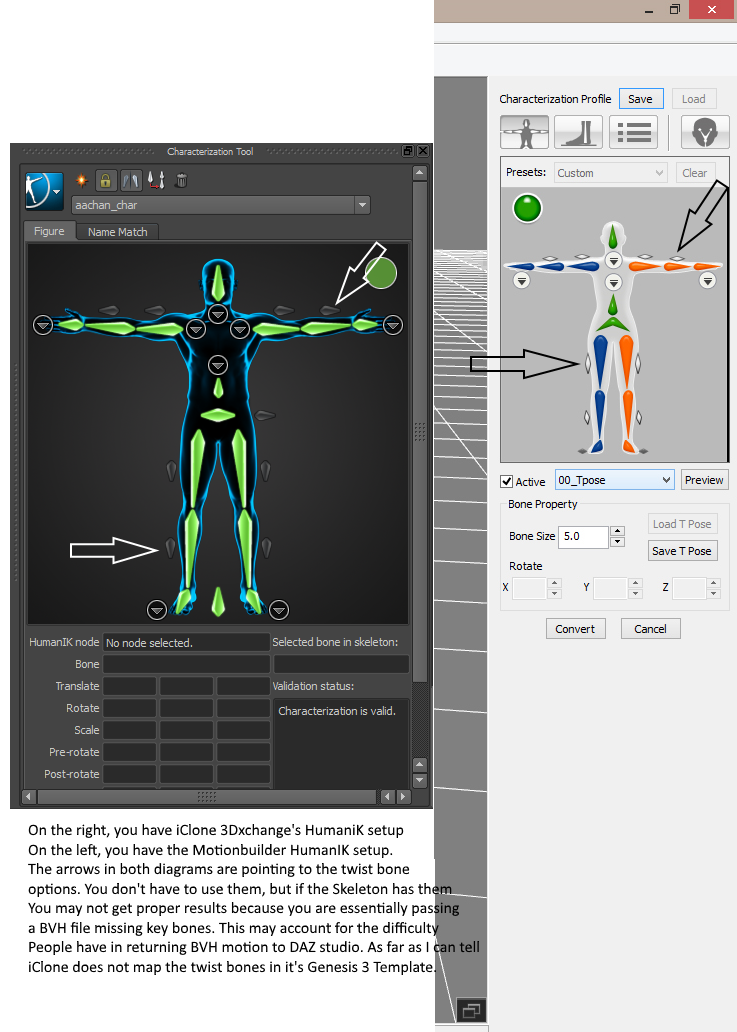
https://forum.reallusion.com/uploads/images/ff2d9f9e-46bb-4ba5-9eca-08ef.png

I haven't tested this, but I have a feeling if they were to be included in the characterization, you might be able to export motions from iClone to DAZ directly without unexpected results. It would more than likely require that you forgo the automatic character setup and map the bones manually, saving your own template if it works OR you might let the characterization go through and simply connect them once it's done and then save it --but I'm not sure that will work. With a little experimenting, this might be a workable solution. I simply do my work in Motionbuilder because  I have it, and it gives me a LOT more control to do it that way, and I'm not really keen on DAZ studio's lack of growth when it comes to anything besides figure geometry. There isn't a foolproof 100% way to do it error free, but you can get it if you apply a little problem solving. Once the motion's there in DAZ studio, you can export MDD or Alembic, capturing all the detail and the Joint Control Morphs like you were talking about. 
wendyluvscatz
wendyluvscatz
Posted 9 Years Ago
View Quick Profile
Senior Forum Member

Senior Forum Member (12.2K reputation)Senior Forum Member (12.2K reputation)Senior Forum Member (12.2K reputation)Senior Forum Member (12.2K reputation)Senior Forum Member (12.2K reputation)Senior Forum Member (12.2K reputation)Senior Forum Member (12.2K reputation)Senior Forum Member (12.2K reputation)Senior Forum Member (12.2K reputation)

Group: Forum Members
Last Active: 3 Months Ago
Posts: 2.5K, Visits: 19.4K
I have the twist bones added in my own bone based profile I often use to go to Carrara and no still does not work in DAZ as BVH.
(I export FBX to Carrara with facial animation using my selfmade facial bone based version)


dr.zap
dr.zap
Posted 9 Years Ago
View Quick Profile
Veteran Member

Veteran Member (847 reputation)Veteran Member (847 reputation)Veteran Member (847 reputation)Veteran Member (847 reputation)Veteran Member (847 reputation)Veteran Member (847 reputation)Veteran Member (847 reputation)Veteran Member (847 reputation)Veteran Member (847 reputation)

Group: Forum Members
Last Active: 8 Years Ago
Posts: 164, Visits: 824
wendyluvscatz (7/1/2017)
sorry to disappoint but getting them back into DAZ studio is not possible, DAZ's FBX import is abysmal they will be a scrunchy pulled apart mess.
You can do BVH export but not for Genesis 3 or 8, they will not load it except for a couple weird bone movements.


I don't want to hijack your thread, but I have just another question.  Have you tried transferring the .bvh to a G2 figure in Daz and then using the transfer pose/anim to G3 plugin?  I heard it was good at G2 to G3 transfers.

<edit>  Ok, I just read Will2power71's comment.   It seems he was suggesting the same thing.  It might work.  
dr.zap
dr.zap
Posted 9 Years Ago
View Quick Profile
Veteran Member

Veteran Member (847 reputation)Veteran Member (847 reputation)Veteran Member (847 reputation)Veteran Member (847 reputation)Veteran Member (847 reputation)Veteran Member (847 reputation)Veteran Member (847 reputation)Veteran Member (847 reputation)Veteran Member (847 reputation)

Group: Forum Members
Last Active: 8 Years Ago
Posts: 164, Visits: 824
Then there is this:  http://www.3dtoall.com/products/daztomaya/

If this flies, I'm not sure why I need iClone.  For previz, maybe?
dr.zap
dr.zap
Posted 9 Years Ago
View Quick Profile
Veteran Member

Veteran Member (847 reputation)Veteran Member (847 reputation)Veteran Member (847 reputation)Veteran Member (847 reputation)Veteran Member (847 reputation)Veteran Member (847 reputation)Veteran Member (847 reputation)Veteran Member (847 reputation)Veteran Member (847 reputation)

Group: Forum Members
Last Active: 8 Years Ago
Posts: 164, Visits: 824
will2power71 (7/1/2017)

Flipbook Market creates a lot of animations for DAZ studio and posted a tutorial on how to use Genesis 3 with Motionbuilder you can view Here It's a bit lengthy, but there's some good information on doing it. 

Webanimate offers some information on doing it as well, but to be honest I don't use Webanimate. I've heard a lot of good things about them.


I've done both of these.  I am on day 6 of my webanimate trial.  I used Genesis 2 with it and it had problems until I contacted support and sent them a Genesis 2 .fbx model.   They modified it (detached the root bone?) and sent it back.  It works fine now, except for animations with a different skeleton structure.  Then it's kind of wonky.   I did the same in Motionbuilder but it wasn't my computer so I couldn't finish the retargeting process.  It is a lot more complicated, though.  I would be happy to use webanimate as a retargeting app (its very simple)  if I can get a source for compatible .bvh files.  That's why I'm so excited about iKinema Orion.  It seems elementary that they will make Orion easily connect to webanimate.  I already contacted support and they said that their solver will output to iClone and Daz3d compatible skeletons. 
wendyluvscatz
wendyluvscatz
Posted 9 Years Ago
View Quick Profile
Senior Forum Member

Senior Forum Member (12.2K reputation)Senior Forum Member (12.2K reputation)Senior Forum Member (12.2K reputation)Senior Forum Member (12.2K reputation)Senior Forum Member (12.2K reputation)Senior Forum Member (12.2K reputation)Senior Forum Member (12.2K reputation)Senior Forum Member (12.2K reputation)Senior Forum Member (12.2K reputation)

Group: Forum Members
Last Active: 3 Months Ago
Posts: 2.5K, Visits: 19.4K
I use Draagonstoms script to convert G2F animation to 3 and it sort of works but I would just use Genesis 2 given the choice myself


animagic
animagic
Posted 9 Years Ago
View Quick Profile
Distinguished Member

Distinguished Member (33.4K reputation)Distinguished Member (33.4K reputation)Distinguished Member (33.4K reputation)Distinguished Member (33.4K reputation)Distinguished Member (33.4K reputation)Distinguished Member (33.4K reputation)Distinguished Member (33.4K reputation)Distinguished Member (33.4K reputation)Distinguished Member (33.4K reputation)

Group: Forum Members
Last Active: 5 Months Ago
Posts: 15.8K, Visits: 31.4K
dr.zap (7/1/2017)
Then there is this:  http://www.3dtoall.com/products/daztomaya/

If this flies, I'm not sure why I need iClone.  For previz, maybe?

If it works and you like (and can afford) Maya, that may be a solution for you. I believe you need the full version of Maya (not LE) to run plugins.


https://forum.reallusion.com/uploads/images/436b0ffd-1242-44d6-a876-d631.jpg

Ardent Enterprise
Ardent Enterprise
Posted 9 Years Ago
View Quick Profile
New Member

New Member (10 reputation)New Member (10 reputation)New Member (10 reputation)New Member (10 reputation)New Member (10 reputation)New Member (10 reputation)New Member (10 reputation)New Member (10 reputation)New Member (10 reputation)

Group: Forum Members
Last Active: 8 Years Ago
Posts: 9, Visits: 57
I can't thank you enough for this! I am fairly new to iClone and 3DXchange ... I just upgraded to 7 on both and purchased Victoria 8 for a special project. I've been days trying to fix the rig thinking could. I finally submitted a ticket to Support Desk, they sent me your solution here ... wish I had checked earlier last night, I might have gotten some sleep! It took all of five minutes and I finally have the "tiny dancer" I needed for my project! She is a beautiful, fluid model, and well worth the expense now.
With heartfelt appreciation!
Constance


Constance

pruiz
pruiz
Posted 9 Years Ago
View Quick Profile
Distinguished Member

Distinguished Member (1.8K reputation)Distinguished Member (1.8K reputation)Distinguished Member (1.8K reputation)Distinguished Member (1.8K reputation)Distinguished Member (1.8K reputation)Distinguished Member (1.8K reputation)Distinguished Member (1.8K reputation)Distinguished Member (1.8K reputation)Distinguished Member (1.8K reputation)

Group: Forum Members
Last Active: 6 Years Ago
Posts: 101, Visits: 1.8K
wendyluvscatz (6/15/2017)
yes she does if you apply the genesis 2 female duf pose from Reallusion
her expressions match
the bounce can be added to any unused bones by selecting the face icon in the retargetting room and adding to extend bone.
Then in main room go to spring open it, select those bones and click the button on far right.

I seem not to be able to get expressions - I load the G2 duf pose. Am I supposed to activate something in 3dxchange? The face bone?
Thanks for the tips and advice here.
wendyluvscatz
wendyluvscatz
Posted 9 Years Ago
View Quick Profile
Senior Forum Member

Senior Forum Member (12.2K reputation)Senior Forum Member (12.2K reputation)Senior Forum Member (12.2K reputation)Senior Forum Member (12.2K reputation)Senior Forum Member (12.2K reputation)Senior Forum Member (12.2K reputation)Senior Forum Member (12.2K reputation)Senior Forum Member (12.2K reputation)Senior Forum Member (12.2K reputation)

Group: Forum Members
Last Active: 3 Months Ago
Posts: 2.5K, Visits: 19.4K
you need the G3F not G2F duf preset
I must have mistyped that will go back and correct it


1
...
2
3
4
5
6
7
8


Reading This Topic