|
By wendyluvscatz - 9 Years Ago
|
other than reposing the shoulders and thighs by rotating in retarget room after importing there is little more needed
(I added extend bone boob spring of course!)
|
|
By charleshoover885 - 9 Years Ago
|
wendy,
Thanks for the info. Does the v8 autodetect for the expression editor?
Interesting about adding the bounce (spring), did you explain how to do that elsewhere?
Charles
|
|
By wendyluvscatz - 9 Years Ago
|
yes she does if you apply the genesis 3 female duf pose from Reallusion
her expressions match
the bounce can be added to any unused bones by selecting the face icon in the retargetting room and adding to extend bone.
Then in main room go to spring open it, select those bones and click the button on far right.
corrected, I accidently typed 2 instead of 3
|
|
By charleshoover885 - 9 Years Ago
|
Sorry to be a dunce, but when you say retargeting room are you referring to 3DXchange?
Charles
|
|
By wendyluvscatz - 9 Years Ago
|
|
yes the room in there you go to clicking convert to nonstandard character
|
|
By charleshoover885 - 9 Years Ago
|
Thanks, just haven't heard that term. Sounded kind of Poser-ish.
Charles
|
|
By wendyluvscatz - 9 Years Ago
|
yeah I came from Poser, Carrara and DAZ studio back to iClone
iClone 3 I started with and 3Dxchange 2 did not have rooms
|
|
By charleshoover885 - 9 Years Ago
|
Sounds like my history except I started with iClone 4. Never looked back.
Thanks for the spring info. Something I have always wanted to try. I am loving iC7 especially with the DAZ characters and the morphing.
Didn't know if I wanted yet another Genesis character.
Charles
|
|
By Dr Forrester - 9 Years Ago
|
I'm seriously out of my depth. Yesterday I finally found the Genesis 123 file and the Youtube video that explains how to use it. Today Daz unveiled Genesis 8! What do we use to move Genesis 8 into iClone 6 (or 7)? Is that what you're talking about in this forum?
|
|
By wendyluvscatz - 9 Years Ago
|
yes that is the topic but if you have never used the pipeline before you are better off trying it with Genesis, Genesis 2 and 3 first.
Those are all automatically done this new figure needs the extra pose step that you may not be familiar with if you have never imported an FBX file into 3Dxchange.
|
|
By will2power71 - 9 Years Ago
|
Wendy,
I saw that new figure in the store this morning and to be honest I wasn't surprised you were among the first to get it into iClone and experiment on it. If I recall correctly, you were instrumental in experimenting with Gen3 when it came out. However, this time I don't think I'll be doing very much with Victoria 8. It's become apparent to me that DAZ has no inclination to actually do any work on improving the software so I'm afraid I'm not going to be following them into the Genesis 4 arena unless they significantly improve the software itself and not just the figure. I have a dual xeon workstation with 64gb of RAM and it chokes on 4 figures in the viewport with nothing else. If anything it's gotten even slower. With iClone 7 on the horizon, I can get what I want out of the Gen 2 and 3 figures I already have, rather than re-buy all the same outfits and hairstyles on Gen 4. It's simply too much to keep up with them. I mean they just release Ophelia 7 a couple of months ago and Bang! Here's Victoria 8! To me, Victoria 8 is like buying a BMW chair to put in a 1993 Honda Civic. Genesis 3 did give us a lot of improvements but we also got a little bit of software improvements to make it easier to swallow. But they've pretty much ignored everything else we've been asking for so I'm not on board with upgrading until they look at improving the operating environment. I daresay that this may even be where I end up parting company with DAZ entirely.
|
|
By Dr Forrester - 9 Years Ago
|
Will there be a place to get the new pose step? Learn the new pose step? And, yes, good advice to start with Genesis 1 ,2 & 3. I was just thinking ahead. Thanks for the reply.
|
|
By wendyluvscatz - 9 Years Ago
|
well I only grabbed the free essentials and DS beta update (I only use the latest beta have 4.7 otherwise)
its no big deal for me I am a late adopter of everything
not gotten iC7 yet either and though I have 6 actually use 5 a lot too for many reasons
Poser I am on PP12 and I was always a Carrara behind until they stopped developing it and caught up.
I try whats free wait and get the paid stuff on sale.
have piles and piles of Reallusion content I bought heavily discounted too!
its my life philosophy with technology in general
my phone is always behind every one elses
|
|
By charleshoover885 - 9 Years Ago
|
Dr Forrester,
Don't hesitate. The DAZ characters work great in iClone and the learning curve is very manageable.
Reallusion tutorials cover it all. It is very easy.
Genesis 2 works best (teeth issues on G3) but differences are minor.
Don't want to kick sand in anyone's face but I have always preferred the DAZ characters.
BTW, use the Genesis 3 Female Face Key .DUF file for the Genesis 8 Female.
Charles
|
|
By will2power71 - 9 Years Ago
|
|
I stood on the fence for a long time about iClone 7. There were a lot of questions that I really mulled over before I purchased it. I think the thing that really clinched it for me was that iClone really offered the best chance of giving a single animator like me the opportunity to make the kind of animations I wanted. I'm not really trying to make the next sci-fi/fantasy epic, but I did want to get a believable animation out of what I was doing. Working in other packages ended up becoming a hassle in a lot of ways. I put a lot of thought into my purchases these days. There are times when I am an early adopter(Girl 7 and Guy 7) and then their are times when I say it's not worth it and walk on by (i.e. Poser 11). I did end up taking the plunge with iClone 7 with the deal where you can get the graph editor for free --that cinched it for me. There are things I still want, but I think when it comes to getting a scene together with Genesis 3 figures, it's the most painless way to do it. That thing with foot sliding was killing me but Warlord and a few other iCloners encouraged me to try and find my own solution to the shortcomings that exasperate me. In fact, I think I've been a little happier since taking the plunge. I'm looking forward to seeing what I can do with Genesis 3 and iClone 7.
|
|
By charleshoover885 - 9 Years Ago
|
Will,
You won't be disappointed. I love iC7. It is a HUGE step forward.
Charles
|
|
By toystorylab - 9 Years Ago
|
Some more hints to extra pose step "reposing the shoulders and thighs by rotating" would be cool :pinch:
|
|
By charleshoover885 - 9 Years Ago
|
toystory,
Here is a quick-and-dirty (note that it is only necessary on the Genesis 8 Female because of the modified T-Pose)
1. Export the G8F from DS in FBX format.
2. Open in 3DXchange and click on "Convert to Non-Standard"
3. Uncheck the "Active" box.
4. Select "lShldrBend" in Scene Tree.
5. Use rotate tool (keyboard E).
6. Rotate to standard T-Pose position.
7. Repeat for "rShldrBend, lThighBend, and rThighBend".
8. Check "Active" box.
9. Click "Convert".
10. Click "iC" Export (Top Left).
Open character in iClone. It should assume the standard standing pose.
Charles
|
|
By toystorylab - 9 Years Ago
|
|
charleshoover885 (6/15/2017)
Here is a quick-and-dirty (note that it is only necessary on the Genesis 8 Female because of the modified T-Pose)
Yo, thanx for quick reply...
Had so far no problems with Genisis 1/2/3, even M4/V4 worked (with little spine-adjustment) well, so i guess i can manage this. Try this later this evening...
T.H.A.N.X
|
|
By toystorylab - 9 Years Ago
|
Hm, for some reason Genesis 8 does not load properly...
Any suggestions what could be the problem??
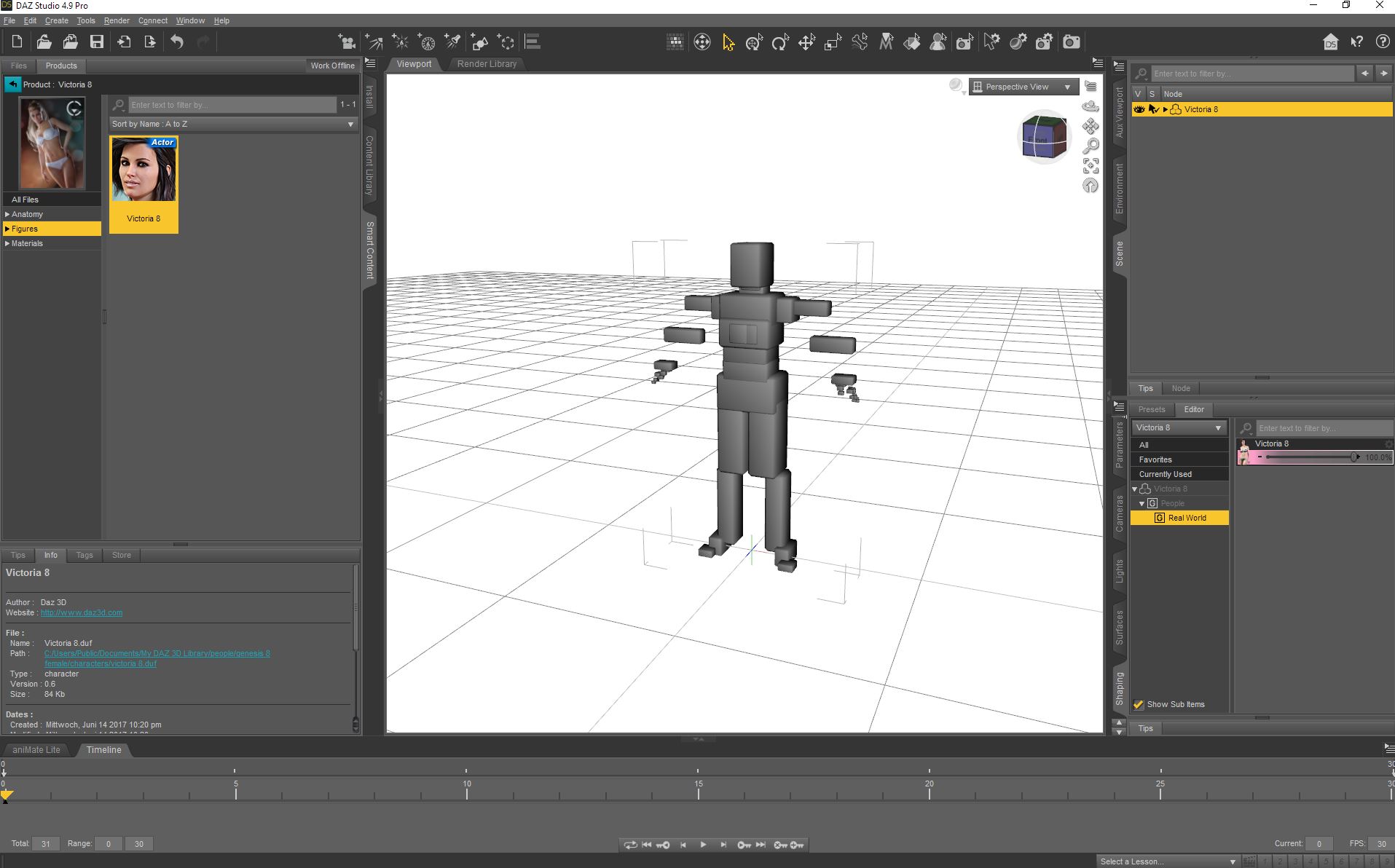
I have installed latest version...

|
|
By Dr Forrester - 9 Years Ago
|
Hi Charles,
Thanks for the advice on the Gen 3 duf. And I see you've posted simple instructions to fix Gen 8. Much appreciated..
|
|
By charleshoover885 - 9 Years Ago
|
ToyStory,
Looks like the Genesis 8 Female Starter Essentials did not install.
Charles
|
|
By charleshoover885 - 9 Years Ago
|
Dr,
Glad to help.
Charles
|
|
By toystorylab - 9 Years Ago
|
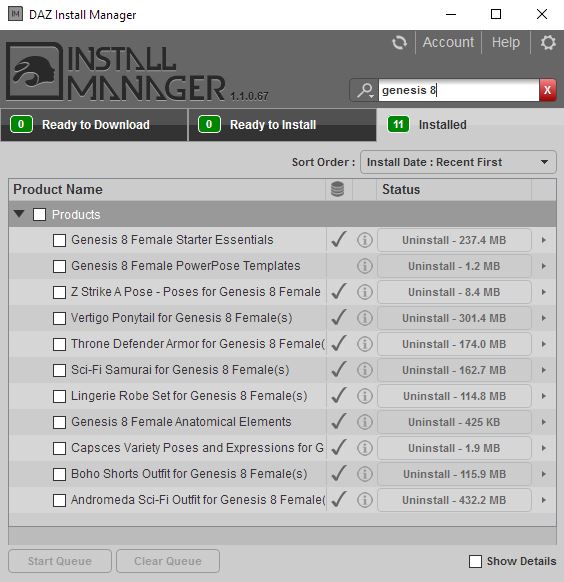
Hm, on DAZ Forums there are a few posts with the same issue:
https://www.daz3d.com/forums/discussion/175901/victoria-8-problem#latest
|
|
By charleshoover885 - 9 Years Ago
|
That's interesting. You don't seem to be alone. No problem for me, though I install everything manually. Shouldn't make a difference.
Does Genesis 8 Female load properly?
Charles
|
|
By toystorylab - 9 Years Ago
|
Nope, Genesis 8 Female same issue...
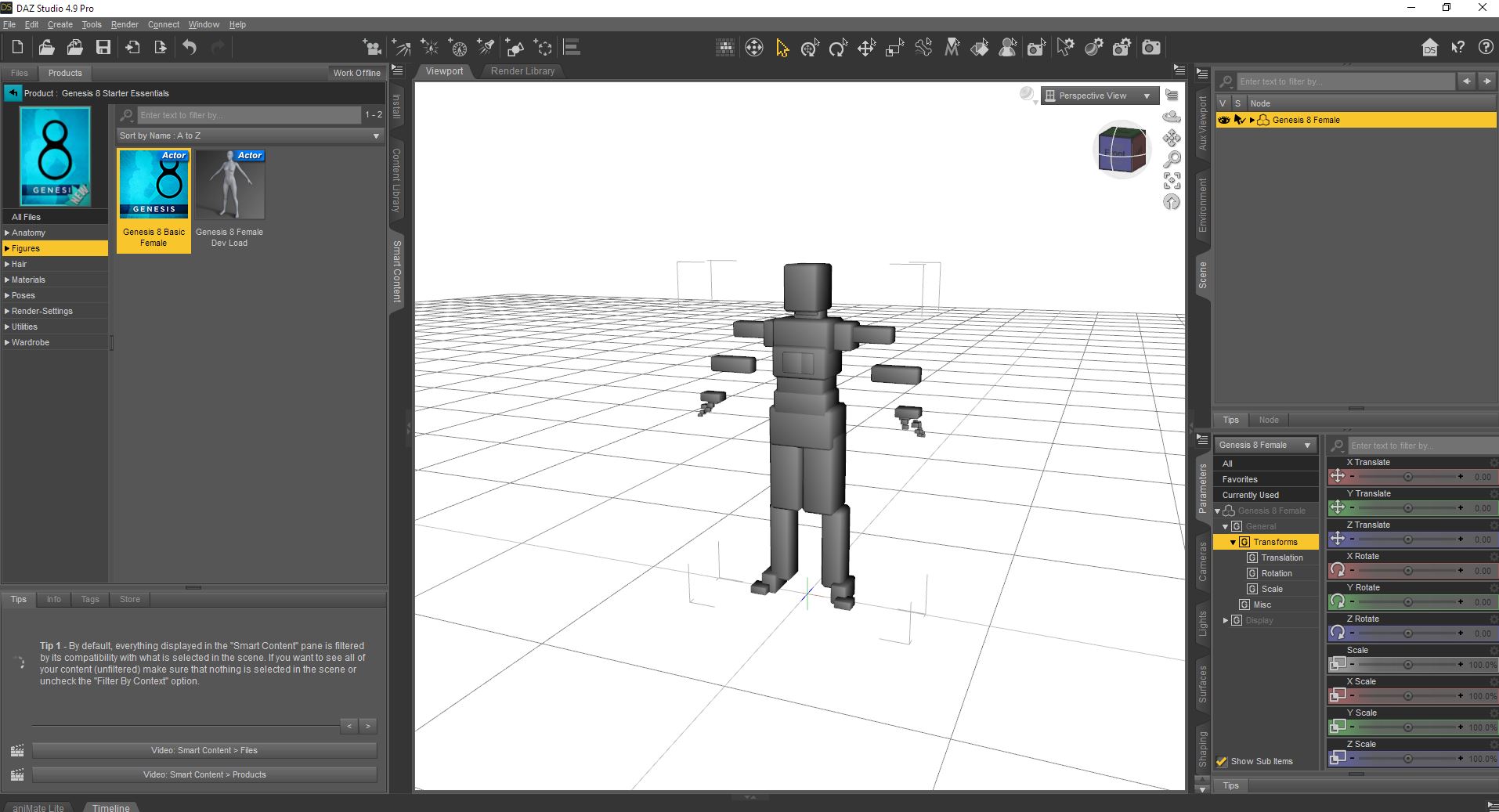
|
|
By charleshoover885 - 9 Years Ago
|
|
Bummer.
|
|
By charleshoover885 - 9 Years Ago
|
Wendy,
When I play an imported G8F (with DAZ Face Key .DUF) and no additional animation I get a random "twitch" on the left side of the face.
Do you see this?
Charles
|
|
By toystorylab - 9 Years Ago
|
uninstall/reinstall via DIM of Genesis 8 Female Starter Essentials did not work BUT
uninstall/reinstall via CONNECT of Genesis 8 Female Starter Essentials DID work :D
Now Genesis 8 Female and Victoria 8 work fine...
I have to go to bed now, import to iclone will be tested tomorrow :pinch:
|
|
By wendyluvscatz - 9 Years Ago
|
not really looked close enough but it sounds like another slider is linked to the eye blink one in the expression editor, am on my ipad ATM.
This could also happen in DAZ applying the pose file and if caused by the preset at least only 1 of 57 poses to fix.
|
|
By animagic - 9 Years Ago
|
|
I'm a simple person, following DAZ from a distance, but what happened to Genesis 4, 5, 6, an 7? ...:unsure:
|
|
By animagic - 9 Years Ago
|
|
Just for fun I decided to run Install Manager and I was able to have G8 show in DAZ without problems.
|
|
By toystorylab - 9 Years Ago
|
Done ;)
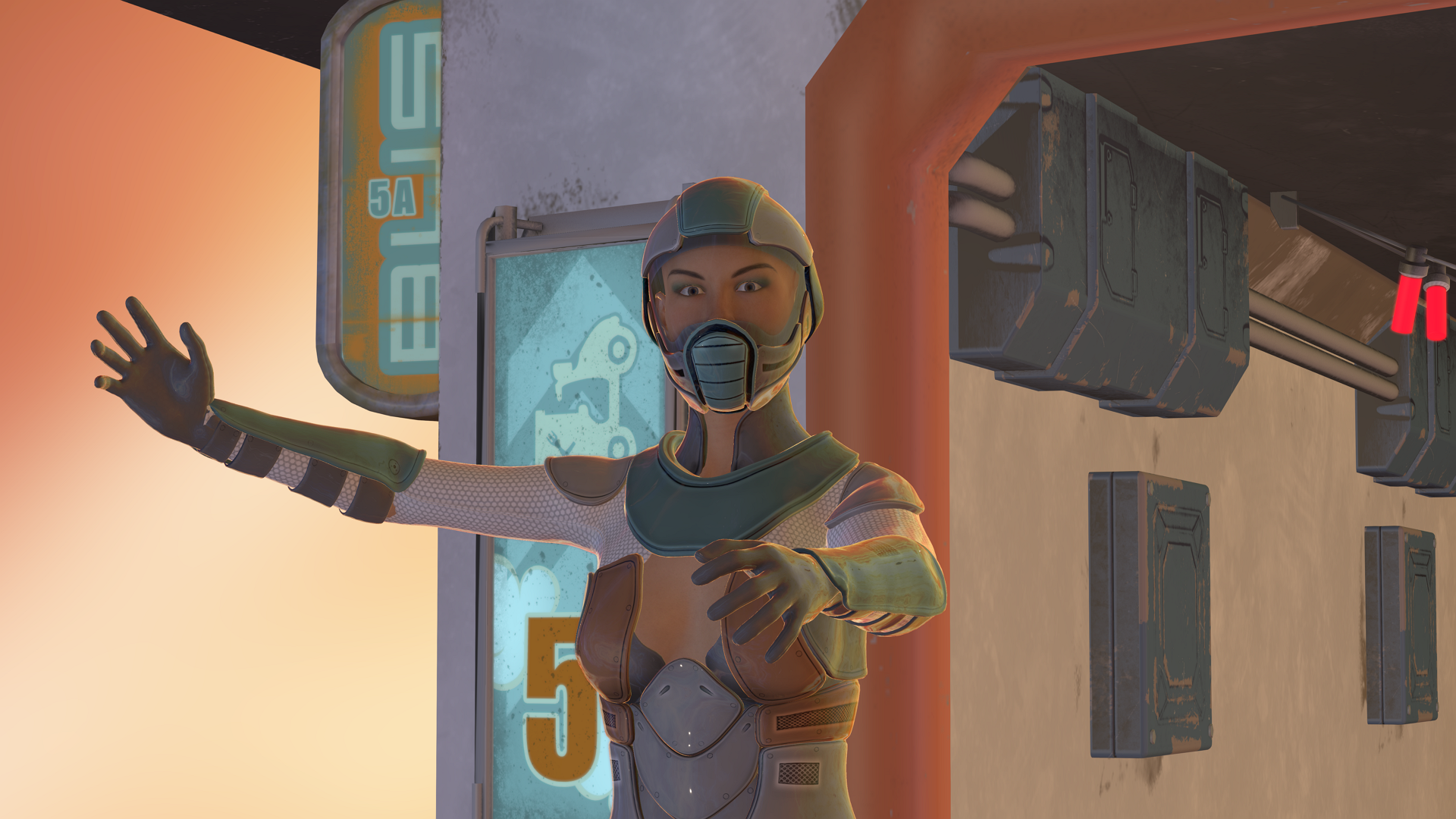
Works fine...
|
|
By toystorylab - 9 Years Ago
|
|
animagic (6/15/2017)
I'm a simple person, following DAZ from a distance, but what happened to Genesis 4, 5, 6, an 7? ...:unsure:
I am not a Daz-Pro, but as far as i can gather;
4 is non genesis but first unimesh (poser and DAZ)
After Daz Studio Pro 4 was launched first genesis was born...
5 is genesis 1, 6 is genesis 2, 7 is genesis 3...
Is 8 genesis 3 or 4? Or genesis 8 :pinch:? I dunno :ermm:
|
|
By Holden7 - 9 Years Ago
|
|
animagic (6/15/2017)
I'm a simple person, following DAZ from a distance, but what happened to Genesis 4, 5, 6, an 7? ...:unsure:
There was a confusing mismatch in numbering between the base Genesis figures and the character morphs for those bases
It went like this:
Genesis = Victoria 5, Michael 5, etc
Genesis 2 = Victoria 6, Michael 6, etc
Genesis 3 = Victoria 7, Michael 7, etc
Instead of calling the next base Genesis 4, and the morphs for that base Victoria 8, Michael 8, etc, they jumped the base number up to 8 so it would match the morph number, so,
Genesis 8 = Victoria 8, Michael 8, etc
|
|
By Kelleytoons - 9 Years Ago
|
Sorry if this might be a bit OT here, but can you folks who have gone this route explain to me (or show me -- that would be great) why you would bother? Assuming, that is, you will be doing your rendering in iClone.
I mean, I can understand perhaps if you are going to take these characters elsewhere to render, but honestly I've never seen Daz characters inside of iClone that looked half as good as the CC stuff. Particularly with hair and such. I realize they are MUCH higher res, but it seems to me that's a bit lost in iClone. And with CC I can get the faces I want (again, no offense to anyone here, but I've never even seen faces on the Daz stuff I like half as much as the CC. Again, INSIDE of iClone, not rendered in Daz with iRay).
I may just be missing something obvious -- perhaps there are samples out there I haven't seen.
|
|
By charleshoover885 - 9 Years Ago
|
|
Kelleytoons (6/17/2017)
I realize they are MUCH higher res, but it seems to me that's a bit lost in iClone..
Answered your own question.
To each his own. For me iClone is the tool to animate DAZ characters.
Charles
|
|
By animagic - 9 Years Ago
|
Kelly, that should wake up a lot of (former) DAZ users...:P
It's probably a matter of transitioning. If you happen to have a lot of DAZ stuff, I can see that you want to use that. Clothing and particularly hair, which is still a weakness in iClone/CC. As for the higher-poly figures, game engines and now CC have taught us that texturing can do a lot to compensate for fewer polys. And the new rendering in IC can't be beat if you are a bit older and want to finish a few films during your lifetime.
|
|
By charleshoover885 - 9 Years Ago
|
Animagic,
It's more than just transitioning. Animation tools and Character/Scene creation are separate issues. Don't you find it interesting that CC is following DAZ's lead on character creation?
BTW, I can only speak for myself but I am not a "former" DAZ user. I use iClone to animate, Daz to create characters.
Charles
|
|
By Kelleytoons - 9 Years Ago
|
charleshoover885 (6/17/2017)
Kelleytoons (6/17/2017)
I realize they are MUCH higher res, but it seems to me that's a bit lost in iClone.. Answered your own question.
Well, no, Charles. Higher res doesn't mean better. As Ani says, texturing can do quite a bit. In point of fact, when I was doing this stuff for a living, we found that using smart textures (that emulate modeling) was a whole lot more efficient and just as good. In some cases even better.
And, again, I've yet to see anything that convinces me the characters look better. I'd LIKE to see something, but so far people have posted things that look worse (like the video at the start of this thread). No question that CC has emulated a lot of stuff that Daz does, but unless you're talking still images I don't see any animation with Daz characters that I went "Wow".
But I'm always willing to learn and don't want to hijack this thread. If others want to post, in another thread, some evidence to the contrary I'd appreciate seeing it.
|
|
By charleshoover885 - 9 Years Ago
|
No thanks.
Charles
|
|
By charleshoover885 - 9 Years Ago
|
|
Kelleytoons (6/17/2017)
I'd LIKE to see something, but so far people have posted things that look worse (like the video at the start of this thread)
This is a bit shrill.
Wendy,
I appreciate you getting out early on this thread.
Charles
|
|
By will2power71 - 9 Years Ago
|
|
Kelleytoons (6/17/2017)
Sorry if this might be a bit OT here, but can you folks who have gone this route explain to me (or show me -- that would be great) why you would bother? Assuming, that is, you will be doing your rendering in iClone.
Kelleytoons, I can give you my perspective if you like. I have a lot of time and money invested in DAZ before I started to do anything with iClone. I actually calculated it out over time and my first purchase with DAZ in 2010. All totalled, it's more than a couple of thousand dollars in my case and I'm sure that I'm not alone in those dollar figures. The thing is with all that time and money invested, a lot of us have become attached to the figures we spend so much time with posing and rendering and well --we want to see them at their best. It's a widely held belief that DAZ's animation tools just aren't up to snuff and for the most part I agree. In fact, if they ever improved the DAZ studio animation tools, a lot of us might go back to it for animation because we wouldn't have to convert every asset and we could get all that detail with very little effort. But it seems that DAZ isn't interested in that so we're stuck looking for other solutions to get our characters moving.
iClone provides that and more and for a lot of us it's enough just to be able to see the figures we've grown attached to live and breathe for us. Take Mike for example:
Mike is a character of mine and I have built her in V4, Genesis, Genesis 2 and Genesis 3. She has a backstory and is very near and dear to me. Just getting to see her in iClone had me on cloud 9 for six months but I want to give her the best that I can. But with the limitations of DAZ there were few options and a lot of trial and error. But with 3dxchange and iClone I can work out the animation and then bring it back into DAZ so that I can compile a high quality output. It's not about render time for me at this point but with the Octane plugin, I can get it down to about 20 seconds or so per frame with my setup. If I was doing a toon render, which is something that I love then I would more than probably do the render in iClone because I feel the toon render in iClone is superior to DAZ but if I want to go for realism, then I would render the final output in DAZ or maybe Carrara or maybe Cinema 4d or Modo. Most of us are getting used to moving back and forth between applications but I suppose it comes down to what the intent is on the user end.
I am not down on the CC characters but the DAZ geometry in it's native app is more detailed. If you take the right approach, you don't have to lose any of that detail. I am now getting my feet wet in alembic export from DAZ and MDD from the Animate2 plugin for DAZ. I am working out a workflow where I set the scene up in DAZ and then I set up a very low poly proxy scene that I export to iClone. I export the DAZ figure in the scene and animate it in iClone before exporting the BVH back to DAZ where I can either render the scene or export the alembic to another application. I want the extra detail and this pipeline is a way to achieve the best result with a minimum of frustration. I'm not at home right now, but I will try to put together an example in the next week or so, so you can see exactly what I'm talking about.
I have it in my head that if I am not going to be doing any special effects, then I'll do the final result in DAZ. If I want to add fire or fog or something, then I'll do it in Cinema 4d or Modo with Octane render because I can achieve a consistent result whether I use DAZ or Cinema 4d. I just bought a 4TB drive to store alembic/MDD files. To me, the final result is just as important as the workflow so if it looks good in iClone, why not take advantage of Octane and the Redspec Shaders?
Hell... Now I'm interested myself to see how this might turn out.
|
|
By knoble - 9 Years Ago
|
|
Hi will2power71 - Are you able to import facial animation from iClone into Daz?
|
|
By will2power71 - 9 Years Ago
|
knoble (6/17/2017)
Hi will2power71 - Are you able to import facial animation from iClone into Daz?
That depends on how it's done, I suppose. If it's strictly bone based, then I'm pretty sure there's a good chance that you can. If it's morph based --that might not be so good. You see, DAZ isn't very good with FBX imports. Some people have said that they have had successful imports but I haven't really heard or seen anything that would convince me that it's possible. You might be able to get away with it if you did an alembic export into Cinema 4D and converted the alembic animation into PLA (Point Level Animation) I remember the video on doing that for Cinema 4d but I'm not sure if it is possible in other applications.
Since the Genesis 3 line has Facial bones, bone based animations could be exported as BVH and theoretically work. I have not tried it as of yet. Personally, If I were going to do it, I would use Genesis 3 Bundle Expressions & Face aniBlocks in DAZ and lyp sync from Mimic Live! along with Keymate and Animate2 to get the facial performance --but that's just me. I tend to believe you'll end up with less of a headache blocking the big motions in iClone and doing the facial expressions stuff in DAZ if you're planning on bringing everything back into DAZ Studio.
|
|
By animagic - 9 Years Ago
|
I think we can at least agree that after a while everyone has their favorite tools and workflow, and one isn't necessarily better than the other. It's what you do with it in the end. (I tried to explain that to sw00000p once.)
iClone has its limitations too, but that's where I have invested a lot of money in over the years, so I certainly understand the investment aspect. You just hope that the company you deal with is responsive to user requests, and RL has not disappointed me. You like to see the products you use evolve.
|
|
By wendyluvscatz - 9 Years Ago
|
|
Kelleytoons (6/17/2017)
I'd LIKE to see something, but so far people have posted things that look worse (like the video at the start of this thread)
that was just a quick day one test using basic content and I also only have the free starter essentials
added an autofitted outfit and skin texture.
|
|
By wendyluvscatz - 9 Years Ago
|
wendyluvscatz (6/17/2017)
Kelleytoons (6/17/2017)
I'd LIKE to see something, but so far people have posted things that look worse (like the video at the start of this thread)that was just a quick day one test using basic content and I also only have the free starter essentials added an autofitted outfit and skin texture.
all DAZ content in iClone
https://www.facebook.com/wendy5/videos/vb.1653360584/10212229346722863/?type=2&theater
|
|
By wendyluvscatz - 9 Years Ago
|
|
double post
|
|
By Kelleytoons - 9 Years Ago
|
Wendy -- I love you dearly (well, your presence here and the work I've seen you post) and I don't mean at all to denegrate what you posted at the start here, or even this latest (although I LOVE the way you did your crowds), but I still haven't seen anything done with Daz characters that is any better than what I've seen with CC ones. I'm not saying they are bad at all, just not better (and in some cases, not as good).
I was just trying to see if the work and effort needed to bring these in was worth it, and at least for me I don't see how it is. I'm sorry if I ruffled anyone's feathers because I certainly didn't mean to. Every single person needs to decide what is best for their art, and it's unlikely that ANY solution will fit more than a few. Animagic explains that quite well.
Willpower -- you answered the best. If you have money (and energy and effort) invested in tools of course you want to leverage them any way you can. And your gal, Mike (which kind of irritates me, as that's my name :>) does look pretty (love her eyes) but, again, nothing I couldn't see doing in CC (*someone* doing -- I'm not necessarily the greatest at doing anything in 3D). But if I had spent my money on her I'd certainly want to use her (so to speak) and I'm really happy you can.
Again, not trying to rain on anyone's parade here. Clearly Daz characters are not something I need concern myself with (but I'm ALWAYS willing to be proven wrong because that's how I get better tools. And spend more money. Sigh).
|
|
By will2power71 - 9 Years Ago
|
|
Kelleytoons (6/17/2017)
Willpower -- you answered the best. If you have money (and energy and effort) invested in tools of course you want to leverage them any way you can. And your gal, Mike (which kind of irritates me, as that's my name :>) does look pretty (love her eyes) but, again, nothing I couldn't see doing in CC (*someone* doing -- I'm not necessarily the greatest at doing anything in 3D). But if I had spent my money on her I'd certainly want to use her (so to speak) and I'm really happy you can.
Again, not trying to rain on anyone's parade here. Clearly Daz characters are not something I need concern myself with (but I'm ALWAYS willing to be proven wrong because that's how I get better tools. And spend more money. Sigh).
Kelleytoons,
I didn't want to hit the hey tonight before showing you a little example of what I was talking about with the DAZ Characters. The video I posted before was one from a while ago back when the character was done in Genesis 2. I updated her to Genesis 3, and I wanted to give you a little indication of why DAZ users are so keen on working with their models and not so apt to switch away from them. DAZ Genesis characters are not at their best in iClone but if you work out rendering the finished animations in Iray and DAZ, you get to take full advantage of the Joint Controlled Morphs and the subdivided detail that you don't get to use in iClone. It's just a quick walk cycle and pardon her attire but I chose something that would let you see what I was talking about. The figure detail in it's native application is perhaps better than any off the shelf figure you can purchase for a similar price. (I am not including professionally rigged models in Maya or Max --they are naturally out of scope for what I'm talking about.) This is just a quick walk cycle that I put together in Hitfilm and Posted to Youtube for the sake of demonstration. Watch it at fullscreen and you can see the little figure details that wouldn't be in the available in iClone. I will post the same walk cycle again in iClone tomorrow to demonstrate the difference. The thing is DAZ animation tools suck. Their render engine does not. If I were to go a step further and use Virtual World Dynamics, I could probably get even more out of the final result with her hair moving dynamically. In fact, I think tomorrow I'll take a stab at doing a dynamic hair version of the same walk cycle --I don't think there are very many good examples online.
|
|
By charleshoover885 - 9 Years Ago
|
will2power71,
You are exactly right.
I believe many Daz users have ended up in iClone precisely because DS has not developed better animation tools in DAZ Studio.
Please keep us posted on your project.
Charles
|
|
By Kelleytoons - 9 Years Ago
|
will2power71 (6/18/2017)
Kelleytoons (6/17/2017)
Willpower -- you answered the best. If you have money (and energy and effort) invested in tools of course you want to leverage them any way you can. And your gal, Mike (which kind of irritates me, as that's my name :>) does look pretty (love her eyes) but, again, nothing I couldn't see doing in CC (*someone* doing -- I'm not necessarily the greatest at doing anything in 3D). But if I had spent my money on her I'd certainly want to use her (so to speak) and I'm really happy you can.
Again, not trying to rain on anyone's parade here. Clearly Daz characters are not something I need concern myself with (but I'm ALWAYS willing to be proven wrong because that's how I get better tools. And spend more money. Sigh).
Kelleytoons, I didn't want to hit the hey tonight before showing you a little example of what I was talking about with the DAZ Characters. The video I posted before was one from a while ago back when the character was done in Genesis 2. I updated her to Genesis 3, and I wanted to give you a little indication of why DAZ users are so keen on working with their models and not so apt to switch away from them. DAZ Genesis characters are not at their best in iClone but if you work out rendering the finished animations in Iray and DAZ, you get to take full advantage of the Joint Controlled Morphs and the subdivided detail that you don't get to use in iClone. It's just a quick walk cycle and pardon her attire but I chose something that would let you see what I was talking about. The figure detail in it's native application is perhaps better than any off the shelf figure you can purchase for a similar price. (I am not including professionally rigged models in Maya or Max --they are naturally out of scope for what I'm talking about.) This is just a quick walk cycle that I put together in Hitfilm and Posted to Youtube for the sake of demonstration. Watch it at fullscreen and you can see the little figure details that wouldn't be in the available in iClone. I will post the same walk cycle again in iClone tomorrow to demonstrate the difference. The thing is DAZ animation tools suck. Their render engine does not. If I were to go a step further and use Virtual World Dynamics, I could probably get even more out of the final result with her hair moving dynamically. In fact, I think tomorrow I'll take a stab at doing a dynamic hair version of the same walk cycle --I don't think there are very many good examples online.
I have zero doubt that Daz figures can look good rendered with other tools -- as I said earlier, that wasn't my question. I wanted to know if, when rendering in iClone, I could get better results with them then CC characters, and I don't think that's true. And I do NOT intend to render elsewhere -- that ship has sailed. I spent decades of my life rendering professionally in Max and waiting weeks in order to get minutes usable animation. I will NEVER go that route again. Even iClone, at times, is a bit slow (because while I can review it in Real Time, I can't render it in *quite* that amount. But it's close enough).
So I do appreciate your thoughts and examples and if it ever changes -- if Daz characters in iClone become superior to those I can get with CC -- I hope someone will post examples so I'll know when I have to switch. In the meantime I'll leave this thread and sorry, again, for interrupting.
|
|
By Kelleytoons - 9 Years Ago
|
Ooops, let me add one more thing (for you older folks here, that's a Columbo impression :>),
I also have some issues with the pursuit of "Real World" characters. I'm sure most of you are familiar with the Uncanny Valley effect, but for those of you who aren't, it's when human characters appear almost, but not exactly, like real people that a revulsion sets in among viewers (it may or may not exactly express itself as revulsion, although it often does, but at the very least it is unsettling to the point of not being able to disengage and enjoy them in a story environment). I feel like we are dangerously close to that even as it is with CC characters, and getting any closer is Not a Good Idea, given that we can't cross that valley (it's possible one day we might, but since even Hollywood has issues along that line I doubt whether we will for many, many years).
It's why we accept digital "actors" who aren't human -- robots and monsters are just fine -- and reject those attempts otherwise (they have made a few inroads putting digital faces on real actors, such as Carrie Fisher, but even those tend to approach that valley. And it takes the entire resources of an SFX department, many folks whom I still know personally, to get decent results).
So there is a Goodness in keeping your characters a bit artificial, a goodness that I don't think most folks appreciate. I would just offer this -- if you don't watch this, you may end up alienating your audience (at least all but the hard-core fanboys who are so invested in the technology they can't see the forest for the trees -- they tend to have a higher tolerance and their own "valley" is much further than nearly everyone else).
|
|
By animagic - 9 Years Ago
|
On that note, my wife frequently comments that some female news anchors look just like avatars (this is in the US), so I wonder if the Uncanny Valley is being approached from two directions...:unsure:
Since we are reminiscing (I love Colombo!), there was a German show orchestra headed by James Last (Hans Last, really), where the violins in particular were sauced with a heavy dose of reverb. So people unfamiliar with how violins sound in an actual symphony orchestra would complain that they didn't sound "real"...:crazy:
|
|
By pruiz - 9 Years Ago
|
|
wendyluvscatz (6/15/2017)
yes she does if you apply the genesis 2 female duf pose from Reallusion
her expressions match
the bounce can be added to any unused bones by selecting the face icon in the retargeting room and adding to extend bone.
Then in main room go to spring open it, select those bones and click the button on far right.
Sorry but I'm new to iclone and 3dxchange. Could you be more precise in steps to modify fbx G2 imported to 3dxchange to enable unused bones please? I cannot get spring to activate on specific body parts in iclone.
|
|
By wendyluvscatz - 9 Years Ago
|
interestingly someone asked the same thing in another thread and I shared this link
https://www.reallusion.com/iclone/help/3DXchange5/Pipeline/04_Modify_Page/Character_Section/Setting_Extend_Bones_Spring.htm
|
|
By pruiz - 9 Years Ago
|
Thank you - this really helps.
|
|
By dr.zap - 9 Years Ago
|
Wow, I just stumbled upon this thread and I realize that I have independently (somewhat) followed the same process as will2power71. It is uncanny. My pipeline will closely resemble his. I am not invested in Daz or iClone yet, but I completely agree that in its native format, Daz characters are unmatched. In iClone, they kind of look the same as CC Characters. So it's the technology within the Daz platform that makes the difference and I can't do without it. I hope you Daz people can mentor me on your process of getting our characters out of Studio and back again. I started a thread in the iClone7 thread so you'll know how I'm thinking. Before I spend a lot of money on tools I will be living with for at least a year, I want to be aware of all the foibles. Thanks a lot. And it's good to see that Genesis 8 will come into iClone, though I don't see the need to use that figure for my own project.
Here is my thread: https://forum.reallusion.com/331798/I-am-evaluating-iClone-7-for-my-project-I-have-questions
Any suggestions would be greatly appreciated!
|
|
By wendyluvscatz - 9 Years Ago
|
sorry to disappoint but getting them back into DAZ studio is not possible, DAZ's FBX import is abysmal they will be a scrunchy pulled apart mess.
You can do BVH export but not for Genesis 3 or 8, they will not load it except for a couple weird bone movements.
|
|
By will2power71 - 9 Years Ago
|
I have found that it is possible to get the motions back into DAZ studio via BVH, but you're going to have to do some work with it first in something like Motion Builder or Ikinema WebAnimate. (Wendy's right though --DAZ FBX Import is terrible and completely worthless for getting anything other than the geometry and maps.) I imagine that the HumanIK in iClone is not fully utilized when it comes to the Genesis 3 Figure. What I find works for me is Characterizing a Genesis 3 Male and Female in Motionbuilder, and then bringing in the Motions and getting them to work there and then bringing them back into DAZ studio From Motionbuilder as a completely characterized BVH. Webanimate has a similar process that is as good at remapping BVH to different skeletons. Motionbuilder's expensive --Webanimate is only $99 dollars.
There is a third option, and that's creating a Genesis 2 replica of the figure in question --or as close to the figure general size and proportions as you can get it, importing the motions from iClone on the Genesis 2 skeleton and then converting it inside of DAZ studio using a DraagonStorm's Script at DAZ3D or this ShareCG Script. They aren't perfect conversions(They get you about 90-95% there but you will have a few adjustments to make to get a finished result), but with a little work you can iron out the kinks and minimize the headaches..
Flipbook Market creates a lot of animations for DAZ studio and posted a tutorial on how to use Genesis 3 with Motionbuilder you can view Here It's a bit lengthy, but there's some good information on doing it.
Webanimate offers some information on doing it as well, but to be honest I don't use Webanimate. I've heard a lot of good things about them.
From what I understand, this isn't uncommon with BVH files and if the bones are not a one to one match, there are problems. I would like to point out one thing that I see in iClone that may be part of the issue and that's NOT including the twist bones of the Genesis 3/Genesis 8 figures in the HumanIK mapping --even though HumanIK does allow for twist bones in Characterization. In the templates from iClone, they are not used. You can see in this diagram where the twist bones options are located --both in Motionbuilder and iClone 3DXchange.
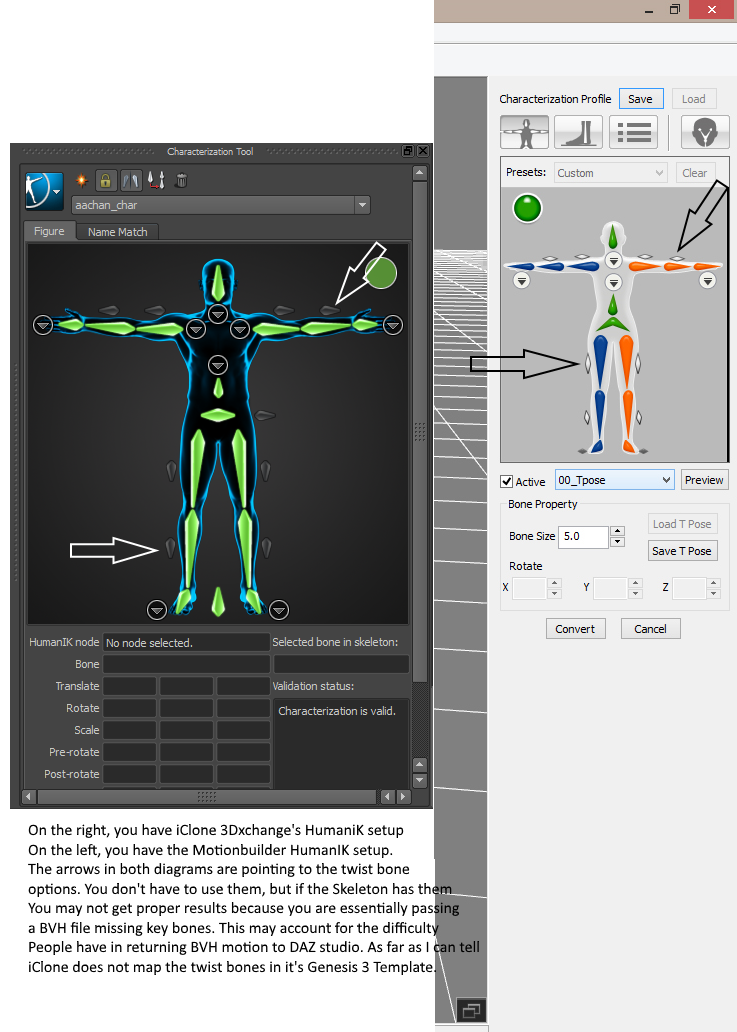
I haven't tested this, but I have a feeling if they were to be included in the characterization, you might be able to export motions from iClone to DAZ directly without unexpected results. It would more than likely require that you forgo the automatic character setup and map the bones manually, saving your own template if it works OR you might let the characterization go through and simply connect them once it's done and then save it --but I'm not sure that will work. With a little experimenting, this might be a workable solution. I simply do my work in Motionbuilder because I have it, and it gives me a LOT more control to do it that way, and I'm not really keen on DAZ studio's lack of growth when it comes to anything besides figure geometry. There isn't a foolproof 100% way to do it error free, but you can get it if you apply a little problem solving. Once the motion's there in DAZ studio, you can export MDD or Alembic, capturing all the detail and the Joint Control Morphs like you were talking about.
|
|
By wendyluvscatz - 9 Years Ago
|
I have the twist bones added in my own bone based profile I often use to go to Carrara and no still does not work in DAZ as BVH.
(I export FBX to Carrara with facial animation using my selfmade facial bone based version)
|
|
By dr.zap - 9 Years Ago
|
|
wendyluvscatz (7/1/2017)
sorry to disappoint but getting them back into DAZ studio is not possible, DAZ's FBX import is abysmal they will be a scrunchy pulled apart mess.
You can do BVH export but not for Genesis 3 or 8, they will not load it except for a couple weird bone movements.
I don't want to hijack your thread, but I have just another question. Have you tried transferring the .bvh to a G2 figure in Daz and then using the transfer pose/anim to G3 plugin? I heard it was good at G2 to G3 transfers.
<edit> Ok, I just read Will2power71's comment. It seems he was suggesting the same thing. It might work.
|
|
By dr.zap - 9 Years Ago
|
Then there is this: http://www.3dtoall.com/products/daztomaya/
If this flies, I'm not sure why I need iClone. For previz, maybe?
|
|
By dr.zap - 9 Years Ago
|
will2power71 (7/1/2017)
Flipbook Market creates a lot of animations for DAZ studio and posted a tutorial on how to use Genesis 3 with Motionbuilder you can view Here It's a bit lengthy, but there's some good information on doing it. Webanimate offers some information on doing it as well, but to be honest I don't use Webanimate. I've heard a lot of good things about them.
I've done both of these. I am on day 6 of my webanimate trial. I used Genesis 2 with it and it had problems until I contacted support and sent them a Genesis 2 .fbx model. They modified it (detached the root bone?) and sent it back. It works fine now, except for animations with a different skeleton structure. Then it's kind of wonky. I did the same in Motionbuilder but it wasn't my computer so I couldn't finish the retargeting process. It is a lot more complicated, though. I would be happy to use webanimate as a retargeting app (its very simple) if I can get a source for compatible .bvh files. That's why I'm so excited about iKinema Orion. It seems elementary that they will make Orion easily connect to webanimate. I already contacted support and they said that their solver will output to iClone and Daz3d compatible skeletons.
|
|
By wendyluvscatz - 9 Years Ago
|
|
I use Draagonstoms script to convert G2F animation to 3 and it sort of works but I would just use Genesis 2 given the choice myself
|
|
By animagic - 9 Years Ago
|
If it works and you like (and can afford) Maya, that may be a solution for you. I believe you need the full version of Maya (not LE) to run plugins.
|
|
By Ardent Enterprise - 9 Years Ago
|
I can't thank you enough for this! I am fairly new to iClone and 3DXchange ... I just upgraded to 7 on both and purchased Victoria 8 for a special project. I've been days trying to fix the rig thinking could. I finally submitted a ticket to Support Desk, they sent me your solution here ... wish I had checked earlier last night, I might have gotten some sleep! It took all of five minutes and I finally have the "tiny dancer" I needed for my project! She is a beautiful, fluid model, and well worth the expense now.
With heartfelt appreciation!
Constance
|
|
By pruiz - 9 Years Ago
|
|
wendyluvscatz (6/15/2017)
yes she does if you apply the genesis 2 female duf pose from Reallusion
her expressions match
the bounce can be added to any unused bones by selecting the face icon in the retargetting room and adding to extend bone.
Then in main room go to spring open it, select those bones and click the button on far right.
I seem not to be able to get expressions - I load the G2 duf pose. Am I supposed to activate something in 3dxchange? The face bone?
Thanks for the tips and advice here.
|
|
By wendyluvscatz - 9 Years Ago
|
you need the G3F not G2F duf preset
I must have mistyped that will go back and correct it
|
|
By pruiz - 9 Years Ago
|
|
wendyluvscatz (7/15/2017)
you need the G3F not G2F duf preset
I must have mistyped that will go back and correct it
Thanks. I re-read the whole thread and noticed that someone later corrected that. Yes the G3F works well - there is this left eye twitch that occurs intermittently.
|
|
By cynsegura - 6 Years Ago
|
Hi guys! Where Can I get the new t profile for genesis 8? Is there someone who can share with me?
Thanks
|