|
Author
|
Message
|
|
blackhawk
|
blackhawk
Posted 10 Years Ago
|
|
Group: Forum Members
Last Active: 2 Months Ago
Posts: 48,
Visits: 554
|
Has anyone figured out a workflow with zBrush and Blender to do this?
|
|
|
|
|
Skuzzlebutt
|
Skuzzlebutt
Posted 10 Years Ago
|
|
Group: Forum Members
Last Active: 3 Years Ago
Posts: 582,
Visits: 8.6K
|
Snarp Farkle (7/27/2016)
[quote] budbundy (7/26/2016)
The cloak was a DAZ figure item not an obj accessory using a figure wont work,export it as obj.
.
|
|
|
|
|
Skuzzlebutt
|
Skuzzlebutt
Posted 10 Years Ago
|
|
Group: Forum Members
Last Active: 3 Years Ago
Posts: 582,
Visits: 8.6K
|
Snarp Farkle (7/27/2016)
[quote] budbundy (7/26/2016)
The cloak was a DAZ figure item not an obj accessory using a figure wont work,export it as obj.
.
|
|
|
|
|
TopOneTone
|
TopOneTone
Posted 10 Years Ago
|
|
Group: Forum Members
Last Active: 3 Years Ago
Posts: 329,
Visits: 3.2K
|
I imported the RL base, did nothing to it, then exported, brought into CC and it crashed.
|
|
|
|
|
Rampa
|
Rampa
Posted 10 Years Ago
|
|
Group: Forum Members
Last Active: Last Month
Posts: 8.2K,
Visits: 62.6K
|
TopOneTone (7/27/2016)
Are you making the armature visible again to see those bones?
When I do that I have the same number of bones as you, but it still crashes.
The add leaf bones box is definitely unchecked.
You say start again with one of the RL templates, am I not already using an RL template?
I just wanted to make sure you were not re-using the FBX you sent me. But yeah, you did start with a RL base. I made the skeleton visible again to show what was causing the problem. So...... What do the hand bones look like when you import an RL base? Try importing a base FBX into Blender, and exporting it without making any clothing. That's a quick way to test that your work-flow works, before taking the time to make the clothing.
|
|
|
|
|
TopOneTone
|
TopOneTone
Posted 10 Years Ago
|
|
Group: Forum Members
Last Active: 3 Years Ago
Posts: 329,
Visits: 3.2K
|
Are you making the armature visible again to see those bones?
When I do that I have the same number of bones as you, but it still crashes.
The add leaf bones box is definitely unchecked.
You say start again with one of the RL templates, am I not already using an RL template?
|
|
|
|
|
Rampa
|
Rampa
Posted 10 Years Ago
|
|
Group: Forum Members
Last Active: Last Month
Posts: 8.2K,
Visits: 62.6K
|
TopOneTone (7/27/2016)
Hi Rampa,
Your fbx worked fine in my CC, but when I loaded your file into Blender, exported it and then brought it into CC it crashed again. So I uninstalled Blender and deleted the app file, then reinstalled and tried again. Once again it crashed. I have attached my fbx file, maybe you could try to use it and see if it crashed for you. Thanks for the help. I had a look, and the leaf bones did sneak in! Notice how many more bones are in your hand vs my hand. You need to start again, as your skeleton has lots of extra bones at this point. Start again with one of the RL templates. Your almost there! :) Yours: 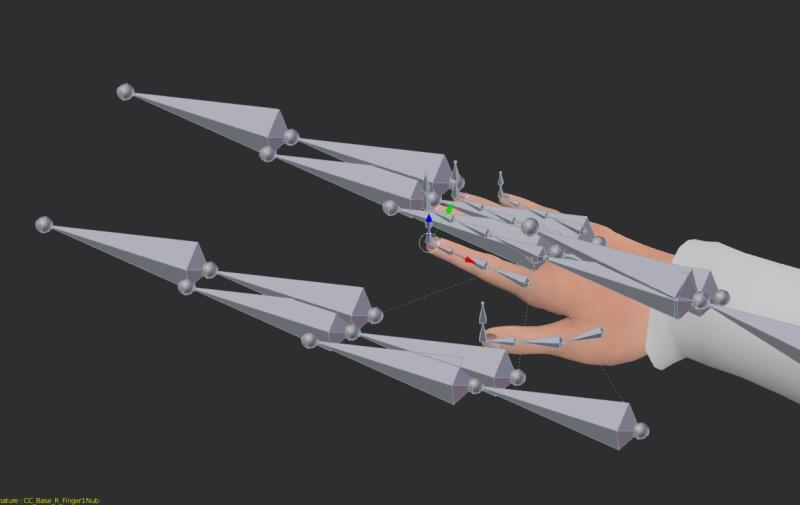 Mine: 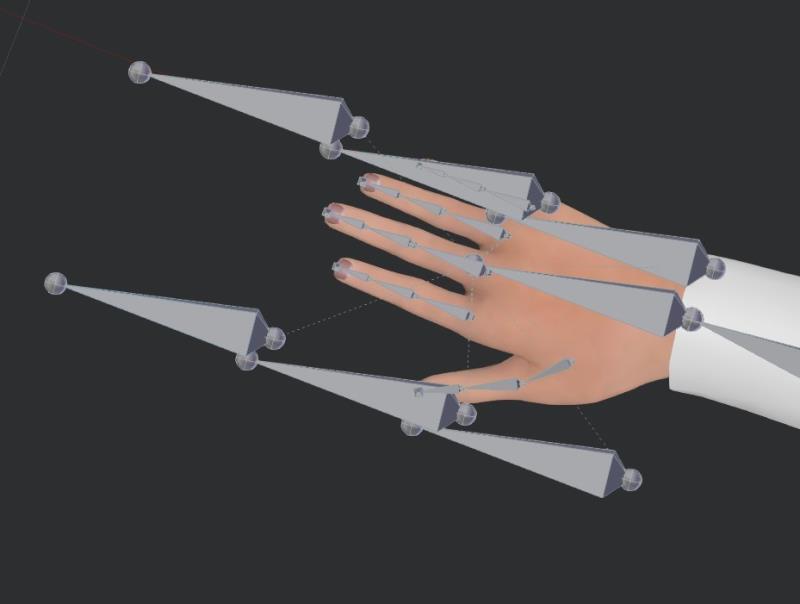
|
|
|
|
|
TopOneTone
|
TopOneTone
Posted 10 Years Ago
|
|
Group: Forum Members
Last Active: 3 Years Ago
Posts: 329,
Visits: 3.2K
|
Hi Rampa,
Your fbx worked fine in my CC, but when I loaded your file into Blender, exported it and then brought it into CC it crashed again. So I uninstalled Blender and deleted the app file, then reinstalled and tried again. Once again it crashed. I have attached my fbx file, maybe you could try to use it and see if it crashed for you. Thanks for the help.
|
|
|
|
|
Snarp Farkle
|
Snarp Farkle
Posted 10 Years Ago
|
|
Group: Forum Members
Last Active: 2 Years Ago
Posts: 770,
Visits: 3.6K
|
budbundy (7/26/2016)
@snarp, do not scale the avatar.....
in the daz advanced export options
set the scale to 40% and see how that looks
you may have to do it a few times until you find the magic number.Yeah rampa says the same, the reason I tried this was because no matter how small I scaled the cloak in DAZ export when imported into blender it would still be giant clothing. The cloak was a DAZ figure item not an obj accessory which might be part of that problem I don't know, there were other things I had to do to the cloak just to get to where I was, in the example above. Trial and error is a wonderful teacher sometimes! :)Regardless, Rampa pointed me in the right direction for scaling it down in Blender (Thanks rampa), and once I complete the whole process a couple more times I'll share my CC/Blender journey if it will help someone else who's been Blender Shy too. :crazy:
Dell XPS 8900, Intel(R) Core(TM) i7-6700 CPU @ 3.40GHz, 3408 Mhz, 4 Core(s), 8 Logical Processor(s), 16 GB RAM, - 4 GB GeForce GTX 745, NVIDIA compatible.
Acer Aspire V Nitro Laptop, 2.5GHz Intel Core i5-7300HQ processor with 6MB cache, 256GB solid state drive, 16GB Ram, 4 GB NVIDIA GeForce GTX 1050 Ti graphics.
|
|
|
|
|
Skuzzlebutt
|
Skuzzlebutt
Posted 10 Years Ago
|
|
Group: Forum Members
Last Active: 3 Years Ago
Posts: 582,
Visits: 8.6K
|
@snarp, do not scale the avatar.....
in the daz advanced export options
set the scale to 40% and see how that looks
you may have to do it a few times until you find the magic number.
.
|
|
|
|