|
By Rampa - 10 Years Ago
|
|
|
|
By animagic - 10 Years Ago
|
|
Thanks, Rampa! Vey easy to follow and instructive.
|
|
By Rampa - 10 Years Ago
|
Here's some basic settings I always set in Blender that make it much easier to use.
|
|
By majorlance - 10 Years Ago
|
|
Excellent stuff. Thanks a lot!
|
|
By sjonesdc - 10 Years Ago
|
Thanks, rampa. Just what I need...straight to the point and "easy" to follow.
|
|
By sjonesdc - 10 Years Ago
|
|
rampa (7/22/2016)
Another video that gets to the point!!!!! Thank you again:D:D:D
|
|
By sumthinwong - 10 Years Ago
|
Direct and to the point, as others have stated. Love this format.
|
|
By Postfrosch - 10 Years Ago
|
alle Rampa,
thjankls für this TUT,
and this is my result
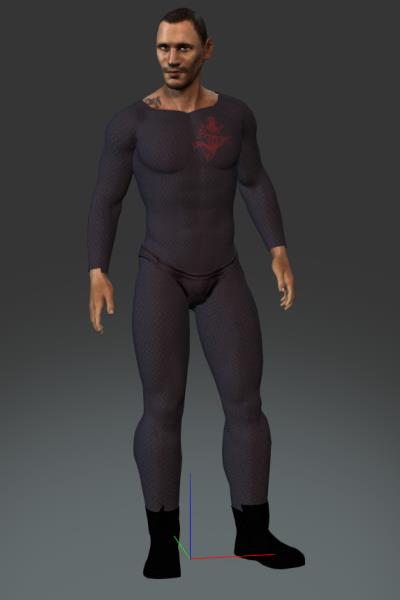
Greets from Germany
Ppstfrosch
|
|
By Emerald Animation (formerly reelcheapfilms) - 10 Years Ago
|
You beat me to it.
You magnificent b******.
|
|
By animagic - 10 Years Ago
|
|
We can expect movies with very tight clothing...:blush:
|
|
By Pollux - 10 Years Ago
|
|
rampa (7/22/2016)
Thanks Rampa, this is a very easy, clean tutorial.
|
|
By Matt GH - 10 Years Ago
|
|
Great job! :)
|
|
By Rampa - 10 Years Ago
|
If anyone needs the free templates and keys, they are available from this linked page.
http://www.reallusion.com/iclone/character-creator/custom-outfit.html
|
|
By Peter (RL) - 10 Years Ago
|
|
Thanks Rampa for sharing the tutorial. This should really help a lot of Blender users. :)
|
|
By Snarp Farkle - 10 Years Ago
|
Looks easy enough to learn but I haven't it tried yet, to be honest I'd rather learn to utilize my plethora of DAZ clothing if it's possible. Before the 1.5 update I had made some attempts using exported obj's of a CC avatar, DAZ won't import iClone fbx files properly, but I had trouble transferring the Genesis bone mapping to the obj which would make it so much easier to fit clothing.
So my question is, is it possible to, or has anyone tried yet to import DAZ .obj clothing items into CC1.5 via 3DX?
|
|
By Rampa - 10 Years Ago
|
Snarp Farkle (7/25/2016)
Looks easy enough to learn but I haven't it tried yet, to be honest I'd rather learn to utilize my plethora of DAZ clothing if it's possible. Before the 1.5 update I had made some attempts using exported obj's of a CC avatar, DAZ won't import iClone fbx files properly, but I had trouble transferring the Genesis bone mapping to the obj which would make it so much easier to fit clothing. So my question is, is it possible to, or has anyone tried yet to import DAZ .obj clothing items into CC1.5 via 3DX?
Bud did one for DAZ clothing. https://forum.reallusion.com/292273/DAZ-clothes-to-CC-15-easy-tut
|
|
By Snarp Farkle - 10 Years Ago
|
Thanks rampa,
I see now that it can be done but 3dmax tuts don't help me much at all, I don't own it or likely will ever own it. If I can use Blender or Daz in some way to do the same thing then all will be good. :)
|
|
By Rampa - 10 Years Ago
|
Snarp Farkle (7/25/2016)
Thanks rampa, I see now that it can be done but 3dmax tuts don't help me much at all, I don't own it or likely will ever own it. If I can use Blender or Daz in some way to do the same thing then all will be good. :)
Like Bud said. Use the DAZ presets he supplied, and do it in Blender instead. Google rigging Blender clothing. :)
|
|
By Walt_R - 10 Years Ago
|
|
Brilliant tutorial, Rampa. Liked the easy to follow steps. Thanks for making it.
|
|
By Rampa - 10 Years Ago
|
Here is a tutorial for quickly finishing the cuffs of the bodysuit. I am using a few keyboard commands in this one. They make a couple processes much easier. There is still no rigging/weighting needed. Future tutorials will be using rigging/weighting, as it just starts to be the easier way to go with more sophisticated designs.
|
|
By Snarp Farkle - 10 Years Ago
|
rampa (7/25/2016) Like Bud said. Use the DAZ presets he supplied, and do it in Blender instead. Google rigging Blender clothing. :)
I've tried for 7 hours to wrap my brain around this seemingly simple task, what I end up with is this, lol :blink:
|
|
By Rampa - 10 Years Ago
|
I've tried for 7 hours to wrap my brain around this seemingly simple task, what I end up with is this, lol :blink:
That looks like a bummer! :(
It's chopping the mesh up by the vertex groups from the DAZ assignments. It can be fixed though. Have a look at the OBJ import dialogue settings.
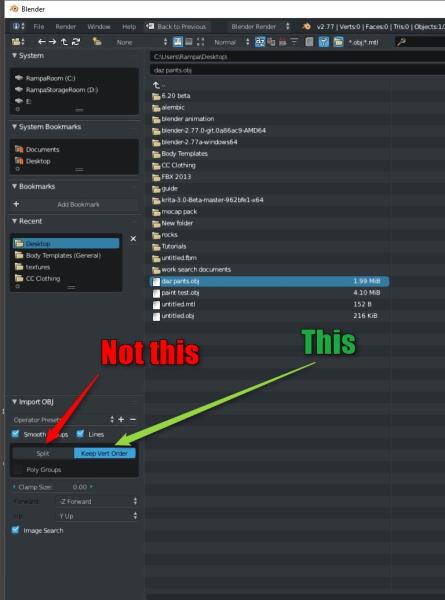
The scale looks maybe 100 times to large. Select the mesh (the new, single one you just imported), type "s", then ".1". Then hit "Enter" to set it. That's the quickest way.
|
|
By wires - 10 Years Ago
|
@Snarp Farkle & Rampa,
Exactly the same size thing happens to G3-G5 Clone Cloth bases exported as obj files with 3DXchange and then imported into Blender for fitting on one of the fbx bases. They come in about 100 times too large.
|
|
By TopOneTone - 10 Years Ago
|
Hi Rampa,
The tutorial is great, but I can't get past the Create Assets stage. I input both fbx files hit ok, it starts to load and then crashes. I've followed the video and recreated the whole thing multiple times, but CC has crashed every time at this point. I have not previously had a problem with CC crashing. Any thoughts as to what I should try?
|
|
By Rampa - 10 Years Ago
|
|
TopOneTone (7/26/2016)
Hi Rampa,
The tutorial is great, but I can't get past the Create Assets stage. I input both fbx files hit ok, it starts to load and then crashes. I've followed the video and recreated the whole thing multiple times, but CC has crashed every time at this point. I have not previously had a problem with CC crashing. Any thoughts as to what I should try?
Double check in Blender's FBX export that you have the "add leaf bones" box un-checked.
|
|
By TopOneTone - 10 Years Ago
|
|
Yes I did that step each time. Could it be to do with preferences in CC,? haven't checked these since the update.
|
|
By Skuzzlebutt - 10 Years Ago
|
@snarp and rampa
i import this at 0.40 scale in max, isn't there some scale option on import in blender?
|
|
By wires - 10 Years Ago
|
|
budbundy (7/26/2016)
@snarp and rampa
i import this at 0.40 scale in max, isn't there some scale option on import in blender?
There is one in the fbx import options, but there doesn't seem to be one when importing obj files.
|
|
By Skuzzlebutt - 10 Years Ago
|
wires (7/26/2016)
budbundy (7/26/2016)
@snarp and rampa
i import this at 0.40 scale in max, isn't there some scale option on import in blender?
There is one in the fbx import options, but there doesn't seem to be one when importing obj files.
that's a bummer,
but there is a option in daz for obj export (snarp) try around 40% and experiment until its close
|
|
By Rampa - 10 Years Ago
|
|
TopOneTone (7/26/2016)
Yes I did that step each time. Could it be to do with preferences in CC,? haven't checked these since the update.
Also make sure that you have a material on the suit.
What version of Blender are you running? It should be 2.77a. That is the current release. Earlier versions had less refined FBX capabilities.
If your Blender is already up-to-date, it could be that something corrupted your Blender. Try re-installing. But before you do, delete the "Blender Foundation" folder that has been created in your Appdata folder. You may have to google how to make Appdata visible in your version of Windows.
Was Blender working with CC for you before this particular tutorial?
Here is the FBX that I generated during the tutorial. You can see if it will import into CC for you.
https://drive.google.com/open?id=0B3nsNVGroEz6RVl1VTJBYUptdkk
|
|
By Snarp Farkle - 10 Years Ago
|
wires (7/26/2016)
budbundy (7/26/2016)
@snarp and rampa
i import this at 0.40 scale in max, isn't there some scale option on import in blender?
There is one in the fbx import options, but there doesn't seem to be one when importing obj files.
Ok, since there is a way to scale fbx imports I imported the Base.fbx at 40.0 scale, this allowed me to fit the obj item to the Base.fbx. How will this effect the export?
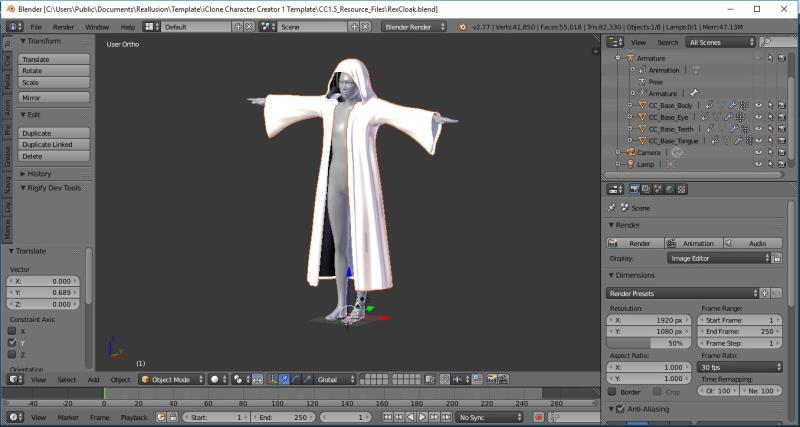
I have to go back to the videos to see how to export correctly anyways but wanted to know if the scaled up avatar is going to give me problems after exporting, will it import into CC too big? :ermm:
|
|
By Rampa - 10 Years Ago
|
You really should not scale the avatar. Unless, of course, you want a giant set of clothes. ;)
Leave the avatar alone, and scale the suit. It is probably 100 times to big, so scaling to ".01" should do it. Assuming you want to scale in Blender, try this video.
|
|
By Skuzzlebutt - 10 Years Ago
|
@snarp, do not scale the avatar.....
in the daz advanced export options
set the scale to 40% and see how that looks
you may have to do it a few times until you find the magic number.
|
|
By Snarp Farkle - 10 Years Ago
|
|
budbundy (7/26/2016)
@snarp, do not scale the avatar.....
in the daz advanced export options
set the scale to 40% and see how that looks
you may have to do it a few times until you find the magic number.
Yeah rampa says the same, the reason I tried this was because no matter how small I scaled the cloak in DAZ export when imported into blender it would still be giant clothing. The cloak was a DAZ figure item not an obj accessory which might be part of that problem I don't know, there were other things I had to do to the cloak just to get to where I was, in the example above. Trial and error is a wonderful teacher sometimes! :)
Regardless, Rampa pointed me in the right direction for scaling it down in Blender (Thanks rampa), and once I complete the whole process a couple more times I'll share my CC/Blender journey if it will help someone else who's been Blender Shy too. :crazy:
|
|
By TopOneTone - 10 Years Ago
|
|
Hi Rampa,
Your fbx worked fine in my CC, but when I loaded your file into Blender, exported it and then brought it into CC it crashed again. So I uninstalled Blender and deleted the app file, then reinstalled and tried again. Once again it crashed. I have attached my fbx file, maybe you could try to use it and see if it crashed for you. Thanks for the help.
|
|
By Rampa - 10 Years Ago
|
TopOneTone (7/27/2016)
Hi Rampa,
Your fbx worked fine in my CC, but when I loaded your file into Blender, exported it and then brought it into CC it crashed again. So I uninstalled Blender and deleted the app file, then reinstalled and tried again. Once again it crashed. I have attached my fbx file, maybe you could try to use it and see if it crashed for you. Thanks for the help.
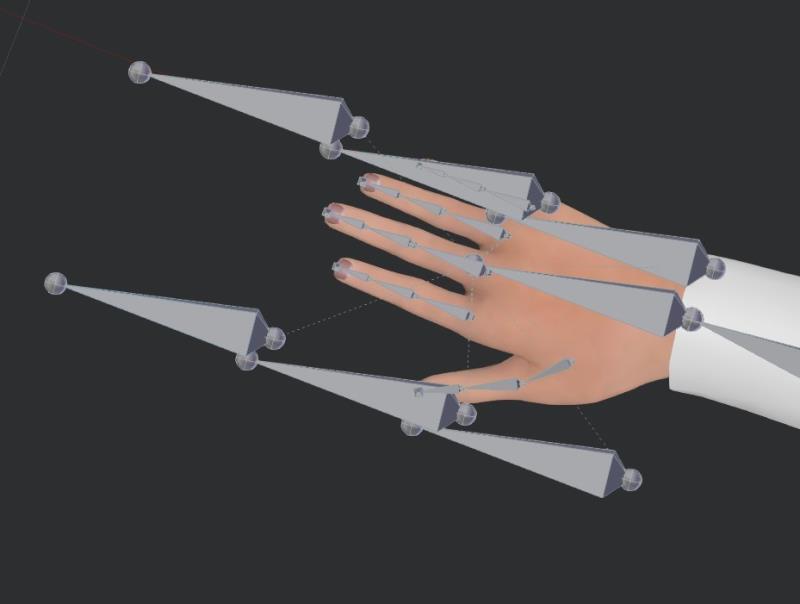
I had a look, and the leaf bones did sneak in! Notice how many more bones are in your hand vs my hand. You need to start again, as your skeleton has lots of extra bones at this point. Start again with one of the RL templates. Your almost there! :)
Yours:
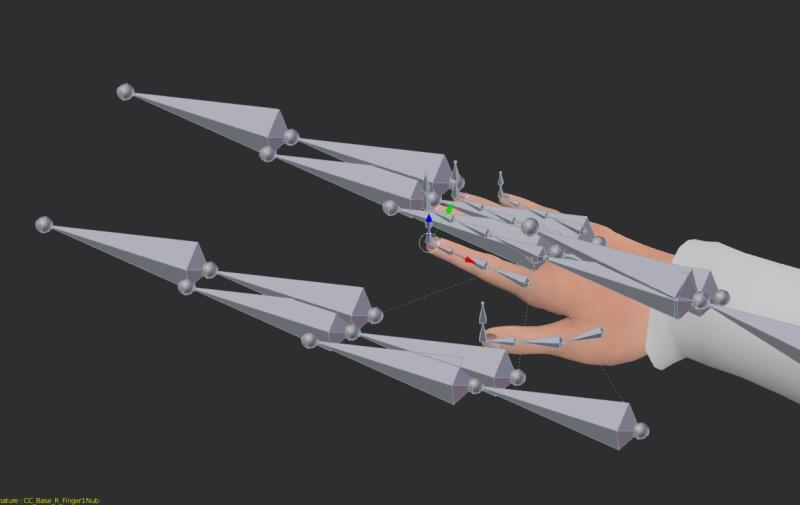
Mine:
|
|
By TopOneTone - 10 Years Ago
|
Are you making the armature visible again to see those bones?
When I do that I have the same number of bones as you, but it still crashes.
The add leaf bones box is definitely unchecked.
You say start again with one of the RL templates, am I not already using an RL template?
|
|
By Rampa - 10 Years Ago
|
|
TopOneTone (7/27/2016)
Are you making the armature visible again to see those bones?
When I do that I have the same number of bones as you, but it still crashes.
The add leaf bones box is definitely unchecked.
You say start again with one of the RL templates, am I not already using an RL template?
I just wanted to make sure you were not re-using the FBX you sent me. But yeah, you did start with a RL base. I made the skeleton visible again to show what was causing the problem.
So...... What do the hand bones look like when you import an RL base?
Try importing a base FBX into Blender, and exporting it without making any clothing. That's a quick way to test that your work-flow works, before taking the time to make the clothing.
|
|
By TopOneTone - 10 Years Ago
|
|
I imported the RL base, did nothing to it, then exported, brought into CC and it crashed.
|
|
By Skuzzlebutt - 10 Years Ago
|
Snarp Farkle (7/27/2016)
[quote] budbundy (7/26/2016)
The cloak was a DAZ figure item not an obj accessory
using a figure wont work,export it as obj.
|
|
By Skuzzlebutt - 10 Years Ago
|
Snarp Farkle (7/27/2016)
[quote] budbundy (7/26/2016)
The cloak was a DAZ figure item not an obj accessory
using a figure wont work,export it as obj.
|
|
By blackhawk - 10 Years Ago
|
|
Has anyone figured out a workflow with zBrush and Blender to do this?
|
|
By Rampa - 10 Years Ago
|
|
TopOneTone (7/27/2016)
I imported the RL base, did nothing to it, then exported, brought into CC and it crashed.
Alright. Try this, and see if it works.
Leaving Blender completely out of the equation for the moment. Are you able to load the non-modified RL base into CC? If yes, there is a Blender issue. If no, then re-download your bases.
|
|
By blackhawk - 10 Years Ago
|
|
@rampa: What version of Blender are you using? I'm using 2.77a
|
|
By Rampa - 10 Years Ago
|
|
blackhawk (7/27/2016)
@rampa: What version of Blender are you using? I'm using 2.77a
That's the one you want! Previous versions did not have as good FBX support.
|
|
By TopOneTone - 10 Years Ago
|
|
Sorry to be a nuisance with this, but it looks like the problem is with Blender. I can load both your file and the RL base directly into CC, but if I put either of them through Blender it crashes when I reload it into CC. I have checked each of the Blender Export pages with your video and they are the same. I also had a look through the Blender Preferences menu, but couldn't see anything obvious there. Given I have uninstalled the latest version of Blender and then re-installed without any success I don't know what else to try.
|
|
By Rampa - 10 Years Ago
|
|
TopOneTone (7/28/2016)
Sorry to be a nuisance with this, but it looks like the problem is with Blender. I can load both your file and the RL base directly into CC, but if I put either of them through Blender it crashes when I reload it into CC. I have checked each of the Blender Export pages with your video and they are the same. I also had a look through the Blender Preferences menu, but couldn't see anything obvious there. Given I have uninstalled the latest version of Blender and then re-installed without any success I don't know what else to try.
The question is, why is Blender not giving you the same result?
Did you also throw away the "Blender Foundation" folder in Appdata? It contains preferences and the startup file. Perhaps they got corrupted? If you have any addons installed, delete them as well. I suppose something could be interfering with the FBX export. That seems to be the issue.
I had a look at file sizes. The FBX base is a touch over 3MB, when exported from Blender it jumps to closer to 6MB. With a bodysuit, It is around 10MB. Those extra skeleton bones would increase file size even more, as well as borking the whole thing.
Can you save your body and suit as a Blend file, rather than exporting as FBX, and send it to me?
|
|
By TopOneTone - 10 Years Ago
|
|
I tried to send you a 3mb zip file but in Add File it says I have already used 3/5 mb so rejects it. Don't know how to rectify this.
I deleted the Blender App in the App folder before I reinstalled Blender and I have no Add-On's in Blender.
I did notice that in the Blender Workflow discussion Mythcons appears to be having exactly the same problem. Maybe this is a bug in the CC Update?
|
|
By Rampa - 10 Years Ago
|
TopOneTone (7/29/2016)
I tried to send you a 3mb zip file but in Add File it says I have already used 3/5 mb so rejects it. Don't know how to rectify this.
I deleted the Blender App in the App folder before I reinstalled Blender and I have no Add-On's in Blender.
I did notice that in the Blender Workflow discussion Mythcons appears to be having exactly the same problem. Maybe this is a bug in the CC Update?
It's a Blender issue your having for sure. Those extra bones are the problem. Strangely, those are leaf bones that are being added. Leaf bones are added at the end of bone chains, and appended with "end" on the end of their name. I'll PM you my email if you haven't found it already.
|
|
By TopOneTone - 10 Years Ago
|
Thanks Rampa for all your help in getting me past this problem. Your tutorial finally got me to make something in Blender and I'm pretty pleased with the way my first attempt ended up in CC.
|
|
By blackhawk - 10 Years Ago
|
Well I have managed to finally get this workflow to work on my Windows 10 desktop which has an i7 processor vs. my laptop running Windows 7 with an i3 processor. Since I'm an airline pilot and travel a lot I'm limited to my laptop on the road. I guess I need to upgrade. I've also discovered that instead of transferring weights you have to use the data transfer modifier in Blender 2.77a to transfer weights to the body suit from the CC Body. Furthermore, I have managed to create a body suit in zBrush and use Blender to accomplish the transfer process.
I would like to create a tutorial once I fine tune the process using CC1.5, Blender and zBrush, but I have never done a tutorial. Any advice?
|
|
By markdsab - 10 Years Ago
|
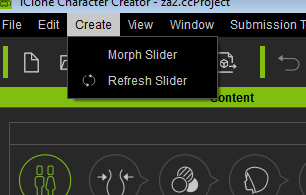
need help the cloth, hair, acc menu is missing for me, how do you fix this?
|
|
By wires - 10 Years Ago
|
markdsab (8/4/2016)
need help the cloth, hair, acc menu is missing for me, how do you fix this?
Are you sure that you are running the latest version of Character Creator? Click on Help>About Character Creator, it should show version 1.5.1913.1.

|
|
By markdsab - 10 Years Ago
|
|
Yes, I forgot to update...Thanks!
|
|
By markdsab - 10 Years Ago
|
Every time I export to .fbx Blender crashes and the toggle system console says "FBX export prepare: Wrapping Animations... False 1.0"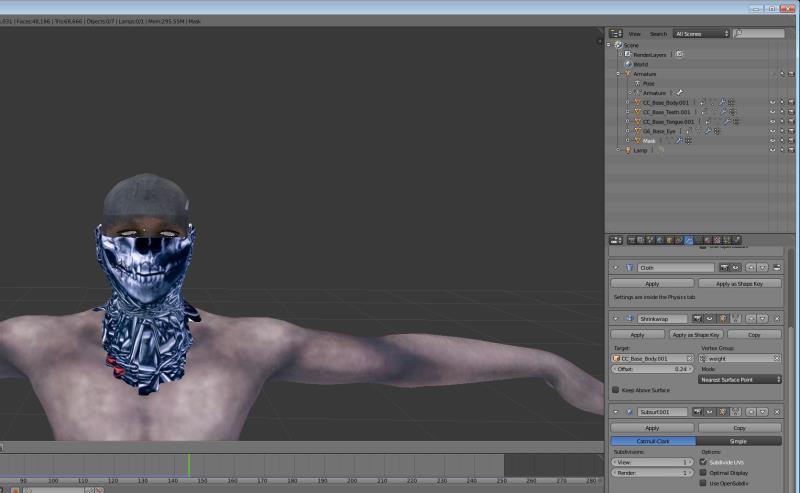
|
|
By sjonesdc - 10 Years Ago
|
Finally had time to work through the tutorial, did a little modification and ended up with this:
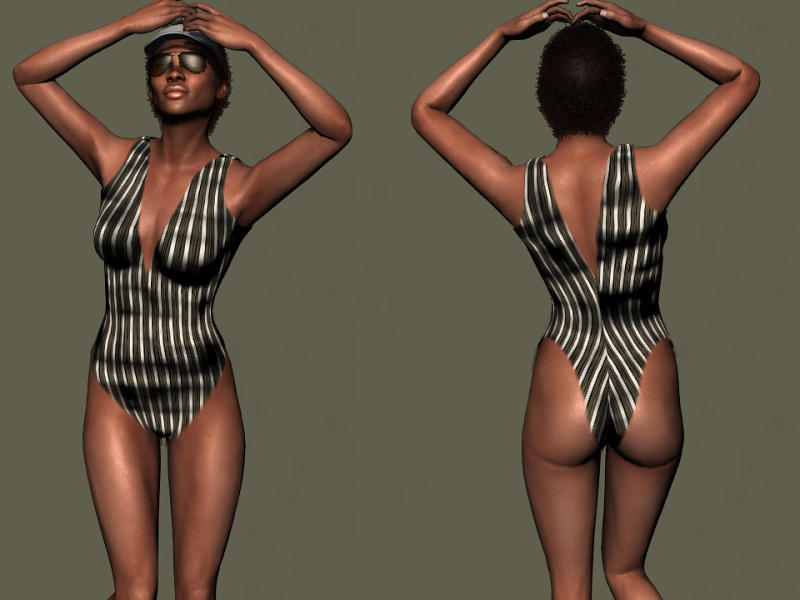
I'm still trying to wrap my head around Blender and v6
|
|
By toppro77 - 10 Years Ago
|
It does not work for me. I have followed these instructions a dozen times and everything looks fine in Blender but when imported into CC the mesh of the base characters hands are pulled and stretched way down almost to the floor. The body suit looks fine but when saved to the content folder the arms are stretched way out of whack. When applied to a new character the suit is blown up to many times it's size like someone stuck an air pump in the characters shorts. What could be the problem?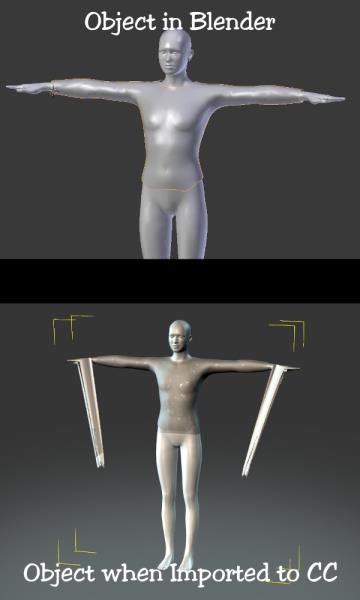
|
|
By toppro77 - 10 Years Ago
|
|
rampa (7/22/2016)
It does not work for me. I have followed these instructions a dozen times and everything looks fine in Blender but when imported into CC the mesh of the base characters hands are pulled and stretched way down almost to the floor. The body suit looks fine but when saved to the content folder the arms are stretched way out of whack. When applied to a new character the suit is blown up to many times it's size like someone stuck an air pump in the characters shorts. What could be the problem? 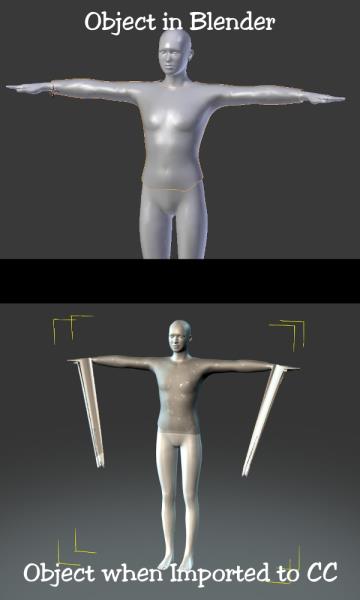
|
|
By toppro77 - 10 Years Ago
|
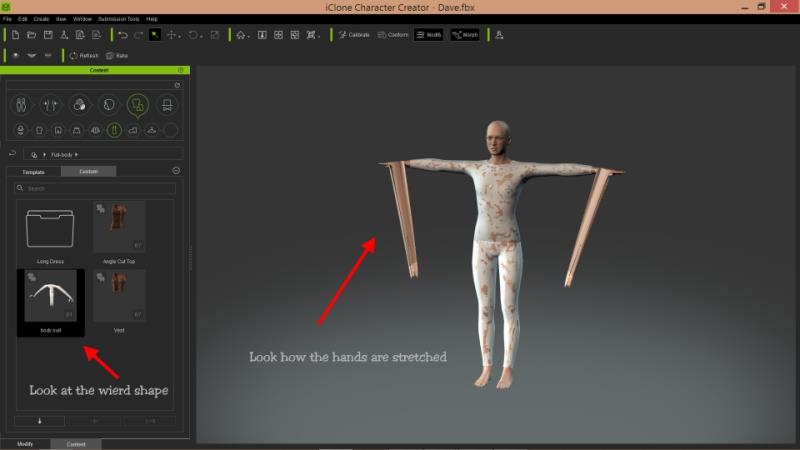 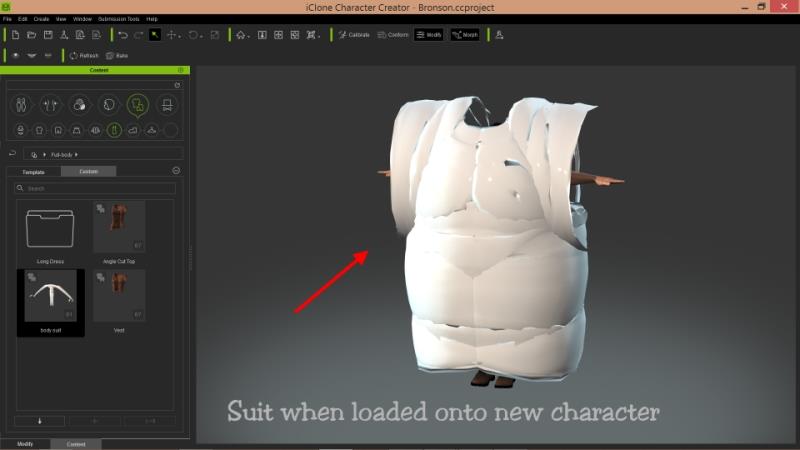 toppro77 (8/7/2016)
rampa (7/22/2016)
It does not work for me. I have followed these instructions a dozen times and everything looks fine in Blender but when imported into CC the mesh of the base characters hands are pulled and stretched way down almost to the floor. The body suit looks fine but when saved to the content folder the arms are stretched way out of whack. When applied to a new character the suit is blown up to many times it's size like someone stuck an air pump in the characters shorts. What could be the problem?
|
|
By Skuzzlebutt - 10 Years Ago
|
toppro77 (8/7/2016)
toppro77 (8/7/2016)
[quote][b]rampa (7/22/2016). What could be the problem?
when using 3ds max and getting this type of a error, it is because a simple units mismatch
(inches and cm)
i dont know if that will help with blender, but worth a try.
|
|
By Cary B - 10 Years Ago
|
|
I have also had issues with CC crashing when I try to bring in the fbx file from Blender. One weird thing I noticed is that the fbx templates from RL do not show the armature or the skeleton in Blender. It is there there in your tutorial, but not when I open them in Blender. The scene tree shows it, but clicking the little eyeball does nothing to turn it on or off.
|
|
By Cary B - 10 Years Ago
|
|
Just checked and updated my Blender version. The new version does show the bones.
|
|
By Cary B - 10 Years Ago
|
|
The new version version of Blender seems to have solved my crashing problems as well. I just want to say thanks, Rampa, for this tutorial and all your other great help to inexperienced users like myself.
|
|
By Rampa - 10 Years Ago
|
|
Shadoesword (8/25/2016)
I have also had issues with CC crashing when I try to bring in the fbx file from Blender. One weird thing I noticed is that the fbx templates from RL do not show the armature or the skeleton in Blender. It is there there in your tutorial, but not when I open them in Blender. The scene tree shows it, but clicking the little eyeball does nothing to turn it on or off.
Just in case those pesky bones go hiding again, there is an option to set them to X-ray. That is what makes them show through the body and clothing.
Oh, and glad the tutorial is helpful! :)
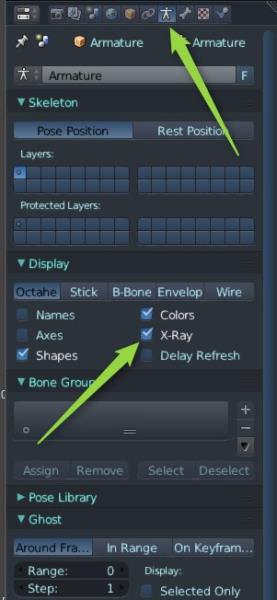
|
|
By Cary B - 10 Years Ago
|
Thanks Rampa. I now have another question about Character Creator, probably something simple I am overlooking.
I watched a tutorial for the mesh editing in CC, using the calibration poses. It worked fine in the tutorial. But when I try to edit a mesh in a calibration pose, it reverts automatically to the T-pose. What am I doing wrong?
|
|
By Lord Ashes - 10 Years Ago
|
I have followed the Bodysuit tutorial and was able to reproduce the results with no issue. Excellent tutorial.
However, the one key point which that tutorial dodges, which is eluding me, is that the mesh does not need to be added to the armature because copying the mesh from the original character mesh (which was already attached to the armature) causes the new mesh to also be attached to the armature. This is great if you want to make body tight clothing like the bodysuit but in most cases you want to use a custom mesh which you would attach to the CC character armature.
I am a Blender newbie but I searched the internet for the steps on how to do this using Blander's auto weight function.
As such, I did:
1. Imported CC template FXB file into Blender
2. Imported my custom mesh as an OBJ into Blender
3. Selected the custom mesh and shift selected the armature
4. Used CTRL+P and selected Armature with Auto Weights
This produced an armature with the custom mesh attached to it. Using the wrench icon, I verified that the custom mesh now had a armature modifier (same as the tutorial for the bodysuit).
The problem that I have run into is that when I exported the results using the same settings as the bodysuit tutorial, the resulting FXB will not import into CC. It keeps giving me a "Failed To Load The File" error. From the fact that the bodysuit tutorial worked for me, it seems that there is some issue with the mapping of the mesh to the armature using the automatic weights function. Of course, being a Blender newbie it could be an issue with my process as opposed to an actual problem with Blender.
Has anyone been able to do this in blender? If so, is there something in my steps that I am doing incorrectly?
Any assistance in resolving this issue would be greatly appreciated.
|
|
By Rampa - 10 Years Ago
|
You need to parent with empty groups instead, and then transfer the weights from the body mesh.
|
|
By Lord Ashes - 10 Years Ago
|
|
Thanks for the quick reply. I will review the provided tutorial and hopefully that will resolve my issue. Thanks.
|
|
By Lord Ashes - 10 Years Ago
|
I have followed the tutorial but when I get to the Transfer Weights my Blender (v 2.77) has somewhat different options. It seems that the defaults are not the correct settings because after I Transfer Weights (from the CC Body to my Cloth) then when I pose the character (as per the tutorial) the Cloth does not move with the rig (bones).
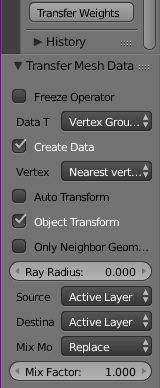
Any idea what the Blender 2.77 settings should be?
UPDATE: I got it working. I am not sure if my problem was that I was selecting multiple CC meshes for the Weight Transfer or that the setting needs to be changed to "Source: By Name, Dest: All Layers".
|
|
By Rampa - 10 Years Ago
|
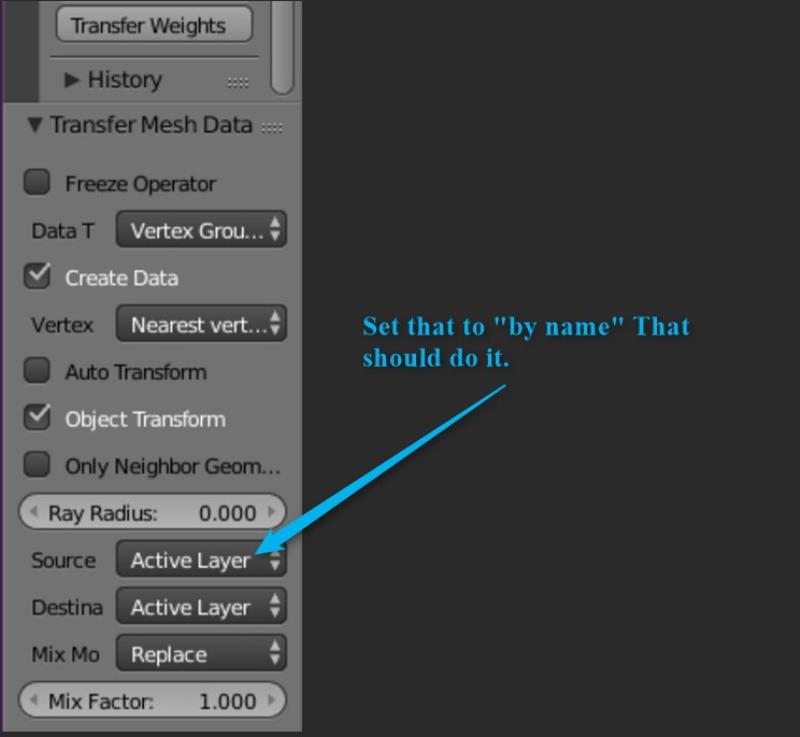
Your getting really close! :)
|
|
By ryanmm - 7 Years Ago
|
Hi,
Thanks for the great info. I have successfully created the body suit. I was wondering if you were able to offer guidance on how you created the top and pants that can be seen in your accessory tab in the video. Or better yet, supply the files for this?
|