|
Author
|
Message
|
|
pmaina
|
pmaina
Posted 9 Years Ago
|
|
Group: Forum Members
Last Active: 6 Years Ago
Posts: 503,
Visits: 2.2K
|
Thank you RL. Much appreciated.
|
|
|
|
|
RobertoColombo
|
RobertoColombo
Posted 9 Years Ago
|
|
Group: Forum Members
Last Active: 4 Years Ago
Posts: 1.6K,
Visits: 3.0K
|
alexbronk (3/24/2016)
I can not import PopVideo 3 in iclone 6 :( already updated the Iclone6 to 4.42 I am using win10 In my case works ok. Just drag&drop into IC keeping CTRL key pressed: it should create a plane with popVideo footage in there. If you do not keep CTRL pressed, the popVideo element will be placed as a background of your scene. Of course, many popVideo files starts with nothing and only when you press PLAY you will start to see the footage. Btw, consider this issue with popVideo files, reported here: https://forum.reallusion.com/276316/OFFICIAL-iClone-642-Issues-Thread?Update=1#bm276362Regards Roberto
My PC:
OS: Windows 10 Pro English 64-bit / CPU: Intel i7-9700 3.6GHz / MB: ASUS ROG Strix Z390 RAM: 32GB DDR4 2.6GHz / HD: 2TB+3TB / SSD: 2x512GB Samsung 860 EVO + 1x2TB Samsung
VB: Palit GTX2080 TI GamingPro 11GB / AB: embedded in the MB and VB (audio from the MOTU M4 I/F) / DirectX: 12
|
|
|
|
|
wires
|
|
|
Group: Forum Members
Last Active: 4 Months Ago
Posts: 5.7K,
Visits: 26.5K
|
There is now a newer patch available - v6.42.2725, dated March 25th. At the moment there is no information available in any public area regarding fixes/additions etc. included in this release.
Gerry
System: Win 10 Pro (21H2), Asus X99-E WS, CPU i7-5930K -3,5 GHz, 32 GB DDR4 2666-16 RAM, NVidia GTX 1080 Ti GPU - 11 GB VRAM(Driver Studio-536.99), Samsung 850 Pro 512 GB SSD, 6 TB HD storage.
|
|
|
|
|
Peter (RL)
|
Peter (RL)
Posted 9 Years Ago
|
|
Group: Administrators
Last Active: Last Year
Posts: 23.1K,
Visits: 36.6K
|
wires (3/25/2016)
There is now a newer patch available - v6.42.2725, dated March 25th.
At the moment there is no information available in any public area regarding fixes/additions etc. included in this release.This updated build is to fix issues with popVideos in iClone 6. If anyone is having problems with their PC3 popVideos do ensure you have this build. :)
Peter
Forum Administrator www.reallusion.com
|
|
|
|
|
R.Man
|
|
|
Group: Forum Members
Last Active: 3 Years Ago
Posts: 53,
Visits: 456
|
The DOF is not working properly since ages, why no one seems to care about...no one is rendering something or ....The DOF is not the same on viewport and final render , worst now it doesn't render at all.
Thanks
https://www.ilema.artstation.com
Open for Professional collaboration as a lighting artist.
|
|
|
|
|
justaviking
|
justaviking
Posted 9 Years Ago
|
|
Group: Forum Members
Last Active: Last Year
Posts: 8.2K,
Visits: 26.5K
|
manran (3/27/2016)
The DOF is not working properly since ages, why no one seems to care about...no one is rendering something or ....The DOF is not the same on viewport and final render , worst now it doesn't render at all.ThanksI was noticing that in 6.41. I didn't use it much before that, so I can't say how long it was broken. Much, much less DOF in the final render than in the preview. I'll try it now it 6.42, and see if it works at all, and will provide side-by-side images in this post.
Done in iClone 6.42. Here are some pictures. I can provide full-res images if anyone wants. a) Editing window has functional DOF :) b) " Preview Render" has zero DOF :( c) " Final Render" has miniscule DOF :( 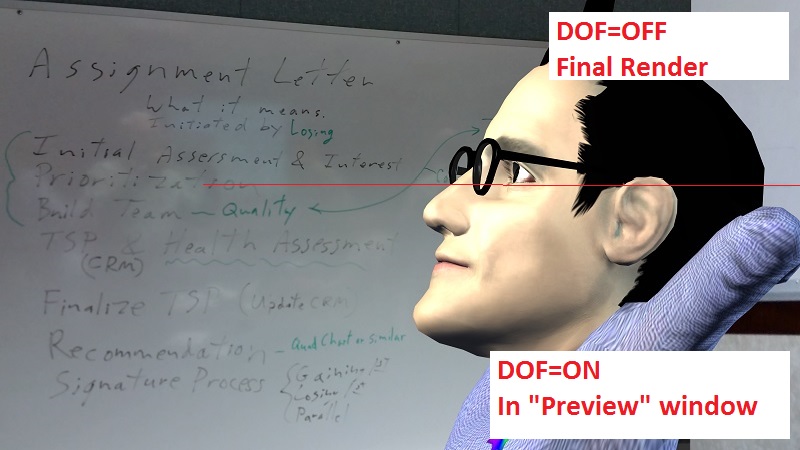 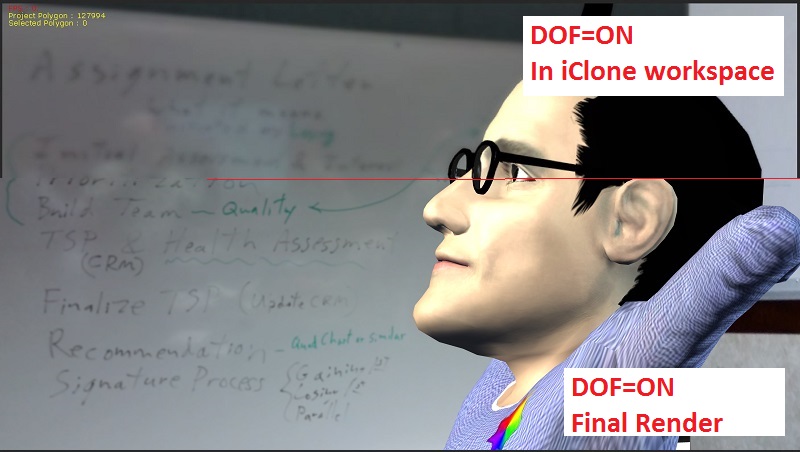 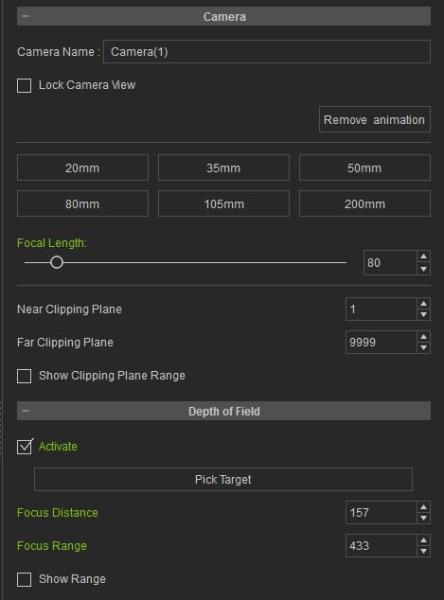
iClone 7... Character Creator... Substance Designer/Painter... Blender... Audacity...
Desktop (homebuilt) - Windows 10, Ryzen 9 3900x CPU, GTX 1080 GPU (8GB), 32GB RAM, Asus X570 Pro motherboard, 2TB SSD, terabytes of disk space, dual monitors.
Laptop - Windows 10, MSI GS63VR STEALTH-252, 16GB RAM, GTX 1060 (6GB), 256GB SSD and 1TB HDD
|
|
|
|
|
mtakerkart
|
mtakerkart
Posted 9 Years Ago
|
|
Group: Forum Members
Last Active: 3 Months Ago
Posts: 3.2K,
Visits: 29.2K
|
Yes the DOF is not the same between render and preview but it works on my version: 6.42.2725.
|
|
|
|
|
R.Man
|
|
|
Group: Forum Members
Last Active: 3 Years Ago
Posts: 53,
Visits: 456
|
Thanks for your explanation, i've noticed it since IC6 came out. Absolutely strange that they didn't fix it yet, one of the weakness of iclone is environment rendering, DOF can help to hide it a bit as the CC characters are pretty good in term of resolution. Obtaining 1% DOF on final render when you expect 40% is absolutely useless.
https://www.ilema.artstation.com
Open for Professional collaboration as a lighting artist.
|
|
|
|
|
Peter (RL)
|
Peter (RL)
Posted 9 Years Ago
|
|
Group: Administrators
Last Active: Last Year
Posts: 23.1K,
Visits: 36.6K
|
TheOldBuffer (3/24/2016)
I installed the update but ever since crash crash crash crash, Im going to try rolling back to previous version. Just what I need when I've got a project to finish GRRRRRSorry to hear of your problems with 6.42. Is the crashing issue occurring with all projects or just the one project you are working on?
Peter
Forum Administrator www.reallusion.com
|
|
|
|
|
Peter (RL)
|
Peter (RL)
Posted 9 Years Ago
|
|
Group: Administrators
Last Active: Last Year
Posts: 23.1K,
Visits: 36.6K
|
manran (3/27/2016)
The DOF is not working properly since ages, why no one seems to care about...no one is rendering something or ....The DOF is not the same on viewport and final render , worst now it doesn't render at all.
ThanksThank you for the notification. We will look into this issue. Apologies for any inconvenience this problem causes.
Peter
Forum Administrator www.reallusion.com
|
|
|
|