|
Author
|
Message
|
|
rgreenidge
|
rgreenidge
Posted 10 Years Ago
|
|
Group: Forum Members
Last Active: 2 Years Ago
Posts: 257,
Visits: 1.7K
|
Nvidia released a new video driver today 2/15/2016, see if it compatible with your GeForce cards. I haven't had any white screen crashes with iC 6.4 since I updated my video driver dated 2/3/2016 for my Radeon 9 (AMD) 290X card. Good luck.
Home built; ASRock X570 Pro 4, AMD Ryzen 9-5950X CPU, AMD RADEON RX6900XT, 16GB video card, 131GB of RAM.
|
|
|
|
|
Bible Story Graphics
|
Bible Story Graphics
Posted 10 Years Ago
|
|
Group: Forum Members
Last Active: 2 Years Ago
Posts: 39,
Visits: 535
|
Thank you for the update notification on NVIDIA. I just updated but sadly, crashes on multiple G5 character projects still occur. My ticket with Reallusion is still in the works and I know they are working furiously on the issues. This has been a great forum of shared info. Thanks everyone.
|
|
|
|
|
Snarp Farkle
|
Snarp Farkle
Posted 10 Years Ago
|
|
Group: Forum Members
Last Active: 2 Years Ago
Posts: 770,
Visits: 3.6K
|
:exclamation: SEE UPDATE EDIT below.
rgreenidge (2/15/2016)
Snarp, sorry I didn't post that I have a problem with a slower iC 6.4, I do. It happens when I save anything like a Avatar, prop or any item. It's takes so long I expected iClone to crash but it didn't since I upgraded the video driver. It's very noticeable, what use to take seconds to save is about a minute or 2. For those who updated your video driver. February 3rd was the latest driver for AMD, I went to the Nvidia site, and it looks like they have a new video driver today. Good luck with it ! Thanks rgreenidge, nice to know I'm not alone with the speed problem. I have a very reliable update program that usually keeps up with the updates quite well but since you posted a February update available I went to check for myself and there it was! It's a beta release is why my update program didn't grab it for me. I've just had other "white screen" crashes and the iClone disappearing act and was about to leave a support message about it, I'll do the update first now. I downloaded it and will give it a try and report back my experiences with it. :ermm:
:exclamation: UPDATE EDIT: :exclamation:
After installing the AMD Feb 2016 update, I don't see as many "white screen crashes" but the ones I had before the update had corrupted the "Restore Projects" that had been saved. They still give me the "white screen crashes" and finally had to delete them. I've only had one "white screen crash" since the update and that was while working on a project that had a lot of actors in it just to see how far I could push it, it held on longer than I expected! :D
The AMD Feb 2016 update is a beta release and is for the version of "AMD Radeon Settings" that you should already have installed on your system. If you have the older "AMD Catalyst Settings" installed you will first have to update that to the current version of "AMD Radeon Settings" and then use the Feb 2016 update to get the updated drivers, all the downloads will be listed after you identify your system. AMD's site is a little hard to follow but if you know your video cards version name code you'll find the drivers you're looking for. A tool I use to identify all my system settings and such is "HWiNFO64_2". This will show you not only the stupid name codes they've given you're video card but everything you could ever need to know about your graphics and other system settings right down to the BIOS drivers and such.
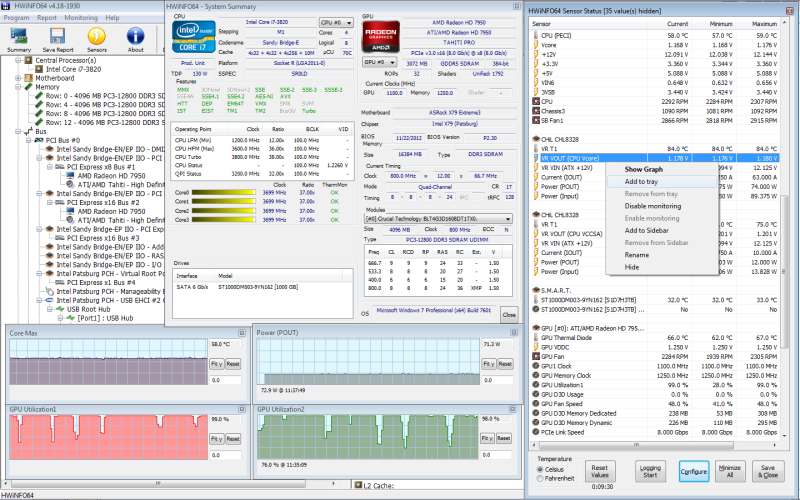
Just remember that this Feb 2016 update is only for the "Crimson - AMD Radeon Settings" not the "Catalyst" version and I found it to be easier to use myself, it didn't speed iC6.4 up much but has made it stable enough to use for now.
Hope this helps someone. :)
Acer Aspire V Nitro Laptop, 2.5GHz Intel Core i5-7300HQ processor with 6MB cache, 256GB solid state drive, 16GB Ram, 4 GB NVIDIA GeForce GTX 1050 Ti graphics.
|
|
|
|
|
planetstardragon
|
planetstardragon
Posted 10 Years Ago
|
|
Group: Forum Members
Last Active: Last Year
Posts: 11.5K,
Visits: 46.0K
|
i just got this in an email from another software company, maybe it can help the RL developers .... "Recent Windows Updates, specifically KB3126587 and KB3126593, cause some packages to stop functioning properly on Windows 7. This is due to a change in the way Windows handles DLLs. " both of those updates say the same thing... - This security update resolves vulnerabilities in Windows. The most severe of the vulnerabilities could allow remote code execution if an attacker is able to log on to a target system and run a specially crafted application. i guess the "security" type errors I was getting makes more sense now.
☯🐉 "To define Tao is to defile it" - Lao Tzu
|
|
|
|
|
duchess110
|
duchess110
Posted 10 Years Ago
|
|
Group: Forum Members
Last Active: 6 Years Ago
Posts: 2.0K,
Visits: 15.5K
|
planetstardragon (2/16/2016)
i just got this in an email from another software company, maybe it can help the RL developers ....
"Recent Windows Updates, specifically KB3126587 and KB3126593, cause some packages to stop functioning properly on Windows 7. This is due to a change in the way Windows handles DLLs. "
Yes those 2 updates broke Corel Video Studio I have installed. Spent all day yesterday trying to find out why they would not even launch. Then found info regards the 2 updates removed them and Video studio now works again.
Duchess Designs Store
|
|
|
|
|
planetstardragon
|
planetstardragon
Posted 10 Years Ago
|
|
Group: Forum Members
Last Active: Last Year
Posts: 11.5K,
Visits: 46.0K
|
i had a feeling microsoft was behind a lot of issues, especially the drag and drop issues that i was getting with both iclone and corel paintshop pro which point to security. Thanks for confirming Duchess :D
☯🐉 "To define Tao is to defile it" - Lao Tzu
|
|
|
|
|
Lamias
|
Lamias
Posted 10 Years Ago
|
|
Group: Forum Members
Last Active: 3 Years Ago
Posts: 646,
Visits: 2.9K
|
Sorry for not posting it before, but 6.4 is A LOT slower for me too.. I am on the verge of upgrading my system, that's why i didn't pay attention, and i didn't bother to post it. It was wrong of me. :) So yes, besides drag and drop, 6.4 is a lot slower now... Yes those 2 updates broke Corel Video Studio I have installed. Spent all day yesterday trying to find out why they would not even launch. Then found info regards the 2 updates removed them
and Video studio now works again. How do you find these updates and remove them? Any pointers? Thanks!!
___________________________________________________________________
My YouTube Channel
Phoenix ;)
|
|
|
|
|
duchess110
|
duchess110
Posted 10 Years Ago
|
|
Group: Forum Members
Last Active: 6 Years Ago
Posts: 2.0K,
Visits: 15.5K
|
Hi Lamias Control Panel - Programmes and Features - View Installed Updates Scroll down to Microsoft Windows and you should find them in that section. Be aware do them both before doing a restart and it took about an hour for my pc to shut down reconfigure and restart which I have read others had about the same length of time.
Duchess Designs Store
|
|
|
|
|
rgreenidge
|
rgreenidge
Posted 10 Years Ago
|
|
Group: Forum Members
Last Active: 2 Years Ago
Posts: 257,
Visits: 1.7K
|
After not crashing after down loading the newest video drivers from AMD. Tuesday I started iC6.4 and while rotating the view in my latest project I crashed almost right away. But I was using my Sonar Platinum program before and closed it, and that uses a lot of memory and a wave editor program for the temp voices in iClone, before I loaded the iClone 6.4 program .I re-booted the computer and started iC 6.4 first this time. It has not crashed again. I counted and I have 38 avatars (no CC avatars) and a bunch of low poly avatars, not used the main characters. Again and I will say it, I used to crash all the time when iC6 first came out until one day I forgot not to change my render screen to 1920x1080. The default is 800x600 I believe. It never crashed. Now I type in 800x450 for the render size. When I rendered the video I then used the 1920 x1080 render setting. But while rendering the videos, it never crashed, only if I was working on a project, and if it did while rendering at 1920x1080 I split the video in half. Out of curiosity I'm going to re-boot my computer now and render my project at 1920x 1080, and mess around and see if it crashes?
Home built; ASRock X570 Pro 4, AMD Ryzen 9-5950X CPU, AMD RADEON RX6900XT, 16GB video card, 131GB of RAM.
|
|
|
|
|
Snarp Farkle
|
Snarp Farkle
Posted 10 Years Ago
|
|
Group: Forum Members
Last Active: 2 Years Ago
Posts: 770,
Visits: 3.6K
|
For some reason I updated my earlier post rather than a reply to the thread, sheesh! :ermm:
Look for the :exclamation: icons above to see what I wrote about AMD's Feb 2016 update, sorry :unsure:
Dell XPS 8900, Intel(R) Core(TM) i7-6700 CPU @ 3.40GHz, 3408 Mhz, 4 Core(s), 8 Logical Processor(s), 16 GB RAM, - 4 GB GeForce GTX 745, NVIDIA compatible.
Acer Aspire V Nitro Laptop, 2.5GHz Intel Core i5-7300HQ processor with 6MB cache, 256GB solid state drive, 16GB Ram, 4 GB NVIDIA GeForce GTX 1050 Ti graphics.
|
|
|
|