|
Author
|
Message
|
|
Postfrosch
|
Postfrosch
Posted 11 Years Ago
|
|
Group: Forum Members
Last Active: 3 Years Ago
Posts: 6.9K,
Visits: 18.4K
|
Hi all,
Load "Mason" avatar in an empty stage. Choose the "Move" option. Click where you want it in the scene to walk. He's not moving ! . It would become fan of the "moonwalk" ?
@agonosYes , I can confirm that. The Persona file at Mason in IC6.3 seems to be defective. Movements are not possible or Mason occurs the actuator ( with bent legs )I changed from a backup the current Mason with the mason of 6.2 ( 6.1 ) . Jetztz it works againGreetings from GermanyPostfrosch
--------------------------------------------------------------

|
|
|
|
|
wires
|
wires
Posted 11 Years Ago
|
|
Group: Forum Members
Last Active: Last Month
Posts: 5.7K,
Visits: 26.5K
|
kenmatthews (12/20/2015)
Hello Peter,
I've been very busy recently with other projects. I tried to download iClone 6.3 today and came up with the error message that I've attached. Can you help please or is it a known glitch?
Best regards.
Ken.The message states that the installer can't find the iClone Template folder. Have you moved your content to another drive without making any changes to the Registry?
Gerry
System: Win 10 Pro (21H2), Asus X99-E WS, CPU i7-5930K -3,5 GHz, 32 GB DDR4 2666-16 RAM, NVidia GTX 1080 Ti GPU - 11 GB VRAM(Driver Studio-536.99), Samsung 850 Pro 512 GB SSD, 6 TB HD storage.
|
|
|
|
|
wires
|
wires
Posted 11 Years Ago
|
|
Group: Forum Members
Last Active: Last Month
Posts: 5.7K,
Visits: 26.5K
|
RoGrie (12/20/2015)
Hi,
Iclone 6,3 crashes when using the "current Frame" option
Workflow: Load project -> select frame 365 -> select animation -> remove scene animation -> keep current frame
regards
RoGrieI've tried this with several projects - mostly default ones, and can't reproduce the problem. Which project are you using, and why Frame 365? Does it happen on other Frames?
Gerry
System: Win 10 Pro (21H2), Asus X99-E WS, CPU i7-5930K -3,5 GHz, 32 GB DDR4 2666-16 RAM, NVidia GTX 1080 Ti GPU - 11 GB VRAM(Driver Studio-536.99), Samsung 850 Pro 512 GB SSD, 6 TB HD storage.
|
|
|
|
|
wires
|
wires
Posted 11 Years Ago
|
|
Group: Forum Members
Last Active: Last Month
Posts: 5.7K,
Visits: 26.5K
|
Cricky (12/19/2015)
For the Indigo Rendering issues, support sent me a replacement "ICIndigoRender.dll" file and it resolved the problem for me. I would load it here, but it may be something completely different for other users, and operating systems. Best left to support to hammer out.Thanks for the info Cricky. While I can't imagine RL being able to produce a software version for each and every user of their products, I guess we'll just have to bombard support with our requests for a solution to this bug, and the usual 2-3 days wait for the download link. I suppose just posting a link in a Forum post involves too much Rocket Science. :Whistling::alien:
Gerry
System: Win 10 Pro (21H2), Asus X99-E WS, CPU i7-5930K -3,5 GHz, 32 GB DDR4 2666-16 RAM, NVidia GTX 1080 Ti GPU - 11 GB VRAM(Driver Studio-536.99), Samsung 850 Pro 512 GB SSD, 6 TB HD storage.
|
|
|
|
|
kenmatthews
|
kenmatthews
Posted 11 Years Ago
|
|
Group: Forum Members
Last Active: 2 Years Ago
Posts: 399,
Visits: 1.7K
|
Hello Peter, I've been very busy recently with other projects. I tried to download iClone 6.3 today and came up with the error message that I've attached. Can you help please or is it a known glitch? Best regards. Ken. 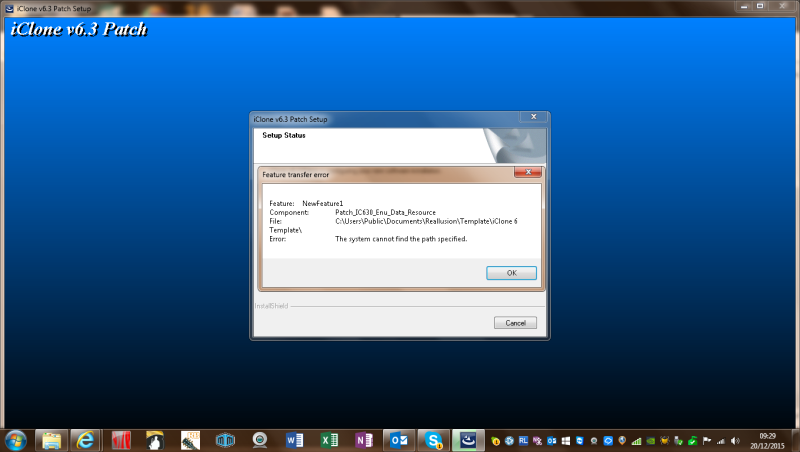 The more I learn, the more I realise, I know nothing!
|
|
|
|
|
RoGrie
|
RoGrie
Posted 11 Years Ago
|
|
Group: Forum Members
Last Active: 3 Years Ago
Posts: 475,
Visits: 10.0K
|
Hi, Iclone 6,3 crashes when using the "current Frame" option Workflow: Load project -> select frame 365 -> select animation -> remove scene animation -> keep current frame 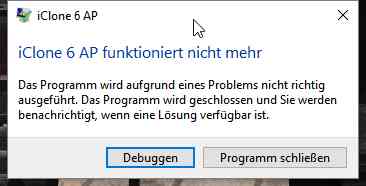 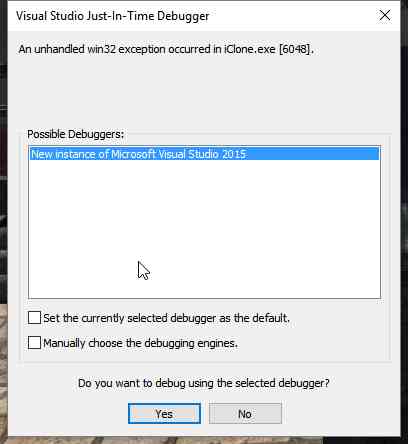 regards RoGrie
Shop: http://city.reallusion.com/store/rogrie
|
|
|
|
|
kenshinw95
|
kenshinw95
Posted 11 Years Ago
|
|
Group: Forum Members
Last Active: 7 Years Ago
Posts: 42,
Visits: 135
|
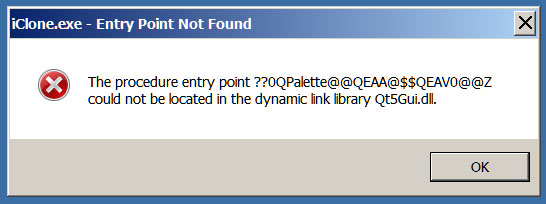
Not that I'm any expert, but when I've gotten similar issues the only thing that would fix it was to reinstall (from scratch) iClone.
Good news is you don't lose your library content even after you uninstall iClone (although you should always back it up to be sure) and then reinstall.
Thank you. I'll try that.
|
|
|
|
|
Snarp Farkle
|
Snarp Farkle
Posted 11 Years Ago
|
|
Group: Forum Members
Last Active: 2 Years Ago
Posts: 770,
Visits: 3.6K
|
I didn't have a problem at all with the updates for 3DX or CC and CT8 opened and ran like a charm! However I do have a problem with the iC6.3 update, after creating a test head in CT8 and sending it to CC, then closing CT8 and opened iC6 and tried to load the newly created CT8-CC actor, I get the "loading box" and watch it load to 100% and go away, but as soon as that happens the cursor just turns into the spinning circle icon and iC6 hangs, not crash but just hangs and no avatar is loaded. Now the strange part is that it doesn't trigger the windows end process box until I click on the scene, then I get the "White Screen Of Crash" and it will stay like that until I click on the "iC6 close button" and thats when the windows end process box appears and I can click the end process button. I even let it go for 30 minutes once while I was doing other things and when I went back to it the spinning cursor was still there. For the fisrt time since I've owned iC6 I was hoping it would just crash so I'd get a crash report but it doesn't crash at all. :crazy:Anyways to keep this short, after several restarts and reinstalling the update I'm still unable to load any actors at all not just CT8-CC ones, I can however load props and such, animate them and all that. I put a support request in but don't expect to hear from them till monday, if anyone has any tricks up their sleeves to remedy this I'd appreciate a heads up.
Dell XPS 8900, Intel(R) Core(TM) i7-6700 CPU @ 3.40GHz, 3408 Mhz, 4 Core(s), 8 Logical Processor(s), 16 GB RAM, - 4 GB GeForce GTX 745, NVIDIA compatible.
Acer Aspire V Nitro Laptop, 2.5GHz Intel Core i5-7300HQ processor with 6MB cache, 256GB solid state drive, 16GB Ram, 4 GB NVIDIA GeForce GTX 1050 Ti graphics.
|
|
|
|
|
thedirector1974
|
thedirector1974
Posted 11 Years Ago
|
|
Group: Forum Members
Last Active: Last Year
Posts: 783,
Visits: 5.2K
|
mark (12/18/2015)
Still don't see the "Shadow Bias" working for Spotlights in 6.3... at least on my system...
I just checked the bias option on my system and everything works as it should be. I can lose the gap between the shadow and the object just fine ... I may have a bug to report. Maybe someone could check this out. The face key animation seems to be buggy. If I want a facial expression change on frame 100 and I create a third key on frame 50, than the change of the facial expression starts from frame 1 to 100 and not from frame 50 to 100. Face Key seems to ignore the created keys by myself. When I copy the key from frame 1 to frame 50 everything works fine. When I place the key by myself, Face Key ignores it. Direx
|
|
|
|
|
Cricky
|
Cricky
Posted 11 Years Ago
|
|
Group: Forum Members
Last Active: 4 Years Ago
Posts: 2.8K,
Visits: 13.8K
|
For the Indigo Rendering issues, support sent me a replacement "ICIndigoRender.dll" file and it resolved the problem for me. I would load it here, but it may be something completely different for other users, and operating systems. Best left to support to hammer out.
SKYPE ID: rc.650
http://city.reallusion.com/store/ModuleExpand.aspx?id=GS634545170497417354&mdid=18866
http://city.reallusion.com/ContentTag.aspx?tagname=Cricky&AuthorID=20081020688550191201#]Reallusion Store Content
" If I had Alzheimer's (Old Timers), would I know it? "
|
|
|
|