|
Author
|
Message
|
|
corthew
|
corthew
Posted 10 Years Ago
|
|
Group: Forum Members
Last Active: 10 Years Ago
Posts: 59,
Visits: 372
|
Is anyone having an issue with glare? I haven't been able to get anything different from diagonal down from left to right.  The horizontal does nothing at all but that may be because the light its pulling from has no horizontal...whatever it is.
********SYSTEM SPECS********
Motherboard - Maximus Hero
Processor - Intel Core i7-4790s 3.2GHz 64 bit Quad-Core Processor
Graphics - MSI GTX 970 4GD5T OC GeForce GTX 970 4GB
Memory - 32GB DDR3 1600 Memory
Storage - SSD main drive + 4 - 1TB 7200RPM Hard Drives
Pending storage - 1 - 4TB Hard Drive
Power Supply -Antec 750W
Operating system - Windows 8.1 Operating System
Case - IN WIN GR one Black Black SECC Full Tower
To run - Iclone 6.0 - 3DXchange Pro 5.51 - Facial Pipeline - Daz3D 4.6
|
|
|
|
DELETED2
|
DELETED2
Posted 10 Years Ago
|
|
Group: Banned Members
Last Active: 10 Years Ago
Posts: 2.4K,
Visits: 6.1K
|
RussellStudios (1/3/2015)
...//...Want to build a computer from scratch...//...OK, well, initially you'll need an iron ore mine for the casing so some knowledge of mining is good. A smelter to extract the molten iron.... then.......... :D:P ;):w00t: ;):w00t: Oh and Happy New Year too. Armstrong.
|
|
|
|
|
prabhatM
|
prabhatM
Posted 10 Years Ago
|
|
Group: Forum Members
Last Active: 5 Years Ago
Posts: 1.8K,
Visits: 8.1K
|
Armstrong (1/4/2015)
RussellStudios (1/3/2015)
...//...Want to build a computer from scratch...//...OK, well, initially you'll need an iron ore mine for the casing so some knowledge of mining is good. A smelter to extract the molten iron.... then.......... :D:P ;):w00t: Oh and Happy New Year too. Armstrong. :)
|
|
|
|
|
corthew
|
corthew
Posted 10 Years Ago
|
|
Group: Forum Members
Last Active: 10 Years Ago
Posts: 59,
Visits: 372
|
Armstrong (1/4/2015)
OK, well, initially you'll need an iron ore mine for the casing so some knowledge of mining is good.
Wouldn't you need a pickaxe to liberate the iron ore? And perhaps a few nice metal carts for transporting it? Some sort of computing device to manage the operation would be nice to of course. You know...There's really no way to acquire said iron without products made from iron. I suspect some form of magick may be needed. Would a background in alchemy help?
********SYSTEM SPECS********
Motherboard - Maximus Hero
Processor - Intel Core i7-4790s 3.2GHz 64 bit Quad-Core Processor
Graphics - MSI GTX 970 4GD5T OC GeForce GTX 970 4GB
Memory - 32GB DDR3 1600 Memory
Storage - SSD main drive + 4 - 1TB 7200RPM Hard Drives
Pending storage - 1 - 4TB Hard Drive
Power Supply -Antec 750W
Operating system - Windows 8.1 Operating System
Case - IN WIN GR one Black Black SECC Full Tower
To run - Iclone 6.0 - 3DXchange Pro 5.51 - Facial Pipeline - Daz3D 4.6
|
|
|
|
|
animagic
|
animagic
Posted 10 Years Ago
|
|
Group: Forum Members
Last Active: 5 days ago
Posts: 15.8K,
Visits: 31.4K
|
corthew (1/4/2015)
Is anyone having an issue with glare?
I haven't been able to get anything different from diagonal down from left to right.
The horizontal does nothing at all but that may be because the light its pulling from has no horizontal...whatever it is.I've noticed that too, and it is not the way it is supposed to work compared to iClone 5. So I think you found a bug! 
This is the Spectral Cross: iClone 5 on the left and iClone 6 on the right. Obviously, one direction is missing. Another problem I found is with the PNG export. It is always set to 32-bit (i.e., with alpha channel), this is undesirable. Exporting the simple scene above as PNG, gives me this: 
The background color is ignored and the HDR effect is invisible. Only by using an image as 2D background, the HDR effect will show, albeit still incorrectly: 
This is not right...
|
|
|
|
|
justaviking
|
justaviking
Posted 10 Years Ago
|
|
Group: Forum Members
Last Active: Last Year
Posts: 8.2K,
Visits: 26.5K
|
Speaking of glare, thank you for reminding about this minor issue. HDR GLARE "Horizontal" and "Vertical" are reversed Unless "horizontal" and "vertical" have some special meaning, this really looks backwards to me. 
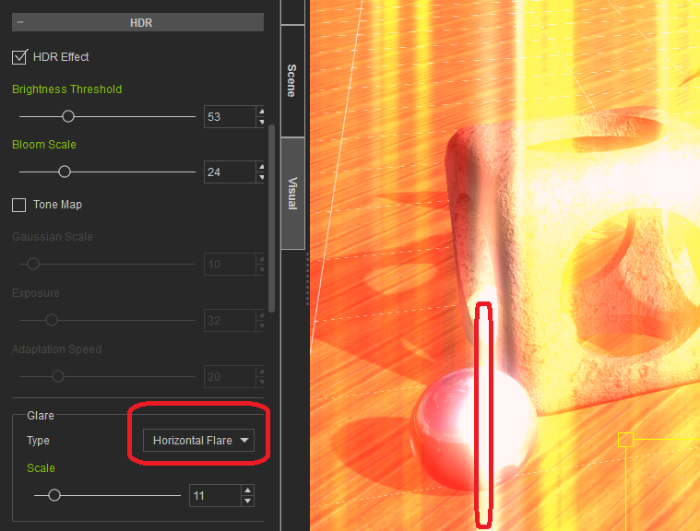
That should take about 5 minutes to fix.
iClone 7... Character Creator... Substance Designer/Painter... Blender... Audacity...
Desktop (homebuilt) - Windows 10, Ryzen 9 3900x CPU, GTX 1080 GPU (8GB), 32GB RAM, Asus X570 Pro motherboard, 2TB SSD, terabytes of disk space, dual monitors.
Laptop - Windows 10, MSI GS63VR STEALTH-252, 16GB RAM, GTX 1060 (6GB), 256GB SSD and 1TB HDD
|
|
|
|
|
justaviking
|
justaviking
Posted 10 Years Ago
|
|
Group: Forum Members
Last Active: Last Year
Posts: 8.2K,
Visits: 26.5K
|
animagic (1/4/2015)
corthew (1/4/2015)
Is anyone having an issue with glare?
I haven't been able to get anything different from diagonal down from left to right.
The horizontal does nothing at all but that may be because the light its pulling from has no horizontal...whatever it is.I've noticed that too, and it is not the way it is supposed to work compared to iClone 5. So I think you found a bug! This is the Spectral Cross: iClone 5 on the left and iClone 6 on the right. Obviously, one direction is missing. Interesting. On the "Default Project" I get what seems to be the proper "diagonals" for each of the different types of glare settings. Are we doing something different? Graphics cards (I'm on an AMD card)? Lighting or other settings? Note: This is a screen capture, I haven't tested the export to various file formats. 
.
iClone 7... Character Creator... Substance Designer/Painter... Blender... Audacity...
Desktop (homebuilt) - Windows 10, Ryzen 9 3900x CPU, GTX 1080 GPU (8GB), 32GB RAM, Asus X570 Pro motherboard, 2TB SSD, terabytes of disk space, dual monitors.
Laptop - Windows 10, MSI GS63VR STEALTH-252, 16GB RAM, GTX 1060 (6GB), 256GB SSD and 1TB HDD
|
|
|
|
|
corthew
|
corthew
Posted 10 Years Ago
|
|
Group: Forum Members
Last Active: 10 Years Ago
Posts: 59,
Visits: 372
|
justaviking (1/4/2015)
On the "Default Project" I get what seems to be the proper "diagonals" for each of the different types of glare settings.
Are we doing something different? Graphics cards (I'm on an AMD card)? Lighting or other settings?Graphics card issue would make sense. Glad its not just me this time. :) The need to tweak their software a bit.
********SYSTEM SPECS********
Motherboard - Maximus Hero
Processor - Intel Core i7-4790s 3.2GHz 64 bit Quad-Core Processor
Graphics - MSI GTX 970 4GD5T OC GeForce GTX 970 4GB
Memory - 32GB DDR3 1600 Memory
Storage - SSD main drive + 4 - 1TB 7200RPM Hard Drives
Pending storage - 1 - 4TB Hard Drive
Power Supply -Antec 750W
Operating system - Windows 8.1 Operating System
Case - IN WIN GR one Black Black SECC Full Tower
To run - Iclone 6.0 - 3DXchange Pro 5.51 - Facial Pipeline - Daz3D 4.6
|
|
|
|
|
Such Stuff
|
Such Stuff
Posted 10 Years Ago
|
|
Group: Forum Members
Last Active: 10 Years Ago
Posts: 55,
Visits: 353
|
What is the supported method for adding a substance? You can't add it through the import dialogue because .sbsar files are not recognized as a supported type. I wasn't able to get it to show up by copying it to the custom hierarchy, either. In the end, I got it in by copying it to the Materials Lib in the Template directory.
|
|
|
|
|
sbaerman
|
sbaerman
Posted 10 Years Ago
|
|
Group: Forum Members
Last Active: Last Year
Posts: 298,
Visits: 1.3K
|
Hello,
I found 4 issues, I want to post here, I will continuously post them in this thread and the status to it :
a) Issue 1 : Project settings not adjustable, internal Frame setting is 60 frames per second
- should be : frame rate should be adjustable by user or 30 frames fix
- also size of the project can not be set in settings
b) Issue 2 : Internal new Iclone lights.
- actually these lights are a prop with attached standard lights the standard lights
are just switched off (not visible)
- when rendering in Indigo the lights appear again
- suggested solution : when passing it on to Indigo set the opacity of the material to
zero
c) Issue 3 : Adjustable UI is only suitable for 1 monitor. If you set up 2 Monitors and save it
when restarting Iclone, it puts the window of monitor 1 correctly but puts on top
of Monitor 1 the panels for Monitor 2, whilst nothing appears on monitor 2 !
d) Issue 4 : Crashing when exporting frames to Indigo
I wrote this before, that Iclone is crashing when exporting with the plugin to Indigo
the heavier the scene the easier it happens, the worser the machine, the quicker.
My analysis : as the machines are rendering frame by frame nicely, it seems that
a buffer is not cleared, when preparing the next frame.
e) Issue 5 : Exported IGS files can not be moved to another computer.
Once an igs file is created you can not move it to another computer.
Tested with : computer without clone installation
Tested with : computer with clone installation, with plugin installion.
This is the error message u get :
A problem occurred with the scene:
Scene parsing error: Error loading model 'G:/test/single_meshes\mesh_1271777580_15748.igmesh': Failed to open file 'G:/test/single_meshes/mesh_1271777580_15748.igmesh' for reading. (In element 'scene / mesh'):
6
Mesh 10760
0Scene metadata: Exporter: iclone | Platform: | Author: | Description: | Date created:
I checked it 3 times. It only opens on the computer it was created on. I made sure, I export it directly to an SD card, so no information could get lost in a potential copying! It opens in Indigo perfectly from the SD card on the computer it was created on, and produces the error on any other machine !
Machines :
MSI Gaming Laptop, I7, GTX 1080, 16GB RAM, 512GB SSD, 1 TB HD
Acer Predator Helios 300 I7 10750H, 16GB, 1TB SSD, RTX 2070
|
|
|
|