|
Author
|
Message
|
|
Miranda (RL)
|
Miranda (RL)
Posted 6 Years Ago
|
|
Group: Administrators
Last Active: 3 Years Ago
Posts: 1.8K,
Visits: 11.2K
|
roboter (4/4/2019)
Hi Miranda, how can I export/import those shaders into Unreal? If I use the usual approach it still uses the standard specular setup. Are those the R and M textures found in the texture view panel, if so I could probably just save those and import directly. According to the step 2 of process, you'll have to add the Content folder to the directory for the specific Unreal Project in order to apply the custom shaders. So next time when you import FBX to Unreal, you will see a message popup for the desired material ( step 3). A big issue I encounter is when exporting without the option Delete Hidden Meshes, upon import this bumps realigns the meshes slightly, requiring tedious modifications via the Edit Mesh feature, and very annoying each time a Windows System alert is called when I resave/overwrite the file. Did you mean that you need to edit mesh because of mesh surface penetration issue? If this is the case, we suggest to adjust the "Increase Size" in the Conform panel to make the clothing larger. *To expand the Conform panel, go to Modify Panel > Modify Section > Conform. By the way, I just sent you a private forum message the end of March. Can you check your message box?
|
|
|
|
|
unit23
|
unit23
Posted 6 Years Ago
|
|
Group: Forum Members
Last Active: 3 Years Ago
Posts: 115,
Visits: 380
|
Miranda (RL) (3/15/2019)
Hi everyone, - Added: Customized Unreal Digital Humans shaders for hair, eyes, tongue, teeth, and skin. The skin will come with two shaders:
- HQ skin shader (high quality): using Unreal Digital Human as a base, we adjust the settings to up the ante on visual quality.
- LW skin shader (lightweight): based on the shaders from Epic Game's Paragon, we leverage their highly optimize skin shader without compromising visual quality.
Hi Miranda, how can I export/import those shaders into Unreal? If I use the usual approach it still uses the standard specular setup. Are those the R and M textures found in the texture view panel, if so I could probably just save those and import directly. A big issue I encounter is when exporting without the option Delete Hidden Meshes, upon import this bumps realigns the meshes slightly, requiring tedious modifications via the Edit Mesh feature, and very annoying each time a Windows System alert is called when I resave/overwrite the file. I keep all meshes because in Unreal I can then randomly show/hide meshes, to spawn different looking AI, results in, instead of importing setting up 3 or more character meshes, with just one 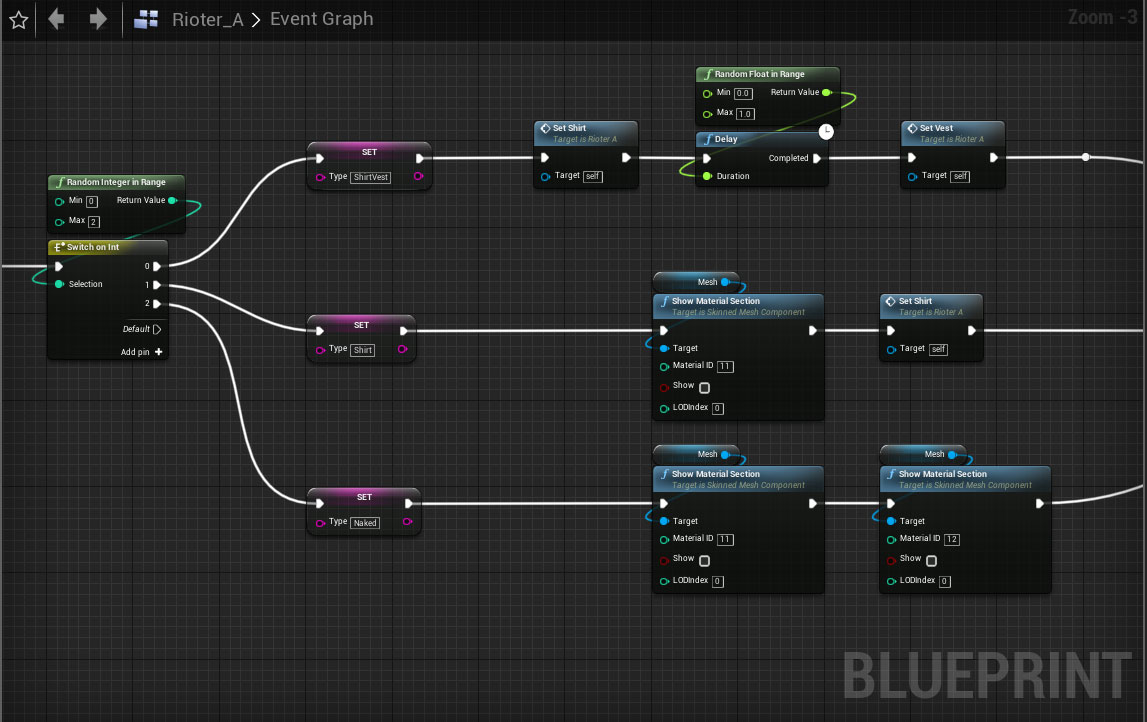 . Additional the different meshes then are set to a random texture to further randomize character AI appearance. . Additional the different meshes then are set to a random texture to further randomize character AI appearance.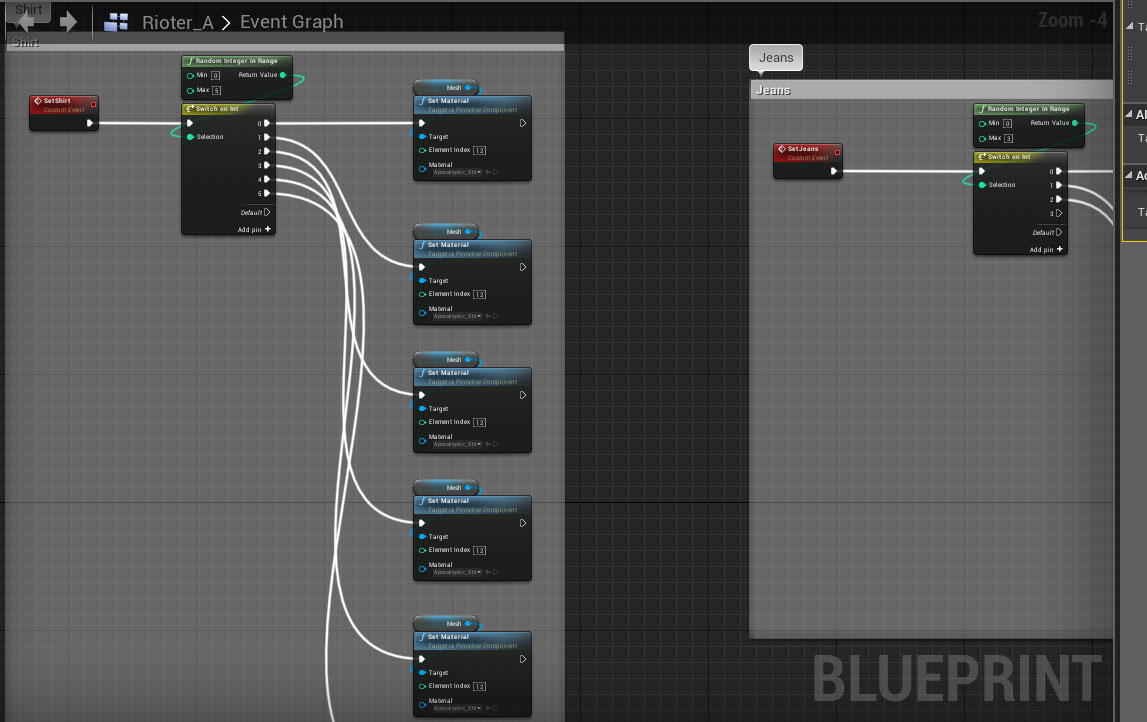 For the player character I keep meshes, in order to hide or show meshes depending on items equipped. This is probably a very desired workflow, and I hope that CC will further adjust the pipeline in that regard, Cheers
|
|
|
|
|
Miranda (RL)
|
Miranda (RL)
Posted 6 Years Ago
|
|
Group: Administrators
Last Active: 3 Years Ago
Posts: 1.8K,
Visits: 11.2K
|
Hi everyone,
Unity Auto-Setup Script Beta 2.0 is available now. Please find the download link from this post.
The auto-setup flow is enhanced with the update of CC3.04, please visit the instructions for the updated flow.- Added: Skin material will be supplemented with a Detail Map along with proper subsurface scattering (SSS) settings. (For HDRP Rendering Pipeline only)
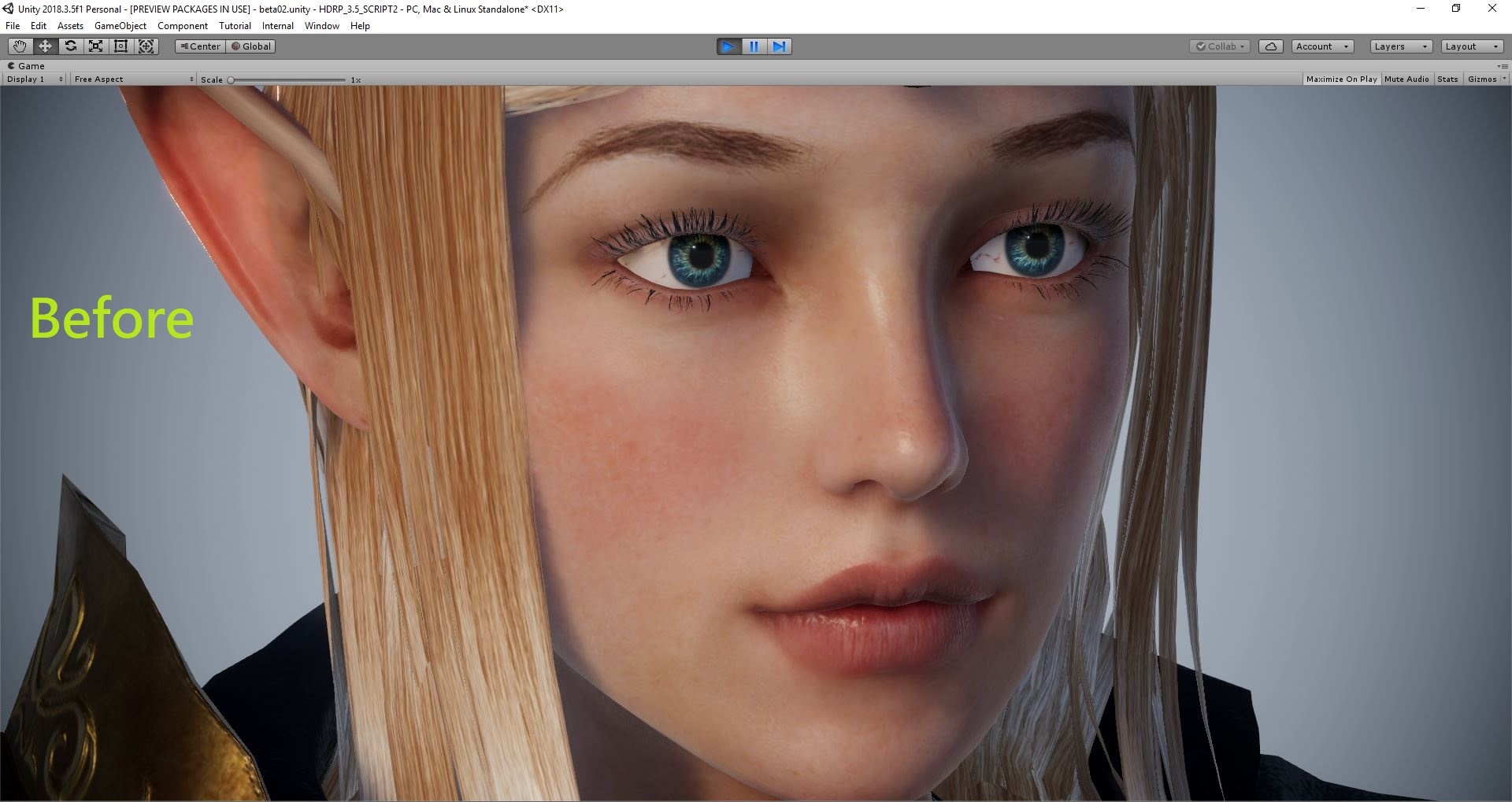
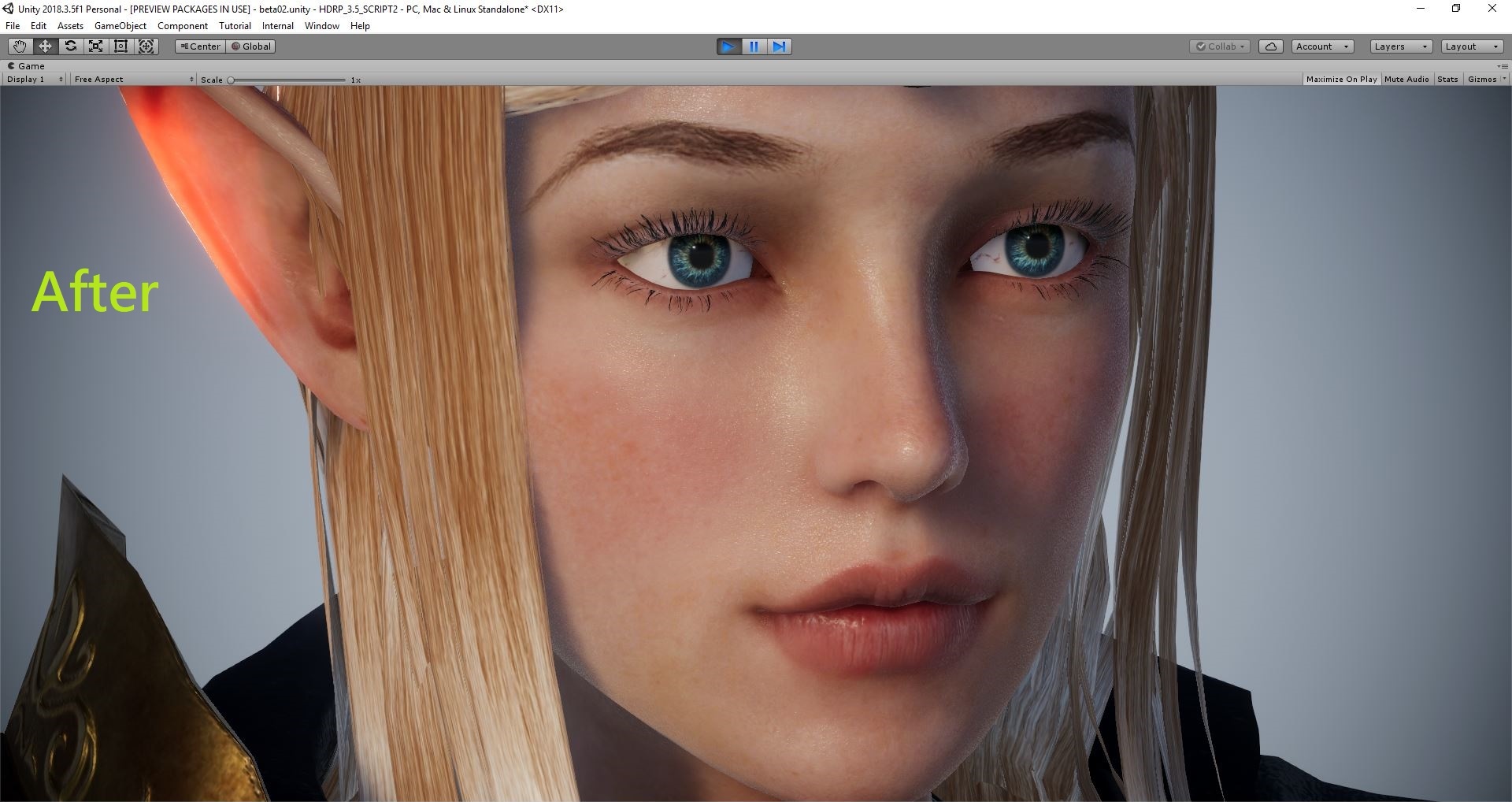
- Added: Assign the equivalent UE materials based on what was deployed in CC3:
- Traditional -> Specular
- PBR -> MatellicAlpha, Roughness, Matellic
- Fixed: Auto-processing checkbox is not recording its unchecked/disabled status. (Related issue)
- Fixed: Automatically change the Color Space of project to be Linear after auto processing. (Related issue) -- we shall recommend users to choose Linear colorspace, instead of forcing them to do
|
|
|
|
|
Miranda (RL)
|
Miranda (RL)
Posted 6 Years Ago
|
|
Group: Administrators
Last Active: 3 Years Ago
Posts: 1.8K,
Visits: 11.2K
|
Hi everyone, Thanks for your patience! Unreal Auto-Setup Plugin Beta 2.0 just released. Please find the download link from this post. Since the auto-setup process of Plugin Beta 2.0 has been improved, please visit the instructions for the details of new procedure. - Enhanced: Simplified script execution procedure
- You can simply drag and drop a FBX file and the rest of the procedure will be automated.
- You can now use the Import Button to bring FBX files into Unreal.
- Added: Customized Unreal Digital Humans shaders for hair, eyes, tongue, teeth, and skin. The skin will come with two shaders:
- HQ skin shader (high quality): using Unreal Digital Human as a base, we adjust the settings to up the ante on visual quality.
- LW skin shader (lightweight): based on the shaders from Epic Game's Paragon, we leverage their highly optimize skin shader without compromising visual quality.
- Added: Automatically split ORM textures into separate channel assignments for AO, Roughness, and Metallic.
- Added: Assign the equivalent UE materials based on what was deployed in CC3:
- Traditional -> Specular
- PBR -> Roughness & Metallic
- Fixed: Skeleton meshes for Motionplus will now be re-imported.
**The script for Unity will be released on March 19th.
|
|
|
|
|
Miranda (RL)
|
Miranda (RL)
Posted 6 Years Ago
|
|
Group: Administrators
Last Active: 3 Years Ago
Posts: 1.8K,
Visits: 11.2K
|
Hi roboter! Thanks for your feedback. Some of the requests have been planned, such as beard content (refer. 2019 Roadmap). Some requests seems to be more related to content. If you can't find the Reallusion official content you want in the Content Store, you can browse Marketplace, where many developers regularly publish content. There are some workarounds for your requests. 1. Can not export accessories or cloths ==> workaround by Rampa2. Content navigation ==> utilize the "search" function in Content Manager. For example, if you want to see all shoes under the Shoes Category, type in the word "shoes", then you will see all shoes. If you want to browse all pants, go to Pants Category, and type in the word "cloth". The reason of typing in the word "cloth" is that the search function takes both file name & its extension for reference. The file extension of pants is ccCloth, so all pants will be shown on the result. 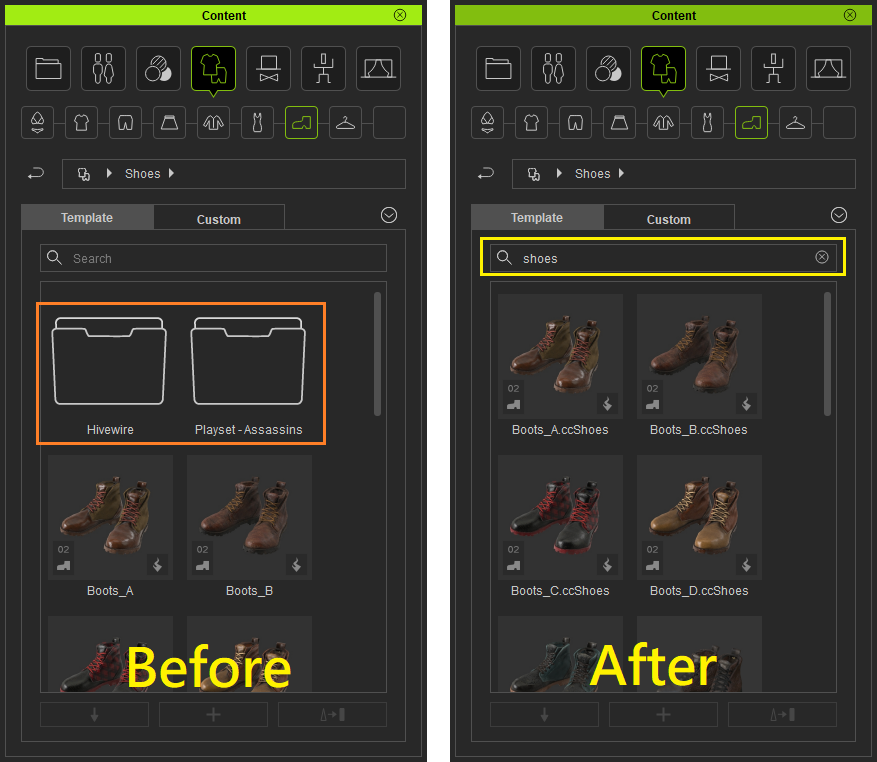
|
|
|
|
|
Miranda (RL)
|
Miranda (RL)
Posted 6 Years Ago
|
|
Group: Administrators
Last Active: 3 Years Ago
Posts: 1.8K,
Visits: 11.2K
|
Mythcons (3/8/2019)
I've been involved in another project, but this looks really great. I plan to dive into the new features ASAP. Just wanted to give you a heads up, the Iray Plugin (Trial) appears to cause a conflict with the update. I had to uninstall it in order to get the package to run. Will have input on the updates shortly.
Hello! good to see you again! The issue has been verified, there is compatibility issue with the combination of CC3.04 & Iray Plugin Trial 1.0, while the combination of CC3.04 & Iray Plugin Trial 1.1 works fine.
|
|
|
|
|
unit23
|
unit23
Posted 6 Years Ago
|
|
Group: Forum Members
Last Active: 3 Years Ago
Posts: 115,
Visits: 380
|
This looks like some great progress, now I wonder how to facilitate those gestures with Unreal. - Can not export accessoires or cloths, but I want to add/remove them during the game (equipped? uneqipped sunglasses?)
- Can not easily modify texture colors.
- CC1 and CC3 content is not easily navigatable/sorted in the content browser, same for other assets, which each come with their own directory structure, which is a hazzle to navigate. I would rather prefer a content browser view option to sort all shoes in one folder, all gloves in one folder, all pants in one folder.
- No beards!
- Foot and Hand IK bones are not included, which is a big issue, since many games use a Unreal player character and relays heavily on IKs.
- Old asset packs CC1 mainly need update to make them fully compatible with CC3 pipeline. Basically I cannot use character CC1 content I bought, because they use a different skeleton, and adding CC1 extra would mean to have animations duplicated, entire code duplicated to have them work with the CC1 skeleton, which is not very feasible.
- No old/aged/wise CC3 human face types.
- More head presets please.
- Profession cloths for doctors, nurses, researchers, hazmat, would be nice too.
- Option to not install, or hide Plain Base assets. If I want to change a texture I do this either way.
- Presets for eyebrows.
- Presets for ears.
- Presets for noses.
- Presets for lips.
- Single options to modify skin tone.
- Single option to modify hair tone.
- Single option to show/hide facial hair.
|
|
|
|
|
Mythcons
|
Mythcons
Posted 6 Years Ago
|
|
Group: Forum Members
Last Active: Last Year
Posts: 455,
Visits: 3.2K
|
I've been involved in another project, but this looks really great. I plan to dive into the new features ASAP. Just wanted to give you a heads up, the Iray Plugin (Trial) appears to cause a conflict with the update. I had to uninstall it in order to get the package to run. Will have input on the updates shortly.
|
|
|
|
|
AriaRedux
|
AriaRedux
Posted 6 Years Ago
|
|
Group: Forum Members
Last Active: 4 Months Ago
Posts: 10,
Visits: 235
|
Superb updates!! Thanks everybody!
|
|
|
|
|
Miranda (RL)
|
Miranda (RL)
Posted 6 Years Ago
|
|
Group: Administrators
Last Active: 3 Years Ago
Posts: 1.8K,
Visits: 11.2K
|
@3dtester, thanks for your feedback! :) @edorseey03, we are testing the Beta 2.0 script/plugin now, and plan to release this week, or early next week. By the time download links will be posted on the thread Unity / Unreal.
|
|
|
|