|
Author
|
Message
|
|
Fionn (RL)
|
Fionn (RL)
Posted 4 Years Ago
|
|
Group: Administrators
Last Active: 3 Years Ago
Posts: 87,
Visits: 614
|
v4.12 (4.12.1125.1) released on November 29th, 2022
Bug fixes in Content Manager. Please update using the Reallusion Hub. >>How to update
Fixed:
|
|
|
|
|
rosuckmedia
|
rosuckmedia
Posted 4 Years Ago
|
|
Group: Forum Members
Last Active: Last Year
Posts: 3.2K,
Visits: 4.8K
|
Hello Fionn, After the hotfix everything was fine, Now I did the update through the hub. Now I have the same error again . Greetings Robert 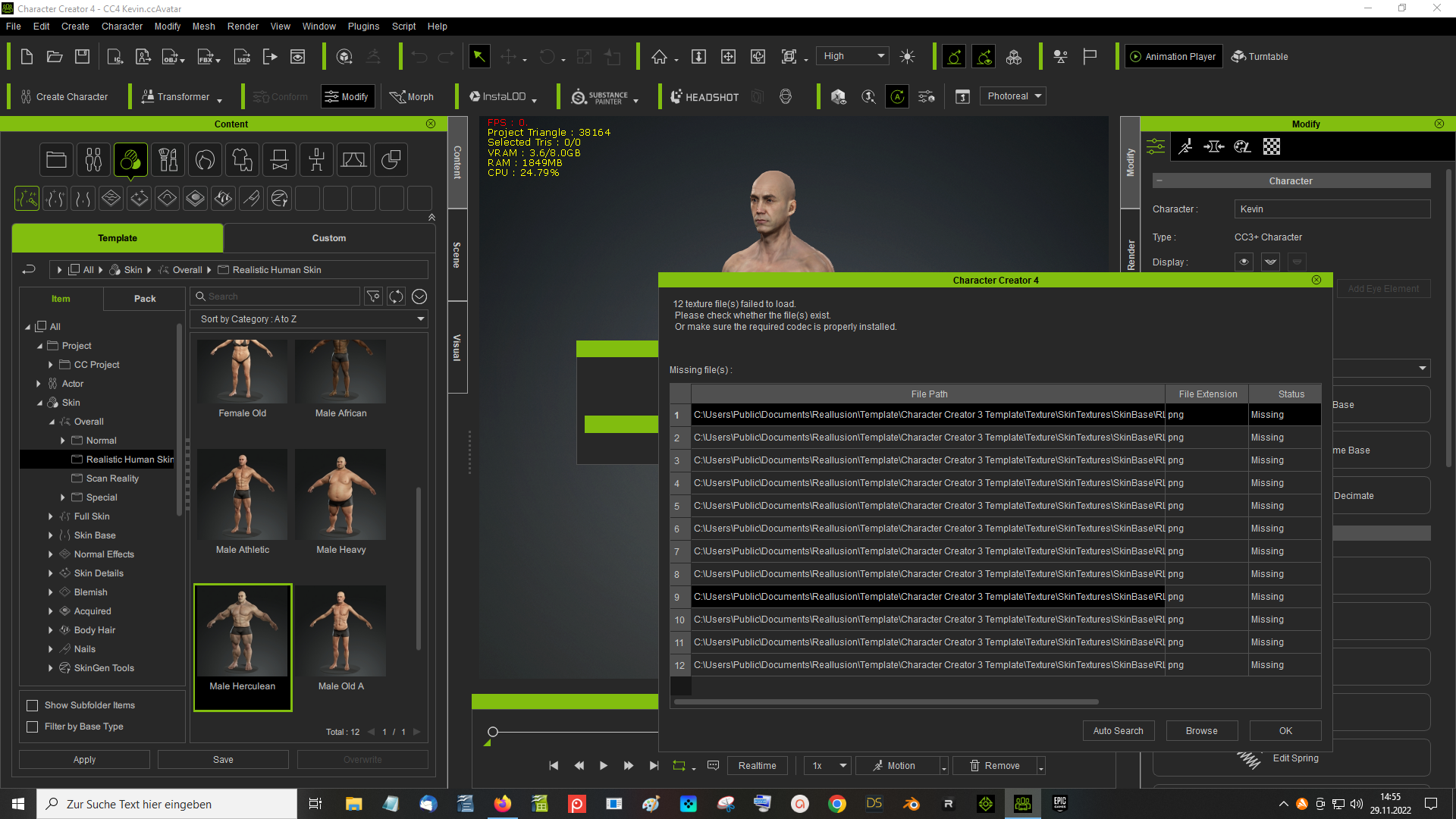
|
|
|
|
|
animagic
|
animagic
Posted 4 Years Ago
|
|
Group: Forum Members
Last Active: 16 hours ago
Posts: 15.8K,
Visits: 31.4K
|
I've noticed the same with some characters, unfortunately...:crying:
|
|
|
|
|
yepkoo
|
yepkoo
Posted 4 Years Ago
|
|
Group: Forum Members
Last Active: Last Year
Posts: 1.2K,
Visits: 1.9K
|
I did not encounter this problem. Maybe the steps I followed will work for you. I had already applied the patch that Peter posted on the forums. After the update the sliders were not visible and the problem was fixed after the program automatically scanned the library. Now I applied the skin to the character and had no problems.
----------------------------------------------------------------
https://www.youtube.com/yepkoo
https://dev.epicgames.com/community/profile/bxvo/Yepkoo#learning
|
|
|
|
|
animagic
|
animagic
Posted 4 Years Ago
|
|
Group: Forum Members
Last Active: 16 hours ago
Posts: 15.8K,
Visits: 31.4K
|
I just did a full content scan to be sure and then loaded the CC4 Kevin avatar and still got the error. I'm sorry I didn't wait...:crying: I have an another install that I didn't update yet (I did apply the patch) and that one doesn't give an error.
|
|
|
|
|
wires
|
|
|
Group: Forum Members
Last Active: Last Month
Posts: 5.7K,
Visits: 26.5K
|
I've tested the latest update by loading quite a few default and custom characters and I am not getting any error messages.
Gerry
System: Win 10 Pro (21H2), Asus X99-E WS, CPU i7-5930K -3,5 GHz, 32 GB DDR4 2666-16 RAM, NVidia GTX 1080 Ti GPU - 11 GB VRAM(Driver Studio-536.99), Samsung 850 Pro 512 GB SSD, 6 TB HD storage.
|
|
|
|
|
rosuckmedia
|
rosuckmedia
Posted 4 Years Ago
|
|
Group: Forum Members
Last Active: Last Year
Posts: 3.2K,
Visits: 4.8K
|
I have now installed the Character Creator 3. Then I installed the Content Reallusion Human Skin.
Now I have no more problems in the Character Creator 4. The Character Creator 4 had not found the Reallusion Human Skin before. Although the content was installed. I will leave it at that now,
Greetings Robert
|
|
|
|
|
animagic
|
animagic
Posted 4 Years Ago
|
|
Group: Forum Members
Last Active: 16 hours ago
Posts: 15.8K,
Visits: 31.4K
|
It must be my bad fortune then...:crying: I already had CC3 installed (I never removed it)...:unsure: It is bad though because CC4 should not depend on cc3 content files and it does now for SkinGen. 
|
|
|
|
|
Thomas(RL)
|
Thomas(RL)
Posted 4 Years Ago
|
|
Group: Forum Members
Last Active: 3 Years Ago
Posts: 4,
Visits: 201
|
Hi animagic ~ Please try following steps in CC4 1.uninstall Characters pack 2.refresh 3.install Characters Pack 4.apply content to check whether skinbase texture founded or not
if it's still not working. we could have remote assistance for u.
|
|
|
|