|
Author
|
Message
|
|
Parthoo
|
Parthoo
Posted 7 Years Ago
|
|
Group: Forum Members
Last Active: 5 Years Ago
Posts: 60,
Visits: 199
|
Hello,
I rendering video of 2650 frames. It takes very long time to process, is there anyway to make it faster?.
Using Mac OS X 10.11.6
render settings: mov file, 1080p, H.264 codec
|
|
|
|
|
Peter (RL)
|
Peter (RL)
Posted 7 Years Ago
|
|
Group: Administrators
Last Active: 2 Years Ago
Posts: 23.1K,
Visits: 36.6K
|
What is a long time? If you let us know how long it took we can run some comparisons.
Peter
Forum Administrator www.reallusion.com
|
|
|
|
|
garylearntech
|
garylearntech
Posted 7 Years Ago
|
|
Group: Forum Members
Last Active: 3 Years Ago
Posts: 158,
Visits: 2.3K
|
Hi Parthoo - the specification of your Mac is another factor that can make a considerable difference to the render time. You mention that you're still using Mac OS X 10.11. macOS 10.15 has just come out, so that suggests that you might be using a comparatively old machine… Here are a couple of things to consider, that might make a noticeable difference for your project: - All other things being equal, more RAM (that's computer memory, not hard disk space) will probably help. If you can't add more RAM just now, try rebooting your Mac and don't run anything else. Not Mail, not Safari, not anything. Then launch CA4 and try your render again…
- If your free disk space is getting low, that could also impact on the render performance. (In fact, it's likely impacting on everything you do.) People will have slightly different opinions, but I'd suggest that if you have less than 20GB free space, then you are beginning to run short on space and need to investigate approaches to free up disk space. Under, hmm, 10GB free and you probably have general problems. Under 5GB free and you've got potentially serious problems.
What model of Mac are you using? Go to > About This Mac and look for something like "iMac (27-inch, Late 2013)", which is what I have. Let us also know what that info box says you have for Memory…
There's a lot more anyone could advise you on performance optimisation, but I'll stop here for now!
---
Cartoon Animator 4 Pipeline (always the current production version, unless otherwise stated)
Mac mini M1, macOS Big Sur (11.6.5)
Signature data last updated 2022-05-15
|
|
|
|
|
Parthoo
|
Parthoo
Posted 7 Years Ago
|
|
Group: Forum Members
Last Active: 5 Years Ago
Posts: 60,
Visits: 199
|
Hi Peter,
Around 1 hour I estimated. But I did not finish it. I cancelled it as my mac might stop working. I will take backup then try again.
Thanks,
|
|
|
|
|
Parthoo
|
Parthoo
Posted 7 Years Ago
|
|
Group: Forum Members
Last Active: 5 Years Ago
Posts: 60,
Visits: 199
|
Hi Gary, Thanks for your update. yes, I will upgrade my mac to latest version. Currently I have 30 GB, Attached my mac config, 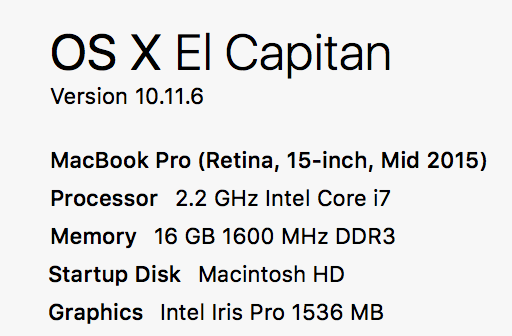
|
|
|
|
|
garylearntech
|
garylearntech
Posted 7 Years Ago
|
|
Group: Forum Members
Last Active: 3 Years Ago
Posts: 158,
Visits: 2.3K
|
Hi Parthoo
Okay, that sounds not too bad. 30GB free disk space and 16GB of RAM. Freeing up used memory by not running any other apps or background utilities might help and is fairly easily done.
Please don't jump in and upgrade to Catalina just on the basis of my comments! There are other issues should be considered as well, before making that decision. If you do decide to go down that path just now, make sure you've got at least one if not two good full backups, just in case other issues crop up and you decide that you want to revert to your previous configuration.
One other thought occurred to to me last night after writing my previous post. Unless this is you trying to render your final video, consider rendering it at a lower resolution if this is you just generating a preview video. I might be wrong but I guess this would be less demanding and should complete sooner…
Good luck!
---
Cartoon Animator 4 Pipeline (always the current production version, unless otherwise stated)
Mac mini M1, macOS Big Sur (11.6.5)
Signature data last updated 2022-05-15
|
|
|
|
|
Parthoo
|
Parthoo
Posted 7 Years Ago
|
|
Group: Forum Members
Last Active: 5 Years Ago
Posts: 60,
Visits: 199
|
Hi Gary,
Thanks again for your reply. sure. I will think about upgrade after my first elearning project finished. I am trying to complete before Xmas begins :)
|
|
|
|
|
Peter (RL)
|
Peter (RL)
Posted 7 Years Ago
|
|
Group: Administrators
Last Active: 2 Years Ago
Posts: 23.1K,
Visits: 36.6K
|
Parthoo (11/7/2019)
Hi Peter,
Around 1 hour I estimated. But I did not finish it. I cancelled it as my mac might stop working. I will take backup then try again.
Thanks,That does seem very slow. I'm not a Mac expert but on Windows a similar project of 2500 frames took me just 3 minutes to render @ 1080p. I would follow the advice of Gary and look into updating your computer and also make sure that you don't have anything else running when you render to video. You could also try dropping to 720p which should help speed up the render process.
Peter
Forum Administrator www.reallusion.com
|
|
|
|
|
Parthoo
|
Parthoo
Posted 7 Years Ago
|
|
Group: Forum Members
Last Active: 5 Years Ago
Posts: 60,
Visits: 199
|
2500 frames@3 seconds..., is really super fast on windows.
I will upgrade my mac and try again, if issue still persists, i will switch to WINDOWS :)
|
|
|
|
|
esemgee
|
esemgee
Posted 7 Years Ago
|
|
Group: Forum Members
Last Active: 3 Years Ago
Posts: 168,
Visits: 469
|
Tried my first render since re-installing iC.7 (thanks Peter RL!) and it was so slow I gave up and did a test render of just 34 frames. 40 minutes later it had manged 25 frames. Gave up again! The scene is basic - about 5 trees, snow, 3 avatars in idle mode. There is some light effect, but hell, if you can't do that what is the point! Running, from fresh start, i.e no other programs in background, Windoze 10, Intel Core i7 6700 2.60GHz, 16 RAM. I remember some years back I had a similar issue which involved switching something off but can't find that thread! Annoyed!
|
|
|
|