|
Author
|
Message
|
|
tallon
|
tallon
Posted 7 Years Ago
|
|
Group: Forum Members
Last Active: 6 Years Ago
Posts: 24,
Visits: 119
|
Hi,
I need my character to carry a prop I've created and place it on the ground. I'm attached the prop to his hands, and I'm using the 'Occupations>Courier' pack animations for the walking and placing, but don't know how to DETACH it when he puts it on the ground.
This is what I've done so far:
- I've created the prop and added it as a 'custom prop'
- using Composer mode I've attached it to his hands - and on the correct layer so it appears between his arms when he walks
- I now need to detach it when he places it on the ground (and walks away)
(I tried using another instance of the prop with visible/invisible settings but it seems there is no place on the character Z axis that is between his arms - only when you add the prop in composer mode)
Am I missing something simple or just doing this the wrong way?
Thanks,
D.
|
|
|
|
|
vepop
|
|
|
Group: Forum Members
Last Active: 2 Years Ago
Posts: 1.0K,
Visits: 9.9K
|
You have to make it invisible once it is on the ground and replace it with a separate prop. I've raised this issue to Reallusion. Hopefully they will do something about it.

YouTube Tutorials Here
|
|
|
|
|
justaviking
|
justaviking
Posted 7 Years Ago
|
|
Group: Forum Members
Last Active: 2 Years Ago
Posts: 8.2K,
Visits: 26.5K
|
For this case, use "LINK" rather than Attach.
When you want him to let go of the walking stick, simply right-click on the stick at select "Un-link."
iClone 7... Character Creator... Substance Designer/Painter... Blender... Audacity...
Desktop (homebuilt) - Windows 10, Ryzen 9 3900x CPU, GTX 1080 GPU (8GB), 32GB RAM, Asus X570 Pro motherboard, 2TB SSD, terabytes of disk space, dual monitors.
Laptop - Windows 10, MSI GS63VR STEALTH-252, 16GB RAM, GTX 1060 (6GB), 256GB SSD and 1TB HDD
|
|
|
|
|
vepop
|
|
|
Group: Forum Members
Last Active: 2 Years Ago
Posts: 1.0K,
Visits: 9.9K
|
I don't think using LINK can place the prop in between the arms.
YouTube Tutorials Here
|
|
|
|
|
justaviking
|
justaviking
Posted 7 Years Ago
|
|
Group: Forum Members
Last Active: 2 Years Ago
Posts: 8.2K,
Visits: 26.5K
|
When he said "attached it to to his HANDS," I didn't really notice the plural "hands" so I was picturing one hand.
If he is trying to connect both hands and do "inverse kinematics (IK)," maybe using dummy props, like on an old "sword fighting" tutorial, that's a bit different.
Maybe a screen shot of what is meant by "between the arms" would be helpful.
iClone 7... Character Creator... Substance Designer/Painter... Blender... Audacity...
Desktop (homebuilt) - Windows 10, Ryzen 9 3900x CPU, GTX 1080 GPU (8GB), 32GB RAM, Asus X570 Pro motherboard, 2TB SSD, terabytes of disk space, dual monitors.
Laptop - Windows 10, MSI GS63VR STEALTH-252, 16GB RAM, GTX 1060 (6GB), 256GB SSD and 1TB HDD
|
|
|
|
|
tallon
|
tallon
Posted 7 Years Ago
|
|
Group: Forum Members
Last Active: 6 Years Ago
Posts: 24,
Visits: 119
|
That's what I tried, but it's impossible to place the new item between the characters hands so it looks bad...
|
|
|
|
|
tallon
|
tallon
Posted 7 Years Ago
|
|
Group: Forum Members
Last Active: 6 Years Ago
Posts: 24,
Visits: 119
|
I've attached it (a letter 'X') to just one hand and the way it moves as the character walks is very good - see attached screen-grab 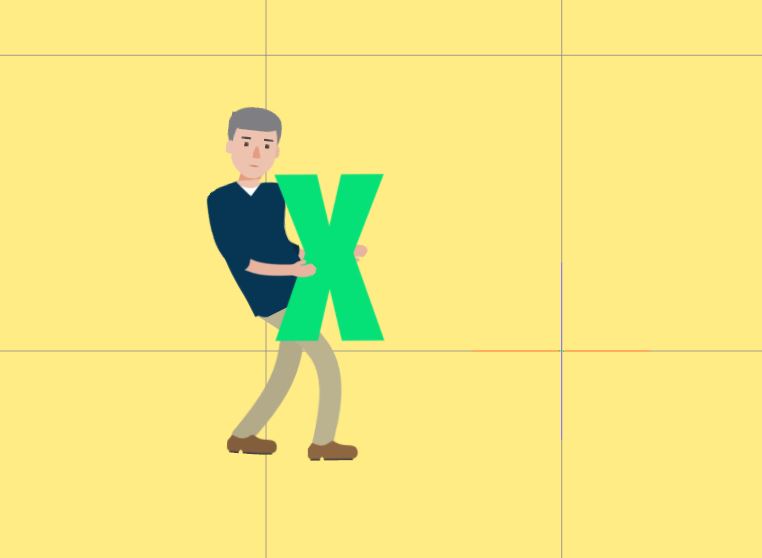
|
|
|
|
|
justaviking
|
justaviking
Posted 7 Years Ago
|
|
Group: Forum Members
Last Active: 2 Years Ago
Posts: 8.2K,
Visits: 26.5K
|
D'oh!
So sorry... I used the "Latest" view for the forum, and forgot to notice this is a CrazyTalk thread, not iClone. :blush:
iClone 7... Character Creator... Substance Designer/Painter... Blender... Audacity...
Desktop (homebuilt) - Windows 10, Ryzen 9 3900x CPU, GTX 1080 GPU (8GB), 32GB RAM, Asus X570 Pro motherboard, 2TB SSD, terabytes of disk space, dual monitors.
Laptop - Windows 10, MSI GS63VR STEALTH-252, 16GB RAM, GTX 1060 (6GB), 256GB SSD and 1TB HDD
|
|
|
|
|
jlittle
|
jlittle
Posted 7 Years Ago
|
|
Group: Forum Members
Last Active: 2 Years Ago
Posts: 1.9K,
Visits: 17.3K
|
When you add a prop to a character, in composer mode, you are adding it to the characters object. This means that the prop is actually another part of the character like a hand, arm or a foot which allows you to layer the prop between other parts of the character. The prop is also linked to some part of the character, just as all parts of the character are linked together. This also means that the prop will always move with the character. You can't drop or leave it behind anymore than you could a hand, foot or arm. On the stage, a character is seen as a single layer just as any other object and can be behind or in front of other objects. This is why other objects can not appear between parts of the characters. Using the internal layers of the character you can re-arrange the layering of the parts of a character with each other but not external objects. Jeff
Get my Plugin Manager and TaskNotes plugins for iClone.
Check out EZColors and Other products for CTA/CA. EZColors: the easy way to change Render Styled (RS) colors!
See my CTA Tutorials on the YouTube channel CTAStepByStep
|
|
|
|
|
tallon
|
tallon
Posted 7 Years Ago
|
|
Group: Forum Members
Last Active: 6 Years Ago
Posts: 24,
Visits: 119
|
Thanks jlittle for that info - I think I understand it a little better now.
Do you know how I can achieve the effect I'm looking for? The 'carry' and 'place' motions are part of the Reallusion 'G3 Human Motions - Occupation Animations' pack, so I'm assuming that it must be possible to make this work...
|
|
|
|