|
Author
|
Message
|
|
allamosa
|
allamosa
Posted 11 Years Ago
|
|
Group: Forum Members
Last Active: 8 Years Ago
Posts: 164,
Visits: 426
|
OK, I have been using this section but I will go to the iClone section.
The files that I saved claim to be SKB files but when I look at the Properties it has it as iproject. The 3Dexchange will not open it but iClone 6 will. I believe that is what happened, I tried opening it in 3Dexchange and since it wouldn't I assumed iClonr6 wouldn't either.
|
|
|
|
|
animagic
|
animagic
Posted 11 Years Ago
|
|
Group: Forum Members
Last Active: Last Month
Posts: 15.8K,
Visits: 31.4K
|
@allamosa: Your descriptions of what you are doing are a bit confusing, as it seems to suggest sometimes that you are opening SKP files in iClone, which is impossible. What I usually do after converting a SKP file in 3DXchange is saving the file first in iClone format (iProp for props). I find that more reliable than sending the converted model directly to iClone. If you seem to miss elements from your model, you are dealing with what Cricky mentioned, which is that SKP models are often not carefully constructed, such that both front and back faces have part of the visible information. What you can try in those cases is to set the textures of such elements to two-sided. For smaller models, I actually don't bother with hiding the back faces, exactly because of the problems as you describe. EDIT: Also, this is the CrazyTalk Animator section of the forum. You may get more effective responses when posting in the iClone section.
|
|
|
|
|
allamosa
|
allamosa
Posted 11 Years Ago
|
|
Group: Forum Members
Last Active: 8 Years Ago
Posts: 164,
Visits: 426
|
Thanks. I opened it in iClone and it did fine. I thought I had tried that before but, apparently, I hadn't. I'll pay a lot more attention when I'm saving files from now on. Whatever happens I know it's not Sketchup's fault. It's strange that the 3Dexchange thing wouldn't recognize it.
|
|
|
|
|
Delerna
|
Delerna
Posted 11 Years Ago
|
|
Group: Forum Members
Last Active: 4 Years Ago
Posts: 1.5K,
Visits: 14.8K
|
Unless something strange is happening with sketchup on your computer then the skb file is likely to have the model as it was before you changed it.
I had a thought of what might have happened so I did a test to see if it does what I thought.
I have backups turned off in sketchup so I turned it back on.
I opened a model file and then clicked "save as" and saved it to a different folder. I then went and checked the folders
My original file was still in the original folder as an .skb and the new model was in the new folder as an .skp
So are you sure you saved your modified model to the same location?
It should be somewhere because I find sketchup to be pretty reliable.
Maybe you can open sketchup and reload the modified model from the "recent list" at the bottom of the file menu.
Then choose save as and take note of where it is located.
i7-3770 3.4GHz CPU 16 GB Ram
GeForce GTX1080 TI 11GB
Windows 10 Pro 64bit
|
|
|
|
|
Cricky
|
Cricky
Posted 11 Years Ago
|
|
Group: Forum Members
Last Active: 4 Years Ago
Posts: 2.8K,
Visits: 13.8K
|
Just rename the *.skb extension to SKP, and you can open it inside 3dXchange, Sketchup or whatever you were using to make the changes with. It's just a backup of your model before you started making changes. allamosa (12/16/2015)
Is there any way to open it? I think that is the only file I have now. Do you know how it got that extension? I have tried all the different programs I have to open it and nothing works. What good is a backup if it can't be opened?
Thanks for your help.
SKYPE ID: rc.650
http://city.reallusion.com/store/ModuleExpand.aspx?id=GS634545170497417354&mdid=18866
http://city.reallusion.com/ContentTag.aspx?tagname=Cricky&AuthorID=20081020688550191201#]Reallusion Store Content
" If I had Alzheimer's (Old Timers), would I know it? "
|
|
|
|
|
allamosa
|
allamosa
Posted 11 Years Ago
|
|
Group: Forum Members
Last Active: 8 Years Ago
Posts: 164,
Visits: 426
|
Is there any way to open it? I think that is the only file I have now. Do you know how it got that extension? I have tried all the different programs I have to open it and nothing works. What good is a backup if it can't be opened?
Thanks for your help.
|
|
|
|
|
Delerna
|
Delerna
Posted 11 Years Ago
|
|
Group: Forum Members
Last Active: 4 Years Ago
Posts: 1.5K,
Visits: 14.8K
|
Skb is a backup file. I think the way it works is when you resave your model the previous file name gets changed to .skb so you can get it back if something happens to corrupt this new .skp file. That is the one you want for your other software, not the skb.
i7-3770 3.4GHz CPU 16 GB Ram
GeForce GTX1080 TI 11GB
Windows 10 Pro 64bit
|
|
|
|
|
allamosa
|
allamosa
Posted 11 Years Ago
|
|
Group: Forum Members
Last Active: 8 Years Ago
Posts: 164,
Visits: 426
|
Have you ever heard of a skb file? I made a couple of models on Sketchup and when I got through I put them in a file I called finished. I really finished them because I can't find anything to open them. The programs I have will not even recognize them. I don't know what I did to put them in that skb file. I Googled it and got nothing useful.
|
|
|
|
|
allamosa
|
allamosa
Posted 11 Years Ago
|
|
Group: Forum Members
Last Active: 8 Years Ago
Posts: 164,
Visits: 426
|
This worked and it sent the model to iClone 6 but there is a lot of quality and different things like a floor and some roofs missing. Is there any way to get these things back?
I like your analogy but I'm still in the Model T class.
Thanks
|
|
|
|
|
Cricky
|
Cricky
Posted 11 Years Ago
|
|
Group: Forum Members
Last Active: 4 Years Ago
Posts: 2.8K,
Visits: 13.8K
|
Now Granted, this model (shown below) is a low savings version for face count, but it could easily have been more than half the model you are describing is made up of "Redundant Back Faces". Exclude the Back Faces and give a link like this to the model you are looking at: https://3dwarehouse.sketchup.com/model.html?id=u10badeca-3fd8-4987-af9c-50e59a1c9999It's a whole lot harder to help, when a mechanic is trying to fix your Studebaker over the phone (so to speak), and you keep describing an Edsel.
Provide the Make Model and Serial number with a Link that has at least an image of what you are actually trying to drive out of the 3DXchange Garage. Remember when Jack Nicholson said: "I'm drowning here, and you're describing the Water" ? With no more than you've given, this is about "As Good As It Gets" ;) 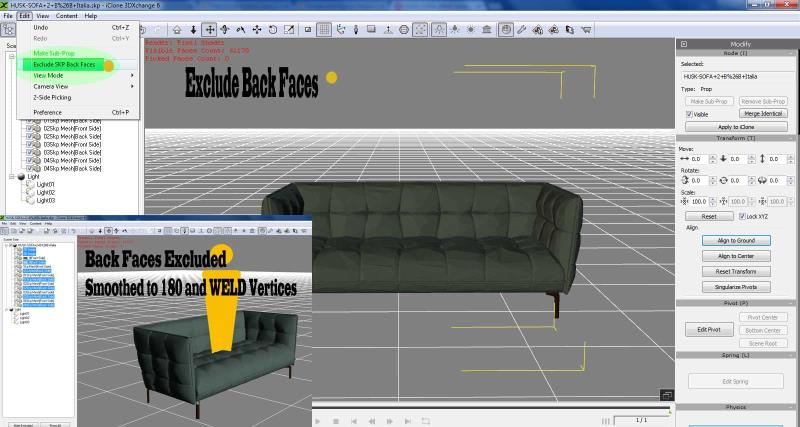 SKYPE ID: rc.650
http://city.reallusion.com/store/ModuleExpand.aspx?id=GS634545170497417354&mdid=18866
http://city.reallusion.com/ContentTag.aspx?tagname=Cricky&AuthorID=20081020688550191201#]Reallusion Store Content
" If I had Alzheimer's (Old Timers), would I know it? "
|
|
|
|