|
Author
|
Message
|
|
magnoliaPower
|
magnoliaPower
Posted 4 Years Ago
|
|
Group: Forum Members
Last Active: 2 Years Ago
Posts: 93,
Visits: 353
|
Great tutorial but a master of UE.
But I thought with Livelink things would be more straightforward to animate the facial and body of metahumans?
thanks for your reply (which desperates me a bit, as I thought all the Reallusion stuff would be things more accessible).
--------
PC : AMD Ryzen 9 5900X 12-Core Processor 3.70 GHz
RAM: 128 Go
OS: Windows 11 64 bits
Graphics Card : NVidia GeForce RTX 3090
Softwares: Reallusion products, Adobe suite, Blender, NVidia Omniverse
|
|
|
|
|
StyleMarshal
|
StyleMarshal
Posted 4 Years Ago
|
|
Group: Forum Members
Last Active: 2 Years Ago
Posts: 5.8K,
Visits: 14.3K
|
When using CC4 FBX facial animation export for Meta Humans :
|
|
|
|
|
magnoliaPower
|
magnoliaPower
Posted 4 Years Ago
|
|
Group: Forum Members
Last Active: 2 Years Ago
Posts: 93,
Visits: 353
|
Thanks for your compassion.
The fact is the UE change since UE5 and it is not easy to follow.
If you have to slow down pause, stop, rewind to understand a video, this may not prove of simplicity and clearness.
I do not blame the author: i'm just asking to Reallusion to update its doc / tutorials to the latest version of their software (8) and follow major changes in UE (5).
--------
PC : AMD Ryzen 9 5900X 12-Core Processor 3.70 GHz
RAM: 128 Go
OS: Windows 11 64 bits
Graphics Card : NVidia GeForce RTX 3090
Softwares: Reallusion products, Adobe suite, Blender, NVidia Omniverse
|
|
|
|
|
risto_986282
|
risto_986282
Posted 4 Years Ago
|
|
Group: Forum Members
Last Active: 2 Years Ago
Posts: 6,
Visits: 81
|
This video was easy to follow as the directions were shown and written as subtitles - if you slow it down or stop and follow each step carefully, I believe this works for you. https://www.youtube.com/watch?v=lb_VK-CVGkQMy mistake was that I stepped over one task as I thought I had already installed the plugins, but that step icluded the new files that need to be copied to each UE-project content folder. But basically I followed this video and the fault I had to ask help for was not due to the video but my own carelessness. Now I have the pileline fully functional thanks to this helpful advise above.
|
|
|
|
|
magnoliaPower
|
magnoliaPower
Posted 4 Years Ago
|
|
Group: Forum Members
Last Active: 2 Years Ago
Posts: 93,
Visits: 353
|
It is so hard to follow ! The video and the screen capture are not updated for UE5 and the Reallusion 8 changes.
Can you update all that? Is there any official video updated?
Also, you are making very speedy videos which are not easy to follow when you are not english mother tongue.
Is there any good updated tutorial you can recommand? All the one I find are not showing all the process from start to finish.
Thanks
--------
PC : AMD Ryzen 9 5900X 12-Core Processor 3.70 GHz
RAM: 128 Go
OS: Windows 11 64 bits
Graphics Card : NVidia GeForce RTX 3090
Softwares: Reallusion products, Adobe suite, Blender, NVidia Omniverse
|
|
|
|
|
StyleMarshal
|
StyleMarshal
Posted 4 Years Ago
|
|
Group: Forum Members
Last Active: 2 Years Ago
Posts: 5.8K,
Visits: 14.3K
|
The "function" you need is in the "IClone Folder" for UE , you can download it here (live link kit) and add it to the content folder of your project : https://www.reallusion.com/iclone/live-link/unreal-engine/download.html
|
|
|
|
|
risto_986282
|
risto_986282
Posted 4 Years Ago
|
|
Group: Forum Members
Last Active: 2 Years Ago
Posts: 6,
Visits: 81
|
Could you tell what am I missing when I can not add step 7 - Live Link setup to my blueprint. It just does not appear in the blueprint editor and there is no Rl Function Lib -line either. I am using UE5.02, and Metahuman, iClone8. CC4 and iClone8 icons appear in my UE5 menubar. But I am clearly missing something. Can you tell which file should contain the function library I seem to be missing and where it should reside.
|
|
|
|
|
yepkoo
|
yepkoo
Posted 4 Years Ago
|
|
Group: Forum Members
Last Active: Last Year
Posts: 1.2K,
Visits: 1.9K
|
I made a short video tutorial about it. 00:00 Intro 00:18 UE5 preparation and Plugin Installations 01:43 Metahuman character creation and import to UE5 04:34 Installing the Metahuman Live Link plugin 05:00 Let's fix missing metahuman textures 05:59 Metahuman preparation and blueprint coding for Face and Body animation 08:42 Let's create face and body animation with iClone 8 11:23 UE5 Let's animate Metahuman and record with Take recorder (with subtitles)
LOD Fixed: Let's also fix the hand problem caused by LOD and therefore the program crash.
----------------------------------------------------------------
https://www.youtube.com/yepkoo
https://dev.epicgames.com/community/profile/bxvo/Yepkoo#learning
|
|
|
|
|
ivanpicas
|
ivanpicas
Posted 4 Years Ago
|
|
Group: Forum Members
Last Active: 4 Years Ago
Posts: 1,
Visits: 34
|
Hello everyone. I'm trying to animate metahumans with Unreal 5 and Iclone 7. Everything works fine except head rotation doesn't work. After reading through various forums and trying on my own I suspect the problem is with the "layered blend per bone" node. When I change the bones affected by this node to head, neck_01 and neck_02, then the neck work but stretches ridiculously. If you can lend a hand I would greatly appreciate it. Greetings 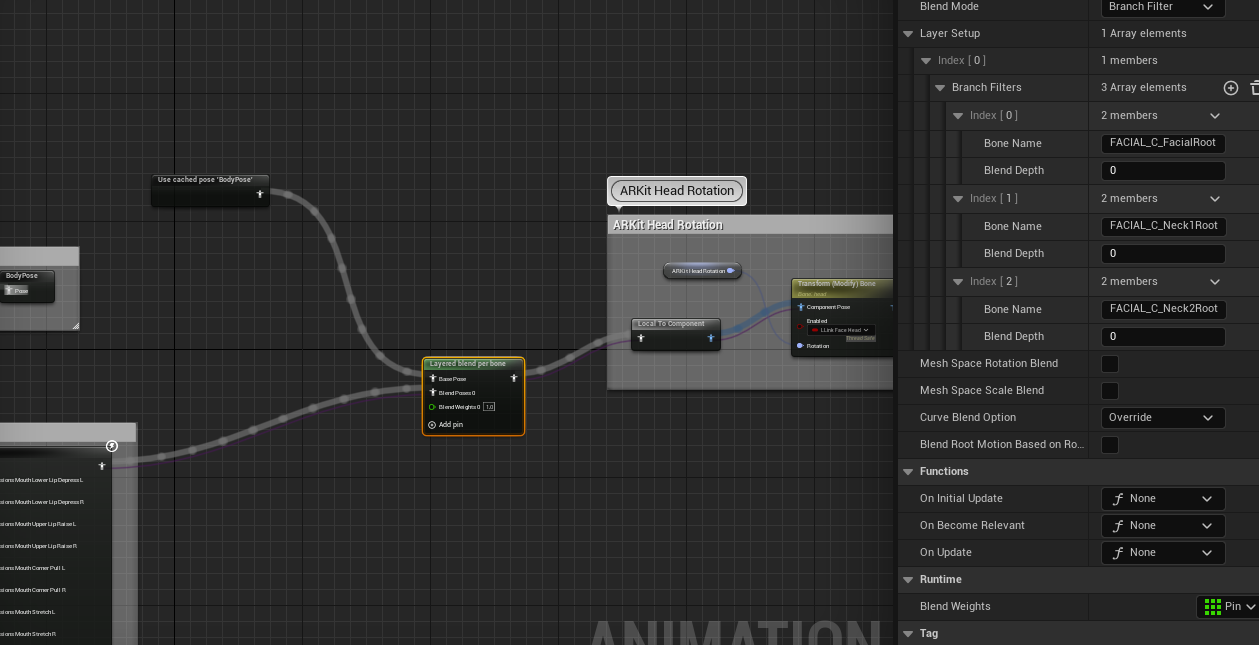
|
|
|
|
|
dancristian08
|
dancristian08
Posted 4 Years Ago
|
|
Group: Forum Members
Last Active: 4 Years Ago
Posts: 1,
Visits: 6
|
I can't understand what I'm doing wrong. I'm using the trial version. When I click on the "Activate Link" - I get the message:
This trial version allows you to export fbx, alembic(ABC), obj 15 times. You have 0 exporting remaining.
But it's my first project, I haven't exported anything so far. How to solve this? I'm using iClone8.
Tks
|
|
|
|